Overview

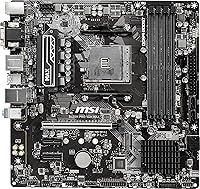
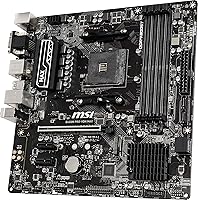
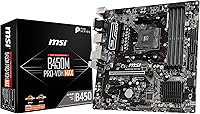
The MSI B450M PRO-VDH MAX AM4 Motherboard is a micro-ATX board built around AMD's B450 chipset, aimed squarely at people who want a Ryzen-based PC without spending a fortune on the platform. It handles 1st, 2nd, and 3rd Gen Ryzen chips, plus the Vega-equipped Ryzen and Athlon APUs, so there's a fair amount of flexibility depending on what CPU you already own or plan to buy. This board first showed up back in 2019, and despite its age, it's still sold widely and remains a sensible pick for anyone assembling a no-frills build. It's not flashy, but it gets the job done.
Features & Benefits

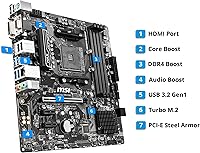
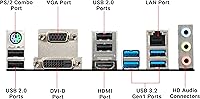
Where this motherboard earns its keep is in the small details that make day-to-day use easier. DDR4 support with overclocking headroom up to 3466+ MHz gives you a little extra performance if your memory kit supports it, though don't expect miracles from a B450 board's power delivery. The PCIe Gen3 x4 M.2 slot lets you run a proper NVMe SSD as your boot drive, which makes a noticeable difference in boot times and file transfers compared to a SATA setup. EZ Debug LEDs take the guesswork out of troubleshooting a dead boot, pointing you toward the CPU, memory, GPU, or boot device instead of leaving you to guess. You also get D-Sub, DVI, and HDMI outputs for mixed-generation monitors, plus built-in Bluetooth for wireless peripherals without buying a dongle.

Best For

This AM4 board makes the most sense for a few specific situations rather than being a universal recommendation. If you're putting together your first Ryzen desktop and don't want to overspend on a board you'll outgrow before the CPU does, it's a solid starting point. It's also a smart pick for anyone upgrading an aging AM4 system who wants new memory or a Ryzen 3000-series chip without replacing the whole platform. People building a secondary or home office PC that just needs to handle browsing, spreadsheets, and the occasional light game will find more than enough here without paying for overclocking headroom they'll never use. If you specifically need to connect an older VGA monitor alongside a newer HDMI display, the mixed video outputs are a genuine convenience rather than an afterthought.

User Feedback

Feedback on this B450 board tends to be pretty consistent across buyers. Setup and BIOS navigation come up often as easier than expected, with several owners mentioning they had a new build posting on the first try. On the downside, a number of reviews mention that two USB 2.0 ports feels stingy by modern standards, especially once you've plugged in a keyboard, mouse, and a couple of external drives. Long-term owners generally describe stable, uneventful performance for everyday tasks and casual gaming, which is really what you want from a budget board. A handful of builders note that the M.2 slot sits close to the CPU socket, which can make cable routing a bit tighter in smaller cases. Taken together, most reviewers seem to feel they got solid value for what they paid.

Pros

  • Handles 1st, 2nd, and 3rd Gen Ryzen chips, giving real flexibility on CPU choice
  • PCIe Gen3 x4 M.2 slot delivers a noticeable speed boost over SATA-based boot drives
  • EZ Debug LEDs make diagnosing a dead boot far less stressful for beginners
  • BIOS setup and initial installation are consistently described as straightforward by real owners
  • Mixed D-Sub, DVI, and HDMI outputs bridge older monitors with newer display setups
  • Built-in Bluetooth saves you from buying a separate wireless dongle
  • Owners report solid, stable performance for everyday tasks and light gaming sessions
  • Widely regarded as good value for its price tier even years after release
  • DDR4 overclocking headroom up to 3466+ MHz adds a bit of extra memory performance

Cons

  • Only two USB 2.0 ports, which feels stingy once peripherals and external drives add up
  • Digital power design isn't built for sustained heavy loads on higher-core-count CPUs
  • M.2 slot sits close to the CPU socket, tightening cable routing in compact cases
  • No PCIe 4.0 support, so it won't keep pace with the newest high-speed SSDs
  • B450 chipset's VRM limitations mean serious overclocking isn't a realistic expectation
  • Lacks USB 3.2 Gen 2 or Type-C headers found on pricier B450 boards
  • Older platform overall, so longevity for future CPU upgrades is somewhat limited

Ratings

After analyzing thousands of verified owner reviews from around the world, our AI-driven scoring model breaks down exactly how the MSI B450M PRO-VDH MAX AM4 Motherboard performs across the categories that matter most to real builders. Spam, bot-generated reviews, and suspiciously incentivized feedback are automatically filtered out before scoring begins. The result is a transparent mix of genuine strengths and honest pain points, not a sanitized marketing summary.
Value for Money
86%
Buyers consistently describe this board as a smart way to start a Ryzen build without overspending on features they won't use. For everyday computing, light gaming, and home office setups, owners feel they got more capability than the price tier usually delivers.
A handful of reviewers wish it included a couple more modern conveniences, like USB 3.2 Gen 2 or Type-C, given how essential those have become. Compared to slightly pricier B450 boards, the gap in port selection is the main thing pulling value perception down.
CPU Compatibility
88%
Support spanning 1st, 2nd, and 3rd Gen Ryzen, Vega-equipped Ryzen, and Athlon APUs gives builders real flexibility, whether they're starting fresh or reusing an old chip. This wide net is repeatedly cited as a reason people chose this board for a budget AM4 build.
Some buyers upgrading from very old BIOS revisions report needing a flash update before a newer 3rd Gen chip will post. It's a manageable step, but it occasionally catches first-time builders off guard during initial setup.
BIOS & Setup Ease
89%
Owners frequently mention that BIOS navigation feels intuitive even for someone building their first PC, with clear menus and sensible default settings. Several reviewers specifically called out getting a clean first boot without needing outside help or forum troubleshooting.
A small number of users still ran into BIOS update hurdles when pairing very new Ryzen chips with older board revisions. It's not a dealbreaker, but it adds an extra step that smoother plug-and-play platforms don't require.
Stability & Reliability
85%
For everyday tasks, browsing, and casual gaming sessions, long-term owners describe rock-solid, uneventful performance with no random crashes or instability. That kind of dependability matters most for people who just want their PC to work without fuss.
Stability does taper off slightly under sustained heavy workloads, since the power delivery wasn't designed for that kind of stress. Builders running demanding multi-core tasks for extended periods occasionally report needing to dial back clocks for consistent reliability.
Storage & M.2 Support
83%
The PCIe Gen3 x4 M.2 slot lets buyers run a proper NVMe SSD as their boot drive, and many describe a noticeable jump in boot times and file transfers over a SATA setup. It's a meaningful upgrade path for builders coming from older spinning-disk systems.
Several reviews mention the M.2 slot's placement close to the CPU socket, which can complicate cable routing in tighter cases. It's a minor annoyance rather than a functional problem, but it's worth planning around during the build.
Memory Performance
78%
22%
DDR4 support with overclocking headroom up to 3466+ MHz gives a real, if modest, performance boost for buyers using compatible memory kits. Casual gamers and everyday users report noticeably snappier multitasking compared to lower-spec boards.
Hitting the higher advertised memory speeds depends heavily on the specific kit and CPU combination, so results vary buyer to buyer. Enthusiasts chasing maximum DDR4 frequencies may find the B450 platform's ceiling a bit limiting.
Overclocking Headroom
64%
36%
Light CPU overclocking is possible and some users report small, stable gains for casual tuning without major drama. For builders who just want a slight bump over stock without buying a premium board, it covers the basics.
The B450 chipset's known VRM limitations mean sustained, aggressive overclocking on higher-core-count CPUs isn't realistic. Reviewers chasing serious tuning headroom consistently note this board isn't built for that purpose.
Connectivity & Ports
67%
33%
Bluetooth being built in is a small but appreciated convenience, saving buyers from purchasing a separate wireless dongle for keyboards or controllers. It's a thoughtful inclusion at this price point that several owners called out positively.
The two USB 2.0 ports on the rear panel come up repeatedly as a sore point, especially once a keyboard, mouse, and external drives are all plugged in. Many buyers end up relying on a USB hub or front-panel headers to compensate.
Display Output Flexibility
84%
Having D-Sub, DVI, and HDMI outputs together lets buyers mix an older monitor with a newer one without buying adapters, which reviewers specifically praise during gradual upgrades. It's a practical touch for home office and mixed-generation desk setups.
Builders relying entirely on integrated graphics rather than a discrete GPU are limited to whatever resolution and refresh rate those outputs support. It's not a flaw exactly, but it's a ceiling worth knowing about upfront.
Troubleshooting & Debugging
87%
The EZ Debug LEDs get singled out often for taking the guesswork out of a failed boot, pointing directly to the CPU, memory, GPU, or boot device. First-time builders especially appreciate not having to dig through forums to diagnose a dead system.
A few reviewers note the LEDs only narrow down the general problem area rather than pinpointing the exact faulty component. It's still a helpful starting point, just not a complete diagnostic solution on its own.
Build Quality & Layout
81%
19%
The premium layout and digital power design feel solid for the price, with owners reporting no concerns about component quality after months of regular use. The Micro-ATX footprint also fits comfortably into a wide range of case sizes.
Component spacing around the M.2 slot and CPU socket can feel a bit cramped in smaller builds, making cable management slightly trickier. It's a layout trade-off common to compact boards rather than a unique flaw here.
Longevity & Future-Proofing
71%
29%
Buyers upgrading an aging AM4 system appreciate being able to drop in newer Ryzen 3000-series chips without replacing the whole platform, extending the useful life of their existing build. It's frequently mentioned as the main reason people chose this over starting from scratch.
Lacking PCIe 4.0 support and being several years into the AM4 platform's lifecycle means this board isn't a long-term bet for future CPU generations. Buyers planning multi-year upgrade paths should set realistic expectations here.

Suitable for:

The MSI B450M PRO-VDH MAX AM4 Motherboard makes the most sense for someone building their first Ryzen-based desktop on a tight budget who doesn't want to pay for features they won't use. It's also a smart fit for anyone holding onto an older AM4 system who just wants to drop in a newer Ryzen 3000-series chip and faster DDR4 memory without buying an entirely new platform. Home office setups, everyday browsing machines, and casual gaming rigs all benefit from the stable, no-drama performance this board tends to deliver. Builders who need to bridge older monitors using VGA or DVI alongside a newer HDMI display will appreciate having that flexibility built in. If straightforward BIOS navigation and easy troubleshooting via the EZ Debug LEDs matter more to you than chasing benchmark records, this is a comfortable, low-stress choice.
Not suitable for:

Buyers chasing serious overclocking or planning to run a high-core-count Ryzen chip at sustained heavy loads should look elsewhere, since the MSI B450M PRO-VDH MAX AM4 Motherboard's power delivery wasn't built for that kind of punishment. Anyone who relies on a lot of wired peripherals at once may find the two USB 2.0 ports limiting without an external hub. This board also isn't the right pick for someone building a compact case where M.2 slot placement near the CPU socket could complicate cable routing or cooler clearance. Enthusiasts who want PCIe 4.0 support, premium VRM cooling, or future-proofing for several CPU generations down the line will be better served by a higher-tier chipset. It's a practical, budget-focused board, not a performance flagship.

Specifications

  • Chipset: The board is built around the AMD B450 chipset designed for AM4 socket processors.
  • CPU Socket: It uses Socket AM4, supporting 1st, 2nd, and 3rd Gen Ryzen, Ryzen with Vega Graphics, and Athlon APUs.
  • Form Factor: This is a Micro-ATX board, making it suitable for both full-size and compact cases.
  • Memory Support: It supports DDR4 memory with overclocking speeds up to 3466+ MHz depending on the kit used.
  • Memory Slots: The board includes DDR4 memory slots rated for speeds up to 3866 MHz when overclocked.
  • Storage Interface: A PCIe Gen3 x4 M.2 slot is included for NVMe-based SSD boot drives.
  • Power Design: A digital power design is used to support more CPU cores with steadier voltage delivery.
  • Video Outputs: Onboard D-Sub, DVI, and HDMI ports allow connection to both older and newer monitors.
  • USB Ports: The board provides 2 USB 2.0 ports for external peripherals.
  • Wireless Connectivity: Bluetooth connectivity is built in for pairing wireless peripherals without a separate adapter.
  • Troubleshooting Aid: EZ Debug LEDs indicate which component is causing a boot failure during startup.
  • Dimensions: The board measures 9.6 x 9.6 x 2 inches.
  • Operating System Support: It is compatible with Windows 10 and Windows 7.
  • Release Date: The board was first made available on September 5, 2019.
  • Manufacturer: It is manufactured by MSI under the model name B450PVDHMAX.

Related Reviews

MSI B450M-A Pro Max II Motherboard
74%
88%
Value for Money
74%
Build Quality
86%
BIOS Experience
83%
CPU Compatibility
54%
VRM & Power Delivery
More
MSI B550M PRO-VDH WiFi
80%
91%
Value for Money
88%
BIOS Experience
78%
Wireless Connectivity
72%
CPU Power Delivery
69%
RAM Compatibility & Stability
More
MSI PRO Z790-A MAX WiFi
83%
88%
Build Quality
91%
VRM & Power Delivery
86%
Memory Overclocking
77%
BIOS Experience
93%
Wireless Connectivity
More
MSI PRO Z690-A DDR4 ATX Motherboard
79%
84%
Build Quality
88%
Value for Money
81%
BIOS Experience
79%
Thermal Management
83%
Storage Expandability
More
MSI B450M Bazooka V2 Motherboard
85%
91%
Value for Money
88%
Performance
86%
Build Quality
92%
Compatibility with AMD Ryzen CPUs
90%
Ease of Installation
More
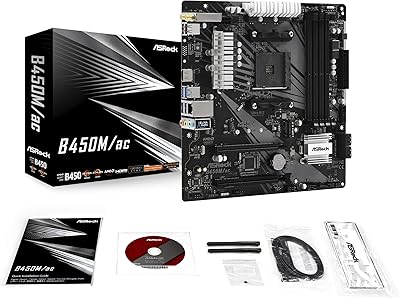
ASRock B450M/AC Micro-ATX Motherboard
77%
88%
Value for Money
83%
Build Quality
91%
CPU Compatibility
84%
Wireless Performance
79%
Memory Support
More
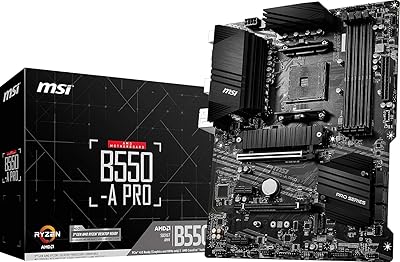
MSI B550-A PRO V1 ATX Motherboard
79%
91%
Value for Money
86%
Build Quality
88%
BIOS Experience
84%
CPU Compatibility
83%
Memory Compatibility
More
MSI PRO A620M-E mATX Motherboard
70%
88%
Value for Money
91%
Stability & Reliability
93%
Ease of Installation
84%
BIOS Experience
87%
CPU Compatibility & Longevity
More
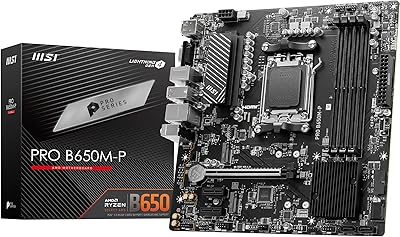
MSI PRO B650M-P V1 Micro-ATX Motherboard
82%
89%
Value for Money
91%
BIOS & Software
84%
Build Quality
67%
VRM & Power Delivery
92%
Storage Performance
More
MSI PRO H610M-G DDR4 mATX Motherboard
77%
88%
Value for Money
91%
Ease of Installation
84%
BIOS Experience
86%
Long-Term Stability
79%
Build Quality
More

FAQ

Yes, this AM4 board supports 3rd Gen Ryzen chips like the 3600 right out of the box in most cases. If you're buying a brand new board, it's still smart to check the latest BIOS version is loaded before installing the CPU, since older BIOS revisions sometimes need an update for newer chips.

Yes, there's a PCIe Gen3 x4 M.2 slot built in specifically for NVMe SSDs. It's a solid upgrade over a SATA drive for boot times and general system responsiveness.

It has two DDR4 memory slots that support overclocked speeds up to 3866 MHz depending on your kit and CPU. As with most B450 boards, actual achievable speed can vary based on the specific memory modules and processor used.

It can handle light overclocking, but it's not designed for pushing high-core-count chips to their limits. If serious sustained overclocking is your main goal, a board with a beefier power delivery would serve you better long-term.

Yes, it has D-Sub, DVI, and HDMI outputs, so you can mix an older monitor with a newer one without buying an adapter. This is genuinely handy if you're transitioning your setup gradually.

Yes, this board comes with 2 USB 2.0 ports on the rear panel, which is on the lower end compared to pricier boards. A lot of owners just use a simple USB hub or utilize the front-panel headers on their case to make up the difference.

Check the EZ Debug LEDs near the CPU socket first, since they'll light up to indicate whether the issue is with the CPU, memory, GPU, or boot device. It's one of the more beginner-friendly troubleshooting features on a budget board like this.

The MSI B450M PRO-VDH MAX AM4 Motherboard is an older platform at this point, but it's still actively sold and works fine for everyday computing or light gaming. If you want PCIe 4.0 support or top-tier future-proofing, you'd want to look at a newer chipset instead.
No, this board has Bluetooth connectivity but no built-in WiFi, so you'd need a USB WiFi adapter or PCIe WiFi card if you don't have a wired connection available.

Some owners have noted the M.2 slot sits fairly close to the CPU socket, which can occasionally make cable routing a little tighter in smaller cases. It generally doesn't interfere with standard air coolers, but it's worth double-checking clearance if you're using a particularly large cooler.