Overview

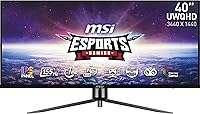
The MSI MAG401QR 40″ Ultrawide Gaming Monitor occupies an interesting spot in the monitor market — 40 inches is still an uncommon size, sitting above the crowded 34-inch ultrawide category but below the ultra-premium 49-inch super-ultrawides. At its mid-range price point, you get a lot of screen for the money, though expectations need to be managed. The 21:9 aspect ratio delivers noticeably more horizontal workspace than a standard 16:9 display — two documents side by side feel genuinely comfortable rather than cramped. The refresh rate and panel size are real strengths here. The stand is tilt-only, and HDR performance is modest. Know that going in, and this becomes a compelling buy.
Features & Benefits

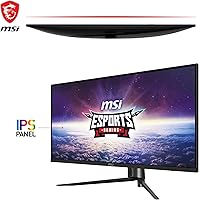
The MAG401QR runs a 40-inch IPS panel at 3440x1440, and the colors look genuinely rich — IPS at this size handles wide viewing angles better than VA, though VA panels typically offer deeper blacks. At 155Hz with FreeSync Premium, fast-paced games feel fluid whether you are on AMD or Nvidia. The advertised 1ms response is MPRT, not GtG — that is a strobing measurement, not native pixel transition speed, so some ghosting in dark scenes is still possible. HDR400 certification is worth tempering expectations over; it is entry-level HDR, not the transformative experience you would get from a higher-tier standard. Connectivity covers HDMI, DisplayPort, and USB-C for laptop hookups. The glossy screen surface pops in dim rooms but struggles near bright windows.

Best For

This 40-inch ultrawide is a strong fit for PC gamers who want immersive screen real estate without crossing into premium pricing. The wide canvas also rewards productivity-heavy workflows — coding with multiple files open, editing timelines, or working across sprawling spreadsheets all feel more natural at this width. Console users with an HDMI cable will appreciate the jump in size from a typical 27-inch, even if they cannot hit 155Hz from current-gen hardware. One caveat: the glossy panel works best in a controlled lighting setup, so bright, window-heavy rooms can be frustrating. Users stepping up from a 34-inch ultrawide will find the extra width meaningful without the dramatic adjustment a 49-inch panel demands.

User Feedback

Across roughly 266 ratings, this MSI gaming monitor settles at a solid 4 out of 5 stars, and the common threads are fairly consistent. Buyers regularly praise the color vibrancy and sheer impact of the screen size, with many noting it holds its own against pricier 40-inch alternatives when gaming is the main priority. On the critical side, the stand comes up repeatedly — tilt-only adjustment frustrates users who work long hours and want height flexibility without purchasing a VESA arm separately. Backlight bleed is another recurring concern, fairly typical for large IPS panels. The USB-C port is generally appreciated, though power delivery wattage leaves some laptop users wanting a bit more output.

Pros

  • A 40-inch ultrawide panel at this price tier is genuinely rare and delivers exceptional screen presence for gaming and work.
  • The IPS panel produces vibrant, accurate colors with wide viewing angles that hold up well across different seating positions.
  • 155Hz refresh rate keeps fast-paced gameplay smooth and responsive, with FreeSync Premium reducing screen tearing on both AMD and Nvidia systems.
  • The 21:9 aspect ratio dramatically expands usable desktop space, making multitasking and productivity workflows noticeably more comfortable.
  • USB-C connectivity makes it easy to hook up a laptop with a single cable, reducing desktop clutter.
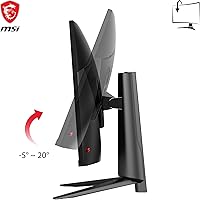
  • VESA mount compatibility means ergonomic positioning is achievable with an aftermarket arm, even if the stock stand is limited.
  • Buyers consistently report that the MAG401QR competes favorably against more expensive 40-inch alternatives when gaming is the primary use case.
  • The combination of screen size and refresh rate at this price point is hard to match without spending significantly more.

Cons

  • The stock stand offers tilt adjustment only — no height or swivel — which is a real limitation for all-day desk work.
  • DisplayHDR 400 certification sounds impressive on paper but delivers a minimal real-world HDR effect; do not expect deep contrast or vivid highlights.
  • The advertised 1ms response time is MPRT, not GtG, so some motion blur in dark or fast-moving scenes is still possible.
  • The glossy screen surface can cause distracting reflections in rooms with uncontrolled ambient lighting or windows nearby.
  • At 27.6 pounds, this is a heavy panel to reposition or mount without a second pair of hands.
  • USB-C power delivery wattage may fall short for users with higher-draw laptops who want to charge and display simultaneously.
  • Some units have shown noticeable IPS backlight bleed along the panel edges, which is more visible in dark-room gaming or movie watching.
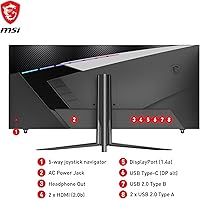
  • Only one USB 3.0 port is included, which feels sparse given the size and target audience of this display.

Ratings

The scores below are generated by AI after analyzing verified global buyer reviews for the MSI MAG401QR 40″ Ultrawide Gaming Monitor, with spam, bot-generated, and incentivized feedback actively filtered out to ensure accuracy. Every category reflects what real owners consistently praised or found frustrating in long-term use, so both the strengths and the genuine pain points are represented here without varnish.

Display Quality
84%
The IPS panel produces genuinely vibrant colors that make games and media feel visually engaging right out of the box. At 40 inches, wide viewing angles hold up well even when sitting slightly off-center, and color consistency across the panel face is strong for this price tier.
The glossy coating amplifies color richness in dim settings but creates noticeable reflections in brighter rooms, which some users found disruptive to long sessions. A handful of owners also noted that pixel density at 3440x1440 across 40 inches is slightly lower than on a 34-inch equivalent, making fine text marginally softer.
Refresh Rate & Gaming
88%
At 155Hz with FreeSync Premium active, fast-paced games like shooters and racing titles feel noticeably fluid, and the wide screen wraps the action in a way smaller panels simply cannot match. AMD and Nvidia GPU owners both report smooth variable refresh rate performance once driver settings are correctly configured.
Sustaining 155Hz at 3440x1440 demands a powerful GPU, and users with mid-range hardware may need to reduce in-game settings to maintain smooth frame rates consistently. The 1ms rating is MPRT rather than GtG, meaning trailing is still visible in dark, fast-moving scenes even with motion blur reduction enabled.
Value for Money
86%
Buyers consistently highlight that the MAG401QR delivers a screen size and refresh rate combination that costs noticeably more on competing 40-inch models. For gamers wanting a large, high-refresh ultrawide without committing to a premium price bracket, the overall package is hard to fault at this tier.
The value equation weakens for buyers who factor in the cost of a VESA arm to compensate for the limited stand, adding meaningfully to total spend. Those prioritizing HDR quality or high-wattage USB-C power delivery will find they need to budget beyond the sticker price to get a complete setup.
Stand & Ergonomics
41%
59%
The stand is stable and handles the weight of the 40-inch panel reliably, with no wobble during normal desk use. VESA compatibility is included, so users who invest in an aftermarket arm can achieve full ergonomic positioning without any modification to the monitor itself.
Tilt is the only adjustment available on the stock stand — height, swivel, and pivot are entirely absent, a significant limitation for users who work long hours or share a desk. Many owners report that without a monitor arm, reaching a comfortable eye level requires improvised solutions like stacking the stand on risers.
HDR Performance
38%
62%
HDR mode pushes peak brightness slightly higher than SDR in supported content, adding a modest pop to outdoor scenes in games and well-mastered streaming titles. For casual users not directly comparing it to higher-end HDR displays, the effect is at least present rather than entirely absent.
DisplayHDR 400 is the entry-level certification tier, and the real-world impact falls well short of what most buyers expect from HDR marketing. There is no local dimming, black levels in dark scenes remain flat, and viewers switching from OLED or premium FALD displays will find the HDR mode deeply disappointing.
Color Accuracy
79%
21%
Out of the box, the IPS panel delivers pleasing, saturated colors that suit gaming and media consumption well without requiring immediate calibration. Most users find the default color profile accurate enough for casual photo editing and video work, making it a reasonable all-rounder for hybrid use cases.
Content creators relying on precise color representation may find the factory calibration runs slightly warm, and the glossy surface can make neutral tones appear richer than they are under certain ambient lighting. Dedicated color-critical workflows would benefit from a hardware calibration pass, which adds time and cost to the setup.
Panel Uniformity
62%
38%
Many units show acceptable uniformity for gaming and general productivity, with consistent brightness distribution across the center of the panel where most screen activity is focused. Users who game in well-lit environments tend to notice uniformity issues far less than those watching dark cinematic content late at night.
Backlight bleed along the edges is a recurring complaint from owners who game in dark rooms, and at 40 inches the affected patches can be wide enough to distract in dark game scenes or movie letterboxing. Quality control variance means some units are significantly cleaner than others, making a good return policy essential.
Connectivity
72%
28%
The combination of HDMI, DisplayPort, and USB-C covers the most common connection scenarios — gaming PCs, laptops, and consoles can all be accommodated without an external hub. The USB-C port is a practical addition for laptop users who want to reduce cable clutter on a shared work and gaming desk.
USB-C power delivery output is insufficient for high-draw laptops under load, leaving users with power-hungry machines needing a separate charger alongside the monitor cable. Only one USB 3.0 downstream port is included, which feels sparse for a display targeting productivity users who typically need multiple peripheral connections.
Motion Clarity
74%
26%
At 155Hz, everyday gaming motion — scrolling maps, panning cameras, fast traversal — feels consistently smooth, and the high frame rate noticeably reduces judder that lower-refresh monitors produce. FreeSync Premium keeps frame pacing steady across a wide range of in-game performance, which helps especially during GPU-intensive scenes.
The MPRT-based response time spec means ghosting remains perceptible in very dark, high-contrast motion sequences, particularly in horror or space-themed games with deep black backgrounds. Users coming from a purpose-built esports monitor with a true low-GtG panel may notice the difference during the most demanding fast-motion scenarios.
Screen Real Estate
91%
The 40-inch 21:9 canvas offers enough horizontal span to run two full application windows side by side without either feeling cramped, which is a genuine daily workflow improvement. Coders, video editors, and spreadsheet-heavy users all report a tangible productivity gain compared to working on a standard 27-inch or 34-inch display.
The sheer size demands a larger desk footprint than most users are accustomed to, and the 37-inch width can feel overwhelming on shallow or narrow desks common in compact home offices. Some users also note that ultrawide content support in certain older games still requires manual configuration or third-party aspect-ratio tools.
Build Quality
73%
27%
The overall build feels solid for a mid-range gaming monitor, with no significant flex in the panel housing and a stable base that handles the screen weight without rocking. The matte black plastic chassis blends cleanly into most desk setups and avoids aggressive gaming aesthetics that not all users appreciate.
The rear housing and stand are predominantly plastic, which feels less premium than the price tag might suggest compared to competitors using aluminum chassis elements. Cable management options at the rear are minimal, leaving visible bundles on open desk setups unless additional management accessories are used.
Gaming Immersion
87%
The broad 21:9 field of view in ultrawide-supported games — racing sims, open-world RPGs, flight simulators — delivers a spatial experience that narrower panels simply cannot replicate at this price point. The flat IPS panel maintains consistent sharpness and color response across the full width of the screen surface.
The flat panel design means the outer edges sit farther from the eye than on a curved ultrawide, which some users feel reduces the wraparound effect at typical 80 to 100 cm sitting distances. Ultrawide black bars remain an issue in games and video content that have not yet been updated to natively support 21:9.
Setup & Installation
77%
23%
Assembly is straightforward — the stand attaches with minimal effort, and inputs are clearly labeled on the rear panel for easy initial cable routing. Most users report getting up and running without consulting the manual, and the included cable selection covers basic connectivity for an immediate first boot.
The monitor weight of 27.6 pounds makes solo installation onto a desk or VESA arm awkward, and most users recommend having a second person assist during initial mounting. The on-screen display navigation via rear-mounted buttons is functional but takes adjustment to operate quickly without looking behind the panel.

Suitable for:

The MSI MAG401QR 40″ Ultrawide Gaming Monitor is a strong choice for PC gamers who want a large, immersive display without paying top-tier prices for a premium ultrawide. The 155Hz refresh rate and FreeSync Premium support make it genuinely capable for fast-paced titles, and the 21:9 canvas adds real depth to open-world and racing games. Productivity users will also get meaningful value here — the extra horizontal space makes working across multiple windows, timelines, or code editors feel far less constrained than a standard 16:9 monitor. Console players connecting via HDMI will appreciate the jump in screen presence compared to a typical 27-inch setup, even if they cannot take advantage of the full refresh rate. Those upgrading from a 34-inch ultrawide who want more screen without changing aspect ratios or desk setups will find this a natural and satisfying step up.
Not suitable for:

Buyers with serious ergonomic requirements should think carefully before purchasing the MAG401QR, as the stand supports tilt adjustment only — no height, swivel, or pivot — meaning you will need a VESA arm for a properly positioned setup, which adds to the total cost. Anyone prioritizing a high-quality HDR experience should also look elsewhere; the DisplayHDR 400 certification on the MSI MAG401QR 40″ Ultrawide Gaming Monitor represents the entry tier of HDR support, and the real-world impact is subtle at best compared to monitors with full-array local dimming or OLED panels. Users in bright, window-lit rooms may struggle with the glossy panel surface, which reflects ambient light more aggressively than a matte-coated alternative. Competitive esports players who prioritize the absolute lowest input lag and native pixel response over screen size would likely be better served by a smaller, purpose-built gaming panel. Finally, buyers expecting USB-C to power a high-wattage laptop fully may be disappointed, as the port works well for connectivity but has limits on power delivery output.
Specifications

  • Screen Size: The panel measures 40 inches diagonally, placing it above standard ultrawides and below the super-ultrawide 49-inch class.
  • Resolution: Native resolution is 3440x1440 UWQHD, delivering a pixel density that balances sharpness with broad GPU compatibility at high refresh rates.
  • Aspect Ratio: The 21:9 aspect ratio provides significantly more horizontal screen real estate than a conventional 16:9 display of similar diagonal size.
  • Panel Type: An IPS panel is used, offering accurate color reproduction and wide viewing angles compared to VA alternatives at this screen size.
  • Refresh Rate: The maximum refresh rate is 155Hz, enabling smooth motion in fast-paced gaming when paired with a capable graphics card.
  • Response Time: The rated 1ms response time is measured as MPRT (moving picture response time), a strobing-based metric rather than native GtG pixel transition speed.
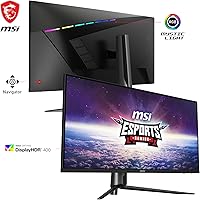
  • HDR Support: DisplayHDR 400 certification is included, representing the entry tier of HDR and offering modest improvements in brightness headroom over standard dynamic range.
  • Adaptive Sync: FreeSync Premium is supported, enabling variable refresh rate technology to reduce screen tearing and stuttering on both AMD and compatible Nvidia GPUs.
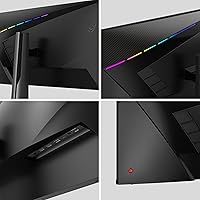
  • Connectivity: Inputs include one HDMI port, one DisplayPort, and one USB-C port with power delivery for single-cable laptop connectivity.
  • USB Ports: One USB 3.0 downstream port is available on the monitor for connecting peripherals directly to the display.
  • Screen Surface: The panel uses a glossy screen coating, which enhances color vibrancy and contrast in controlled lighting but increases reflections in bright environments.
  • Stand Adjustment: The included stand supports tilt adjustment only, with no height, swivel, or pivot functionality built in.
  • VESA Mount: The display is VESA mount compatible, allowing users to attach a third-party monitor arm for full ergonomic positioning flexibility.
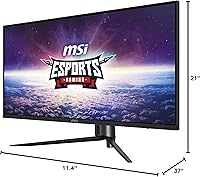
  • Dimensions: The assembled monitor measures 37 x 11.4 x 21 inches (width x depth x height), requiring a desk with adequate depth and width clearance.
  • Weight: The unit weighs 27.6 pounds with the stand attached, which should be accounted for when selecting a monitor arm or desk mount rated for the load.
  • Color Finish: The chassis is finished in matte black, consistent with MSI MAG-series gaming aesthetics and compatible with most desk setups.

Related Reviews

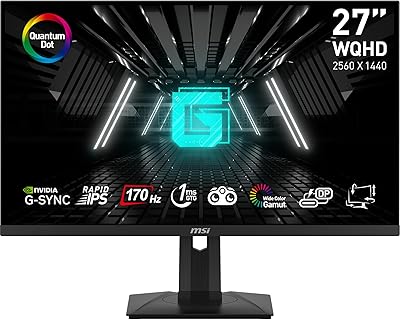
MSI G273QPF 27-inch QHD Gaming Monitor
78%
88%
Image Clarity
91%
Refresh Rate Performance
86%
Response Time
79%
Panel Quality
84%
Ergonomics & Stand
More
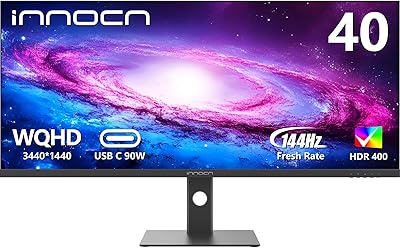
INNOCN 40C1R 40-inch Ultrawide Monitor
83%
91%
Display Quality
88%
Gaming Performance
89%
Color Accuracy
76%
Ergonomics & Adjustability
83%
Ease of Setup
More
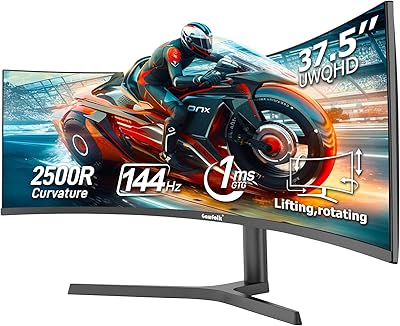
Gawfolk GF400A 38-Inch Ultrawide Gaming Monitor
77%
88%
Image Clarity
91%
Refresh Rate & Smoothness
71%
Color Accuracy
74%
Connectivity
69%
Brightness & Glare Handling
More
MSI G274QPF-QD 27″ Gaming Monitor
86%
92%
Performance for Gaming
89%
Color Accuracy
83%
Build Quality
91%
Response Time
80%
Design & Ergonomics
More
MSI MPG321UR QD 32″ Gaming Monitor
85%
94%
Display Quality
92%
Gaming Performance
89%
Color Accuracy
88%
Ergonomics/Adjustability
85%
Build Quality
More
Raywego Q34DB45-1 34-inch Curved Gaming Monitor
72%
88%
Value for Money
84%
Gaming Performance
74%
Image Quality
51%
HDR Performance
67%
Build Quality
More
Westinghouse 34-Inch Curved Ultrawide Gaming Monitor
72%
84%
Value for Money
78%
Image Quality
81%
Refresh Rate & Motion
82%
Adaptive Sync
83%
Curve & Immersion
More
Deco Gear 39-inch Curved Ultrawide Gaming Monitor
77%
76%
Display Clarity
83%
Color Accuracy
89%
Refresh Rate & Motion
44%
HDR Performance
81%
USB-C Connectivity
More
Samsung 34-Inch SJ55W Ultrawide Monitor
77%
88%
Picture Quality
91%
Contrast & Blacks
86%
Resolution & Sharpness
67%
Refresh Rate & Gaming Smoothness
93%
Ultrawide Productivity
More
MSI MAG321CUP 32-inch 4K Gaming Monitor
76%
88%
Image Quality
83%
Refresh Rate Performance
86%
Value for Money
91%
Console Compatibility
74%
Motion Clarity
More

FAQ

Yes, it does. Nvidia added support for FreeSync-certified displays through its G-Sync Compatible program, so the MAG401QR will run variable refresh rate smoothly on modern Nvidia cards. You may need to enable G-Sync Compatible mode manually in the Nvidia Control Panel, but once set up it works well.

It depends on your desk setup. If your desk height already puts the screen at a comfortable eye level, tilt adjustment alone may be fine for gaming sessions. For all-day office work, though, the inability to raise or lower the panel without a VESA arm is a genuine ergonomic limitation that adds cost if you want a proper seated posture.

To be direct: DisplayHDR 400 is the lowest tier of HDR certification, and the difference versus standard dynamic range content is subtle at best on this panel. You will not get the deep blacks or punchy highlights that OLED or high-zone local dimming displays deliver. Think of it as a modest brightness boost rather than a transformative HDR experience.

GtG (grey-to-grey) measures how fast a pixel transitions between shades on its own, while MPRT (moving picture response time) measures perceived blur using backlight strobing. The MSI MAG401QR 40″ Ultrawide Gaming Monitor advertises 1ms MPRT, which is the strobing measurement — not the native pixel transition speed. In practice, this means you may still notice some motion blur in dark or fast-moving scenes, particularly without motion blur reduction enabled.
Yes, both consoles connect via HDMI and will display correctly. Keep in mind that current-gen consoles top out at 4K 60Hz or 1080p 120Hz over HDMI 2.1, so you will not be running at 155Hz from a console — but the screen size still makes for an immersive experience at standard frame rates.

The USB-C port does support power delivery, which works well for most ultrabooks and mid-range laptops. However, if your laptop requires 90W or more to charge under load, the power delivery output on this monitor may not keep up fully, and your battery could slowly drain during intensive tasks. For lighter laptops and basic productivity workloads, it handles the job fine.

It really depends on where your light sources are. In a dim room or one where you can control the lighting, the glossy surface actually makes colors look richer and more vibrant. If you have a window directly in front of or behind you, reflections can get distracting. A matte privacy curtain or repositioning the desk angle usually solves it, but it is worth considering before you buy.

The display is 37 inches wide, so you need a desk that can comfortably accommodate that span. Depth-wise, the stand footprint is 11.4 inches front-to-back, which is on the larger side — shallow desks under 20 inches of usable depth may feel cramped. If space is tight, a monitor arm reduces the footprint considerably.

IPS panels at larger sizes are more prone to some degree of backlight bleed compared to smaller displays, and user reports on this monitor are mixed. Some units show noticeable glow along the edges in dark scenes, while others are relatively clean. It is a lottery to some extent with IPS at 40 inches — if you get a problematic unit, most retailers allow an exchange within the return window.

The jump is more noticeable than the numbers suggest. The extra width adds meaningful space for gaming immersion and productivity layouts, and the 21:9 ratio stays consistent so your existing ultrawide workflows and game settings transfer without adjustment. Most users who make this upgrade find it hard to go back, though the larger footprint does demand a bigger desk.

Where to Buy