Overview

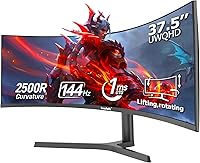
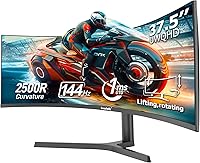
The Gawfolk GF400A 38-Inch Ultrawide Gaming Monitor enters a crowded field dominated by LG and Samsung, positioning itself as a budget-conscious alternative for buyers who want serious screen real estate without the flagship price tag. Gawfolk is a relatively new name in displays, which means less brand history to lean on — worth keeping in mind. The panel measures 37.5 inches in reality, though it is marketed as 38 inches — a minor discrepancy, but one worth noting before purchase. The 2500R curved matte screen handles ambient light well, making it a practical fit for mixed-lighting environments like home offices where glossy panels would cause constant distraction.
Features & Benefits

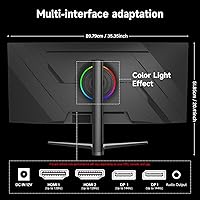
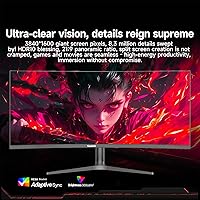
The 3840x1600 UWQHD+ resolution is the headline spec here, and it genuinely delivers a sharp, wide canvas that makes multitasking feel less cramped than a standard widescreen. Paired with a 144Hz refresh rate and AMD FreeSync, this curved gaming screen keeps motion smooth and tear-free — particularly useful if you run an AMD GPU. One practical caveat worth flagging: the two HDMI 2.0 ports cannot carry the full resolution at 144Hz, so you will need DisplayPort 1.4 to get the most out of the panel. Brightness sits at 300 cd/m², which is fine for most indoor settings. The flicker-free backlight is a quiet but meaningful detail for anyone spending long hours in front of a screen.

Best For

The GF400A makes the most sense for AMD GPU users who want to take full advantage of FreeSync at high refresh rates. Gamers who want an immersive experience without spending on a premium brand will find the wide 21:9 format genuinely useful for titles that support ultrawide rendering. It also works well as a productivity workhorse — having two apps side by side on a screen this wide feels natural rather than forced. Casual photo editors or content creators on a budget can get by with the 8-bit panel, though anyone doing serious color-critical work should note it lacks HDR capability. Buyers in brightly lit rooms may find 300 cd/m² limiting compared to rivals at a similar price point.

User Feedback

Since this ultrawide monitor only hit the market in early 2025, buyer feedback is still limited — worth flagging if you typically rely on a large review pool before committing. Early buyers tend to praise the out-of-box image quality and value offered, with several drawing favorable comparisons to pricier LG UltraWide options. On the downside, some users have raised concerns about stand adjustability, noting a limited ergonomic range, and a few mention the OSD menu feels unintuitive to navigate. The HDMI bandwidth limitation also surfaces in real-world feedback, catching some buyers off guard. Overall, early sentiment leans cautiously positive, though a larger review base would make long-term reliability easier to assess.

Pros

  • UWQHD+ resolution at 144Hz delivers sharp, smooth visuals that punch above typical budget ultrawide specs.
  • The 2500R curvature feels natural and immersive without the distortion issues of tighter curved panels.
  • AMD FreeSync integration keeps gameplay tear-free for Radeon GPU users at no extra cost.
  • Matte screen finish is genuinely practical, cutting glare in mixed-light home office setups.
  • Dual DisplayPort 1.4 and dual HDMI ports give solid multi-device flexibility for desk setups.
  • The 21:9 aspect ratio makes side-by-side multitasking feel effortless and genuinely productive.
  • Flicker-free backlight is a real comfort benefit for anyone logging long hours at the desk.
  • At this price tier, the resolution and refresh rate combination is difficult to match from established brands.
  • The audio output jack adds useful headphone connectivity without needing a separate adapter.
  • Early buyer feedback on out-of-box image quality is notably positive relative to price expectations.

Cons

  • HDMI 2.0 ports cannot support full resolution at 144Hz — DisplayPort is mandatory for peak performance.
  • Gawfolk has limited brand history, making long-term reliability and after-sales support harder to evaluate.
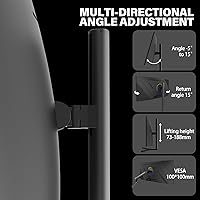
  • Stand adjustability is reportedly limited, which can make ergonomic positioning a frustration for taller or shorter users.
  • The OSD menu navigation has drawn complaints for being unintuitive and slow to work through.
  • At 300 cd/m² brightness, the panel may look dim in well-lit or sunlit rooms compared to brighter rivals.
  • No HDR support makes this a poor choice for buyers who want to future-proof for HDR content.
  • The actual panel size is 37.5 inches, not 38 — a small but legitimate discrepancy worth knowing before buying.
  • With a launch date of early 2025, the review pool is still thin, making failure-rate trends hard to assess.
  • No G-Sync compatibility leaves NVIDIA GPU users without hardware-level sync support.
  • At nearly 25 pounds, this ultrawide monitor is heavy enough that repositioning or mounting requires some effort.

Ratings

The Gawfolk GF400A 38-Inch Ultrawide Gaming Monitor has been evaluated by our AI rating system after analyzing verified buyer reviews from global markets, with spam, bot-generated, and incentivized feedback actively filtered out. The scores below reflect a transparent synthesis of real user experiences — covering both what this curved gaming screen does well and where it falls short compared to established competitors at a similar price point.
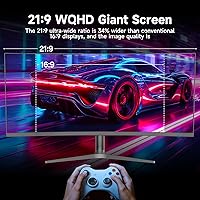
Image Clarity
88%
Buyers consistently praise how sharp and detailed the 3840x1600 UWQHD+ panel looks in daily use — whether browsing wide spreadsheets, watching 21:9 films, or playing open-world games. The jump from standard 1440p ultrawide is immediately visible, and most users say the extra horizontal resolution makes text noticeably crisper.
A small number of buyers note that the panel requires some manual calibration out of the box to reach its visual potential, with default sharpness settings sometimes adding unwanted edge enhancement that affects fine text rendering.
Refresh Rate & Smoothness
91%
The 144Hz performance draws strong praise from gamers who previously owned 60Hz or 75Hz panels — the difference in perceived motion smoothness is dramatic, and users running AMD GPUs report FreeSync working reliably without configuration headaches. Fast-paced action games feel genuinely responsive.
Buyers using NVIDIA cards are unable to leverage FreeSync, and a handful noted occasional frame pacing inconsistencies at the lower end of the dynamic refresh range — something that tends to show up in slower, less demanding titles rather than in competitive play.
Color Accuracy
71%
29%
For everyday gaming, movie watching, and general productivity, most buyers find the colors natural and well-balanced straight out of the box. Casual content creators report that skin tones and landscape visuals look pleasing without requiring extensive calibration effort.
The 8-bit panel without HDR support shows its limits when buyers try to use this curved gaming screen for professional photo editing or video color work — saturation handling in high-contrast scenes can feel flat compared to HDR-capable alternatives at a higher price tier.
Connectivity
74%
26%
Having two DisplayPort 1.4 and two HDMI ports gives buyers real flexibility for multi-device desks — users commonly run a gaming PC and a work laptop simultaneously, switching between inputs without cable swapping. The audio output jack is a quiet but appreciated addition.
The HDMI 2.0 bandwidth ceiling is a recurring pain point: buyers who expected to run full resolution at 144Hz via HDMI were caught off guard when they discovered this requires DisplayPort. Several reviews flag this as a setup frustration that Gawfolk should communicate more clearly in the box.
Brightness & Glare Handling
69%
31%
The matte anti-glare coating performs well in typical home office environments, and users in rooms with overhead lighting or windows to the side report noticeably less reflection interference compared to glossy alternatives they had previously owned.
At 300 cd/m², the panel struggles in bright or sun-facing rooms — buyers working near south-facing windows specifically mention the image can look washed out during daytime hours, and a few note that HDR content looked disappointingly dim without a higher brightness ceiling.
Build Quality
73%
27%
The chassis feels sturdy enough for everyday desk use, and the ultra-thin bezels give it a clean, premium appearance that buyers say looks noticeably more expensive than its price point suggests. Several users mention the panel housing feels well-assembled with no obvious flex or rattle.
The stand base has attracted mixed commentary — a portion of buyers describe it as less solid than expected for a panel this large and heavy, noting minor wobble when bumping the desk. Some also feel the plastic quality of the rear housing lags behind what competitors offer.
Ergonomics & Stand
58%
42%
The stand footprint is reasonable for a monitor of this width, and buyers who kept it at the default height found setup quick and stable enough for standard desk heights. Those who added a third-party VESA arm reported much improved flexibility and desk space reclaim.
The stand's native adjustment range is limited — height adjustment in particular is constrained, which has frustrated taller users or those with non-standard desk and chair setups. Multiple reviewers recommend budgeting for a monitor arm to get the most ergonomic use out of this ultrawide.
OSD & Controls
61%
39%
Basic OSD functions like brightness and contrast adjustment are accessible, and buyers who just want to set the monitor and leave it largely do not interact with the menu enough for it to become a problem in daily use.
The OSD navigation is a recurring complaint — users describe button placement as awkward and menu traversal as slow and unintuitive, especially when trying to switch input sources quickly. Compared to the cleaner menu systems on LG and Dell panels, this is one area where the GF400A feels less polished.
Curvature & Immersion
86%
The 2500R curve hits a sweet spot that many users appreciate — immersive enough to add genuine peripheral depth in games and films, but subtle enough that straight lines in documents and spreadsheets do not appear noticeably distorted. Buyers transitioning from flat ultrawides tend to adapt quickly.
A small number of buyers who sit very close to the screen or use it primarily for precision design work find the curvature mildly disorienting for tasks involving perfectly straight horizontal lines — though this is a minority view and typical of any curved panel at this size.
Gaming Performance
84%
AMD GPU users in particular report a well-rounded gaming experience — FreeSync keeps tearing absent, and the wide 21:9 field of view in supported titles adds genuine immersion that flat widescreen panels simply cannot replicate. Racing and RPG titles draw the most enthusiasm from buyers.
Competitive FPS players note that the pixel response at extreme fast-motion scenarios is not on par with dedicated 1ms IPS or TN gaming monitors, and NVIDIA users lose the adaptive sync benefit entirely. For casual and mid-core gamers this rarely matters, but it is a real limitation for esports-focused buyers.
Productivity & Multitasking
89%
This is arguably where the GF400A earns its strongest praise — buyers running dual-app workflows describe the 21:9 canvas as transformative for productivity, especially those who used to manage dual-monitor setups. Code editors, research tasks, and video editing timelines all benefit from the horizontal real estate.
The limited stand adjustability can make long work sessions less comfortable, and buyers who share a desk with others note that repositioning the monitor is heavier and more effortful than expected given its 24.7-pound weight.
Value for Money
82%
18%
The price-to-spec ratio draws consistent praise, with many buyers noting they could not find a comparable 144Hz UWQHD+ ultrawide from a recognized brand at anywhere near this cost. For buyers who prioritize resolution and refresh rate over brand heritage, the GF400A delivers strong perceived value.
Some buyers feel the savings show up in the areas of stand quality, OSD polish, and after-sales support confidence — and a handful note that LG occasionally runs sales that narrow the price gap enough to make brand loyalty worth considering before committing to a lesser-known manufacturer.
Eye Comfort
83%
The flicker-free backlight is consistently appreciated by users who clock long hours at their desk — remote workers and students in particular mention reduced end-of-day eye fatigue compared to older monitors they replaced. The matte coating also contributes to a less visually tiring experience in lit rooms.
A few buyers sensitive to PWM flicker or blue light report that default color temperature settings run slightly cool, requiring manual adjustment to warmer profiles for comfortable extended use — a minor calibration step but one that less technical buyers may not know to perform.
Brand Reliability
63%
37%
Early buyers report no widespread dead-on-arrival incidents, and those who needed to contact support describe response times as acceptable. The monitor arrived well-packaged in most cases, with no major transit damage complaints surfacing in early feedback.
Gawfolk simply does not yet have the track record of established brands, and buyers looking for confidence in long-term warranty support or easy local repair options will find the peace of mind gap real. With a launch date of January 2025, failure-rate trends over a multi-year horizon remain genuinely unknown.

Suitable for:

The Gawfolk GF400A 38-Inch Ultrawide Gaming Monitor is a strong fit for AMD GPU users who want a high-refresh-rate ultrawide experience without the premium price tag of established brands. Gamers who play titles with native 21:9 support will appreciate how the 2500R curved panel wraps the view naturally, adding genuine immersion without feeling gimmicky. The wide 3840x1600 canvas is equally useful for productivity-focused buyers — having a browser, document, and communication app open side by side on a screen this wide genuinely reduces the need for a dual-monitor setup. Home office workers in rooms with variable lighting will benefit from the matte surface, which cuts down on glare without washing out the image. Casual content creators or video editors on a tighter budget will find the color output respectable for everyday work, provided they are not doing print-grade color grading.
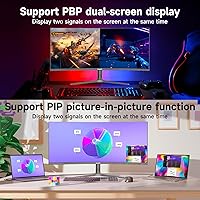
Not suitable for:

Buyers who rely heavily on NVIDIA-exclusive sync technology should know the GF400A supports only AMD FreeSync, so G-Sync users will not get the full benefit from their GPU. Anyone planning to connect via HDMI should be aware that the two HDMI 2.0 ports cannot carry 3840x1600 at 144Hz — reaching full performance requires a DisplayPort 1.4 connection, which can catch buyers off guard. Professional photographers, colorists, or print designers should look elsewhere, as the 8-bit panel without HDR support is not built for color-critical precision work. At 300 cd/m² peak brightness, this curved gaming screen may struggle in sun-facing rooms or very bright environments where competing panels push significantly higher. Finally, buyers who prioritize long-term brand support and an established warranty track record may want to consider that Gawfolk is a newer player with limited customer history to evaluate.

Specifications

  • Screen Size: The panel measures 37.5″ diagonally, though it is marketed as 38″ — a minor but worth-knowing discrepancy before purchase.
  • Resolution: Native resolution is 3840x1600 UWQHD+, delivering a noticeably sharper and wider image than standard 1080p or 1440p widescreen monitors.
  • Aspect Ratio: The 21:9 aspect ratio provides a cinematic, panoramic field of view suited to both gaming and side-by-side productivity workflows.
  • Panel Curvature: The screen uses a 2500R curvature, which wraps gently around the viewer's peripheral vision without the distortion that tighter curves can introduce.
  • Refresh Rate: Supports a maximum refresh rate of 144Hz, enabling smooth motion in fast-paced games and fluid scrolling in everyday use.
  • Sync Technology: AMD FreeSync is supported for adaptive sync, eliminating screen tearing when paired with a compatible AMD Radeon GPU.
  • Color Depth: The panel outputs 8-bit color, covering approximately 16.7 million colors for accurate and consistent everyday visual reproduction.
  • Brightness: Peak brightness is rated at 300 cd/m², which performs well in typical indoor lighting but may feel insufficient in very bright or sunlit environments.
  • Contrast Ratio: The static contrast ratio is 1000:1, a standard figure for this panel type that delivers reasonable depth between dark and light areas.
  • Screen Surface: The matte anti-glare coating reduces reflections from ambient light sources, making it a practical choice for home office or mixed-light setups.
  • Connectivity: The monitor includes 2x HDMI 2.0 ports and 2x DisplayPort 1.4 ports; note that HDMI 2.0 cannot carry 3840x1600 at 144Hz, so DisplayPort is required for full performance.
  • Audio Output: A 3.5mm audio output jack is included, allowing direct connection of headphones or external speakers without a separate adapter.
  • Dimensions: With the stand attached, the monitor measures approximately 35.35 inches wide, 20.4 inches tall, and 7.48 inches deep.
  • Weight: The unit weighs 24.7 pounds with stand, which is typical for a large curved ultrawide display but worth noting for desk mounting or repositioning.
  • Model Number: The official model designation is GF400A, manufactured by Gawfolk.
  • Availability Date: The GF400A first became available in January 2025, making it a relatively recent release with a still-developing buyer review history.
  • HDR Support: This monitor does not support HDR, which is a notable limitation for buyers seeking future-proofed or high dynamic range content viewing.
  • Flicker-Free: The backlight is flicker-free, reducing eye strain during extended viewing sessions — a practical benefit for long work or gaming hours.

Related Reviews
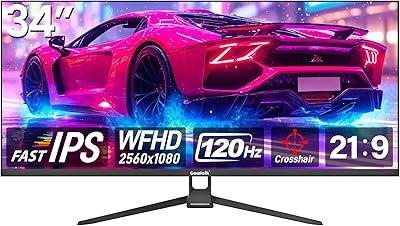
Gawfolk GF340H 34-inch Ultrawide Monitor
72%
84%
Value for Money
88%
Screen Real Estate
71%
Image Quality
78%
Color Accuracy
76%
Refresh Rate & Motion
More
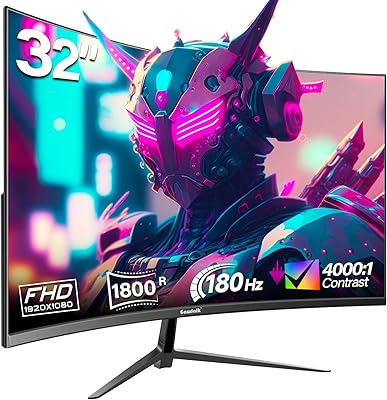
Gawfolk GF320D 32-inch Curved Gaming Monitor
72%
83%
Value for Money
76%
Image Quality
81%
Refresh Rate Performance
54%
Brightness & Visibility
79%
Contrast & Black Levels
More
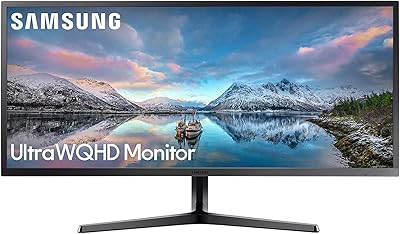
Samsung 34-Inch SJ55W Ultrawide Monitor

77%
88%
Picture Quality
91%
Contrast & Blacks
86%
Resolution & Sharpness
67%
Refresh Rate & Gaming Smoothness
93%
Ultrawide Productivity
More
Gawfolk GF270C 27-Inch Curved Gaming Monitor
72%
83%
Value for Money
78%
Image Quality
81%
Refresh Rate Performance
74%
Response Time & Motion Clarity
62%
Build Quality
More
Raywego Q34DB45-1 34-inch Curved Gaming Monitor
72%
88%
Value for Money
84%
Gaming Performance
74%
Image Quality
51%
HDR Performance
67%
Build Quality
More
Gawfolk GF320C 32-Inch Curved Gaming Monitor
75%
88%
Refresh Rate Performance
83%
Image Quality
76%
Motion Clarity
86%
Curvature & Immersion
91%
Value for Money
More
Westinghouse 34-Inch Curved Ultrawide Gaming Monitor

72%
84%
Value for Money
78%
Image Quality
81%
Refresh Rate & Motion
82%
Adaptive Sync
83%
Curve & Immersion
More
Gawfolk GF245A 24.5-Inch Curved Gaming Monitor
72%
88%
Value for Money
79%
Image Quality
83%
Refresh Rate Performance
81%
Response Time
63%
Build Quality
More
Gawfolk GF270L 27-inch QHD Gaming Monitor
74%
88%
Image Clarity
83%
Gaming Performance
74%
Color Accuracy
79%
Motion Handling
81%
Refresh Rate & Sync
More
INNOCN 25G2S 24.5″ Gaming Monitor
76%
91%
Image Clarity
88%
Refresh Rate Performance
86%
Color Accuracy
84%
Gaming Responsiveness
89%
Console Compatibility
More

FAQ

No, and this is one of the more important things to know before buying. The two HDMI 2.0 ports on this monitor do not have enough bandwidth to carry 3840x1600 at 144Hz. To hit the full resolution and refresh rate simultaneously, you need to use one of the DisplayPort 1.4 connections. If you only have HDMI available on your GPU, you will be limited to either a lower refresh rate or a reduced resolution.

It will work as a display, yes — but the AMD FreeSync adaptive sync feature is designed for AMD Radeon GPUs. NVIDIA cards do not support FreeSync natively, so G-Sync users will not get hardware-level tear-free sync. You can still use the monitor at full resolution and refresh rate with an NVIDIA GPU via DisplayPort, you just lose the adaptive sync benefit.

Technically, the panel measures 37.5 inches diagonally. Gawfolk lists it as 38 inches in marketing materials, which is common rounding practice in the display industry but worth knowing if you are comparing it directly to a competitor's true 38-inch panel. In day-to-day use, the half-inch difference is negligible.

Based on early buyer feedback, the stand has a somewhat limited range of ergonomic adjustment. Tilt is available, but height and swivel adjustments may be restricted depending on your desk setup. If precise ergonomic positioning is important to you, it may be worth budgeting for a third-party VESA arm — the monitor does support VESA mounting.

It is serviceable for casual creative work and general content creation, but professionals doing color-critical work should be cautious. The panel is 8-bit and does not support HDR, which means it is not suited to print-grade color grading or high-precision design work. For everyday photo editing, retouching, or video review at a mid-range budget, it can hold its own — just go in with realistic expectations about color accuracy at this tier.

The 2500R curvature is on the gentler end of the curved monitor spectrum. In practice, it adds a sense of depth and wrap without causing text distortion or making straight lines look bent — which can happen with tighter curves like 1500R or 1800R. For productivity use like spreadsheets, coding, or writing, it should feel natural rather than distracting.

At just over 35 inches wide, this monitor will comfortably fit most large desks, but it will dominate a smaller or shallower workspace. The 37.5-inch panel combined with the stand adds meaningful depth as well, so it is worth measuring your desk before ordering. If desk space is tight, a VESA arm can help reclaim some surface area by lifting the stand footprint.

Gawfolk does not prominently advertise a specific response time spec for this monitor, which is worth noting. For competitive fast-paced gaming where pixel response time is critical — think battle royale or high-speed shooters — the lack of a clearly stated response time figure means it may not match panels from brands that explicitly market 1ms GTG performance. For most mainstream gaming, the 144Hz refresh rate will still deliver noticeably smooth gameplay.

The GF400A does not appear to include built-in speakers. It does have a 3.5mm audio output jack, so you can connect headphones or external desktop speakers directly from the monitor — useful if your PC case lacks a front audio jack or if your GPU does not pass audio through DisplayPort.

LG brings more brand trust, a wider service network, and typically stronger out-of-box color calibration at this display tier. That said, the GF400A competes closely on paper specs — matching or exceeding resolution and refresh rate against comparably priced LG panels. Where Gawfolk has less certainty is in long-term reliability data and after-sales support, since it is a newer brand. If brand confidence and warranty peace of mind matter to you, LG has the edge; if raw specs per dollar is the priority, this curved gaming screen is worth serious consideration.