Overview

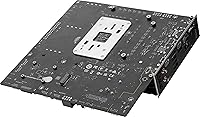
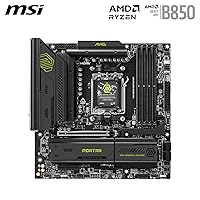
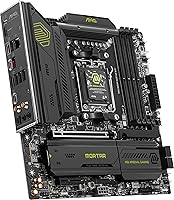
The MSI MAG B850M Mortar WiFi Motherboard occupies a well-judged position on the AM5 platform — it is not trying to be a flagship, and that is exactly the point. Built around the AMD B850 chipset, it sits comfortably above entry-level B650 boards while stopping short of X870E pricing, giving builders access to PCIe 5.0 and DDR5 without paying for features most will never use. The mATX form factor is a deliberate choice for compact, high-performance builds that still need real connectivity. With full Ryzen 9000 series support, this MSI board arrived at a good moment for builders ready to commit to the AM5 platform with genuine room to grow.
Features & Benefits

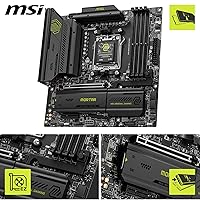
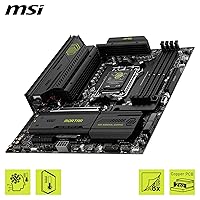
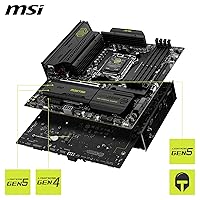
The 60A SPS VRM across 12 Duet Rail phases is not designed for extreme overclocking competition, but it gives a Ryzen 9000 CPU solid sustained headroom under real workloads without throttling — which matters far more for most users. DDR5 slots can push past 8200 MT/s in single-rank configurations, making a tangible difference in memory-sensitive tasks like video encoding. Two Gen5 M.2 slots and one Gen4 slot, all thermally shielded, handle diverse storage setups cleanly. Wi-Fi 7 paired with 5G LAN puts the B850M Mortar WiFi ahead of comparable Wi-Fi 6E boards in its class, while the FROZR Guard heatsink keeps VRM temperatures honest during long sessions.

Best For

This mATX motherboard suits builders who want a Ryzen 9000-ready AM5 foundation inside a compact case without sacrificing storage speed or wireless capability. Anyone upgrading from AM4 who wants a PCIe 5.0 slot ready for the next GPU generation will find the B850M Mortar WiFi a practical stepping stone. Content creators running multiple NVMe drives benefit directly from the dual Gen5 M.2 configuration. That said, buyers planning aggressive CPU overclocking or needing more than one PCIe expansion slot should honestly consider a full ATX or X870E board — the mATX layout imposes real expansion limits that not every builder can work around.

User Feedback

Sitting at 4.5 stars across over 150 ratings, this MSI board earns consistent praise for build quality and BIOS polish — buyers note MSI's firmware has matured noticeably, and initial setup feels straightforward for an AM5 platform. A meaningful share of reviewers confirm that high-speed DDR5 profiles train reliably, though hitting the upper OC range does require some manual BIOS tuning rather than a simple one-click profile. On the downside, a handful of builders flag that cooler clearance can get tight in smaller mATX cases, and first-time DDR5 users mention a steeper learning curve than expected. Against competing boards at a similar price point, most buyers conclude the networking and storage package tips the balance in this board's favor.

Pros

  • The B850M Mortar WiFi includes a full Wi-Fi 7 module, which is still uncommon among competing boards at this price.
  • Dual Gen5 M.2 slots offer serious sequential storage speeds without needing an add-in card.
  • The 60A SPS VRM handles sustained Ryzen 9000 loads cleanly without throttling under normal conditions.
  • DDR5 can be pushed well past standard speeds in single-rank configurations, benefiting memory-sensitive workloads.
  • The mATX form factor keeps the build compact while retaining a full PCIe 5.0 x16 slot for current and future GPUs.
  • 5G LAN is included alongside Wi-Fi 7, giving wired users a fast connection without a separate network card.
  • Thermal management is taken seriously: MOSFET pads, an extended heatsink, and shielded M.2 slots all come standard.
  • BIOS quality and usability receive consistent praise from buyers, making setup less painful than on some rivals.
  • The EZ M.2 Clip II and Shield Frozr II make installing and swapping NVMe drives noticeably less frustrating.
  • Rear USB 20G Type-C adds practical high-speed connectivity that many boards in this segment skip.

Cons

  • Only one PCIe x16 slot means no room for expansion cards if your GPU is already installed.
  • Hitting the highest DDR5 OC speeds requires manual BIOS tuning rather than a reliable automatic profile.
  • The VRM, while adequate, leaves limited headroom for heavy manual overclocking on higher-TDP Ryzen 9000 chips.
  • Cooler clearance can become tight in smaller mATX cases, particularly with large tower air coolers.
  • First-time DDR5 platform builders report a steeper-than-expected learning curve getting memory to train correctly.
  • The single Gen4 M.2 slot runs at x2 bandwidth rather than the full x4, limiting its throughput compared to the Gen5 slots.
  • No onboard display output means a discrete GPU is always required, even for basic setup and diagnostics.
  • Bluetooth 5.4 is solid but not the newest standard available on higher-end boards releasing alongside this product.
  • At 3.98 pounds the board is reasonably solid, but the heatsink assembly adds bulk that can complicate cable routing in tight builds.
  • Buyers comparing boards at a similar price point note that some rivals offer a more complete rear I/O USB selection.

Ratings

The scores below for the MSI MAG B850M Mortar WiFi Motherboard were generated by our AI engine after analyzing verified buyer reviews from global markets, with spam, bot activity, and incentivized feedback actively filtered out. Each category reflects a balanced read of what real builders experienced — the genuine strengths and the frustrations that showed up consistently across hundreds of submissions. Nothing has been softened or inflated.
Build Quality
91%
Buyers consistently describe the board as feeling premium for its class — the Steel Armor II slot reinforcement and the heft of the heatsink assembly give a tactile sense of solidity that cheaper boards lack. First-time builders and veterans alike noted components feel well-anchored and the PCB shows no flex during installation.
A small number of reviewers flagged that the heatsink mounting pressure on certain M.2 slots feels uneven, and a few noted minor cosmetic inconsistencies around the VRM heatsink clips that do not affect function but are noticeable up close.
VRM & Power Delivery
83%
For everyday Ryzen 9000 builds running stock or with PBO enabled, the 60A SPS VRM handles sustained loads without breaking a sweat — users running video encoding and gaming sessions back-to-back reported no throttling or abnormal temperatures. It is a solid performer for the vast majority of real-world use cases.
Builders pushing aggressive all-core manual overclocks on higher-TDP chips like the 9950X noted the VRM runs noticeably warm under extended stress tests, and a handful recommended adding a small heatsink fan for those edge cases. It is not an X870E-class power stage, and the scores reflect that honesty.
DDR5 Memory Compatibility
78%
22%
Most users report that EXPO and XMP profiles up to around 6400 MT/s train on the first boot without any manual intervention, which is a better out-of-box experience than many competing B850 boards. Builders who invested in fast DDR5 kits appreciated not having to fight the board to unlock their RAM's rated speed.
Hitting speeds above 7200 MT/s reliably requires manual timing adjustments in BIOS, and not all DDR5 kits behave consistently even with the same profile. A handful of buyers with four-DIMM configurations found stability harder to achieve at higher frequencies than the single-rank numbers suggest.
BIOS Experience
86%
MSI's Click BIOS 5 UI receives genuine praise from experienced builders for its layout clarity and the granularity of memory and fan control options. Several users coming from older platforms mentioned that navigating to PBO settings or memory OC profiles feels intuitive compared to competing vendor interfaces.
First-time builders and AM5 newcomers flagged the BIOS as intimidating without prior experience — the depth of options that enthusiasts appreciate can overwhelm someone who just wants a stable default setup. A few reviewers also mentioned that BIOS updates, while improving stability, occasionally reset fan curve customizations.
Storage Performance
93%
The dual Gen5 M.2 slots deliver the full bandwidth headroom that the latest NVMe drives demand, and users building workstations or gaming rigs with separate boot, game, and project drives found the three-slot layout genuinely practical rather than just a spec-sheet bullet point. The Shield Frozr II thermal covers kept drive temperatures stable across extended transfer sessions.
The third M.2 slot runs at Gen4 x2 rather than full x4, which caps its throughput at 32 Gbps — adequate for a scratch drive but a limitation worth knowing if you expected full Gen4 performance from all three slots. Some users found the heatsink clips slightly fiddly to seat properly on the first installation.
Wireless Connectivity
89%
Wi-Fi 7 inclusion at this price point is a genuine differentiator, and users in dense wireless environments noted cleaner sustained speeds and lower latency compared to their previous Wi-Fi 6E boards. The Bluetooth 5.4 connection for peripherals was praised as stable and consistent across multiple connected devices simultaneously.
A small number of users noted the included antennas provide only adequate signal if the PC is enclosed in a steel case in a far corner of the room, and suggested a longer aftermarket antenna for those situations. Wi-Fi 7 benefits are also capped by router hardware, so buyers with older routers will not see the full advantage immediately.
Wired Networking
87%
The 5G LAN port delivered noticeably faster local file transfers for users with a compatible multi-gig switch or router, particularly those moving large media libraries or game installs from a NAS. For competitive gaming over Ethernet, latency and packet loss figures reported by buyers were consistently clean.
The 5G LAN advantage is entirely dependent on your network hardware — users with standard gigabit switches see no benefit until they upgrade their networking infrastructure. A small number of buyers also noted the LAN controller required a driver installation on fresh Windows installs rather than being plug-and-play.
Thermal Management
84%
The FROZR Guard heatsink system with high-conductivity MOSFET thermal pads keeps VRM temperatures in a comfortable range during prolonged gaming or rendering workloads, and users running stress tests overnight reported stable readings without manual fan curve intervention. The M.2 thermal shields also made a measurable difference for sustained sequential write workloads.
Under genuinely heavy CPU loads in warm ambient environments — think a summer gaming marathon in a poorly ventilated room — VRM temperatures climb more than expected given the heatsink size. Adding a chassis fan directed toward the VRM area largely solves this, but it should not be necessary at stock settings on a mid-range board.
Ease of Installation
88%
The EZ M.2 Clip II system drew consistent positive comments from builders who have fought tiny M.2 retention screws on other boards — the screwless mechanism genuinely speeds up the process and reduces the risk of dropping hardware inside the case. The overall component layout was described as sensible and accessible even in tighter mATX cases.
The VRM heatsink can make CPU cooler installation slightly awkward depending on the cooler bracket design, and a few users noted the SATA port positions are not ideal for cable management in smaller cases. Nothing here is a dealbreaker, but it is not the most forgiving mATX layout for first-time builders.
Audio Quality
74%
26%
For a motherboard-integrated audio solution, the Audio Boost 5 implementation performed well enough that several users reported not feeling any urgency to add a discrete sound card for regular gaming and media consumption. The S/PDIF output option was appreciated by users connecting to external DACs or home theater receivers.
Audiophiles and users running high-impedance headphones directly from the rear panel noted the output lacks the power and clarity of even an entry-level discrete audio card. At high volumes, a very small number of users reported faint electrical noise picked up through the analog outputs, which is a known limitation of on-board audio near high-frequency components.
Rear I/O Ports
76%
24%
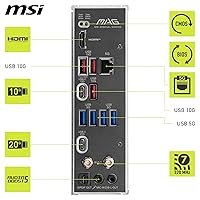
The presence of a USB 20G Type-C port on the rear I/O stands out in this price bracket, and users connecting fast external SSDs or modern docking stations found it immediately useful. The overall port selection covers the practical needs of most desktop builds without requiring add-in cards.
Several buyers noted the total USB port count on the rear I/O feels conservative compared to some competing boards, particularly for users with multiple peripherals who prefer to avoid a hub. There is no Thunderbolt or USB4 support, which is expected at this chipset tier but worth noting for users coming from Intel platforms.
Value for Money
85%
Buyers who cross-shopped competing AM5 mATX boards repeatedly landed on the B850M Mortar WiFi as the best overall package — getting Wi-Fi 7, dual Gen5 M.2, and 5G LAN together without paying X870 prices was cited as the main reason buyers chose it over alternatives. The feature density relative to cost was the most commonly praised aspect in direct comparisons.
Users who only need basic connectivity and have no interest in fast wireless or Gen5 storage pointed out that a B650 board at a lower price would suit their build just as well. The value proposition is strongest for builders who will actually use the advanced connectivity features, and weaker for those who will leave them idle.
Form Factor Practicality
79%
21%
The mATX footprint makes this board a natural fit for compact mid-tower cases where an ATX board would be overkill, and builders specifically targeting a smaller desk footprint appreciated getting flagship-adjacent features in a more manageable size. Cable management in appropriately sized cases was described as cleaner than expected.
The single PCIe x16 slot is a genuine constraint for users who want to add a secondary card — a capture card, 10G NIC, or RAID controller — alongside a discrete GPU. Buyers who did not fully account for this limitation before purchasing expressed frustration, and it remains the most cited reason for choosing a competing ATX board instead.
Long-term Stability
81%
19%
Users who have run the board for extended periods — several months of daily use — report no unexpected reboots, POST failures, or component issues, and the general sense from longer-term reviews is that the board behaves predictably under consistent workloads. MSI's firmware update cadence received positive mentions for addressing early compatibility issues quickly.
A small but notable group of buyers encountered BIOS-related instability after certain firmware updates, particularly around memory training behavior, requiring a rollback or manual profile re-entry. These issues appear to have been addressed in later firmware revisions, but they created friction for early adopters who expected a smoother update experience.

Suitable for:

The MSI MAG B850M Mortar WiFi Motherboard is a strong match for builders who want a capable, compact AM5 system without committing to flagship-tier pricing. If you are pairing a Ryzen 9000 or 7000 series CPU with a mid-to-high-end GPU in a mATX or small ATX case, the feature set here covers nearly every real-world need: fast wireless, ample NVMe storage, and a PCIe 5.0 slot that keeps your GPU options open for years. Content creators who juggle multiple NVMe drives for project files, cache, and backups will appreciate having two Gen5 M.2 slots without needing an add-in card. Home office users who depend on reliable wireless rather than a cable run to the router will find Wi-Fi 7 a genuine step up from the Wi-Fi 6E boards common at this price. AM4 upgraders who want a forward-looking platform rather than a stopgap will feel at home here, as the B850M Mortar WiFi gives them a solid foundation without demanding they buy the most expensive board on the shelf.
Not suitable for:

Builders who push CPUs hard through manual overclocking or sustained extreme workloads should be clear-eyed about the VRM: the 60A SPS setup on the MSI MAG B850M Mortar WiFi is competent for stock and moderate overclocked Ryzen operation, but it is not in the same league as the beefier power delivery found on X870E boards targeting serious enthusiasts. If your build requires multiple PCIe expansion cards — a dedicated capture card, a 10G network card, or dual GPUs — the single PCIe x16 slot and mATX layout will become a genuine limitation rather than just a theoretical one. Users who need a large tower cooler or a 360mm AIO should measure clearances carefully, since mATX boards leave less room to maneuver inside certain cases. Anyone running a Threadripper or non-AM5 AMD platform will obviously need to look elsewhere entirely. If ATX form factor expansion flexibility is a priority for your workflow, spending a bit more on an X870 ATX alternative is likely the smarter long-term call.

Specifications

  • Form Factor: The board uses the mATX form factor, measuring 11.2 x 11 inches, making it compatible with most mATX and full ATX cases.
  • Chipset: Built on the AMD B850 chipset, which sits between the entry-level B650 and the enthusiast X870 in AMD's current platform lineup.
  • CPU Socket: Uses the AM5 socket, supporting AMD Ryzen 9000, 8000, and 7000 series desktop processors.
  • Memory Slots: Four DDR5 DIMM slots support overclocked speeds up to 8200+ MT/s in single-rank, single-DIMM-per-channel configurations.
  • VRM: A 12-phase Duet Rail Power System with 60A SPS per phase delivers stable power delivery for Ryzen 9000 CPUs under sustained workloads.
  • PCIe Slot: One PCIe 5.0 x16 slot with Steel Armor II reinforcement supports current and next-generation discrete graphics cards at up to 128 GB/s bandwidth.
  • M.2 Storage: Three M.2 slots are included: two Gen5 x4 slots at 128 Gbps each and one Gen4 x2 slot at 32 Gbps, all covered by the EZ M.2 Shield Frozr II thermal solution.
  • Wireless: An integrated Wi-Fi 7 module with Bluetooth 5.4 provides high-throughput wireless connectivity with lower latency than Wi-Fi 6E implementations.
  • Wired LAN: A 5 Gbps Ethernet port handles wired network connections, offering five times the bandwidth of standard gigabit LAN.
  • Rear USB: The rear I/O includes a USB 20G Type-C port for high-speed peripheral and storage device connections.
  • Audio: Onboard audio uses Audio Boost 5 with 7.1-channel USB High Performance Audio support and an S/PDIF optical output for external DAC or home theater connections.
  • Thermal Pads: 7W/mK MOSFET thermal pads and supplementary choke thermal pads are used alongside an extended heatsink to keep VRM temperatures in check during long sessions.
  • Power Connector: The board uses a 4+4-pin EPS CPU power connector, which is standard for AM5 builds using mid-range to high-end power supplies.
  • Dimensions: Physical dimensions are 11.2 x 11 x 3 inches, and the board weighs 3.98 pounds including the heatsink assembly.
  • Fan Headers: A Combo fan header rated at 3A supports both pump and system fan connections, consolidating cooling control in compact builds.

Related Reviews
MSI MAG B650M Mortar WiFi Gaming Motherboard
86%
91%
Overall Performance
88%
Ease of Installation
93%
Networking Capabilities (Wi-Fi 6E & LAN)
87%
Build Quality
90%
Compatibility with AMD Ryzen 7000 Series
More
MSI MAG B650 Tomahawk WiFi ATX Motherboard
81%
88%
VRM & Power Delivery
82%
Memory Compatibility
91%
Storage Versatility
86%
Wireless Performance
89%
Wired Networking
More
MSI MAG Z890 Tomahawk WiFi Gaming Motherboard
80%
88%
Value for Money
84%
Build Quality
86%
BIOS Experience
79%
DDR5 Compatibility
77%
Wireless Performance
More
MSI MAG X870 Tomahawk WiFi
87%
89%
Build Quality
94%
External Connectivity
91%
Networking Performance
87%
Ease of Installation
83%
Value for Money
More
MSI MAG Z790 Tomahawk WiFi Gaming Motherboard
86%
94%
Performance
88%
Cooling Efficiency
90%
Wi-Fi and Networking
85%
Overclocking Stability
70%
Ease of Setup
More
MSI MAG X670E Tomahawk WiFi Gaming Motherboard
89%
94%
Performance
90%
Power Delivery and Overclocking Stability
88%
Wi-Fi and Connectivity
93%
Build Quality and Durability
89%
Thermal Management
More
MSI MAG B550 Tomahawk MAX WiFi
88%
93%
Build Quality
91%
Thermal Management
94%
Wireless Connectivity
88%
Installation Ease
87%
Value for Money
More
MSI MAG B850 Tomahawk MAX WiFi
86%
92%
VRM & Power Delivery
88%
DDR5 Memory Compatibility & OC Stability
91%
M.2 Storage Performance
86%
BIOS Experience
83%
Wireless Connectivity (Wi-Fi 7 & Bluetooth)
More
MSI PRO B650M-A WiFi V1 Motherboard
79%
88%
Value for Money
91%
BIOS & Setup Experience
86%
Memory Compatibility & OC
84%
Thermal Management
72%
Connectivity & I/O
More
MSI PRO Z790-A MAX WiFi
83%
88%
Build Quality
91%
VRM & Power Delivery
86%
Memory Overclocking
77%
BIOS Experience
93%
Wireless Connectivity
More

FAQ

Yes, the AM5 socket on this MSI board is fully compatible with Ryzen 7000 series CPUs including the 7600X. You may need to update the BIOS first if the board ships with older firmware, but that process is straightforward using MSI's Flash BIOS button or a compatible USB drive.

In most cases, yes — enabling an EXPO or XMP profile in the BIOS is the first step and works reliably for kits rated up to around 6000–6400 MT/s. Pushing into the higher speed tiers above 7000 MT/s typically requires manual tuning of primary timings and voltage, and results can vary depending on your specific memory kit and CPU's memory controller.

The NH-D15 is a dual-tower cooler that can be very tight on mATX builds depending on your case. The board itself does not block the cooler, but your case's internal width and the memory slot clearance are the real limiting factors. Check your case's maximum CPU cooler height specification and whether the cooler's outer fan will clear your RAM before committing.

Both. Two of the three M.2 slots are Gen5 x4, meaning they support PCIe 5.0 NVMe drives like the Samsung 9100 Pro or Crucial T705. The primary x16 slot also runs at PCIe 5.0 for your GPU, so you are not trading one for the other.

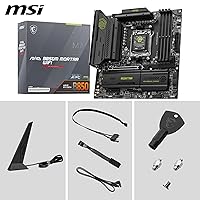
MSI includes antennas in the box for the Wi-Fi module. You screw them onto the rear I/O connectors during installation. For most desktop setups, the included antennas provide solid signal, though if your PC is inside a metal case in a poor reception spot, a longer or external antenna can help.

The B850M Mortar WiFi has multiple fan headers across the board including the Combo header rated at 3A, which can handle pump plus fan connections. For exact header count and placement, MSI's product page and manual list the full layout — but for a typical mATX build with three to five fans, you should have enough headers without needing a hub.

Only if your Ryzen CPU has integrated graphics — Ryzen 8000G series CPUs do, but standard Ryzen 7000 and 9000 non-G models do not. The board has no video output on the rear I/O, so if you are using a GPU-less Ryzen CPU like a 9700X, you will get no display output at all without a discrete card.

It is genuinely useful. The screwless retention clip means you can seat and remove an M.2 drive without hunting for a tiny screw and a jeweler's screwdriver. For anyone who swaps storage regularly or is building their first PC, it removes a frustrating step. The Shield Frozr heatsink also clicks on and off cleanly, which makes the whole M.2 bay less intimidating.

For gaming, the difference versus gigabit is minimal since most online game traffic is nowhere near 1 Gbps anyway. Where 5G LAN makes a real difference is local network file transfers — moving large video files or game installs from a NAS — where you can sustain speeds several times faster than gigabit if your router or switch also supports multi-gig connections.

It depends on what you mean by significantly. The VRM here handles the 9950X at stock and with moderate PBO tuning without breaking a sweat. If you are planning aggressive all-core manual overclocking with high voltage and sustained loads, you would be better served by an X870E board with heavier power delivery. For most users, including gamers and creators who just want PBO enabled, this board is perfectly capable.

Where to Buy