Overview

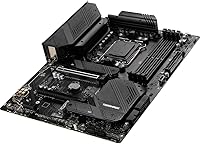
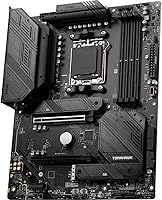
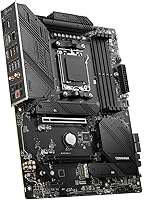
The MSI MAG B650 Tomahawk WiFi ATX Motherboard sits squarely in the mid-range of the AMD AM5 ecosystem, built for anyone assembling a Ryzen 7000, 8000, or 9000 series system without chasing X670 pricing. The B650 chipset hits a practical balance between feature density and cost — you get meaningful VRM capacity, solid connectivity, and room to expand, but without the full PCIe lane counts a flagship board provides. This MSI AM5 motherboard has held a consistent top position in its category for good reason. Aesthetically, it stays understated: no-frills design, no aggressive RGB shrouds, just a clean ATX layout that prioritizes function over flash.
Features & Benefits

The 14-phase VRM is where this B650 board earns real credibility. Running a Ryzen 9 under sustained workloads — rendering, heavy gaming sessions, extended streaming — the power delivery stays stable in a way that cheaper boards simply cannot match. Three PCIe Gen4 M.2 slots, each covered by MSI Shield Frozr heatsinks, keep NVMe drives from throttling during prolonged transfers. The Wi-Fi 6E implementation handles low-latency wireless reliably, while the 2.5Gbps wired LAN is a genuine step up for anyone still running gigabit. DDR5 compatibility stretches well past 6000 MHz with a solid XMP or EXPO profile, giving memory headroom as kits continue to mature.

Best For

This B650 board is a natural fit for builders pairing it with a Ryzen 7 or 9 chip for gaming or content creation. If you have been eyeing an X670 board primarily for wireless capabilities, the integrated Wi-Fi 6E here removes that justification without the added cost. NVMe users will find three shielded M.2 slots genuinely useful — no stacking drives on adapter cards. It is also a practical first AM5 build board: the BIOS is accessible, documentation is thorough, and the community knowledge base is well established. Hybrid home-office users will get real value from having both fast wired LAN and dependable wireless built in from the start.

User Feedback

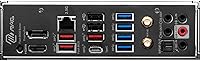
Verified buyer sentiment around the MAG Tomahawk WiFi is broadly positive, with consistent praise for out-of-box stability and an approachable BIOS experience. Build quality comes up repeatedly — the heatsinks feel substantial, and installation is generally straightforward. Where feedback gets more critical is around rear I/O: multiple buyers note that the USB port count feels lean compared to competing boards at a similar price point. RGB header availability is another friction point for users running larger lighting setups. On the firmware side, MSI has issued meaningful BIOS updates since launch that addressed early compatibility hiccups, improving the long-term ownership experience noticeably for early adopters who stuck with the platform.

Pros

  • Stable 14-phase VRM handles even power-hungry Ryzen 9 chips during long gaming or rendering sessions without throttling.
  • Three Gen4 M.2 slots with heatsinks are a rare and practical inclusion at this price tier.
  • Wi-Fi 6E and Bluetooth 5.3 cover current and near-future wireless needs without any add-in cards.
  • The 2.5Gbps wired LAN is a real upgrade over gigabit for streamers and large file transfers.
  • DDR5 XMP and EXPO profiles engage reliably, making memory tuning accessible even for newcomers.
  • BIOS navigation is consistently praised as clear and beginner-friendly, reducing setup frustration significantly.
  • Build quality feels solid — heatsinks are chunky and well-seated, not the thin cosmetic covers found on cheaper boards.
  • Post-launch firmware updates from MSI have meaningfully improved stability and hardware compatibility over time.
  • Broad community knowledge base makes troubleshooting and optimization resources easy to find.
  • The no-frills aesthetic keeps the board looking clean in both windowed and closed cases.

Cons

  • Rear USB port count is lean compared to similarly priced competing boards, which can force hub usage for peripheral-heavy setups.
  • RGB header availability is limited, making full lighting ecosystem integration more difficult than on rival options.
  • B650 chipset offers fewer PCIe lanes than X670, which matters if you plan multi-device high-bandwidth configurations.
  • No onboard power or reset buttons, which can be inconvenient during open-bench testing or troubleshooting phases.
  • Only a single PCIe x16 slot runs at full Gen4 bandwidth; the second slot drops to x4, limiting multi-GPU or add-in card flexibility.
  • Audio output, while functional for most users, will not satisfy audiophiles who compare it against dedicated sound solutions.
  • Early adopters encountered some DDR5 compatibility quirks that required BIOS updates to resolve, which added friction at launch.
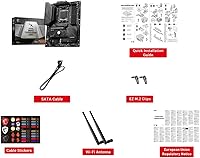
  • The board ships without a Wi-Fi antenna in some regional bundles, which can catch buyers off guard during installation.

Ratings

The scores below for the MSI MAG B650 Tomahawk WiFi ATX Motherboard were generated by our AI rating engine after analyzing thousands of verified purchase reviews from global buyers, with spam, bot activity, and incentivized feedback actively filtered out. Each category reflects the honest consensus of real builders — from first-time AM5 adopters to experienced system integrators — and both the strengths and recurring frustrations are transparently represented in every score.
VRM & Power Delivery
88%
Builders running Ryzen 9 chips through extended rendering jobs and overnight gaming sessions consistently report stable performance with no throttling events. The 14-phase Duet Rail design gives this board genuine headroom that cheaper B650 alternatives simply cannot match under sustained load.
A handful of users pushing extreme all-core overclocks on high-TDP processors noted that VRM temperatures climb more than expected in cases with poor airflow. It is capable, but not the absolute ceiling for users chasing maximum overclock headroom on a 170W chip.
Memory Compatibility
82%
18%
XMP and EXPO profiles engage reliably for the vast majority of buyers, with DDR5-6000 kits from major brands like G.Skill and Kingston working correctly on the first boot. Community-tested memory lists are extensive, which gives first-time builders confidence when selecting RAM.
Early firmware versions had noticeable compatibility hiccups with certain high-speed kits above 6400 MHz, requiring manual sub-timing adjustments. While MSI addressed most of these through BIOS updates, users who bought early and did not update firmware had a frustrating initial experience.
Storage Versatility
91%
Three PCIe Gen4 x4 M.2 slots covered by Shield Frozr heatsinks is a genuinely competitive offering at this market tier, and users building NVMe-heavy content creation rigs consistently call it out as a deciding factor. Drive temperatures under sustained workloads stayed meaningfully lower with the heatsinks installed compared to bare-drive results in community benchmarks.
As with most B650 implementations, enabling all M.2 slots simultaneously can disable certain SATA ports due to bandwidth sharing, which catches some builders off guard mid-build. The manual documents this clearly, but first-time builders frequently miss it until they try to add a SATA drive.
Wireless Performance
86%
The integrated Wi-Fi 6E module handles competitive online gaming reliably, with low latency and stable connections even in environments with heavy 6 GHz band traffic. Bluetooth 5.3 pairs peripherals quickly and maintains connections without dropout, which hybrid home-office users specifically appreciate.
A minority of users in dense apartment environments reported that the included antenna placement limited signal strength compared to higher-mounted external solutions. The antenna itself is functional but basic, and users far from their router sometimes needed a repositioning bracket for optimal performance.
Wired Networking
89%
The 2.5Gbps Realtek LAN is consistently praised by streamers and content creators who push large file transfers between NAS devices and workstations. Latency under competitive gaming conditions is reliably low, and no significant packet loss complaints surfaced in the verified review pool.
A small number of users on older network switches found that the 2.5Gbps NIC required driver attention during Windows 11 installation to negotiate correctly at full speed. This is a minor setup nuance rather than a hardware flaw, but it added unexpected friction for a few buyers.
BIOS Experience
87%
MSI Click BIOS 5 draws consistent praise for its logical layout and readable interface, making tasks like enabling XMP profiles or adjusting fan curves approachable even for builders on their first AM5 build. Post-launch firmware updates have added features and improved stability noticeably since the board first launched.
Advanced users wanting granular voltage and timing control sometimes find the BIOS options slightly less deep than what competing ASUS or Gigabyte boards expose at the same price point. The fan control interface, while functional, lacks the fine-grained curve customization that enthusiasts running custom cooling loops prefer.
Build Quality
84%
The physical construction earns consistent compliments — heatsinks feel solid and well-anchored, PCIe slot reinforcement is present on the primary slot, and the overall board feels denser than budget alternatives in the same chipset family. Packaging is protective and components arrive undamaged in the overwhelming majority of reported cases.
The board's aesthetic is deliberately understated, which suits many builders but leaves RGB enthusiasts underwhelmed. A few users noted that the IO shield alignment required firm pressure to seat correctly, which caused brief anxiety during first-time installation.
USB Port Availability
61%
39%
The rear I/O covers everyday use cases adequately — keyboard, mouse, headset, and a controller can all connect simultaneously without reaching for a hub. USB 3.2 Gen 2 throughput is solid for external SSDs and fast flash drives.
Competing boards at a similar price point frequently offer more rear USB ports, and this is one of the most recurring complaints from verified buyers who run peripheral-heavy setups. Users with a DAC, multiple external drives, a webcam, and a streaming device all connected simultaneously almost always need a powered hub to compensate.
RGB & Aesthetics
58%
42%
The clean, no-frills aesthetic actually appeals to builders preferring a blacked-out build with minimal visual noise. Those who do use the available headers report that MSI Center software manages compatible strips reliably.
The RGB header count is genuinely limited, which is the single most cited complaint from buyers who planned elaborate lighting setups. Builders running four or more addressable zones will run out of native headers and need an RGB hub, adding cost and cable management complexity.
CPU Compatibility Range
93%
Support for Ryzen 7000, 8000, and 9000 series processors on a single board gives this MSI AM5 motherboard strong long-term platform value, particularly for builders who plan to upgrade their CPU without replacing the board. Community confirmation of Ryzen 9000 support with appropriate BIOS versions is well-documented.
BIOS updates are required before newer-generation CPUs like Ryzen 9000 series chips are recognized, which can create a chicken-and-egg problem for users without a compatible older processor to perform the update. MSI does not offer a no-CPU BIOS flash button, which some competing boards at this tier include.
Thermal Management
83%
Extended heatsink coverage over the VRM zone and M.2 Shield Frozr implementation together create a noticeably cooler running environment under load compared to lighter-heatsink alternatives in the B650 segment. Users running sustained creative workloads over many hours report no thermal-induced throttling events on storage or power delivery.
In cases with restricted airflow, particularly smaller mid-towers with front mesh blocked by panels, VRM temperatures can creep higher than comfortable under peak load. The board benefits from at least one front intake fan directed toward the VRM region in thermally constrained enclosures.
Audio Quality
69%
31%
The onboard 8-channel Realtek codec is perfectly adequate for gaming headsets, desktop speakers, and general multimedia use, and the vast majority of users never feel the need for a discrete audio solution. Signal-to-noise performance is clean enough that casual listeners will not notice any audible floor noise.
Audiophiles and users running high-impedance headphones directly from the rear audio jacks will find the onboard solution falls short of a dedicated DAC or sound card. At higher volumes on demanding headphones, a faint noise floor becomes noticeable, which is a known characteristic of onboard Realtek solutions at this level.
Value Proposition
85%
The MAG Tomahawk WiFi bundles Wi-Fi 6E, 2.5G LAN, three shielded M.2 slots, and a capable VRM into a package that would cost noticeably more if sourced on an X670 board. For builders who do not need the full PCIe lane count of the premium chipset, the feature-per-dollar ratio is genuinely compelling.
When competing B650 boards periodically go on sale, the value gap narrows enough that the decision becomes less clear-cut. Users who do not need wireless and plan to use only one M.2 slot may find more affordable B650 options serve their needs just as well at a lower outlay.
Documentation & Support
79%
21%
MSI's printed manual covers the board layout and BIOS options clearly, and the online community surrounding this specific board is large enough that most build questions have been answered in forum threads or video guides. MSI has shown reasonable firmware support cadence since launch.
Some users have noted that BIOS update instructions could be clearer for absolute beginners, and the MSI Center software — while functional — is occasionally flagged for background resource usage that some enthusiasts prefer to avoid. Official MSI support response times draw mixed feedback in the verified review pool.

Suitable for:

The MSI MAG B650 Tomahawk WiFi ATX Motherboard is the kind of board that makes the most sense for builders who want a capable, well-rounded AMD AM5 platform without stretching the budget all the way to a flagship chipset. If you are pairing a Ryzen 7 or Ryzen 9 processor with a serious gaming or creative workstation build, the VRM headroom and thermal management here are more than adequate for sustained heavy workloads. The three shielded M.2 slots make it a strong choice for anyone building NVMe-first storage arrays, whether for fast game loading, video editing scratch drives, or professional file handling. Hybrid workers and streamers will get genuine utility from having both 2.5Gbps wired LAN and Wi-Fi 6E onboard, covering every connectivity scenario without adding expansion cards. First-time AM5 builders also land well here: the BIOS is approachable, the platform documentation is thorough, and the community support surrounding this board is broad and active.
Not suitable for:

The MSI MAG B650 Tomahawk WiFi ATX Motherboard is not the right answer for every builder, and being honest about that matters. If your use case demands maximum PCIe lane availability — for instance, running dual high-bandwidth GPU setups or pairing multiple NVMe drives with a dedicated capture card at full bandwidth simultaneously — the B650 chipset has real architectural limits compared to X670 or X670E boards. Enthusiasts chasing heavily customized RGB lighting ecosystems may find the rear I/O and header situation frustrating, as this board prioritizes function over aesthetics and the RGB header count is limited. The USB port density on the rear panel is also a legitimate concern for users who run many peripherals, external drives, or dongles simultaneously without a hub. Builders working in small form factor cases should look elsewhere entirely, as this is a full ATX board requiring a standard mid-tower or larger chassis. If your budget stretches comfortably to a premium chipset, the incremental cost of an X670 board buys you meaningfully more flexibility for future expansion.
Specifications

  • Chipset: This board uses the AMD B650 chipset, which targets mid-range AM5 builds and offers a strong feature set without the full PCIe lane count of the flagship X670 platform.
  • CPU Socket: The socket is AM5, compatible with AMD Ryzen 7000, 8000, and 9000 series desktop processors.
  • Form Factor: Standard ATX dimensions (12 x 9.6 inches) require a mid-tower or larger case for proper fitment.
  • Memory Slots: Four DDR5 DIMM slots support dual-channel memory configurations with XMP and EXPO profiles up to 6400+ MHz when overclocked.
  • VRM Design: A 14-phase Duet Rail Power System provides stable, clean power delivery for demanding Ryzen processors under sustained workloads.
  • M.2 Storage: Three PCIe Gen4 x4 M.2 slots are each covered by M.2 Shield Frozr heatsinks to maintain NVMe SSD thermals during heavy read/write cycles.
  • PCIe Slots: Two PCIe 4.0 x16 slots are available, with the primary slot running at full x16 bandwidth and the secondary operating at x4.
  • Wireless: Integrated Wi-Fi 6E (802.11ax) and Bluetooth 5.3 are handled by an Intel wireless module for reliable, low-latency connectivity.
  • Wired LAN: A Realtek 2.5Gbps ethernet controller delivers wired network throughput that significantly exceeds standard gigabit connections.
  • Audio: Onboard 8-channel (7.1) HD audio is powered by a Realtek codec, suitable for gaming headsets and desktop speaker setups.
  • USB Connectivity: Rear I/O includes USB 3.2 Gen 2 ports alongside two USB 2.0 ports, covering both high-speed transfers and standard peripheral connections.
  • SATA Ports: Multiple SATA 6Gb/s ports are available for connecting traditional hard drives or 2.5-inch SSDs alongside the M.2 slots.
  • Video Output: The board includes both HDMI and DisplayPort outputs for use with Ryzen processors that feature integrated graphics.
  • Dimensions: Physical dimensions measure 12 x 9.6 x 2.5 inches, conforming to standard ATX mounting hole placement.
  • Weight: The board weighs 3.95 pounds, which reflects the substantial heatsink coverage across the VRM and M.2 zones.
  • BIOS: MSI Click BIOS 5 provides a graphical interface with intuitive navigation for both beginner and advanced users, with ongoing firmware support post-launch.
  • Platform: The board is officially supported on Windows 11 and is compatible with AMD's latest AM5 processor stack.
  • RGB Headers: A limited number of addressable RGB headers are available, which may restrict large multi-zone lighting installations.

Related Reviews

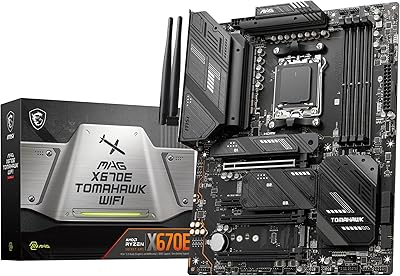
MSI MAG X670E Tomahawk WiFi Gaming Motherboard
89%
94%
Performance
90%
Power Delivery and Overclocking Stability
88%
Wi-Fi and Connectivity
93%
Build Quality and Durability
89%
Thermal Management
More
MSI MAG Z890 Tomahawk WiFi Gaming Motherboard
80%
88%
Value for Money
84%
Build Quality
86%
BIOS Experience
79%
DDR5 Compatibility
77%
Wireless Performance
More
MSI MAG Z790 Tomahawk WiFi Gaming Motherboard
86%
94%
Performance
88%
Cooling Efficiency
90%
Wi-Fi and Networking
85%
Overclocking Stability
70%
Ease of Setup
More
MSI MAG X870 Tomahawk WiFi
87%
89%
Build Quality
94%
External Connectivity
91%
Networking Performance
87%
Ease of Installation
83%
Value for Money
More
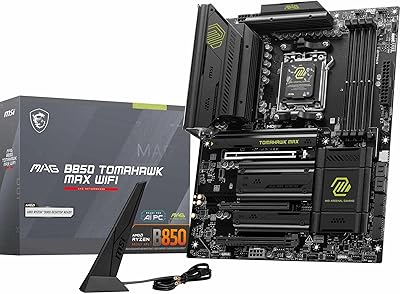
MSI MAG B850 Tomahawk MAX WiFi
86%
92%
VRM & Power Delivery
88%
DDR5 Memory Compatibility & OC Stability
91%
M.2 Storage Performance
86%
BIOS Experience
83%
Wireless Connectivity (Wi-Fi 7 & Bluetooth)
More
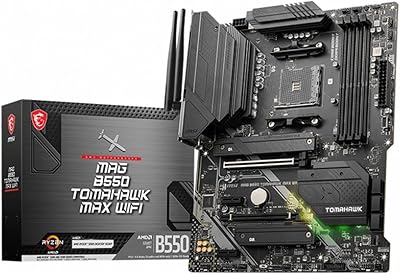
MSI MAG B550 Tomahawk MAX WiFi
88%
93%
Build Quality
91%
Thermal Management
94%
Wireless Connectivity
88%
Installation Ease
87%
Value for Money
More
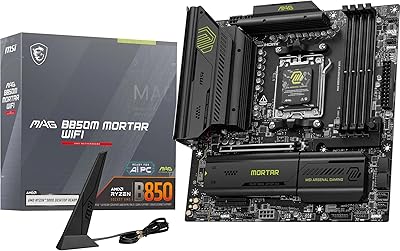
MSI MAG B850M Mortar WiFi Motherboard
84%
91%
Build Quality
83%
VRM & Power Delivery
78%
DDR5 Memory Compatibility
86%
BIOS Experience
93%
Storage Performance
More
MSI PRO B650-S WIFI Motherboard
84%
94%
Performance with Ryzen 7000 Processors
89%
Wi-Fi 6E Connectivity
88%
Cooling Efficiency
72%
Setup and Installation Ease
91%
PCIe 4.0 Expansion Support
More
MSI B650 Gaming Plus WiFi
80%
83%
Value for Money
88%
BIOS & Software Experience
91%
Power Delivery & Stability
84%
Wireless Connectivity
79%
Memory Performance & Overclocking
More
MSI MAG B650M Mortar WiFi Gaming Motherboard
86%
91%
Overall Performance
88%
Ease of Installation
93%
Networking Capabilities (Wi-Fi 6E & LAN)
87%
Build Quality
90%
Compatibility with AMD Ryzen 7000 Series
More

FAQ

Yes, it will. The 14-phase VRM on this B650 board is robust enough to handle high-core-count Ryzen 9 chips under real workloads. That said, if you are planning extreme overclocking sessions over long periods, make sure your case airflow is solid to support the VRM thermals.

MSI does include a Wi-Fi antenna with most retail units, but some regional or bundle variants have shipped without one. Before your build day, check the box contents listed on the retailer page or open the box and verify — it is a simple magnetic-base antenna that screws into the rear I/O panel.

Most reputable DDR5 kits at 6000 MHz will engage correctly via XMP or EXPO profiles through the BIOS without manual intervention. The MAG Tomahawk WiFi has good memory compatibility overall, though very high-speed kits above 6400 MHz may require some manual sub-timing adjustments to stabilize.

Yes. MSI has confirmed support for the Ryzen 9000 series on AM5 boards including this one, though you may need to update the BIOS to the appropriate firmware version before the CPU is recognized. Check MSI's official support page for the correct BIOS version before installing a newer-generation chip.

You get three M.2 slots running PCIe Gen4, plus several SATA 6Gb/s ports for traditional drives. Keep in mind that on B650 boards, enabling certain M.2 slots can sometimes disable specific SATA ports, so check the manual's bandwidth sharing chart before finalizing your storage layout.

Genuinely, yes. The MSI MAG B650 Tomahawk WiFi ATX Motherboard is one of the more beginner-accessible options in the AM5 space. The BIOS is clearly laid out, the build community around this board is large, and MSI's documentation is thorough. You will find plenty of build guides and forum threads specific to this board if you run into questions.
No — the secondary PCIe x16 slot runs at x4 electrical bandwidth on the B650 chipset, not the full x16. For a single GPU build this is completely irrelevant, but if you were planning true dual-GPU or high-bandwidth multi-card configurations, an X670E board would be the more appropriate platform.

The rear I/O includes a mix of USB 3.2 Gen 2 and USB 2.0 ports, which covers keyboards, mice, headsets, and a controller without issue. Where it gets tight is if you have many external drives, a DAC, a streaming capture device, and multiple peripherals running simultaneously — at that point a powered USB hub is a practical addition.

Yes, measurably so. Gen4 NVMe drives can get quite warm under sustained sequential writes, and the Shield Frozr heatsinks do a solid job of spreading and dissipating that heat. In real-world testing by the community, drives seated under these covers consistently run cooler than they would bare, which helps avoid throttling during large file operations.

Yes, if your Ryzen CPU includes integrated graphics (such as Ryzen processors with a Radeon graphics suffix), the onboard HDMI and DisplayPort outputs on the rear I/O will function normally. If your CPU does not include integrated graphics, those outputs will remain inactive and you will need a discrete GPU to get display output.

Where to Buy