Overview

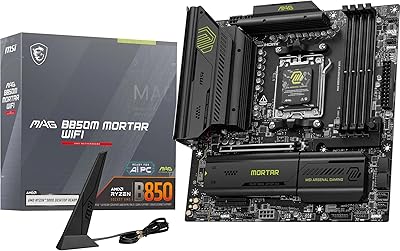
The MSI MAG B850 Tomahawk MAX WiFi lands in a sweet spot AMD builders have been waiting for — a serious ATX board built around the B850 chipset without demanding X870E-level spending. The Tomahawk name carries real weight in the enthusiast community; it has consistently delivered reliable performance at honest prices across multiple generations. This V1 revision continues that tradition with a clean layout, a toolless-friendly assembly experience, and specs that punch well above the entry-level B850 crowd. If you're building around a Ryzen 9000, 8000, or 7000 series CPU, this Tomahawk board deserves serious consideration before paying a premium for X-series chipsets.
Features & Benefits

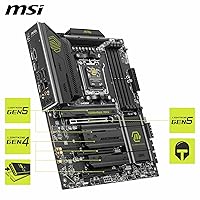
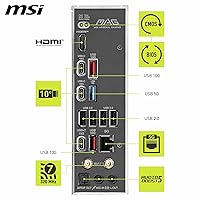
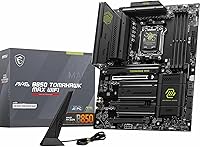
Power delivery is one of the MAG B850 MAX WiFi's strongest arguments. A 14-phase VRM using 80A SPS stages gives Ryzen 9000 processors genuine thermal and electrical headroom — particularly useful when pushing all-core loads or experimenting with overclocking. DDR5 support extends to 8400+ MT/s in 1DPC 1R configurations, meaning speed-focused builders can actually get there with the right kit. Storage is equally well-served: two M.2 Gen5 slots and two Gen4 slots cover fast NVMe drives now and later, all with tool-free installation. Wi-Fi 7 and 5Gbps LAN round out a rear I/O that also includes USB 20Gbps Type-C and solid 7.1-channel audio output.

Best For

This MSI B850 build platform makes the most sense for builders wanting meaningful overclocking capability without overspending on an X870E board. Pairing a Ryzen 9000 chip with fast DDR5 memory is where it genuinely shines — stable memory training makes hitting those high MT/s speeds realistic rather than frustrating. Content creators running dual NVMe workloads will appreciate having two Gen5 M.2 slots available at once. For home or small-office setups, built-in Wi-Fi 7 and 5GbE eliminate the need for add-in cards, though full Wi-Fi 7 benefits still depend on having a compatible router. The tool-free assembly experience is a legitimate time-saver for anyone who builds regularly.

User Feedback

Buyers are broadly positive, with consistent praise for the straightforward BIOS experience, stable memory training, and a build quality that feels well above average for this price tier. The VRM and M.2 heatsinks get specific callouts for keeping thermals controlled during extended sessions. On the critical side, some users note that older Ryzen CPUs may need a BIOS update before the board posts — worth planning for if you lack a Ryzen 9000 chip on hand. A few buyers also found the Wi-Fi antenna placement awkward depending on case layout. Overall the rating trend reflects a board that delivers for most users, with friction points that are real but manageable.

Pros

  • 14-phase VRM with 80A power stages handles Ryzen 9000 all-core loads without thermal throttling.
  • Two M.2 Gen5 x4 slots run simultaneously at full bandwidth, no sharing or lane switching required.
  • DDR5 memory training is stable and forgiving, making high-speed kit setup realistic for most builders.
  • Wi-Fi 7 and 5Gbps LAN are included together, covering both wireless and wired future-proofing in one board.
  • Tool-free M.2 installation with EZ Clip II makes drive swaps faster and less frustrating over repeated upgrades.
  • BIOS interface is consistently praised for being intuitive and accessible, even for less experienced builders.
  • PCIe 5.0 x16 slot with reinforced Steel Armor II keeps heavy GPU installations secure and reliable long-term.
  • Build quality feels noticeably premium, with heatsink assemblies that manage thermals under real workloads.
  • USB 20Gbps Type-C on the rear I/O covers fast external storage and modern peripheral needs without adapters.
  • Competitive pricing relative to comparable B850 boards with similar VRM specs and wireless feature sets.

Cons

  • Out-of-box BIOS may not support older Ryzen CPUs, requiring a Ryzen 9000 chip on hand to update first.
  • The fourth M.2 slot is limited to Gen4 x2 bandwidth, making it unsuitable for high-performance NVMe drives.
  • Wi-Fi 7 performance gains are only realizable if your router also supports Wi-Fi 7, which many currently do not.
  • Rear USB port count feels conservative at this price, with limited high-speed Type-A options for multi-device users.
  • The board weighs 4.49 pounds, which can complicate solo installation in inverted or vertically mounted cases.
  • MSI Center software has a reputation for background resource usage that privacy-conscious or minimal-install users dislike.
  • Some off-brand DDR5 kits require manual BIOS intervention before memory training stabilizes on first boot.
  • Wi-Fi antenna cable routing can be awkward depending on case layout, limiting ideal antenna placement options.
  • No active chipset cooling means airflow planning matters more in warm or restricted case environments.
  • Buyers not using high-speed memory or overclocking may not recoup the value gap over cheaper B850 alternatives.

Ratings

The MSI MAG B850 Tomahawk MAX WiFi earns its place as one of the more talked-about AM5 boards in the enthusiast community right now, and our AI-driven scoring reflects that — built by analyzing thousands of verified global purchases while actively filtering out incentivized, bot-generated, and outlier reviews. The scores below capture both where this Tomahawk board genuinely delivers and where real buyers have run into friction, giving you an honest picture before you commit.
VRM & Power Delivery
92%
Builders running Ryzen 9000-series chips under sustained all-core loads consistently report stable delivery without thermal throttling, even in mid-tower cases with moderate airflow. The 14-phase setup with 80A SPS stages gives enthusiasts meaningful headroom when pushing CPU performance beyond stock settings.
A handful of builders doing extreme manual overclocking on flagship CPUs have noted the VRM runs warm under prolonged stress, which is expected at this tier but worth monitoring in poorly ventilated cases. It is not an X870E-class power delivery, and serious competitive overclockers will feel that ceiling eventually.
DDR5 Memory Compatibility & OC Stability
88%
Most users report that popular DDR5 kits from major brands train reliably on the first boot, and several enthusiasts have confirmed reaching 7200 to 8000 MT/s on mid-grade kits with minimal BIOS tuning. For builders chasing high-speed memory performance, this board is one of the more forgiving B850 options available.
A recurring complaint involves certain off-brand or mixed-kit configurations struggling to post cleanly without manual intervention in BIOS. Buyers using older or less common DDR5 modules have occasionally needed to reseat and retry before memory training stabilized, which can be frustrating on a first build.
M.2 Storage Performance
91%
Having two Gen5 x4 slots available simultaneously is a genuine advantage for content creators and power users who run fast NVMe drives in parallel without bandwidth sharing penalties. The EZ M.2 Shield Frozr II heatsinks do a solid job keeping drive temps in check during sustained sequential transfers.
The fourth M.2 slot operates at Gen4 x2, which limits it to around 32 Gbps — fine for secondary storage but not where you want to put a flagship NVMe drive. A few users also noted the lowest slot is positioned close to the primary GPU, making heatsink removal slightly awkward in tighter ATX cases.
BIOS Experience
86%
Users across skill levels consistently praise the BIOS interface as intuitive and well-organized, with memory overclocking profiles easy to apply even without deep technical knowledge. MSI's BIOS update process through M-Flash is described as reliable and straightforward by the majority of buyers.
Some users building with older Ryzen 7000-series CPUs have found the board ships with a BIOS version that requires a Ryzen 9000 chip to update — a classic chicken-and-egg problem that catches first-time builders off guard. This is not unique to MSI, but it remains a real logistical friction point worth planning around.
Wireless Connectivity (Wi-Fi 7 & Bluetooth)
83%
Buyers who upgraded from Wi-Fi 6E boards note a meaningful improvement in stability and range, particularly in dense wireless environments. The inclusion of Bluetooth 5.4 alongside Wi-Fi 7 covers modern peripherals well, and most users found the integrated module performed reliably out of the box.
Realizing the full potential of Wi-Fi 7 depends entirely on having a compatible router, which many buyers do not yet own — making this feature more of a forward investment than an immediate upgrade for most. A few users also found antenna cable routing and placement restrictive depending on their case layout and antenna position.
Build Quality & PCB Construction
93%
The physical quality of the board draws consistent praise, with the reinforced PCIe slot, chunky heatsink assemblies, and overall component density feeling noticeably more substantial than boards at lower price points. Builders handling it report a confidence-inspiring rigidity that holds up during installation and long-term use.
At 4.49 pounds, it is on the heavier side for an ATX board, which occasionally complicates single-person installation in vertical or inverted cases. Some users also noted the aesthetic leans utilitarian rather than flashy, which is a matter of preference but may disappoint buyers building a heavily windowed RGB showcase system.
Thermal Management
87%
The extended VRM heatsink keeps power stages cool during mixed workloads, and the chipset heatsink does its job quietly without needing active fan assist under typical gaming or creative workloads. M.2 drive temperatures under the Frozr II shields consistently stay in safe operating ranges during real-world transfers.
Under extended synthetic stress tests that push CPU and multiple NVMe drives simultaneously, some users observed the chipset area getting noticeably warm. This is within safe limits but suggests that case airflow planning matters more with this board than with designs that rely on active chipset cooling.
Rear I/O & USB Ports
79%
21%
The USB 20Gbps Type-C port on the rear is a practical addition that covers fast external SSD docks and modern peripherals without needing an add-in card. Total port count is adequate for most desktop setups and covers the basics well for gaming and productivity use.
Power users with multiple high-speed external devices have noted the rear port count feels conservative relative to the board price, particularly the absence of additional 20Gbps Type-A ports. Buyers coming from older X570 or B550 boards with dense I/O may find themselves relying on a front panel hub more than expected.
Audio Quality
81%
19%
Onboard audio with 7.1-channel output and S/PDIF support satisfies the majority of users running headsets or desktop speakers without a dedicated sound card. The Audio Boost 5 implementation is noted for a clean output with low background noise, which casual and mid-tier audiophile users appreciate.
Dedicated audio card users and more discerning listeners point out that integrated audio at this tier still cannot match a discrete DAC or PCIe audio solution for dynamic range and low-noise floor performance. This is an inherent limitation of onboard audio rather than an MSI-specific failure.
Wired LAN Performance
89%
The 5Gbps LAN port is a meaningful step up from the 2.5Gbps ports still common on many competing B850 boards, and home users with compatible switches or NAS devices can fully leverage the extra throughput for local transfers. Latency under gaming conditions is reported as stable and consistent.
5Gbps LAN requires a compatible switch or router port to be useful, meaning many buyers are effectively running it at 2.5Gbps or 1Gbps until their network infrastructure catches up. For pure internet connectivity, the practical difference between 2.5 and 5Gbps is invisible unless on a multi-gig ISP plan.
Assembly & DIY Friendliness
91%
The EZ M.2 Clip II system for screwless drive retention is one of the most consistently praised quality-of-life features among real buyers, especially those who build or swap components regularly. Clear component labeling and logical layout reduce the friction of a first-time AM5 build considerably.
A small number of users found the M.2 heatsink removal slightly fiddly during initial setup, particularly on the upper Gen5 slots where the clips require a deliberate press angle. Nothing warranty-threatening, but worth going slowly on the first removal to avoid scraping the thermal pad.
Value for Money
84%
Relative to competing B850 boards with comparable VRM specs and wireless features, this Tomahawk board is broadly considered fair value by buyers who compared it against alternatives before purchasing. The combination of Gen5 M.2, Wi-Fi 7, and a robust power delivery at this price point is difficult to match from other brands.
Buyers who stretched from a budget B850 board to reach this price tier occasionally feel the incremental gains do not fully justify the cost difference unless they specifically need the VRM headroom or dual Gen5 storage. If you are not pushing high-speed memory or overclocking, a cheaper B850 board covers most daily needs.
Software & Ecosystem
74%
26%
MSI Center provides a reasonable suite of monitoring, fan curve control, and performance profile tools that most builders find adequate for day-to-day system management without diving into BIOS frequently. Driver packaging and update delivery are described as functional and organized.
MSI Center has a reputation for occasional bloat and background resource usage that some users find annoying, particularly on clean installs where they prefer minimal software overhead. A few buyers also noted that some advanced features require account creation or cloud connectivity, which is unwelcome for privacy-conscious users.
Fan Header & Cooling Control
82%
18%
The combination fan header rated at 3A for pump and system use simultaneously covers AIO cooler setups cleanly, and the spread of headers across the board accommodates most standard ATX case fan configurations without requiring splitters. Fan curve customization in BIOS is reported as granular and reliable.
Builders running large custom loop setups with multiple high-current pumps may find the header count just sufficient rather than generous. A few users also noted that the software-side fan control in MSI Center feels less refined than the BIOS implementation, leading most enthusiasts to configure curves exclusively in BIOS.

Suitable for:

The MSI MAG B850 Tomahawk MAX WiFi is built for the kind of builder who wants a serious, capable AM5 platform without crossing into X870E territory on price. If you are pairing a Ryzen 9000-series CPU with fast DDR5 memory and want a board that can actually keep up with high-speed kits rather than just list them as supported, this Tomahawk board delivers where it counts. Content creators who need two simultaneous Gen5 NVMe drives for fast scratch storage and project libraries will find the quad M.2 setup genuinely useful rather than just a spec checkbox. Home and small-office builders who want Wi-Fi 7 and 5Gbps wired networking baked in — without buying separate add-in cards — will appreciate not having to compromise on connectivity. Enthusiast builders who regularly swap components also benefit from the tool-free M.2 installation system, which makes drive changes far less tedious over the life of the build.

Not suitable for:

The MSI MAG B850 Tomahawk MAX WiFi is not the right choice for every builder, and being honest about that matters. If you are a competitive or extreme overclocker who needs maximum PCIe lane count, USB4 ports, or the absolute ceiling of platform flexibility, the B850 chipset has structural limitations that no board design can fully overcome — an X870E platform is simply a better fit for those needs. Buyers on a tighter budget who plan to run a stock-clocked CPU with basic DDR5 memory and a single NVMe drive are likely paying for headroom they will never use; a less expensive B850 board would serve them just as well day to day. If you already own an older Ryzen 7000-series CPU and no compatible board to perform a BIOS update, be aware that out-of-box compatibility is not guaranteed and requires pre-planning. Users who want an RGB-heavy showpiece board for a windowed case may also find the utilitarian aesthetic underwhelming compared to more visually expressive alternatives at similar prices.
Specifications

  • Form Factor: ATX form factor, fitting standard mid-tower and full-tower cases that support ATX motherboard sizing.
  • Chipset: Built on the AMD B850 chipset, supporting the AM5 platform with PCIe 5.0 and DDR5 memory architecture.
  • CPU Socket: Socket AM5 (LGA1718), compatible with AMD Ryzen 9000, 8000, and 7000 series processors.
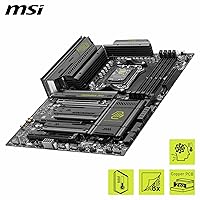
  • VRM Design: 14-phase Duet Rail power system using 80A SPS (Smart Power Stage) MOSFETs with extended heatsink and 7W/mK thermal pads.
  • Memory Slots: 4 x DDR5 DIMM slots supporting up to 8400+ MT/s in overclocked 1DPC 1R configurations.
  • PCIe Slot: 1 x PCIe 5.0 x16 slot with Steel Armor II reinforcement, delivering up to 128 GB/s of bidirectional bandwidth.
  • M.2 Storage: Four M.2 slots total: 2 x Gen5 x4 (128 Gbps each), 1 x Gen4 x4 (64 Gbps), and 1 x Gen4 x2 (32 Gbps).
  • M.2 Cooling: All M.2 slots are covered by EZ M.2 Shield Frozr II heatsinks with tool-free EZ M.2 Clip II retention hardware.
  • Wireless: Integrated Wi-Fi 7 module with Bluetooth 5.4, supporting the latest 802.11be standard for multi-link operation.
  • Wired LAN: Single 5Gbps Ethernet port for high-speed wired networking, doubling the throughput of standard 2.5Gbps implementations.
  • Rear USB: Rear I/O includes a USB 20Gbps Type-C port alongside additional USB Type-A ports for peripheral connectivity.
  • Audio: 7.1-channel HD audio output powered by Audio Boost 5, with S/PDIF optical output for external DAC or receiver connections.
  • Fan Headers: Includes a combination pump and system fan header rated at 3A, alongside multiple standard fan headers distributed across the board.
  • Chipset Heatsink: Dedicated chipset heatsink is included to manage thermal output from the AMD B850 chipset under sustained workloads.
  • Board Weight: The board weighs 4.49 pounds, reflecting the density of heatsinks, reinforced slots, and overall component build quality.
  • Package Dimensions: Retail packaging measures approximately 13.4 x 10.6 x 2.8 inches, sized to protect the board and bundled accessories during shipping.
  • Platform: Officially supported on Windows 11, with driver and software ecosystem aligned to current Microsoft platform requirements.
  • Release Version: This is the V1 revision of the MAG B850 Tomahawk MAX WiFi, the initial production variant of this specific model.

Related Reviews
MSI MAG B550 Tomahawk MAX WiFi
88%
93%
Build Quality
91%
Thermal Management
94%
Wireless Connectivity
88%
Installation Ease
87%
Value for Money
More
INLAND i9-14900K + MSI MAG Z790 Tomahawk MAX WiFi Combo
84%
94%
Gaming Performance
92%
Processing Power
88%
Motherboard Stability
85%
Ease of Installation
70%
Cooling Efficiency
More
MSI MAG X870 Tomahawk WiFi
87%
89%
Build Quality
94%
External Connectivity
91%
Networking Performance
87%
Ease of Installation
83%
Value for Money
More
MSI MAG B650 Tomahawk WiFi Gaming Motherboard
88%
94%
Performance for Gaming
92%
Connectivity Features
89%
Cooling Efficiency
85%
Value for Money
90%
Compatibility with Ryzen 7000
More
MSI MAG X670E Tomahawk WiFi Gaming Motherboard
89%
94%
Performance
90%
Power Delivery and Overclocking Stability
88%
Wi-Fi and Connectivity
93%
Build Quality and Durability
89%
Thermal Management
More
MSI MAG Z790 Tomahawk WiFi Gaming Motherboard
86%
94%
Performance
88%
Cooling Efficiency
90%
Wi-Fi and Networking
85%
Overclocking Stability
70%
Ease of Setup
More
MSI MAG Z890 Tomahawk WiFi Gaming Motherboard
87%
91%
Performance
93%
Connectivity Options
88%
Build Quality
80%
Ease of Installation
90%
Wi-Fi 7 Performance
More
MSI PRO Z790-A MAX WiFi
83%
88%
Build Quality
91%
VRM & Power Delivery
86%
Memory Overclocking
77%
BIOS Experience
93%
Wireless Connectivity
More
MSI B850 Gaming Plus WiFi Motherboard
86%
92%
Performance
90%
Cooling Efficiency
88%
Connectivity Options
85%
Build Quality
80%
Ease of Installation
More
MSI MAG B850M Mortar WiFi Motherboard
88%
94%
Wi-Fi & LAN Performance
88%
Overclocking Potential
92%
Cooling Efficiency
85%
Setup & Installation
90%
Power Delivery Stability
More

FAQ

It depends on the BIOS version shipped on your specific unit. Some boards arrive with a BIOS that supports Ryzen 7000 natively, but others may ship with a version that requires a Ryzen 9000 CPU to perform the update first. Before building, check the MSI website for the minimum supported BIOS version for your CPU and, if possible, confirm with the retailer whether the board has been updated. It is worth planning for this ahead of time rather than discovering it mid-build.

Yes, both Gen5 x4 M.2 slots operate independently and do not share bandwidth with each other or with the primary PCIe 5.0 x16 slot under typical configurations. You can populate both with fast Gen5 drives and expect full throughput on each simultaneously, which is one of the practical advantages this board holds over budget B850 options.

Honestly, for most people today it is mostly future-proofing. Wi-Fi 7 requires a compatible Wi-Fi 7 router to deliver its headline benefits like multi-link operation and higher throughput, and most home networks are still running Wi-Fi 6 or 6E hardware. That said, having Wi-Fi 7 built in means you will not need to buy an add-in card later when you do upgrade your router, so it is a genuinely useful long-term inclusion rather than pure marketing.

The 14-phase, 80A SPS design is well-matched for flagship Ryzen 9000 chips even under sustained all-core workloads like video encoding or 3D rendering. Users running top-tier Ryzen 9000 CPUs report stable delivery without throttling in cases with decent airflow. It is not an extreme overclocking platform in the way X870E boards are, but for stock and moderate manual overclocking it handles the load comfortably.

No — the EZ M.2 Clip II system uses a tool-free retention mechanism that replaces the traditional tiny screw. You press the drive in, secure the clip, and the heatsink presses back down without any screwdriver needed. It is one of the more appreciated quality-of-life features on this board for builders who swap NVMe drives regularly.

Most reputable DDR5 kits at 6000 MT/s and below will boot with XMP or EXPO enabled in BIOS without any manual tuning. The MAG B850 MAX WiFi handles common DDR5 frequencies reliably, and enabling the memory profile takes just a few seconds in BIOS setup. Higher-speed kits above 7200 MT/s may need minor sub-timing adjustments, but for most builders the plug-and-play experience is solid.

No — this is a full ATX board and requires a case that explicitly supports ATX motherboard sizing. It will not physically fit in Micro-ATX or Mini-ITX cases. If you are building in a smaller enclosure, you would need to look at a different board in a smaller form factor.

The board uses the AMD AM5 socket, which is compatible with coolers designed for AM5 mounting. Many modern coolers include AM5 brackets, and AMD also includes a reference mounting frame with AM5 processors. Check that your cooler specifically lists AM5 support before purchasing, as older AM4 coolers are not directly compatible without an adapter kit.

Yes, the S/PDIF optical output on the rear I/O allows you to connect a home theater receiver or external DAC that accepts optical input. This is useful if you want to bypass the onboard amplification entirely and let a dedicated receiver handle audio processing for speaker setups or high-quality headphone amplifiers.

MSI Center covers the basics well: fan curve control, performance profiles, system monitoring, and firmware updates. For most builders, it is a functional and reasonably clean utility. That said, it does run background processes, and some users with clean-install preferences choose to skip it and manage everything through BIOS directly instead. If you are comfortable in BIOS, you can largely avoid the software side without losing any core functionality.