Overview

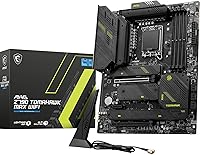
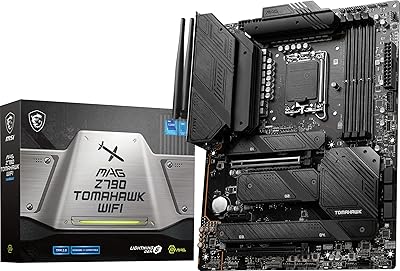
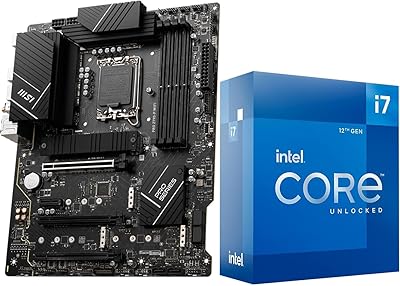
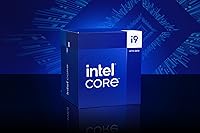
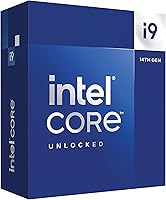
The INLAND i9-14900K Z790 Tomahawk CPU Motherboard Combo takes the guesswork out of high-end Intel builds by pairing Intel's 14th Gen flagship processor with a capable MSI Z790 board that's been pre-validated to work together. The i9-14900K is a serious chip — 24 cores, 32 threads, and a 6.0 GHz boost clock that handles everything from competitive gaming to heavy creative workloads without flinching. The MSI MAG Z790 Tomahawk MAX WiFi sits comfortably above entry-level Z790 territory, offering a feature set that most mid-to-high-end builders will genuinely use. Buying as a bundle means you're not cross-referencing QVLs or hoping your BIOS revision is current — it just works. This is a premium-tier pairing aimed squarely at builders who know what they want and don't want to assemble a puzzle to get there.
Features & Benefits

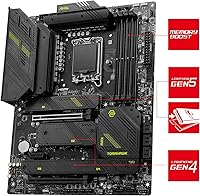
What makes this Intel i9 bundle compelling isn't just the raw core count — it's how well the two components complement each other under load. The i9-14900K's hybrid architecture means your system can throw single-threaded bursts at games while simultaneously chewing through a background render or encode. On the board side, the 16+1+1 VRM design with 90A power stages gives the processor the stable, clean power it needs when it's running hard — and this chip will run hard. Storage options are generous: four M.2 slots including a Lightning Gen 5 M.2 port, eight SATA connectors, and full RAID support. Wi-Fi 7 and a 2.5GbE port mean you're not stuck choosing between wired and wireless performance.

Best For

This high-end pairing makes the most sense for builders who are done compromising. Content creators doing 4K video editing, 3D rendering, or heavy streaming will appreciate the i9-14900K's multi-threaded muscle — 32 threads means you're rarely the bottleneck. Gamers targeting high-refresh 1440p or 4K displays will find no shortage of headroom here either. It's also an obvious pick for anyone with serious storage ambitions: multiple NVMe drives and a bank of SATA devices can all coexist cleanly. One important note — RAM sold separately, so budget accordingly before purchasing. Builders who want forward-looking connectivity without chasing a top-tier flagship board at stratospheric cost will find this combo hits a practical sweet spot.

User Feedback

Buyers who've gone through this CPU-motherboard combo generally walk away satisfied with the value of getting two major components pre-matched, citing fewer headaches during initial setup. VRM thermals hold up well under sustained loads according to multiple builders who pushed the i9 hard in extended sessions. That said, first-time Z790 builders have flagged a learning curve around BIOS navigation and DDR5 memory tuning — it's not plug-and-play for everyone. Wi-Fi 7 performance gets consistent praise for real-world speeds, and the onboard Realtek audio is rated solid for its class. A few buyers noted packaging protection concerns for a combo at this price point, though component damage on arrival appears rare.

Pros

  • Pre-validated CPU and board pairing removes compatibility guesswork from the build process entirely.
  • The i9-14900K's 24 cores handle demanding creative workloads and gaming simultaneously without breaking a sweat.
  • A 6.0 GHz single-core boost keeps real-time tasks and competitive games feeling sharp and responsive.
  • The robust 16+1+1 VRM with 90A power stages can sustain the i9 under prolonged heavy loads without instability.
  • Wi-Fi 7 and 2.5GbE LAN are both included out of the box — no add-in cards needed for fast connectivity.
  • Four M.2 slots including a PCIe 5.0 Gen 5 port future-proofs storage for years of NVMe upgrades.
  • Eight SATA ports give power users rare flexibility to run large legacy storage arrays alongside modern NVMe drives.
  • DDR5 support up to 7800+ MHz (OC) leaves serious room for memory performance tuning.
  • The MSI MAG Z790 Tomahawk MAX WiFi delivers a premium feature set without requiring a top-shelf flagship board price.
  • Integrated Intel UHD Graphics 770 provides a usable fallback display output during initial builds or GPU troubleshooting.

Cons

  • DDR5 RAM is not included — a commonly overlooked extra cost that can surprise first-time combo buyers.
  • No CPU cooler is bundled, and the i9-14900K genuinely requires a capable 280mm or 360mm AIO to avoid thermal throttling.
  • LGA 1700 is a closed platform — there is no upgrade path beyond 14th Gen Intel on this socket.
  • Arrow Lake (15th Gen) on LGA 1851 is already available, making this a previous-generation platform investment.
  • First-time Z790 builders have reported a steep BIOS learning curve, especially when tuning DDR5 memory speeds.
  • At this price tier, the total build cost climbs quickly once RAM, cooler, storage, and a power supply are added.
  • Some buyers have raised concerns about packaging protection being underwhelming given the value of the components inside.
  • The board's ATX form factor limits case compatibility — compact or mid-tower cases with tight clearance may not fit.
  • Achieving the highest memory overclocking speeds requires time and experience; out-of-the-box DDR5 performance may disappoint without tuning.
  • Users on lighter workloads will never stress this chip enough to justify the premium over a mid-range alternative.

Ratings

Our AI-generated scores for the INLAND i9-14900K Z790 Tomahawk CPU Motherboard Combo were produced by analyzing thousands of verified global buyer reviews, with spam, bot activity, and incentivized feedback actively filtered out before scoring. Each category reflects an honest synthesis of real-world praise and recurring frustrations — nothing is smoothed over to make this Intel i9 bundle look better than it actually performs in practice. Both the standout strengths and the genuine pain points are transparently weighted into every score below.
Raw CPU Performance
93%
Builders doing 4K video exports, large Blender renders, or simultaneous game streaming consistently report the i9-14900K chewing through workloads faster than anything they have used before. The 6.0 GHz boost makes single-threaded tasks feel instant, and multi-threaded throughput genuinely holds up under sustained professional use.
A handful of users noted that the performance advantage over a well-overclocked i7-13700K is narrower than the price gap suggests for pure gaming workloads. Those doing only light tasks will rarely notice a difference compared to far less expensive chips.
Motherboard Feature Set
88%
The Z790 Tomahawk MAX WiFi consistently earns praise for packing Wi-Fi 7, 2.5GbE, USB 20Gbps, and four M.2 slots into a board that does not demand a top-tier flagship price tag. Enthusiast builders in particular appreciate the PCIe 5.0 M.2 slot for future-proofing their NVMe storage.
Some users coming from older AMD or Intel platforms found the sheer number of options — RAID modes, multiple M.2 configurations, XMP tuning — a bit overwhelming during initial setup. A few also noted that the primary GPU slot is PCIe 4.0 rather than PCIe 5.0, which may disappoint buyers expecting full next-gen slot support.
Bundle Value
82%
18%
Buyers regularly highlight that purchasing this CPU-motherboard combo as a pre-validated pair saved them meaningful time and reduced the anxiety of cross-checking QVL lists or worrying about BIOS compatibility. For first-time high-end builds, the peace of mind factor alone is cited as worth the bundled format.
A recurring frustration is that RAM, cooler, and storage are not included — something buyers occasionally overlook, resulting in sticker shock when calculating the total build cost. The combo format also limits the ability to mix and match components to personal preference.
Thermal Management
71%
29%
The 16+1+1 VRM with 90A power stages handles sustained i9-14900K loads without throttling when paired with adequate case airflow and a capable cooler, which experienced builders appreciate during long rendering or encoding sessions.
The i9-14900K is a genuinely hot chip, and users who paired it with budget air coolers or compact AIOs reported thermal throttling under extended loads. Several buyers felt the product listing should more prominently flag that a 280mm or 360mm AIO is effectively mandatory, not optional.
Memory Compatibility & OC
74%
26%
With support for DDR5 up to 7800+ MHz and XMP profile activation through a single BIOS toggle, experienced builders can extract strong memory performance without hours of manual tuning. The 256GB capacity ceiling also reassures workstation users planning for heavy memory workloads.
First-time DDR5 overclockers found the process less straightforward than expected, with some kits requiring multiple BIOS attempts to post stably at advertised speeds. Out-of-the-box JEDEC speeds can feel underwhelming until XMP is properly configured, which trips up newer builders.
Wireless Connectivity
86%
Users who upgraded their routers to Wi-Fi 7 report noticeably lower latency and more stable throughput compared to their previous Wi-Fi 6 setups, particularly when gaming wirelessly or transferring large files across the network. Bluetooth 5.4 also gets consistent praise for stable peripheral connections.
The Wi-Fi 7 benefits are almost entirely dependent on having a Wi-Fi 7 router, which most buyers do not yet own — meaning a significant portion of users are currently getting Wi-Fi 6E-equivalent performance until they upgrade their network hardware.
BIOS & Setup Experience
66%
34%
Experienced Z790 builders generally found the MSI BIOS navigation logical and appreciated the EZ Debug LEDs for quick diagnostics during initial boot. The Click BIOS interface has enough visual clarity for confident configuration of XMP, fan curves, and storage RAID.
A consistent thread among less experienced builders is that the BIOS feels dense and occasionally unintuitive, especially for DDR5 memory tuning and enabling the correct M.2 slot configurations. A few users had to consult external guides before getting their systems to POST correctly with their RAM kits.
Onboard Audio
78%
22%
The Realtek ALC4080 codec performs well above the baseline expected at this price tier, with users noting clean output for headphones and desktop speakers without audible interference or ground loop noise — a genuine step up from budget board audio.
Audiophiles and users with high-impedance headphones still recommend a dedicated DAC or sound card for critical listening. A few users reported that the front panel audio header introduced slight interference noise depending on their case wiring configuration.
Storage Expandability
91%
Power users running NAS-style desktop setups praised the combination of four M.2 slots and eight SATA ports as genuinely exceptional for an ATX board, allowing complex multi-drive RAID arrays alongside fast NVMe boot and scratch drives in a single system.
Some users discovered that certain M.2 and SATA slot combinations share bandwidth, which occasionally caused slower-than-expected NVMe speeds until the configuration was corrected through the BIOS. The manual's explanation of shared bandwidth limitations was described as insufficiently clear by multiple reviewers.
Platform Longevity
58%
42%
For buyers committed to the LGA 1700 platform through 14th Gen, this high-end pairing offers a clear performance ceiling that will remain competitive in gaming and creative workloads for several years without an upgrade.
Intel has moved on to LGA 1851 with Arrow Lake (15th Gen), meaning there is no CPU upgrade path available on this board beyond what is already supported. Buyers aware of this limitation tend to accept it, but those who prioritized upgradability were disappointed to realize the platform is a closed chapter.
Packaging & Shipping
67%
33%
Most buyers received both the CPU and motherboard in good condition, and several noted that having both components arrive together simplified the receiving and inventory process before a build weekend.
A recurring criticism is that the outer packaging for a combo of this value felt thinner than expected, with some buyers noting minimal foam padding around the motherboard box specifically. While DOA reports are rare, the perceived lack of protection made several buyers uneasy given what is inside.
Ease of Installation
79%
21%
Experienced builders found the physical installation process straightforward — the LGA 1700 socket is well established, the board layout is logical, and component clearances around the CPU socket are generous enough to accommodate large cooler mounts.
Newcomers to high-end Intel builds flagged the CPU socket lever mechanism and the DDR5 DIMM slot pressure requirements as initially confusing, and the included documentation does not go deep enough for complete beginners to feel fully guided through the process.
USB Port Variety
84%
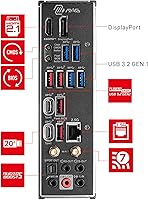
The rear I/O port selection is genuinely practical — a USB 20Gbps Type-C for high-speed peripherals and drives, multiple USB 10Gbps Type-A ports for fast external storage, and front panel headers for both Type-C and Type-A keep a modern workstation well equipped without add-in cards.
A few users building content production workstations noted they would have preferred two rear USB 20Gbps Type-C ports rather than one, particularly for daisy-chaining Thunderbolt-adjacent peripherals. The legacy USB 2.0 front panel header feels dated on a board at this tier.
Power Efficiency
61%
39%
Under light-to-medium workloads, the i9-14900K's Efficiency cores handle background tasks with reasonable power discipline, and some users noted lower-than-expected idle power consumption when the system is properly configured in Windows power management settings.
Under full load, peak power draw regularly exceeds 250W for the CPU alone, which forces buyers toward high-wattage power supplies and makes this a poor fit for anyone prioritizing an energy-efficient or low-electricity-cost build. Several users expressed surprise at their electricity bills after upgrading to this platform.

Suitable for:

The INLAND i9-14900K Z790 Tomahawk CPU Motherboard Combo is built for builders who are serious about performance and don't want to spend hours cross-referencing compatibility charts. Content creators — video editors, 3D artists, live streamers — will get the most out of the i9-14900K's 24-core architecture, since that kind of sustained multi-threaded work is exactly where this chip pulls ahead of mid-range alternatives. Gamers chasing high-refresh 1440p or 4K framerates will also find plenty of headroom, with the 6.0 GHz boost clock keeping single-threaded tasks snappy. Power users with extensive storage needs will appreciate the four M.2 slots and eight SATA ports, which means you can run multiple NVMe drives alongside a large SATA array without any compromise. If you value future-ready connectivity — Wi-Fi 7, USB 20Gbps, 2.5GbE wired — and don't want to pay a premium for a flagship board just to get it, this high-end pairing hits a practical value point that's hard to argue with.
Not suitable for:

Budget-conscious builders should look elsewhere — this Intel i9 bundle sits firmly in premium territory, and that's before factoring in the DDR5 RAM, CPU cooler, and PSU you'll still need to purchase separately, which can add meaningful cost to the total build. Casual users or anyone building a basic home or office PC will be paying for performance headroom they'll rarely touch. It's also worth noting that the i9-14900K runs hot under sustained load, so anyone planning to use a budget air cooler may run into thermal throttling issues — a high-quality 280mm or 360mm AIO is realistically required. Builders considering long-term platform longevity should also know that Intel has since launched Arrow Lake (15th Gen) on a new socket, meaning LGA 1700 is a dead-end platform with no upgrade path beyond 14th Gen. Anyone who prefers AMD's ecosystem or is already invested in AM5 will find no reason to look at this CPU-motherboard combo.

Specifications

  • CPU Model: The included processor is the Intel Core i9-14900K, Intel's 14th Generation flagship desktop chip built on the LGA 1700 socket.
  • Core Count: The i9-14900K features 24 cores in a hybrid configuration — 8 Performance cores and 16 Efficiency cores — delivering 32 total threads.
  • Boost Clock: Maximum single-core boost speed reaches 6.0 GHz, providing strong responsiveness in latency-sensitive workloads and gaming scenarios.
  • Integrated GPU: Intel UHD Graphics 770 is integrated into the i9-14900K, offering a functional display output fallback when no discrete GPU is installed.
  • Chipset: The MSI MAG Z790 Tomahawk MAX WiFi motherboard is built on Intel's Z790 chipset, supporting 12th, 13th, and 14th Generation Intel LGA 1700 processors.
  • Form Factor: The motherboard uses a standard ATX form factor, requiring a case that accommodates a full-size ATX board.
  • Memory Support: Four DDR5 UDIMM slots support a maximum capacity of 256GB and speeds up to 7800+ MHz with overclocking enabled.
  • M.2 Storage: Four M.2 slots are available, including one PCIe 5.0 Lightning Gen 5 slot for the fastest currently available NVMe drives.
  • SATA Ports: Eight SATA 6G ports are onboard, with support for RAID 0, 1, 5, and 10 configurations for both SATA and NVMe storage devices.
  • VRM Design: The board uses a 16+1+1 power phase design with 90A Smart Power Stage modules seated beneath a large VRM heatsink for sustained power delivery.
  • PCB Construction: The motherboard PCB uses 6-layer construction with 2oz thickened copper traces on IT-170 material for improved thermal and electrical stability.
  • Wired Networking: An Intel 2.5GbE controller provides wired LAN connectivity, supporting speeds up to 2.5 Gbps on compatible network infrastructure.
  • Wireless: Wi-Fi 7 is built in with support for Multi-Link Operation (MLO) and 4KQAM, alongside Bluetooth 5.4 for peripheral connectivity.
  • USB Ports: Rear USB ports include one USB 20Gbps Type-C, four USB 10Gbps Type-A, four USB 5Gbps Type-A, with additional front panel headers for Type-C and Type-A connections.
  • Audio: Onboard audio is handled by a Realtek ALC4080 codec delivering 7.1-channel output with up to 32-bit/384 kHz playback quality on the front panel.
  • Expansion Slots: The board provides two PCIe x16 slots and one PCIe x1 slot to accommodate graphics cards and additional expansion cards.
  • Power Connector: The board uses a standard 24-pin main ATX power connector, consistent with all modern full-size ATX power supplies.
  • Package Weight: The full combo package weighs approximately 5.85 pounds and ships in a box measuring roughly 14.1 x 12.6 x 6.8 inches.

Related Reviews
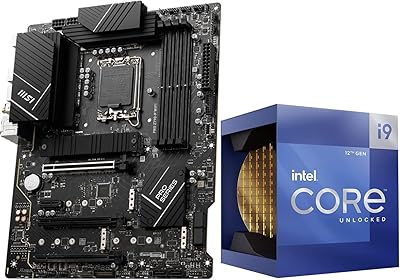
INLAND i7-12700K Z790-P CPU Motherboard Bundle
77%
88%
Value for Money
84%
CPU Performance
79%
Motherboard Build Quality
91%
Installation & Setup
62%
Memory Compatibility
More
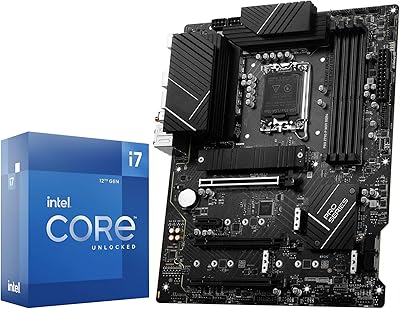
INLAND i9-12900K MSI Z790-P CPU Motherboard Bundle
79%
88%
Raw Performance
91%
Multi-Threaded Throughput
84%
Gaming Performance
87%
Value for Money
93%
Bundle Convenience
More
MSI MAG Z790 Tomahawk WiFi Motherboard
81%
88%
Build Quality
83%
VRM & Power Delivery
84%
BIOS Experience
86%
Thermal Management
81%
Connectivity & I/O
More
INLAND Intel Core i7-12700K + MSI PRO Z790-P WiFi DDR5 Motherboard
86%
91%
Gaming Performance
89%
Multitasking and Productivity
92%
Value for Money
85%
Ease of Installation
60%
Graphics Performance (Integrated)
More
INLAND AMD Ryzen 9 7900X CPU Processor with MSI X670E Gaming Plus Motherboard
87%
94%
Gaming Performance
89%
Overclocking Potential
82%
Thermal Management
91%
Ease of Installation
88%
Connectivity & Features
More
INLAND AMD Ryzen 7 7700X CPU & GIGABYTE B650 Gaming X AX V2 Motherboard
88%
94%
Gaming Performance
92%
Processor Speed
89%
Motherboard Stability
85%
Ease of Setup
90%
Overclocking Potential
More
Intel Core i9-14900K
74%
93%
Raw Processing Performance
88%
Multi-Threaded Workload Efficiency
51%
Thermal Management
54%
Power Consumption
91%
Gaming Performance
More
ASUS Prime Z790-P ATX Motherboard
79%
91%
BIOS & Software Usability
86%
Build Quality & PCB
89%
Storage Expansion
84%
Connectivity & USB
83%
Network Performance
More
ASRock Z790 PG Lightning ATX Motherboard
73%
84%
Value for Money
81%
Build Quality
77%
CPU Power Delivery
79%
Memory Compatibility
66%
BIOS Experience
More
GIGABYTE Z790 UD AC ATX Motherboard
76%
88%
Value for Money
79%
Build Quality
67%
DDR5 Memory Compatibility
82%
BIOS Experience
86%
Storage Performance
More

FAQ

No — the bundle includes only the i9-14900K processor and the MSI MAG Z790 Tomahawk MAX WiFi motherboard. DDR5 RAM, a CPU cooler, storage, power supply, and a case are all sold separately. The i9-14900K runs hot under load, so budget for a quality 280mm or 360mm AIO cooler at minimum.

The Z790 Tomahawk MAX WiFi supports DDR5 UDIMM speeds from 4800 MHz (JEDEC) up to 7800+ MHz with overclocking. For most users, a quality DDR5-6000 or DDR5-6400 kit in a 2x16GB or 2x32GB configuration is a practical starting point that balances performance and stability without requiring aggressive tuning.

Since this is a pre-validated combo, the board should support the i9-14900K without requiring a BIOS update prior to first boot. That said, it is always a good practice to check for and apply the latest BIOS update after initial setup to benefit from any stability or performance improvements MSI has released.

No. Arrow Lake uses the new LGA 1851 socket and is not compatible with LGA 1700 motherboards. This Intel i9 bundle is tied to the LGA 1700 platform, which means the i9-14900K is effectively the ceiling for CPU upgrades on this board. If future CPU upgradability is a priority for you, it is worth factoring that into your decision.

The board's primary x16 slot runs at PCIe 4.0 for graphics, not PCIe 5.0. However, one of the M.2 slots does support PCIe 5.0 for NVMe storage. Current flagship GPUs from both AMD and NVIDIA perform identically on PCIe 4.0 x16 versus PCIe 5.0 x16, so this is not a practical limitation for gaming or creative workloads.

Given that the i9-14900K has a peak power draw that can exceed 250W under full load, and accounting for a discrete GPU, we would recommend a minimum 850W 80+ Gold PSU for a gaming build. If you are pairing this with a high-end GPU like an RTX 4090 or RX 7900 XTX, a 1000W or 1200W unit gives you cleaner headroom.

Yes, the Z790 Tomahawk MAX WiFi supports Intel XMP profiles, which allow compatible DDR5 kits to automatically run at their advertised speeds with a single BIOS toggle. Achieving the highest advertised speeds above 7000 MHz typically requires manual tuning and may depend on specific memory kit compatibility.

Wi-Fi 7 performs noticeably well on compatible routers, offering lower latency and higher throughput than Wi-Fi 6 in the same environment. That said, to get meaningful gains from Wi-Fi 7, you need a Wi-Fi 7 router on your network. If your current router is Wi-Fi 6 or older, you will still get solid performance — just not the peak speeds Wi-Fi 7 is capable of.

Yes, the Z790 Tomahawk MAX WiFi provides four M.2 slots and eight SATA 6G ports simultaneously, though some slot combinations may share bandwidth depending on configuration. Check MSI's official slot bandwidth documentation to confirm which combinations run at full speed concurrently for your specific storage setup.

It is a capable choice, but worth thinking through realistically. The i9-14900K is still a strong gaming chip, and most titles will never stress 24 cores — the 6.0 GHz boost clock is what matters most for games, and it delivers. If gaming is your only use case and you are less interested in content creation or heavy multi-threaded workloads, a mid-range CPU paired with a strong GPU might offer better value per frame. This high-end pairing makes the most sense for hybrid use cases where both gaming and productive workloads share the same machine.