Overview

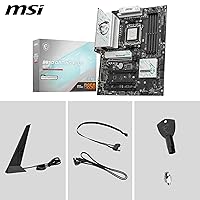
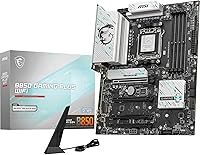
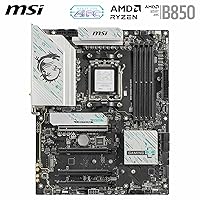
The MSI B850 Gaming Plus WiFi Motherboard sits in that comfortable middle ground of the AM5 lineup, built around the B850 chipset rather than the pricier X870E silicon. It's meant for people putting together a system around current Ryzen 9000, 8000, or 7000 chips, not someone chasing the absolute top end. MSI released it in January 2025 as part of the Gaming Plus series, which has always been about giving builders most of what they want without the flagship markup. If you're assembling a gaming rig and don't need every last overclocking knob or extra PCIe lane, this AM5 lineup entry covers the fundamentals well and leaves room in the budget for a better GPU or cooler instead.
Features & Benefits

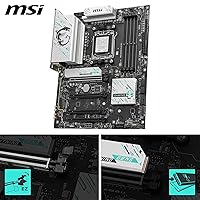
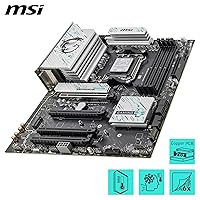
Under the hood, this MSI board uses a 12 Duet Rail Power System for VRM duty, which matters more than it sounds once you're running a power-hungry chip under sustained load. MSI backs that up with Frozr Guard cooling, extended heatsinks, and thermal pads that keep temperatures in check during long gaming or rendering sessions. Four DDR5 slots support speeds up to 8200+ MT/s, so there's real headroom if you enjoy tuning memory timings. The PCIe 5.0 x16 slot, wrapped in steel armor, is ready for next-generation graphics cards, while the triple M.2 setup, Gen5 plus two Gen4 drives, gives you fast primary storage and room to expand. Add Wi-Fi 7, Bluetooth 5.4, and 5Gbps LAN, and networking stops being an afterthought.

Best For

The B850 Gaming Plus makes the most sense for someone building a new AM5 rig who wants PCIe 5.0 headroom without paying X870E prices. It's a strong pick if you want fast Wi-Fi 7 networking built in rather than bolted on with a separate card later. Builders planning to drop in a Gen5 NVMe drive down the line will appreciate having that slot ready from day one, even if they start with a Gen4 drive for now. The VRM and cooling setup also make it a solid choice for anyone who wants their CPU holding boost clocks under sustained load instead of throttling. In short, it suits buyers who want flagship-adjacent features without flagship spending.

User Feedback

Early owners of this MSI board rate it around 4.3 out of 5, though it's worth noting the review count is still fairly small, so treat that number as a useful signal rather than gospel. Most feedback centers on how painless the AM5 build process was and how stable DDR5 overclocks have been straight out of the box. The cooling design and VRM heatsinks get singled out repeatedly as better than expected for this price tier. On the downside, a handful of buyers mention needing a BIOS update before the newest Ryzen chips boot properly, which is a minor hassle but worth knowing ahead of time. Several reviewers also call out the jump to Wi-Fi 7 and 5G LAN as a genuine upgrade over older MSI boards they'd owned.

Pros

  • Strong VRM design keeps sustained Ryzen workloads stable without overheating
  • DDR5 support up to 8200+ MT/s gives real overclocking headroom
  • PCIe 5.0 x16 slot future-proofs against next-generation graphics cards
  • Triple M.2 layout balances fast primary storage with flexible secondary slots
  • Built-in Wi-Fi 7 and 5Gbps LAN eliminate the need for add-on cards
  • Frozr Guard cooling earns consistent praise for keeping temperatures in check
  • Owners report genuinely easy AM5 builds straight out of the box
  • Solid feature set for the price compared to flagship X870E boards
  • The MSI B850 Gaming Plus WiFi Motherboard delivers flagship-adjacent connectivity at a mid-tier cost
Cons

  • Some newer Ryzen CPUs require a BIOS update before the system will boot
  • Only one of the three M.2 slots runs at full Gen5 speed
  • Sits below X870E boards in total PCIe lane count and expansion options
  • User review count is still fairly small for judging long-term reliability
  • Lacks the extensive RGB and premium styling some enthusiasts look for
  • No onboard Thunderbolt support for users wanting that connectivity option
  • Overkill for budget builds that don't need PCIe 5.0 or Wi-Fi 7
  • Secondary M.2 slots run at Gen4 speeds, not matching the primary slot

Ratings

These scores for the MSI B850 Gaming Plus WiFi Motherboard were generated by AI after analyzing verified user reviews from buyers around the world, with spam, bot activity, and incentivized feedback filtered out before scoring. Every category below reflects a balance of what owners genuinely praised and where they ran into friction, so you're seeing the full picture rather than a polished highlight reel.
VRM & Power Delivery
88%
Owners running demanding Ryzen chips under sustained load, like long gaming sessions or video exports, consistently report stable performance without throttling. The 12 Duet Rail design seems to handle heat better than expected for a board in this price bracket.
It's not built for extreme overclockers pushing voltage limits for benchmark records, so that crowd may still want a higher-tier board. A few users wished MSI published more detailed VRM temperature data for peace of mind.
Cooling System
85%
The extended heatsinks and thermal pads get specific praise from builders running small or poorly ventilated cases, who noticed lower chipset temps than older boards. It's a noticeable step up from MSI's previous generation in this segment.
Some reviewers in very hot climates or with minimal case airflow still recommend adding extra case fans for best results. The cooling is solid but not dramatically better than competing B850 boards at a similar price.
Memory Overclocking
84%
Buyers pairing this with fast DDR5 kits report hitting rated 8200+ MT/s speeds without much manual tuning, just enabling EXPO and going. That ease of use matters a lot for people who don't want to spend a weekend in BIOS menus.
A handful of users with less common memory kits had to manually adjust timings to get full stability. Results can vary depending on which specific RAM kit you pair with the board.
PCIe 5.0 & GPU Support
91%
Gamers upgrading their graphics card love that the steel-armored PCIe 5.0 slot is ready for next-gen GPUs without needing a new motherboard down the road. It feels like genuine future-proofing rather than a marketing checkbox.
Most current GPUs don't yet saturate PCIe 5.0 bandwidth, so the practical benefit today is limited for buyers running existing cards. It's an investment in tomorrow more than a today upgrade.
Storage & M.2 Layout
79%
21%
Having three M.2 slots, including a shielded Gen5 option, gives builders flexibility to mix a fast boot drive with cheaper secondary storage. Reviewers running multiple NVMe drives appreciate not needing add-in cards.
Only one slot reaches full Gen5 speeds, which surprises buyers who assumed all three would match. Slot placement also means some larger GPUs can partially block access to the lower M.2 bay.
Wireless Connectivity
89%
Wi-Fi 7 support gets called out repeatedly as a meaningful jump from older MSI boards, especially by buyers with newer routers who notice tangibly faster and more stable connections. Bluetooth 5.4 also pairs reliably with peripherals.
The benefit is largely wasted on anyone still using a Wi-Fi 5 or 6 router, since you need compatible hardware on both ends. A small number of users also reported needing a driver update for full stability at launch.
Wired Networking
82%
18%
The 5Gbps LAN port is appreciated by home users with NAS setups or fast internet plans who want wired speeds beyond standard gigabit. It just works for most people without extra configuration.
Most home internet plans in 2026 still don't reach 5Gbps, so many buyers won't fully use the available bandwidth. It's a nice-to-have rather than a daily difference-maker for typical use.
BIOS & Firmware Experience
68%
32%
Once updated, the BIOS interface is described as clean and reasonably easy to navigate, even for people building their first AM5 system. Memory and fan curve settings are laid out logically.
Buyers installing the newest Ryzen CPUs sometimes hit a no-boot situation until they update firmware, which is frustrating without access to an older compatible chip. This remains the most commonly repeated complaint in reviews.
Audio Quality
74%
26%
Audio Boost and the 7.1 HD setup satisfy casual listeners and gamers using standard headsets or basic desktop speakers without complaint. It's a clear improvement over baseline integrated audio on cheaper boards.
Audiophiles or musicians running high-end studio headphones say it doesn't compare to a dedicated DAC or sound card. It's functional rather than exceptional, which is fairly typical at this price point.
Build Quality & Design
83%
The board feels sturdy during installation, with reinforced slots that buyers say hold heavy graphics cards securely over time. The black color scheme fits cleanly into most standard case builds without clashing.
A few reviewers mention the aesthetic is fairly plain compared to flashier boards with more visible RGB or shroud styling. Those wanting a showpiece build may find it a bit understated.
Ease of Installation
86%
First-time builders specifically mention how straightforward the AM5 socket and standard ATX layout made their build, with clearly labeled headers and connectors. The manual covers the basics without unnecessary complexity.
The M.2 heatsink screws are described as fiddly by a few users, especially in tight case environments. It's a minor annoyance rather than a serious installation barrier.
Value for Money
90%
Buyers consistently frame this as flagship-adjacent functionality, PCIe 5.0, Wi-Fi 7, DDR5 overclocking, at a noticeably lower cost than X870E boards. For builders who don't need every advanced feature, it feels like a smart middle-ground purchase.
Buyers who only need basic functionality may still find a simpler B650 board better suited to their budget. The value proposition shrinks if you don't actually plan to use the higher-end features.
Overall User Satisfaction
86%
With a 4.3 out of 5 average, most owners describe the board as reliable and well-rounded for a mid-range AM5 build, particularly praising the build process and memory stability. It consistently meets expectations for its price tier.
The review base is still relatively small, so long-term durability and large-scale consensus aren't fully established yet. A minority of buyers cite the BIOS update requirement as their main point of frustration.

Suitable for:

The MSI B850 Gaming Plus WiFi Motherboard makes the most sense for someone building a brand-new AM5 gaming rig who wants modern features without stretching into flagship pricing. It's a great fit for gamers who plan to run current Ryzen 9000, 8000, or 7000 chips and want the PCIe 5.0 slot ready for whatever graphics card they upgrade to next. Builders who care about networking will appreciate having Wi-Fi 7 and 5Gbps LAN built in, rather than needing to add a separate card later. It also suits anyone who wants real overclocking headroom on DDR5 memory without paying for an X870E board's extra bells and whistles. If you want a Gen5 NVMe slot ready for future storage even while running a Gen4 drive today, this board covers that base too. Overall, it's a smart pick for value-conscious enthusiasts who still want solid VRM cooling under sustained loads.
Not suitable for:

That said, the MSI B850 Gaming Plus WiFi Motherboard isn't the right call for buyers chasing the absolute highest-end AM5 features, since the X870E tier offers more PCIe lanes and a more robust feature set overall. Builders who already own the newest Ryzen chips should be aware they may need to update the BIOS before the system boots correctly, which can be an annoying extra step if you don't have a spare older CPU on hand. Anyone who needs every M.2 slot running at full Gen5 speed will be disappointed, since only one of the three storage slots hits that tier. The relatively small number of user reviews also means the long-term reliability picture isn't fully established yet. Buyers who prioritize extensive RGB lighting or premium aesthetics over function may find the styling fairly plain. Finally, those on a tighter budget might be better served by a basic B650 board if they don't need PCIe 5.0 or Wi-Fi 7 at all.
Specifications

  • CPU Socket: The board uses an AM5 socket, supporting AMD Ryzen 9000, 8000, and 7000 series desktop processors.
  • Chipset: It is built on the AMD B850 chipset, positioned as a mid-range option in the current AM5 lineup.
  • Form Factor: This is a standard ATX board measuring 13.39 x 2.8 x 10.55 inches and weighing 3.87 pounds.
  • Memory Support: Four DDR5 DIMM slots are included, supporting speeds up to 8200+ MT/s with overclocking and a maximum capacity of 256GB.
  • VRM Power Design: Power delivery uses a 12 Duet Rail Power System with Core Boost architecture to support sustained high-load CPU performance.
  • Cooling System: Frozr Guard cooling includes 7W/mK MOSFET thermal pads, extended heatsinks, and a chipset heatsink to manage VRM and chipset temperatures.
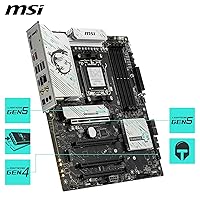
  • PCIe Slot: One PCIe 5.0 x16 slot with steel armor reinforcement provides up to 128GB/s of bandwidth for graphics cards.
  • M.2 Storage Slots: Storage options include one M.2 Gen5 x4 slot, one M.2 Gen4 x4 slot, and one M.2 Gen4 x2 slot.
  • M.2 Shielding: The primary M.2 Gen5 slot uses an EZ M.2 Shield Frozr II to help prevent thermal throttling under sustained transfer loads.
  • Wireless Networking: A full-speed Wi-Fi 7 module is built in, paired with Bluetooth 5.4 for wireless peripheral connectivity.
  • Wired Networking: Onboard 5Gbps LAN provides faster wired networking than standard gigabit Ethernet.
  • Rear USB Ports: Rear I/O includes a USB 10Gbps Type-C port for high-speed peripheral and data transfer connections.
  • Audio: The board includes 7.1 HD audio output enhanced by MSI Audio Boost circuitry.
  • Power Connector: Main system power is delivered through a standard 24-pin connector.
  • Operating System: The board is listed as compatible with Windows 11.
  • Color: The board has a black color scheme suited to most standard ATX case builds.
  • Release Date: This model first became available on January 6, 2025.
  • Model Number: The official item model number is B850GPW.

Related Reviews

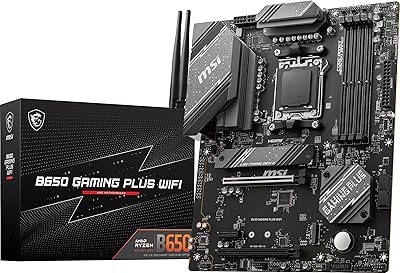
MSI B650 Gaming Plus WiFi
80%
83%
Value for Money
88%
BIOS & Software Experience
91%
Power Delivery & Stability
84%
Wireless Connectivity
79%
Memory Performance & Overclocking
More
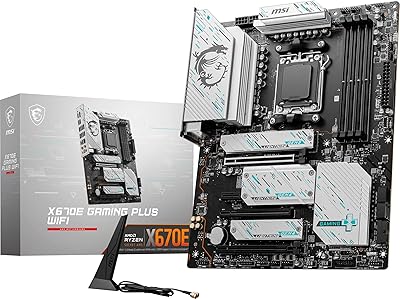
MSI X670E Gaming Plus WiFi AM5 Motherboard
80%
86%
Build Quality
89%
Power Delivery
91%
PCIe 5.0 & Storage Support
71%
DDR5 Memory Compatibility
78%
BIOS Experience
More
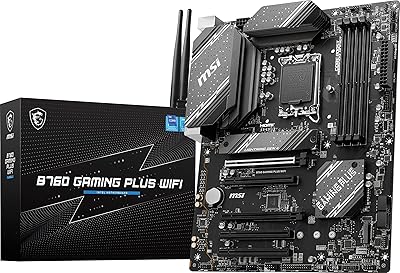
MSI B760 Gaming Plus WiFi Motherboard
87%
92%
Performance
88%
Stability during Gaming
90%
Connectivity (Wi-Fi 6E & LAN)
85%
Thermal Performance
87%
Build Quality
More
MSI MPG B550 Gaming Plus ATX Motherboard
77%
88%
Value for Money
81%
Build Quality
83%
BIOS & Software Experience
76%
CPU Compatibility
61%
Overclocking Headroom
More
ASUS TUF Gaming A620M-PLUS WiFi Motherboard
77%
91%
Value for Money
84%
Build Quality
88%
Ease of Installation
86%
BIOS Experience
89%
Networking Performance
More
ASUS ROG Strix B850-I Mini-ITX Motherboard
82%
91%
Build Quality
88%
BIOS Usability
93%
Power Delivery
74%
Thermal Management
89%
Connectivity & I/O
More
MSI MAG Z890 Tomahawk WiFi Gaming Motherboard
80%
88%
Value for Money
84%
Build Quality
86%
BIOS Experience
79%
DDR5 Compatibility
77%
Wireless Performance
More
ASUS ROG Strix B850-A ATX Motherboard
83%
93%
Power Delivery
88%
BIOS Experience
86%
Storage Throughput
91%
Wireless Connectivity
89%
Build & Aesthetics
More
MSI MPG X670E Carbon WiFi ATX Motherboard
78%
91%
Build Quality
88%
VRM & Thermal Performance
63%
BIOS Experience
67%
DDR5 Compatibility & Memory Tuning
86%
PCIe 5.0 & Storage Expandability
More
MSI B450 Gaming Plus Max Motherboard
76%
91%
Value for Money
88%
Ryzen Compatibility
84%
BIOS & Setup Experience
67%
Build Quality & VRM Design
86%
Storage Performance (M.2 & StoreMI)
More

FAQ

In most cases yes, but it depends on when the board was manufactured. Some early production units may need a BIOS update before they'll recognize the newest Ryzen chips, so it's worth checking MSI's support page for the latest firmware before you start your build. If you don't have an older AM5 chip on hand to do the update, look for boards listed as having updated BIOS pre-installed.

It depends on your priorities. If you don't care about PCIe 5.0 or Wi-Fi 7, a basic B650 board will save you some money. But if you want room to grow into a faster GPU or NVMe drive later without replacing the motherboard, this one gives you that flexibility without jumping to flagship pricing.

You get three M.2 slots total. One runs at Gen5 x4 speeds, while the other two run at Gen4 x4 and Gen4 x2 respectively, so only the primary slot hits the fastest tier. That's a fairly normal layout for this price range.

Wi-Fi 7 and Bluetooth 5.4 are both built in, so you don't need to buy or install a separate wireless card. Just make sure your router supports Wi-Fi 7 to get the full benefit of the faster speeds.

The VRM uses Frozr Guard cooling with extended heatsinks and thermal pads, which has gotten solid feedback from owners running sustained gaming or rendering sessions. It's not flagship-tier cooling, but it's well above what you'd expect at this price point and should comfortably handle most Ryzen chips under normal use.

Yes, the four DIMM slots are rated for speeds up to 8200+ MT/s with overclocking enabled, and most owners report stable results once XMP or EXPO profiles are applied. As with any overclocking, results can vary slightly depending on your specific memory kit and CPU.

It's a reasonable choice, honestly. The layout is fairly standard ATX, the manual covers the basics clearly, and several reviewers specifically mentioned how straightforward their AM5 build went. Just take your time with the M.2 heatsink screws since those can be fiddly on a first build.

The MSI B850 Gaming Plus WiFi Motherboard sits a tier below X870E boards in terms of total PCIe lanes and some advanced connectivity options, but it covers the essentials, DDR5, PCIe 5.0, Wi-Fi 7, at a noticeably lower cost. For most gaming builds, the practical difference is small unless you're running multiple GPUs or heavy expansion cards.
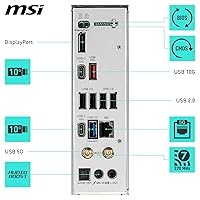
Yes, the rear I/O includes a USB 10Gbps Type-C port along with additional USB ports for everyday peripherals like keyboards, mice, and external drives. It should comfortably handle a standard gaming or productivity setup.

MSI typically backs its motherboards with a standard manufacturer warranty, though exact terms can vary by region, so it's worth checking your specific retailer listing. Early user feedback has been positive, with an average rating around 4.3 out of 5, though the number of reviews is still relatively small, so long-term reliability data is still developing.