Overview

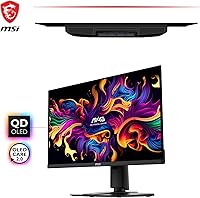
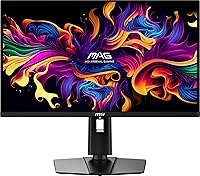
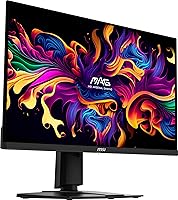
The MSI MAG 271QPX 27-inch QD-OLED Gaming Monitor sits firmly in the premium tier of gaming displays, built for players who want both speed and visual quality rather than having to choose between them. The pairing of QD-OLED technology with a 360Hz refresh rate is what separates it from the crowded IPS field — no traditional LCD panel comes close to matching that contrast at this frame rate. At 27 inches with a QHD resolution, it hits a practical sweet spot: sharp enough to look great, forgiving enough that you don't need a top-tier GPU to push it. One honest caveat — the glossy panel surface looks stunning in a controlled setup but picks up reflections in brighter rooms.
Features & Benefits

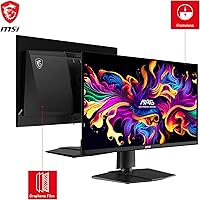
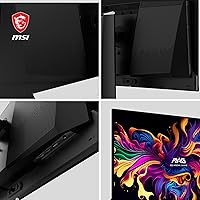
QD-OLED as a panel technology means near-perfect black levels and color that pops without the backlight bleed or halo artifacts you get from edge-lit LCD HDR monitors. The True Black HDR 400 certification actually means something here, unlike the watered-down HDR labels slapped on budget IPS screens. In fast games, the 0.03ms response time keeps motion crisp — enemy movement in a twitchy FPS stays readable rather than smearing. The 360Hz refresh rate sounds like a marketing number until you've played on it; panning the camera feels physically different. Connectivity covers HDMI, DisplayPort, and USB-C, and the narrow bezel keeps things clean whether you run a single display or a multi-monitor arrangement.

Best For

This QD-OLED monitor makes the most sense for competitive FPS and esports players who want every frame they can get without giving up the image quality that OLED delivers. It's also the right call for enthusiast gamers who are curious about OLED but aren't ready to commit to a larger ultrawide footprint. If you already have a capable GPU sitting underutilized by your current 1080p or 144Hz display, this 27-inch OLED panel is a natural next step. Those upgrading from a 144Hz or 165Hz IPS monitor will notice the difference immediately — not just in speed, but in how colors and shadows render during everyday gameplay.

User Feedback

Across hundreds of ratings, buyers land at a strong 4.4 out of 5, which reflects genuine enthusiasm tempered by a few recurring concerns. Color vibrancy and contrast draw the most praise, with many owners calling it a dramatic visual step up from their previous IPS panels. The glossy screen coating draws the most consistent criticism — users near windows or in well-lit offices report distracting reflections. Burn-in also comes up in reviews, particularly from users who run HUD-heavy games or leave static content on screen for extended periods; it's worth being aware of, though most report no issues with normal gaming use. The USB-C port quietly earns appreciation from laptop users as a convenient single-cable option.

Pros

  • Per-pixel OLED dimming delivers true blacks and HDR contrast that LCD panels cannot replicate at any price.
  • At 360Hz, motion in fast-paced games is noticeably sharper and more readable than on 144Hz or 165Hz panels.
  • Color depth and saturation out of the box make open-world environments and cinematic cutscenes genuinely striking.
  • The 27-inch QHD format hits a practical sweet spot — sharp enough to look great, manageable enough for standard desk setups.
  • HDMI, DisplayPort, and USB-C connectivity cover most use cases without needing adapters or docks.
  • Narrow bezels keep the desk setup clean and work well in side-by-side multi-monitor configurations.
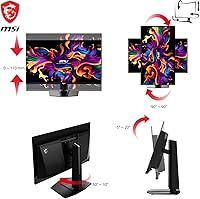
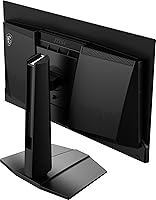
  • Height and tilt adjustability handle most ergonomic needs without requiring a third-party arm.
  • Buyers upgrading from IPS panels consistently report the visual difference as immediately and obviously apparent.
  • The USB-C input is a practical convenience for laptop users who want a single-cable desk connection.

Cons

  • The glossy panel surface picks up reflections easily and performs poorly in bright or sunlit rooms.
  • Long-term burn-in risk is real for users who run static UI elements or HUD-heavy games for many hours daily.
  • The stand lacks swivel rotation, limiting flexibility for shared desks or angled secondary viewing positions.
  • Only one USB 3.0 port is included, which feels limited for a monitor at this price point.
  • Peak brightness in HDR mode falls short of high-end mini-LED competitors in very bright viewing conditions.
  • The OSD companion software is Windows-only, leaving console and non-Windows PC users without software-side control.
  • Plastic construction throughout the stand and chassis does not match the premium feel of the panel itself.
  • Factory color calibration favors saturation over accuracy, requiring manual adjustment for neutral or balanced output.
  • Realizing the full 360Hz benefit demands a high-end GPU — mid-range hardware will hit a ceiling in demanding titles.

Ratings

The MSI MAG 271QPX 27-inch QD-OLED Gaming Monitor earns a strong overall standing based on AI-analyzed feedback from verified global buyers, with spam, bot activity, and incentivized reviews actively filtered out before scoring. This QD-OLED monitor draws consistent praise for its motion performance and image quality, but real buyer data also surfaces a handful of legitimate concerns that are honestly reflected in each category score below.
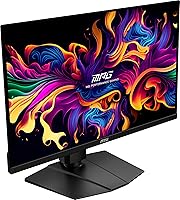
Image Quality
94%
Owners repeatedly describe the visual experience as a clear step above anything they had seen on IPS panels — blacks are genuinely black, colors carry real depth, and the wide viewing angle means the image holds up even when you shift slightly off-center. HDR content in particular looks noticeably more convincing than on edge-lit LCD screens.
The glossy coating, while enhancing perceived contrast and color saturation, can make the image appear washed out in rooms with strong overhead lighting or windows behind the desk. A matte option would address this for a broader range of setups.
Motion Clarity
96%
At 360Hz with a 0.03ms response time, fast movement in competitive shooters stays sharp in a way that lower-refresh IPS monitors simply cannot replicate. Players switching from 144Hz or 165Hz panels consistently report that tracking moving targets feels more precise and less visually demanding.
The performance gains at this refresh rate are most apparent in genuinely fast-paced scenarios; casual or slower-paced games benefit less, which means users who split time evenly between genres may not extract full value from this specific capability.
HDR Performance
88%
True Black HDR 400 lands differently on an OLED panel than on a typical LCD claiming HDR support. The per-pixel dimming means shadow detail in dark game environments reads clearly without crushing blacks, and bright highlights have punch without bleeding into surrounding areas.
Peak brightness under HDR, while competitive for an OLED panel, does not match the nit levels of some high-end mini-LED competitors in very bright scenes. Users watching HDR video in a sunlit room may find the image underwhelming compared to a high-brightness LCD alternative.
Refresh Rate & Smoothness
93%
The 360Hz panel delivers a physically distinct feel when panning in fast games — input lag is barely perceptible, and the motion cadence feels natural rather than artificially sharp. Several buyers mention that returning to a 144Hz screen after extended use feels noticeably sluggish.
Achieving the full benefit of 360Hz requires a GPU capable of pushing high frame rates at QHD, which rules out mid-range cards in demanding titles. Buyers running older or budget hardware may find the refresh rate advantage limited by their system rather than the panel itself.
Connectivity & Ports
81%
19%
The combination of HDMI, DisplayPort, and USB-C in one panel covers most connection scenarios without needing an adapter. Laptop users especially appreciate the USB-C input for a single-cable desk setup that handles both video and power delivery.
The USB hub is limited to a single USB 3.0 port, which feels lean for a monitor at this price point. Users with multiple peripherals will still need a separate hub, which slightly undermines the convenience factor of the connectivity suite.
Build Quality & Aesthetics
79%
21%
The narrow bezel gives the panel a clean, modern look, and the stand feels stable without being bulky. Tilt and height adjustments cover the range most users need for comfortable positioning over long sessions.
The stand does not support swivel or pivot rotation, which limits flexibility for users who occasionally need portrait mode or prefer finer lateral adjustments. The all-plastic construction, while sturdy, does not convey the premium feel some buyers expect at this price tier.
Burn-in Risk
62%
38%
For standard gaming use — varied content, normal session lengths, and occasional desktop use — most owners report no burn-in issues after months of regular use. MSI includes pixel-refreshing features that run during downtime to mitigate retention over time.
Users who leave static HUDs, taskbars, or overlays on screen for many hours daily carry a real long-term risk. This QD-OLED monitor is not the ideal choice for someone who also uses their display as a primary productivity screen with persistent UI elements sitting in fixed positions.
Ergonomics
74%
26%
Height adjustment range is generous enough to accommodate both seated and standing desk workflows, and the tilt range handles most comfortable viewing angles without much effort. Setup is straightforward and the stand ships largely pre-assembled.
The absence of swivel adjustment is a recurring complaint from users who share their workstation or periodically angle the screen toward a couch or second seating position. Adding VESA mount compatibility helps, but wall-mount setups require an additional purchase.
Glare & Reflections
58%
42%
In a controlled environment — dim room, no direct light sources behind the user — the glossy panel produces a stunning, almost cinema-like image quality that matte-coated panels struggle to match. The coating does not add the grain some matte screens introduce.
In typical home office or open-plan setups, reflections on the glossy surface are a persistent frustration. Multiple buyers specifically recommend this panel only for rooms where ambient light can be managed, noting that daytime use near windows degrades the experience significantly.
Value for Money
77%
23%
At its price point, the MSI MAG 271QPX occupies a competitive position among QD-OLED gaming monitors — buyers are getting genuine OLED image quality combined with one of the highest refresh rates available on a 27-inch panel, which is not a combination available at lower tiers.
The price still represents a meaningful investment, and some buyers feel the limited USB hub, plastic build, and glossy-only finish leave room for improvement at this cost. Competing QD-OLED options at similar prices offer features like swivel stands or higher peak brightness.
Gaming Experience (Overall)
92%
Playing fast-paced titles on the MSI MAG 271QPX feels like a hardware upgrade even when the PC specs stay the same. The combination of color depth, black levels, and motion performance creates an immersive environment that is hard to go back from once experienced.
The glossy screen and burn-in considerations mean the overall gaming experience is genuinely tied to how and where the panel is used. For gamers who play in less-controlled environments or run static overlay tools constantly, these factors quietly erode the otherwise excellent experience.
Color Accuracy
86%
Out of the box, the QD-OLED panel produces rich, saturated colors that look natural in most gaming content without requiring manual calibration. Wide color gamut coverage makes colorful open-world environments and cinematic cutscenes genuinely enjoyable to look at.
Out-of-the-box color tuning leans toward vivid rather than accurate, which is fine for gaming but unsuitable for color-critical work like photo editing or video grading. Users expecting a do-it-all creative display alongside gaming will likely need to invest time in custom calibration.
Setup & Ease of Use
83%
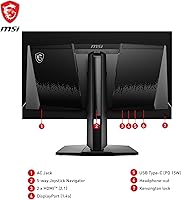
The on-screen display menu is navigated through a rear joystick that is easy to locate by feel, and the Gaming OSD software gives PC users a convenient way to adjust settings without diving into hardware menus. First-time setup from unboxing to display-ready takes most buyers under 20 minutes.
The OSD software requires a Windows install and is not available on other platforms, which limits software-side adjustments for console or non-Windows PC users. A few buyers also note that the default factory settings need tweaking before the panel performs at its best.
Multi-Use Versatility
63%
37%
For users who keep gaming as the clear primary function, this 27-inch OLED panel handles the role well — the QHD resolution is usable for light productivity tasks like browsing and document work alongside gaming sessions.
As a shared gaming and productivity monitor, the burn-in risk from static taskbars and the glossy coating in daylight conditions create friction. It is clearly engineered around gaming performance, and buyers hoping for equal capability in professional or creative workflows will find compromises quickly.

Suitable for:

The MSI MAG 271QPX 27-inch QD-OLED Gaming Monitor is built squarely for competitive and enthusiast gamers who want both speed and visual quality in one package — and are willing to pay for it. It makes the most sense for FPS and esports players who already know that motion clarity and low latency directly affect their performance, not just their enjoyment. If you own a capable mid-to-high-end GPU that has been held back by a 144Hz or 165Hz IPS panel, this is the kind of upgrade that makes an immediate, tangible difference from the first session. The 27-inch QHD format is also well-suited to standard desk distances — large enough to be immersive, compact enough that you won't need to rearrange your entire workspace. Laptop users running a hybrid setup will appreciate the USB-C input for a clean single-cable connection, and anyone building a multi-monitor rig will find the narrow bezel a practical fit.

Not suitable for:

The MSI MAG 271QPX 27-inch QD-OLED Gaming Monitor is a harder sell for anyone whose monitor doubles as a full-time productivity workstation display. The glossy panel surface creates persistent reflections in naturally lit rooms or near windows, which makes extended daytime use in a typical home office genuinely uncomfortable. Users who keep static desktop elements — taskbars, chat overlays, or application sidebars — on screen for many hours a day face a real long-term burn-in risk that cannot be completely ignored, regardless of the built-in pixel-refresh features. Color-critical work like photo editing or video grading is also a poor fit; the panel's out-of-box calibration leans toward vivid rather than accurate, and OLED panels are generally not the tool for that job. Buyers running mid-range GPUs may also find that their hardware limits how much of the 360Hz headroom they can actually use in demanding modern titles, making the investment harder to justify on a constrained system budget.
Specifications

  • Panel Type: The display uses a QD-OLED (Quantum Dot Organic Light-Emitting Diode) panel, combining OLED per-pixel lighting with a quantum dot color layer for enhanced saturation and brightness over standard OLED.
  • Screen Size: The viewable screen area measures 27 inches diagonally, with a super-narrow bezel that maximizes the usable display surface within a compact physical footprint.
  • Resolution: Native resolution is 2560x1440 (QHD), delivering a pixel density that balances sharpness at typical desk viewing distances without requiring an extreme GPU workload.
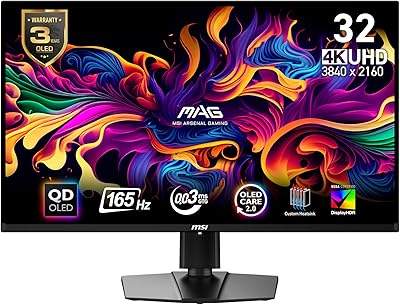
  • Refresh Rate: The panel supports a maximum refresh rate of 360Hz, enabling exceptionally fluid motion rendering in fast-paced gaming scenarios.
  • Response Time: Rated at 0.03ms (GtG), the panel's response time is fast enough to virtually eliminate ghosting and trailing artifacts during rapid on-screen movement.
  • HDR Support: Certified under True Black HDR 400, leveraging the OLED panel's native per-pixel dimming to deliver accurate dark scenes and high-contrast highlights without backlight blooming.
  • Aspect Ratio: The screen uses a standard 16:9 widescreen aspect ratio, compatible with the vast majority of gaming content, video, and desktop environments.
  • Screen Surface: The panel features a glossy (non-matte) coating, which enhances color vibrancy and contrast clarity but increases susceptibility to ambient light reflections.
  • Connectivity: Inputs include one HDMI port, one DisplayPort, and one USB Type-C port, alongside one USB 3.0 downstream port for peripheral connectivity.
  • Ergonomic Range: The stand supports tilt and height adjustment, allowing vertical positioning flexibility to suit different desk heights and seating arrangements.
  • VESA Compatibility: The monitor supports VESA wall-mount compatibility, enabling third-party arm or wall bracket installation for users who prefer not to use the included stand.
  • Dimensions: The monitor body measures approximately 24 x 2.72 x 14 inches (LxWxH) with the stand attached, making it suitable for most standard desktop setups.
  • Weight: Total unit weight with stand is 17.6 pounds, which is typical for a 27-inch gaming monitor with a height-adjustable stand assembly.
  • Color: The chassis and stand are finished in matte black, consistent with a neutral gaming aesthetic that suits most desktop environments.
  • OSD Software: MSI Gaming OSD 2.0 software is available for Windows PCs, providing on-screen display control through a desktop application rather than requiring hardware button navigation.
  • Power: The monitor uses an internal power supply with a standard AC power cable connection, eliminating the need for an external power brick.
  • Sync Technology: The MSI MAG 271QPX supports adaptive sync technology, compatible with both AMD FreeSync and NVIDIA G-Sync setups to reduce screen tearing during variable frame rate gaming.
  • Availability Date: The product was first made available for purchase on February 29, 2024, positioning it as a current-generation QD-OLED gaming display.

Related Reviews
MSI MAG 275F 27″ Gaming Monitor
78%
93%
Refresh Rate Performance
86%
Panel Color Quality
88%
Response Time & Ghosting
84%
Console Compatibility
52%
HDR Implementation
More
MSI MAG 321UP QD-OLED 32-inch Monitor
84%
94%
Gaming Performance
90%
Display Quality
88%
Color Accuracy
85%
Ergonomics and Adjustability
91%
Build Quality
More
MSI MAG 275QF 27-inch 2K Gaming Monitor
85%
94%
Performance (Refresh Rate & Response Time)
88%
Display Quality (Color Accuracy & HDR)
74%
Build Quality & Durability
85%
Ergonomics (Tilt Adjustability & Comfort)
90%
Connectivity Options
More
Samsung Odyssey G81SF 27-inch Gaming Monitor

80%
96%
Image Quality
97%
Contrast & Black Levels
89%
Refresh Rate & Motion Clarity
88%
Glare Resistance & Matte Coating
91%
HDR Performance
More
ASUS ROG Swift PG27UCDM 27-inch 4K QD-OLED Gaming Monitor
87%
95%
Display Quality
92%
Gaming Performance
94%
Color Accuracy
89%
Burn-in Protection
91%
HDR Performance
More
MSI G274QPF-QD 27″ Gaming Monitor
86%
92%
Performance for Gaming
89%
Color Accuracy
83%
Build Quality
91%
Response Time
80%
Design & Ergonomics
More
Alienware AW2725DF 27-inch OLED Gaming Monitor
89%
96%
Display Quality
94%
Gaming Performance
92%
Color Accuracy
90%
Build Quality
88%
Ease of Setup
More
GIGABYTE AORUS FO27Q3 27″ QD OLED Gaming Monitor
88%
96%
Display Quality
92%
Performance (Gaming)
88%
Build Quality
94%
Color Accuracy
98%
Response Time
More
Corsair XENEON 27QHD240 27-Inch OLED Gaming Monitor
85%
94%
Display Quality
96%
Gaming Performance (Refresh Rate & Response Time)
92%
Color Accuracy
85%
Build Quality
70%
Ease of Setup
More
Pixio PX277 OLED MAX 27-inch Gaming Monitor
87%
94%
Display Quality
91%
Gaming Performance
88%
Ease of Setup
95%
Color Accuracy
89%
Ergonomics & Adjustability
More

FAQ

It is worth taking seriously, but it is not a reason to avoid the panel outright. For normal gaming — varied content, regular session lengths — most owners report no retention issues after months of use. The risk increases meaningfully if you leave a static HUD, taskbar, or overlay in a fixed position for many hours daily. MSI includes pixel-refresh routines that run during idle periods to help manage this over time.

The USB-C port on this 27-inch OLED panel supports video input, which makes it genuinely useful for connecting a laptop with a single cable. Power delivery capability and its wattage output should be confirmed in the current official MSI spec sheet, as these details can vary by firmware revision.

It depends heavily on the game and settings. In lighter esports titles like CS2 or Valorant, a mid-to-upper mid-range GPU can push frame rates high enough to take advantage of the high refresh rate. In demanding AAA titles at QHD, even high-end cards may not consistently reach 360fps — but you will still benefit from whatever frame rate your GPU delivers, since the panel handles lower frame rates cleanly.

They are a genuine issue if your desk faces a window or sits under bright overhead lighting. The glossy coating significantly amplifies reflections compared to a matte-coated alternative. If you can control your room lighting or keep the screen away from direct light sources, it is manageable — but buyers in bright or uncontrolled lighting environments regularly cite this as their biggest frustration with the panel.

Yes, the HDMI port supports console connections. Keep in mind that current-generation consoles do not output at 1440p 360Hz — you will typically be running at 4K 60Hz or 1080p 120Hz depending on game support, so the panel's highest-performance features are GPU and PC-oriented rather than console-focused.

It performs well for casual video consumption — OLED contrast and color depth make HDR content from streaming services look noticeably better than on most LCD screens. The glossy panel helps in a dimly lit room. Just be mindful of leaving static letterboxing or static streaming UI elements on screen for very long periods, as these represent fixed-position content that could contribute to retention over time.

Setup is generally straightforward — the stand ships largely pre-assembled and attaches to the panel without tools in most cases. Most buyers report being up and running within 15 to 20 minutes of opening the box, including initial display configuration.

No, the included stand supports tilt and height adjustment only — there is no swivel or pivot rotation. If you need to angle the screen laterally or rotate it to portrait mode, you would need to use a VESA-compatible third-party monitor arm, which the panel does support.

Standard OLED panels use white OLED subpixels with color filters, which can limit peak brightness and color volume. QD-OLED replaces those color filters with a quantum dot layer that converts blue OLED light into red and green with much higher efficiency — the result is a wider color gamut, higher brightness, and more saturated colors than traditional OLED, while retaining the per-pixel contrast and black levels OLED is known for.

The MSI MAG 271QPX does not include built-in speakers, which is common for monitors in the gaming performance category. Audio output is handled through the connected device or a separate audio setup, which most dedicated gaming setups already use.

Where to Buy