Overview

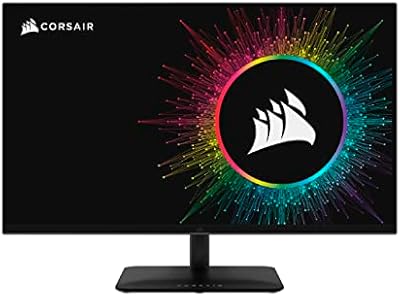
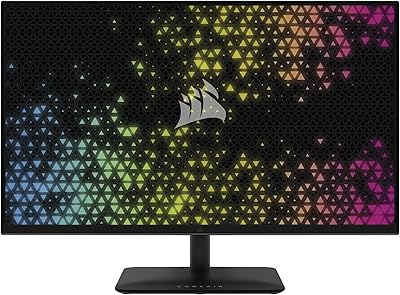
The Corsair XENEON 27QHD240 27-inch OLED Gaming Monitor is Corsair's serious entry into premium OLED territory, built around an LG Display panel and aimed squarely at enthusiast gamers and creative professionals. Before anything else, it's worth knowing that the v103 firmware update — available on Corsair's website — boosts full-screen brightness by roughly 33%, and it meaningfully changes what you get straight out of the box. The glossy panel finish is intentional; it makes colors pop and blacks look even deeper, but it does pick up reflections in brighter rooms. This competes directly with offerings from LG, Asus, and Alienware, and the price reflects that positioning clearly.
Features & Benefits

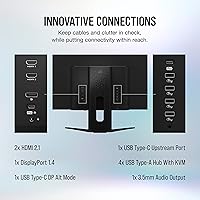
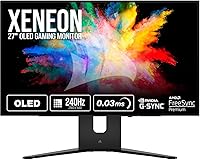
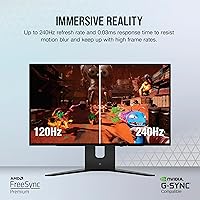
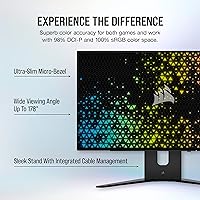
The 240Hz refresh rate and sub-millisecond response time aren't just talking points — in fast-paced shooters, the difference in motion clarity over a standard 144Hz IPS panel is immediate and obvious. Because every pixel generates its own light, true black levels are absolute; HDR content doesn't just look brighter, it looks fundamentally different from what most people are used to. The 98.5% DCI-P3 coverage is broad enough that color-critical work holds up alongside gaming without needing constant profile-switching. Connectivity is thorough: HDMI 2.1, DisplayPort 1.4, USB-C 3.1, and four USB 3.0 ports cover nearly every modern device. The micro-bezel design keeps things clean on a desk, especially in a dual-monitor configuration.

Best For

This 27-inch OLED display makes the most sense for competitive PC gamers who refuse to trade image quality for raw speed, and for PS5 or Xbox Series X owners wanting to use full HDMI 2.1 bandwidth on a genuinely high-refresh panel. Photographers and video editors who game heavily will also find the color accuracy holds up for both tasks without constant recalibration. If you're stepping up from a high-refresh IPS monitor, the contrast difference alone will feel significant. One honest caveat: if your desk sits in front of a window or under bright overhead lighting, the glossy screen will be a daily friction point that's worth thinking through carefully before committing.

User Feedback

People who own the Corsair XENEON consistently report that the visual jump from their previous IPS or VA panels was larger than expected — out-of-the-box color accuracy earns specific praise, and motion handling in fast games draws strong reactions. On the other side, glare from the glossy surface is a frequently mentioned complaint, not a niche one, so it's worth taking seriously depending on your setup. Burn-in comes up occasionally; most owners report no issues when using the built-in pixel-refresh tools, but it's a fair concern for anyone running static, HUD-heavy games for many hours daily. The 4.3-star average across hundreds of ratings reflects a monitor that largely delivers on its core promises.

Pros

  • True OLED blacks make HDR content look genuinely different, not just marginally brighter than a good IPS panel.
  • 240Hz refresh paired with near-instant response time gives competitive gamers one of the fastest OLED experiences available.
  • The 98.5% DCI-P3 color coverage holds up for real color-critical work, not just gaming.
  • HDMI 2.1 support makes this one of the cleaner options for next-gen console users who also want high refresh rates.
  • Dual sync certification means it works well whether your GPU is from Nvidia or AMD, with no caveats.
  • The v103 firmware update adds a meaningful brightness boost — easy to apply and noticeably improves the out-of-box experience.
  • Four USB 3.0 ports built into the monitor reduce desk cable clutter considerably.
  • The slim micro-bezel design looks polished and works especially well in multi-monitor setups.
  • Out-of-the-box color accuracy earns consistent praise from buyers, with minimal calibration needed for most use cases.

Cons

  • The glossy panel surface causes real, recurring reflections in any room that is not lighting-controlled.
  • Burn-in remains a legitimate long-term concern for anyone who logs heavy hours in static-HUD games daily.
  • The premium price point is difficult to justify unless your workload genuinely demands both high refresh rates and professional color accuracy.
  • Full-screen brightness at stock settings is underwhelming until the v103 firmware update is manually applied — it should not require a firmware fix to hit expected brightness levels.
  • At 27 inches with a 1440p resolution, pixel density is adequate but not remarkable for close-up creative work compared to 4K alternatives at similar prices.
  • The monitor's weight and dimensions make it less portable and harder to reposition on smaller desks than lighter alternatives.
  • Buyers coming from matte-panel monitors may find the adjustment to a glossy surface frustrating regardless of the image quality benefits.

Ratings

Our AI rating system analyzed verified buyer reviews for the Corsair XENEON 27QHD240 27-inch OLED Gaming Monitor from across major global markets, filtering out incentivized, bot-generated, and low-quality submissions to surface genuine ownership experiences. The scores below reflect both what this display genuinely excels at and the real frustrations that show up consistently in long-term ownership, with no glossing over the pain points.
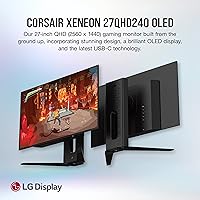
Image Quality
94%
Buyers who upgraded from IPS or VA panels describe the visual shift as immediately striking — not gradual. True blacks in dark game environments and HDR film content make scenes look three-dimensional in a way that backlit panels simply cannot replicate. The 98.5% DCI-P3 coverage means colors are rich without looking oversaturated.
The glossy panel amplifies reflections in anything but a controlled lighting setup, which directly undercuts the image quality experience for a meaningful portion of buyers. A few users also noted that very bright all-white scenes can look slightly uneven compared to darker content where OLED shines most.
Motion Performance
96%
This is one of the most consistently praised aspects across all reviewed feedback. In fast-paced shooters and racing games, the near-instantaneous pixel response makes motion look cleaner than anything most buyers had experienced before on a desktop monitor. At 240Hz, trailing and ghosting are essentially non-issues.
Hitting the full 240Hz consistently requires a very high-end GPU, which means many buyers will only experience the panel's peak motion performance in less demanding titles. There is no native 4K option for buyers who want sharper pixel density alongside this level of motion clarity.
Contrast & Black Levels
97%
Self-lit OLED pixels deliver absolute black — there is no backlight bleed, no clouding, and no IPS glow to manage. Gaming in dark environments like horror titles or space exploration games produces a depth of image that makes competing monitor technologies look noticeably inferior by comparison.
In very bright room environments, ambient reflections on the glossy surface can compromise the perceived contrast advantage in real-world use. Buyers who primarily watch or play content in bright, well-lit spaces may not extract the full benefit that makes this panel special.
HDR Experience
88%
HDR content on this display feels meaningfully different from HDR on a typical backlit monitor — specular highlights in games and films actually stand out instead of blending into a uniformly bright background. The 1,000-nit peak brightness, combined with true blacks, creates a contrast window that makes HDR look like it was intended to.
Out-of-the-box brightness before the v103 firmware update underwhelmed a number of buyers, with full-screen brightness falling short of expectations for a premium panel. The update resolves much of this, but requiring a firmware fix to reach expected brightness levels is a legitimate complaint.
Color Accuracy
91%
Most buyers doing photo editing or light video color grading report that the panel holds up without needing a colorimeter straight out of the box. Coverage across the DCI-P3 space is wide enough that creative professionals can trust the display for most production workflows.
For print-critical color work, a proper calibration tool is still recommended since factory accuracy, while strong, can vary slightly unit to unit. A small number of buyers noted minor color uniformity differences toward the corners of the panel under close examination.
Build Quality
82%
18%
The slim profile and micro-bezel design feel appropriately premium for the price tier, and the overall construction is solid with no significant reports of structural defects or loose hinges. The black finish stays clean-looking on most desk setups and pairs well with other peripherals.
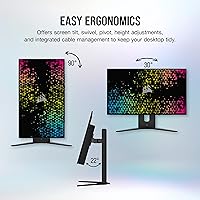
Some buyers felt the stand ergonomics were functional but not exceptional — particularly that lateral cable management could be cleaner at this price point. The monitor's weight makes repositioning on smaller desks mildly inconvenient compared to lighter alternatives in the same category.
Connectivity
89%
Having HDMI 2.1, DisplayPort 1.4, and USB-C 3.1 in the same monitor is genuinely useful for buyers who switch between a gaming PC and a console without juggling adapters. The four built-in USB 3.0 ports are a practical addition that reduces how many devices need to run directly to the PC.
USB-C power delivery capacity is not rated for high-wattage laptop charging, which limits its usefulness as a true single-cable docking solution for power-hungry notebooks. Buyers expecting full laptop charging functionality through USB-C may need an additional adapter or dedicated charger.
Refresh Rate & Sync
93%
Dual certification for both G-SYNC Compatible and FreeSync Premium means this display works cleanly with Nvidia and AMD cards alike, without tearing or stutter even when frame rates fluctuate. The variable refresh range covers the practical window where most gameplay actually sits.
G-SYNC Compatible — rather than full G-SYNC Ultimate — means HDR and VRR cannot always operate simultaneously depending on the GPU and driver configuration, which is a nuance some buyers discover only after purchase. At very low frame rates below the VRR floor, some users report minor visual artifacts.
Setup Experience
76%
24%
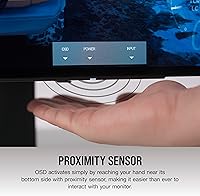
Physical setup is straightforward for a monitor of this size and weight, and the OSD controls are clear enough for most users to navigate without consulting a manual. The stand assembles tool-free and feels stable on a standard desk surface.
The requirement to download and apply the v103 firmware update as a first step adds friction to the unboxing experience that buyers at this price point should not have to deal with. A small number of users encountered OSD navigation that felt less intuitive than competing displays from LG and Asus.
Burn-in Risk
67%
33%
The built-in pixel-refresh and panel care tools work as intended under normal gaming and productivity use, and the overwhelming majority of owners report no visible burn-in after extended ownership. For buyers who vary their content regularly, long-term panel health has not been a significant real-world issue.
For buyers who spend many hours daily in a single HUD-heavy game — MMOs, strategy titles, or competitive shooters with persistent on-screen elements — the burn-in risk is not hypothetical and requires active management. This remains a structural limitation of OLED technology that no firmware update fully resolves.
Glare & Reflectivity
58%
42%
In a dedicated gaming room or home office with controlled, non-directional ambient lighting, the glossy surface amplifies the panel's contrast and color depth in a way that matte coatings cannot match. Buyers in these environments consistently report the finish feels like the right design decision.
In standard home setups with windows, overhead lights, or desk lamps, reflections on the glossy panel are a persistent and frequently mentioned complaint — not an edge case. Buyers accustomed to matte-coated monitors will find this adjustment genuinely difficult regardless of picture quality benefits.
Value for Money
72%
28%
For buyers who use the display across both competitive gaming and professional creative work, the cost per use case is reasonable compared to buying separate specialized monitors for each task. The HDMI 2.1 port also future-proofs the investment for console generations beyond the current one.
At this price tier, buyers who primarily game at standard refresh rates or who do not actively use HDR content will struggle to justify the premium over capable high-refresh IPS alternatives that cost significantly less. The pre-firmware brightness limitation and glossy-only finish reduce perceived value for buyers who discover these factors after purchase.
Desk Aesthetics
84%
The slim bezel and clean matte-black housing make this one of the more visually neutral monitors in the premium gaming segment — it does not look aggressively gamer-branded, which suits professional and mixed-use desks well. Dual-monitor configurations look particularly clean given the micro-bezel design.
There is only a single color option, which limits flexibility for buyers with lighter desk setups or white peripheral configurations. The stand, while functional, is less visually refined than the panel itself and can look slightly utilitarian in a design-conscious workspace.
Gaming Performance Overall
93%
Taken as a complete package — refresh rate, response time, contrast, color, and sync support — this is one of the most capable gaming monitors available at the QHD resolution tier. Competitive gamers and enthusiast players consistently describe it as a meaningful, visible upgrade over their previous display.
The performance ceiling is only fully unlocked with a high-end GPU, meaning mid-range PC builds will not see the full benefit of what this panel offers at its peak specifications. Console buyers are also limited by platform output constraints that prevent native full-spec use of the display.

Suitable for:

The Corsair XENEON 27QHD240 27-inch OLED Gaming Monitor is built for buyers who genuinely use a display hard and want it to perform across multiple demanding scenarios without compromise. Competitive PC gamers running high-end GPUs will get the full benefit of 240Hz refresh and near-instantaneous response, while PS5 and Xbox Series X owners can finally use a monitor that takes full advantage of HDMI 2.1 without artificially capping performance. Photographers, video editors, and colorists who also game heavily will appreciate that the wide color gamut holds up for professional work without needing a separate display. If you are upgrading from a high-refresh IPS or VA panel, the contrast difference in dark scenes and HDR content will feel like a meaningful step forward rather than a marginal one. This display also suits anyone building a clean, minimal desk setup, as the slim bezel and tidy design lend themselves well to dual-monitor configurations.
Not suitable for:

The Corsair XENEON 27QHD240 27-inch OLED Gaming Monitor is a harder sell for anyone whose workspace gets significant natural light or sits beneath strong overhead lighting, because the glossy panel surface picks up reflections in a way that a matte-coated display simply would not. Buyers on a tight budget should look elsewhere — the premium price is justified by the hardware inside, but only if your actual use pattern takes advantage of what OLED brings to the table; casual web browsing and office work do not extract meaningful value from this level of investment. Anyone who regularly runs static-HUD-heavy games for extended daily sessions should go in with clear eyes about OLED burn-in risk; the built-in pixel-refresh tools reduce the risk meaningfully, but they do not eliminate it entirely. If you primarily game on console at standard refresh rates and HDR is not a priority, there are sharper value propositions at lower price points. Those who prefer a matte screen for color accuracy in mixed lighting environments will likely find this panel a persistent frustration regardless of how good the underlying image quality is.
Specifications

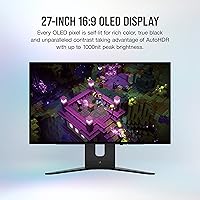
  • Panel Type: Uses an OLED panel manufactured by LG Display, providing self-lit pixels with absolute black levels and infinite contrast ratio.
  • Screen Size: 27-inch diagonal display with a micro-bezel design and an ultra-slim profile suited for multi-monitor setups.
  • Resolution: Native resolution of 2560x1440 (QHD) at a pixel density of 110 PPI, delivering a sharp 16:9 image across the full panel.
  • Refresh Rate: Supports up to 240Hz refresh rate, making it one of the highest-refresh OLED monitors available in its class.
  • Response Time: Rated at 0.03ms GtG response time, effectively eliminating motion blur during fast-paced gameplay and high-motion content.
  • HDR Support: Certified DisplayHDR 10 with peak brightness reaching up to 1,000 nits, producing HDR content that looks visibly distinct from standard dynamic range output.
  • Color Gamut: Covers 98.5% of the DCI-P3 color space, making it suitable for color-grading, photo editing, and professional creative work alongside gaming.
  • Screen Surface: Glossy panel finish that enhances color saturation and perceived contrast depth but reflects ambient light in brightly lit environments.
  • Sync Technology: Certified both NVIDIA G-SYNC Compatible and AMD FreeSync Premium, ensuring tear-free gameplay across a wide range of modern GPUs.
  • Video Inputs: Equipped with one HDMI 2.1 port and one DisplayPort 1.4 port, supporting high-bandwidth connections for both PC and next-gen console use.
  • USB-C: Includes one USB-C 3.1 port for single-cable connectivity with compatible laptops and devices that support DisplayPort Alt Mode.
  • USB Hub: Built-in USB hub provides four USB 3.0 Type-A ports for connecting peripherals directly through the monitor.
  • Dimensions: Measures 8.83 x 20.9 x 23.8 inches (with stand) and weighs 13.89 pounds, which is typical for a fully featured 27-inch gaming monitor.
  • Aspect Ratio: Standard 16:9 widescreen aspect ratio optimized for gaming, streaming, and general desktop productivity workflows.
  • Firmware Update: The v103 firmware update, available on Corsair's official download page, increases full-screen brightness by approximately 33% and is strongly recommended immediately after setup.
  • Release Date: First made available in May 2023, representing Corsair's initial entry into the premium OLED monitor segment.
  • Model Number: Corsair internal model reference is RDD0023, useful when referencing warranty claims or downloading drivers and firmware updates.
  • Color Finish: Available in black with a clean, minimal industrial aesthetic designed to complement both gaming and professional desk environments.

Related Reviews

Alienware AW2725DF 27-inch OLED Gaming Monitor
89%
96%
Display Quality
94%
Gaming Performance
92%
Color Accuracy
90%
Build Quality
88%
Ease of Setup
More
Corsair XENEON 315QHD165 32-Inch QHD Gaming Monitor
85%
91%
Gaming Performance
89%
Display Quality
87%
Color Accuracy
90%
Build Quality
88%
Design & Aesthetics
More
LG 27GX790A-B 27-inch OLED Gaming Monitor
80%
94%
Motion Clarity
92%
Image Quality
88%
HDR Performance
89%
Connectivity
86%
Ergonomics & Stand
More
Pixio PX277 OLED MAX 27-inch Gaming Monitor
87%
94%
Display Quality
91%
Gaming Performance
88%
Ease of Setup
95%
Color Accuracy
89%
Ergonomics & Adjustability
More
Corsair XENEON 32UHD144-A 32-Inch 4K Gaming Monitor
86%
94%
Gaming Performance
91%
Color Accuracy
89%
Visual Quality
87%
Build Quality
88%
Connectivity Options
More
Redragon GM27 OLED Gaming Monitor 27-inch QHD 240Hz
86%
94%
Display Quality
92%
Refresh Rate Performance
93%
Color Accuracy
88%
Eye Care Features
85%
Build Quality
More
Samsung Odyssey G81SF 27-inch Gaming Monitor
80%
96%
Image Quality
97%
Contrast & Black Levels
89%
Refresh Rate & Motion Clarity
88%
Glare Resistance & Matte Coating
91%
HDR Performance
More
MSI MAG 271QPX 27-inch QD-OLED Gaming Monitor
80%
94%
Image Quality
96%
Motion Clarity
88%
HDR Performance
93%
Refresh Rate & Smoothness
81%
Connectivity & Ports
More
ASUS ROG Swift PG27AQDM-R 27-inch OLED Gaming Monitor
88%
94%
Display Quality
92%
Color Accuracy
91%
Refresh Rate and Response Time
88%
Build Quality
89%
Ease of Setup
More
ASUS ROG Swift PG27UCDM 27-inch 4K QD-OLED Gaming Monitor
87%
95%
Display Quality
92%
Gaming Performance
94%
Color Accuracy
89%
Burn-in Protection
91%
HDR Performance
More

FAQ

Yes, and it makes a noticeable difference. The v103 firmware update pushes full-screen brightness up by around 33%, which brings the panel much closer to what most buyers expect from a premium OLED display. You download it as a zip file from Corsair's website and the installation instructions are included. It takes about 10 minutes and is worth doing before you form any opinions about the screen's brightness.

It is a legitimate question, and the honest answer is: it depends on your habits. OLED panels can develop burn-in over time if the same static elements — like a game HUD or taskbar — sit in exactly the same position for thousands of hours. The Corsair XENEON 27QHD240 27-inch OLED Gaming Monitor includes built-in pixel-refresh tools that help mitigate this, and most owners report no visible burn-in under normal use. If you tend to leave a game paused on-screen for hours or run the same HUD-heavy title for eight-plus hours a day, it is worth being more cautious about using screensavers and enabling the panel care features.
Yes, with an important note. The monitor has HDMI 2.1, which has the bandwidth to handle high refresh rates on console. However, the PS5 does not natively output 1440p; it will typically run at either 1080p or 4K and then scale down. You will still get a great image at 120Hz in 1080p, and many games look perfectly sharp upscaled on this panel, but do not expect native 1440p output from the PS5 specifically.

It is a real issue in certain environments. If your desk faces a window or sits under a bright overhead light, you will see reflections during dark scenes or when the screen is off. In a typical room with ambient lighting behind you rather than in front, it is manageable. If you have ever owned a glossy TV and found the reflections acceptable, this will feel similar. If you switched to a matte monitor specifically because glare bothered you, this panel may bring that frustration back.

It is genuinely one of the stronger use cases for this display. The 98.5% DCI-P3 coverage is wide enough for serious color work, and the color accuracy out of the box is consistently praised by buyers who use it for creative tasks. You may still want to use a colorimeter for print-critical work, but for most photo editing and video color grading workflows, this monitor covers the range you need without requiring a separate dedicated display.

You will want something in the range of an RTX 4080 or RX 7900 XTX to consistently push 240 frames per second in demanding modern titles at 1440p with settings turned up. In competitive shooters with lower graphical demands, a mid-range card like an RTX 4070 can hit those numbers more easily. The good news is that with G-SYNC and FreeSync both supported, you get smooth, tear-free gameplay even when your frame rate dips below 240Hz, so the experience stays strong even if you are not maxing out the refresh rate constantly.

The USB-C 3.1 port supports data and DisplayPort Alt Mode for video input, but power delivery capacity can vary. You should check Corsair's current spec sheet for confirmed wattage before assuming it will charge a power-hungry laptop. For lighter laptops and tablets, it will typically provide some charge, but it is not rated as a high-wattage charging dock.

Both monitors use LG Display OLED panels at the same resolution and share broadly similar panel characteristics in terms of contrast and color. The Corsair XENEON differentiates itself with its connectivity — particularly HDMI 2.1 — and its four-port USB hub, which the LG model does not match. Pricing and availability shift over time, so it is worth comparing current prices directly, but in terms of raw image quality, the two are closely matched at the panel level. Build quality, OSD usability, and software ecosystem are where real-world differences show up between the two.

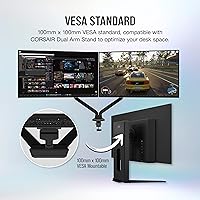
The stand offers height, tilt, and swivel adjustment, covering the typical range you would expect from a monitor in this price category. It does support VESA mounting if you prefer to use an arm, which is a good option if you want to maximize desk space or position the screen more precisely than the stock stand allows.

Corsair typically covers their monitors with a three-year limited warranty, but you should verify current warranty terms directly on Corsair's website as coverage details can change. General community feedback on Corsair's support for monitor issues is mixed — response times can vary, and for a display at this price point, it is worth registering your product on Corsair's site immediately after purchase to streamline any future claims.

Where to Buy