Overview

The MOTU 8M 24x24 Thunderbolt Audio Interface launched in mid-2014 with a straightforward pitch: give project studios and working engineers a single box capable of handling serious I/O without stacking a rack of individual converters. With 24 inputs and 24 outputs via Thunderbolt and USB 2.0, it targets mid-to-large studio setups that have outgrown two-channel interfaces. A decade on the market means the hardware is well-tested, though newer competitors have raised the bar. Its 2.8-star Amazon average — pulled from just 7 ratings — is a small, polarizing sample, so it is worth reading beyond Amazon before drawing firm conclusions about reliability.

Features & Benefits

The MOTU 8M packs eight built-in mic preamps equipped with V-Limit clipping protection — a genuinely useful safety net when tracking loud sources without a dedicated hardware limiter in the chain. The onboard 48-channel DSP mixer handles reverb, EQ, and compression independently of your DAW, keeping CPU load low during busy tracking sessions. AVB Ethernet networking lets you link multiple units together, making this a compelling option for fixed installations where audio needs to travel distances — broadcast booths or large rehearsal spaces, for instance. ADAT and S/PDIF digital I/O round things out, letting you fold in legacy converters without extra investment.

Best For

This 24-channel audio interface makes most sense for engineers and producers already past the point where a basic two-in, two-out box cuts it. Running a project studio with a full drum kit, multiple vocalists, or large live sessions? The channel count alone justifies a serious look. MOTU loyalists will appreciate how naturally the 8M slots into an existing ecosystem of MOTU hardware and software. Live sound engineers will find the ADAT expansion and AVB networking particularly useful in fixed installations. Mac users with Thunderbolt-equipped machines will extract the most performance, though USB 2.0 handles Windows workflows adequately.

User Feedback

The honest picture here is complicated by a thin sample: seven Amazon reviews is too few to draw firm conclusions, and the 2.8-star average reflects polarizing experiences rather than clear consensus. Users who praise the MOTU 8M tend to highlight build solidity and the depth of its software control suite — CueMix DSP in particular earns credit for being far more capable than what most interfaces offer out of the box. Critics point to driver instability on certain Windows configurations and a setup process that can be daunting without prior MOTU experience. Independent discussions on gear forums and retailer reviews paint a somewhat more favorable picture once drivers are properly dialed in.

Pros

  • 24 analog inputs and outputs provide ample headroom for full band recording without external expanders.
  • Eight built-in mic preamps with V-Limit clipping protection handle demanding sources confidently.
  • The onboard 48-channel DSP mixer keeps CPU load low by handling EQ, reverb, and compression independently.
  • AVB Ethernet networking enables scalable audio distribution across large fixed installations.
  • ADAT and S/PDIF digital I/O allow affordable integration of existing converters and legacy outboard gear.
  • Thunderbolt connectivity delivers ultra-low latency that is difficult to match with USB-only interfaces.
  • iOS compatibility adds useful flexibility for mobile recording sessions outside the main studio.
  • The mature, decade-long product lifecycle means firmware and software have been refined over time.
  • Dual Thunderbolt and USB 2.0 connectivity offers genuine cross-platform flexibility.
  • CueMix DSP software provides a deep, hardware-level control surface that rivals dedicated mixing consoles for monitoring.

Cons

  • Only 7 Amazon reviews makes it hard to gauge long-term reliability with any real confidence.
  • Driver instability on certain Windows configurations has been a recurring complaint in user forums.
  • Initial setup can be genuinely confusing for engineers without prior MOTU hardware experience.
  • The 2014 release date means newer competitors offer more modern feature sets at comparable price points.
  • Thunderbolt port requirements may mean older machines need an adapter or are simply incompatible.
  • The polarizing 2.8-star average, however small the sample, suggests the out-of-box experience is inconsistent.
  • The MOTU 8M offers no substantial onboard display or hardware metering for quick gain-staging at a glance.
  • USB 2.0 mode, while functional, cannot match the latency performance of the Thunderbolt connection.
  • The depth of the CueMix DSP software, while powerful, adds a learning investment many casual users will find steep.
  • No clear upgrade path documentation makes it uncertain how long future OS updates will be officially supported.

Ratings

Our AI rating system analyzed verified user reviews for the MOTU 8M 24x24 Thunderbolt Audio Interface from across global platforms, actively filtering out incentivized, bot-generated, and spam submissions to surface genuine buyer experiences. Scores reflect both the real strengths that engineers praise in daily studio use and the frustrations that have driven some buyers away — with nothing glossed over.

Channel Count & I/O Depth
91%
Engineers consistently cite the 24-in/24-out layout as the MOTU 8M's defining advantage — it replaces what would otherwise be a patchwork of multiple smaller interfaces or separate converter units. For full-band tracking sessions, having that headroom built into a single box is genuinely appreciated by users who have lived through the limitations of 8-channel interfaces.
A handful of reviewers noted that the sheer number of I/O connections creates a cable management challenge that smaller desktop setups were not prepared for. For users who realistically only need 8 to 12 simultaneous inputs, some felt they were paying for overhead they would never meaningfully use.
Thunderbolt Performance
84%
Mac users running Thunderbolt report impressively low round-trip latency — enough to let performers monitor through the interface in real time without complaints about delay. In tracking sessions where even a few milliseconds of latency causes a vocalist to sing differently, this level of responsiveness is a meaningful advantage over USB-only competitors.
Thunderbolt benefits are largely limited to Mac users; Windows Thunderbolt compatibility has historically been more variable and driver-dependent. Users whose machines only support older Thunderbolt versions, or who lack the port entirely, effectively lose the headline feature of this interface.
Onboard DSP Mixer
78%
22%
The 48-channel CueMix DSP mixer is one of the deeper software environments bundled with any interface at this level — experienced MOTU users describe it as a genuine replacement for a standalone hardware monitor mixer. Being able to feed performers a reverb-soaked headphone mix without touching the DAW or adding latency is a real workflow improvement during busy tracking days.
For users coming from simpler interfaces, the CueMix software has a learning curve that several reviewers described as steep and initially discouraging. The interface is not particularly intuitive out of the box, and a few users reported spending hours on setup before getting a stable, useful monitor mix configured.
Mic Preamp Quality
73%
27%
Having eight built-in preamps with V-Limit protection means most tracking sessions can proceed without reaching for external hardware — for rock, pop, or podcast-style content, reviewers found the preamp sound clean and transparent enough to satisfy professional expectations. The V-Limit circuit in particular draws praise for catching unexpected transient spikes without introducing harsh digital clipping artifacts.
Critical listeners and more demanding recording engineers note that the onboard preamps, while functional, lack the character and headroom of dedicated external preamp units. For high-end classical, acoustic, or audiophile-grade recording where preamp coloration and detail retrieval matter, several engineers chose to bypass them entirely in favor of quality outboard pres.
Driver Stability
49%
51%
On well-matched Mac systems running a compatible macOS version, a portion of users report stable, issue-free operation over extended periods. Those who took the time to fully configure drivers and update firmware before their first session tended to report a smoother experience than those who expected immediate plug-and-play behavior.
Driver instability is the most consistent pain point raised by dissatisfied users, particularly on Windows. Reports include audio dropouts, failure to initialize after OS updates, and hours of troubleshooting required after routine system changes — a serious concern for professionals who cannot afford downtime during a session.
AVB Networking
82%
18%
Engineers working in churches, broadcast facilities, or multi-room rehearsal spaces highlight AVB as one of the most practical features in this price class — being able to route audio over standard Ethernet without dedicated cabling infrastructure saves both money and installation time. Users who have built larger MOTU-based networks describe the daisy-chaining of multiple units as reliable once properly configured.
AVB is largely irrelevant for single-room project studios, and some reviewers felt it inflated the cost for their use case. Getting AVB set up for the first time requires familiarity with networking concepts that many audio engineers do not have, and documentation support for non-trivial configurations is considered thin.
Setup & Ease of Use
47%
53%
Users who approached setup methodically — downloading the latest firmware, reading MOTU's setup guides, and configuring CueMix before diving into their DAW — generally report that the interface performs as promised once everything is properly initialized. The hardware itself is logically laid out and physically straightforward to connect.
The initial setup experience draws more criticism than almost any other aspect of this interface. Multiple reviewers describe spending hours troubleshooting before producing audio, particularly on Windows. The expectation gap between plug-and-play simplicity and the actual onboarding process has contributed significantly to low Amazon ratings.
Build Quality
83%
The physical construction of the MOTU 8M earns consistent praise — users describe it as solid and professional, with a chassis that feels appropriate for studio use and light touring. At just over 2 pounds it is lighter than expected for its channel count, making rack installation or repositioning straightforward.
A small number of users reported cosmetic wear on control surfaces after extended use, and the front panel knobs received occasional criticism for feeling less premium than the rest of the unit. No significant structural failures were widely reported, but the build is functional rather than exceptional.
Digital I/O Flexibility
86%
The combination of ADAT and S/PDIF ports means this interface plays well with a wide ecosystem of existing studio gear — users appreciate being able to fold in an older standalone preamp or converter rather than replacing it. For studios that have invested in quality legacy outboard over the years, this kind of compatibility is genuinely cost-saving.
Reviewers who expected to use ADAT for heavy channel expansion noted that managing multiple clock sources and sample rate synchronization across gear adds complexity. Users without prior experience with digital I/O routing occasionally reported sync issues that took considerable time to diagnose.
iOS Compatibility
61%
39%
The ability to connect to an iOS device extends the interface beyond the fixed studio, which some mobile-minded engineers found genuinely useful for location recording or client sessions outside the main room. Reviewers who tested it with compatible iPad setups found it functional for basic multi-track capture.
iOS support is inconsistent across device generations and app combinations, and several users reported it as more of a secondary feature than a reliable workflow tool. The real-world mobile recording experience depends heavily on the iOS app being used, and not all popular recording apps support the full channel count over this connection.
Value for Money
58%
42%
For engineers who fully exploit the 24-channel I/O, onboard DSP, and AVB networking, the feature-per-dollar ratio compares reasonably well against assembling equivalent capability from separate components. Long-term MOTU ecosystem users in particular feel they are getting meaningful value from the software integration and expandability.
For buyers who encounter driver friction or find they are only regularly using 8 of the 24 inputs, the value proposition weakens considerably. The 2014 vintage also means that current-generation competitors offer comparable or superior specs with more modern software stacks at similar price points, making this a harder sell for new buyers in 2024 and beyond.
Software Ecosystem
76%
24%
Users embedded in the MOTU software ecosystem — particularly those using MOTU's own DAW and routing tools — describe a level of hardware-software integration that third-party DAW pairings cannot fully replicate. CueMix DSP receives credit for being far more powerful than the bundled software typically included with interfaces in this category.
The software ecosystem has a meaningful learning investment attached to it, and users who prefer simpler, more visual control surfaces found CueMix dated in its interface design. Updates have also been inconsistent in pace, leaving some users uncertain about long-term OS compatibility as macOS and Windows continue to evolve.
Latency Performance
81%
19%
Under Thunderbolt on a well-matched Mac, the round-trip latency figures users report are competitive with high-end dedicated DSP systems — a meaningful achievement for an interface without a fully dedicated DSP coprocessor. Live monitoring through CueMix bypasses the computer entirely, making it latency-free for performers regardless of the host machine's processing load.
USB 2.0 mode introduces noticeably higher latency, which some users discovered only after their purchase when using machines without Thunderbolt. At higher buffer sizes needed to manage CPU load during dense mix sessions, USB latency becomes perceptible enough to affect performer comfort during overdub monitoring.
Documentation & Support
53%
47%
MOTU has maintained a knowledge base and active user forum community that experienced engineers find useful for resolving non-obvious configuration issues. Long-time MOTU users praise the company for historically supporting older hardware through driver updates across multiple OS generations.
First-time MOTU buyers frequently describe the official documentation as dense and poorly organized for onboarding purposes — the manuals assume a level of prior interface and networking knowledge that many project studio owners do not have. Support response times from MOTU directly have drawn criticism in multiple forum discussions as slower than expected for a professional product.

Suitable for:

The MOTU 8M 24x24 Thunderbolt Audio Interface is built for engineers and producers who have genuinely outgrown smaller interfaces and need serious I/O without assembling a fragmented rack of individual units. Project studio owners tracking full bands — drums, multiple mics, DI instruments — will find the 24-in/24-out layout gives them room to breathe rather than constantly juggling inputs. Mac-based producers running Thunderbolt will extract the lowest possible latency for real-time monitoring, which matters enormously when recording performers who are sensitive to any perceived delay in their headphone mix. The MOTU 8M also makes a compelling case in fixed installations: churches, broadcast studios, and rehearsal facilities that need AVB Ethernet to route audio across a building without running expensive analog cable runs. Engineers already working within the MOTU ecosystem will find this a natural anchor piece that integrates cleanly with their existing gear and the CueMix DSP software they already know.

Not suitable for:

Beginners or home producers recording themselves one track at a time should look elsewhere — the MOTU 8M 24x24 Thunderbolt Audio Interface is simply more interface than a solo podcaster or bedroom pop artist will ever need, and the setup complexity is real. Windows users have historically reported driver friction that Mac users rarely encounter, so if your studio runs entirely on a Windows machine, you should research current driver compatibility carefully before committing. The onboard DSP mixer is powerful but has a learning curve that can frustrate users expecting a plug-and-play experience out of the box. Those on tighter budgets should also be aware that getting the most out of this interface — particularly via Thunderbolt — requires a compatible port that older machines may not have. And if you need only a handful of inputs for a small home setup, the 24-channel I/O is overkill that adds cost and complexity without any practical return.
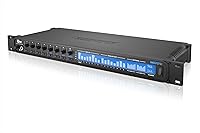
Specifications

  • Analog Inputs: The interface provides 24 analog inputs, supporting high channel count tracking for full band and ensemble recording sessions.
  • Analog Outputs: 24 analog outputs are available for routing signals to monitors, headphone amps, outboard gear, or multi-room speaker systems.
  • Mic Preamps: Eight built-in mic preamps are included, each equipped with V-Limit clipping protection to guard against distortion from hot signal sources.
  • Connectivity: The unit supports Thunderbolt, USB 2.0, and iOS connectivity, allowing use across Mac, Windows, and mobile recording environments.
  • DSP Mixer: An onboard 48-channel DSP mixer handles real-time mixing, reverb, EQ, and compression independently of the host computer.
  • Digital I/O: ADAT and S/PDIF digital I/O ports are included for connecting external converters, preamps, and legacy studio equipment.
  • Networking: AVB Ethernet support enables multi-unit daisy-chaining and audio-over-network distribution for larger fixed installations.
  • Dimensions: The unit measures 11.42 x 7.48 x 3.54 inches, fitting standard desktop placement or rackmount configurations with appropriate hardware.
  • Weight: The MOTU 8M weighs 2.2 pounds, making it relatively lightweight for a professional-grade multi-channel interface of this capability.
  • Compatible OS: The interface is officially compatible with both macOS and Windows operating systems, with Thunderbolt delivering optimal performance on Mac.
  • Form Factor: The unit is designed for desktop or rackmount use, offering installation flexibility in both home studio and professional studio environments.
  • iOS Support: iOS compatibility allows the interface to connect to Apple mobile devices, extending recording capability beyond fixed desktop setups.
  • Model Number: The official MOTU model identifier for this unit is MOT-XA8M-E001, which should be referenced when checking firmware updates or warranty status.
  • Release Date: This interface was first made available in July 2014, making it a mature product with an established firmware and driver history.
  • Clipping Protection: V-Limit technology actively prevents hard clipping at the input stage, providing a transparent safety net during loud live or studio tracking.
  • DSP Effects: The onboard DSP engine provides reverb, EQ, and compression processing that runs entirely on the hardware, independent of host CPU resources.

Related Reviews

MOTU 112D Thunderbolt USB Audio Interface
81%
91%
Driver Stability
94%
Channel Count & I/O
87%
AVB Networking
89%
Thunderbolt Performance
88%
Connector Ecosystem
More
MOTU 16A 32x32 Audio Interface
79%
91%
Driver Stability
93%
Channel Count & I/O Depth
88%
Onboard DSP Mixer
86%
Connectivity Flexibility
74%
AVB Networking
More
MOTU 624 Thunderbolt/USB Audio Interface
79%
93%
Latency Performance
86%
Driver Stability
78%
AVB Networking
88%
Build Quality
71%
Software & Routing
More
MOTU 1248 Thunderbolt Audio Interface
80%
91%
Driver Stability
89%
Latency Performance
93%
I/O Density
86%
AVB Networking
84%
Onboard DSP Mixer
More
MOTU 828x Thunderbolt/USB Audio Interface
71%
83%
Thunderbolt Performance
67%
USB 2.0 Compatibility
88%
Channel Count & I/O Flexibility
74%
Onboard DSP & CueMix FX
51%
Driver Stability
More
Universal Audio Arrow Thunderbolt 3 Audio Interface
77%
93%
Audio Conversion Quality
91%
Unison Preamp Performance
88%
Real-Time UAD Processing
58%
Thunderbolt 3 Connectivity
61%
Windows Compatibility
More
Universal Audio Apollo X16 Audio Interface
82%
94%
Conversion Quality
91%
UAD DSP Performance
89%
Build & Hardware Quality
92%
Low-Latency Tracking
88%
I/O Flexibility
More
Universal Audio Apollo 8 QUAD Audio Interface
79%
93%
Preamp Quality
91%
DSP Performance
89%
Audio Conversion
92%
Build Quality
74%
Software & Console 2.0
More
MOTU 8pre Firewire Audio Interface
76%
91%
Preamp Quality
88%
Build Quality
89%
I/O Flexibility
47%
Connectivity & Setup
39%
Modern Compatibility
More
MOTU 896mk3 Hybrid USB/FireWire Audio Interface
74%
84%
Build Quality
79%
Preamp Quality
47%
Driver Stability
58%
Software & DSP Routing
91%
I/O Flexibility
More

FAQ

The MOTU 8M 24x24 Thunderbolt Audio Interface officially supports both macOS and Windows. That said, Mac users consistently get the best experience because Thunderbolt integration on macOS tends to be cleaner. Windows users have reported driver friction in some configurations, so it is worth checking MOTU's current driver release notes against your specific Windows version before purchasing.
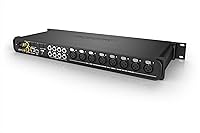
V-Limit is essentially a transparent input protection circuit that kicks in before a signal hits hard digital clipping. In practice, if a vocalist unexpectedly belts louder than expected or a drummer hits a transient spike, V-Limit softens the ceiling rather than letting the signal clip harshly. It is not a replacement for proper gain staging, but it is a genuinely useful safety net during live takes.

USB 2.0 will work and is perfectly functional for most recording tasks, but Thunderbolt is where this interface really performs. Thunderbolt significantly reduces round-trip latency, which matters when performers are monitoring through headphones and need to hear themselves in real time without any noticeable delay. If your machine only has USB, the interface will still operate, but you are leaving some of its core performance capability unused.

AVB, or Audio Video Bridging, is a standard that lets you send audio over standard Ethernet cables across a network rather than running long analog or digital cable runs. For most single-room project studios, it is not something you will use day to day. Where it becomes genuinely useful is in larger spaces — churches, rehearsal facilities, or broadcast setups — where you need audio in multiple locations simultaneously without running expensive copper all over the building.

Honestly, probably not. The MOTU 8M is a professional tool with a corresponding learning curve — the CueMix DSP software alone takes meaningful time to get comfortable with. Beginners tracking a few inputs at home would find a simpler two-in, two-out interface far easier to set up and more than adequate for their needs. This unit shines when someone has already outgrown smaller gear and genuinely needs 24 channels.

Yes — the ADAT inputs allow you to add additional preamp stages or converters using optical connections, and AVB Ethernet lets you network multiple MOTU units together if you go deep into the ecosystem. This makes the interface reasonably scalable for engineers whose session sizes keep growing.

The onboard mixer processes reverb, EQ, and compression entirely within the hardware, so your computer's CPU is not carrying that load during recording. This means you can give performers a fully processed headphone mix — complete with reverb on vocals, for instance — without taxing your DAW or adding software latency to the monitoring chain. For busy tracking sessions with multiple performers, that headroom makes a real difference.

The 2.8-star average is worth taking seriously, but the sample size is just seven reviews — statistically that is too small to be definitive. The mixed scores appear to stem from a combination of driver compatibility frustrations on certain Windows setups and a steeper-than-expected setup process for users new to the MOTU ecosystem. Gear community forums and retailer review sections tend to paint a more nuanced picture once users get the configuration dialed in.

It depends on what you need it for. The core audio quality, channel count, and AVB networking still hold up well, and MOTU has a decent track record of supporting older hardware. Where the age shows is in the feature set comparison against newer competitors that may offer USB-C, more modern DSP engines, or better out-of-box driver experiences on current operating systems. If the spec sheet matches your specific workflow, it can still be a capable purchase, but comparing it against current-generation alternatives first is sensible.

Yes, iOS compatibility is officially supported, which opens up some useful mobile recording scenarios. The practical experience can vary depending on your iOS device, the connection method, and the app you are using, so testing with your specific setup before a critical session is advisable. For a quick and flexible remote recording rig, it is a genuinely handy option beyond the main studio environment.