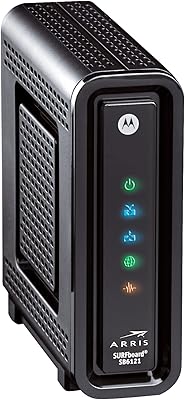
Motorola SURFboard SB6121 Cable Modem
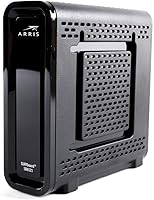
Overview
The Motorola SURFboard SB6121 Cable Modem has been a quiet workhorse since it launched in 2011, and it still makes a convincing case for anyone tired of paying their ISP a monthly rental fee. This standalone modem is wired-only — no Wi-Fi, no VoIP — so if you walk in expecting an all-in-one box, you will be disappointed. It works with Cox, Spectrum, Charter, Cablevision, and Optimum, but not Comcast Xfinity, Verizon FiOS, or AT&T U-verse. That compatibility list matters enormously, so check with your provider before buying.
Features & Benefits
The SB6121 runs on DOCSIS 3.0 with four bonded downstream and four upstream channels, which translates to consistent, stable throughput for everyday browsing, streaming, and video calls. It supports up to 172 Mbps down and 131 Mbps up, though your real-world speeds are entirely dependent on the plan you pay for — the modem won't exceed what your ISP delivers. A single Gigabit Ethernet port handles the connection to your router or computer. At 6.4″ x 8.7″ and just one pound, this standalone modem is compact enough to tuck behind a desk without a second thought.
Best For
This cable modem makes the most sense for households on Cox, Spectrum, or Charter with plans in the 100–150 Mbps range who already own a separate Wi-Fi router. Renters especially benefit — a single purchase can offset months of ISP rental charges. It also works well for minimalist home office setups where reliability matters more than cutting-edge specs, or for a vacation property where you want a simple, no-fuss internet connection. If you are on a gigabit plan or expecting future-proof performance, though, this is not the right fit — the channel count simply will not keep up.
User Feedback
Across nearly 12,000 ratings, the SB6121 holds a 4.4-star average — a strong signal for a product this age. Buyers consistently praise how quickly it provisions with compatible ISPs and how little attention it demands once installed. Multi-year ownership without a single dropout is a theme that shows up regularly. On the critical side, some users note frustration discovering after purchase that Comcast dropped support, which is a real sting. A handful of negative reviews trace back to ISP configuration issues rather than hardware failure. It is not a perfect modem, but the complaints are rarely about the device itself.
Pros
- Eliminates the monthly ISP modem rental fee, typically paying for itself within a few months.
- Provisioning on compatible ISPs like Cox and Spectrum is fast, often taking under 15 minutes.
- Consistent uptime is a recurring theme, with many owners reporting years of trouble-free use.
- The compact vertical design takes up minimal desk or shelf space.
- A dedicated wired-only setup reduces wireless interference for households with a separate router.
- Gigabit Ethernet port ensures the connection between modem and router is never the bottleneck on supported plans.
- At just one pound, it is easy to pack and reprovision at a new address.
- Nearly 12,000 verified ratings averaging 4.4 stars reflects broad, sustained buyer satisfaction.
- Negative reviews consistently trace back to ISP-side issues rather than hardware failures.
- Works reliably for standard 100 Mbps plans without any configuration or optimization required.
Cons
- No longer approved by Comcast Xfinity, cutting off one of the largest ISP customer bases entirely.
- Four downstream channels cannot support gigabit-tier plans, making it a short-term solution for upgrading households.
- Only one Ethernet port means a separate router is mandatory for any wireless or multi-device setup.
- No built-in diagnostic app or guided troubleshooting tool for less technical users.
- Runs noticeably warm in enclosed spaces or warm climates, with some users reporting heat-related slowdowns.
- Firmware updates have stalled, leaving the device with no meaningful support improvements over time.
- ISP compatibility confusion has caused a disproportionate number of avoidable bad-purchase experiences.
- No VOIP support rules it out for anyone wanting to bundle a home phone line through their internet connection.
Ratings
The Motorola SURFboard SB6121 Cable Modem scores here reflect an AI-driven analysis of thousands of verified global buyer reviews, with spam, incentivized, and bot-generated feedback actively filtered out. Ratings cover everything from day-one setup to years of continuous use, capturing both the strengths that keep this standalone modem relevant and the limitations that frustrate buyers with the wrong expectations. Every score — high or low — is grounded in patterns real users reported.
Ease of Installation
Connection Stability
Value for Money
ISP Compatibility
Speed Performance
Build Quality
Throughput Consistency
Setup Documentation
Form Factor & Size
Heat Management
Long-Term Reliability
Gigabit Readiness
Indicator Lights & Status Feedback
Wi-Fi Capability
Suitable for:
The Motorola SURFboard SB6121 Cable Modem is a practical, no-frills choice for anyone whose primary motivation is escaping the monthly modem rental charge on their cable bill. It fits best in households subscribed to Cox, Spectrum, Charter, Cablevision, or Optimum on plans that top out around 100 to 150 Mbps — the kind of everyday broadband tier that covers streaming, remote work video calls, and general multi-device browsing without pushing into gigabit territory. If you already own a standalone Wi-Fi router, this standalone modem slots in cleanly without any redundancy or wasted features. Renters who move between apartments and want a portable, reliable device that works across multiple compatible ISPs will find it particularly practical. It also makes strong sense for a vacation home or secondary property where simplicity and low maintenance matter far more than cutting-edge throughput.
Not suitable for:
The Motorola SURFboard SB6121 Cable Modem is the wrong choice for a growing number of households, and it is worth being direct about that. If your ISP is Comcast Xfinity, Verizon FiOS, or AT&T U-verse, this device simply will not work — full stop — and discovering that after purchase is a frustrating experience many buyers have already lived through. Anyone on a gigabit or multi-gig plan will find the four-channel downstream configuration a hard ceiling that no amount of optimization can overcome. Buyers who want an all-in-one solution with built-in Wi-Fi or VOIP support will need to look elsewhere entirely, since this hardware does neither. If your household internet needs are trending upward — more devices, faster plans, heavier upload demands for content creation or remote work — a newer modem with more channels will serve you better in the long run.
Specifications
- Cable Standard: The SB6121 operates on DOCSIS 3.0, the cable internet standard that enables channel bonding for faster and more consistent throughput than older DOCSIS 2.0 equipment.
- Downstream Channels: Four downstream bonded channels allow the modem to aggregate multiple cable frequencies simultaneously, supporting download speeds up to 172 Mbps.
- Upstream Channels: Four upstream bonded channels support upload speeds up to 131 Mbps, which is well above average for a four-channel DOCSIS 3.0 configuration.
- Ethernet Port: A single Gigabit Ethernet (10/100/1000 Mbps) port connects the modem directly to a router or computer via a standard RJ-45 cable.
- Wi-Fi: This modem has no built-in wireless radio; a separate Wi-Fi router is required for any wireless connectivity in the home.
- VoIP Support: The SB6121 does not include a telephone adapter or any VoIP capability, making it incompatible with cable-based home phone service.
- Dimensions: The unit measures 6.4″ in length, 2″ in width, and 8.7″ in height, designed for vertical orientation on a desk or shelf.
- Weight: At 1 lb, the modem is light enough to move between rooms or properties without any inconvenience.
- Compatible ISPs: Verified compatible cable providers include Cox, Spectrum, Charter, Cablevision, and Optimum, subject to each ISP's current approved device list.
- Incompatible ISPs: The SB6121 is not compatible with Verizon FiOS, AT&T U-verse, or Comcast Xfinity, which has officially removed it from its approved modem list.
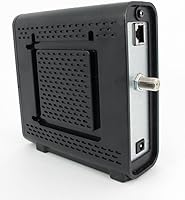
- Coax Connector: The modem connects to the cable wall outlet via a standard F-type coaxial connector, which is the industry-standard fitting for residential cable service.
- Manufacturer: The SB6121 was manufactured by ARRIS and marketed under the Motorola SURFboard brand, a longstanding consumer networking label.
- First Available: The product was first made available in June 2011, giving it over a decade of real-world deployment data across a wide range of cable networks.
- Discontinuation Status: As of the most recent product data, the SB6121 has not been officially discontinued by the manufacturer and remains available through retail channels.
- Power Input: The modem uses an external AC power adapter; no internal battery is included, and the unit requires a continuous power connection to operate.
- Indicator Lights: Front-panel LED indicators display the status of power, downstream channel lock, upstream channel lock, and online connectivity in real time.
- Max Download Speed: Under optimal cable signal conditions and on a supported ISP plan, the modem can sustain download throughput up to 172 Mbps.
- Max Upload Speed: Upload throughput reaches up to 131 Mbps under ideal conditions, though actual speeds are always capped by the subscribed ISP service tier.
Related Reviews

ARRIS SB6141 DOCSIS 3.0 Cable Modem
Motorola SBG901 Cable Modem Router

Motorola MB7621 DOCSIS 3.0 Cable Modem
Motorola B12
ARRIS SURFboard SBV3202 DOCSIS 3.0 Cable Modem
ARRIS SURFboard SB8200

Motorola MT7711 Cable Modem Router with Phone Ports
ARRIS SBG7600AC2 Cable Modem Router Combo

Motorola MB7420 16x4 Cable Modem