Overview

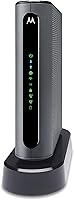
The Motorola MT7711 Cable Modem Router with Phone Ports is one of the few combo units on the market that handles both home internet and landline service in a single device — but only for Xfinity subscribers, and that distinction matters enormously. Ignoring it is the single biggest driver of buyer regret here. This Motorola combo unit replaces both your rented modem and your router, and over time those eliminated rental fees add up to meaningful savings on your Comcast bill. The standout feature is its two built-in telephone ports for Xfinity Voice, which is genuinely uncommon in consumer-grade combo hardware and is the primary reason to choose this over a more conventional option.
Features & Benefits

The MT7711 uses DOCSIS 3.0 with 24x8 channel bonding, which gives it enough headroom to handle the speeds most Xfinity residential plans deliver without any bottlenecking on the modem side. Its AC1900 dual-band Wi-Fi splits traffic across 2.4 GHz and 5 GHz, and AnyBeam beamforming on both bands directs the signal toward your connected devices rather than scattering it — a noticeable improvement in homes with several competing devices. Wireless Power Boost extends that coverage further, useful when walls or distance would otherwise thin things out. Four Gigabit Ethernet ports handle wired connections for consoles or desktop PCs, and guest network support keeps visitor traffic off your main network without any extra hardware.

Best For

This modem-router with phone support is designed for a specific Comcast customer: someone already subscribed to, or planning to add, Xfinity Voice landline service alongside their home internet. If a landline isn't part of your setup, other combo units offer similar internet performance without the added cost. For households that do want both services consolidated, the MT7711 eliminates extra equipment, reduces monthly fees, and simplifies the setup considerably. Homes with moderate to heavy usage — streaming on multiple TVs, a couple of laptops, maybe a gaming console — will find the dual-band configuration handles daily demand well without needing to step up to a more expensive tri-band system.

User Feedback

The most consistent praise from verified buyers focuses on reliable everyday performance — streaming, video calls, and general browsing all hold up well according to the majority of long-term users. Voice port activation is a mixed experience; some customers set it up without issues, while others report needing a call with Comcast support to get the line recognized properly. A portion of reviewers note the unit runs noticeably warm during extended use, and a few have encountered firmware hiccups after updates. Motorola support responses have varied widely, with some users finding help quickly and others feeling underserved. The most avoidable complaint, raised repeatedly, is discovering after purchase that this device works exclusively with Xfinity.

Pros

  • Eliminates the monthly Comcast modem rental fee, paying for itself within a year for most subscribers.
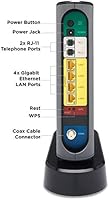
  • Two built-in phone ports support Xfinity Voice directly — no separate adapter or extra hardware needed.
  • DOCSIS 3.0 with 24x8 channel bonding keeps pace with most Xfinity residential speed tiers without bottlenecking.
  • AnyBeam beamforming on both bands directs signal toward your devices rather than broadcasting it in all directions.
  • Four Gigabit Ethernet ports handle wired connections for TVs, gaming consoles, and desktop PCs simultaneously.
  • Guest network support lets visitors get online without touching your primary network or connected devices.
  • Setup is straightforward for most Xfinity subscribers — coax in, Ethernet out, one call to Comcast to activate.
  • Consolidates modem, router, and phone adapter into a single device, reducing cable clutter and power draw.
  • Supports up to 253 connected devices, more than enough headroom for even a heavily loaded home network.

Cons

  • Strictly Xfinity-only — switching ISPs means this hardware becomes unusable with no workaround.
  • Voice port activation requires Comcast coordination and has caused multi-hour delays for a notable share of buyers.
  • The unit runs warm during extended use, which can be a concern in enclosed or poorly ventilated spaces.
  • Firmware updates have caused intermittent drop-outs and instability for some long-term users.
  • Router management interface feels outdated and lacks the advanced controls that network-savvy users expect.
  • Motorola customer support quality is inconsistent — response times and resolution rates vary significantly across verified reports.
  • Wi-Fi range has real limits in larger or multi-story homes, often requiring an additional extender.
  • No USB port means there is no option for basic network storage or printer sharing from this device.
  • Buyers who later drop their Xfinity Voice subscription are left paying for built-in phone capability they no longer use.

Ratings

The Motorola MT7711 Cable Modem Router with Phone Ports earns its reputation as a niche but capable device for a very specific type of Comcast household — and our AI-generated scores reflect that reality, drawn from thousands of verified buyer reviews worldwide with spam, bot, and incentivized feedback actively filtered out. What you see here is an honest synthesis of what real users experienced over months of daily use, including both the aspects that genuinely impressed them and the friction points that led some to return the device or leave frustrated reviews.
Ease of Setup
81%
19%
Most Xfinity subscribers report a straightforward activation process — plug in the coax and Ethernet, call Comcast to provision the modem, and you are online within 20 to 30 minutes. Users coming from a rented Comcast gateway consistently describe the transition as less painful than expected.
Voice port activation is where things can slow down. A noticeable share of buyers needed multiple calls with Comcast support to get the landline recognized, and a handful reported spending over an hour on hold before the phone service came online properly.
Wi-Fi Performance
76%
24%
For everyday household use — streaming on a couple of TVs, video calls, and general browsing across smartphones and laptops — the dual-band AC1900 radio holds up well. Beamforming makes a tangible difference in rooms that are one or two walls away from the unit.
In larger homes or floor plans with dead zones, coverage starts to show its limits. Users expecting the MT7711 to blanket a two-story house with strong signal on its own are often disappointed, and a mesh extender becomes necessary in those situations.
Modem Speed & Reliability
84%
The 24x8 DOCSIS 3.0 channel bonding keeps up with most Xfinity residential speed tiers without any noticeable throttling on the modem side. Long-term users report stable connections over months of continuous operation, which is the baseline expectation for any piece of gear like this.
A subset of reviewers have documented intermittent drop-outs following firmware updates, requiring a manual reboot to restore connectivity. It is not a universal complaint, but it appears consistently enough in long-term reviews to warrant attention.
Voice Port Functionality
69%
31%
For Xfinity Voice subscribers, having two phone ports built directly into the combo unit is genuinely convenient — no separate ATA adapter, no extra cables, no additional device sitting on a shelf. Users who got their lines activated smoothly report call quality on par with a dedicated device.
The activation process is dependent entirely on Comcast, and that introduces an unpredictable variable. Several verified buyers found that Xfinity support was unfamiliar with provisioning this specific model for voice, leading to delays and repeated troubleshooting calls that had nothing to do with the hardware itself.
ISP Compatibility
41%
59%
Within its intended ecosystem, the MT7711 works exactly as advertised. Xfinity subscribers get a fully certified device that Comcast officially supports, which removes the guesswork around compatibility that comes with some third-party modems.
This device is strictly Xfinity-only, and that is a hard wall. Buyers who misread the product listing and later switched ISPs or discovered they were on Cox or Spectrum were left with hardware they simply could not use. It is the single most common source of one-star reviews across verified feedback.
Build Quality & Design
72%
28%
The unit feels solid rather than cheap, and its vertical form factor keeps the footprint manageable on a shelf or entertainment center. Most buyers report no physical issues with ports or connectors even after a year or more of continuous use.
The device runs noticeably warm during extended operation, which concerns some users. While thermal throttling has not been widely reported, a portion of long-term reviewers mention the heat as something they keep an eye on, particularly in poorly ventilated spaces.
Value for Money
78%
22%
When you factor in the elimination of a monthly modem rental fee from Comcast, the MT7711 typically pays for itself within the first year. For households already paying for Xfinity Voice, consolidating two functions into one device adds meaningful practical value on top of that.
If you do not use or need Xfinity Voice, the price premium over a standard modem-router combo is hard to justify. Buyers who later dropped their landline service found themselves paying for hardware capability they no longer needed.
Router Feature Set
73%
27%
Guest network support and beamforming on both bands are genuinely useful features for a busy household. Being able to hand visitors a separate network password without giving them access to your primary devices is the kind of practical security that comes in handy regularly.
The router side of the MT7711 lacks the advanced controls that network-savvy users look for — QoS settings are basic, and the web interface feels dated compared to standalone routers in a similar price range. Power users will likely feel constrained.
Wired Connectivity
83%
Four Gigabit Ethernet ports give you enough wired connections for the devices that benefit most from a stable link — a gaming console, a desktop PC, a smart TV, and maybe a network switch if needed. Throughput on wired connections is consistently strong across user reports.
Four ports can fill up quickly in a media-heavy household, and there is no USB port for network storage or printer sharing. Users who want to expand beyond four wired devices will need to add a separate switch.
Long-Term Reliability
67%
33%
The majority of verified buyers who have owned the MT7711 for one to two years report it still performing without major issues. For most families, it runs in the background without demanding attention, which is exactly what you want from infrastructure hardware.
A recurring pattern in older reviews points to firmware updates occasionally introducing instability — random reboots or degraded Wi-Fi performance that clears up after a manual restart. It is not constant, but it is frequent enough to be a real nuisance for users who cannot afford downtime.
Customer Support Experience
53%
47%
When Motorola support does engage effectively, users describe the team as knowledgeable about the hardware side of troubleshooting. Phone and chat options are available, which at least gives buyers multiple ways to reach someone.
The experience is inconsistent enough to be a genuine risk. Verified reviewers describe long wait times, support staff who seem unfamiliar with the MT7711 specifically, and unresolved tickets. For a device where voice activation requires third-party coordination with Comcast, poor support compounds the frustration significantly.
Device Capacity & Network Handling
77%
23%
Supporting up to 253 simultaneous connections is more than any typical home will ever need, and in practice the MT7711 handles a crowded network — smartphones, tablets, smart home devices, laptops — without obvious degradation during peak usage hours.
In households with dozens of active devices streaming simultaneously, some users notice the router processor showing its limits. It is not a high-performance mesh system, and expecting it to handle enterprise-level traffic density will expose that ceiling.
Package Contents & Documentation
74%
26%
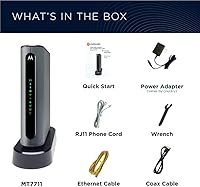
The included accessories are practical and complete — Ethernet cable, power adapter, telephone cord, and a quick start guide that most users found sufficient to get up and running without needing to search online for additional help.
The quick start guide does not adequately explain the voice port activation process or what to expect when calling Comcast for provisioning. New users unfamiliar with modem self-installation often wish the documentation went into more detail on that specific step.

Suitable for:

The Motorola MT7711 Cable Modem Router with Phone Ports was built for one specific household profile, and it serves that profile well: Xfinity subscribers who pay for both internet and Xfinity Voice landline service. If you are currently renting a Comcast gateway and also paying for a phone line, this device consolidates all of that into one piece of hardware, and the monthly rental savings alone make the purchase worthwhile within the first year. It also works well for moderately busy homes — families with several streaming devices, a gaming console or two, and a mix of wired and wireless connections will find the dual-band AC1900 radio and four Gigabit Ethernet ports cover their daily needs without requiring a more expensive setup. Buyers who want a cleaner home network — one box instead of a modem plus a separate router — and who are comfortable doing a basic self-install will get the most out of this unit.
Not suitable for:

The Motorola MT7711 Cable Modem Router with Phone Ports is simply not the right device if your internet service comes from anyone other than Comcast Xfinity — and that is a hard limit, not a minor caveat. Cox, Spectrum, Sparklight, and other cable providers are not supported, and the device cannot be reconfigured to work with them. If you do not need or use a home landline, the voice port hardware becomes a cost you are paying for without any return, and a standard modem-router combo at a lower price point would serve you better. Power users who want granular router controls, advanced QoS settings, or the flexibility to swap out their Wi-Fi hardware independently should look elsewhere, since the router side of this combo is functional but not feature-rich. Finally, anyone in a large home expecting whole-house coverage without additional extenders may be left wanting more than the MT7711 can realistically deliver on its own.

Specifications

  • Modem Standard: The device uses DOCSIS 3.0, the cable modem standard that supports the speed tiers offered by most Xfinity residential internet plans.
  • Channel Bonding: A 24x8 channel bonding configuration provides up to 24 downstream and 8 upstream channels for high-throughput performance.
  • Wi-Fi Standard: AC1900 dual-band Wi-Fi delivers combined theoretical speeds across both the 2.4 GHz and 5 GHz radio bands.
  • Frequency Bands: The unit broadcasts simultaneously on both 2.4 GHz for range-sensitive devices and 5 GHz for bandwidth-intensive connections.
  • Antennas: Three internal antennas form a 3x3 configuration supporting three send and three receive channels on the wireless radio.
  • Beamforming: AnyBeam beamforming is active on both frequency bands, focusing wireless signal toward connected client devices rather than broadcasting omnidirectionally.
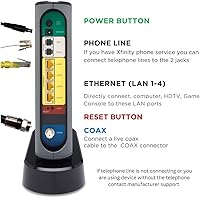
  • Ethernet Ports: Four Gigabit Ethernet ports are included on the rear panel for wired device connections at up to 1 Gbps per port.
  • Phone Ports: Two RJ-11 telephone ports support Xfinity Voice landline service, including caller ID, call forwarding, and conference calling features.
  • Device Capacity: The router supports up to 253 simultaneous connected devices across both wired Ethernet and wireless connections combined.
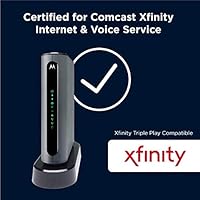
  • ISP Compatibility: This device is certified exclusively for use with Comcast Xfinity internet and voice services and is not compatible with any other cable ISP.
  • Dimensions: The unit measures 8.25 x 2.25 x 9 inches in its upright vertical orientation.
  • Weight: The device weighs 3.78 pounds, consistent with a mid-sized combo modem-router unit.
  • Guest Network: A dedicated guest network function allows visitors to access the internet without being granted access to the primary local network.
  • Wi-Fi Power Boost: Wireless Power Boost technology adds hardware amplifiers to the radio chain, extending signal range and improving throughput at greater distances from the unit.
  • In-Box Contents: The retail package includes the MT7711 unit, one Ethernet cable, one power adapter, one telephone cord, and a printed quick start guide.
  • Manufacturer: The device is manufactured by MTRLC LLC, which produces and supports the Motorola-branded networking product line.
  • First Available: The product was first listed for sale on August 28, 2018, and has not been discontinued by the manufacturer.

Related Reviews

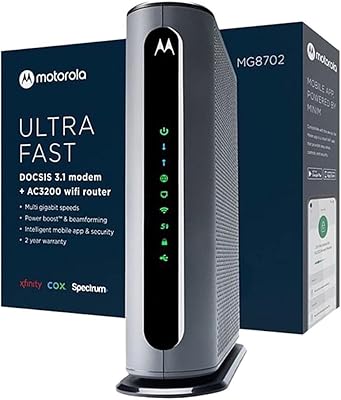
Motorola MG8702 DOCSIS 3.1 Cable Modem + Wi-Fi Router
83%
92%
Value for Money
89%
Wi-Fi Performance
88%
Ease of Setup
85%
ISP Compatibility
82%
Mobile App Experience
More
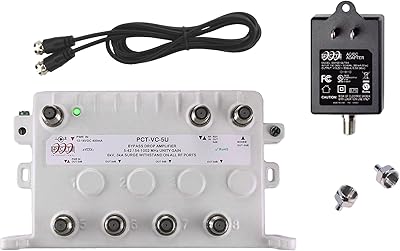
Reliable Cable RCP-PCT-5UN-KIT 5-Port Cable TV Amplifier
73%
78%
Signal Stability Improvement
41%
Compatibility Clarity
74%
Build Quality
81%
Installation Experience
77%
Active Return Path Performance
More
Motorola B12
Motorola B12
81%
93%
Connection Speed & Throughput
88%
ISP Compatibility
91%
Installation & Setup
86%
Latency & Gaming Performance
79%
Long-Term Reliability
More
Motorola MB7621 Cable Modem
85%
88%
Performance & Speed
94%
ISP Compatibility
91%
Setup & Installation
86%
Reliability & Stability
83%
Build Quality & Design
More
Motorola SURFboard SB6121 Cable Modem
71%
91%
Ease of Installation
88%
Connection Stability
93%
Value for Money
62%
ISP Compatibility
74%
Speed Performance
More
NETGEAR C6230 AC1200 Cable Modem Router
73%
83%
Connection Stability
61%
WiFi Range & Coverage
78%
Setup & Activation
86%
Value for Money
69%
WiFi Speed Performance
More
ARRIS G20 Cable Modem Router Combo
85%
89%
Performance
83%
Wi-Fi Coverage
91%
Ease of Setup
85%
Speed Consistency
93%
Compatibility with ISPs
More
ARRIS SB6141 DOCSIS 3.0 Cable Modem
78%
91%
Value for Money
88%
Connection Stability
93%
Ease of Setup
74%
Speed Performance
86%
ISP Compatibility
More
ARRIS SBG10 Cable Modem Router Combo
76%
91%
Value for Money
86%
Setup & Activation
83%
Connection Stability
61%
Wi-Fi Coverage & Range
88%
Modem Performance
More
ARRIS TG862G-CT Cable Modem Router
85%
91%
Value for Money
89%
Performance & Speed
93%
Ease of Setup
85%
Voice Service Quality
72%
Wi-Fi Range
More

FAQ

No, and this is the most important thing to confirm before buying. The Motorola MT7711 Cable Modem Router with Phone Ports is certified exclusively for Comcast Xfinity. It will not work with Cox, Spectrum, Sparklight, or any other cable internet provider. If you are on any ISP other than Xfinity, this device is simply not an option.

You can absolutely use it without ever plugging in a phone. The telephone ports sit unused if you do not subscribe to Xfinity Voice, and the internet side of the device functions completely independently. That said, if you have no landline and no plans to add one, you are paying for hardware capability you will never use, so a standard combo without phone ports may be a smarter buy.

The process is straightforward for most Xfinity customers. Connect the coax cable from your wall to the modem, plug in the power adapter, connect your computer or router via Ethernet, and then call Xfinity at their activation number or use their online activation portal. Have your account number handy. Internet activation usually takes 10 to 20 minutes, and voice activation, if applicable, may require a separate step with Comcast support.

Generally, no. Comcast officially supports this unit and it appears on their approved device list. Bring the MAC address and serial number from the label on the bottom of the device when you call to activate — that is what their system needs to provision it to your account. Some phone representatives are more familiar with the self-installation process than others, so a bit of patience can help.

For a typical single-story home or a smaller two-story layout, the coverage is solid for everyday use. The beamforming helps in rooms that are one or two walls away from the device. In larger homes, particularly those with thick walls or multiple floors, you may find the signal thins out in distant rooms, and adding a wireless extender becomes worth considering.

It has come up in enough long-term reviews to take seriously, though it is not universal. Some users have experienced intermittent connectivity drops after automatic firmware updates, usually resolved by a manual reboot. If you are someone who cannot afford unexpected downtime — say, you work from home — it is worth being aware of this pattern and knowing how to do a quick power cycle when needed.

Warm, but within normal operating range for hardware of this type. The unit does not have an external cooling fan, so heat dissipates passively through the casing. Users who place it in open, ventilated spots report no issues. Where problems have been raised is when the device is placed inside a closed cabinet or in a poorly ventilated corner — in those situations the warmth becomes more noticeable and potentially a longer-term concern.

It replaces both completely. The MT7711 is a true combo unit — the cable modem and the Wi-Fi router are integrated into a single device. You connect your coax line directly to it, and it handles both your internet connection and your home Wi-Fi without any additional hardware, unless you later decide to add a wireless extender for coverage in larger spaces.

Since the telephone ports on this unit rely on Xfinity Voice, which is delivered over your cable internet connection, a loss of internet service will also take down the phone line. This is standard for VoIP-based phone services and is not unique to this device — it applies to any cable-based voice service. If reliable phone access during outages is critical, a traditional copper landline or a mobile backup would be needed.

Yes. Motorola offers several modem-router combos without phone ports in the same product family, such as the MG7550 and MG7700, which are worth comparing if you only need internet and Wi-Fi. If you want a standalone modem without any built-in router, the MB7420 is the modem-only counterpart in the DOCSIS 3.0 lineup. The right choice depends entirely on whether Xfinity Voice is part of your Comcast subscription.

Where to Buy