Motorola B12




Overview
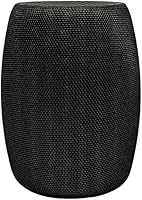
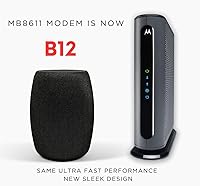
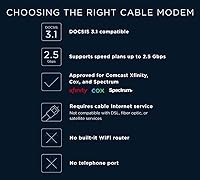
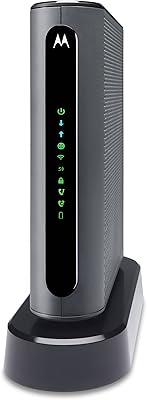
The Motorola B12 is a standalone DOCSIS 3.1 cable modem built for one clear purpose: getting you off your ISP's rental equipment for good. It works with all the major cable providers — Xfinity, Cox, Spectrum, RCN, and Astound — making it broadly compatible for most American households. As the successor to the well-regarded MB8611, this Motorola modem brings upgraded hardware to support today's fastest residential internet tiers. It sits upright in a compact tower footprint, easy to tuck onto any shelf. If you've been quietly paying a monthly rental fee without questioning it, this cable modem makes a strong case to stop.
Features & Benefits
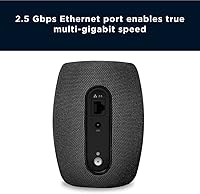
Where this Motorola modem earns its keep is in the hardware specifics. DOCSIS 3.1 isn't just a spec-sheet checkbox — it's what allows the modem to handle gigabit and multi-gig internet tiers that older DOCSIS 3.0 hardware struggles with. The 2.5 Gbps Ethernet port is a meaningful detail: if your ISP delivers close to 2,000 Mbps, a standard gigabit port becomes the bottleneck. That problem doesn't exist here. Channel bonding at 32x8 keeps throughput stable under real load, and Active Queue Management noticeably reduces latency during video calls and online gaming. A two-year warranty backed by US-based support adds practical peace of mind.
Best For
The B12 suits anyone on a gigabit or multi-gig cable plan who's tired of ISP-supplied hardware holding them back. Gamers and heavy streamers benefit most directly — consistent low latency makes a tangible difference in both experience and performance. It's also a logical upgrade for anyone still on a DOCSIS 3.0 modem looking to future-proof their setup. Pairing this cable modem with a Wi-Fi 6 or 6E router unlocks its full capacity across the home. Worth noting: this Motorola modem is approved for residential use only, and ISP compatibility lists do shift — always verify your provider's current approved device list before purchasing.
User Feedback
With nearly 30,000 ratings at a 4.3-star average, the reception for this cable modem is broadly positive and credible at scale. The most repeated praise is easy self-installation — most buyers report being up and running within minutes — alongside consistent connection stability in the weeks and months that follow. Speed gains over older rental gear come up frequently. On the critical side, some users experience friction during ISP activation, particularly with Xfinity's self-service process. Occasional reboots and minor firmware issues surface in a smaller share of reviews. Importantly, negative feedback tends to point at ISP-side complications rather than hardware defects, which gives a clearer picture of where the real risk lies.
Pros
- DOCSIS 3.1 support handles gigabit and multi-gig internet plans without breaking a sweat.
- The 2.5 Gbps Ethernet port prevents the modem from bottlenecking fast ISP connections.
- Active Queue Management noticeably reduces latency during gaming and video conferencing.
- Broad approval across five major cable ISPs covers the vast majority of US cable households.
- Most buyers are up and running within fifteen minutes of opening the box.
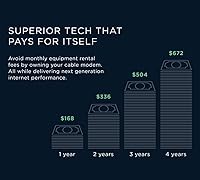
- Eliminating a monthly modem rental fee typically recoups the purchase cost within one to two years.
- 32x8 channel bonding keeps throughput more consistent during peak evening congestion.
- The B12 is compact enough to sit unobtrusively on any shelf or equipment rack.
- A two-year warranty with US-based support adds meaningful post-purchase protection.
- Long-term owners consistently report stable, low-maintenance operation after initial setup.
Cons
- ISP activation friction — especially on Spectrum — has caused multi-hour delays for some buyers.
- ISP-pushed firmware updates have triggered unexpected reboots and brief outages for a subset of users.
- Motorola provides little transparency about what each firmware update changes or fixes.
- Real-world speeds are entirely dependent on your ISP plan and line quality — the modem cannot compensate for weak signal.
- Upstream speeds remain practically limited by ISP infrastructure, far below the hardware ceiling.
- Documentation is thin and does not cover non-standard activation or troubleshooting scenarios well.
- Support quality is inconsistent — some users report fast resolutions, others describe scripted and unhelpful responses.
- Placement in enclosed cabinets can cause heat buildup that contributes to intermittent instability.
- Buyers with gigabit-only routers cannot utilize the 2.5 Gbps port without additional hardware investment.
- ISP compatibility approval is not permanent — buyers should verify current approval status before purchasing.
Ratings
The Motorola B12 has been put through its paces by our AI review engine, which analyzed thousands of verified global buyer experiences while actively filtering out incentivized, bot-generated, and spam submissions to ensure the scores reflect genuine ownership. What emerged is a clear picture of a high-performing cable modem with real strengths in speed and compatibility — and a few friction points that prospective buyers deserve to know about upfront. Both the wins and the frustrations are reflected honestly in the categories below.
Connection Speed & Throughput
ISP Compatibility
Installation & Setup
Latency & Gaming Performance
Long-Term Reliability
Value for Money
Build Quality & Design
Customer & Technical Support
Router Pairing & Compatibility
Firmware Stability
Channel Bonding & Network Stability
Heat Management
Documentation & User Guidance
Upstream Performance
Suitable for:
The Motorola B12 is a strong fit for households that are already paying — or about to upgrade to — a gigabit or multi-gig cable internet plan and want to stop handing money to their ISP every month for rented equipment. If you are on Xfinity, Cox, Spectrum, RCN, or Astound and your plan delivers 500 Mbps or more, this cable modem is built to handle that workload without becoming the weak link in your network. Gamers who have noticed lag spikes during peak hours will appreciate the AQM-driven latency management, which keeps the connection more responsive even when multiple people are using the network simultaneously. Remote workers running video calls alongside cloud backups and file syncs will find the throughput stability a meaningful improvement over typical ISP-supplied gear. It also makes particular sense for anyone currently running an older DOCSIS 3.0 modem — the performance headroom difference is real and noticeable, especially on faster plans. Pair this Motorola modem with a capable Wi-Fi 6 or Wi-Fi 6E router and you have an infrastructure setup that should hold up comfortably for the next several years without needing replacement.
Not suitable for:
If your internet plan tops out at 200 or 300 Mbps, the Motorola B12 is more modem than you need, and a less expensive DOCSIS 3.0 device will deliver nearly identical real-world performance at a lower upfront cost. Apartment renters or anyone who moves frequently and switches ISPs regularly should be especially cautious — ISP approval lists shift over time, and there is no guarantee this cable modem will remain approved for a provider you switch to in the future. It is also strictly a residential device, so business accounts or commercial installations are outside its intended scope and may not be supported. Buyers who are not comfortable with basic self-installation — connecting coax, calling ISP support to activate, or troubleshooting a failed provisioning attempt — may find the process stressful, particularly if their ISP's activation flow is less streamlined. Finally, if your home router only has a standard gigabit WAN port, you will not be able to take advantage of the 2.5 Gbps Ethernet connection, which removes one of the core advantages this Motorola modem holds over cheaper alternatives.
Specifications
- DOCSIS Standard: Built on DOCSIS 3.1, the current top-tier cable modem standard, enabling support for gigabit and multi-gigabit residential internet plans.
- Max Download Speed: Supports downstream throughput of up to approximately 2,500 Mbps, subject to the speed tier provided by your cable ISP.
- Max Upload Speed: Supports upstream throughput of up to 800 Mbps when the connected ISP plan and infrastructure can accommodate that capacity.
- Ethernet Port: Equipped with a single 2.5 Gbps Ethernet port for connecting directly to a router or computer without creating a wired bottleneck on fast plans.
- Channel Bonding: Uses 32x8 channel bonding to aggregate multiple cable channels simultaneously, improving throughput consistency especially during high-demand periods.
- Latency Management: Implements Active Queue Management (AQM) to reduce bufferbloat and maintain lower latency under congested network conditions.
- Compatible ISPs: Approved for use on Comcast Xfinity, Cox, Spectrum, RCN, and Astound cable networks as of the product release date — verify current approval status before purchasing.
- Use Classification: Designated for residential use only; commercial or business account installations are outside the scope of this device's intended and supported deployment.
- Connectivity Type: Connects to the cable wall outlet via a coaxial (coax) cable and delivers the internet connection to a router or computer through its Ethernet port.
- Compatible Devices: Designed to pair with any external Wi-Fi router or wired computer; does not include built-in Wi-Fi and requires a separate router for wireless coverage.
- Dimensions: Measures 3.5″ long by 3.5″ wide by 5.5″ tall, making it a compact vertical tower suitable for placement on a shelf or desk.
- Weight: Weighs 1.98 pounds, light enough to reposition easily and unobtrusive in most home or home-office network setups.
- Warranty: Covered by a two-year limited warranty from Motorola, which is above average for this product category.
- Technical Support: US-based customer and technical support is accessible via phone, live chat, and email for troubleshooting, activation assistance, and warranty claims.
- Predecessor Model: Serves as the direct successor to the Motorola MB8611, bringing updated hardware and the same DOCSIS 3.1 platform to a refined design.
- Model Number: Officially designated as model B12, distinct from the MB8611 it replaces, though both share the same DOCSIS 3.1 foundation.
Related Reviews
Motorola MG7700 Modem Router Combo
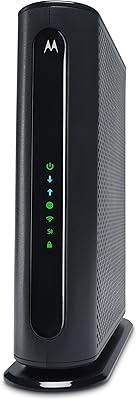
Motorola MG7540 Cable Modem Router Combo
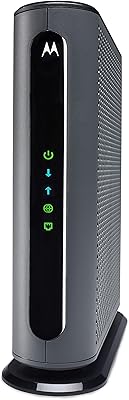
Motorola MB7621 DOCSIS 3.0 Cable Modem

Motorola Moto Buds 065
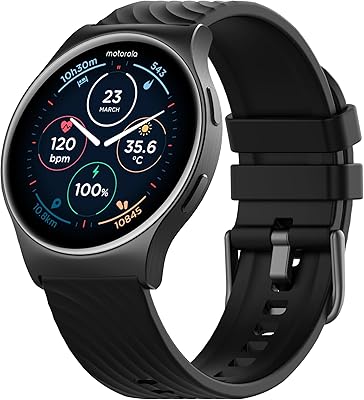
Motorola Moto Watch 120 Smartwatch
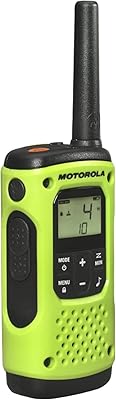
Motorola T600 Talkabout Radio

Motorola Moto 40 Smartwatch
Motorola MT7711 Cable Modem Router with Phone Ports