


Overview

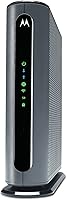
The Motorola MG7700 Modem Router Combo is a single device that replaces both your ISP-supplied modem and a standalone router — a practical choice for cable internet subscribers looking to cut monthly rental fees. Built around the DOCSIS 3.0 standard with 24x8 channel bonding, it pairs a capable modem with AC1900 dual-band Wi-Fi in one compact unit. It works with Comcast Xfinity, Cox, and Charter Spectrum, but if your home runs on fiber, DSL, or satellite, this unit simply won't work for you. Having launched in early 2018 and accumulated over 15,000 real-world reviews, this modem-router combo sits at a mid-to-premium price point compared to bare-bones alternatives.

Features & Benefits

At the core of the MG7700 is 24x8 channel bonding, which allows it to handle downstream speeds up to 800 Mbps on qualifying cable plans — enough headroom for most households streaming, gaming, and working from home simultaneously. The AC1900 dual-band radio covers both 2.4 GHz and 5 GHz, with Power Boost amplifiers pushing signals closer to the legal transmission limit. AnyBeam beamforming further sharpens this by focusing the signal toward connected devices rather than scattering it in all directions. Four Gigabit Ethernet ports handle wired connections for desktops, consoles, or smart TVs, and a built-in firewall provides basic network protection without needing a separate security appliance. Owning this unit instead of renting ISP gear can realistically pay for itself within a year or two.

Best For

This modem-router combo makes the most sense for cable internet subscribers on plans up to 800 Mbps who want one box instead of two. If you're currently paying a monthly equipment fee to Comcast Xfinity, Cox, or Charter Spectrum, the math is pretty straightforward — most people recover the cost within 12 to 18 months. It suits moderate-to-large homes reasonably well, though households with thick walls or multiple floors may still want a mesh extender to shore up coverage on the edges. Worth saying plainly: this Motorola unit is not a fit for fiber, DSL, or satellite connections, nor for anyone whose cable plan pushes past 800 Mbps. Those on gigabit tiers should look elsewhere.

User Feedback

With over 15,000 ratings averaging 4.1 stars, this modem-router combo has a broad track record to examine. Most positive feedback focuses on easy initial setup, reliable day-to-day performance, and a noticeable improvement over whatever modem the ISP shipped out. The complaints, though, are worth reading carefully. Wi-Fi range is the most common criticism — the 5 GHz band in particular tends to fade through walls faster than some users expect, and larger homes often need additional coverage support. A few long-term owners also note that firmware updates have slowed considerably since launch, which is worth weighing given the unit's age. One important clarification: a chunk of the lower-star reviews trace back to ISP activation hiccups rather than hardware failures, so not every one-star experience reflects the device itself.

Pros

  • Replaces both your modem and router with one compact device, cutting equipment clutter significantly.
  • Cable subscribers can realistically recover the purchase cost within 12 to 18 months by avoiding ISP rental fees.
  • Setup is straightforward — most users report being online within minutes of unboxing.
  • 24x8 DOCSIS 3.0 channel bonding handles plans up to 800 Mbps with consistent downstream performance.
  • Power Boost amplifiers push the Wi-Fi signal strength closer to the legal limit, improving range in typical layouts.
  • AnyBeam beamforming focuses the signal toward your devices rather than wasting it in empty directions.
  • Four Gigabit Ethernet ports give wired connections to desktops, consoles, or smart TVs without a separate switch.
  • A built-in firewall provides basic network security right out of the box, no extra hardware required.
  • Over 15,000 real-world reviews give buyers a reliable picture of long-term performance before purchasing.
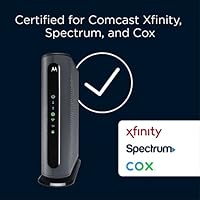
  • Approved by Comcast Xfinity, Cox, and Charter Spectrum, so ISP activation is supported and well-documented.

Cons

  • The 5 GHz band loses strength through walls faster than many users expect, creating dead zones in larger homes.
  • Firmware updates have slowed considerably since the 2018 launch, raising concerns about long-term software support.
  • No support for telephony means this unit cannot replace a modem for bundled voice service subscribers.
  • Incompatible with fiber, DSL, and satellite connections — a hard stop for a large portion of potential buyers.
  • Gigabit-tier cable subscribers will find the 800 Mbps ceiling a real limitation as faster plans become more common.
  • Multi-story homes often need a separate mesh extender to get reliable coverage throughout the house.
  • Some buyers experience ISP activation delays that can make initial setup frustrating, even when the hardware itself is fine.
  • The 2018 hardware design means it may not support Wi-Fi 6 or newer standards that modern devices are built for.

Ratings

The scores below reflect our AI-driven analysis of thousands of verified purchaser reviews for the Motorola MG7700 Modem Router Combo, with spam, incentivized feedback, and bot activity actively filtered out before scoring. Each category is weighted against real-world usage patterns reported by cable internet subscribers across the U.S., and both the strengths and the genuine frustrations are reflected without sugarcoating.

Modem Performance
88%
For cable plans up to 800 Mbps, the modem side of this unit consistently delivers. Users regularly report speed test results that match or closely approach their subscribed plan tier, and the 24x8 channel bonding keeps throughput stable even during peak household usage hours.
The DOCSIS 3.0 ceiling is a real constraint for anyone eyeing gigabit cable tiers. As more ISPs roll out multi-gig plans, this hardware will feel increasingly limited for subscribers who want room to upgrade their plan without swapping equipment.
Wi-Fi Coverage
71%
29%
In open-plan apartments and smaller single-story homes, the AC1900 dual-band radio with Power Boost amplification performs well enough that most users never feel the need for an extender. The 5 GHz band handles bandwidth-heavy tasks like 4K streaming and video calls without obvious dropouts in favorable layouts.
Multi-story homes and spaces with dense walls expose the unit's range limitations quickly, particularly on the 5 GHz band. A meaningful number of reviewers in larger homes report dead zones that required adding a mesh node or extender to solve — an added cost that erodes the all-in-one value proposition.
Setup & Activation
79%
21%
The physical setup process is genuinely plug-and-play for most buyers — coax cable in, power on, call the ISP. Users who have switched away from ISP-rented gear frequently describe the hardware side of the transition as faster and easier than they expected.
ISP activation is where friction tends to appear, and it can be difficult to separate the device from the process. Some users experienced hold times and provisioning delays that colored their overall impression of the unit, even when the hardware itself was working correctly.
Value for Money
86%
The financial case for owning rather than renting is hard to argue against for long-term cable subscribers. Most users recover the upfront cost within 12 to 18 months of avoiding monthly rental fees, and those who have owned the MG7700 for two or three years often describe it as one of the smarter purchases they have made for their home network.
At its mid-to-premium price point, buyers are paying for a 2018-era hardware platform, which gives some users pause. Compared to newer alternatives at similar price points, the value equation weakens slightly for anyone planning to scale to a faster internet plan in the near future.
Build Quality
82%
18%
The unit has a solid, upright form factor that holds up well on a shelf or in a media cabinet. Long-term owners regularly comment that the hardware shows no visible degradation after years of continuous operation, which is meaningful for a device that runs 24 hours a day.
The exterior finish — a two-tone black and grey plastic — is functional rather than premium, and it picks up dust noticeably. Nothing about the physical construction feels fragile, but it also does not match the fit and finish of more recent networking hardware at the same price.
Connection Stability
84%
Stability is one of the most consistent praise points across long-term reviews. Users transitioning from ISP-supplied gear frequently describe an immediate improvement in connection reliability, with far fewer random disconnects or speed dips during high-traffic periods in the evening.
A smaller subset of users — typically those on older or poorly maintained coaxial cable infrastructure — report intermittent drops that are difficult to diagnose as device-specific versus signal-source issues. Stability appears closely tied to the quality of the incoming cable signal, which is outside the device's control.
Dual-Band Wi-Fi Performance
74%
26%
Having both 2.4 GHz and 5 GHz available simultaneously is genuinely useful in a home with a mix of devices — older IoT gadgets, smart TVs, and laptops can spread across bands without manual management. AnyBeam beamforming helps the faster 5 GHz band stay focused on devices rather than dissipating in all directions.
The 5 GHz band's effective range is noticeably shorter than the 2.4 GHz band, which can force nearby-only use for bandwidth-heavy devices. Users in larger homes note that the two bands feel unbalanced — the 2.4 GHz reaches everywhere, while the 5 GHz often covers only the rooms adjacent to the unit.
Firmware & Software
58%
42%
The admin interface is functional and accessible to non-technical users, covering the basics of network management without overwhelming menus. Initial firmware is stable enough that most users never feel an urgent need to dig into the settings at all.
Firmware update cadence has slowed substantially since 2018, and this is one of the most common long-term complaints from owners. The lack of recent updates raises legitimate questions about whether the unit will continue receiving meaningful security patches as it ages further into its lifecycle.
Wired Connectivity
91%
Four Gigabit Ethernet ports handle wired devices without any bottleneck at speeds this modem supports. Users who wire in a desktop, gaming console, or network-attached storage report consistent and reliable throughput that takes full advantage of their subscribed cable plan.
Four ports is adequate for most households but can feel limiting in setups with multiple wired entertainment devices plus a desktop. There is no USB port for network-attached storage sharing, which some users at this price tier reasonably expect.
ISP Compatibility
83%
Certification with Comcast Xfinity, Cox, and Charter Spectrum covers the majority of U.S. cable internet subscribers, and activation support for these three providers is well-documented and broadly functional. Most users working with these ISPs get the device approved and running without complications.
Compatibility is strictly limited to these three cable providers, and the unit offers zero flexibility for anyone on a regional cable ISP not on that list. Buyers who move to a new home served by a different provider could find themselves with a suddenly incompatible device.
Network Security
77%
23%
The built-in SPI firewall handles basic stateful packet inspection without requiring any additional hardware or subscription, which is genuinely useful for buyers who want a baseline level of protection without managing a separate security appliance or paying for a third-party service.
Beyond the firewall, security features are fairly basic — there is no advanced parental control suite, no VPN server functionality, and no content filtering built in. Users with more sophisticated home network security needs will likely find the built-in tools insufficient on their own.
Heat & Noise
85%
The unit runs passively cooled and silently, which matters for buyers who place it in a living room or home office where audible fan noise would be disruptive. Most long-term owners report that the unit stays at a manageable temperature even during sustained heavy usage.
In warmer environments or poorly ventilated spaces, some users report the unit running noticeably warm to the touch after extended operation. While no widespread heat-related failure pattern emerges from the reviews, proper ventilation around the unit is worth factoring into placement decisions.
Physical Footprint
80%
20%
The slim upright design takes up less horizontal space than a modem and router sitting side by side, which is a practical win for buyers working with limited shelf or desk space. The cable management is straightforward, with ports logically grouped at the rear.
The vertical orientation, while compact horizontally, is taller than some users anticipate, and the unit can tip if the coaxial cable runs at an angle that stresses the base. A few users mention wishing for a more secure mounting or base design to keep it upright reliably.

Suitable for:

The Motorola MG7700 Modem Router Combo is a strong fit for cable internet subscribers on Comcast Xfinity, Cox, or Charter Spectrum who want to stop paying monthly equipment rental fees to their ISP. If your household runs on a plan anywhere up to 800 Mbps, this modem-router combo has enough throughput headroom to handle streaming, video calls, and gaming happening at the same time. It works particularly well for renters or homeowners who want a single, manageable device rather than a modem and router sitting side by side. The plug-and-play setup is genuinely straightforward, making it a solid pick for people who are not especially technical but still want capable hardware. Families in average-sized homes — think single-story or two-bedroom apartments — will likely find the dual-band Wi-Fi coverage adequate without needing to add extenders.

Not suitable for:

Fiber, DSL, and satellite internet users should stop reading here — the Motorola MG7700 Modem Router Combo is fundamentally incompatible with those service types and will not function as a replacement for their ISP equipment. Subscribers on gigabit-tier cable plans should also look elsewhere, since the MG7700 tops out at 800 Mbps on supported plans and cannot keep pace with faster tiers now rolling out across major providers. Because the hardware launched in 2018, buyers who anticipate upgrading to a faster cable plan in the near future may find themselves outgrowing this unit sooner than expected. Anyone living in a large multi-story home or a space with dense walls should know upfront that the 5 GHz band can fall short in those conditions, potentially requiring a separate mesh node or extender to fill dead zones. This unit also does not support phone lines, so it is not an option for anyone who needs telephony bundled into their network hardware.

Specifications

  • Modem Standard: This unit operates on DOCSIS 3.0, the widely supported cable modem standard compatible with major U.S. cable internet providers.
  • Channel Bonding: The modem supports 24x8 channel bonding, meaning 24 downstream and 8 upstream channels for aggregated bandwidth.
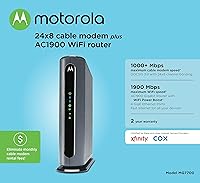
  • Max Modem Speed: The modem component is rated for downstream speeds up to 1000 Mbps under ideal conditions.
  • Supported Plan Speed: Real-world supported cable plan speeds top out at 800 Mbps, covering the vast majority of residential cable tiers currently available.
  • Wi-Fi Standard: Wireless networking runs on 802.11ac (AC1900), a dual-band standard delivering combined theoretical speeds of up to 1900 Mbps across both bands.
  • Frequency Bands: The unit broadcasts on both 2.4 GHz and 5 GHz simultaneously, allowing devices to connect on whichever band suits their distance and speed needs.
  • Signal Technology: Power Boost amplifiers and AnyBeam beamforming work together to push signals to the legal limit and focus them toward connected devices.
  • Ethernet Ports: Four Gigabit Ethernet ports (10/100/1000 Mbps) are included for wired device connections such as desktops, gaming consoles, and smart TVs.
  • Network Security: A built-in SPI firewall provides basic stateful packet inspection security without requiring a separate network security appliance.
  • Compatible ISPs: Certified for use with Comcast Xfinity, Cox, and Charter Spectrum; not compatible with fiber, DSL, or satellite internet services.
  • Telephony: This unit does not include a telephone port and does not support voice-over-cable or bundled phone services.
  • Dimensions: The device measures 8.6 x 2.6 x 9 inches, designed to stand vertically with a relatively slim footprint on a shelf or desk.
  • Color: Available in a two-tone Black and Grey finish suited to most home or office environments.
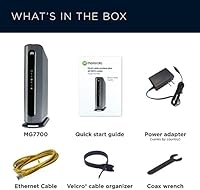
  • Included Items: The package includes the modem-router unit, a power supply adapter, and one Ethernet cable for initial setup.
  • Launch Date: This unit was first made available in March 2018 and has not been discontinued by the manufacturer as of the latest product listing.
  • User Rating: Across more than 15,300 verified customer ratings on Amazon, the device holds an average score of 4.1 out of 5 stars.
  • BSR Ranking: It ranks among the top 5 products in the Modem Router Combos category on Amazon, placing it at number 6,671 overall in Electronics.
  • Manufacturer: Designed and sold by Motorola, a brand with a long history in telecommunications and networking hardware for residential use.

Related Reviews
Motorola MT7711 Cable Modem Router with Phone Ports
71%
81%
Ease of Setup
76%
Wi-Fi Performance
84%
Modem Speed & Reliability
69%
Voice Port Functionality
41%
ISP Compatibility
More
ARRIS G20 Cable Modem Router Combo
85%
89%
Performance
83%
Wi-Fi Coverage
91%
Ease of Setup
85%
Speed Consistency
93%
Compatibility with ISPs
More
NETGEAR Nighthawk C7000 AC1900 Modem Router Combo
75%
91%
Ease of Setup
78%
Wi-Fi Speed & Performance
71%
Modem Speed & DOCSIS Performance
74%
Wi-Fi Coverage & Range
76%
Build Quality & Design
More
NETGEAR Nighthawk CAX30
79%
88%
Setup & Installation
83%
WiFi Speed & Performance
71%
WiFi Coverage & Range
91%
Modem Reliability & Uptime
78%
Value for Money
More
ARRIS SBG10 Cable Modem Router Combo
76%
91%
Value for Money
86%
Setup & Activation
83%
Connection Stability
61%
Wi-Fi Coverage & Range
88%
Modem Performance
More
NETGEAR C6300 Cable Modem Router Combo
69%
83%
Value for Money
88%
Setup & Installation
71%
WiFi Performance
91%
Wired Connectivity
62%
Long-Term Reliability
More
ARRIS SURFboard SBG7600AC2 Cable Modem Router Combo
86%
89%
Performance
92%
Setup Ease
91%
Value for Money
86%
Wi-Fi Range & Speed
82%
Parental Controls
More
NETGEAR C6250 AC1600 Modem Router Combo
74%
84%
Value for Money
88%
Ease of Setup
71%
Wi-Fi Performance
82%
Modem Speed & Reliability
73%
Provider Compatibility
More
NETGEAR Nighthawk C7800 Cable Modem WiFi Router Combo
84%
88%
Wi-Fi Performance
75%
Ease of Setup
92%
Speed and Reliability
85%
Compatibility with ISPs
90%
Value for Money
More
NETGEAR Nighthawk C7100V Cable Modem WiFi Router Combo with Voice
86%
92%
Ease of Setup
85%
WiFi Performance
91%
Value for Money
89%
Stability for Gaming & Streaming
88%
VoIP Feature
More
NETGEAR Orbi CBK752 Mesh Modem Router Combo
74%
88%
WiFi Speed & Throughput
78%
Whole-Home Coverage
71%
Modem Compatibility & ISP Provisioning
66%
Satellite Connection Stability
82%
Setup & Initial Configuration
More

FAQ

Yes, the MG7700 is officially certified by Comcast Xfinity and appears on their approved modem list. That said, it is always worth double-checking Xfinity's current approved device page before purchasing, since certification lists do occasionally get updated. Once confirmed, you simply call or chat with Xfinity to activate the new device on your account.

No. This unit is built exclusively for cable internet delivered over a coaxial connection. Fiber, DSL, and satellite services use completely different infrastructure, and the MG7700 is not compatible with any of them.

Unfortunately, no. This modem-router combo is rated to support cable plans up to 800 Mbps, so a gigabit tier will exceed its ceiling. If your provider has bumped you to a gigabit plan or you plan to upgrade soon, you should look at a DOCSIS 3.1 device instead.

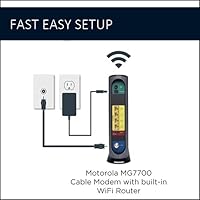
Setup is pretty painless for most people. You connect the coaxial cable from your wall to the modem port, plug in the power adapter, and connect a device via Ethernet or Wi-Fi. Then you contact your ISP — either by phone, chat, or their app — give them the device's MAC address (printed on the label), and they activate it on your account. The whole process usually takes under 30 minutes.

Yes, that is exactly the point. This single device handles both the modem function (connecting to your ISP's cable network) and the router function (distributing Wi-Fi and wired connections throughout your home). You return the ISP's gear and stop paying the monthly rental fee.

It depends a lot on your home's layout and building materials. In an open single-story space or a mid-sized apartment, most users report solid coverage. In a two-story home with thick walls or a layout with many partitioned rooms, the 5 GHz band in particular tends to weaken noticeably toward the edges. If range is a concern, pairing this unit with a mesh extender is a practical workaround.

Technically yes — you can put the built-in router into bridge mode and run your own router off one of the Ethernet ports. That said, this does add some complexity to the setup, and if you are going that route, you might consider whether a standalone modem paired with your preferred router would be a cleaner solution overall.

No. There is no telephone port on this unit, and it does not support voice-over-cable services. If your ISP bundle includes a home phone line, this device cannot replace their equipment for that purpose.

This is one of the honest trade-offs of buying a device that launched in 2018. Motorola has issued updates over the years, but long-term owners report that update frequency has slowed down. It is not a security disaster, but it is worth knowing that this unit is not receiving the same active development attention as a brand-new product.

Mostly something else. A noticeable chunk of the negative reviews about this unit actually describe frustration with the ISP activation process rather than a hardware defect. Getting a new modem activated can sometimes involve hold times, miscommunications with support staff, or the ISP needing time to update their system. If you have a smooth call with your ISP, most people are up and running without any drama.

Where to Buy