Overview

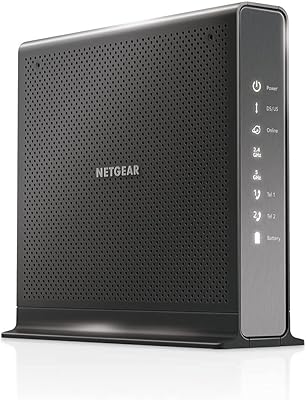
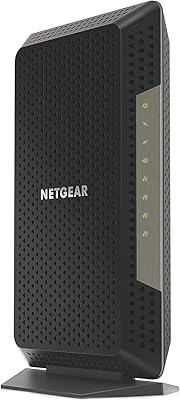
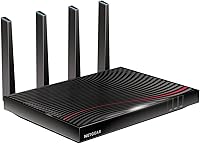
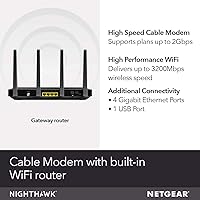
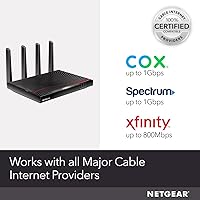
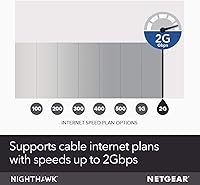
The NETGEAR Nighthawk C7800 Cable Modem Router Combo is a DOCSIS 3.1 all-in-one gateway built specifically for cable internet households on gigabit or near-gigabit plans. It is certified with Xfinity (up to 800Mbps), Spectrum, and Cox (both up to 1Gbps) — but it will not work on Verizon, AT&T, DSL services, or any bundled voice plan. That compatibility gap catches a lot of buyers off guard, so check your provider before purchasing. On the market since 2019, this modem-router combo continues to be a strong pick for anyone looking to cut monthly rental fees and take full ownership of their home network.
Features & Benefits

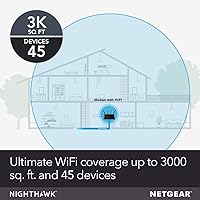
What sets the Nighthawk C7800 apart is not just the headline specs — it is how they hold up under real household pressure. DOCSIS 3.1 with 32x8 channel bonding means the modem side can genuinely keep pace with gigabit cable plans, not just come close. Dual-band AC3200 Wi-Fi with beamforming covers up to 3,000 square feet and handles up to 45 devices without obvious slowdowns. Four Gigabit Ethernet ports and two USB 3.0 ports give you practical options for wired connections, shared storage, and peripherals. For technically inclined users, the Linux-based firmware opens the door to more granular network control well beyond what the default setup exposes.

Best For

This all-in-one cable gateway makes the most sense for cable subscribers on gigabit or near-gigabit plans with Xfinity, Spectrum, or Cox — it is one of the few combo units that can actually put that bandwidth to use. Anyone who has done the math on ISP equipment rental will appreciate the case for ownership: monthly modem fees add up quickly, and this unit tends to pay for itself within two to three years. Larger homes benefit from its wide wireless reach without needing a mesh system, and households juggling remote work, 4K streaming, and gaming will find the available device headroom genuinely useful.

User Feedback

Across thousands of reviews, this modem-router combo earns consistent praise for long-term stability — many owners report years of reliable performance with minimal intervention. The price is the most common sticking point, particularly for buyers weighing it against purchasing a standalone modem and router separately; it is a legitimate comparison worth doing. Xfinity users sometimes hit activation delays during provisioning, which can be frustrating but is usually resolved with a provider call. The unit runs noticeably warm, so open shelf placement is genuinely recommended. On the upside, the Nighthawk app gets consistent credit for making initial setup accessible even to non-technical users, and firmware update frequency remains a minor but recurring concern for long-term owners.

Pros

  • DOCSIS 3.1 support means this modem-router combo is ready for gigabit cable plans today and for near-future speed tier upgrades.
  • Eliminating ISP rental fees typically recoups the purchase cost within two to three years.
  • AC3200 dual-band Wi-Fi with beamforming covers up to 3,000 square feet reliably in most home layouts.
  • Handles up to 45 connected devices without obvious performance degradation under mixed real-world loads.
  • Four Gigabit Ethernet ports offer practical wired options for desktops, gaming consoles, and smart TVs.
  • Two USB 3.0 ports allow network-attached storage or shared printer access directly from the unit.
  • The Nighthawk app makes initial setup straightforward even for buyers with no networking background.
  • Linux-based firmware gives technically inclined users a solid foundation for advanced network customization.
  • Long-term owners consistently report stable, reliable performance with minimal reboots or intervention needed.
  • One device replaces two, reducing cable clutter and the number of power adapters in your setup.

Cons

  • Upfront cost is significantly higher than buying a budget modem and mid-range router separately.
  • Xfinity certifies this unit only up to 800Mbps, not the full gigabit some buyers expect.
  • Activation with Xfinity in particular can involve frustrating provisioning delays that require a support call.
  • The unit runs noticeably warm and needs open-air placement — enclosed entertainment cabinets are a poor fit.
  • Firmware updates have been infrequent, which raises mild long-term security and feature stagnation concerns.
  • Built on 802.11ac Wi-Fi, which lags behind the Wi-Fi 6 standard now common in newer routers.
  • No telephone voice port support means bundled voice customers cannot use this as a full ISP equipment replacement.
  • Larger homes with thick walls or complex layouts may still need a Wi-Fi extender despite the broad coverage claim.
  • If your ISP ever drops certification support for this hardware, the unit could become incompatible with no easy fix.

Ratings

The NETGEAR Nighthawk C7800 Cable Modem Router Combo has been scored by our AI system after analyzing thousands of verified global user reviews, with spam, bot-generated, and incentivized feedback actively filtered out. Scores reflect the full spectrum of real ownership experiences — from long-term reliability wins to recurring frustrations around price, heat, and ISP compatibility edge cases. Both the strengths and the honest pain points are baked into every number below.
Internet Performance
88%
Users on gigabit and near-gigabit cable plans consistently report hitting or approaching their subscribed speeds, with stable throughput even during peak evening hours. The DOCSIS 3.1 standard with 32x8 channel bonding gives the modem side genuine headroom that older DOCSIS 3.0 hardware simply cannot match.
Xfinity subscribers specifically note that the unit is certified only up to 800Mbps on their network, which can feel like leaving performance on the table for those paying for a full gigabit plan. A small number of users also report occasional speed dips that a full modem restart resolves.
Wi-Fi Coverage
82%
18%
In open-plan homes and single-story layouts up to around 2,500 square feet, most users report strong, consistent signal throughout — including in garages and backyards close to the structure. Beamforming noticeably helps devices at moderate distances maintain better throughput than older router hardware at comparable price points.
Multi-story homes and spaces with thick masonry walls expose the limits of a single-unit solution, with several owners in larger or more complex layouts reporting dead zones on upper floors or at the far ends of their homes. A mesh extender often ends up being added, which somewhat undermines the all-in-one value proposition.
Value for Money
71%
29%
When calculated over a two-to-three year window, owning this modem-router combo rather than renting ISP equipment typically results in meaningful net savings, particularly for Spectrum and Cox subscribers who face steeper rental fees. For buyers who stay on cable internet long-term, the math genuinely works in their favor.
The upfront cost is a real barrier, especially when buyers realize a capable standalone DOCSIS 3.1 modem paired with a solid mid-range router can be assembled for less. Users who move, switch providers, or upgrade to fiber within two years are unlikely to recoup the investment.
Setup Experience
84%
The Nighthawk app receives consistent praise for walking non-technical users through initial configuration in a clear, step-by-step way, with most Spectrum and Cox users reporting they were online within 20 to 30 minutes of unboxing. The physical port layout is logical and the included Ethernet cable is a small but appreciated touch.
Xfinity activations are a consistent outlier — a meaningful portion of buyers report provisioning delays that require a call to Xfinity support, which turns a smooth setup into a frustrating hour-long ordeal. The issue is on the ISP side rather than the hardware, but it still colors the out-of-box experience negatively for a notable share of buyers.
Device Capacity
86%
Households running 20 to 35 simultaneous devices — a mix of laptops, phones, smart TVs, game consoles, and smart home sensors — report no meaningful congestion or prioritization issues during normal use. Buyers upgrading from budget ISP-provided gateways often notice an immediate improvement in how well the network handles simultaneous heavy usage.
A handful of power users with extremely dense device environments, such as home offices running multiple video calls alongside heavy smart home setups, mention occasional instability that required tweaking QoS settings. The all-in-one architecture means there is less flexibility to optimize the modem and router sides independently if specific bottlenecks arise.
Build Quality
78%
22%
The physical construction feels solid and appropriately substantial for a premium networking device, and the ventilation design on the chassis is clearly intentional rather than an afterthought. Long-term owners frequently note the hardware keeps running without failure years after purchase, which suggests good component quality at the core.
The unit runs noticeably warm under sustained load, and several buyers in warmer climates or with limited ventilation report it running hot enough to be a concern. There are no active cooling fans, which keeps it quiet but places the burden of thermal management entirely on placement and ambient conditions.
Long-Term Reliability
87%
Multi-year owners are among the most vocal positive reviewers, frequently citing years of uninterrupted service with only occasional reboots needed. This kind of feedback carries real weight — it suggests the hardware holds up well past the honeymoon period that flatters many networking devices early in their lifecycle.
A subset of long-term owners raise concerns about the cadence of firmware updates, noting that patches and feature improvements have slowed considerably as the device ages. For security-conscious users, the infrequency of updates is a legitimate concern that is worth monitoring over time.
ISP Compatibility
69%
31%
For Spectrum and Cox subscribers, compatibility is straightforward and certification covers plans up to 1Gbps, making this all-in-one cable gateway one of the more capable options available without needing a separate router. Xfinity users also benefit from a certified, hassle-free hardware relationship once provisioning is complete.
The compatibility wall is hard and unforgiving — Verizon, AT&T, DSL, and fiber subscribers cannot use this hardware at all, and buyers who discover this post-purchase make up a noticeable share of negative reviews. The lack of voice port support also disqualifies it for anyone relying on ISP-bundled home phone service.
Wired Connectivity
89%
Four Gigabit Ethernet ports handle wired desktop PCs, NAS devices, smart TVs, and game consoles without any bottleneck, and users who wire in their most bandwidth-hungry devices consistently report the fastest and most stable connections in their household. The two USB 3.0 ports add genuine utility for shared storage or printer access without requiring a separate device.
For households with more than four wired devices, an Ethernet switch becomes a necessary additional purchase, which adds both cost and a cable run that the all-in-one form factor was partly meant to avoid. The USB port implementation also lacks advanced NAS-style features that a dedicated network storage device would offer.
Ease of Management
77%
23%
The Nighthawk app provides a clean interface for monitoring connected devices, running speed tests, and adjusting basic settings, which most users find sufficient for everyday network management without ever touching a browser-based admin panel. Guest network setup and parental controls are accessible without requiring any technical background.
Users who want deeper control — custom DNS, advanced QoS rules, or VLAN configuration — find the app's capabilities limited and end up relying on the web-based interface, which is less polished and less intuitive. The gap between the app's simplicity and the underlying Linux firmware's potential feels wider than it should at this price tier.
Heat Management
62%
38%
The fanless passive cooling design keeps the unit completely silent during operation, which is genuinely appreciated in living rooms and home offices where fan noise would be noticeable. Under typical workloads in well-ventilated spaces, the device maintains acceptable operating temperatures.
In enclosed entertainment centers, under-desk setups, or warmer climates, thermal performance becomes a real concern — several users report sustained high temperatures that make them uncomfortable leaving the unit running unattended. The chassis does not actively communicate thermal status to the user, so there is no warning before heat becomes a problem.
Firmware and Updates
58%
42%
The Linux-based firmware is stable and does not tend to introduce regressions or bugs through updates, and the base feature set covers everything the majority of home users will ever need out of the box. When updates do arrive, they apply cleanly without requiring manual intervention in most cases.
The update cadence has slowed noticeably over the device's lifespan, which is a legitimate concern for buyers thinking about security patch coverage over the next several years. Several technically experienced owners express frustration that a device at this price point does not receive more consistent maintenance from NETGEAR.
Physical Footprint
73%
27%
Combining modem and router into one unit does reduce overall desk or shelf clutter meaningfully compared to a two-device setup, and the angular industrial design looks intentional rather than dated in most home networking spots. The weight and dimensions make repositioning straightforward when needed.
At 10.4 x 12.4 x 7.5 inches, this is not a small device, and buyers with limited shelf space or those used to compact standalone routers sometimes express surprise at its actual physical size. Enclosed spaces that would otherwise hide networking hardware are a poor fit due to the thermal considerations already noted.

Suitable for:

The NETGEAR Nighthawk C7800 Cable Modem Router Combo is purpose-built for cable internet subscribers on gigabit or near-gigabit plans with Xfinity, Spectrum, or Cox — and it genuinely delivers where many combo units fall short. If you are paying monthly equipment rental fees to your ISP, this all-in-one cable gateway tends to pay for itself within two to three years, making it a financially sound decision for anyone planning to stay on cable internet long-term. Medium-to-large homes covering up to 3,000 square feet benefit from the wide wireless reach without needing to invest in a separate mesh system on top. Remote workers and households running a dense mix of streaming devices, gaming consoles, smart home gear, and work laptops will appreciate the headroom this modem-router combo provides without needing to micromanage the network. Power users who enjoy tinkering will also find the Linux-based firmware a welcome foundation for more advanced configuration.
Not suitable for:

The NETGEAR Nighthawk C7800 Cable Modem Router Combo is simply not the right tool if you are on a DSL, fiber, or satellite connection — it is cable-only hardware, full stop. Verizon Fios, AT&T, CenturyLink, DirecTV, and DISH subscribers should stop here; this all-in-one cable gateway is incompatible with those networks regardless of your internet speed tier. If your household relies on a bundled voice service through your cable provider, you will need to keep your ISP equipment or find a separate VoIP solution, since this unit does not support telephone ports. Buyers on modest cable plans well below 500Mbps may find the investment difficult to justify compared to pairing a budget DOCSIS 3.0 modem with a mid-range router. Finally, anyone who prioritizes cutting-edge Wi-Fi 6 performance should know this unit is built on the older 802.11ac standard, which may feel limiting as newer devices lean harder into Wi-Fi 6 capabilities.
Specifications

  • Model Number: The unit ships under model number C7800-200NAS.
  • Modem Standard: Uses DOCSIS 3.1, the current top-tier cable modem standard supporting gigabit-class download and upload speeds.
  • Channel Bonding: Engineered with 32x8 channel bonding for maximizing throughput stability on congested cable networks.
  • Wi-Fi Standard: Dual-band 802.11ac (Wi-Fi 5) with a combined AC3200 speed rating across both frequency bands.
  • Wi-Fi Coverage: Rated to cover up to 3,000 square feet under typical residential conditions.
  • Device Capacity: Supports up to 45 simultaneous connected devices across both Wi-Fi bands and wired ports.
  • Ethernet Ports: Equipped with four Gigabit Ethernet LAN ports for high-speed wired device connections.
  • USB Ports: Includes two USB 3.0 ports for connecting shared storage drives or network printers.
  • Beamforming: Supports beamforming technology, which focuses the Wi-Fi signal toward connected devices rather than broadcasting in all directions equally.
  • ISP Compatibility: Certified with Xfinity by Comcast (up to 800Mbps), Spectrum (up to 1Gbps), and Cox (up to 1Gbps).
  • ISP Incompatibility: Not compatible with Verizon, AT&T, CenturyLink, DSL providers, DirecTV, DISH, or any ISP-bundled voice service.
  • Operating System: Runs a Linux-based firmware that allows advanced users to access deeper network configuration options.
  • Dimensions: Physical footprint measures 10.4 x 12.4 x 7.5 inches, requiring adequate open shelf space for ventilation.
  • Weight: The unit weighs 3.15 pounds, making it relatively straightforward to mount or reposition if needed.
  • Color: Available exclusively in black.
  • Included Items: Package includes the modem-router unit, one Ethernet cable, a power adapter, and a quick install guide.
  • Voice Port Support: This unit does not include any telephone voice ports and cannot replace equipment used for ISP-bundled phone service.
  • Release Date: First made available in June 2019 and remains in active production as of the time of writing.

Related Reviews

NETGEAR Nighthawk C7100V Cable Modem WiFi Router Combo with Voice
86%
92%
Ease of Setup
85%
WiFi Performance
91%
Value for Money
89%
Stability for Gaming & Streaming
88%
VoIP Feature
More
NETGEAR Nighthawk CAX30
79%
88%
Setup & Installation
83%
WiFi Speed & Performance
71%
WiFi Coverage & Range
91%
Modem Reliability & Uptime
78%
Value for Money
More
NETGEAR Nighthawk C7000 AC1900 Modem Router Combo
75%
91%
Ease of Setup
78%
Wi-Fi Speed & Performance
71%
Modem Speed & DOCSIS Performance
74%
Wi-Fi Coverage & Range
76%
Build Quality & Design
More
NETGEAR C6300 Cable Modem Router Combo
69%
83%
Value for Money
88%
Setup & Installation
71%
WiFi Performance
91%
Wired Connectivity
62%
Long-Term Reliability
More
NETGEAR C6250 AC1600 Modem Router Combo
74%
84%
Value for Money
88%
Ease of Setup
71%
Wi-Fi Performance
82%
Modem Speed & Reliability
73%
Provider Compatibility
More
NETGEAR Orbi CBK752 Mesh Modem Router Combo
74%
88%
WiFi Speed & Throughput
78%
Whole-Home Coverage
71%
Modem Compatibility & ISP Provisioning
66%
Satellite Connection Stability
82%
Setup & Initial Configuration
More
NETGEAR Nighthawk C6900 Cable Modem Router
75%
88%
Value for Money
91%
Setup & Installation
74%
Wi-Fi Speed & Performance
63%
Wi-Fi Range & Coverage
86%
Connection Stability
More
NETGEAR Nighthawk CM1200
75%
88%
Internet Speed Performance
83%
Setup & Installation
63%
Long-Term Reliability
79%
Value for Money
71%
Compatibility & ISP Support
More
ARRIS G20 Cable Modem Router Combo
76%
86%
Setup Experience
91%
Connection Stability
71%
Wi-Fi Coverage
88%
Upload Performance
83%
Value for Money
More
NETGEAR C6230 AC1200 Cable Modem Router
73%
83%
Connection Stability
61%
WiFi Range & Coverage
78%
Setup & Activation
86%
Value for Money
69%
WiFi Speed Performance
More

FAQ

It is certified with Xfinity, but there is an important caveat: Xfinity currently caps the Nighthawk C7800 at around 800Mbps rather than a full gigabit. For most households that difference is barely noticeable in practice, but if hitting exactly 1Gbps matters to you, it is worth checking Xfinity's current approved device list before purchasing.

No. This modem-router combo is cable-only hardware and will not work with Verizon Fios, AT&T, or any fiber or DSL provider. If you are on one of those networks, you will need a different device entirely.

The setup process is fairly straightforward. You connect the coaxial cable from your wall to the modem port, plug in the power adapter, and then use the Nighthawk app on your phone to walk through the configuration. Most users without any networking background report getting online within 20 to 30 minutes, though Xfinity customers occasionally hit a provisioning delay that requires a quick call to their ISP.

It replaces both. The NETGEAR Nighthawk C7800 Cable Modem Router Combo is a single device that handles cable modem functions and Wi-Fi routing in one box, so you can return both pieces of rented ISP equipment and stop paying those monthly fees.
It does run noticeably warm, which is common for combo units handling both modem and router tasks in one chassis. Several owners mention this, and the practical advice is consistent: give it open-air placement on a shelf rather than tucking it inside an enclosed cabinet. Adequate airflow keeps it running reliably over the long term.

For most two-story homes up to around 3,000 square feet, the dual-band AC3200 Wi-Fi with beamforming generally performs well. Homes with thick concrete or brick walls, or very irregular layouts, may still develop weak spots in distant corners. In those cases a single Wi-Fi extender or access point in the problem area is usually enough to fill the gap.

ISP modem and router rental fees typically run anywhere from roughly 10 to 15 dollars per month depending on your provider. Over two to three years, that adds up to a figure that often exceeds the purchase price of this all-in-one cable gateway, meaning it tends to pay for itself and save money beyond that point.

No, the Nighthawk C7800 is built on the 802.11ac standard, which is Wi-Fi 5. It does not support Wi-Fi 6. For most households with current devices this is not a day-to-day limitation, but buyers who already own several Wi-Fi 6 devices and want to maximize their speed potential may want to consider a newer unit.

Yes. The two USB 3.0 ports on the back let you connect a compatible USB storage drive or printer, which then becomes accessible to other devices on your network. It is a convenient feature if you want basic network-attached storage without buying a dedicated NAS device.

This is one area where some long-term owners express mild frustration. Firmware updates for this modem-router combo have not been frequent, which is not unusual for mature hardware but does raise reasonable questions about ongoing security patching. It is worth checking NETGEAR's support page for the C7800-200NAS periodically to apply any available updates manually.