Overview

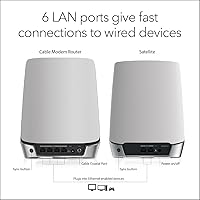
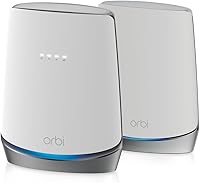
The NETGEAR Orbi CBK752 Mesh Modem Router Combo takes a genuinely practical approach to home networking by folding a certified cable modem and a mesh router into one coordinated system. For anyone still renting equipment from their ISP, that alone is worth paying attention to. The hardware is certified for Xfinity, Spectrum, and Cox, which covers a large chunk of U.S. cable subscribers. NETGEAR claims coverage up to 5,000 square feet, though your actual results will depend heavily on floor plan and materials — concrete walls and multi-story layouts will shrink that number. The real question is whether consolidating everything into one box makes your network life meaningfully simpler.
Features & Benefits

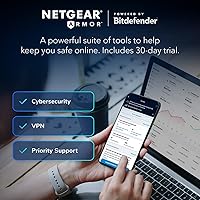
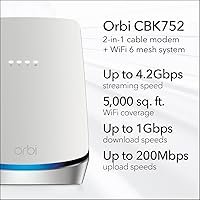
At its technical core, this Orbi modem-router combo runs on WiFi 6 tri-band radios with an aggregate throughput of 4.2 Gbps, which translates to less congestion when a dozen devices are hammering the network simultaneously. The DOCSIS 3.1 modem is built for internet plans up to 4 Gbps, so it won't become a bottleneck if your ISP eventually offers faster tiers. A satellite unit ships in the box, extending coverage without an additional purchase. NETGEAR Armor adds a layer of real-time threat monitoring and a VPN option, though it transitions to a paid subscription after the initial 30-day trial. Firmware updates run automatically, and the Orbi app handles setup and device management with reasonable ease.

Best For

The CBK752 system is a natural fit for homeowners on Xfinity, Spectrum, or Cox who are tired of paying monthly modem rental fees — at roughly ten to fifteen dollars a month, the hardware can realistically pay for itself within two years. It suits households running 30 or more connected devices: gaming consoles, smart TVs, laptops, and phones all sharing the same network without noticeable slowdowns. People working from home who need reliable video calls while kids stream in parallel will appreciate the bandwidth headroom. It also appeals to anyone who wants network-level security without bolting on a separate appliance. Less ideal for apartment dwellers or anyone on fiber or DSL.

User Feedback

Across roughly 1,900 ratings, this all-in-one mesh setup holds a 3.9-star average — solid but not universal praise. Most owners report a noticeable speed jump compared to ISP-rented gear, and the Orbi app setup earns consistent appreciation for being genuinely straightforward. The friction points, though, are real. Satellite disconnects appear in enough reviews to be a pattern rather than a fluke, and some users hit provisioning headaches when switching from a rented modem for the first time — a process that can require a call to your ISP. The Armor subscription cost after the free trial also catches people off guard. Long-term owners generally report stable firmware, but customer support responsiveness gets mixed marks.

Pros

  • Eliminates monthly ISP modem rental fees, typically paying for itself within two years.
  • WiFi 6 tri-band radio handles 30 or more active devices without noticeable congestion.
  • A mesh satellite ships in the box — no separate purchase needed for basic whole-home coverage.
  • DOCSIS 3.1 supports cable internet plans well beyond what most ISPs currently offer, keeping it relevant long-term.
  • The Orbi app makes initial setup accessible for non-technical users with clear step-by-step guidance.
  • Automatic firmware updates run silently in the background, keeping security current without user action.
  • Certified by Xfinity, Spectrum, and Cox, reducing compatibility guesswork for the majority of U.S. cable subscribers.
  • Network-level threat protection through NETGEAR Armor covers every connected device without per-device software installs.
  • Long-term owners generally report stable performance once the system is correctly provisioned and placed.

Cons

  • ISP provisioning requires a call to your cable provider and can take well over an hour to complete.
  • Satellite disconnects appear frequently enough in user reviews to be a genuine reliability concern, not an outlier.
  • NETGEAR Armor transitions to a paid subscription after 30 days — a cost that surprises many buyers post-purchase.
  • Real-world coverage falls short of the advertised figure in homes with concrete walls or multi-story layouts.
  • Customer support receives consistently poor marks for wait times and inconsistent technical guidance.
  • Advanced network controls like detailed QoS and traffic analytics are absent from the Orbi app.
  • Some users report that specific firmware updates introduced instability that required waiting on a follow-up patch.
  • The system is incompatible with fiber and DSL connections, limiting it strictly to cable internet subscribers.
  • Buyers who already own a modem gain no practical benefit from the integrated DOCSIS hardware, inflating effective cost.
  • Peak-hour slowdowns have been reported in households consistently running 40 or more simultaneously active devices.

Ratings

The NETGEAR Orbi CBK752 Mesh Modem Router Combo scores below are generated by AI after analyzing thousands of verified global user reviews, with spam, bot activity, and incentivized feedback actively filtered out. The result is an honest snapshot of how this all-in-one mesh setup performs across real households — strengths and frustrations alike, weighted by how frequently each theme appeared and how much it affected day-to-day use.
WiFi Speed & Throughput
88%
Owners upgrading from ISP-rented gateway hardware report the speed difference is immediately noticeable — video calls that used to buffer, 4K streams that would stutter, and large file transfers that dragged all improved substantially. The WiFi 6 tri-band radio handles congested households with far more composure than older AC-standard equipment.
A subset of users on high-tier gigabit plans found that real-world throughput fell short of their subscribed speeds, particularly at range. WiFi 6 benefits also require compatible client devices, so older laptops and phones in the home may not see the full uplift.
Whole-Home Coverage
78%
22%
The included satellite unit meaningfully extends signal into rooms and floors that a single router would never reach reliably. For open-plan homes in the 2,500 to 4,000 square foot range, most owners report consistent coverage without needing to buy additional nodes.
The advertised 5,000 square foot figure assumes favorable conditions that most homes do not have. Thick concrete walls, multi-story layouts, and older construction with dense framing all reduce effective range — buyers in those situations may still need an extra satellite purchased separately.
Modem Compatibility & ISP Provisioning
71%
29%
For subscribers on Xfinity, Spectrum, or Cox, the DOCSIS 3.1 modem is officially certified and generally activates without major drama once you call your ISP to register the device. Owners who successfully provision it describe the process as a one-time inconvenience that is quickly forgotten.
First-time modem switchers frequently underestimate what provisioning involves — you cannot simply plug this in and go. Several users report spending 30 to 90 minutes on hold with their ISP, and a handful experienced multi-day activation delays. The process is not unique to this product, but it is still a real friction point worth preparing for.
Satellite Connection Stability
66%
34%
When the satellite connection holds, the mesh backhaul performs well, maintaining strong speeds across the coverage area without the user noticing any handoff between nodes. Long-term owners who have had stable units report years of reliable service.
Satellite disconnects appear in enough independent reviews to constitute a genuine pattern. Some users experience periodic drops requiring a restart, and a smaller group reports satellite connectivity never fully stabilizing. Whether this reflects unit variance or a firmware issue, it is the most cited reliability complaint and warrants attention.
Setup & Initial Configuration
82%
18%
The Orbi app walks you through hardware placement, ISP provisioning steps, and basic network configuration in a clear sequence that most non-technical users can follow without consulting a manual. Pairing the router and satellite is quick and reliable in the majority of reported experiences.
The app-guided setup assumes a smooth ISP activation, and when that goes sideways — wrong modem MAC address on file, provisioning holds — the app offers limited troubleshooting guidance. Users in those situations effectively have to exit the guided flow and call their ISP directly.
Network Security (NETGEAR Armor)
61%
39%
Armor provides a meaningful layer of real-time threat detection at the network level, which is a step up from leaving every device to fend for itself. The 30-day trial gives buyers enough time to assess whether the service adds value for their household.
The recurring subscription cost after the trial ends catches a surprising number of buyers off guard, given that the hardware already sits at a premium price point. Many users opt out after the trial, which effectively disables a feature marketed prominently on the box — leaving some feeling the value proposition was oversold.
Value for Money
74%
26%
At the price this system commands, buyers who were previously renting a modem from their ISP can realistically recoup the cost within 18 to 24 months — after that, the savings are pure. Getting a capable WiFi 6 mesh satellite bundled in the box adds further weight to the argument.
For buyers who already own a separate modem, the value calculus shifts considerably — they are paying a premium largely for a modem they do not need. Add the Armor subscription and occasional need for an extra satellite, and total cost of ownership can climb past initial expectations.
Multi-Device Performance
84%
Households running 20 to 30 simultaneous devices — smart TVs, gaming consoles, phones, tablets, work laptops — report that the CBK752 system handles the load without any single device visibly starving for bandwidth. The tri-band design dedicates a backhaul channel specifically to router-satellite communication, keeping client traffic cleaner.
In households pushing 40 or more active devices with aggressive usage patterns, some users describe occasional slowdowns during peak evening hours. Device prioritization through the Orbi app helps, but requires manual configuration that not all users think to do.
Firmware Reliability
77%
23%
Automatic firmware updates run in the background without requiring user action, and the majority of long-term owners describe consistent, stable performance over months of use. NETGEAR has a reasonably solid history of maintaining the Orbi line through software improvements.
A portion of users report that a specific firmware update introduced new instability — reboots, degraded speeds, or satellite pairing issues — that required rolling back or waiting for a subsequent patch. Automatic updates are convenient until one of them causes a regression.
Physical Design & Placement
69%
31%
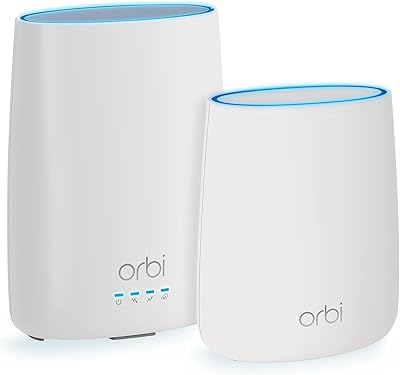
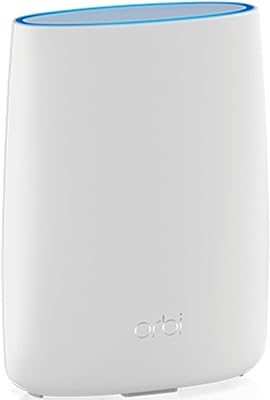
The white cylindrical design is relatively discreet compared to antenna-heavy routers, and the two-unit system means neither piece needs to be centrally located — one can sit near the coax wall outlet while the satellite covers the far end of the home.
At over 8 pounds for the pair and with footprints that are not especially compact, the CBK752 system is not something you can tuck behind a bookshelf without sacrificing signal. The size is a practical trade-off for the hardware inside, but buyers expecting a low-profile setup may be surprised.
Customer Support Experience
54%
46%
NETGEAR offers multiple support channels including phone, chat, and a moderately active community forum where some technical issues have documented solutions. For straightforward questions, the Orbi app itself surfaces basic troubleshooting steps.
Reviews citing customer support paint a frustrating picture — long wait times, representatives with inconsistent technical depth, and in some cases, unresolved hardware swap situations. Users dealing with satellite connectivity issues in particular report feeling passed between departments without a concrete resolution.
App & Remote Management
79%
21%
The Orbi app covers the essentials well: network overview, device list, guest network management, speed test, and basic parental controls. It is one of the cleaner ISP-agnostic router apps available, and most users find it genuinely useful beyond initial setup.
Power users looking for advanced QoS controls, detailed traffic analytics, or VLAN configuration will hit the app's ceiling quickly. Some features that were previously available were also moved behind the Armor subscription tier, which rankles users who expected them included at no extra cost.
Future-Proofing & Scalability
83%
DOCSIS 3.1 and WiFi 6 represent current-generation standards that are not at risk of obsolescence in the near term. The ability to add optional Orbi satellites incrementally means the system can grow with a household rather than requiring a full replacement if needs change.
The modem side supports plans up to 4 Gbps, but most cable ISPs are not yet offering those speeds to residential customers at scale — so that headroom is theoretical for most buyers today. WiFi 6E and emerging 6 GHz band capabilities are absent, which may matter as that standard becomes more prevalent.

Suitable for:

The NETGEAR Orbi CBK752 Mesh Modem Router Combo is purpose-built for cable internet subscribers — specifically those on Xfinity, Spectrum, or Cox — who are ready to stop paying monthly equipment rental fees and want a single, capable system to replace everything their ISP provided. Homeowners with medium-to-large floor plans, particularly those dealing with dead zones from a single router, will find the bundled satellite a practical solution rather than an afterthought. Remote workers who need a stable, low-latency connection for video calls while the rest of the household streams, games, and scrolls simultaneously will appreciate the headroom that WiFi 6 and the tri-band radio provide. It also suits tech-aware buyers who want network-level security without purchasing and managing a separate appliance — Armor handles that at the router, covering every connected device automatically. If you have 20 or more devices at home and your current setup regularly struggles during evening peak hours, this all-in-one mesh setup addresses that problem more directly than a router upgrade alone would.
Not suitable for:

The NETGEAR Orbi CBK752 Mesh Modem Router Combo makes little financial sense for anyone who already owns a working standalone modem, since you would be paying a premium for hardware redundancy you cannot use. Fiber internet subscribers are categorically excluded — DOCSIS is a cable-only standard, and this system is simply incompatible with fiber or DSL connections regardless of ISP. Apartment dwellers or anyone in a smaller home under 1,500 square feet will likely find the two-unit mesh system overkill and the price hard to justify when a single mid-range router would cover the space adequately. Buyers who are not prepared to call their ISP to manually provision a new modem should also think carefully — the activation process is not plug-and-play, and it can be a genuine source of frustration if you are not expecting it. Finally, if the idea of an ongoing subscription to maintain full security functionality bothers you at the principle level, the Armor model may feel like a bait-and-switch after the 30-day trial expires.
Specifications

  • WiFi Standard: Operates on 802.11ax (WiFi 6), the current mainstream standard offering improved throughput and better performance in congested multi-device environments.
  • Frequency Bands: Tri-band configuration uses one 2.4 GHz band and two 5 GHz bands, with one 5 GHz band dedicated to router-to-satellite backhaul communication.
  • Aggregate Speed: Maximum combined wireless throughput is rated at AX4200 (4.2 Gbps) across all three bands under ideal conditions.
  • Modem Standard: Integrated DOCSIS 3.1 cable modem supports internet service plans up to 4 Gbps download and is backward compatible with DOCSIS 3.0 infrastructure.
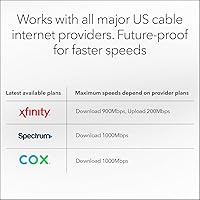
  • ISP Certifications: Officially certified for use with Xfinity (up to 900 Mbps download), Spectrum (up to 1 Gbps), and Cox (up to 1 Gbps); compatible with most other U.S. cable providers.
  • Coverage Area: Rated for up to 5,000 sq. ft. combined across both units under open-plan conditions; real-world coverage varies with wall materials and floor layout.
  • Device Capacity: Supports 40 or more simultaneously connected devices, spanning smartphones, laptops, smart TVs, gaming consoles, and IoT appliances.
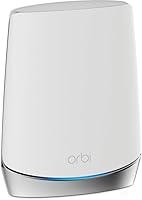
  • Included Units: Package contains one Orbi Cable Modem Router (CBR750), one Orbi WiFi 6 Satellite (RBS750), two power adapters, one 2-meter Ethernet cable, and a quick start guide.
  • Security Suite: NETGEAR Armor provides real-time network-level threat protection and an optional VPN layer; a 30-day free trial is included, after which a paid subscription is required.
  • Firmware Updates: Firmware updates are applied automatically by default, requiring no manual action from the user to maintain current security patches.
  • Setup Method: Initial configuration and ongoing network management are handled through the Orbi mobile app, available for iOS and Android.
  • Dimensions: Combined unit footprint measures 11.4 x 10.3 x 8.9 inches for the router unit; the satellite has a similar cylindrical tower form factor.
  • Weight: Total system weight for both units combined is 8.18 pounds, making stationary tabletop or shelf placement the intended installation method.
  • Connectivity Ports: The modem-router includes a coaxial cable input for ISP connection plus Ethernet ports for wired device connections; the satellite also provides Ethernet ports for wired backhaul or local device use.
  • Color & Finish: Both units ship in a matte white finish designed to blend into residential interiors without drawing attention.
  • Expandability: Coverage can be extended by adding optional Orbi WiFi 6 satellite units (sold separately), each rated to add approximately 2,500 sq. ft. of additional coverage.
  • Power Requirements: The router unit requires a 19V/3.16A power adapter and the satellite requires a 12V/2.5A power adapter, both included in the box.
  • Regional Availability: Designed and certified exclusively for use in the United States; ISP compatibility and regulatory compliance outside the U.S. are not guaranteed.

Related Reviews

NETGEAR Nighthawk CAX30
79%
88%
Setup & Installation
83%
WiFi Speed & Performance
71%
WiFi Coverage & Range
91%
Modem Reliability & Uptime
78%
Value for Money
More
NETGEAR Nighthawk C7000 AC1900 Modem Router Combo
75%
91%
Ease of Setup
78%
Wi-Fi Speed & Performance
71%
Modem Speed & DOCSIS Performance
74%
Wi-Fi Coverage & Range
76%
Build Quality & Design
More
NETGEAR C6300 Cable Modem Router Combo
69%
83%
Value for Money
88%
Setup & Installation
71%
WiFi Performance
91%
Wired Connectivity
62%
Long-Term Reliability
More
NETGEAR C6250 AC1600 Modem Router Combo
74%
84%
Value for Money
88%
Ease of Setup
71%
Wi-Fi Performance
82%
Modem Speed & Reliability
73%
Provider Compatibility
More
NETGEAR Orbi CBK40 Modem Mesh WiFi System
74%
82%
Coverage & Range
74%
WiFi Speed Performance
88%
Modem Integration
83%
Setup & Onboarding
77%
App Experience
More
NETGEAR Nighthawk C7800 Cable Modem WiFi Router Combo
84%
88%
Wi-Fi Performance
75%
Ease of Setup
92%
Speed and Reliability
85%
Compatibility with ISPs
90%
Value for Money
More
NETGEAR Orbi LBR20 4G LTE WiFi Router
71%
71%
Cellular Connectivity
74%
WiFi Coverage
86%
Setup Experience
58%
Value for Money
78%
Mesh Expandability
More
NETGEAR Nighthawk C7100V Cable Modem WiFi Router Combo with Voice
86%
92%
Ease of Setup
85%
WiFi Performance
91%
Value for Money
89%
Stability for Gaming & Streaming
88%
VoIP Feature
More
NETGEAR C7500 AC3200 Cable Modem Router Combo
66%
78%
Wi-Fi Performance
71%
Modem Reliability
74%
Setup Experience
55%
ISP Compatibility
63%
Value for Money
More
ARRIS G20 Cable Modem Router Combo
85%
89%
Performance
83%
Wi-Fi Coverage
91%
Ease of Setup
85%
Speed Consistency
93%
Compatibility with ISPs
More

FAQ

Unfortunately, you do need to contact your cable provider to activate the modem. This is true for any third-party modem, not just this one. You will need to give your ISP the modem's MAC address and serial number — both are printed on the device — and they will provision it on their end. The call usually takes 15 to 30 minutes, though some users have reported longer waits. It is a one-time step, but it is worth scheduling it for a time when you can afford to be without internet briefly.

Yes, the NETGEAR Orbi CBK752 Mesh Modem Router Combo is officially certified by Xfinity, though the certification covers download speeds up to 900 Mbps rather than a full gigabit. In practice, most users on Xfinity gigabit plans see speeds very close to that ceiling over a wired connection. WiFi speeds will naturally vary depending on distance, interference, and the capabilities of the device you are connecting with.

It depends entirely on your home's layout. If your space is under 2,000 square feet and relatively open, the modem-router alone might cover you adequately. But in a two-story home, a long ranch layout, or anywhere with thick interior walls, the satellite makes a meaningful difference by placing a second WiFi source where the main unit's signal starts to fade. Most buyers in medium-to-large homes find the satellite earns its place.

Once the trial expires, Armor's active threat scanning and VPN features are disabled unless you purchase a subscription. The router itself continues to work normally — you are not losing internet access — but the network-level security layer goes dark. The subscription cost is worth factoring into your total cost of ownership before you buy, since many users feel caught off guard when the trial ends.

No. The built-in modem uses DOCSIS technology, which is specific to cable internet infrastructure. Fiber connections use an ONT (optical network terminal) provided by your ISP, and DOCSIS is simply incompatible with that setup. If you are on fiber, you would only be able to use this system's router functionality by connecting it to your existing ONT — but at that point, you are overpaying significantly for hardware you cannot fully use.

Yes, satellite disconnects are the most commonly reported reliability complaint for this system. Some users resolve it by repositioning the satellite — it should ideally be placed midway between the router and the farthest area you want to cover, not at the very edge of the router's range. Checking for a pending firmware update can also help, as some versions have addressed backhaul stability. If disconnects persist after repositioning and updating, contacting NETGEAR support for a potential unit replacement is the next step.

Most cable ISPs charge between 10 and 15 dollars per month for modem rental. At 13 dollars a month, that is roughly 156 dollars per year. At that rate, the CBK752 system pays for itself somewhere between 18 and 24 months depending on what you pay for it. After that crossover point, every month is money back in your pocket. It is a real saving, but it requires staying with the same ISP long enough to hit that break-even threshold.

Yes. If you can run an Ethernet cable between the modem-router and the satellite, wired backhaul delivers a significantly more stable and faster connection between the two units compared to the wireless backhaul. This is the setup to pursue if you have existing Ethernet runs in your home, as it frees up the wireless bands entirely for client devices and virtually eliminates the satellite disconnect issues some users experience.

Yes, the system is designed to be expandable. You can add compatible Orbi WiFi 6 satellites sold separately, and each one is rated to extend coverage by roughly 2,500 additional square feet. Just make sure any satellite you purchase is compatible with the Orbi WiFi 6 ecosystem — not all Orbi satellites are cross-compatible across different generations.

The hardware side is straightforward — connect the coax cable, plug in power, and let the Orbi app guide you through the rest. The part that trips people up is the ISP activation call, which involves terminology like MAC addresses and serial numbers that can feel foreign if you have never dealt with it. That said, the information is clearly printed on the device, and ISP support agents walk you through it regularly. Give yourself an hour the first time and do not be deterred if it takes a couple of back-and-forth steps with your provider.