Overview

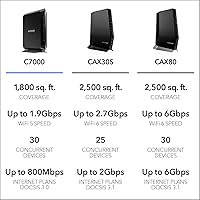
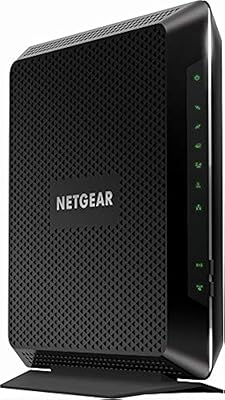
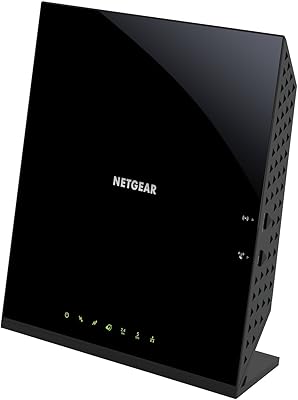
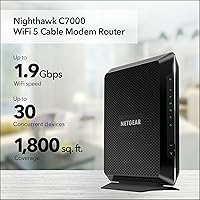
The NETGEAR Nighthawk C7000 AC1900 Modem Router Combo is a single-box solution that replaces two separate pieces of hardware — your cable modem and your Wi-Fi router — under one roof. It has been around since 2015, which makes it a veteran in the combo modem-router space, and it still holds up for a lot of households. One important thing to know upfront: this modem-router combo only works with cable providers like Xfinity, Spectrum, and Cox. If you're on Verizon, AT&T, a DSL connection, or any bundled voice plan, it simply won't work for you. For everyone else, it covers up to 1,800 square feet and can handle around 30 connected devices at once.
Features & Benefits

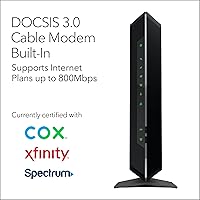
The Nighthawk C7000 runs on DOCSIS 3.0 with 24x8 channel bonding, meaning it handles cable internet plans up to around 800Mbps without issue. The dual-band AC1900 Wi-Fi delivers combined wireless speeds up to 1.9Gbps across both 2.4GHz and 5GHz bands — plenty for streaming, video calls, and casual gaming happening simultaneously. You get four Gigabit Ethernet ports for wired devices, plus a USB 2.0 port for sharing a printer or external drive. Security is handled out of the box with WPA2, a double firewall, and DoS protection, while a 30-day trial of NETGEAR Armor adds real-time threat monitoring if you want that extra layer of peace of mind.

Best For

This NETGEAR combo unit is a solid pick for cable internet subscribers on Xfinity, Spectrum, or Cox who are tired of paying a monthly rental fee for equipment they'll never actually own. If your ISP plan tops out around 500–800Mbps, it handles that range comfortably. The 1,800 square feet of Wi-Fi coverage works well for apartments, condos, and smaller single-story homes — don't expect it to blanket a large two-story house without dead spots. It's also a good fit for households that want one less device to manage and configure. If you're already targeting gigabit speeds or Wi-Fi 6, though, a newer model would serve you better.

User Feedback

With a 4.2-star rating across nearly 6,000 reviews, the Nighthawk C7000 has earned real goodwill from everyday users. Quick, easy setup comes up constantly — most people get it activated with their cable provider in under 10 minutes. Stable connections and solid mid-range coverage in average-sized homes are the most repeated positives. On the flip side, some owners note the unit runs noticeably warm, so giving it open shelf space is a smart idea. A fair number of reviewers also flag that NETGEAR Armor costs extra after the initial trial period. And if you're on a gigabit plan, the DOCSIS 3.0 ceiling is a real limitation worth weighing before you buy.

Pros

  • Eliminates monthly cable equipment rental fees, typically paying for itself within one to two years.
  • Setup takes under 10 minutes for most Xfinity, Spectrum, and Cox subscribers.
  • Dual-band AC1900 Wi-Fi handles simultaneous streaming, browsing, and gaming across multiple devices reliably.
  • Four Gigabit Ethernet ports cover wired desktop, console, TV, and NAS connections without needing a separate switch.
  • Security essentials — WPA2, double firewall, and DoS protection — are active right out of the box.
  • Automatic firmware updates keep the Nighthawk C7000 patched without requiring manual intervention.
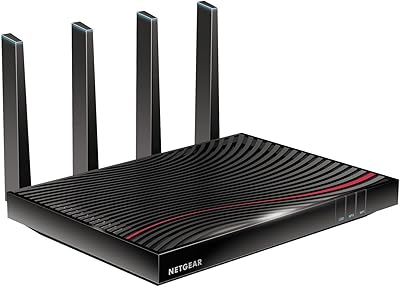
  • Compact, flat form factor fits neatly on a shelf or inside an entertainment center without dominating the space.
  • Consistent long-term reliability reported by users running the unit for three or more years without hardware failure.
  • Broad certification across major cable providers reduces activation friction and provider support headaches.

Cons

  • DOCSIS 3.0 caps real-world throughput, making this modem-router combo a poor fit for gigabit cable plans.
  • Wi-Fi coverage thins out noticeably in two-story homes or layouts with concrete and brick walls.
  • The NETGEAR Armor security subscription adds ongoing cost that buyers often do not anticipate after the 30-day trial ends.
  • The USB 2.0 port is too slow for practical NAS or high-volume file-sharing use cases.
  • The router admin interface and companion app feel dated compared to current competitor offerings.
  • Advanced routing features like QoS customization and VLAN support are limited for power users.
  • The unit runs warm under sustained load and requires open ventilation to avoid potential stability issues.
  • Firmware and software support for this aging platform has slowed, with fewer meaningful updates over recent years.
  • Provider incompatibility with DSL, fiber, and bundled voice plans catches uninformed buyers off guard at the point of purchase.

Ratings

The NETGEAR Nighthawk C7000 AC1900 Modem Router Combo has been put through its paces by thousands of real cable internet subscribers, and our AI-driven scoring system has analyzed verified global reviews — actively filtering out incentivized, bot-generated, and spam submissions — to produce the balanced scorecard below. The ratings reflect genuine day-to-day experiences from households of different sizes and usage patterns, capturing both what this unit does well and where it falls short for certain buyers.
Ease of Setup
91%
Getting this unit online is refreshingly straightforward. Most cable subscribers report completing the entire activation process — from unboxing to a live internet connection — in under 10 minutes, with Xfinity and Spectrum activations going particularly smoothly thanks to the Nighthawk C7000's broad certification status.
A small portion of users hit snags during provider activation calls, which is more a cable company process issue than a hardware flaw. Those switching from a provider-issued combo unit occasionally report needing a technician callback to fully migrate their account.
Wi-Fi Speed & Performance
78%
22%
For everyday cable plans in the 200–600Mbps range, the dual-band AC1900 radio delivers consistent throughput on both the 2.4GHz and 5GHz bands. Households running multiple 4K streams, video calls, and gaming sessions simultaneously generally find the wireless performance more than adequate.
On plans pushing 800Mbps or above, the Wi-Fi ceiling becomes noticeable. Users on newer high-speed tiers often report that real-world wireless speeds plateau well before their plan's theoretical maximum, which points to the aging AC1900 radio architecture as the limiting factor.
Modem Speed & DOCSIS Performance
71%
29%
The DOCSIS 3.0 engine with 24x8 channel bonding handles mid-tier cable plans reliably. For subscribers on plans up to around 600–700Mbps, wired connections through the Ethernet ports consistently deliver near line-rate speeds with very stable latency under normal load.
DOCSIS 3.0 is genuinely aging technology, and buyers on gigabit cable plans will hit a hard ceiling. Reviewers who upgraded to gigabit service while still using this unit found their wired speeds capped well below their plan's advertised throughput, making an upgrade to a DOCSIS 3.1 device necessary.
Wi-Fi Coverage & Range
74%
26%
In apartments, condos, and single-story homes up to roughly 1,500–1,800 square feet, the Nighthawk C7000 provides solid, gap-free coverage. Users in open-plan layouts especially praise the consistency of the 5GHz band when devices are within a reasonable distance of the unit.
In two-story homes or spaces with thick concrete or brick walls, dead zones crop up more than expected. Coverage starts thinning noticeably past 1,200 square feet in challenging layouts, and several reviewers in larger homes resorted to adding a separate access point to compensate.
Build Quality & Design
76%
24%
The flat, horizontal form factor is practical for shelf or entertainment center placement, and the chassis feels sturdy for a device in this category. The matte black finish resists fingerprints well and blends into most home setups without drawing attention.
The unit runs warm under sustained load, which is a recurring observation in user feedback. Without adequate ventilation around it — particularly if tucked into a closed cabinet — some owners report the heat becoming noticeable enough to affect long-term reliability concerns.
Connected Device Handling
79%
21%
Homes running 15 to 25 simultaneously connected devices — phones, tablets, smart TVs, laptops, and game consoles — report no meaningful performance degradation under typical mixed loads. The dual-band setup helps distribute traffic reasonably well across device types.
When device counts push toward the upper limit of 30, especially in households with heavy simultaneous usage across all connections, some users notice increased latency and occasional drops on the 2.4GHz band. Heavy smart home deployments with 30-plus devices are better served by a more modern platform.
Security Features
77%
23%
WPA2 encryption, a double firewall, and DoS protection are all active straight out of the box — no digging through menus required. Automatic firmware updates mean most users are protected against known vulnerabilities without having to remember to patch manually.
The NETGEAR Armor subscription, which adds real-time threat detection and VPN access, reverts to a paid tier after 30 days. Buyers who assumed ongoing protection was included in the hardware cost felt misled, and the recurring cost adds up when factored into the total ownership picture.
Value for Money
83%
The math on rental fee savings is compelling for most cable subscribers. Over 18 to 24 months, this modem-router combo typically pays for itself entirely compared to paying a monthly equipment rental charge — a calculation that resonates strongly with long-term Xfinity, Spectrum, and Cox customers.
Given that it is a 2015-era device sold at a mid-range price in 2024, the value proposition weakens if your provider plan is already at or approaching gigabit speeds. Paying a comparable amount for a DOCSIS 3.1 combo unit starts making more financial sense at that tier.
Router Feature Set
68%
32%
The four Gigabit Ethernet ports cover most standard wired setups well — desktop PCs, gaming consoles, smart TVs, and NAS drives all connect without issue. The USB 2.0 port adds basic printer or external storage sharing, which is a genuinely useful convenience for small home offices.
Advanced router features like QoS customization, robust parental controls, and VLAN support are limited compared to standalone routers in the same price tier. Power users who want fine-grained traffic management or guest network options may find the interface and feature depth underwhelming.
ISP Compatibility
72%
28%
Certified compatibility with Xfinity, Spectrum, and Cox — three of the largest cable providers in the US — means the activation process is well-documented and provider support lines are familiar with the hardware. Xfinity certification in particular is notably smooth.
The compatibility wall is real and unforgiving. Anyone on Verizon Fios, AT&T, CenturyLink, any DSL provider, or a bundled voice plan will find this unit entirely useless, and that incompatibility is not always obvious at the point of purchase for less experienced buyers.
Thermal Management
61%
39%
Under normal loads in a well-ventilated space, the unit manages its operating temperature adequately and runs without issue. Users who place it on an open shelf with airflow on all sides report no heat-related problems even during extended high-usage periods.
Tucked into a TV stand cubby or a closed media cabinet, the warmth it generates becomes a legitimate concern. A subset of long-term owners report unexpected reboots or Wi-Fi instability after extended use in confined spaces, which they traced back to heat buildup rather than firmware issues.
Long-Term Reliability
81%
19%
The volume of reviewers who report years of trouble-free operation is notable. Many verified purchasers have been running this unit continuously for three or more years without experiencing hardware failures, which speaks well to the build consistency coming out of NETGEAR's manufacturing.
As with any networking hardware approaching a decade of market life, firmware support and feature updates are slowing down. A handful of users report that NETGEAR's support responsiveness for this older model is not what it once was, and replacement parts or warranty resolutions can be slower to arrange.
Software & App Experience
63%
37%
The NETGEAR Nighthawk app provides basic network management — device visibility, speed tests, and simple access controls — without requiring login to a web admin panel. For non-technical users who just want a quick network check, it covers the basics adequately.
The app experience draws mixed reactions. Several reviewers flag that the interface feels dated and that pushing users toward NETGEAR Armor subscriptions within the app feels intrusive. Advanced settings still require navigating the browser-based admin panel, which is clunky by modern router standards.
Port Selection & Connectivity
75%
25%
Four Gigabit LAN ports handle the wired device needs of most households without requiring an additional switch. Having dedicated ports for a desktop, a gaming console, a smart TV, and a NAS simultaneously is a practical setup that many reviewers specifically call out as a genuine convenience.
A single USB 2.0 port feels limited by current standards — USB 3.0 has been the baseline for meaningful NAS or printer-sharing throughput for years. File transfer speeds over the USB port are slow enough that users with heavier storage-sharing needs generally look elsewhere.

Suitable for:

The NETGEAR Nighthawk C7000 AC1900 Modem Router Combo is a well-matched choice for cable internet subscribers on Xfinity, Spectrum, or Cox who are currently renting equipment from their provider and want to stop paying that monthly fee for good. If your household runs a cable plan anywhere between 200Mbps and 800Mbps, this modem-router combo handles that range comfortably without requiring any technical expertise to get running. It works particularly well in apartments, condos, and single-story homes up to around 1,800 square feet, where its dual-band Wi-Fi can realistically reach every corner without dead zones. Families or shared households running 10 to 25 connected devices — a mix of phones, laptops, smart TVs, and game consoles — will find the performance more than sufficient for simultaneous everyday use. It is also a smart pick for anyone who simply wants one reliable box to manage instead of juggling a separate modem and router, especially non-technical users who value straightforward setup over advanced configuration options.
Not suitable for:

The NETGEAR Nighthawk C7000 AC1900 Modem Router Combo is the wrong choice for anyone not on a traditional cable internet plan — if you are with Verizon Fios, AT&T, a DSL provider, or have a bundled voice service attached to your account, this unit will not work for your setup, full stop. Buyers who have already upgraded to gigabit internet speeds, or who are planning to do so in the near future, should look elsewhere: the DOCSIS 3.0 modem inside has a real throughput ceiling that will leave a meaningful portion of your plan's capacity untapped. Households spread across larger two-story homes or properties with dense walls will likely need a mesh system or additional access points, since the Wi-Fi range of 1,800 square feet has genuine limits in challenging layouts. Power users who want granular router controls — detailed QoS rules, robust VLAN support, or deep parental filtering — will find the feature set thin compared to a dedicated standalone router. And if you are eyeing Wi-Fi 6 for its efficiency gains with a dense smart home device load, this aging Wi-Fi 5 platform simply does not offer that.

Specifications

  • Wi-Fi Standard: The unit uses 802.11ac (Wi-Fi 5) with dual-band operation across both the 2.4GHz and 5GHz frequency bands.
  • Max Wi-Fi Speed: Combined wireless throughput is rated at AC1900, delivering up to 1.9Gbps across both bands under ideal conditions.
  • Modem Standard: The integrated cable modem operates on DOCSIS 3.0 with 24x8 channel bonding for downstream and upstream traffic.
  • Max ISP Speed: The modem is certified to support cable internet plans up to 800Mbps, making it unsuitable for gigabit-tier subscriptions.
  • Ethernet Ports: Four Gigabit Ethernet LAN ports (10/100/1000 Mbps) are available for wired device connections such as desktop PCs, consoles, and smart TVs.
  • USB Port: One USB 2.0 port is included for basic printer sharing or external storage access across the local network.
  • Wi-Fi Coverage: NETGEAR rates wireless coverage at up to 1,800 square feet under typical open-plan residential conditions.
  • Device Capacity: The router supports up to 30 simultaneously connected wireless and wired devices across the combined network.
  • Security Protocols: Built-in security includes WPA2 wireless encryption, a double firewall, and Denial-of-Service (DoS) attack protection enabled by default.
  • NETGEAR Armor: A 30-day trial of NETGEAR Armor is included, providing real-time threat detection, VPN access, and active malware protection — a paid subscription is required afterward.
  • Firmware Updates: The device supports automatic over-the-air firmware updates to maintain security patches without requiring manual user intervention.
  • Dimensions: The unit measures 9.66 x 8.31 x 1.7 inches and is designed for horizontal placement on a shelf or entertainment surface.
  • Color & Finish: The chassis is finished in matte black, which resists surface fingerprints and suits most home or office environments.
  • Compatible Providers: The modem is certified for use with major U.S. cable providers including Xfinity by Comcast, Spectrum, and Cox — DSL, fiber, and bundled voice services are not supported.
  • Included in Box: The package includes the modem-router unit, a network (Ethernet) cable, and a power adapter.
  • Memory Type: The device uses DDR DRAM for onboard memory to manage routing and modem operations.
  • Power Input: The unit operates at 24 volts via the included power adapter.
  • Amazon Rating: The product holds a 4.2 out of 5 star rating based on approximately 5,959 verified customer ratings on Amazon.

Related Reviews

NETGEAR Nighthawk CAX30
79%
88%
Setup & Installation
83%
WiFi Speed & Performance
71%
WiFi Coverage & Range
91%
Modem Reliability & Uptime
78%
Value for Money
More
NETGEAR Nighthawk C7800 Cable Modem WiFi Router Combo
84%
88%
Wi-Fi Performance
75%
Ease of Setup
92%
Speed and Reliability
85%
Compatibility with ISPs
90%
Value for Money
More
NETGEAR Nighthawk C7100V Cable Modem WiFi Router Combo with Voice
86%
92%
Ease of Setup
85%
WiFi Performance
91%
Value for Money
89%
Stability for Gaming & Streaming
88%
VoIP Feature
More
NETGEAR Nighthawk C6900-100NAS Dual Band AC1900 Cable Modem Router
85%
91%
Wi-Fi Performance
89%
Gaming and Streaming Speed
87%
Setup and Installation
92%
Value for Money
80%
Reliability and Stability
More
NETGEAR C6300 Cable Modem WiFi Router Combo
85%
92%
Value for Money
88%
WiFi Performance
90%
Ease of Setup
85%
Device Support
91%
Gaming Performance
More
NETGEAR Nighthawk AC1900 Smart WiFi Router R6900
83%
85%
Performance
88%
Range & Coverage
91%
Ease of Setup
80%
Gaming Performance
87%
Streaming Quality
More
NETGEAR C6250 Cable Modem Wi-Fi Router Combo
80%
87%
Performance
94%
Ease of Setup
82%
Wi-Fi Coverage
91%
ISP Compatibility
88%
Value for Money
More
NETGEAR Orbi CBK752 Cable Modem Router Combo Mesh System
88%
88%
Performance
93%
Ease of Setup
85%
WiFi Range & Coverage
90%
Speed (DOCSIS 3.1 Support)
89%
App & Software Experience
More
Netgear Nighthawk AX5200 Router
87%
92%
Wi-Fi Performance
89%
Range & Coverage
84%
Setup & Installation
88%
Reliability & Stability
91%
Gaming & Streaming Experience
More
NETGEAR C7500 Modem Router
81%
89%
Performance with Cable Plans
91%
WiFi Coverage
72%
Ease of Setup
88%
Device Connectivity (Number of Devices Supported)
85%
Value for Money
More

FAQ

Yes, the Nighthawk C7000 is officially certified for Xfinity by Comcast, which is one of the smoothest activations users report. Just call Xfinity with your modem's MAC address and CMAC number — both printed on the label on the bottom of the unit — and they will provision it to your account, usually within a few minutes.

No, it does not. This modem-router combo is built exclusively for traditional cable internet delivered over coaxial cable. Verizon Fios and AT&T use fiber-optic infrastructure that requires completely different equipment, so this unit would be incompatible from the ground up.

Honestly, no. The DOCSIS 3.0 modem inside this unit has a practical throughput ceiling that falls well short of true gigabit speeds. If your cable plan is at or approaching 1Gbps, you will want a DOCSIS 3.1 modem-router combo instead to actually get what you are paying your provider for.

After you activate the NETGEAR Nighthawk C7000 AC1900 Modem Router Combo with your cable provider and confirm your connection is working, call your provider and inform them you are now using your own equipment. They will remove the rental charge from your next billing cycle and arrange for you to return their equipment — usually by dropping it off at a local store or sending it back by mail.
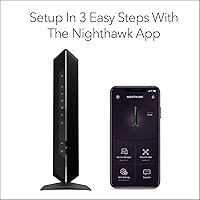
For most people, it genuinely is under 10 minutes. You connect the coax cable from the wall, plug in power, connect your device via Ethernet or Wi-Fi, and then call your provider to activate the new modem on your account. The hardware side is quick — the wait time on the provider's activation line is usually the longest part.

It might cover most of it, but you should go in with realistic expectations. The rated 1,800 square feet applies to reasonably open, single-level layouts. A two-story home with walls in between will likely have weaker signal on the far end of the upper floor. A Wi-Fi extender or a mesh node added to your setup would solve that reliably.

Running warm is normal for this device and is noted by a lot of long-term users. What you want to avoid is placing it inside a closed cabinet or a tight cubby with no airflow around it. Give it open space on a shelf where air can circulate around the vents, and the heat stays at a manageable level without affecting performance.

Once the trial period is up, Armor reverts to a free tier with limited functionality, and the more advanced features — real-time threat scanning, VPN, and active malware protection — require a paid annual subscription. It is worth deciding ahead of time whether you plan to pay for it, since some buyers are surprised when the trial ends.

Yes, you can put the built-in router into bridge mode and run your own separate router behind it. That setup gives you a clean pass-through from the cable modem to your preferred router without dealing with double NAT issues. It is a reasonably common setup for users who already own a high-end router they prefer over the built-in one.

Updates still come through periodically, but the frequency has slowed compared to earlier years given the age of the platform. The automatic update feature means most users stay current without doing anything manually, but if you are someone who closely tracks firmware changelogs and security patches, you should know this device does not receive the same update cadence as NETGEAR's newer lineup.