Overview

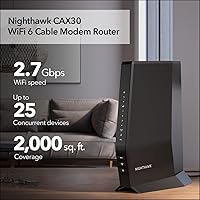
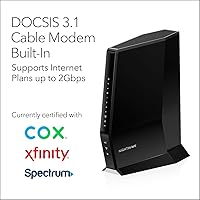
The NETGEAR Nighthawk CAX30 does something most home networking gear refuses to do: it combines a capable cable modem and a WiFi 6 router into one box without cutting obvious corners. For anyone still renting a modem from their ISP every month, that rental fee quietly adds up — often well over a hundred dollars a year — so owning your own hardware just makes financial sense over time. This all-in-one cable gateway works with major providers like Xfinity, Spectrum, and Cox, but it is absolutely not compatible with DSL, fiber, Verizon, AT&T, or any bundled voice plan. Built around DOCSIS 3.1, it can handle cable plans pushing toward 2Gbps, giving it useful headroom as providers roll out faster tiers. It is a solid fit for mid-size homes, though it is not a mesh system.
Features & Benefits

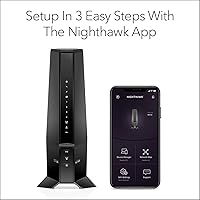
At its core, this modem router combo runs WiFi 6 across dual bands, handling up to 25 devices without the congestion you would expect from older hardware. The real advantage on the modem side is 32x8 channel bonding combined with DOCSIS 3.1, which means the connection has far more lanes to pull data through than entry-level modems. Four Gigabit Ethernet ports cover wired needs, and port aggregation lets you bond two of them for faster throughput to a NAS or capable switch. There is also a USB 3.0 port for attaching a storage drive. Setup runs through the Nighthawk app, which is genuinely straightforward for most users, and the app handles ongoing network management without requiring you to dig into a browser-based interface.

Best For

This all-in-one cable gateway makes the most sense for households on Xfinity, Spectrum, Cox, or another major cable provider who are tired of paying a monthly rental fee for equipment they will never own. It handles homes up to around 2,000 square feet reasonably well, though open floor plans fare better than multi-story buildings with thick walls. Gamers and remote workers benefit from the wired port options and the low-latency characteristics of WiFi 6. If your plan runs up to gigabit speeds, this hardware can keep up. What it is not built for: DSL subscribers, fiber customers, Verizon users, or anyone with a bundled voice plan should look elsewhere — compatibility matters here, and buying the wrong modem is an expensive mistake.

User Feedback

Most buyers come away satisfied — the setup process via the app consistently draws positive comments, and the speed improvement compared to ISP-issued gear is something many reviewers mention right away. Long-term reliability also holds up well; owners frequently report months of stable uptime with almost no need to restart the unit. That said, not everything lands perfectly. The 2,000 square foot coverage estimate reads more generously than real-world walls and floors allow, so larger or complex homes may feel the limits. A recurring frustration is the Armor subscription — it comes included for 30 days, but plenty of buyers are caught off guard when it switches to a paid tier. A small number of users also note a brief activation delay when replacing an ISP-rented modem.

Pros

  • Eliminates monthly ISP modem rental fees, which adds up to real savings within the first year or two.
  • DOCSIS 3.1 with 32x8 channel bonding gives the modem side substantial headroom for faster cable plans in the future.
  • WiFi 6 support means noticeably better performance in busy households with many devices active simultaneously.
  • Setup via the Nighthawk app is fast and approachable, even for users replacing ISP hardware for the first time.
  • Long-term reliability is a consistent highlight — many owners report months of stable uptime with zero unplanned reboots.
  • Four Gigabit Ethernet ports with port aggregation support covers most wired device needs without requiring an external switch.
  • The USB 3.0 port adds a useful option for attaching shared storage directly to the network.
  • Combines modem and router in one box, reducing cable clutter, power adapters, and overall desk or shelf footprint.
  • Handles cable plans up to 2Gbps, so it will not become a bottleneck as providers push speeds higher over time.

Cons

  • The advertised 2,000 sq. ft. coverage claim is optimistic — multi-story homes and older construction often fall short.
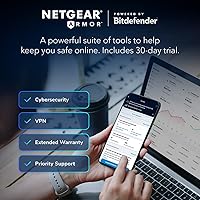
  • NETGEAR Armor reverts to a paid subscription after the 30-day trial, a detail many buyers only discover after purchase.
  • ISP activation after replacing a rented modem can take hours in some cases, leaving households temporarily without service.
  • The Nighthawk app is easy but shallow — advanced network controls and detailed traffic management are notably absent.
  • Dual-band only means no dedicated 6 GHz band, so WiFi 6E devices will not connect at their full potential.
  • Four Ethernet ports fills up quickly in homes with multiple wired devices, often requiring an external switch anyway.
  • A small but recurring pattern of units developing connectivity sync issues after extended months of continuous use.
  • Buyers on slower or budget cable plans are unlikely to extract enough value to justify the premium price point.
  • Browser-based admin interface feels dated and is less intuitive than competing routers at a similar price tier.

Ratings

The NETGEAR Nighthawk CAX30 earns a strong overall position in the modem router combo category, backed by analysis of verified buyer reviews from across the globe — with spam, bot activity, and incentivized feedback actively filtered out. Scores reflect what real cable internet subscribers actually experienced day-to-day, from first-time setup through months of live use. Both the standout strengths and the genuine frustrations are represented here without sugarcoating.
Setup & Installation
88%
The Nighthawk app guides most users through activation in under 15 minutes, even those who have never swapped out ISP-provided equipment before. Buyers switching from a rented modem consistently describe the process as far less intimidating than expected, with clear on-screen prompts covering each step.
A noticeable subset of users — particularly those on Xfinity — report a waiting period of anywhere from a few minutes to several hours for ISP-side modem authorization, which can be confusing if you expect instant connectivity. A handful of Cox subscribers noted needing a call to customer support to complete activation.
WiFi Speed & Performance
83%
Most users on gigabit cable plans report a clear, measurable speed improvement compared to the gateway hardware their ISP had been renting them. The WiFi 6 radio handles a busy household — multiple 4K streams, video calls, and active gaming sessions running simultaneously — without obvious slowdowns.
The 5 GHz band, while fast when you are close to the unit, drops off more noticeably with distance or through walls than some buyers expect at this price tier. Users in older homes with plaster walls or multi-story layouts report the 2.4 GHz band carrying more load than intended, limiting real-world peak speeds.
WiFi Coverage & Range
71%
29%
In open-plan apartments and single-floor homes under 1,500 square feet, coverage is generally consistent and dead zones are rare. Users in this kind of layout regularly report strong signal reaching every corner without any need for a range extender.
The advertised 2,000 square foot figure reads generously for anyone with a two-story home, a basement, or older construction materials in the walls. Several buyers in mid-size houses found signal strength at the far end noticeably weaker than anticipated, and a few added a separate access point to compensate.
Modem Reliability & Uptime
91%
Long-term owners are among the most satisfied voices in the review pool — many report running this all-in-one cable gateway for six months or more without a single unplanned reboot. That kind of quiet, consistent uptime is genuinely valuable for anyone working from home or relying on a stable connection for online gaming.
A small percentage of units appear to develop intermittent connectivity issues after extended use, often described as the modem losing sync with the ISP and requiring a manual power cycle. It is not widespread, but the pattern appears often enough in long-term reviews to be worth noting.
Value for Money
78%
22%
For cable subscribers who have been paying monthly rental fees on ISP hardware for years, the math on owning this modem router combo typically works out favorably within the first year or two of use. Getting a modern DOCSIS 3.1 modem and a WiFi 6 router in one box, rather than buying both separately, is a legitimate cost advantage.
The upfront cost is high enough that buyers on slower or lower-tier cable plans may struggle to justify it — you are paying for 2Gbps-capable hardware that only delivers full value if your plan can actually push those speeds. At that price, some buyers feel competing combo units offer comparable performance for meaningfully less.
Wired Connectivity
86%
Four Gigabit Ethernet ports give wired device users real flexibility — desktop PCs, game consoles, smart TVs, and a NAS can all connect without a switch. Port aggregation support is a feature most competing combo units in this class skip entirely, and it makes a practical difference for anyone with a multi-drive NAS or a managed switch downstream.
Four ports is functional but starts to feel tight once you account for a desktop, a console, a smart TV, and a network printer. Users with more demanding home lab setups or a lot of wired devices still end up needing an external switch, which partially undermines the all-in-one appeal.
Device Capacity & Network Management
79%
21%
In households with smartphones, laptops, tablets, smart home devices, and a streaming stick or two all active at once, this modem router combo handles the load without obvious degradation in quality. The Nighthawk app makes it straightforward to monitor connected devices and apply basic controls.
Power users looking for advanced QoS controls, VLAN support, or detailed traffic analytics will find the management features too basic. The app is friendly but shallow, and the browser-based interface does not offer much more depth for those who want granular control over their network.
Security Features
64%
36%
The included NETGEAR Armor trial gives users a meaningful taste of active threat protection — malware blocking, intrusion detection, and device-level vulnerability scanning all function as advertised during the trial period. For users who do activate and pay for the subscription, the protection layer is considered genuinely useful.
The 30-day trial ends and a paid subscription kicks in with no graceful fallback — buyers who do not want to pay are left with a stripped-down security experience and no clear free alternative built into the device. Many reviewers felt the feature should be disclosed more prominently before purchase, and the surprise billing catches people off guard regularly.
ISP Compatibility
74%
26%
For Xfinity, Spectrum, and Cox subscribers on standard cable internet plans, compatibility is well-established and the activation experience is generally predictable. NETGEAR maintains an updated compatibility list, and most buyers on supported plans report no friction getting the hardware recognized by their provider.
The compatibility fence is strict and unforgiving — Verizon, AT&T, CenturyLink, DSL users, DirecTV, DISH, and anyone with a bundled voice package simply cannot use this hardware, full stop. Buyers who miss this detail and purchase without checking return rates are higher than average for this product.
Build Quality & Design
77%
23%
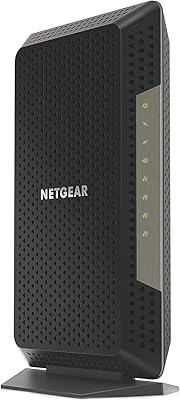
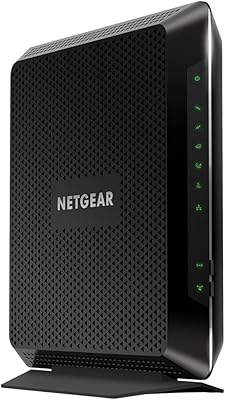
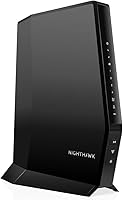
The unit feels solid and well-constructed, and the vertical standing design with angled vents manages heat effectively even during extended high-load periods. Most buyers report no heat-related performance issues, which matters for hardware that runs continuously.
The all-black tower design is functional but uninspiring, and at nearly four pounds it is not particularly easy to tuck away or mount discreetly. A few users noted that the status LEDs are bright enough to be distracting in a bedroom or media room setup at night.
App & User Interface
81%
19%
The Nighthawk app earns consistent praise for making initial setup approachable, especially for buyers who have never managed their own modem before. Routine tasks like checking connection status, running a speed test, and setting up a guest network are all handled without needing to open a browser.
Beyond the basics, the app feels underdeveloped — parental controls are limited, scheduling options are rudimentary, and the app occasionally loses connection to the device and requires a refresh. Users who want more control often resort to the web interface, which is more capable but noticeably dated in design.
Future-Proofing
84%
DOCSIS 3.1 with 32x8 channel bonding means this hardware is built well ahead of where most residential cable plans currently sit, so it should remain relevant as providers push speeds higher over the next several years. WiFi 6 support similarly ensures the router side will not become a bottleneck as more WiFi 6 client devices enter the home.
The dual-band configuration, while perfectly adequate now, does not offer a dedicated 6 GHz band — meaning it will not support WiFi 6E devices at their full capability. Buyers planning five-plus years out may eventually find the wireless side less competitive as the device ecosystem shifts toward tri-band and 6E standards.
Documentation & Support
67%
33%
The quick-start guide covers the basics cleanly, and NETGEAR's online knowledge base provides reasonably detailed walkthroughs for common configuration scenarios. Users who stick to standard setups rarely need to reach out for help at all.
Customer support quality gets inconsistent marks — phone and chat wait times draw recurring complaints, and a few users describe being bounced between NETGEAR and their ISP when troubleshooting activation issues. The printed documentation bundled in the box offers little help beyond the first setup.

Suitable for:

The NETGEAR Nighthawk CAX30 is a strong fit for cable internet subscribers — specifically those on Xfinity, Spectrum, Cox, or similar providers — who are paying a monthly rental fee for ISP-supplied hardware and want to stop. If you are on a gigabit or near-gigabit plan and have been stuck with a sluggish, aging gateway from your provider, the jump to this all-in-one unit is often immediately noticeable. It works well in single-floor homes and open apartments up to roughly 1,500 to 2,000 square feet where walls and floors are not a major obstacle. Remote workers who need a dependable, always-on connection will appreciate the rock-solid uptime most long-term owners report. Gamers benefit from the wired Ethernet options and the reduced latency characteristics that come with WiFi 6 compared to older wireless standards. It is also a reasonable choice for households juggling 15 to 25 connected devices — smart TVs, phones, tablets, and a laptop or two — without wanting to invest in a full mesh system.

Not suitable for:

The NETGEAR Nighthawk CAX30 is a hard no for anyone whose internet service runs over DSL, fiber, or a bundled voice package — the hardware simply will not work with those setups, and no amount of configuration changes that. Verizon Fios, AT&T, CenturyLink, DirecTV, and DISH customers should stop reading here and look elsewhere. Buyers in larger homes — think multi-story houses over 2,000 square feet with thick interior walls or a finished basement — may find the wireless coverage falls short of what they need, and adding extenders to compensate starts to undercut the value of an all-in-one device. If you want deep network control, like per-device QoS prioritization, VLAN segmentation, or detailed traffic logging, the management tools here are too basic for those demands. Budget-conscious buyers on slower cable plans, say 200 Mbps or below, are essentially overpaying for modem and WiFi capability they will never actually use. And anyone who wants true WiFi 6E support — the 6 GHz band — will need to look at newer tri-band hardware, since this unit is dual-band only.
Specifications

  • WiFi Standard: Uses 802.11ax (WiFi 6) technology across dual bands for improved speed and efficiency over older WiFi standards.
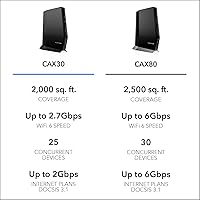
  • Max WiFi Speed: Rated at up to 2.7 Gbps combined across both bands under the AX2700 classification.
  • Frequency Bands: Dual-band operation covering both 2.4 GHz for range and 5 GHz for higher-speed connections.
  • WiFi Coverage: Designed to cover homes up to approximately 2,000 sq. ft., though real-world results vary by layout and construction materials.
  • Device Support: Supports up to 25 concurrently connected wireless devices without significant performance degradation under normal usage conditions.
  • Modem Standard: DOCSIS 3.1 modem technology supports cable internet plans up to 2 Gbps download speeds.
  • Channel Bonding: 32x8 channel bonding provides 32 downstream and 8 upstream channels for maximizing available bandwidth on cable connections.
  • Ethernet Ports: Equipped with four Gigabit Ethernet LAN ports for wired device connections at up to 1 Gbps per port.
  • Port Aggregation: Supports link aggregation by bonding two Ethernet ports together, allowing combined throughput to a compatible NAS or switch.
  • USB Port: Includes one USB 3.0 port for connecting an external storage drive or compatible peripheral for network-shared access.
  • Security Suite: Comes with a 30-day trial of NETGEAR Armor, an active threat protection service that requires a paid subscription to continue after the trial period.
  • Mobile App: Managed via the Nighthawk app, available for both iOS and Android, for setup, monitoring, and basic network configuration.
  • Compatible ISPs: Certified for use with major U.S. cable providers including Xfinity, Spectrum, and Cox, among other select cable services.
  • Incompatible With: Not compatible with Verizon, AT&T, CenturyLink, any DSL provider, DirecTV, DISH, or cable plans that include bundled voice service.
  • Dimensions: Unit measures 12.17 x 9.92 x 5.39 inches and is designed to stand vertically with integrated ventilation for passive cooling.
  • Weight: Weighs 3.87 pounds, making it a moderately sized desktop unit rather than a compact or travel-friendly device.
  • Color: Available in black with a matte finish that blends into most home office or living room setups without drawing attention.
  • In the Box: Package includes the modem router unit, one Ethernet cable, a power adapter, and a printed quick start guide.

Related Reviews

Netgear Nighthawk AX5200 Router
87%
92%
Wi-Fi Performance
89%
Range & Coverage
84%
Setup & Installation
88%
Reliability & Stability
91%
Gaming & Streaming Experience
More
NETGEAR Nighthawk CM1200
75%
88%
Internet Speed Performance
83%
Setup & Installation
63%
Long-Term Reliability
79%
Value for Money
71%
Compatibility & ISP Support
More
Netgear Nighthawk AX12 AX11000 Router
87%
92%
Wi-Fi Performance
89%
Speed & Latency
85%
Ease of Setup
88%
Build Quality
90%
Security Features
More
NETGEAR Nighthawk R7350 AC2400 Router
82%
88%
Performance for Gaming
85%
Streaming Performance
91%
Ease of Setup
82%
Wi-Fi Range and Coverage
84%
Reliability
More
NETGEAR Nighthawk RS90 WiFi 7 Router
79%
84%
Wireless Performance
67%
Coverage & Range
91%
Setup & Ease of Use
83%
Value for Money
78%
Build Quality & Design
More
NETGEAR Nighthawk RAXE500 WiFi 6E Router
86%
92%
WiFi Coverage
89%
Speed Performance
90%
Setup and Installation
86%
Security Features
91%
Device Support Capacity
More
NETGEAR Nighthawk BE9300 WiFi 7 Router
88%
94%
Wireless Performance
91%
Coverage Area
88%
Device Capacity
85%
Setup & Installation
90%
Security Features
More
Netgear Nighthawk R6700 AC1750 WiFi Router
86%
88%
Performance & Speed
91%
Security Features
85%
Ease of Setup
80%
Wi-Fi Range & Coverage
83%
Build Quality
More
NETGEAR Nighthawk RS200
81%
88%
Wireless Speed & Performance
71%
Coverage & Range
91%
Setup & Installation
63%
App & Firmware Experience
82%
Value for Money
More
NETGEAR Nighthawk R6900P Wi-Fi Router
85%
88%
Wi-Fi Speed & Performance
85%
Coverage Area
83%
Device Connectivity
91%
Setup & Installation
89%
Security Features
More

FAQ

Yes, the NETGEAR Nighthawk CAX30 is certified for use with Xfinity cable internet plans. Just make sure your plan is a standard cable internet service — if it includes a bundled voice or phone line, this unit will not support that portion of the service and you will need to keep a separate device or choose a different modem.

For most users, the physical setup takes about 10 to 15 minutes using the Nighthawk app. The trickier part is ISP activation — your cable provider needs to register the new modem on their end, and that process can take anywhere from a few minutes to a couple of hours depending on the provider. Xfinity tends to be faster via their app; Cox and Spectrum may occasionally require a quick call to customer support.

You will need to notify your ISP to swap the registered modem on your account — they need the new device's MAC address and serial number, both printed on the bottom of the unit. Some providers like Xfinity let you do this entirely through their self-service app or website, while others may ask you to call in. Either way, plan for a brief window of downtime during the transition.

After the 30-day trial, Armor switches to a paid subscription service and the active protection features — malware blocking, intrusion detection, and vulnerability scanning — stop working unless you subscribe. The modem router combo itself continues to function normally; you just lose the enhanced security layer. This is worth factoring in when comparing the real ongoing cost of this unit to alternatives.

It depends on the layout and construction of your home. In a typical two-story house with standard drywall, coverage on both floors is usually manageable if the unit is placed centrally. However, in older homes with plaster walls, brick construction, or a basement involved, signal strength can drop off more sharply than the advertised range suggests. If your home is over 2,000 sq. ft. or has multiple floors and thick walls, you may want to pair this with a wired access point or consider a mesh system instead.

Yes, the USB 3.0 port supports connecting an external storage drive, which can then be accessed by devices on your network as a basic NAS. It is a useful feature for light file sharing or media storage, though it is not designed for high-performance workloads. Do not expect NAS-grade read and write speeds — it is more suited to occasional access than continuous heavy use.

Yes, this all-in-one cable gateway is well-suited for Spectrum gigabit plans. The DOCSIS 3.1 modem technology has the headroom to handle those speeds, and the unit is on Spectrum's approved modem list. Keep in mind that actual speeds delivered over WiFi will depend on distance from the unit and the capabilities of your connected devices — a wired connection will always get you closest to your plan's full speed.

Port aggregation lets you bond two of the Ethernet ports together so a single device — typically a NAS or a managed network switch — sees them as one combined connection with higher throughput. For most households, it is not something you will ever use. But if you have a home NAS with a 2.5G or multi-gig port, or a managed switch downstream, it is a genuinely useful capability that most competing combo units in this category do not include.

Reasonably well. WiFi 6 includes OFDMA technology, which allows the router to serve multiple devices in the same transmission window instead of one at a time — that is the main practical benefit in a device-dense home. With 20-plus devices active, you are unlikely to notice congestion during typical use like streaming, browsing, and video calls running concurrently. Heavy simultaneous gaming and 4K streaming may push the limits in the largest households.

Technically it will work fine, but you would be paying a significant premium for modem and WiFi capabilities that your current plan cannot come close to utilizing. If you are locked into a slower tier for the foreseeable future, a less expensive DOCSIS 3.0 combo unit would serve you just as well at a lower upfront cost. The value of this modem router combo really starts to show on gigabit or multi-gigabit plans where the hardware's headroom actually gets used.