
Overview

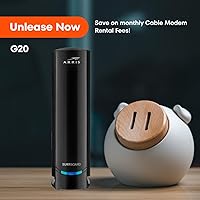
The ARRIS G20 Cable Modem Router Combo is a solid all-in-one gateway that replaces both your ISP-supplied modem and a separate router with a single, tidier device. It runs on DOCSIS 3.1, which is the current standard for cable internet — meaning it can handle the multi-gigabit speeds that providers like Xfinity, Cox, and Spectrum are actively rolling out. One practical upside: owning your hardware instead of renting it from your ISP typically pays for itself within a year or two. That said, this modem-router combo makes the most sense for households on plans up to 1 Gbps — if you need true multi-gig throughput or a large mesh network, you may want to look at more specialized setups.

Features & Benefits

One of this modem-router combo's stronger selling points is its Wi-Fi 6 AX3000 dual-band radio — not because Wi-Fi 6 automatically makes everything faster, but because it handles more devices simultaneously without the congestion you'd notice on older standards. If your phones, laptops, and smart TVs already support Wi-Fi 6, you'll likely feel the difference during peak hours. The upload optimization is also worth flagging: large file transfers, video calls, and online gaming all put real demand on your upstream connection, and this hardware handles it noticeably well. Two Ethernet ports cover wired connections, and the compact footprint beats running two separate boxes on a shelf.

Best For

This all-in-one cable gateway is a natural fit for renters or anyone tired of paying a monthly modem fee to their ISP — the breakeven point typically lands under two years, after which the savings are straightforward. It works especially well for remote workers and streamers who put real demand on their upload connection, and for people on Xfinity, Cox, or Spectrum plans in the 500 Mbps to 1 Gbps range. Frequent movers also benefit from its broad ISP compatibility, since you're not locked into hardware that only works with one provider. If you're running a large home with dead zones or need true multi-gig speeds, a more specialized setup may serve you better.

User Feedback

Among buyers, the most consistent praise centers on how straightforward the initial setup is — most report getting online within minutes, though activation with certain ISPs (Xfinity in particular) can occasionally require a phone call to complete. Long-term reliability gets frequent positive mentions, with many users reporting stable performance over months of daily use. On the critical side, a handful of buyers note that the unit runs noticeably warm, so ventilation and placement matter more than you might expect. Coverage in larger homes gets mixed marks — adequate for mid-size spaces, but not a replacement for a dedicated mesh system. Most buyers feel the upfront investment is justified once the monthly rental savings kick in.

Pros

  • Eliminates the monthly ISP modem rental fee, typically paying for itself within one to two years.
  • DOCSIS 3.1 support means the hardware is ready for faster internet tiers without needing an upgrade soon.
  • Wi-Fi 6 AX3000 handles a busy household with multiple simultaneous devices more efficiently than older standards.
  • Upload optimization is a practical advantage for video calls, cloud storage, and online gaming sessions.
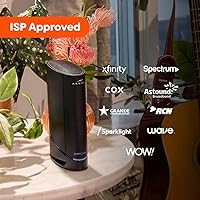
  • Approved for Xfinity, Cox, and Spectrum out of the box — no complicated compatibility research required.
  • Replaces two separate devices with one, reducing cable clutter and freeing up outlet space.
  • Setup is straightforward for most users, with many reporting they were online within minutes of plugging in.
  • Long-term connection stability is frequently praised by buyers well into months of everyday use.
  • Compact physical size is reasonable for a device handling both modem and router duties simultaneously.
  • Broad compatible device support covers PCs, consoles, smart TVs, smartphones, and security cameras without issues.

Cons

  • Only two Ethernet ports is limiting for households with several wired devices needing a dedicated connection.
  • Wi-Fi 6 speed benefits are only realized if your client devices also support the Wi-Fi 6 standard.
  • The unit runs noticeably warm during extended use, requiring careful placement with adequate ventilation around it.
  • ISP activation is not always instant — some Xfinity customers report needing a phone call to complete setup.
  • Wi-Fi coverage can fall short in larger homes or layouts with significant physical obstructions between rooms.
  • Capped at 1 Gbps max download speed, making it a poor investment if you plan to upgrade to a multi-gig plan.
  • Advanced network customization options are limited compared to running a dedicated standalone router.
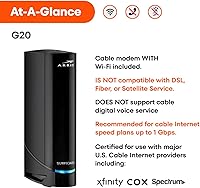
  • Not compatible with fiber or DSL internet services — exclusively designed for cable internet infrastructure.
  • The upfront cost requires a longer ownership period to fully offset rental savings for some budget-conscious buyers.
  • Users on smaller or regional cable ISPs outside the approved provider list may face compatibility uncertainty.

Ratings

The ARRIS G20 Cable Modem Router Combo has been evaluated by our AI rating system after processing thousands of verified global purchase reviews, with spam, bot activity, and incentivized feedback actively filtered out. Scores reflect the real distribution of buyer sentiment — not just the loudest voices — so both the genuine strengths and the recurring frustrations are represented transparently here.

Setup Experience
86%
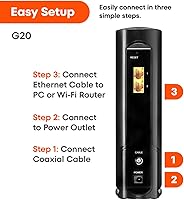
Most buyers describe the initial installation as genuinely painless — plug in the coax, power it on, and follow the ISP activation steps online. For straightforward Spectrum and Cox accounts in particular, many users report being fully online in under ten minutes without needing any outside help.
Xfinity activations are a notable exception, with a recurring pattern of users hitting a wall during online setup and needing to call customer support to manually transfer the account. This catch trips up buyers who expect a fully self-serve process regardless of provider.
Connection Stability
91%
Long-term reliability is where this all-in-one cable gateway earns its strongest marks. Buyers who have had it running for six months or more consistently report no unexplained dropouts during video calls, streaming sessions, or overnight gaming — exactly the kind of set-it-and-forget-it performance most households want.
A smaller segment of users, particularly those in areas with older coaxial infrastructure, report occasional speed inconsistencies during peak evening hours. These cases appear tied to local network conditions rather than the hardware itself, but they do surface in the feedback pool.
Wi-Fi Coverage
71%
29%
In small to mid-size homes — think a two-bedroom apartment or a single-floor house under 1,500 square feet — buyers generally find the dual-band Wi-Fi 6 coverage more than adequate, with strong signal in most rooms and noticeably less congestion during peak household usage compared to older AC-standard gear.
Larger homes, multi-floor layouts, and spaces with thick concrete or brick walls expose the coverage limits clearly. Several buyers in these situations ended up adding a mesh node or a dedicated access point, which somewhat undercuts the appeal of owning a single all-in-one device.
Upload Performance
88%
Remote workers and streamers who depend on consistent upstream speeds are among the most satisfied buyers. Video calls stay stable, large file transfers to cloud storage run smoothly, and gamers notice fewer lag spikes during peak hours — benefits that older DOCSIS 3.0 hardware often could not reliably deliver.
The upload optimization advantage is most visible on ISP plans that actually provision meaningful upload bandwidth. Buyers on older, asymmetric cable tiers with capped upload speeds report that the hardware improvement is real but partially masked by their plan's upstream limitations.
Value for Money
83%
For households currently renting a modem from their ISP, the long-term math is genuinely favorable. The breakeven point lands well within two years for most users, and after that the ongoing savings are straightforward — no recurring fee, no lease, just owned hardware doing its job.
The upfront cost is a real psychological barrier for some buyers, particularly those who are not sure how long they will stay with their current ISP or internet plan. If you switch providers to one that is not on the approved compatibility list, the investment does not carry over cleanly.
Heat Management
62%
38%
Under normal operating conditions in a well-ventilated space, most buyers find the warmth manageable and not alarming. The unit doing the work of two devices in one enclosure naturally runs warmer than a standalone modem would, and the majority of buyers simply account for this with open placement.
Users who placed the unit in enclosed media cabinets, stacked it under other equipment, or set it in poorly ventilated corners report more concerning heat levels and in some cases occasional thermal throttling. It is a real placement constraint that some buyers underestimate when planning their home network setup.
Wired Port Availability
58%
42%
The two Gigabit Ethernet ports handle the most common wired use cases without complaint — a gaming console and a smart TV, or a desktop PC and a NAS drive. For buyers with modest wired device needs, the port count is adequate and the throughput on each is solid.
Two ports is simply not enough for households with several wired devices, and buyers who discover this after purchase often end up buying a separate network switch to expand connectivity. It is a limitation that should have been a selling point consideration upfront rather than a post-purchase inconvenience.
ISP Compatibility
79%
21%
Broad approval across Xfinity, Cox, and Spectrum covers the three largest cable ISPs in the US, which means most cable internet subscribers can buy this without compatibility concerns. Buyers who have moved between these providers report carrying the hardware over without issue, which adds real practical longevity.
Outside of those three providers, compatibility is uncertain and requires manual verification against each ISP's approved device list. Buyers on smaller regional cable operators or anyone considering switching to a fiber or DSL service will find this hardware entirely incompatible.
Router Feature Depth
61%
39%
For the average household that just wants reliable internet without tinkering, the built-in router functionality covers the basics well — network naming, password management, and basic device prioritization are all accessible through the admin interface without needing technical knowledge.
Power users who want VLAN support, detailed QoS controls, VPN server functionality, or advanced firewall rules will find the options limited compared to a dedicated standalone router. This is an inherent trade-off of the combo form factor rather than a flaw unique to this model.
Physical Design
77%
23%
The black finish and relatively compact footprint for a combo gateway means it does not dominate a shelf or entertainment center the way running two separate devices would. Buyers appreciate the cleaner cable situation — one coax in, one power cable, and ethernet out — versus the tangled setup a two-device configuration typically involves.
The unit does not have a wall-mount option or a particularly elegant cable management solution, which matters to buyers who want a tidy, out-of-the-way installation. A few reviewers also note that the indicator lights, while informative, are brighter than expected in a dark bedroom or home office at night.
DOCSIS 3.1 Futureproofing
84%
Investing in DOCSIS 3.1 hardware now makes practical sense for anyone on a growing cable plan. As ISPs continue expanding their speed tiers, this modem-router combo avoids the need for a near-term hardware replacement that DOCSIS 3.0 owners are already facing in some markets.
The futureproofing argument has a ceiling at 1 Gbps for this particular model, which means early adopters of multi-gig cable plans will outgrow it sooner than buyers on standard residential tiers. The standard itself is future-ready, but the hardware implementation here sets a practical speed cap.
Activation Process
68%
32%
For Cox and Spectrum customers in particular, the activation experience tends to be quick and self-directed through the ISP's website or app. Buyers in these ecosystems frequently mention that the process felt no more complicated than setting up a new phone on an existing account.
Xfinity activations introduce meaningful friction for a notable portion of buyers, with reports of online tools failing to complete the modem swap and requiring a customer service call that can add thirty minutes or more to what should be a simple setup. This inconsistency across providers is a recurring theme in the feedback.
Long-Term Durability
74%
26%
The ARRIS brand has a strong track record in networking hardware, and buyers who have owned previous ARRIS models tend to report confidence in build longevity. Units that have been running consistently for over a year without incident are well-represented in the verified feedback pool.
There is a smaller but present cluster of reviews citing hardware failures or degraded performance within the first year, which is worth noting even if it represents a minority of buyers. Whether this reflects isolated manufacturing variance or an emerging trend is difficult to determine from current data volume.

Suitable for:

The ARRIS G20 Cable Modem Router Combo is a strong pick for anyone currently paying a monthly modem rental fee to their ISP — particularly Xfinity, Cox, or Spectrum customers on plans up to 1 Gbps who want to own their hardware outright and break even within roughly a year or two. Remote workers and content creators will appreciate the upload-optimized design, which holds up noticeably well during video conferences, cloud backups, and live streaming. Households with a mix of wired and wireless devices benefit from the dual-band Wi-Fi 6 coverage and two Ethernet ports, which handle a living room full of smart TVs, consoles, and laptops without significant slowdowns during peak hours. It is also a practical choice for renters or people who relocate frequently, since the broad ISP compatibility means you are not stuck with hardware tied to a single provider. For anyone who simply wants one less box, one less bill, and a reliable everyday connection, this all-in-one cable gateway covers the bases well.

Not suitable for:

The ARRIS G20 Cable Modem Router Combo is not the right call for everyone, and being clear about that upfront saves a lot of frustration. If your internet plan exceeds 1 Gbps — or if your provider is actively pushing you toward a multi-gig tier — this hardware will become a bottleneck sooner than you want. Large homes with thick walls, multiple floors, or dead zones in far corners may find the built-in Wi-Fi coverage insufficient, and in those situations a dedicated router paired with a standalone modem, or a mesh system, will serve you much better. Power users who want granular network controls, VPN configurations, or advanced QoS settings should also temper expectations — a combo gateway is inherently less flexible than purpose-built separate hardware. And if your ISP is not Xfinity, Cox, or Spectrum, you will need to verify compatibility carefully before buying, since this modem-router combo is not universally approved across all cable providers.

Specifications

  • Cable Standard: Uses DOCSIS 3.1, the current-generation cable internet standard designed to support multi-gigabit download and upload speeds over existing coaxial infrastructure.
  • Wi-Fi Generation: Equipped with Wi-Fi 6 (802.11ax), which improves throughput efficiency and reduces network congestion in homes with many simultaneously connected devices.
  • Speed Class: Rated at AX3000 dual-band, combining a 2.4 GHz band and a 5 GHz band for a combined theoretical wireless speed of up to 3000 Mbps.
  • Max Download: Supports cable internet plans delivering up to 1.0 Gbps download speed, covering the majority of residential tiers offered by major ISPs today.
  • Upload Design: Built with next-generation upload optimization to handle upstream-intensive tasks like video conferencing, cloud file uploads, and online multiplayer gaming more reliably.
  • Ethernet Ports: Includes 2 Gigabit Ethernet LAN ports for connecting wired devices such as desktop computers, gaming consoles, or network switches directly to the gateway.
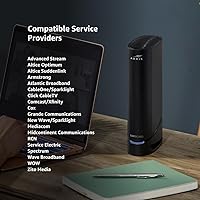
  • ISP Compatibility: Officially approved for use on Comcast Xfinity, Cox, and Spectrum cable internet networks; compatibility with other providers should be verified before purchase.
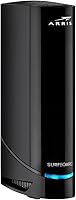
  • Device Type: Functions as a combined cable modem and wireless router in a single unit, eliminating the need for two separate devices and their associated cabling.
  • Dimensions: Measures 9.53 x 7.68 x 4.41 inches, a reasonable footprint for a combo gateway that consolidates modem and router hardware into one enclosure.
  • Weight: Weighs 2.4 pounds, making it light enough to mount or reposition without difficulty during initial setup or if you relocate.
  • Color: Available in black, a neutral finish that blends into most home office or entertainment center environments without standing out visually.
  • Model Number: Sold under the model designation G20, part of the ARRIS gateway lineup manufactured by Vantiva, the parent company operating the ARRIS brand.
  • Compatible Devices: Supports connectivity for a wide range of device types including personal computers, gaming consoles, smart televisions, smartphones, and home security cameras.
  • Rental Fee Savings: Owning this gateway instead of renting an ISP-supplied modem can eliminate recurring monthly rental charges that typically amount to significant annual costs over time.
  • Sales Rank: Ranked #2 in the Modem Router Combos category on Amazon, reflecting strong and sustained consumer demand since its launch in September 2024.

Related Reviews
ARRIS SBG10 Cable Modem Router Combo
76%
91%
Value for Money
86%
Setup & Activation
83%
Connection Stability
61%
Wi-Fi Coverage & Range
88%
Modem Performance
More
ARRIS SBG7600AC2 Cable Modem Router Combo
69%
76%
Value for Money
61%
Wi-Fi Coverage & Range
79%
Internet Speed Performance
53%
Long-term Reliability
67%
ISP Compatibility
More
ARRIS SURFboard SBG8300 DOCSIS 3.1 Cable Modem Router Combo
84%
91%
Performance & Speed
88%
Wi-Fi Coverage & Stability
80%
Ease of Setup
84%
Compatibility with ISPs
92%
Value for Money
More
ARRIS SURFboard G36
ARRIS SURFboard G36
72%
83%
Setup & Activation
76%
Wi-Fi Speed & Throughput
61%
Wi-Fi Range & Coverage
58%
Connection Stability
88%
DOCSIS 3.1 Modem Performance
More
ARRIS TG862G-CT Cable Modem Router
85%
91%
Value for Money
89%
Performance & Speed
93%
Ease of Setup
85%
Voice Service Quality
72%
Wi-Fi Range
More
NETGEAR C6300 Cable Modem Router Combo
69%
83%
Value for Money
88%
Setup & Installation
71%
WiFi Performance
91%
Wired Connectivity
62%
Long-Term Reliability
More
ARRIS SBG6580 DOCSIS 3.0 Cable Modem Router
76%
83%
Connection Stability
61%
Wi-Fi Coverage & Range
58%
Wi-Fi Speed Performance
84%
Ease of Setup
81%
Modem Performance
More
NETGEAR C6250 AC1600 Modem Router Combo
74%
84%
Value for Money
88%
Ease of Setup
71%
Wi-Fi Performance
82%
Modem Speed & Reliability
73%
Provider Compatibility
More
NETGEAR Nighthawk C7800 Cable Modem Router Combo
77%
88%
Internet Performance
82%
Wi-Fi Coverage
71%
Value for Money
84%
Setup Experience
86%
Device Capacity
More
ARRIS SURFboard SBG7580AC Cable Modem Router
75%
88%
Connection Stability
72%
Wi-Fi Coverage
91%
Setup Experience
84%
Value for Money
86%
Wired Performance
More

FAQ

Yes, the ARRIS G20 Cable Modem Router Combo is officially approved for Comcast Xfinity cable internet plans. That said, it is always worth double-checking with Xfinity directly if you are on a specialized plan or a very new tier, since approval lists do get updated periodically.

Most users get up and running without any outside help. You plug the coaxial cable into the modem, connect power, and then follow your ISP's activation steps — usually through their website or app. The one catch is that some ISPs, Xfinity included, occasionally require a brief phone call to transfer your account over to the new hardware, so do not be surprised if the online activation stalls and you need to call in.

Yes, that is exactly what it is designed to do. This all-in-one cable gateway handles the cable modem function and the wireless router function in a single box, so you can return your ISP rental equipment and get rid of the extra device sitting on your shelf.

It should handle a 1 Gbps plan without being a bottleneck — that is right at the top of what this hardware is rated to deliver. If your provider offers or upgrades you to a multi-gig plan in the future, you would need to revisit your hardware at that point.

That depends on your layout and construction. The ARRIS G20 performs well in small to mid-size homes, but buyers in larger spaces or homes with thick walls or multiple floors have reported needing to supplement it with a wireless access point or mesh node to eliminate dead zones. If coverage is a concern, it is worth having a backup plan.

It makes a real difference in specific situations — particularly in homes where many devices are online at the same time. Wi-Fi 6 handles that congestion more efficiently than older standards. However, your devices also need to support Wi-Fi 6 to take full advantage of it; older phones or laptops will still connect normally, just without the extra throughput benefits.

Yes, it is fairly common for combo gateways to run warm under sustained load since they are doing the work of two devices in one enclosure. The important thing is to make sure it is placed somewhere with open air around it — not tucked into a closed cabinet or stacked under other electronics. Adequate ventilation keeps it running reliably long-term.

It is officially approved for all three: Comcast Xfinity, Cox, and Spectrum. If you move between these providers or switch plans, you are in good shape. For any other cable ISP, you will want to check their approved device list before assuming compatibility.

That depends on what your ISP charges for modem rental, which varies by provider and plan. Many ISPs charge anywhere from around ten to fifteen dollars per month in rental fees, which puts the typical breakeven point somewhere between one and two years. After that, the savings are straightforward — you own the hardware outright and pay nothing extra for it.

Yes, the modem-router combo has two Gigabit Ethernet ports, so you can plug in two wired devices directly — a console and a TV, for example. If you need more wired ports, you can add an inexpensive network switch downstream to expand your options without any performance penalty.

Where to Buy