Overview

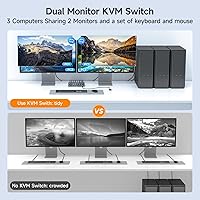
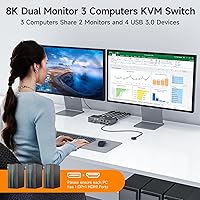
The AOOCOO 8K 3-Computer Dual Monitor KVM Switch tackles one of the more persistent frustrations of a multi-PC desk: three machines, two monitors, and no clean way to share them without a cable mess. This dual-monitor KVM switch puts all three computers under one keyboard and mouse, routing video to a shared pair of displays in either extended or copy mode. AOOCOO isn't a household name in the KVM space, but that's not unusual at this price tier — plenty of capable hardware comes from brands you've never heard of. The real test is whether the specs hold up in practice, and based on available data, the answer is mostly yes, with a few caveats worth knowing upfront.
Features & Benefits

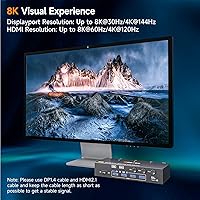
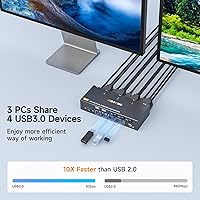
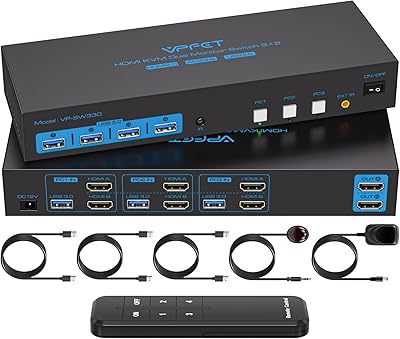
The headline spec is 8K resolution support, but read carefully before assuming both ports are equal. The HDMI output handles up to 8K@60Hz and 4K@120Hz, while the DisplayPort side reaches 4K@144Hz — genuinely useful for high-refresh gaming rigs. In practice, most users are on 1440p or 4K panels anyway, so the ceiling is rarely a limitation. Each connected computer needs both an HDMI and a DisplayPort output, which means discrete GPU setups work fine, but integrated-graphics-only machines may not support extended mode. The four USB 3.0 ports run at 5Gbps and handle keyboards, mice, printers, and scanners without issue. A wired remote and three USB 3.0 cables ship in the box, and the whole thing is completely driver-free from day one.

Best For

This 3-PC KVM hub is a natural fit for home office users who cycle between a work laptop, a personal desktop, and a third machine — all on the same dual-monitor setup. Developers and designers will appreciate skipping the cable-swap routine every time they need to change context. It also suits someone who games on one rig and works on another, since the 4K@144Hz DisplayPort output keeps high-refresh displays running properly. That said, it's not the right call for MacBook users or anyone relying on Thunderbolt-only ports. Every machine in the chain needs native HDMI and DisplayPort outputs — no adapters from VGA or DVI are supported.

User Feedback

Buyers generally report that the AOOCOO KVM switch works reliably once configured correctly, with the included wired remote receiving consistent praise for everyday convenience. The most common sticking point involves USB device recognition — if cables aren't connected to the KVM in the right order, peripherals simply won't register, which can mimic a hardware defect at first glance. Some users mention a brief signal dropout when switching between computers, though most consider it a minor annoyance rather than a dealbreaker. Build quality earns decent remarks given the compact footprint. The included cables do their job but feel short to some, prompting upgrades. Overall, feedback skews positive, particularly for users who take time to read the setup instructions before plugging everything in.

Pros

  • Controls three computers from one keyboard and mouse without touching a single cable
  • Supports 4K at 144Hz on the DisplayPort output — a genuine perk for high-refresh gaming setups
  • Ships with three USB 3.0 cables and a wired remote, so most buyers need nothing extra to get started
  • Completely driver-free setup means you are up and running in under twenty minutes on a standard Windows build
  • Four USB 3.0 ports handle keyboards, mice, printers, and scanners reliably at full 5Gbps throughput
  • Dual-color LED indicator instantly shows which machine is active without any guesswork
  • Both extended and copy display modes give the hub versatility beyond basic mirroring use cases
  • Compact form factor fits neatly on a desk without demanding dedicated shelf or rack space
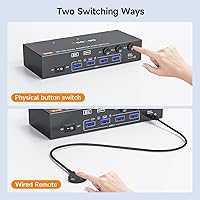
  • Front panel button and wired remote offer two switching methods to suit different desk layouts

Cons

  • USB peripherals stop responding entirely if cables are connected out of order during initial setup
  • Each connected computer must have both a native HDMI and a native DisplayPort output — no exceptions
  • The brief monitor blackout during every computer switch becomes noticeable and tiring with frequent use throughout the day
  • Included USB cables are only 1.5 meters, which falls short for desktop towers placed on the floor
  • Extended dual-monitor mode requires a discrete GPU on each machine, a requirement that catches many buyers off guard
  • MacBook and Thunderbolt-only laptop users have no supported path to compatibility with this hub
  • The 8K headline spec applies only to the HDMI port and only under specific conditions most users will never encounter
  • Replacement power adapters are not easy to source since the barrel connector is proprietary to this unit
  • Build materials feel noticeably budget compared to established KVM brands in a similar configuration tier

Ratings

The AOOCOO 8K 3-Computer Dual Monitor KVM Switch has been scored by our AI rating engine after analyzing verified global buyer reviews, with spam, bot submissions, and incentivized feedback actively filtered out. The scores below reflect the full picture — what real users genuinely praised and where they ran into friction — so you can make a confident, informed decision before buying.
Dual-Monitor Configuration
88%
Most buyers found the 3-in, 2-out setup worked exactly as described. For home office users managing a work laptop, personal desktop, and a media PC, the ability to share a dual-monitor spread without rewiring anything each time was the single most valued aspect of this hub.
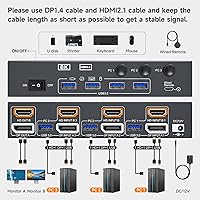
A handful of users expected the switch to work with any combination of video ports, only to discover that each computer must have both an HDMI and a DisplayPort output. Machines with only one video output type simply cannot be used in extended mode.
Video Signal Quality
83%
At 1440p and 4K, the image passthrough is clean with no noticeable degradation. Users running 4K@144Hz on the DisplayPort side for gaming reported that refresh rates held steady without dropped frames or flickering during active use.
The headline 8K figure causes real confusion. The HDMI and DP ports have different resolution ceilings, and several buyers felt misled when they realized 8K@60Hz is only achievable on HDMI. True 8K monitor owners are a small audience, but the spec framing disappointed a few.
USB Peripheral Reliability
74%
26%
Keyboards, mice, and printers connected to the four USB 3.0 ports generally worked without needing drivers or restarts. The 5Gbps throughput was appreciated by users transferring files through a connected USB hub during routine workdays.
USB device recognition is the most reported pain point across verified reviews. If cables are inserted in the wrong order or not fully seated, peripherals simply stop responding — a frustrating experience that mimics a hardware fault but is actually a setup error.
Switching Speed
76%
24%
For most tasks, the transition from one computer to another happens in roughly one to two seconds, which users found acceptable for a wired KVM at this price point. The wired remote made switching feel more deliberate and reliable compared to software-based alternatives.
There is a consistent brief signal dropout on the monitors during every switch, causing screens to go black for a moment before re-syncing. For users who switch frequently throughout the day, this adds up and can become irritating, especially mid-task.
Setup & Installation
86%
The driver-free plug-and-play design genuinely delivered for most buyers. Several users noted they had the entire system running within fifteen minutes, with no software to install and no configuration menus to navigate — just cables and power.
The requirement for a discrete GPU in extended mode is buried in the documentation and caught a meaningful number of buyers off guard. Users with integrated graphics only on one of their machines had to fall back to copy mode, which was not what they intended.
Included Accessories
79%
21%
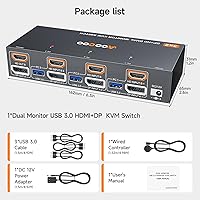
Including three USB 3.0 cables and a wired remote controller in the box is a genuine plus at this price tier. Most competing units ship bare, so having usable cables out of the box reduced friction during first-time setup for the majority of buyers.
The included cables are 1.5 meters each, which works fine for compact desk setups but left users with tower PCs on the floor needing longer runs. Several reviewers recommended budgeting for aftermarket cables if your machines are more than a meter from your desk surface.
Build Quality
71%
29%
The compact footprint — just over eight inches wide and under three inches tall — fits neatly on a crowded desk or can be tucked behind a monitor stand. The casing feels solid enough for a stationary device that rarely gets moved once installed.
Compared to established brands in the KVM category, the chassis feels slightly plasticky to buyers who handled both side by side. It functions fine, but users expecting a premium metal build at this price point should temper expectations.
Wired Remote Controller
82%
18%
The included wired remote was consistently called out as a thoughtful addition. Being able to tap a button on the desk surface rather than reaching behind a monitor stack to hit the front panel switch made daily use noticeably more comfortable.
The remote cable is not especially long, so placement flexibility is limited. A few buyers wished it were wireless or at least had a longer tether, particularly for wider desk setups where the switch sits at one end of a multi-monitor array.
Compatibility Range
63%
37%
For Windows desktop users with discrete GPUs, compatibility was largely problem-free across a range of hardware configurations. Users connecting modern gaming rigs and workstation towers generally reported no unexpected compatibility issues.
MacBook and laptop users were the most vocal about compatibility friction. Machines without native DisplayPort outputs require adapters, which AOOCOO explicitly does not recommend. Several Mac users had to return the unit after finding no clean workaround for their setup.
Indicator Lights
77%
23%
The dual-color LED system for showing which computer is currently active was appreciated for being immediately readable at a glance. Users who hot-desk or multitask found it useful to confirm at a glance which machine their peripherals were currently controlling.
The indicator lights are functional but small, and in brightly lit office environments a couple of users found them hard to spot from across the desk. Nothing deal-breaking, but a slightly larger or brighter indicator would improve the experience.
Value for Money
81%
19%
For a dual-monitor KVM that handles three computers, ships with cables and a remote, and supports 4K@144Hz, buyers generally felt the pricing was fair relative to the feature set. Users who compared it to pricier name-brand alternatives often concluded the performance gap did not justify the cost difference.
The value equation shifts somewhat for buyers who encounter USB recognition issues or compatibility dead-ends with their hardware. If setup requires troubleshooting time or cable replacements, the effective cost of ownership creeps up beyond the initial purchase price.
Display Mode Flexibility
72%
28%
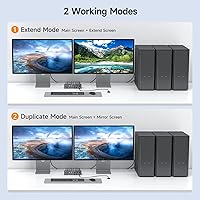
Having both extended and copy (mirror) modes available gives the switch meaningful versatility. Buyers using it for presentations appreciated copy mode, while power users running separate workflows on each monitor relied on extended mode throughout the day.
Switching between extended and copy modes requires a specific cable and GPU configuration that is not always intuitive to set up. A small but vocal group of users could not get extended mode to work at all, ultimately settling for copy mode as the only functional option.
Power & Stability
84%
The included DC 12V adapter kept the unit running stably across extended sessions. Long-term users reported no unexpected shutdowns or power-related signal drops after weeks of continuous operation across three connected machines.
The power adapter is a proprietary barrel connector, meaning a replacement requires sourcing from the manufacturer or finding a compatible third-party unit. For a device intended for permanent desk installation this is a minor concern, but worth noting.

Suitable for:

The AOOCOO 8K 3-Computer Dual Monitor KVM Switch is a strong fit for anyone who juggles multiple Windows desktop machines at a single workstation and wants to stop swapping cables every time they change tasks. Developers who keep a dedicated work machine, a personal build, and a test box all running simultaneously will find real day-to-day value here — one keyboard, one mouse, one dual-monitor spread, no compromise. Creative professionals who need to move between a high-powered editing desktop and a secondary laptop for client calls will also appreciate how cleanly this hub handles that context switch. Gamers who double their setup as a productivity station benefit especially from the DisplayPort side, which sustains 4K at 144Hz without throttling refresh rates. If your machines all have native HDMI and DisplayPort outputs — which is standard on most modern discrete GPU builds — setup is genuinely straightforward and the learning curve is minimal.
Not suitable for:

The AOOCOO 8K 3-Computer Dual Monitor KVM Switch is not the right tool for MacBook users or anyone whose machines rely solely on Thunderbolt, USB-C, VGA, or DVI video outputs — adapters are not supported, and trying to force them often leads to frustration and a return. Anyone expecting true 8K output on both ports simultaneously will be disappointed; the HDMI and DisplayPort sides have different resolution ceilings, and real 8K-capable monitor owners will likely find the setup constraining. Users planning to connect a machine that only has integrated graphics should also be cautious — extended dual-monitor mode requires a discrete GPU, and falling back to copy mode defeats much of the purpose. Buyers who frequently switch between all three computers in rapid succession may find the brief screen blackout on each transition more disruptive than expected in fast-paced workflows. Finally, anyone needing a wireless or longer-tether remote for a large desk layout will find the included wired controller limiting in practice.
Specifications

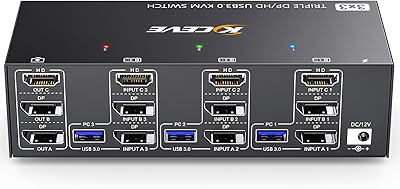
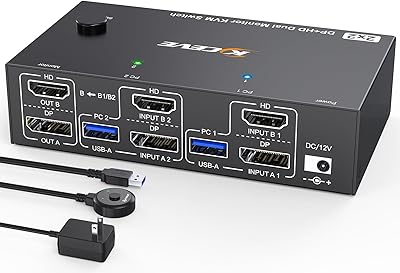
  • Configuration: Supports 3 computer inputs and 2 monitor outputs, allowing full control of three machines from a single keyboard, mouse, and dual-display setup.
  • Video Connections: Each computer connects via one HDMI and one DisplayPort cable, with matching HDMI and DisplayPort outputs going to the two monitors.
  • HDMI Resolution: The HDMI ports support a maximum resolution of 8K@60Hz and 4K@120Hz depending on the connected display and source hardware.
  • DP Resolution: The DisplayPort ports support a maximum resolution of 8K@30Hz and 4K@144Hz, making them the preferred connection for high-refresh-rate monitors.
  • USB Ports: Four USB 3.0 Type-A ports are available for peripherals, each capable of data transfer speeds up to 5Gbps.
  • Switching Method: Computer switching is performed via a front-panel button on the unit or the included wired remote controller.
  • Display Modes: Supports both Extended mode (two independent screens) and Copy mode (mirrored output), selectable based on the connected hardware configuration.
  • Included Cables: The box includes three USB 3.0 cables, each measuring 1.5 meters in length, for connecting the KVM to each computer.
  • Power Supply: Powered by the included DC 12V adapter; the unit does not draw power directly from a USB host connection.
  • Dimensions: The unit measures 8.07 x 6.02 x 2.52 inches, making it compact enough to sit flat on a desk or be tucked behind a monitor stand.
  • Weight: The switch weighs 1.68 pounds, light enough to reposition easily but substantial enough to stay in place during daily use.
  • Driver Requirement: Completely driver-free; the switch is recognized as a standard HID device by Windows and does not require any software installation.
  • Status Indicator: Dual-color LED lights on the unit show which of the three computers is currently active at a glance.
  • GPU Requirement: Extended dual-monitor mode requires a discrete graphics card on each connected computer; integrated-graphics-only machines are limited to Copy mode.
  • Brand: Manufactured by AOOCOO, a newer entrant in the KVM hardware category focused on mid-range multi-monitor switching solutions.
  • Compatibility Note: Each connected computer must have native HDMI and DisplayPort outputs; VGA, DVI, and Thunderbolt-only ports are not supported.
  • Packing List: Package includes the KVM switch unit, three USB 3.0 cables (1.5m), one wired remote controller, one DC 12V power adapter, and a user manual.

Related Reviews
DXchip KVM8203 Triple Monitor HDMI KVM Switch

79%
83%
Video Signal Quality
71%
Switching Speed
74%
USB Peripheral Reliability
88%
Build Quality
86%
Cable & Accessory Inclusion
More
KCEVE KC-303X Triple Monitor KVM Switch
78%
88%
Setup & Installation
83%
Video Signal Quality
79%
Switching Speed & Reliability
71%
Remote Controller
81%
USB Peripheral Performance
More
EVATEK 8K@60Hz DisplayPort KVM Switch 2 Monitors 2 Computers USB 3.0
84%
88%
Performance
91%
Value for Money
78%
Setup & Installation
94%
Display & Visuals
89%
Ease of Use
More
Camgeet KVM Switch 3 Monitors 3 Computers HDMI+2 DisplayPort
88%
95%
Display Resolution Support
93%
Multi-Computer Switching
89%
USB Connectivity
82%
Setup and Installation
91%
Compatibility Across OS
More
AILVLVNG HDMI KVM Switch 2 Monitors 3 Computers 4K@60Hz USB 3.0
84%
91%
Ease of Setup
88%
Dual Monitor Functionality
87%
USB Port Performance
84%
Display Consistency (EDID Emulator)
80%
Switching Speed (Button vs Remote)
More
MLEEDA 8K Dual Monitor KVM Switch
86%
92%
Visual Performance
88%
Ease of Setup
85%
Build Quality
90%
USB Connectivity
75%
Switching Reliability
More
DXchip 8K Dual Monitor KVM Switch
85%
88%
Performance
91%
Ease of Use
94%
Visual Quality (Resolution & Clarity)
87%
USB Transfer Speed
83%
Build Quality
More
ANGEET KVM Switch 3 Monitors 4 Computers
87%
90%
Performance Stability
93%
Ease of Setup
85%
Display Quality
88%
Compatibility with Multiple OS
91%
Switching Convenience (Wired Remote)
More
CMSTEDCD SW330 Dual Monitor KVM Switch
77%
91%
EDID & Window Layout Preservation
88%
4K Display Quality
84%
Switching Speed & Responsiveness
79%
USB 3.0 Peripheral Sharing
61%
Setup & Initial Configuration
More
TJCXELE HDMI KVM Switch 3 Monitors 2 Computers 4K@60Hz
85%
85%
Overall Performance
92%
Visual Quality (4K@60Hz)
75%
Ease of Setup
88%
USB Port Functionality (Data Transfer)
90%
Compatibility with Operating Systems
More

FAQ

Yes, every computer you connect to this hub needs one native HDMI port and one native DisplayPort output. There is no workaround built into the switch for machines that only have one type of video port. If even one of your computers is HDMI-only, it will not work in extended mode.

Not reliably. MacBooks typically output video only through Thunderbolt or USB-C ports, and AOOCOO explicitly does not support adapter-based connections from those interfaces. Most Mac users who have tried this route report compatibility failures, so it is best to avoid this combination.

Yes, there is a brief signal dropout — usually one to two seconds — each time you switch. The monitors go dark while the switch re-establishes the video handshake with the newly active computer. It is normal behavior for this class of KVM and not a defect.

This is the most common setup issue with this switch. If the USB 3.0 input cables are not connected to the correct ports on the KVM, or are not fully seated, the output peripherals will not be recognized. Unplug everything, consult the port labeling in the manual, and reconnect one cable at a time in the correct sequence.

No, and this is a spec worth reading carefully. The HDMI side can reach 8K@60Hz, while the DisplayPort side maxes out at 8K@30Hz. In practical terms, most users are running 1440p or 4K displays, so the 8K ceiling is largely academic. For 4K@144Hz, use the DisplayPort connection.

Yes. The four USB 3.0 ports are not limited to input devices — printers, scanners, and USB storage devices all work. At 5Gbps they are fast enough for regular file transfers, though the ports switch along with the active computer, so only the currently selected machine will see those connected devices.

That works fine. You can leave the third input completely unused and the switch will operate normally between the two connected machines. There is no setting to change; the indicator light will simply never show the unused input as active.

At 1.5 meters each, they work well if your computers sit on or near the desk surface. If your towers are on the floor or positioned more than about four feet from the switch, you may find the cables a bit short. A few users recommend having a couple of longer USB 3.0 cables on hand just in case.

It works well for gaming, particularly if you use the DisplayPort connection to your gaming monitor. The 4K@144Hz capability on the DP side means high-refresh panels run at full speed without being bottlenecked by the switch. Just make sure your gaming rig has a discrete GPU so extended mode functions correctly.

No software installation is required at all. The switch registers as a standard plug-and-play device on Windows 10 and 11, so you can have it fully running without touching a single driver or settings panel. Most users report being fully set up within fifteen to twenty minutes of opening the box.