Overview

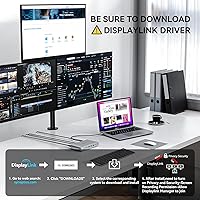
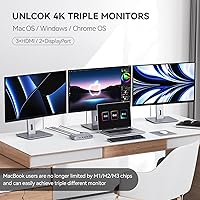
The Minisopuru MD6950D Triple Monitor Docking Station enters a crowded mid-range market with a genuinely useful pitch: triple 4K display support for both Apple silicon MacBooks and Windows laptops, all from a single USB-C cable. Launched in late 2023, it has built a steady reputation with over 200 ratings averaging 4.2 stars. One thing worth knowing before you buy — this dock depends on the DisplayLink driver to unlock full multi-monitor functionality. Skip that install step, and you'll wonder why nothing works. The included 140W power adapter ships in the box, which isn't a given at this price point, and the compact silver chassis packs 15 ports into a footprint barely larger than a paperback book.
Features & Benefits

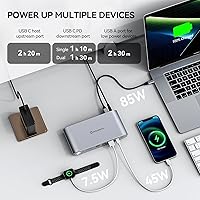
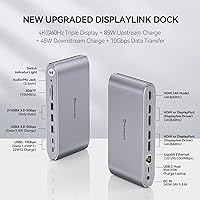
The display setup here is more nuanced than the spec sheet suggests. Four of the five video outputs depend on the DisplayLink driver — only a single HDMI port operates in native Alt Mode without any software. That distinction matters: DisplayLink introduces a small amount of processing overhead, which is barely noticeable during typical office tasks but can produce occasional frame drops when streaming 4K video across all three screens simultaneously. On the power side, the dock delivers up to 85W to your laptop while a front-facing USB-C port can charge phones or tablets at up to 45W — though that drops to 22W when both USB-C ports are active. The SD and TF slots and gigabit Ethernet make this a well-rounded hub for demanding desks.

Best For

This triple-display hub is the right pick if you're running an Apple silicon MacBook — M1 through M4 — and you've hit the wall on external display limits. It's equally capable for Windows users who want a single-cable desk setup without juggling multiple adapters. Hybrid workers who commute between home and office will appreciate how fast it is to plug in and be fully operational. Photographers and video editors get a practical bonus in the built-in TF and SD card reader, so they're not hunting for a separate dongle. One firm caveat: if you're on Linux or Unix, this dock won't work — that's not a workaround situation, it's just not supported. USB-A laptop users should also temper expectations, as charging and Alt Mode are disabled over that connection.

User Feedback

Among buyers who've settled into using the Minisopuru dock, the most consistent praise centers on how painless setup becomes once the DisplayLink driver is installed — people note it just works after that point. The bundled power brick earns genuine appreciation too; buyers coming from docks that ship without one find real value in not sourcing a separate adapter. On the downside, a noticeable segment of users reports video lag during heavy workloads — multiple streams or fast-moving content can tax the DisplayLink processing and cause visible stuttering. Some also mention the unit running warm after several hours of continuous use. Build quality gets a mixed reception: the silver finish looks sharp, but a few buyers feel the plastic chassis doesn't quite justify the asking price.

Pros

  • Unlocks genuine triple 4K monitor support for MacBook M1 through M4 users, bypassing Apple silicon display limits.
  • The included 140W power adapter is a real convenience — many competing docks make you source one separately.
  • Up to 85W of laptop charging through a single USB-C connection keeps your desk cable-clean.
  • Gigabit Ethernet delivers rock-solid wired connectivity for video calls and large file transfers.
  • Dual 10Gbps USB-C data ports make external SSD workflows noticeably fast.
  • Built-in SD and TF card slots save photographers and editors from carrying a separate reader.
  • Compact footprint — barely larger than a paperback — for the sheer number of ports on offer.
  • Compatible with Windows, Chrome OS, and Android in addition to Mac, making it versatile across device ecosystems.
  • Front-facing USB-C port lets you charge a phone or tablet without reaching around to the back.

Cons

  • DisplayLink driver installation is mandatory — skip it and most of the display outputs simply will not work.
  • Frame drops and video stuttering can appear during heavy multi-display workloads, particularly with fast-moving content.
  • The front USB-C charging port drops from 45W to 22W when both USB-C ports are active simultaneously.
  • The plastic chassis feels less premium than the price point might lead buyers to expect.
  • The unit runs noticeably warm after several hours of sustained heavy use, which may concern some users.
  • Linux and Unix are entirely unsupported — not a limitation that can be worked around.
  • USB-A laptop users lose both charging passthrough and HDMI Alt Mode, making this dock far less useful for older hardware.
  • Only one display output operates in native Alt Mode; the rest depend on DisplayLink processing, adding a layer of software dependency.

Ratings

Our AI rating engine analyzed verified global buyer reviews for the Minisopuru MD6950D Triple Monitor Docking Station, actively filtering out incentivized, bot-generated, and low-signal feedback to surface what real users consistently experienced across diverse setups. The scores below reflect both the genuine strengths that kept buyers satisfied and the recurring friction points that tempered enthusiasm — nothing is glossed over.

Multi-Monitor Performance
74%
26%
For MacBook M-series users who previously struggled to run even two external screens, getting three 4K displays up and running through this docking station feels like a genuine unlock. Productivity-focused users — coders, finance professionals, and designers working across multiple windows — consistently praised the expanded screen real estate it delivers.
The DisplayLink dependency introduces real trade-offs under load. Users running video editing timelines or watching streams across three 4K panels frequently reported dropped frames and sluggish cursor behavior — issues that a native Thunderbolt dock simply does not produce. The experience is workable for static productivity, but not for motion-heavy workflows.
Setup & Driver Experience
68%
32%
Buyers who read the instructions and installed the DisplayLink driver before connecting the dock reported a surprisingly smooth experience — monitors detected quickly, ports recognized without issue, and the whole process taking under ten minutes from unboxing to a working triple-monitor desk.
A significant portion of negative reviews trace directly back to the driver requirement catching buyers off guard. Many users plugged in expecting instant functionality, got a blank screen, and assumed the dock was defective. The setup dependency is manageable once understood, but it creates unnecessary friction for less technical buyers.
Laptop Charging
81%
19%
Delivering up to 85W of pass-through charging to the host laptop through a single USB-C cable is a meaningful convenience for daily desk users. MacBook Pro owners in particular noted their laptops maintained battery level or charged slowly even during demanding sessions — without needing a separate power brick plugged into the wall.
The charging output is not quite enough for the most power-hungry 16-inch laptops under sustained load, where some users noticed the battery draining slightly even while docked. It is also worth noting that the front device-charging port drops from 45W to 22W once the host laptop is connected, which can slow tablet charging noticeably.
Port Selection & Density
88%
Fifteen ports packed into a chassis the size of a paperback book is legitimately impressive. Having gigabit Ethernet, five video outputs, dual 10Gbps USB-C data ports, three USB-A ports, and an SD and TF card reader all accessible from one hub means most users can leave every peripheral permanently connected and just swap the single host cable.
The USB-A ports are limited to 5Gbps rather than the faster 10Gbps standard, which is a minor but noticeable omission for users transferring large files via USB-A peripherals. A few buyers also wished for a dedicated audio output on the rear rather than relying on a single shared audio jack.
Value for Money
79%
21%
The bundled 140W power adapter removes a real hidden cost that catches buyers off guard with many competing docks. When users factor in what they would have spent sourcing a compatible adapter separately, the Minisopuru dock starts looking quite competitive for the feature set it delivers — especially for Mac users with limited alternatives.
Buyers who run into DisplayLink performance limitations or USB-A compatibility issues can feel the price is harder to justify. A vocal segment of reviewers felt the plastic build quality did not reflect the asking price, particularly those who had previously owned docks with aluminum enclosures.
Build Quality
63%
37%
The silver finish gives the Minisopuru dock a clean, professional appearance on a desk, and the overall form factor is tidy enough that it does not look out of place next to a MacBook or a modern Windows ultrabook. Port connections feel secure and do not wobble during normal use.
The plastic chassis is where most build quality criticism lands. Users comparing this to aluminum-bodied competitors consistently describe it as feeling light and somewhat hollow. A few long-term users also noted minor scuffing on the silver finish after months of daily handling — nothing catastrophic, but not the premium feel the price point implies.
Thermal Management
61%
39%
Under typical office conditions — two or three monitors displaying documents, a browser, and email — the dock runs at an acceptable temperature and does not cause concern for most users during standard workday use.
Extended heavy use tells a different story. Users who push all five video outputs while running external SSDs and charging devices simultaneously report the dock becoming noticeably warm to the touch after a few hours. No reported failures have been tied to heat, but it is enough that users in warmer environments have flagged it as a concern.
Ethernet Reliability
86%
The gigabit Ethernet port is one of the dock's most consistently praised features. Remote workers relying on stable connections for video calls and VPN sessions found the wired network performance rock-solid, with none of the drop-outs or latency spikes that plague wireless setups in busy home or office environments.
A small number of users reported the Ethernet port occasionally failing to be recognized after the laptop woke from sleep, requiring a dock reconnect. This appears to be an edge case related to specific OS or driver version combinations rather than a universal hardware issue.
USB-A Compatibility
44%
56%
Users with newer USB-C-only laptops are unaffected, and the dock performs as advertised for that audience. The USB-A adapter bundled or available as an accessory at least gives older-laptop users some path to connectivity.
For anyone connecting via a laptop's USB-A port, two of the dock's headline features — laptop charging and HDMI Alt Mode — are completely non-functional. This is a hardware limitation rather than a firmware bug, meaning it cannot be fixed with updates. Buyers with USB-A-only laptops who purchased expecting full functionality were among the most dissatisfied reviewers.
SD & TF Card Reader
77%
23%
Photographers and video editors appreciated having both SD and TF slots built directly into the dock, eliminating the need for a separate reader occupying a USB port. Transfer speeds for large RAW photo batches and high-bitrate video clips were described as quick and consistent in everyday use.
The card reader operates over USB 3.2 Gen 1 rather than a dedicated faster interface, so users working with the very fastest UHS-II SD cards will not see their full theoretical read speeds. It is practical for most workflows, but not ideal for professionals who push card reader performance to its limits.
Mac M-Series Compatibility
83%
Compatibility across the M1, M2, M3, and M4 chip families is reliable and well-documented. Mac users who installed the DisplayLink driver correctly found that the dock integrated smoothly with macOS, with display arrangement, resolution, and refresh rate settings all accessible through the standard System Settings display panel.
macOS updates have historically caused temporary DisplayLink driver incompatibilities, and some users reported brief periods after an OS update where displays stopped working until a driver patch was released. This is an industry-wide DisplayLink challenge rather than a Minisopuru-specific fault, but it is a real inconvenience.
Windows Compatibility
82%
18%
Windows users generally had a smoother out-of-box experience than Mac users, partly because DisplayLink drivers on Windows are more mature and update-resilient. IT professionals setting up shared docking stations in office environments found deployment straightforward and stable across Windows 10 and 11.
A handful of Windows users reported conflicts between the DisplayLink driver and certain GPU drivers, particularly on systems with dedicated Nvidia graphics cards. These conflicts typically manifested as display flickering and required manual driver management to resolve — not a common issue, but a real one for affected users.
Portability
71%
29%
At 1.59 pounds and with a footprint small enough to slip into a laptop bag side pocket, this triple-display hub is one of the more travel-friendly options in its class. Hybrid workers who commute between home and office reported it adding minimal weight to their daily carry.
The included 140W power brick is considerably bulkier than the dock itself, and it travels as a mandatory companion — the dock will not deliver full functionality without it. Frequent travelers will find the combined bulk of dock plus adapter less convenient than the dock's compact dimensions alone suggest.

Suitable for:

The Minisopuru MD6950D Triple Monitor Docking Station was clearly built with a specific buyer in mind: someone running an Apple silicon MacBook who keeps hitting the wall on external display support. Apple's M-series chips impose native display limits that leave many users stuck at one or two external screens, and this dock sidesteps that restriction entirely through DisplayLink technology — provided you install the driver first. Windows professionals who want a single USB-C cable to replace a tangle of adapters on their desk will also find this a practical solution, especially given the 15 available ports covering video, data, networking, and charging in one unit. Hybrid workers who split time between a home office and a corporate desk will appreciate how quickly they can plug in and get up and running. Photographers and video editors get an added practical benefit from the built-in SD and TF card slots, which removes the need for yet another peripheral cluttering the workspace.
Not suitable for:

The Minisopuru MD6950D Triple Monitor Docking Station is a hard pass for anyone running Linux or Unix — the hardware simply does not support those operating systems, and there is no workaround. Users who prefer a completely driver-free plug-and-play experience will also find this dock frustrating, since the DisplayLink software installation is mandatory for most of the display outputs to function at all. If you push the dock hard — running three 4K displays while simultaneously streaming high-bitrate video — you may encounter frame drops or latency that a native Thunderbolt dock would not produce. People on older laptops with USB-A ports only should be aware that key features like laptop charging and HDMI Alt Mode are disabled in that configuration, significantly diminishing the dock's value. Anyone prioritizing a premium metal build quality over functionality may also feel underwhelmed by the plastic chassis at this price point.
Specifications

  • Model Number: This docking station carries the official model designation MD6950D.
  • Dimensions: The unit measures 6.61″ long by 3.38″ wide by 1.06″ tall, making it unusually slim for a 15-port dock.
  • Weight: The dock weighs 1.59 pounds, light enough to carry between a home and office setup without hassle.
  • Display Outputs: Five video ports are included: 3x HDMI and 2x DisplayPort, each capable of outputting up to 4K resolution.
  • Display Technology: Four of the five video outputs rely on the DisplayLink driver; only one HDMI port operates in native Alt Mode without software.
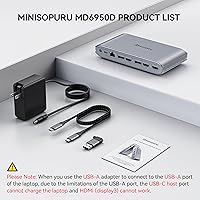
  • Power Adapter: A 140W power adapter is included in the box and is required for the dock to deliver full charging and performance.
  • Laptop Charging: The dock provides up to 85W of pass-through charging to the connected laptop via its USB-C host connection.
  • Device Charging: A front-facing USB-C port delivers up to 45W for phones or tablets, though output drops to 22W when both USB-C ports are active simultaneously.
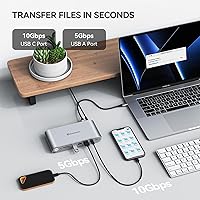
  • USB-C Data Ports: Two USB-C ports support USB 3.2 Gen 2 data transfer speeds of up to 10Gbps, suitable for fast external SSDs and high-bandwidth peripherals.
  • USB-A Data Ports: Three USB-A ports operate at USB 3.2 Gen 1 speeds of up to 5Gbps for standard peripherals such as keyboards, mice, and flash drives.
  • Total Ports: The dock offers 15 ports in total, covering video output, data transfer, charging, networking, and media card reading.
  • Ethernet: A dedicated Gigabit Ethernet port supports wired network speeds of up to 1000Mbps for stable, low-latency connectivity.
  • Card Slots: Both a TF (microSD) slot and a full-size SD card slot are built into the dock for direct media transfer without a separate reader.
  • Compatibility: The dock is compatible with MacBook M1, M2, M3, and M4, as well as Windows, Chrome OS, Ubuntu, and Android devices with a full-featured USB-C port.
  • OS Limitations: Linux and Unix operating systems are explicitly not supported and no driver workaround exists for those platforms.
  • USB-A Host Limits: When connected via a laptop's USB-A port, laptop charging and HDMI Alt Mode are both disabled due to the 7.5W power ceiling of USB-A.
  • Color: The dock is finished in silver and uses a plastic chassis construction.
  • Driver Requirement: The DisplayLink driver must be downloaded and installed on the host laptop before multi-monitor functionality will operate correctly.

Related Reviews

LIONWEI Triple Monitor USB-C Docking Station
75%
83%
Multi-Monitor Display Performance
41%
macOS Compatibility
89%
Value for Money
81%
Power Delivery & Charging
92%
Plug-and-Play Setup
More
Minisopuru DS808 DisplayLink Triple Monitor Docking Station
76%
86%
Multi-Monitor Setup Success
71%
DisplayLink Driver Experience
78%
Display Output Quality
83%
USB-C Power Delivery
88%
Port Selection & Coverage
More
j5create USB-C Triple Monitor Docking Station JCD543
85%
89%
Setup & Installation
91%
Display Performance
85%
Build Quality
90%
Port Availability & Functionality
94%
Power Delivery
More
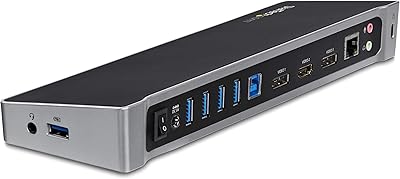
StarTech.com Triple Monitor USB 3.0 Docking Station
83%
89%
Performance
91%
Ease of Setup
88%
Display Support
85%
Connectivity Options
80%
Build Quality
More
Minisopuru MK808M-US Dual Monitor KVM Switch Docking Station
84%
94%
Dual Monitor Performance
91%
USB Peripheral Compatibility
88%
Switching Convenience
90%
Build Quality
82%
Setup & Installation
More
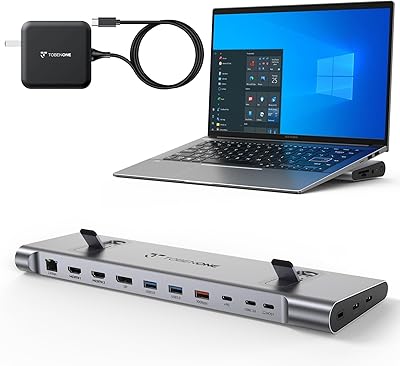
AV Access KD-S03 Triple Monitor Docking Station
77%
88%
Multi-Monitor Performance
41%
macOS Compatibility
91%
Setup & Ease of Use
74%
100W Power Delivery
86%
Data Transfer Speed
More
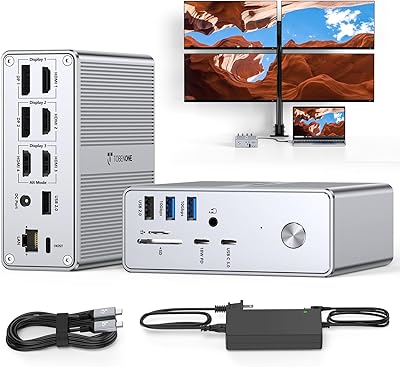
TobenONE UDS041W USB-C Triple Monitor Docking Station
77%
84%
Multi-Monitor Output
91%
Single-Display Performance
93%
Integrated 100W Charging
88%
Data Transfer Speed
79%
Ethernet Performance
More
TobenONE UDS033B 18-in-1 Quad Monitor Docking Station
77%
86%
Multi-Monitor Performance
58%
Driver Setup Experience
91%
Port Variety & Density
83%
Charging Capability
62%
macOS Compatibility
More
WAVLINK UG69DK13 Triple Monitor USB-C Docking Station
74%
88%
Multi-Monitor Performance
61%
Setup & Ease of Use
91%
Port Selection & Variety
86%
Video Output Quality
83%
Data Transfer Speed
More
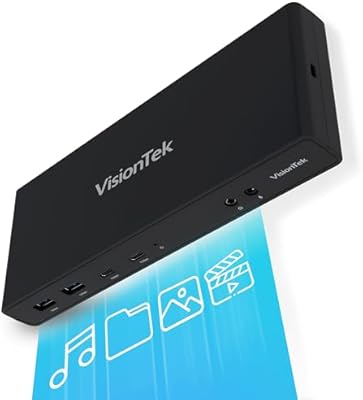
VisionTek VT4510
VisionTek VT4510
73%
84%
Dual Display Performance
52%
Driver Setup & Ease of Use
74%
Laptop Charging & Power Delivery
61%
macOS & Apple Silicon Compatibility
88%
Port Selection & Connectivity
More

FAQ

You do need to install the DisplayLink driver — this is not optional. Without it, most of the video outputs simply will not function. The good news is the driver is free, straightforward to download from the DisplayLink website, and once installed it runs quietly in the background without requiring ongoing attention.

Yes, and this is genuinely one of the strongest use cases for the Minisopuru MD6950D Triple Monitor Docking Station. DisplayLink bypasses Apple silicon's native display restrictions by routing video through the CPU and USB bandwidth rather than the GPU's display engine. You can run two or three external monitors on an M2 Air that Apple's own software would otherwise cap at one.

Technically yes, but with a caveat. The dock supports 4K across its HDMI and DisplayPort outputs, but four of those five ports depend on DisplayLink processing. Running three 4K displays simultaneously, especially with video playback or animation involved, can produce frame drops or minor latency. For static productivity work like spreadsheets, documents, or code, three 4K screens tend to run without issue.

You can connect it, but you will lose two key features: laptop charging will not work through the dock, and the HDMI Alt Mode port will be inactive. The USB-A port on most laptops is capped at 7.5W, which is far too little for the dock to charge a laptop or power its Alt Mode display. You would still get the USB hub and Ethernet functionality, but the experience is significantly reduced.

The dock handles laptop charging on its own — no separate charger needed. It can deliver up to 85W to your laptop through the same USB-C cable you use to connect the dock. For most MacBooks and mid-range Windows laptops, 85W is sufficient to charge at a normal rate even under load.

It still works, but at reduced output. When both USB-C ports on the dock are active at the same time, each port is limited to around 22W instead of the advertised 45W. That is plenty for charging a phone, but you should not expect fast-charge speeds for a power-hungry tablet in that scenario.

Some users report that the dock runs noticeably warm after several hours of continuous heavy use, particularly when all display outputs and USB ports are active simultaneously. It is not reported to run dangerously hot, but placing it in an open, ventilated spot on your desk rather than enclosed in a drawer is a sensible precaution for all-day use.

Unfortunately, no. Linux and Unix are explicitly unsupported, and DisplayLink's driver situation on Linux is inconsistent at best. The manufacturer does not claim compatibility, and trying to force it is unlikely to produce a reliable result. If Linux is your primary OS, you will need to look at a dock that uses a different display technology.

The 140W power adapter is included in the box, which is worth noting because several competing docks at similar price points require you to purchase a compatible adapter separately. The fact that it ships ready to use out of the box is one of the more practical advantages this dock has over alternatives.

The SD and TF slots are genuinely handy for photographers and video editors who would otherwise need a separate card reader taking up a USB port. Transfer speed is tied to the USB 3.2 Gen 1 interface, so you can expect up to 5Gbps theoretical throughput — fast enough for moving large batches of RAW files or high-bitrate video clips without sitting around waiting.