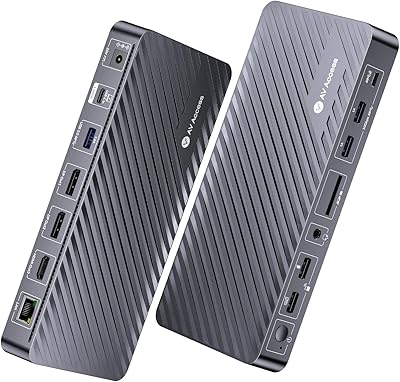
4URPC DC0001A Triple 4K Docking Station

Overview
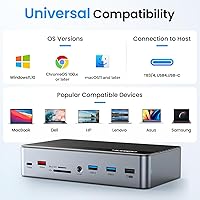
The 4URPC DC0001A Triple 4K Docking Station is essentially a single brick that turns one USB-C port into a small command center for your desk. Plug it in and you get seventeen connection points crammed into a footprint barely bigger than a deck of cards, around 3.9 by 1.6 by 7.1 inches and just over two pounds. It leans on DisplayLink technology to push video out to multiple screens, which matters because that's a software-driven approach rather than a purely hardware one. It works with Thunderbolt 3, 4, and 5, USB4, and standard USB-C laptops, and the bundled 120W power brick means it can charge your laptop while running everything else.
Features & Benefits
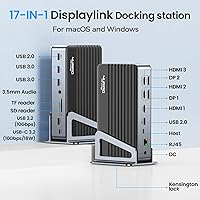
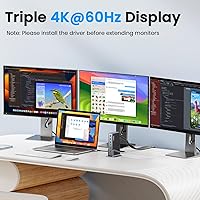
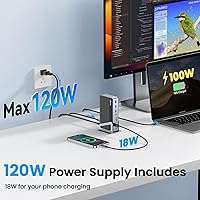
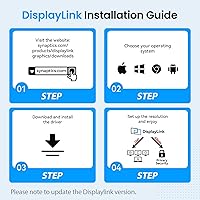
Once you dig into what this docking station can actually drive, the numbers get interesting. Connect three monitors and each one runs at 4K at 60Hz; use just the first HDMI port alone and it'll push a single display to 8K at 30Hz or 4K at 144Hz. The port lineup backs that up: three HDMI, two DisplayPort, Gigabit Ethernet, SD and microSD slots, and a 3.5mm audio jack. On the data side, six USB ports including a 10Gbps USB-C line keep external drives and webcams from bottlenecking. Charging is generous too, with up to 100W reaching your laptop and 18W left for a phone, plus a Kensington lock slot for office security. One catch: triple-monitor mode needs the DisplayLink driver installed first.
Best For
This setup makes the most sense for remote and hybrid workers who want a permanent multi-screen station rather than juggling laptop-only views. MacBook owners running M1 through M4 chips will likely appreciate it most, since macOS handles external displays differently than native Thunderbolt docking and often needs this kind of DisplayLink bridge to get past a single extended monitor. Anyone bouncing between spreadsheets, video calls, and reference documents across several screens will feel the difference almost immediately. It also suits home offices where a wired Ethernet connection matters more than relying on spotty Wi-Fi. Where it falls short is gaming or color-critical work like photo and video editing, since DisplayLink's compression can introduce a touch of lag that's noticeable in fast-moving or precision-dependent tasks.
User Feedback
Reception sits at a solid 4.2 stars across just over a hundred ratings, which is respectable without being a runaway success story. Most positive comments point to the sheer number of ports and the fact that a proper power adapter is included instead of being sold separately, something competitors sometimes skip. The recurring complaint, unsurprisingly, centers on the driver step: a handful of buyers expected true plug-and-play and were caught off guard by needing to install DisplayLink software before triple-monitor mode would cooperate. A smaller slice of feedback hints at compatibility hiccups tied to specific laptop models or operating system versions, which is fairly typical for any dock leaning on DisplayLink rather than native GPU output. None of this is a dealbreaker, but it's worth setting expectations before you unbox it.
Pros
- Packs 17 ports into one compact hub, covering video, data, audio, and storage needs.
- Drives three external monitors at 4K@60Hz simultaneously, a rare feature at this price tier.
- Includes a full 120W power adapter, so you're not buying one separately.
- Passthrough charging sends up to 100W to your laptop while still running everything else.
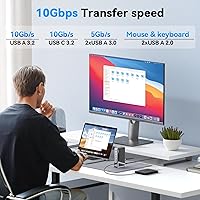
- Six USB ports, including a 10Gbps USB-C line, keep peripheral transfers fast and snappy.
- Gigabit Ethernet gives remote workers a more reliable connection than relying on Wi-Fi.
- Kensington lock slot adds real physical security for shared office desks.
- Wide compatibility list covers Thunderbolt 3/4/5, USB4, and Apple M1 through M4 chips.
- Holds a solid 4.2-star rating, with buyers consistently praising the port selection.
Cons
- Triple-monitor mode requires installing the DisplayLink driver first, not true plug-and-play.
- DisplayLink's video compression can introduce noticeable lag for gaming or fast-motion content.
- 8K output only applies to a single HDMI port, not the entire triple-monitor setup.
- Some buyers report compatibility quirks tied to specific laptop models or operating systems.
- Color-critical work like photo or video editing may suffer slightly from compression artifacts.
- A 4.2-star rating from just over 100 reviews is decent but not exceptional.
- Setup involves an extra software step that casual users might find mildly annoying.
- Six USB ports may still feel limiting for users running multiple high-power peripherals.
Ratings
These scores for the 4URPC DC0001A Triple 4K Docking Station are generated by AI after analyzing verified user reviews from buyers worldwide, with spam, bot activity, and incentivized feedback filtered out along the way. Each category below reflects what real owners actually experienced, strengths and frustrations alike, so you can see exactly where this docking station shines and where it falls short before you buy.
Port Selection & Connectivity
Multi-Monitor Display Performance
Charging & Power Delivery
Driver & Software Setup
Build Quality & Design
Compatibility Across Devices
Data Transfer Speed
Ethernet Reliability
Security Features
Portability & Footprint
Value for Money
Heat & Noise Management
Overall User Satisfaction
Suitable for:
The 4URPC DC0001A Triple 4K Docking Station is a strong fit for remote and hybrid workers who have settled into a single home desk and want three real monitors instead of squinting at one laptop screen all day. It's especially useful for MacBook owners on M1 through M4 chips, since macOS doesn't always extend displays the way Windows machines do, and this kind of DisplayLink-based dock fills that gap. Professionals who spend their day flipping between spreadsheets, video calls, and reference documents will notice real time savings once everything has its own screen. Anyone setting up a permanent home office where wired Ethernet matters more than Wi-Fi reliability will also get good mileage out of it. If you already know you want a multi-monitor setup and just need the hardware to make it happen, this is a sensible, well-rounded choice.
Not suitable for:
On the other hand, the 4URPC DC0001A Triple 4K Docking Station isn't the right call for gamers or anyone doing color-critical work like video editing or photo retouching, since DisplayLink's compression can introduce lag that's noticeable the moment frame timing or color accuracy actually matters. Buyers expecting pure plug-and-play across all three monitors will be disappointed too, because triple-display mode only works after installing the DisplayLink driver, which is an extra step some people simply don't want to deal with. If your laptop already has native Thunderbolt video outputs and you only need one or two extra screens, a simpler hub might serve you better and avoid the software layer entirely. It's also not the best pick if you're chasing 8K across multiple displays, since that resolution is limited to a single HDMI port, not the whole setup.
Specifications
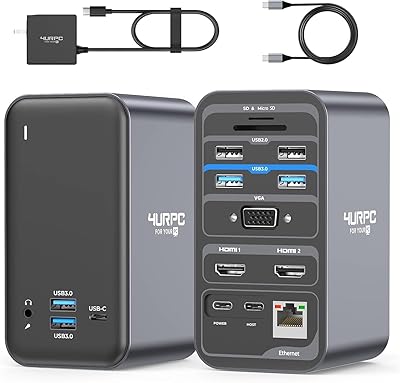
- Total Ports: The dock packs 17 total ports covering video, data, audio, storage, and networking.
- HDMI Outputs: Three HDMI ports are included, with HDMI 1 supporting resolutions up to 8K@30Hz.
- DisplayPort Outputs: Two DisplayPort outputs are available, each supporting up to 4K@60Hz.
- Multi-Monitor Support: It can drive three external displays at 4K@60Hz simultaneously or a single display at up to 8K@30Hz or 4K@144Hz.
- Ethernet Port: One Gigabit Ethernet port provides a wired networking option.
- USB-C Port: One USB-C 3.2 port offers 10Gbps data transfer along with 18W charging output.
- USB-A Ports: USB-A connectivity includes one 10Gbps 3.2 port, two 5Gbps 3.0 ports, and two USB 2.0 ports.
- Card Slots: SD and microSD card slots are built in for direct memory card access.
- Audio Jack: A 3.5mm combo jack supports both audio output and microphone input.
- Security Slot: A Kensington lock slot lets users physically secure the dock to a desk.
- Power Adapter: A bundled 120W power adapter can deliver up to 100W of charging to a connected laptop.
- Device Compatibility: It supports Thunderbolt 3/4/5, USB4, and full-function USB-C laptops, including Apple M1 through M4 chips.
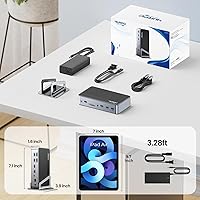
- Dimensions: The unit measures 3.9 by 1.6 by 7.1 inches.
- Weight: It weighs approximately 2.31 pounds.
- Driver Requirement: Extending beyond a single monitor requires installing the DisplayLink driver software.
- Model Number: The product is identified by model number DC0001A.
Related Reviews

StarTech DK31C3HDPD USB-C USB-A Docking Station
4URPC DSC05 USB-C Docking Station

LIONWEI Triple Monitor USB-C Docking Station
Minisopuru DS808 DisplayLink Triple Monitor Docking Station
j5create USB-C Triple Monitor Docking Station JCD543
WAVLINK UG69DK13 Triple Monitor USB-C Docking Station
StarTech.com Triple Monitor USB 3.0 Docking Station
Plugable UD-3900PDZ USB-C Triple Display Docking Station
Selore&S-Global 16-in-1 USB-C Docking Station with Triple HDMI