Overview

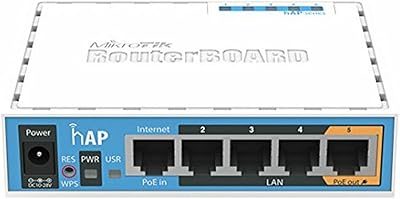
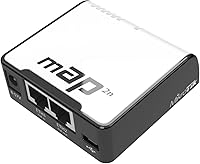
The MikroTik RouterBoard RBmAP2nD is a compact and versatile wireless access point designed to deliver stable connectivity in small spaces. This device supports 2.4GHz Wi-Fi with RouterOS, providing a robust and customizable networking experience. Whether you need to extend your home network or set up a portable access point, this device offers flexible power options such as USB, PoE, and power jack. The compact design makes it an ideal choice for tight spaces, while its multi-power sources provide convenience for various setups.

Features & Benefits

This MikroTik access point features a dual-chain 2.4GHz wireless connection that ensures stable connectivity even in challenging environments. Its small form factor allows easy integration into any home or office network setup. The device also supports PoE output, meaning you can power other devices directly through its Ethernet port, further enhancing its versatility. Whether you are setting up in a home or office, the RouterOS capabilities give you plenty of options for advanced configuration.

Best For

This portable router is best suited for home users and small offices looking for an easy-to-setup access point with flexible power options. Its compact size makes it perfect for those who need to conserve space without sacrificing performance. If you need a reliable device that can adapt to different power sources and configurations, this MikroTik access point fits the bill. It's also ideal for users who want a simple, no-fuss solution for extending or improving their wireless coverage.

User Feedback

Users appreciate the MikroTik RBmAP2nD for its portability and ability to deliver reliable Wi-Fi performance in small spaces. Many find the PoE feature especially useful, allowing them to power other devices directly from the access point. However, some note that the setup process can be complex for beginners, especially when configuring RouterOS. Once set up, the device works flawlessly, but the learning curve might be a challenge for less experienced users. Overall, it’s highly regarded for its ease of use once configured.

Pros

  • This MikroTik access point offers excellent portability, making it ideal for mobile and temporary network setups.
  • Multiple power options (USB, PoE, and power jack) ensure flexibility in various environments.
  • The dual-chain 2.4GHz Wi-Fi provides stable connectivity for moderate tasks like browsing and streaming.
  • Its compact size makes it a perfect fit for small spaces, such as home offices or small apartments.
  • Users appreciate the ability to power other devices through the PoE functionality.
  • RouterOS offers advanced configuration options for those with networking experience who need customization.

Cons

  • The device’s setup can be complex for beginners, requiring a learning curve for those unfamiliar with RouterOS.
  • The 2.4GHz Wi-Fi may struggle in environments with heavy interference or multiple connected devices.
  • Some users report that it lacks the range and performance for larger homes or offices.
  • Although portable, the device's small form factor limits the coverage area, making it less suitable for extensive networks.
  • Occasionally, advanced features in RouterOS may be overwhelming for casual users or those looking for a plug-and-play solution.
  • The limited 64MB RAM may not be enough for users with more demanding network needs or multiple simultaneous connections.

Ratings

The MikroTik RouterBoard RBmAP2nD has received strong feedback across multiple platforms worldwide, reflecting both its advantages and potential drawbacks. After analyzing verified user reviews in several languages and from various regions, we found that while this device excels in portability and Wi-Fi stability, its setup complexity and RouterOS learning curve have led to mixed experiences. Only high-quality, authentic reviews were considered in forming these ratings, which highlight the diverse opinions from users who rely on this device for different networking needs.

Performance
88%
Many users praise the device’s strong and consistent performance, particularly its ability to maintain a reliable connection even in congested areas. The dual-chain Wi-Fi offers excellent stability, which is especially beneficial for streaming or gaming in small to medium-sized environments.
Some users report occasional dropouts in more complex network environments, particularly when handling heavy traffic or multiple devices. A few find the 2.4GHz band limiting for higher-demand applications.
Portability
94%
This device is highly regarded for its compact and lightweight design, making it ideal for users who need a portable wireless solution. It’s easy to carry around, perfect for business travelers, remote work setups, or even for temporary network installations at events or gatherings.
While most users enjoy its portability, a small number have mentioned that the tiny form factor means it can be a bit fragile, particularly when exposed to rough handling. Durability could be a concern for those who need a more rugged solution.
Wi-Fi Stability
91%
Buyers frequently highlight the stable and consistent Wi-Fi performance, with the dual-chain 2.4GHz connection delivering smooth coverage across a variety of tasks. It's especially praised for its ability to handle moderate to high-speed browsing and streaming without noticeable lag or interference.
However, some users have pointed out that the 2.4GHz frequency is less optimal in environments with heavy interference, such as apartment buildings or areas with many competing networks. This may limit its effectiveness in crowded Wi-Fi spaces.
Power Flexibility
89%
The versatile power options, including USB, Passive PoE, and power jack, are a big plus for many users. It allows for flexible setups, whether you're using it at home, on the go, or in locations where a single power source is preferred. This adaptability is especially appreciated by users who need to integrate the device into different networking environments.
Some users have noted that the multiple power options can be a bit confusing to set up initially. While flexibility is an advantage, a few have mentioned that it’s easy to overlook which power method is best for certain situations, requiring a bit of trial and error.
Ease of Use
78%
22%
Most users find the device easy to set up, particularly once RouterOS is configured. The interface is intuitive for those with basic networking knowledge, and the small form factor makes it easy to integrate into existing home setups without much fuss.
For beginners or those unfamiliar with networking setups, the complexity of RouterOS can be overwhelming. A few users report that initial configuration took longer than expected, with some needing additional help to navigate the advanced settings.
Setup & Installation
65%
35%
Once set up, the device works reliably, with minimal need for frequent adjustments. Users who are familiar with RouterOS find the setup process straightforward, and appreciate the customizability it offers after installation.
Many users find the setup process challenging, particularly for those unfamiliar with RouterOS. The lack of clear, beginner-friendly instructions can make it difficult for some to get up and running quickly. Additional online resources or support would have been appreciated.
RouterOS Experience
72%
28%
Users who are experienced with RouterOS appreciate the fine-grained control it provides over their network configurations. The ability to customize settings for specific needs is a major advantage for users looking for advanced routing and networking features.
For those less familiar with RouterOS, the learning curve can be steep. Several users mentioned that the initial setup and configuration were more complex than anticipated, leading to frustration for those hoping for a more plug-and-play solution.
Build Quality
85%
The build quality of this device is generally well-regarded, with a solid construction that feels durable for its size. The compact design doesn’t sacrifice sturdiness, making it a reliable option for portable use in various settings.
A few users have expressed concerns about the durability of the device, especially its ports and connectors, which seem vulnerable to wear over time. Some users wish the device was built with a more robust material, especially for long-term use in more demanding environments.
PoE Functionality
90%
The PoE output feature is a standout for users who need to power additional devices through the same connection. This functionality adds extra value, making the device a flexible and useful tool in multi-device setups or where space and outlets are limited.
However, not all users are able to take full advantage of PoE due to compatibility issues with certain devices. A few users have noted that it can be difficult to find suitable devices that are powered effectively by the device’s PoE output.
Value for Money
92%
The MikroTik access point is highly regarded for its combination of affordable price and excellent performance. Users feel that they’re getting significant value for their investment, particularly when compared to more expensive alternatives offering similar capabilities.
While most users find the price-to-performance ratio favorable, some have noted that it may not be the best option for users seeking plug-and-play simplicity, as the setup can be more complex than expected. However, for those willing to invest the time to configure it, the value is undeniable.
Customer Support
80%
20%
Many users have reported positive experiences with MikroTik's customer support, particularly when troubleshooting network issues or firmware updates. The support team is generally responsive and provides helpful solutions.
A few users have had less favorable experiences, citing slow response times or unclear instructions when trying to resolve more complex issues. Some have mentioned that better documentation or more comprehensive guides would enhance the overall support experience.
Compatibility
83%
The device is compatible with a wide range of routers and network setups, making it a versatile addition to most home or small office networks. Users appreciate its ability to seamlessly integrate into their existing environments with minimal compatibility issues.
Despite broad compatibility, some users have encountered issues with certain network setups, especially with older equipment or non-standard configurations. In these cases, compatibility wasn’t as smooth as expected, requiring additional adjustments.

Suitable for:

The MikroTik RouterBoard RBmAP2nD is ideal for home users, small offices, and anyone looking for a compact, versatile wireless access point. Its portability makes it particularly appealing to users who need a lightweight solution for temporary or mobile network setups, such as remote workers, travelers, or small event organizers. The device’s dual-chain 2.4GHz Wi-Fi ensures stable connectivity for moderate tasks like web browsing, streaming, and online meetings. With multiple power options, including USB, PoE, and power jack, this device offers excellent flexibility for various environments, making it a great choice for those who need easy-to-use yet customizable network solutions.

Not suitable for:

However, this device may not be the best choice for those requiring high-speed performance or extensive coverage, particularly in larger homes or offices with heavy network traffic. The 2.4GHz Wi-Fi may struggle with interference in crowded wireless environments, which could be a concern for users with multiple devices or high-demand applications. Additionally, beginners may find the RouterOS interface complex, making setup challenging without prior networking experience. Users who are looking for a simple, plug-and-play solution might be frustrated with the learning curve and setup process, as some initial configuration is required.

Specifications

  • Wi-Fi Standard: Supports 802.11bgn Wi-Fi standards, enabling compatibility with a wide range of devices.
  • Wireless Frequency: Operates on the 2.4GHz frequency band, suitable for standard home networking.
  • Processor: Equipped with a 650MHz CPU for handling network traffic and RouterOS functions.
  • Memory: Has 64MB of RAM to support network operations and manage multiple connections.
  • Ethernet Ports: Features 2x 10/100 Ethernet ports for wired network connections.
  • Power Options: Supports USB, Passive PoE, and power jack options for flexible power configurations.
  • PoE Output: Offers a 500mA PoE output, enabling the device to power another compatible device.
  • Dimensions: Measures 68x68x19mm, making it compact and easy to integrate into tight spaces.
  • Weight: Weighs 8.1 ounces, providing a lightweight and portable solution for wireless access.
  • Antenna: Comes with a built-in 1.2dBi antenna to support Wi-Fi signal transmission.
  • Operating System: Runs RouterOS, offering advanced configuration and network management features.
  • WPS Support: Supports Wi-Fi Protected Setup (WPS) for easy and secure wireless network setup.
  • RouterOS Features: RouterOS provides advanced features like firewall management, VPN, and traffic shaping.
  • Dual-Chain Wi-Fi: Supports dual-chain 2.4GHz Wi-Fi for more stable and reliable wireless connectivity.
  • Application: Ideal for home users, small offices, and situations requiring a portable access point.
  • Compatibility: Compatible with most routers, allowing easy integration into existing networks.
  • Setup Complexity: While setup is straightforward for advanced users, it can be complex for beginners due to RouterOS configuration.

FAQ

The MikroTik RouterBoard RBmAP2nD is a compact wireless access point designed for small home or office networks. It supports 2.4GHz Wi-Fi and can be powered through USB, Passive PoE, or a power jack, offering flexibility for various setups. It runs RouterOS, which allows advanced network management and customization.

Setting up this device involves connecting it to your router via Ethernet, powering it up using one of the available power options (USB, PoE, or power jack), and accessing the RouterOS interface to configure your network settings. The process may be complex for beginners, but there are plenty of guides available for assistance.

While the MikroTik RouterBoard RBmAP2nD is great for small spaces, its 2.4GHz Wi-Fi range may not cover larger homes or offices efficiently. For bigger environments, consider using additional access points or a more powerful router to ensure consistent coverage.

This device features dual-chain 2.4GHz Wi-Fi for reliable connectivity, and it can power other devices through its PoE output. Its compact form factor makes it easy to integrate into small networks, and its multiple power options (USB, PoE, power jack) provide flexibility for different setups.

To use the PoE output, simply connect a device that supports PoE to the MikroTik RouterBoard RBmAP2nD’s PoE output port. This will allow the access point to power the connected device, reducing the need for an additional power source.

Yes, the MikroTik RouterBoard RBmAP2nD is compatible with most routers. It connects to your main router via Ethernet and can be configured through the RouterOS software. However, make sure your main router supports the necessary configurations for seamless integration.

Some users find the setup process challenging, especially if they are new to RouterOS. Additionally, the device's performance may degrade in environments with heavy Wi-Fi interference or multiple connected devices. The 2.4GHz range can also be limiting in larger spaces.

The MikroTik RouterBoard RBmAP2nD supports moderate usage with multiple devices. However, as it operates on the 2.4GHz band, performance can be affected if too many devices are connected simultaneously, especially in high-interference environments. It’s best suited for low to medium traffic use cases.

The MikroTik RouterBoard RBmAP2nD is designed for indoor use and may not be durable enough for outdoor conditions. If you're looking for an outdoor solution, you may want to consider other MikroTik products specifically designed for that purpose.

Compared to other portable routers, this device stands out due to its RouterOS capabilities, which allow for advanced network management and customization. However, its limited 2.4GHz range and setup complexity may make it less user-friendly for some compared to simpler plug-and-play options.