Overview

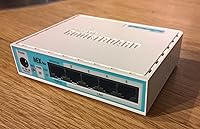
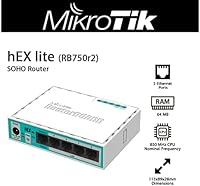
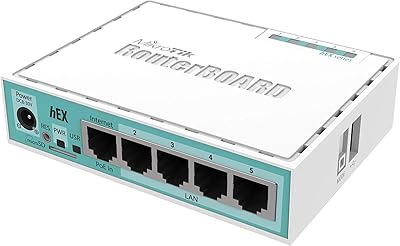
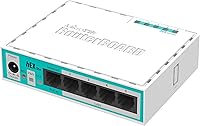
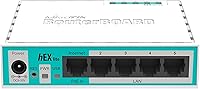
The MikroTik RB750r2 hEX lite 5-Port Router is one of those rare devices that punches well above its weight class — a serious networking tool that happens to fit in the palm of your hand. Most consumer routers hide their inner workings behind locked-down firmware; this MikroTik router runs RouterOS Level 4, giving you full control over traffic, routing rules, and security policies right out of the box. The enclosure is compact plastic in a distinctive caper green, small enough to tuck behind a monitor or sit unobtrusively on a shelf. For anyone craving real network control without spending enterprise money, the hEX lite makes a genuinely compelling case.
Features & Benefits

At its core, the RB750r2 packs five Fast Ethernet ports, one of which delivers passive PoE output — handy for powering a small access point or IP camera without an extra adapter. The real story is RouterOS: think of it as a professional-grade networking operating system that supports VLANs (virtual network segments that isolate traffic), quality-of-service prioritization, stateful firewall rules, and even MPLS — a protocol used in carrier-grade networks to route data efficiently. You can manage everything through Winbox, a web interface, or the command line. The included 24V adapter and its 7.1-ounce frame mean setup demands almost no desk real estate whatsoever.

Best For

The hEX lite is not a router for someone who wants to plug in and forget it. It shines brightest in the hands of home lab enthusiasts who want to practice enterprise concepts — routing protocols, VLAN design, firewall policies — on real hardware without paying enterprise prices. Small offices and SOHO setups benefit from its rock-solid wired routing and port segmentation capabilities. Network engineers often keep one around as a cheap testbed for configuration experiments. Students working through networking certifications will find RouterOS surprisingly thorough. That said, if your internet plan already exceeds 100 Mbps, the port speed ceiling is a genuine bottleneck worth considering before you commit.

User Feedback

Across roughly 279 ratings, the RB750r2 holds a 4.2-star average — a score that reflects real satisfaction rather than casual enthusiasm. Technically inclined buyers consistently praise its long-term stability and the depth of what RouterOS delivers at this price point. The recurring criticism is equally consistent: newcomers to MikroTik often find the interface intimidating compared to consumer-friendly alternatives, and the learning curve is steep if you have no prior networking experience. Several buyers also flag the 100 Mbps port speed as a hard ceiling — a legitimate concern for anyone on a fast broadband plan. Longevity reports skew positive, with units running reliably for years, and heat issues are rarely mentioned as a problem.

Pros

  • RouterOS Level 4 unlocks VLAN segmentation, stateful firewall, QoS, and MPLS support at a fraction of the typical cost.
  • Hardware stability is consistently praised — many buyers report years of uninterrupted operation.
  • The passive PoE output port lets you power a small access point or IP camera without a separate injector.
  • Multiple management options — Winbox, web GUI, and full CLI — accommodate both beginners and advanced users.
  • The compact footprint makes it easy to tuck into any desk setup, server rack, or network closet.
  • Likely the most affordable entry point for hands-on MPLS learning on physical hardware.
  • The included power adapter means you are ready to deploy straight out of the box.
  • Build quality is solid for the price tier, with no notable heat issues reported by the majority of long-term owners.

Cons

  • All five ports are limited to 100 Mbps — a hard ceiling that will throttle any gigabit internet connection.
  • RouterOS has a steep learning curve; expect hours of reading documentation before feeling comfortable.
  • No wireless capability at all — a separate access point is mandatory for any Wi-Fi needs.
  • The web interface can feel dated and cluttered compared to modern consumer router dashboards.
  • MikroTik's support resources, while extensive, are largely community-driven rather than polished official guides.
  • Passive PoE output is non-standard and incompatible with most 802.3af/at PoE devices without an adapter.
  • The hEX lite offers no USB port, limiting options for storage or modem attachment.
  • Not a practical choice for households with multiple simultaneous high-bandwidth users or 4K streaming demands.

Ratings

The scores below reflect AI-driven analysis of verified global buyer reviews for the MikroTik RB750r2 hEX lite 5-Port Router, with spam, bot-generated, and incentivized feedback actively filtered out before any scoring was calculated. Across hundreds of real-world assessments — from home lab tinkerers to small business network admins — both the genuine strengths and the friction points surfaced clearly. Nothing has been smoothed over: where buyers struggled, the scores reflect it honestly.

Value for Money
93%
Buyers consistently flag this as one of the most capable routers available at its price point, citing the RouterOS Level 4 license alone as justification for the cost. For home lab users and SOHO network managers, getting MPLS and VLAN support without stepping up to enterprise hardware pricing feels like an outsized win.
A small segment of buyers felt the value calculation shifts if you factor in the time investment required to learn RouterOS from scratch. For non-technical users, the hidden cost is hours of self-education rather than dollars spent upfront.
Routing Feature Depth
91%
RouterOS gives users access to stateful firewall rules, VLAN tagging, QoS traffic shaping, and MPLS — capabilities that typically require hardware costing several times more. Network engineers setting up test environments or learning protocol behavior in practice found this depth genuinely impressive for the form factor.
The sheer breadth of features can feel overwhelming, especially since RouterOS exposes every option without much contextual guidance. Users who just want basic routing without the complexity often find they are paying for a depth of functionality they will never actually use.
Ease of Setup
41%
59%
Buyers who already had MikroTik or enterprise networking experience reported getting the hEX lite configured and running in under an hour. The availability of Winbox — a lightweight graphical management client — does lower the barrier compared to pure CLI-only routers.
For users without prior RouterOS exposure, the initial setup is genuinely difficult. The default configuration requires meaningful customization before it functions as a typical home or office router, and the interface logic is unfamiliar enough that many beginners report hours of troubleshooting before achieving basic connectivity.
Port Speed & Throughput
52%
48%
For wired networks operating at or below 100 Mbps — which still covers many older small office setups and lower-tier internet plans — the switching and routing throughput is clean and consistent, with no reported packet loss or instability under sustained load.
The 100 Mbps ceiling on every port is a real and frequently cited frustration. Anyone with a modern gigabit internet plan will immediately see this router become their network bottleneck, and there is no hardware workaround — it is a fixed limitation of the chipset.
Hardware Reliability
88%
Long-term reliability is one of the RB750r2's most quietly consistent strengths in buyer feedback. Units running continuously for three, four, and even five years without hardware failure are commonly reported, which speaks to solid component selection for the price tier.
A handful of buyers reported units arriving dead on delivery or failing within the first few weeks, suggesting some variability in manufacturing consistency. While these cases appear to be the exception rather than the rule, post-purchase support from MikroTik is not as responsive as some buyers expected.
Thermal Management
84%
The low power draw of the RB750r2 means it runs cool under typical conditions — no fan noise, no heat warnings, and no thermal throttling reported in normal SOHO or home lab use. The compact plastic enclosure dissipates heat adequately at this power level.
In very warm environments or enclosed network cabinets with poor airflow, a few buyers noted the case warming more than expected during extended operation. There are no ventilation slots or active cooling, so ambient temperature management falls entirely on the installation environment.
Build Quality & Enclosure
71%
29%
The plastic shell feels sturdy enough for desk or shelf use, and the low-profile dimensions make it easy to fit into tight spaces. The distinctive caper green finish gives it a recognizable aesthetic that stands out from generic black-box routers.
Buyers accustomed to metal-chassis routers or rack-mountable equipment find the all-plastic build underwhelming. The enclosure has no mounting points for wall or rack installation without third-party accessories, which limits deployment flexibility in more formal network setups.
Management Interface Quality
67%
33%
Winbox is genuinely useful once you learn its layout — it gives full visibility into every RouterOS function and responds quickly even on older hardware. The CLI via SSH is powerful and scriptable, which advanced users in particular praised for automation and configuration management.
The web interface lags behind modern router dashboards in both design and usability, and Winbox itself is primarily a Windows application that requires extra steps on other platforms. New users frequently report that none of the three interfaces feel intuitive without prior MikroTik-specific training.
Wireless Capability
12%
88%
For buyers who already planned to use a dedicated wireless access point or who needed a purely wired routing solution, the absence of Wi-Fi was not a drawback — it kept the device focused and the price low.
There is simply no Wi-Fi radio in this device, full stop. Buyers who did not read the specifications carefully and expected wireless connectivity out of the box were uniformly disappointed, and several left negative reviews specifically because of this gap in their expectations.
PoE Output Usability
63%
37%
Having a passive PoE output port bundled into a router at this price is a genuinely useful feature for users pairing it with MikroTik access points or compatible IP cameras, eliminating the need for a separate PoE injector in simple deployments.
The passive 24V PoE standard is not compatible with the more common 802.3af or 802.3at devices that most buyers already own, which leads to confusion and occasionally damaged equipment. Several reviewers flagged this incompatibility as a significant practical limitation.
Documentation & Learning Resources
58%
42%
MikroTik's official wiki is extensive and covers nearly every RouterOS feature in technical depth. A large and active community forum also provides supplementary help, configuration examples, and troubleshooting threads that experienced users find genuinely valuable.
The official documentation is dense, inconsistently organized, and written primarily for users who already understand networking concepts. Beginners frequently report that finding basic setup guidance requires sifting through advanced material with no clear starting path.
Suitability for Certification Study
86%
Home lab users preparing for networking certifications praised the RB750r2 as affordable hands-on hardware for practicing routing concepts, firewall policy design, and VLAN configuration with a real operating system rather than a simulator.
RouterOS syntax and logic differ from Cisco IOS and other platforms, so the CLI experience does not directly translate to exam-specific command practice. Users studying for Cisco certifications in particular may find the conceptual value high but the syntax practice limited.
Out-of-Box Readiness
44%
56%
The included 24V power adapter means there are no missing accessories to track down, and the physical setup — plugging in cables and powering on — takes under five minutes. The hardware side of getting started is genuinely simple.
The software side is the opposite: the default RouterOS configuration is minimal and requires deliberate setup before the router behaves predictably as a NAT gateway or managed switch. Users expecting an experience similar to consumer routers from day one will be caught off guard.

Suitable for:

The MikroTik RB750r2 hEX lite 5-Port Router is genuinely well-suited for anyone who wants professional-grade network control without committing to professional-grade hardware costs. Home lab enthusiasts building out a practice environment for networking certifications will find RouterOS rich enough to simulate real-world scenarios involving VLANs, firewall rules, and even MPLS — the kind of traffic-labeling protocol normally found in carrier networks. Small offices and SOHO setups benefit from its stable wired routing and the ability to segment traffic cleanly between departments or devices. Network engineers needing a low-cost testbed or a disposable secondary router for configuration experiments will appreciate how much capability the RB750r2 packs into such a small device. Students and educators teaching or learning networking fundamentals on real hardware, rather than in a simulator, will also get solid mileage out of it.
Not suitable for:

The MikroTik RB750r2 hEX lite 5-Port Router is a poor fit for anyone expecting a simple, plug-and-play experience — this is not a consumer router you set up in ten minutes and never think about again. The RouterOS interface has a steep learning curve, and users without prior networking knowledge will likely find it disorienting at first. More critically, every port on this device is capped at 100 Mbps, which makes it a genuine bottleneck for households or offices with gigabit internet service — a common plan today. Wireless connectivity is entirely absent, so anyone expecting Wi-Fi will need to add a separate access point. Power users who need high-throughput routing, link aggregation, or SFP connectivity will quickly outgrow what this hardware can offer.
Specifications

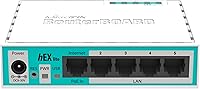
  • Ethernet Ports: The router includes five 10/100 Fast Ethernet ports for wired network connections.
  • PoE Output: Port 1 supports passive PoE output, allowing compatible low-power devices to draw power directly from the router.
  • Operating System: Ships with RouterOS Level 4, which enables advanced routing, firewall, VLAN, QoS, and MPLS functionality.
  • MPLS Support: Full MPLS (Multiprotocol Label Switching) support is included, making it one of the most affordable routers to offer this capability.
  • VLAN Support: Supports 802.1Q VLAN tagging, allowing users to logically segment network traffic across the five ports.
  • Firewall: Includes a stateful packet inspection firewall with support for advanced rule creation, NAT, and traffic filtering.
  • Dimensions: The unit measures 3.5 x 4.45 x 1.1 inches, making it compact enough for shelf, desk, or wall placement.
  • Weight: The router weighs 7.1 oz, light enough to mount or reposition without any special hardware.
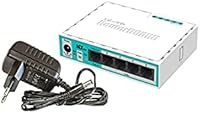
  • Power Supply: Comes with a 24V 0.38A power adapter included in the box, providing a standardized and reliable power source.
  • Enclosure: Built from durable plastic in a caper green finish, designed for indoor SOHO or home lab environments.
  • Management Tools: Supports Winbox (Windows desktop client), a web-based GUI, and full CLI access via SSH and Telnet.
  • Wireless: This is a wired-only router with no built-in Wi-Fi radio; a separate access point is required for wireless connectivity.
  • Max Port Speed: Each of the five ports is limited to 100 Mbps, which caps throughput on fast or gigabit internet connections.
  • Model Number: The official model designation is RB750r2, part of MikroTik's RouterBOARD hEX lite product line.
  • Manufacturer: Designed and manufactured by MikroTik, a Latvian networking hardware and software company established in 1996.
  • First Available: The RB750r2 was first made available in July 2015 and remains an active, non-discontinued product.

Related Reviews

MikroTik hEX RB750Gr3 5-Port Gigabit Router
79%
93%
Routing Performance
88%
VPN Throughput
96%
Stability & Uptime
91%
Value for Money
38%
Ease of Setup
More
MikroTik RB941-2nD Wireless Access Point
71%
89%
Value for Money
38%
Setup & Ease of Use
61%
Wireless Performance
44%
Wired Throughput
78%
Build Quality
More
MikroTik hEX S RB760iGS Gigabit Router
81%
93%
Value for Money
89%
Routing Performance
88%
VPN & IPsec Throughput
91%
Hardware Build & Reliability
87%
Port Density & Flexibility
More
Tripp Lite NG5 5-Port Gigabit Ethernet Switch
86%
89%
Performance
94%
Ease of Setup
83%
Build Quality
90%
Energy Efficiency
87%
Reliability
More
Xiaomi Redmi Watch 5 Lite Smartwatch
73%
91%
Display Quality
83%
Battery Life
71%
GPS Accuracy
88%
Value for Money
76%
Fitness Tracking
More
YuanLey YS100-0410TP 5-Port 10G PoE Switch
79%
91%
Value for Money
94%
Ease of Setup
78%
PoE Performance
88%
Multi-Gig Speed Performance
83%
Build Quality
More
Tenda TEG1005D 5-Port Gigabit Network Switch
83%
97%
Ease of Setup
88%
Build Quality
91%
Network Performance
96%
Noise Level
89%
Value for Money
More
NICGIGA S100-0500T 5-Port 10G Ethernet Switch
82%
96%
Ease of Setup
91%
Link Stability
88%
10G Throughput Performance
58%
Fan Noise
84%
Build Quality
More
MikroTik hAP ac lite Dual-Band Wireless Router
74%
91%
Value for Money
41%
Ease of Setup
67%
Wireless Performance
94%
Routing & Advanced Features
78%
Build Quality & Design
More
Linksys MR6350 Dual-Band Mesh WiFi Router
74%
91%
Ease of Setup
62%
WiFi Coverage
84%
Connection Stability
71%
Real-World Speed
68%
App Experience
More

FAQ

Honestly, yes — there is a real learning curve here. The MikroTik RB750r2 hEX lite 5-Port Router runs RouterOS, which is far more powerful than typical consumer router firmware but also more complex to configure. Most beginners find that reading through MikroTik's official wiki and a few community tutorials gets them functional within a day or two, but do not expect a plug-and-play experience right out of the box.
Not effectively, no. Every port on the hEX lite is limited to 100 Mbps, so if your internet plan delivers speeds above that, this router will become your bottleneck. For gigabit plans, you would want to look at MikroTik's hEX (RB750Gr3), which offers five Gigabit ports in a very similar form factor.

No, this is a wired-only device — there is no wireless radio included. If you need Wi-Fi, you would pair it with a separate access point. Many users connect a wireless AP to one of the LAN ports and manage everything centrally through RouterOS.

The passive PoE output on port 1 lets you power a compatible device — like certain MikroTik access points or IP cameras — directly through the Ethernet cable, without needing a separate power supply. Be aware that this is passive PoE at 24V, not the standard 802.3af or 802.3at that most commercial PoE devices expect, so check your device's compatibility before relying on it.

RouterOS is MikroTik's own operating system, and it turns this small router into something much closer to a professional networking appliance than a typical home router. It supports features like VLAN segmentation (splitting your network into isolated zones), stateful firewall rules, traffic shaping, and MPLS — a protocol used in large carrier networks. For anyone learning networking or managing a complex small office setup, that feature depth is the main reason to choose this device over a consumer alternative.

There are three options: Winbox, which is a lightweight desktop application for Windows (also runs under Wine on Linux); a web-based interface accessible from any browser; and full command-line access via SSH or Telnet. Most experienced users prefer Winbox for daily management, while the CLI is preferred for scripting and automation tasks.

Based on the general buyer feedback pattern, yes — longevity is one of the RB750r2's quiet strengths. Many owners report running these units continuously for several years without hardware failures. Heat is not commonly flagged as a problem given the low power draw, and the plastic enclosure, while not industrial-grade, holds up well in typical indoor environments.

Absolutely, and it is one of the better budget tools for exactly that purpose. RouterOS supports enough real-world protocols and configurations — including static routing, OSPF, firewall ACLs, and VLANs — to practice many core concepts hands-on. It is not a Cisco device, so the CLI syntax differs from what you would see on exam simulations, but the underlying networking logic translates well.

Pretty much. The box includes the router and a 24V power adapter, so you are ready to plug in and connect Ethernet cables right away. You will need to supply your own cables and, if you want wireless, a separate access point. Winbox can be downloaded for free from MikroTik's website.

The comparison depends entirely on what you need. Consumer routers are easier to configure and typically include Wi-Fi and a friendlier interface, but they lock you out of advanced controls. The hEX lite gives you far more granular control over routing, firewall rules, and traffic policies, but demands that you invest time in learning the platform. If you want simplicity, a consumer router wins. If you want genuine control over your network, this one is in a different category altogether.

Where to Buy