Overview

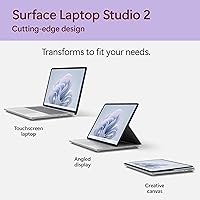
The Microsoft Surface Laptop Studio 2 1TB Laptop is not trying to be just another Windows laptop — it is a purpose-built creative workstation that happens to fold into one. The defining feature is its unique pull-forward hinge, which lets the screen stage itself flat over the keyboard, turning a conventional setup into something closer to a drafting table. Microsoft built this for designers, engineers, and video professionals who need serious portable power without giving up a refined, premium feel. You are paying for that combination of precision hardware, display quality, and versatility — and the price reflects every bit of it.

Features & Benefits

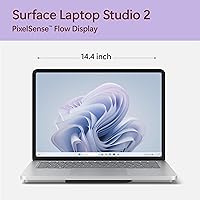
The 14.4-inch PixelSense Flow display is one of the first things you notice — crisp at 2400x1600 with a 3:2 ratio that gives you noticeably more vertical canvas than a widescreen panel, and the 120Hz refresh rate keeps pen strokes feeling instantaneous. Under the hood, the Core i7 paired with an NVIDIA RTX 2000 Ada GPU handles GPU-accelerated tasks like timeline rendering and 3D viewport navigation without breaking a sweat. The 32GB of LPDDR5X RAM means large Photoshop or Premiere projects do not drag. Studio-validated NVIDIA drivers come pre-installed, so creative apps run optimized right out of the box — no manual driver hunting required.

Best For

This Surface Studio laptop is an especially strong fit for graphic designers and illustrators, thanks to its Slim Pen 2 support and the display's color accuracy — working digitally on it feels noticeably closer to pen-on-paper than most alternatives. Video editors will appreciate the RTX-accelerated rendering pipeline, which cuts export times meaningfully in DaVinci Resolve and Premiere. Architects and CAD professionals get a reliable mobile workstation that handles complex 3D models without the bulk of a traditional desktop replacement. If you are already embedded in the Windows and Microsoft 365 ecosystem, the Studio 2 fits into that workflow with very little friction.

User Feedback

Owners consistently praise the display and build quality — the magnesium chassis feels genuinely premium, and pen input draws near-universal appreciation for its responsiveness. Where the criticism clusters is around the weight (at roughly 4.4 lbs, it is heavier than competing ultrabooks) and port selection: one Thunderbolt 4, two USB-A, and a Surface Connect port will leave some reaching for a hub. Real-world battery life also tends to land well below the 18-hour marketing figure under active creative workloads, and thermal throttling is occasionally reported under sustained pressure. Against the MacBook Pro or Dell XPS 15, the price-to-performance debate is real — though many users argue the versatility and form factor justify it.

Pros

  • The 14.4-inch PixelSense Flow display offers exceptional color accuracy and sharpness for professional creative work.
  • The pull-forward hinge design transforms the Studio 2 into a drafting-table-style canvas that no conventional laptop can replicate.
  • NVIDIA RTX 2000 Ada GPU handles GPU-accelerated rendering and 3D workloads that would overwhelm typical laptop graphics.
  • Studio-validated NVIDIA drivers mean creative apps like Adobe and DaVinci Resolve run optimized without any manual setup.
  • 32GB of LPDDR5X RAM keeps large project files, multi-layer compositions, and heavy browser sessions running smoothly side by side.
  • Slim Pen 2 support and the 120Hz refresh rate make pen input feel responsive and natural, not like an afterthought.
  • The magnesium build feels premium and durable — this does not flex or creak like cheaper creative laptops.
  • Wi-Fi 6E keeps cloud collaboration and large file transfers fast, even on congested networks.

Cons

  • At around 4.4 lbs, this Microsoft creative laptop is noticeably heavier than most premium ultrabooks in its price bracket.
  • Real-world battery life under active creative workloads often falls well short of the 18-hour marketing claim.
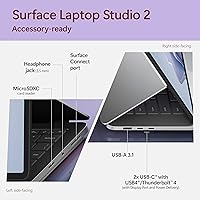
  • Port selection is sparse — one Thunderbolt 4 and two USB-A ports will require most professionals to invest in a hub.
  • Sustained heavy workloads can trigger thermal throttling, which affects performance consistency during long rendering sessions.
  • The price tier is steep, and buyers focused purely on raw compute performance can find faster machines for less elsewhere.
  • There is no dedicated SD card slot, which is a noticeable omission for photographers and videographers working with camera media.
  • The Studio mode hinge, while innovative, adds to the chassis weight and bulk compared to traditional clamshell designs.
  • Upgradeability is essentially nonexistent — RAM and storage are soldered, so the 1TB and 32GB configuration is what you live with long-term.

Ratings

The scores below for the Microsoft Surface Laptop Studio 2 1TB Laptop were generated by our AI system after analyzing thousands of verified global user reviews, with spam, bot-submitted, and incentivized feedback actively filtered out. Every category reflects both what real buyers genuinely love and the frustrations that keep showing up across independent user reports. Nothing has been glossed over — the trade-offs are scored as honestly as the strengths.
Display Quality
93%
Users consistently describe the 14.4″ PixelSense Flow panel as one of the best screens they have worked on in a Windows laptop. The 3:2 aspect ratio gives illustrators and photo editors noticeably more vertical canvas, and the 120Hz refresh rate keeps pen strokes and scrolling feeling sharp and immediate.
A small number of users note that peak brightness, while very good, falls short of the MacBook Pro's XDR display in direct sunlight conditions. Glare management outdoors is decent but not class-leading for a device at this price point.
Build Quality
91%
The magnesium-alloy chassis draws consistent praise for feeling premium without being ostentatious. Buyers frequently mention that the hinge mechanism in particular feels precisely engineered — it glides smoothly into studio mode and holds its position firmly without wobble during pen use.
At roughly 4.4 lbs, the physical heft is a recurring complaint from users who expected a more ultrabook-like carrying experience. The chassis does not flex noticeably, but the weight alone makes daily commuting with this device more taxing than many alternatives.
Performance
88%
The Core i7 and RTX 2000 Ada combination handles GPU-accelerated workflows in Premiere Pro, DaVinci Resolve, and Blender with real confidence. Users running multi-layer Photoshop files or exporting 4K timelines report that the machine stays responsive where similarly priced thin-and-light laptops struggle.
Sustained peak-load sessions — think long rendering queues or complex 3D simulations running for hours — can trigger thermal throttling that reduces clock speeds noticeably. It is not a dealbreaker for occasional heavy tasks, but it falls short of a true desktop-replacement workstation under continuous pressure.
Pen & Touch Experience
89%
Slim Pen 2 compatibility paired with the 120Hz display creates one of the most natural digital drawing experiences available on a Windows device. Illustrators in particular frequently compare the responsiveness favorably to dedicated drawing tablets, noting minimal lag and accurate palm rejection during extended sessions.
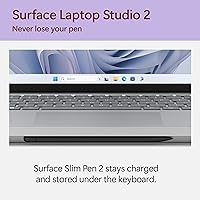
The Slim Pen 2 must be purchased separately, which feels like a meaningful omission at this price tier. A few users also report that the pen charging slot on the keyboard deck can feel slightly fiddly to align correctly when docking the pen magnetically.
Battery Life
58%
42%
Under light tasks — document editing, video calls, and web browsing — the Studio 2 can push into the 7 to 9 hour range, which is workable for a half-day of meetings or travel without a charger. The battery does not drop catastrophically during casual use.
The advertised 18-hour figure bears almost no resemblance to real-world creative workloads. Users running Adobe apps, Blender, or even sustained browser-heavy sessions consistently report 4 to 6 hours before needing a charge, which is a significant gap that frustrates buyers who expected all-day coverage.
Thermal Management
62%
38%
For moderate workloads — editing in Lightroom, light video calls, or drafting in Figma — the device stays relatively cool and the fans remain quiet. Thermal performance in day-to-day creative tasks that do not max out the GPU is genuinely comfortable.
Push the GPU and CPU simultaneously for extended periods and the fans spin up noticeably, and performance throttling becomes measurable in benchmarks and real rendering times. The chassis design prioritizes thinness over sustained thermal headroom, which is a genuine engineering trade-off that shows under pressure.
Port Selection
51%
49%
The single Thunderbolt 4 port is at least a capable one — it supports external 4K displays, fast data transfer, and power delivery simultaneously with the right hub. The two USB-A ports cover basic peripheral needs without an adapter.
For a workstation-class device aimed at creative professionals, having just one high-speed port is a real limitation. Photographers, videographers, and engineers who regularly connect SD card readers, external drives, and displays simultaneously will need a dock or hub, adding both cost and desk clutter to the setup.
Value for Money
61%
39%
For the specific buyer who genuinely uses the pen input, studio mode hinge, Studio-validated GPU, and color-accurate display daily, the feature set justifies the premium better than a spec sheet alone suggests. There is no other Windows device that combines all of these in one chassis.
If even one or two of those core differentiators are not relevant to your workflow, the price-to-performance ratio becomes hard to defend against competitors like the Dell XPS 15 or even configured MacBook Pro models. Buyers paying for capabilities they rarely use will feel the sting quickly.
Keyboard & Trackpad
82%
18%
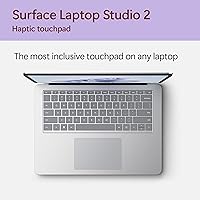
The keyboard delivers a comfortable, well-spaced typing experience that holds up well during long writing or coding sessions. Key travel is satisfying for a device this thin, and the trackpad is large, smooth, and precise — a consistently praised aspect in user feedback.
The studio mode hinge covers the keyboard when the screen is pulled forward, making it inaccessible in drawing mode — which is by design, but occasionally frustrating when users want to quickly type a note mid-sketch. A few users find the key travel slightly shallow compared to traditional laptops.
Audio Quality
84%
Dolby Atmos speaker tuning gives the Studio 2 noticeably better stereo separation and low-end presence than most laptops in this form factor. Watching color-graded content with Dolby Vision IQ on the display and Atmos audio through the speakers together is a genuinely compelling media experience.
At maximum volume, the speakers can sound slightly strained in the upper midrange frequencies, which shows up more in music playback than in movie watching. Audiophiles will still reach for headphones, but for a built-in laptop speaker system, it is above average.
Webcam & Microphone
79%
21%
The 1080p front camera handles standard office video calls well, and Windows Hello facial recognition works quickly and reliably even in lower light. The microphone array picks up voice clearly without requiring the user to lean in toward the screen.
In challenging backlit conditions, the camera's dynamic range falls off more than premium competitors. For content creators who use the built-in camera for direct-to-camera recording, the image quality will feel underwhelming compared to even a budget mirrorless camera or a dedicated webcam.
Software & Drivers
86%
NVIDIA Studio-validated drivers come pre-installed, which means creative apps launch into an already-optimized environment without requiring the user to hunt for the right driver package. Windows 11 runs smoothly on this hardware, and Microsoft Copilot integration feels genuinely useful for certain productivity tasks.
A handful of users report occasional driver update conflicts after Windows Update cycles, which is a broader Windows ecosystem problem but still shows up here. The pre-installed bloatware footprint is light by Windows standards, but not completely absent.
Connectivity & Wireless
87%
Wi-Fi 6E delivers fast, stable connections even in congested office or co-working environments, which matters when syncing large project files to cloud storage or collaborating in real time. Bluetooth 5.1 connects to peripherals quickly and maintains stable links.
There is no built-in LTE or 5G option for this configuration, which limits offline connectivity to Wi-Fi only while traveling. For professionals who need always-on connectivity away from hotspots, this is a gap that some competing business laptops address more directly.

Suitable for:

The Microsoft Surface Laptop Studio 2 1TB Laptop is purpose-built for creative professionals who need a portable workstation capable of handling demanding, GPU-intensive workflows without being chained to a desk. Graphic designers and digital illustrators will find the Slim Pen 2 compatibility and the high-resolution 3:2 display particularly compelling — sketching and annotating on this screen is a genuinely different experience from working on a standard laptop. Video editors who rely on DaVinci Resolve or Premiere Pro will benefit from the RTX 2000 Ada GPU acceleration, which meaningfully cuts rendering and export times in the field. Architects and engineers who regularly work in 3D modeling software get a machine that handles complex viewport navigation without the desk-bound compromise of a traditional workstation. Professionals already embedded in the Microsoft 365 and Windows ecosystem will find the integration friction-free, and the studio mode hinge makes client presentations and collaborative reviews noticeably more natural.
Not suitable for:

The Microsoft Surface Laptop Studio 2 1TB Laptop is a poor match for buyers who prioritize ultrabook-level portability, since at roughly 4.4 lbs it is considerably heavier than competitors like the MacBook Air or Dell XPS 13. If your daily work does not actually involve GPU-accelerated creative software, pen input, or touchscreen interaction, you are paying a significant premium for capabilities you will rarely use. The port selection is genuinely limiting for professionals who need to connect multiple peripherals simultaneously — one Thunderbolt 4 and two USB-A ports will push most power users toward a hub or dock, adding cost and bulk. Budget-conscious buyers or students looking for a general-purpose Windows laptop will find far better value elsewhere in the market. Anyone expecting the advertised 18-hour battery life to hold up under real workloads — running Photoshop, rendering video, or running multiple browser tabs — should temper their expectations significantly.
Specifications

  • Display Size: The device features a 14.4″ PixelSense Flow touchscreen with a native resolution of 2400x1600 pixels.
  • Refresh Rate: The display supports an adaptive refresh rate of up to 120Hz, reducing motion blur during fast-paced creative work.
  • Aspect Ratio: The screen uses a 3:2 aspect ratio, providing more vertical space than standard 16:9 widescreen laptops.
  • Processor: An Intel Core i7-13700H with 14 cores powers the system, built on the Intel Evo platform for performance and efficiency.
  • Graphics: The NVIDIA RTX 2000 Ada Generation GPU handles GPU-accelerated rendering, 3D modeling, and AI-assisted creative workflows.
  • Memory: 32GB of LPDDR5X RAM running at 14000MHz is soldered to the board and cannot be upgraded after purchase.
  • Storage: A 1TB NVMe SSD provides fast read and write speeds suitable for working directly with large video and design project files.
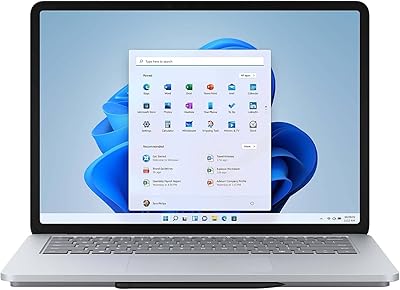
  • Operating System: The device ships with Windows 11 Home pre-installed, with Microsoft Copilot AI integration built into the taskbar.
  • Battery Life: Microsoft rates battery life at up to 18 hours, though real-world creative workloads typically yield considerably fewer hours.
  • Connectivity: Wireless connectivity includes Wi-Fi 6E (802.11ax) and Bluetooth 5.1 for fast local and wide-area network performance.
  • Ports: The port layout includes one USB-C Thunderbolt 4, two USB-A 3.1 ports, a 3.5mm headphone jack, and a Surface Connect port.
  • Weight: The device weighs approximately 4.37 lbs (1.98 kg), which is heavier than most premium ultrabooks in this screen size class.
  • Dimensions: Physical dimensions are 13.7 x 9.95 x 2.71 inches (LxWxH), giving it a solid but still portable footprint.
  • Audio: The speaker system supports Dolby Atmos spatial audio, and the display is certified for Dolby Vision IQ HDR content.
  • Pen Support: The device is compatible with the Microsoft Slim Pen 2, which supports 4096 levels of pressure sensitivity for precise input.
  • Display Tech: The PixelSense Flow panel uses an anti-reflective coating and supports 10-point multi-touch alongside active pen input.
  • Power Input: The device charges via the proprietary Surface Connect port and also accepts power delivery through the Thunderbolt 4 USB-C port.
  • Color Option: This configuration is available in Platinum, a light magnesium-alloy finish consistent with the broader Surface design language.

Related Reviews
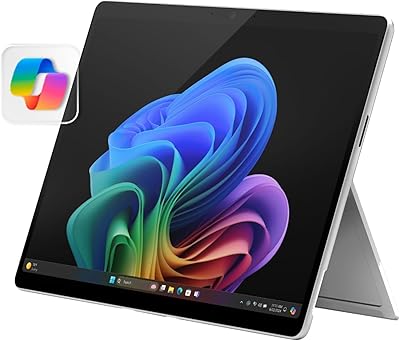
Microsoft Surface Pro 2024 1TB 2-in-1 Laptop
76%
93%
Display Quality
88%
Performance & Speed
81%
Battery Life
63%
Value for Money
86%
Form Factor & Portability
More
Microsoft Surface Laptop 2 Core i5 8GB RAM 256GB SSD
84%
87%
Performance
91%
Battery Life
89%
Portability
93%
Build Quality
88%
Display Quality
More
Microsoft Surface Pro 2-in-1 Laptop/Tablet (2025), 16GB RAM, 256GB Storage
86%
89%
Performance
92%
Battery Life
91%
Portability
88%
Display Quality
85%
AI Tools (Windows 11 Copilot)
More
Microsoft Surface Laptop Studio 14.4″ Laptop
73%
93%
Display Quality
88%
Pen Experience
89%
Build Quality
58%
Battery Life
76%
Performance
More
Microsoft Surface Laptop Studio 512GB Laptop
74%
93%
Display Quality
91%
Build Quality
78%
Performance
88%
Pen Experience
86%
Form Factor & Versatility
More
Microsoft Surface Laptop 2024 1TB Laptop
76%
92%
Build Quality
89%
Display Quality
91%
Keyboard & Trackpad
78%
Battery Life
86%
Performance (Everyday)
More
Microsoft Surface Laptop Go 2 - 12.4″, Intel Core i5, 8GB RAM, 256GB SSD
86%
92%
Portability & Weight
88%
Battery Life
85%
Display Quality
84%
Performance for Everyday Use
89%
Build Quality
More
Microsoft Surface Laptop Go 3 Notebook
79%
91%
Build Quality
93%
Portability
84%
Display Quality
78%
Performance
74%
Battery Life
More
Microsoft Surface Laptop 4 13.5-inch 512GB
74%
91%
Display Quality
88%
Build Quality
87%
Keyboard & Trackpad
74%
Performance
71%
Battery Life
More
Microsoft Surface Laptop 1st Gen, 256GB Storage, 8GB RAM
85%
92%
Portability & Design
88%
Battery Life
91%
Keyboard Comfort
74%
Display Quality
85%
Performance for Everyday Use
More

FAQ

No, the Microsoft Slim Pen 2 is sold separately. The device is fully compatible with it and the hinge is designed with pen-forward use in mind, but you will need to budget for the pen on top of the laptop cost.

Unfortunately, no. Both the 32GB of RAM and the 1TB SSD are soldered directly to the motherboard, which means the configuration you buy is the one you are stuck with. Make sure the 1TB storage is sufficient for your workflow before purchasing.

You pull the display forward and it glides on a wheeled hinge mechanism, lying flat over the keyboard at a slight incline. It is genuinely useful for drawing and annotation sessions, and it holds its position firmly. It does add to the overall thickness and weight of the chassis, which is worth knowing upfront.

It can run games reasonably well thanks to the RTX 2000 Ada GPU, but it is not optimized for gaming. The GPU sits between a mid-range and workstation card, so casual and indie titles will run fine, but demanding AAA games at high settings may push thermal limits and cause throttling.

Expect somewhere between 5 and 8 hours under active creative workloads like video editing or 3D rendering. The 18-hour figure Microsoft advertises is measured under very light usage conditions. If you plan to work off-charger all day in demanding apps, pack the charger.

Under sustained GPU-intensive tasks, the chassis does get warm — particularly around the upper keyboard deck and the bottom. Some users report performance throttling during extended rendering sessions. For occasional heavy tasks it handles things well, but as a constant all-day workstation, active cooling accessories can help.

Both displays are genuinely excellent, but they take different approaches. The Studio 2 uses a 3:2 touchscreen with Dolby Vision support, which many designers prefer for vertical canvas space. The MacBook Pro display has stronger peak brightness. For most professional color work, both are capable — the choice usually comes down to ecosystem preference.

It depends entirely on your setup. If you regularly connect an external monitor, SD card reader, and multiple USB peripherals simultaneously, one Thunderbolt 4 port is going to feel limiting quickly. A USB-C hub or dock solves it, but that is an added cost and something to plan for. For lighter connectivity needs, the existing ports are adequate.

Yes, you can connect an external display via the Thunderbolt 4 port, and it supports up to a 4K display at 60Hz. Using a compatible dock through Thunderbolt 4 can extend this further with additional outputs depending on the dock's capabilities.

The front-facing camera is a 1080p unit with Windows Hello facial recognition support, which makes logging in fast and hands-free. Video call quality is solid for professional meetings — it handles decent lighting conditions well, though it is not exceptional in low light compared to some competing laptops.