Overview

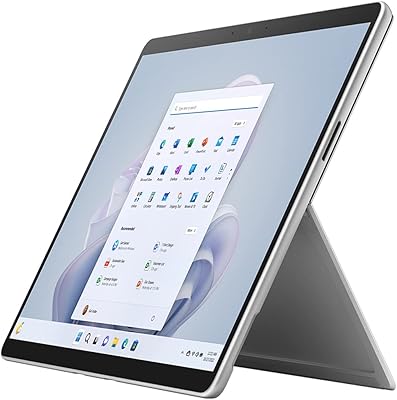
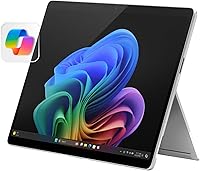
The Microsoft Surface Pro 2024 1TB 2-in-1 Laptop represents Microsoft's most serious attempt yet to give professionals a single device that genuinely replaces both a tablet and a laptop. The move to the Snapdragon X Elite chip isn't just a processor swap — it's a meaningful architectural shift that brings a dedicated NPU and ARM-based efficiency to the Windows ecosystem. You're paying a premium here, and that's worth stating plainly. One thing to know before you buy: the keyboard is sold separately, which stings at this price point. The OLED display and Copilot+ AI features are the headline attractions, but real-world performance deserves a closer look.
Features & Benefits

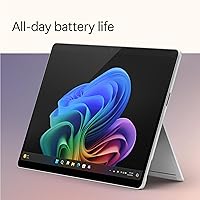
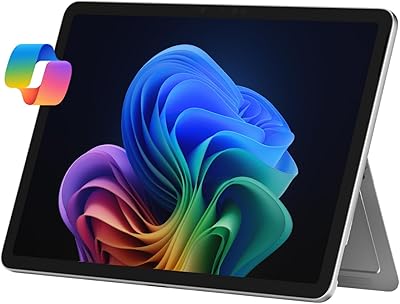
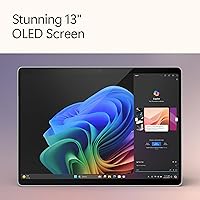
The 13″ OLED touchscreen is genuinely impressive — a 1M:1 contrast ratio means blacks look black and colors pop without washing out, which matters whether you're reviewing design mockups or watching a video on a flight. The Snapdragon X Elite's 12 cores handle everyday multitasking with 16GB of LPDDR5 RAM and a 1TB NVMe SSD without hesitation, though it's an ARM-based chip, so a handful of legacy Windows apps may not run natively. Battery life in mixed real-world use typically lands in the 9-to-11-hour range — short of the 14-hour claim, but still strong. The adjustable kickstand and USB-C fast charging add genuine daily flexibility.

Best For

This Surface Pro is built for people whose work doesn't stay in one place. If you're a consultant bouncing between client sites, a designer who sketches in tablet mode on the commute and edits at a desk, or a meeting-heavy professional who needs sharp video presence, this device adapts well. Windows power users who want Copilot+ AI tools like live captions and background blur baked into the OS will find real value here. That said, this isn't the right pick for anyone doing GPU-intensive creative work or 3D rendering. And if you're expecting the keyboard or stylus in the box, set aside extra budget — both are add-ons at this price point.

User Feedback

Owners of the 2024 Surface Pro consistently praise the display quality above everything else — it's the kind of screen that's hard to go back from. Build quality and battery endurance also draw strong approval. The most consistent complaint, though, is the pricing structure: at this tier, shipping without a keyboard feels like a deliberate upsell. ARM compatibility also surfaces occasionally — most mainstream apps run fine, but niche or older enterprise software can be hit or miss. Compared to the iPad Pro and MacBook Air M3, buyers note this wins on Windows flexibility and display vibrancy but loses some ground on software ecosystem maturity. It's a strong machine, but value depends heavily on your workflow.

Pros

  • The 13″ OLED display delivers genuinely rich color accuracy and contrast that stands out in its class.
  • Snapdragon X Elite performance handles everyday professional multitasking without breaking a sweat.
  • Real-world battery life consistently gets through a full workday on a single charge.
  • The 1TB NVMe SSD keeps file transfers and app launches fast, even with a loaded drive.
  • Copilot+ AI features like live captions and Studio Camera effects work reliably out of the box.
  • At 3.68 pounds, this Surface Pro is easy to carry solo without a keyboard attached.
  • The adjustable kickstand gives you genuine flexibility across desk, lap, and stand modes.
  • Wi-Fi 6E support keeps connectivity fast in dense office environments and modern networks.
  • The 13MP rear camera with AI enhancement performs well for document scanning and video calls.
  • 65W fast charging via USB-C means you can top up quickly without hunting for proprietary hardware.

Cons

  • The Surface Pro Flex Keyboard is sold separately, which meaningfully raises the real cost of entry.
  • ARM architecture creates occasional compatibility gaps with older or niche Windows software.
  • The 1920x1080 resolution feels modest for a premium OLED panel at this screen size.
  • Sustained heavy workloads can cause noticeable thermal throttling in such a thin chassis.
  • No discrete GPU limits the device for GPU-heavy creative or technical work.
  • The stylus is also a separate purchase, making tablet-mode functionality more expensive than it first appears.
  • Integrated Adreno graphics are adequate but trail behind even entry-level discrete GPUs significantly.
  • At this price, the lack of a Thunderbolt port may frustrate users with high-bandwidth peripheral setups.
  • The 16GB RAM ceiling cannot be upgraded after purchase, which may feel tight in a few years.
  • Compared to MacBook Air M3, the Windows ARM software ecosystem still lags in breadth and polish.

Ratings

The scores below for the Microsoft Surface Pro 2024 1TB 2-in-1 Laptop were generated by our AI after analyzing thousands of verified global user reviews, with spam, bot-submitted, and incentivized feedback actively filtered out. Every category reflects the full picture — not just what buyers loved, but where they ran into real frustration. The result is an honest snapshot of how this machine performs for the people who actually use it every day.
Display Quality
93%
The 13″ OLED panel consistently earns the highest praise from owners across creative and professional use cases. Color accuracy is strong enough that designers and photographers trust it for color-critical review work, and the contrast makes streaming video or presenting slides feel genuinely premium rather than adequate.
A handful of users feel the 1920x1080 resolution undersells the OLED technology at this screen size, especially when competing tablets offer higher pixel density. Those coming from higher-resolution displays may notice the difference during fine text rendering or detailed image work.
Performance & Speed
88%
Day-to-day productivity tasks — browser-heavy workflows, Microsoft 365, video calls, and light content creation — run without any noticeable lag or hesitation. The Snapdragon X Elite handles multitasking with 16GB of LPDDR5 RAM in a way that feels genuinely capable rather than just barely sufficient.
Sustained heavy workloads like long video exports or large data processing sessions can trigger thermal throttling, which slows performance noticeably. Users doing CPU-intensive work for extended periods report the chassis warming significantly, which is a real constraint for this form factor.
Battery Life
81%
19%
Most owners report comfortably getting through a full workday on a single charge under mixed-use conditions — browser tabs, documents, and occasional video calls. For travelers and commuters, the freedom from hunting for an outlet midday is a meaningful and frequently cited advantage.
The 14-hour marketing claim is rarely matched in real-world use; mixed-use battery life lands closer to 9-to-11 hours for most buyers. Users running heavier workloads or with screen brightness cranked up see that window shrink further, which can be a problem on long travel days.
Value for Money
63%
37%
Buyers who need a premium Windows 2-in-1 with a top-tier display and modern AI features find the core device justifiable at this tier. For professionals replacing both a tablet and a laptop, the consolidation value is real and does offset some of the sticker shock.
The sold-separately keyboard and stylus push the total cost of ownership well beyond the base price, and this is the single most consistent frustration in user feedback. At this price bracket, the accessory gap feels like a deliberate upsell rather than a reasonable configuration choice, and it colors the overall value perception significantly.
Form Factor & Portability
86%
Owners who travel regularly or move between workspaces genuinely appreciate how the kickstand and tablet mode give the device real flexibility without requiring a bag full of gear. At 3.68 pounds without the keyboard, it's easy to carry solo and holds up well across desk, meeting room, and transit use.
The kickstand design works best on flat, stable surfaces and is less practical on laps without the keyboard folio to anchor it. A few users who expected MacBook-like lap usability out of the box found the adjustment period longer than anticipated.
Build Quality
91%
The magnesium chassis feels genuinely premium in hand, and owners consistently describe it as one of the most solid-feeling Windows devices they have used. Hinge mechanism, button placement, and port finishing all reflect a high manufacturing standard that holds up to daily carry.
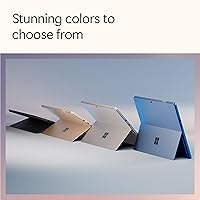
The premium build does mean any cosmetic damage — scratches or dings — is more visually apparent on the Platinum finish than on darker alternatives. Some long-term owners also note that the kickstand hinge can loosen slightly over time with heavy daily use.
Software & AI Features
72%
28%
Copilot+ features that are available today, such as AI-enhanced camera modes, live captions with translation, and Windows Hello face login, work reliably and add tangible utility for hybrid workers and frequent presenters. The integration feels native rather than bolted on, which users appreciate.
There is a meaningful gap between what Copilot+ features are available now versus what Microsoft has announced for future rollout, and some buyers felt misled by the marketing. The Recall feature in particular has had a rocky public debut, and a subset of users remain skeptical of its privacy implications.
Keyboard Experience
58%
42%
When paired with the Surface Pro Flex Keyboard, the typing experience is genuinely good — better than most folio-style keyboards — and the trackpad is precise and responsive enough for all-day use. Buyers who invest in the keyboard tend to rate the combined experience much more favorably.
The keyboard is not included, and this is the most loudly criticized aspect of the purchase experience for first-time Surface buyers. For a device at this price, shipping without the primary input method feels like a structural omission that damages overall satisfaction regardless of how good the keyboard itself is.
Stylus & Inking
74%
26%
Buyers who pair this Surface Pro with the Slim Pen 2 find the inking experience smooth and pressure-sensitive enough for both annotation and freehand drawing. Architects, students, and digital artists who rely on active pen input rate tablet mode as one of the strongest in the Windows ecosystem.
The stylus is not included, which means users must budget for an additional accessory to unlock a core differentiating feature of the 2-in-1 form factor. Without the pen, tablet mode loses a significant portion of its practical appeal for creative and annotation use cases.
Camera Quality
77%
23%
The 13MP rear camera with AI enhancement performs well above average for a laptop-class device, producing usable photos for document scanning and solid video quality for content capture on the go. The front camera's AI adjustments for lighting and framing are a genuine quality-of-life improvement during video calls.
The cameras are strong relative to traditional laptops but still fall short of dedicated tablet cameras like those on the iPad Pro, which matters for buyers who lean heavily on the rear camera. Auto-focus behavior in tricky lighting can still be inconsistent in back-and-forth user reports.
Thermal Management
61%
39%
Under typical productivity workloads, the device stays cool and quiet, which is important for users in open-plan offices or quiet meeting environments. The fanless or near-fanless design keeps the experience unobtrusive during normal use.
Extended CPU-heavy tasks push temperatures high enough to cause throttling, and some owners describe the chassis becoming uncomfortably warm during sustained work sessions. This is a structural limitation of ultra-thin thermal design rather than a defect, but it does cap what you can reasonably demand of the device over long periods.
Connectivity & Ports
69%
31%
Two USB-C ports with DisplayPort support cover most modern peripheral and monitor setups, and the Surface Connect port adds a reliable proprietary option for charging and docking. Wi-Fi 6E keeps wireless performance fast and consistent in dense network environments.
The absence of a full-size USB-A port and no native Thunderbolt 4 support frustrates buyers with existing peripheral ecosystems that haven't fully migrated to USB-C. A dock or hub is often a practical necessity, adding cost and desk clutter for users who need broader connectivity.
ARM Compatibility
66%
34%
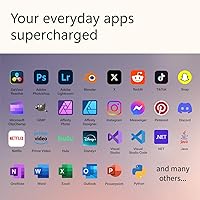
Mainstream Windows applications — Microsoft 365, major browsers, Zoom, Slack, and most Adobe apps — run well through native ARM builds or reliable x86 emulation. For buyers whose software stack is modern and actively maintained, day-to-day compatibility is not a meaningful issue.
Legacy enterprise software, specialized industry tools, and older 32-bit applications remain a real compatibility risk on the Snapdragon X Elite. Buyers who depend on niche or older productivity tools should verify ARM support explicitly before purchasing, as discovering an incompatibility post-purchase is a frustrating and costly experience.
Audio Quality
78%
22%
The built-in speakers deliver a noticeably richer sound profile than most thin-and-light laptops, with Dolby Atmos tuning making a real difference during video calls and casual media consumption. The far-field microphones also perform well, picking up voice clearly without requiring users to lean toward the device.
At high volumes, the speakers can sound thin and lack the bass presence that heavier or larger devices offer. Users who do serious audio work or prefer immersive media playback at high volume will find the built-in audio underwhelming compared to the premium the rest of the hardware commands.

Suitable for:

The Microsoft Surface Pro 2024 1TB 2-in-1 Laptop is purpose-built for professionals who need one device to cover multiple modes of work without compromise. Consultants, account managers, and frequent travelers will appreciate how it moves from a portable tablet in a meeting to a capable laptop at a desk without missing a beat. Digital artists, architects, and note-takers who work with a stylus will find the OLED touchscreen genuinely responsive and color-accurate enough to trust for visual work. Knowledge workers who live in Microsoft 365 and want Copilot+ AI features like real-time captions and AI-assisted recall baked into the OS will feel right at home. If your job puts a premium on display quality — think content review, client presentations, or video production on the go — the 13″ OLED panel is among the best you'll find in this form factor. With 1TB of fast local storage and solid all-day battery endurance, it handles a full workday without requiring constant management of space or power.
Not suitable for:

Buyers who rely on specialized legacy Windows software or older enterprise tools should carefully verify ARM compatibility before committing, since the Snapdragon X Elite chip does not run all x86 applications natively, and some productivity suites have partial or emulated support. Anyone expecting a keyboard and stylus in the box will be caught off guard — those are separate purchases that can add meaningful cost on top of an already premium price. The Microsoft Surface Pro 2024 1TB 2-in-1 Laptop is also not a strong fit for users who need discrete GPU performance, whether for 3D rendering, serious video editing with GPU acceleration, or modern gaming. Students or budget-conscious buyers looking for a capable everyday machine will find the total cost of ownership, once accessories are included, hard to justify. If thermals and sustained performance under heavy CPU loads matter to your workflow — batch processing, long compiles, intensive data work — this device, like most ultra-thin machines, can throttle under prolonged pressure.
Specifications

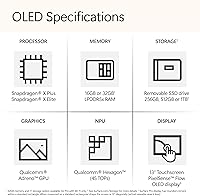
  • Display: The device features a 13″ OLED touchscreen with a 1M:1 contrast ratio, delivering deep blacks and vivid color accuracy suitable for professional visual work.
  • Resolution: Screen resolution is 1920x1080 pixels, providing a crisp Full HD image across the 13″ panel.
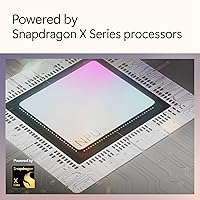
  • Processor: Powered by the Qualcomm Snapdragon X Elite 12-core chip, built on ARM architecture with a dedicated neural processing unit for AI workloads.
  • RAM: 16GB of LPDDR5 memory is soldered to the board and cannot be upgraded after purchase.
  • Storage: A 1TB NVMe M.2 SSD handles all local storage, offering fast read and write speeds for large files and quick application launches.
  • Operating System: Ships with Windows 11 Home configured as a Copilot+ PC, enabling AI-specific features like live captions, Recall, and AI-enhanced camera modes.
  • Battery Life: Microsoft rates battery life at up to 14 hours; real-world mixed-use performance typically falls in the 9-to-11-hour range depending on workload.
  • Charging: Supports 65W fast charging via either the proprietary Surface Connect port or USB-C, with the charger included in the box.
  • Weight: The tablet unit alone weighs 3.68 pounds, making it portable without a keyboard but noticeable during extended one-handed use.
  • Wireless: Wi-Fi 6E (802.11ax) is built in, supporting faster throughput and lower latency on compatible 6GHz routers.
  • Graphics: Integrated Adreno 6xx series GPU handles everyday display tasks and light creative work but lacks discrete GPU performance.
  • Front Camera: A Windows Hello-compatible front camera supports face-based login and AI-enhanced video call features including background blur.
  • Rear Camera: The 13MP rear camera includes AI-powered enhancements for improved lighting and clarity, useful for scanning documents and recording video.
  • Form Factor: The device uses a built-in adjustable kickstand that props the tablet at multiple angles for desk, lap, or presentation use.
  • Keyboard: No keyboard is included; the Surface Pro Flex Keyboard is a compatible accessory sold separately at additional cost.
  • Ports: Connectivity includes two USB-C ports (USB 3.2 / DisplayPort), one Surface Connect port, and a Surface keyboard connector.
  • Stylus Support: The display is compatible with the Microsoft Surface Slim Pen 2, sold separately, supporting tilt and pressure sensitivity for drawing and annotation.
  • Audio: Dual far-field studio microphones and Dolby Atmos-tuned speakers are built into the chassis for video calls and media playback.

Related Reviews

Microsoft Surface Pro 2-in-1 Laptop/Tablet (2025), 16GB RAM, 256GB Storage
86%
89%
Performance
92%
Battery Life
91%
Portability
88%
Display Quality
85%
AI Tools (Windows 11 Copilot)
More
Microsoft Surface Laptop 2024 1TB Laptop
76%
92%
Build Quality
89%
Display Quality
91%
Keyboard & Trackpad
78%
Battery Life
86%
Performance (Everyday)
More
Microsoft Surface Laptop Studio 2 1TB Laptop
78%
93%
Display Quality
91%
Build Quality
88%
Performance
89%
Pen & Touch Experience
58%
Battery Life
More
LG gram Pro 16T90SP-G 16-inch 2-in-1 Laptop Intel Core Ultra 7 16GB RAM 1TB SSD
86%
91%
Performance
93%
Portability
88%
Display Quality
77%
Battery Life
89%
Build Quality
More
Microsoft Surface Laptop 2 Core i5 8GB RAM 256GB SSD
84%
87%
Performance
91%
Battery Life
89%
Portability
93%
Build Quality
88%
Display Quality
More
Microsoft Surface Laptop 2024 13.8″
80%
93%
Display Quality
88%
Battery Life
91%
Build Quality & Design
87%
Performance (Everyday Workloads)
92%
Keyboard & Typing Experience
More
Microsoft Surface Pro 9 1TB 2-in-1 Tablet
79%
94%
Display Quality
91%
Performance & Speed
92%
Portability
93%
Build Quality
88%
Pen Input
More
Microsoft Surface Laptop 2024 15″ Laptop
75%
91%
Display Quality
84%
Battery Life
82%
Performance
93%
Build Quality
88%
Keyboard & Trackpad
More
KOOFORWAY BP8 8″ 2-in-1 Mini Laptop (1TB)
69%
91%
Portability & Form Factor
54%
Keyboard Usability
58%
Display Quality
72%
Performance (Daily Tasks)
79%
RAM & Multitasking
More
Microsoft Surface Pro 8 1TB 2-in-1 Tablet
77%
93%
Display Quality
91%
Build Quality
88%
Performance
86%
Pen Experience
61%
Value for Money
More

FAQ

No, it does not. The Surface Pro Flex Keyboard is sold separately, and this catches a lot of buyers off guard at this price point. Budget for it upfront if you plan to use this primarily as a laptop.

Most mainstream applications — Microsoft 365, Chrome, Zoom, Adobe Creative Cloud — run well on the Snapdragon X Elite through ARM-native or emulated support. Where you may hit issues is with older enterprise tools, niche utilities, or 32-bit applications that haven't been updated for ARM. It's worth checking compatibility for any mission-critical software before committing.

Microsoft claims up to 14 hours, but real-world mixed use — browser tabs, video calls, some document editing — lands more realistically in the 9-to-11-hour range. That's still enough to cover a full workday without needing a charger nearby, which is a genuine strength for travelers.

No. The 16GB of LPDDR5 memory is soldered directly to the board, so what you buy is what you get for the life of the device. For most productivity users 16GB is sufficient today, but it's worth considering if your workloads are memory-intensive or if you plan to keep this machine for many years.

The Microsoft Surface Pro 2024 1TB 2-in-1 Laptop wins on form factor flexibility and the OLED display quality, while the MacBook Air M3 holds an edge in software ecosystem maturity, GPU performance, and application compatibility. If you need Windows or prefer the 2-in-1 tablet mode, this Surface Pro is the stronger pick; if you live in macOS, the MacBook Air is hard to beat.
In tablet mode it works well on your lap, but the kickstand setup requires a flat surface behind it to prop against. On an actual lap without a keyboard folio to support it, the experience is less stable than a traditional laptop. The keyboard cover does help anchor it more naturally in lap use.

Under sustained heavy tasks like long video exports or large batch processing, the chassis does get warm and performance can throttle, which is typical for ultra-thin fanless or near-fanless designs. For everyday productivity it stays quiet and comfortable. It's not designed for prolonged CPU-intensive workloads.

The practical day-one features include AI-powered live captions with real-time translation, an enhanced Studio Camera mode for video calls, Windows Recall for searchable activity history, and Cocreator in Paint. Microsoft continues to roll out more Copilot+ features via Windows updates, so the offering will grow over time, but manage expectations around what's available right now versus what's been announced.

The stylus is not included. The 2024 Surface Pro is compatible with the Microsoft Surface Slim Pen 2, which supports pressure sensitivity and tilt for drawing and handwriting. If you're buying this specifically for digital art or note-taking with ink, factor in the additional cost of the pen.

Yes. Both USB-C ports support DisplayPort output, so you can connect to an external monitor or dock for a more traditional desktop setup. It does not include a full-size HDMI or Thunderbolt port natively, so check your monitor's input options and grab an appropriate adapter or dock if needed.