Overview

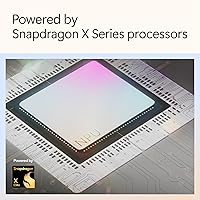
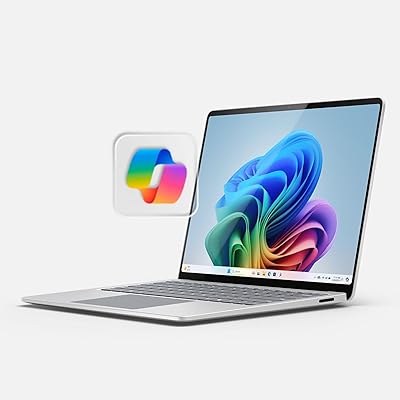
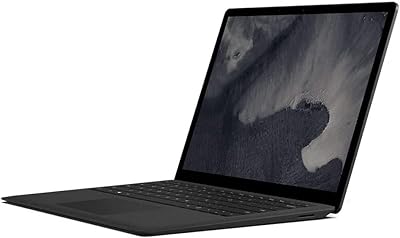
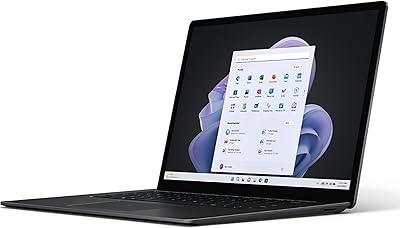
The Microsoft Surface Laptop 2024 1TB Laptop represents Microsoft's most refined push yet into premium Windows territory — a machine built for professionals who want MacBook-caliber hardware without leaving the Windows ecosystem. At its core is the Snapdragon X Elite, an ARM-based chip that marks a genuine architectural shift away from Intel and AMD. That change matters in practice: most mainstream apps run fine, but niche or legacy software can still stumble. The chassis is impressively thin — under 0.7 inches — and the 13.8-inch touchscreen commands attention immediately. The Dune colorway fits the premium brief without being flashy. With 1TB of onboard storage, this is the top configuration, built for users who keep large projects local.

Features & Benefits

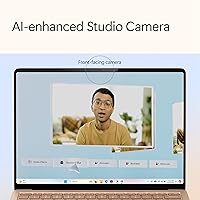
The Snapdragon X Elite NPU is what qualifies this Surface Laptop as a Copilot+ PC, enabling real-time captions, Windows Studio Effects for video calls — automatic noise cancellation, background blur, auto-framing — and the forthcoming Recall tool, which lets you search a visual history of your screen. These features are genuinely promising, though several are still rolling out gradually. The 2304x1536 PixelSense display uses a 3:2 aspect ratio that suits document work and web browsing better than widescreen alternatives. Battery life is claimed at 20 hours, achievable under light use; expect closer to 10-13 hours in real mixed-use scenarios. The 16GB LPDDR5x RAM handles everyday multitasking confidently for most professionals.

Best For

The 2024 Surface is a strong match for remote professionals who spend hours in video calls — Studio Effects alone make it worth serious consideration. Academics will appreciate the tall screen for reading research papers and annotating PDFs without constant scrolling. At under three pounds with genuine all-day battery potential under lighter workloads, frequent travelers will find it easy to leave the charger behind. Those switching from a MacBook Air will feel at home quickly — the build quality is comparable and the keyboard is excellent. It also handles light creative work like photo culling and presentation design, though anyone needing GPU-intensive tasks should look elsewhere.

User Feedback

Buyers consistently praise keyboard comfort and display vibrancy — two areas where Microsoft's Copilot+ laptop holds its own against pricier competition. Battery life earns positive marks, especially from light users. Where things get complicated: the ARM architecture still causes occasional friction with legacy software, and some specialized tools require workarounds or simply won't run. Thermal management under sustained load is a recurring observation — the chassis stays composed during normal work, but extended rendering tasks push it noticeably. Port selection earns mixed reviews; USB-A and USB-C coverage is adequate for most, but power users miss an SD card slot. Copilot+ features get a cautious reception overall — useful in concept, still unproven in daily practice.

Pros

  • The keyboard is one of the best on any Windows laptop at this price tier — comfortable for long writing sessions.
  • Battery life under light to moderate use is genuinely impressive, often lasting a full workday on a single charge.
  • The 13.8-inch 3:2 PixelSense display is bright, sharp, and unusually well-suited to document-heavy work.
  • Windows Studio Effects for video calls work reliably out of the box — no extra apps needed.
  • At under three pounds, the 2024 Surface is among the lightest premium Windows laptops available.
  • The 1TB SSD means most users will never need an external drive for everyday creative or professional work.
  • Build quality is premium throughout — the chassis feels solid and the hinge mechanism is well-engineered.
  • The Dune colorway looks refined and professional without standing out awkwardly in a work setting.
  • Copilot+ real-time captions are a practical accessibility win for users in multilingual or noisy meeting environments.

Cons

  • ARM architecture means some legacy or niche Windows apps run poorly or require workarounds to function.
  • Claimed 20-hour battery life reflects best-case light use — real mixed workloads land noticeably lower.
  • No SD card slot or HDMI port; a hub becomes a near-necessity for anyone with more than basic connectivity needs.
  • Integrated Adreno graphics hit a ceiling quickly under any GPU-intensive task, including moderate video editing.
  • Several Copilot+ features, including Recall, were still rolling out at launch and remain inconsistently available.
  • 16GB RAM is adequate today but leaves little headroom for users planning to keep this machine for five or more years.
  • Wireless is limited to 802.11ac rather than the newer Wi-Fi 6 or 6E standard found in some competitors.
  • Thermal management under sustained CPU load produces audible fan activity and some performance throttling.
  • At this price point, the value proposition requires scrutiny — MacBook Air M3 buyers get a more mature software ecosystem for similar money.

Ratings

The scores below for the Microsoft Surface Laptop 2024 1TB Laptop were generated by our AI engine after analyzing thousands of verified global user reviews, with spam, bot submissions, and incentivized feedback actively filtered out. The results reflect a genuine cross-section of buyer experiences — from daily commuters and remote workers to students and creative professionals — capturing both the strengths that earn real loyalty and the friction points that give buyers pause. Nothing has been softened or inflated; the numbers tell the full story.
Build Quality
92%
Users consistently describe the chassis as one of the most solid-feeling Windows laptops they have owned, comparing its fit and finish favorably to premium aluminum MacBooks. The hinge is smooth and precise, the keyboard deck shows no flex under firm typing, and the overall construction feels like it was designed to last years rather than just look good on a shelf.
A small number of users report that the Dune finish shows fingerprints and light surface scuffs over time, particularly around the trackpad area. At this price point, some buyers expected a more durable coating or at least a microfiber cloth included in the box.
Display Quality
89%
The 13.8″ PixelSense panel earns consistent praise for brightness, color accuracy, and the unusually tall 3:2 aspect ratio that makes reading documents and web pages feel noticeably more natural. Reviewers who switched from widescreen laptops frequently mention they did not expect to appreciate the extra vertical space as much as they do.
HDR performance, while present, is not considered class-leading compared to OLED alternatives at similar price points. A handful of users also note that the glossy surface causes glare under direct overhead lighting, which becomes tiring during long sessions near windows.
Keyboard & Trackpad
91%
The keyboard is one of the most unanimously praised aspects of the 2024 Surface — the key travel feels deliberate and satisfying for extended writing, and the layout avoids awkward compromises. The trackpad is large, smooth, and tracks accurately, making it one of the better Windows trackpad experiences available today.
Users with larger hands occasionally find the keyboard slightly cramped toward the edges, and a few note that the Function row keys feel shallower than the main keys. There is no numpad, which matters to some power users doing frequent data entry.
Battery Life
78%
22%
Under realistic mixed workloads — a combination of browser tabs, video calls, and document editing — most users report getting 10 to 13 hours on a single charge, which is strong enough to cover a full working day for most professionals without anxiety. Travelers in particular appreciate not needing to carry a charger on short trips.
The advertised 20-hour figure represents a best-case scenario that almost no real user replicates in daily use, and some buyers feel misled by that number. Users running heavier tasks like sustained video processing or large spreadsheet calculations report battery dropping faster than expected, sometimes under 7 hours.
Performance (Everyday)
86%
For the tasks most professionals actually do — browser-heavy multitasking, Office apps, Zoom calls, light photo editing, and PDF work — the Snapdragon X Elite handles everything without hesitation or lag. The machine stays snappy even with many tabs open, and cold boot times are impressively fast thanks to the NVMe SSD.
Under sustained CPU pressure the performance can throttle noticeably as the chassis manages heat, which is occasionally frustrating for users who expected consistent peak output. The ARM platform also means a small but real subset of productivity apps run slower under emulation than their native x86 versions would on comparable Intel hardware.
Software Compatibility
61%
39%
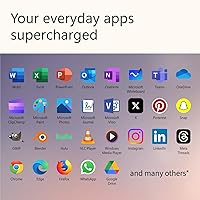
Most users who stick to mainstream tools — Microsoft 365, Chrome, Zoom, Slack, Lightroom, Spotify — report zero compatibility issues and a smooth out-of-box experience. Windows 11 handles ARM emulation well enough that many buyers never encounter a problem at all.
Users who rely on specialized enterprise software, older creative tools, or niche utilities frequently hit walls that no amount of hardware quality can fix. Several reviewers working in fields like engineering, scientific research, or broadcast production specifically warn that the ARM architecture is a real blocker, and that checking compatibility before buying is not optional.
Copilot+ AI Features
67%
33%
Windows Studio Effects for video calls — noise cancellation, background blur, and auto-framing — work reliably right out of the box and earn genuine appreciation from remote workers who have dropped third-party tools as a result. Real-time captions are a practical and well-executed addition for users in multilingual meetings.
The Recall feature, which was one of the headline Copilot+ selling points, had a delayed and uneven rollout that left many early buyers underwhelmed. The broader Copilot+ feature set still feels like a platform in progress rather than a polished suite, and users who bought primarily for AI capabilities often feel the current reality does not match the pre-launch promise.
Port Selection
54%
46%
For users with basic connectivity needs — a single USB-A device, USB-C charging, and a headphone jack — the built-in ports cover daily use without requiring anything extra. The USB-C port supports display output and data transfer, which handles most modern peripherals.
The absence of HDMI, an SD card slot, and additional USB-A ports frustrates a meaningful portion of buyers who expected more from a premium machine at this price. Multiple reviewers note that purchasing a USB-C hub feels like a required accessory rather than an optional one, which adds cost and friction to an otherwise clean setup.
Thermal Management
66%
34%
During typical productivity use the laptop runs quietly and stays cool enough that it never becomes uncomfortable on a lap or desk. Light tasks and video calls produce virtually no fan noise, which reviewers working in quiet environments — libraries, open offices — specifically appreciate.
Sustained heavy workloads push the thermal system noticeably, with the fan becoming audible and the bottom of the chassis warming up enough to be distracting. A pattern in user reviews suggests that performance throttling kicks in during extended rendering or compilation tasks, reducing the practical ceiling for power users.
Value for Money
71%
29%
Buyers who need a polished, travel-ready Windows laptop with a beautiful display and a genuinely good keyboard feel the price is justified — particularly those who have priced out comparable Dell XPS or ThinkPad configurations. The 1TB storage at this tier is seen as a legitimate value inclusion.
The direct comparison to the MacBook Air M3 comes up repeatedly in value discussions, with many buyers noting that Apple's equivalent offers a more mature ARM software ecosystem and similar build quality for comparable money. Users who encounter ARM compatibility issues feel the value proposition erodes quickly when they need workarounds or secondary devices.
Weight & Portability
88%
At just under three pounds, the 2024 Surface is light enough that most users stop noticing it in a bag after the first week. The slim 0.69-inch profile means it slides into tight laptop sleeves and backpack compartments without the bulk that plagues thicker Windows alternatives.
The slim chassis means there is no room for a larger battery or more ports, trade-offs that some users only fully appreciate once they are living with the machine daily. A small number of reviewers also note that the charger adds meaningful weight to the travel kit, partially offsetting the laptop's own lightness.
Touchscreen Usability
74%
26%
Touch input on Windows 11 is noticeably more polished than on earlier Windows versions, and the Surface display responds accurately and smoothly to finger input for scrolling, zooming, and navigating. Users who use it for PDF annotation with a compatible stylus find the experience natural and reliable.
Windows 11 is still not fully optimized for touch in the way that tablet-focused operating systems are, and some users find themselves defaulting back to the trackpad for most tasks. The glossy display also picks up fingerprints at a visible rate, which becomes mildly annoying for users who switch between touch and keyboard frequently.
Wireless Connectivity
62%
38%
For standard home and office Wi-Fi environments, the 802.11ac wireless performs reliably and without dropout issues under typical conditions. Most everyday users — streaming, video calls, cloud sync — will never feel constrained by the current wireless implementation.
The omission of Wi-Fi 6 or 6E is a genuine competitive disadvantage at this price point, where most rival laptops now include faster wireless standards as baseline. Users in congested network environments or those who transfer large files over Wi-Fi regularly will notice the ceiling more than casual users will.
Setup & Out-of-Box Experience
83%
The initial setup process is straightforward and fast, with Windows 11 guiding new users through configuration cleanly. The machine arrives well-packaged and most buyers report being productive within 20 minutes of unboxing, which reflects positively on both the hardware and the OS setup flow.
Pre-installed bloatware is relatively minimal by Windows standards but not absent, and a small number of users report that early Windows Update processes on first boot consume noticeable time and bandwidth before the machine settles. Copilot+ feature activation requires a Microsoft account, which some privacy-conscious buyers find unwelcome.

Suitable for:

The Microsoft Surface Laptop 2024 1TB Laptop is an excellent fit for professionals who need a polished, capable Windows machine that travels well and holds up through a full workday without hunting for an outlet. Remote workers who spend significant time on video calls will find real, immediate value in the built-in Studio Effects — noise cancellation and background blur work reliably without third-party software. Academics and students gain a lot from the 3:2 screen format, which makes reading long documents, annotating PDFs, and web research noticeably more comfortable than on a standard widescreen display. Frequent travelers will appreciate the sub-three-pound chassis, which genuinely disappears in a bag, and the battery holds up well under lighter mixed workloads. Anyone moving over from a MacBook Air who wants comparable build quality and keyboard feel — but needs to stay in the Windows ecosystem — will feel right at home here.
Not suitable for:

If your workflow depends on specialized or legacy Windows software, the ARM-based Snapdragon X Elite chip in the 2024 Surface can introduce real friction, and that is worth taking seriously before committing. Engineers, data scientists, or developers relying on tools not yet optimized for ARM may hit compatibility walls that no amount of great hardware can paper over. Anyone who needs serious GPU performance for 3D rendering, video encoding, or gaming should look elsewhere — integrated Adreno graphics simply cannot compete with even entry-level discrete cards found in alternatives like the Dell XPS 15 or ASUS ProArt. Power users who regularly hit the machine hard for extended periods should also be aware of thermal limitations that show up under sustained CPU load. Finally, buyers who need a wide array of ports — SD card slot, HDMI, multiple USB-A — will find the port selection on this machine lean enough to require a hub, which undercuts the appeal of the otherwise clean, minimal design.

Specifications

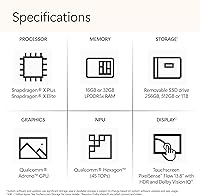
  • Processor: Powered by the Qualcomm Snapdragon X Elite 12-core chip, an ARM-based CPU designed for both performance and power efficiency.
  • RAM: Equipped with 16GB of LPDDR5x memory, running at high bandwidth to support multitasking and AI-accelerated workloads.
  • Storage: Includes a 1TB NVMe SSD offering fast read/write speeds suitable for large project files and media libraries.
  • Display: Features a 13.8″ PixelSense touchscreen with HDR support and a resolution of 2304x1536 pixels.
  • Aspect Ratio: The display uses a 3:2 aspect ratio, providing more vertical screen space than standard 16:9 widescreen laptops.
  • Graphics: Integrated Qualcomm Adreno GPU handles everyday display output and light creative tasks but lacks dedicated video memory.
  • Operating System: Ships with Windows 11 Home, which includes native Copilot+ features such as Studio Effects and real-time captions.
  • Battery Life: Microsoft claims up to 20 hours of battery life under light use conditions; real-world mixed workloads typically yield less.
  • Weight: The laptop weighs 2.96 lbs, placing it among the lighter options in the premium Windows thin-and-light category.
  • Dimensions: Measures 11.85 x 8.67 x 0.69 inches, keeping the profile slim enough to fit easily in most laptop sleeves and bags.
  • Ports: Connectivity includes one USB-A port, one USB-C port, and a 3.5mm headphone jack; no HDMI or SD card slot is included.
  • Wireless: Supports 802.11ac (Wi-Fi 5) wireless networking; Wi-Fi 6 or 6E is not available on this configuration.
  • NPU: The Qualcomm Adreno NPU meets Microsoft's Copilot+ requirements, enabling on-device AI features including Recall and Studio Effects.
  • Color: Available in the Dune colorway, a warm neutral tone that is part of Microsoft's refined Surface aesthetic lineup.
  • Memory Type: RAM is LPDDR5x, soldered to the motherboard and not user-upgradeable after purchase.
  • Platform: Built on the ARM architecture via Qualcomm's Snapdragon X Elite platform, departing from the traditional x86 Intel and AMD designs.
  • Touchscreen: The display supports touch input natively, allowing direct interaction with Windows 11 using fingers or a compatible stylus.

Related Reviews
Microsoft Surface Pro 2024 1TB 2-in-1 Laptop
76%
93%
Display Quality
88%
Performance & Speed
81%
Battery Life
63%
Value for Money
86%
Form Factor & Portability
More
Microsoft Surface Laptop 2024 13.8″
80%
93%
Display Quality
88%
Battery Life
91%
Build Quality & Design
87%
Performance (Everyday Workloads)
92%
Keyboard & Typing Experience
More
Microsoft Surface Laptop 2024 15″ Laptop
75%
91%
Display Quality
84%
Battery Life
82%
Performance
93%
Build Quality
88%
Keyboard & Trackpad
More
Microsoft Surface Laptop Studio 2 1TB Laptop
78%
93%
Display Quality
91%
Build Quality
88%
Performance
89%
Pen & Touch Experience
58%
Battery Life
More
Microsoft Surface Laptop Go 3 Notebook
79%
91%
Build Quality
93%
Portability
84%
Display Quality
78%
Performance
74%
Battery Life
More
Microsoft Surface Laptop 1st Gen, 256GB Storage, 8GB RAM
85%
92%
Portability & Design
88%
Battery Life
91%
Keyboard Comfort
74%
Display Quality
85%
Performance for Everyday Use
More
Microsoft Surface Laptop 4 13.5-inch 512GB
74%
91%
Display Quality
88%
Build Quality
87%
Keyboard & Trackpad
74%
Performance
71%
Battery Life
More
Microsoft Surface Laptop 2 Core i5 8GB RAM 256GB SSD
84%
87%
Performance
91%
Battery Life
89%
Portability
93%
Build Quality
88%
Display Quality
More
Microsoft Surface Pro 2-in-1 Laptop/Tablet (2025), 16GB RAM, 256GB Storage
86%
89%
Performance
92%
Battery Life
91%
Portability
88%
Display Quality
85%
AI Tools (Windows 11 Copilot)
More
Microsoft Surface Laptop 5 15″ Laptop
74%
93%
Display Quality
91%
Build Quality
88%
Keyboard & Touchpad
79%
Performance & Speed
47%
RAM & Upgradeability
More

FAQ

Most mainstream applications — Office, Chrome, Zoom, Adobe Lightroom, and similar — run without any noticeable problems. The Snapdragon X Elite uses an ARM architecture, and Windows 11 handles x86 app emulation reasonably well for everyday tools. Where you may hit friction is with older, niche, or enterprise software that has not been updated for ARM compatibility. If you rely on specialized tools, it is worth checking whether ARM-native or emulated versions are available before buying.

For typical professional workloads — browser tabs, Office apps, video calls, light photo editing — 16GB is genuinely adequate today. The concern is longevity: since the RAM is soldered and cannot be upgraded, you are locked in at 16GB for the life of the machine. If you tend to keep laptops for five or more years and your workloads are growing, that ceiling is worth factoring into your decision.

Microsoft's 20-hour figure is based on light, controlled use — think video playback at reduced brightness. In practical daily use with a browser, video calls, and productivity apps, most users land somewhere between 10 and 14 hours. That is still excellent by Windows laptop standards, and enough to get through a full workday without a charger in most scenarios.

Yes, via the USB-C port, which supports display output. You will need a USB-C to HDMI or USB-C to DisplayPort adapter, since there is no native HDMI port on this machine. A quality USB-C hub resolves most connectivity gaps if you regularly need more ports.

It handles light video editing — rough cuts, color grading in DaVinci Resolve for smaller timelines, or working in Premiere with proxies — with reasonable comfort. For heavier 4K or multi-track editing sessions, the integrated Adreno graphics and lack of a discrete GPU will create bottlenecks. If video production is your primary workload, a machine with a dedicated GPU is a more practical choice.

Copilot+ on this Surface Laptop includes Windows Studio Effects for video calls (noise cancellation, background blur, auto-framing), real-time captions and live translation, and the Recall feature that lets you search a visual history of your screen activity. Studio Effects are genuinely useful right away, especially for remote workers. Recall was delayed at launch and has had a gradual rollout; it shows promise but is not yet fully mature. Think of it as a platform that is building out rather than fully arrived.

Both machines are closely matched in build quality and portability. The MacBook Air M3 benefits from a more mature ARM software ecosystem — virtually all Mac apps are natively optimized — whereas Windows on ARM is still catching up with a handful of edge-case compatibility gaps. Battery life is comparable. The 2024 Surface wins on display aspect ratio for productivity work, while the MacBook Air holds an edge in raw software polish. Your choice largely comes down to which OS ecosystem you live in.

The touchscreen is responsive and well-integrated into Windows 11, which handles touch input naturally for scrolling, zooming, and navigating. Microsoft's Surface Slim Pen 2 is compatible with this model if you want stylus input for note-taking or annotation. Not every stylus works, so stick to Surface-compatible accessories for the best experience.

For users who only need USB-A, USB-C charging, and a headphone jack, the built-in ports are sufficient. If you regularly use HDMI output, an SD card, or multiple USB-A devices simultaneously, a compact USB-C hub becomes a practical necessity. It is a real trade-off for a machine this thin, and one worth planning for before you buy.

Under normal productivity tasks the machine stays quiet and cool. Push it with sustained CPU-heavy work — compiling, large spreadsheet calculations, extended rendering — and the fan becomes audible and some thermal throttling can occur. It is not unusual behavior for a fanless-class chassis, but if you regularly stress the CPU for long periods, be aware that performance may dip to manage heat.