Overview

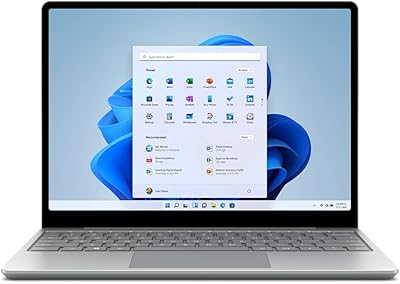
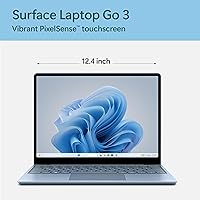
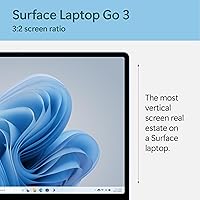
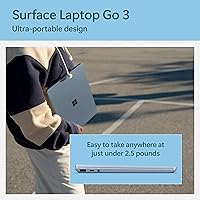
The Microsoft Surface Laptop Go 3 Notebook is Microsoft's answer to the growing demand for compact, carry-everywhere Windows machines that don't feel cheap in hand. At just under 2.5 pounds with an Ice Blue metal finish, this compact Windows laptop punches above its weight visually and structurally. The 12.4″ PixelSense touchscreen with its tall 3:2 aspect ratio genuinely sets it apart — you see more of a webpage or document without scrolling constantly. Positioned in the mid-range, it competes with similarly priced ultrabooks, though buyers should be clear-eyed: this machine is built for everyday tasks, not heavy lifting.

Features & Benefits

The Surface Laptop Go 3 runs on Intel's Core i5-1235U, a 10-core chip that handles web browsing, video calls, Office apps, and light photo editing without breaking a sweat. The 8GB of LPDDR5 RAM paired with a 256GB SSD is plenty for most daily routines, but it's worth knowing upfront: neither is user-upgradeable, so what you buy is what you keep. Battery life is rated at 15 hours, and while real-world use tends to land closer to 10–12, that's still solid for a full workday. Wi-Fi 6 support and a fingerprint-secured power button round out a genuinely practical feature set.

Best For

This compact Windows laptop is a natural fit for students who shuttle between classes and need something lightweight that won't drag down a backpack. It's also a strong pick for remote workers and commuters — the touchscreen and tall display make it especially comfortable for reading documents, annotating PDFs, or casual sketching on the go. If you're already using Microsoft 365 and OneDrive, the integration here feels genuinely cohesive rather than bolted on. Where it falls short: power users, video editors, or anyone running multiple demanding apps simultaneously will likely hit the hardware ceiling faster than they'd like.

User Feedback

Buyers consistently praise the build quality and display — the metal chassis feels premium, and the screen's clarity earns genuine compliments. The keyboard also gets high marks for a laptop this compact. On the flip side, the port situation comes up often: one USB-A, one USB-C, a headphone jack, and a Surface Connect port means a hub becomes a near-necessity for anyone with multiple peripherals. The non-upgradeable RAM frustrates buyers who later wish they'd had more headroom. On value, opinions split — some feel the build justifies the price, while others believe competing ultrabooks offer better raw specs at the same cost.

Pros

  • The metal chassis feels genuinely premium and holds up well to daily bag-in, bag-out use.
  • At under 2.5 pounds, the Surface Laptop Go 3 is light enough to forget it is in your bag.
  • The 12.45″ touchscreen with a 3:2 ratio displays noticeably more vertical content than standard widescreen laptops.
  • Real-world battery life in moderate use comfortably covers a full workday without hunting for an outlet.
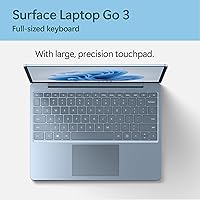
  • The full-size keyboard has well-judged key travel that holds up during long writing sessions.
  • Fingerprint login via the power button is fast, reliable, and works consistently from cold boot.
  • Wi-Fi 6 support keeps wireless performance sharp even on congested networks.
  • Windows 11 Home with OneDrive integration works especially well for users already in the Microsoft ecosystem.
  • Fast Charging support means a short plug-in during lunch can meaningfully extend the afternoon.

Cons

  • 8GB of RAM is non-upgradeable, making the machine a poor long-term bet for growing workloads.
  • The 256GB SSD fills up faster than expected once Windows updates, apps, and files accumulate.
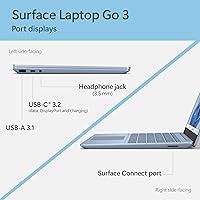
  • Only one USB-A and one USB-C port means most users will need a hub for everyday desk setups.
  • Actual battery life in heavier use drops noticeably below the 15-hour figure Microsoft promotes.
  • The display resolution of 1536×1024 is adequate but looks soft next to sharper panels at similar price points.
  • No dedicated graphics mean anything beyond basic photo editing or light video playback will struggle.
  • The Surface Connect charging port is proprietary, adding another cable to carry when traveling.
  • At its price, rivals offer more configurable specs, making the value case dependent on valuing build and ecosystem over raw hardware.
  • There is no SD card slot, which is a friction point for photographers or anyone who works with media cards regularly.

Ratings

Our AI rating system analyzed thousands of verified global purchases of the Microsoft Surface Laptop Go 3 Notebook, actively filtering out incentivized, duplicate, and bot-generated reviews to surface what real buyers actually experience day to day. The scores below reflect an honest cross-section of feedback — the genuine strengths that keep buyers satisfied months after purchase, and the recurring frustrations that no amount of good marketing can paper over. Both sides are represented transparently so you can make a confident, informed decision.

Build Quality
91%
The metal chassis consistently earns praise from users who have carried this ultraportable daily for months — it resists flex, feels solid in hand, and the Ice Blue finish holds up without chipping or scuffing under normal bag wear. Students and commuters especially appreciate that it does not feel like a budget machine despite its accessible positioning.
A handful of buyers reported that the bottom panel, which is plastic rather than metal, feels noticeably cheaper than the lid and palm rest. In drop scenarios the build holds adequately, but it is not ruggedized, and a few users noted minor dents after accidental falls.
Portability
93%
At under 2.5 pounds, this is one of the lightest full-Windows laptops available at this screen size, and buyers who commute daily or move between classrooms report that it becomes essentially invisible in a bag. The compact footprint fits on cramped lecture desks and airplane tray tables without drama.
The small form factor does come with trade-offs some users did not anticipate — the limited port selection means carrying extra adapters, which adds bulk and partially offsets the portability benefit. A few buyers also found the 12.45″ screen slightly small for prolonged desk work.
Display Quality
84%
The 3:2 PixelSense panel earns consistent compliments for color accuracy and the practical advantage of extra vertical space — users switching from standard widescreen laptops frequently call it a revelation for reading documents, scrolling feeds, and web research. Viewing angles are comfortable and touch responsiveness is reliable.
The 1536×1024 resolution looks soft compared to sharper QHD panels available on competing laptops at similar prices, and this becomes more apparent when displaying detailed graphics or fine text at native size. Maximum brightness can also feel insufficient in bright outdoor environments.
Performance
78%
22%
For the core daily workflow — multiple browser tabs, Microsoft 365 apps, video calls, and light media — the i5-1235U handles everything without hesitation, and most buyers report that the machine feels genuinely quick and responsive for the tasks it was designed around.
Users who push beyond everyday tasks hit the ceiling quickly: running local development environments, editing high-resolution video, or stacking memory-heavy browser sessions alongside creative software produces noticeable slowdowns. The 8GB RAM ceiling is the primary constraint buyers wish they had thought harder about before purchasing.
Battery Life
74%
26%
In light-to-moderate use — document editing, streaming music, casual browsing at around 50 percent brightness — buyers consistently report getting through a full workday on a single charge, which aligns with real needs even if it falls short of Microsoft's headline figure.
The 15-hour official rating creates inflated expectations, and users doing video calls, screen sharing, or heavier multitasking frequently report landing closer to 8 or 9 hours. Several long-term owners noted that battery capacity degraded more noticeably than expected after 12 to 18 months of daily use.
Keyboard & Touchpad
88%
Writers, students, and remote workers consistently highlight the keyboard as a standout feature — the key travel feels deliberate without being mushy, and the full-size layout means no compromises on key placement. The precision touchpad is large, accurate, and smooth enough that many users skip an external mouse entirely.
A small number of buyers found the key feedback slightly shallow compared to dedicated typing keyboards, and the touchpad, while accurate, can occasionally register unintended palm input during fast typing sessions. Backlight brightness adjustment is also limited in granularity.
Port Selection
47%
53%
The inclusion of both a USB-A and USB-C port means most basic accessories connect without an adapter, which is a small but practical advantage over laptops that have gone USB-C only. The Surface Connect port also provides a tidy, secure magnetic charging option at the desk.
With just two data ports and no HDMI, no SD card slot, and no Thunderbolt support, buyers who set up at a desk with an external monitor and multiple peripherals find themselves immediately dependent on a hub or dock. This recurring complaint appears in a significant share of critical reviews, and many buyers say they wished the limitation had been more prominent before purchase.
Value for Money
69%
31%
Buyers who specifically value the build quality, the display format, and Microsoft ecosystem integration tend to feel the price is justified — the machine feels premium in a way that cheaper plastic-bodied competitors simply do not, and for ecosystem loyalists the OneDrive and Windows Hello integration adds real daily value.
A consistent minority of reviewers feel that competing ultrabooks at the same price point offer more configurable RAM and storage options, faster processors, or more ports. The non-upgradeable hardware particularly amplifies value concerns over a multi-year ownership horizon, making the long-term cost-per-capability argument harder to win.
Startup & Wake Speed
86%
Boot times are fast and the machine wakes from sleep almost instantly, which buyers who frequently open and close the lid throughout the day appreciate enormously. Combined with the fingerprint power button, the experience from closed lid to working screen takes only a few seconds.
Occasional users report that after extended sleep periods or Windows update cycles, wake times become less consistent and the fingerprint reader occasionally fails on the first attempt. These instances are not frequent but do interrupt the otherwise polished startup experience.
Touchscreen Usability
76%
24%
For note annotation, casual touch navigation, and pinch-to-zoom on documents and maps, the touchscreen is responsive and accurate enough to become a natural part of daily use. Buyers who switched from non-touch laptops often mention that they now instinctively reach for the screen.
Without an included stylus and without Wacom or MPP digitizer support, precision tasks like detailed handwriting or illustration feel imprecise. The glass also picks up fingerprints quickly, and some users find themselves cleaning the screen frequently to maintain display clarity.
Webcam & Audio
63%
37%
For standard video calls in decent lighting, the 720p camera produces acceptable results and the microphones handle quiet home office or classroom environments reasonably well without significant background noise bleed.
In lower-light environments the camera image becomes grainy and soft, which is a common frustration for remote workers who do not have dedicated lighting. The speakers are adequate for personal listening but thin at higher volumes, and buyers using this machine for frequent presentations or group audio report disappointment.
Thermal Management
81%
19%
Under typical daily workloads the Surface Laptop Go 3 stays cool and the fan remains quiet or inaudible, which buyers who use the machine on their lap or in quiet study spaces specifically appreciate. Passive cooling handles light tasks without the fan spinning up at all.
Under sustained heavier loads — long video exports, extended browser sessions with many tabs, or prolonged Teams calls with screen sharing — the bottom of the chassis warms noticeably and the fan ramps up to an audible level. Thermal throttling under prolonged peak load has been flagged by a subset of technically oriented reviewers.
Software & OS Experience
83%
Windows 11 Home runs cleanly on this hardware without the sluggishness that plagued earlier budget Surface devices, and the OneDrive integration alongside Windows Hello fingerprint login creates a cohesive, low-friction daily experience for Microsoft ecosystem users.
Windows 11 Home ships with a layer of bloatware and pre-installed Microsoft apps that some buyers find cluttering, and the Home edition lacks certain enterprise features that business-leaning buyers occasionally expect. Mandatory update interruptions are a recurring minor complaint.
Connectivity & Wireless
87%
Wi-Fi 6 support delivers fast, stable wireless performance on compatible routers, and buyers in dense apartment buildings or busy campus networks report noticeably fewer drops and stronger sustained speeds compared to older Wi-Fi 5 devices. Bluetooth 5.1 pairs quickly and holds connections reliably.
Wi-Fi 6 only provides a tangible benefit if your router supports it, and buyers on older home networks will not notice any difference over a standard Wi-Fi 5 machine. A small number of users also reported occasional Bluetooth audio stuttering when connected to certain wireless headphone models.

Suitable for:

The Microsoft Surface Laptop Go 3 Notebook is a strong fit for students, commuters, and light-duty professionals who need a real Windows machine without hauling a heavy bag. If your daily workload revolves around web browsing, email, video calls, cloud-based apps, and Microsoft 365, this ultraportable handles all of it comfortably and without complaint. The tall 3:2 touchscreen is a genuine advantage for anyone who reads long documents or annotates notes by hand — it's notably more comfortable than the standard widescreen format most laptops ship with. Frequent travelers will appreciate the sub-2.5-pound weight and all-day battery that, in moderate use, genuinely gets close to the rated figure. Anyone already invested in the Microsoft and OneDrive ecosystem will find the integration here feels natural rather than forced, and the fingerprint login makes the whole experience feel polished for everyday use.

Not suitable for:

The Microsoft Surface Laptop Go 3 Notebook is not the right call for anyone who pushes their hardware — video editors, developers running local environments, or users who regularly juggle many browser tabs alongside creative software will hit the ceiling of 8GB RAM sooner than they expect. Because neither the RAM nor the storage is user-upgradeable, there is no path to grow into a more capable machine later; what you configure at purchase is what you live with for the lifespan of the device. The port selection is also a real constraint — with just one USB-A, one USB-C, and a headphone jack, anyone with external drives, monitors, or multiple peripherals will need to budget for a USB hub or dock on top of the purchase price. Gamers and anyone who needs discrete graphics should look elsewhere entirely, as the integrated Intel Iris Xe handles light visuals but nothing demanding. Finally, buyers who prioritize raw specs-per-dollar over build quality and ecosystem fit may find competing ultrabooks offer more processing power or storage at a comparable price point.

Specifications

  • Display: 12.45″ PixelSense touchscreen with a 1536×1024 pixel resolution and a tall 3:2 aspect ratio for more vertical screen space.
  • Processor: Intel Core i5-1235U with 10 cores (2 performance, 8 efficiency) clocking up to 4.4 GHz for responsive everyday computing.
  • RAM: 8GB of LPDDR5 memory, soldered to the motherboard and not user-upgradeable after purchase.
  • Storage: 256GB solid-state drive offering fast read and write speeds for quick boot times and app launches.
  • Graphics: Intel Iris Xe integrated graphics, suitable for everyday tasks, light photo editing, and casual media consumption.
  • Operating System: Windows 11 Home comes pre-installed, with full access to the Microsoft Store and standard Windows features.
  • Battery: Rated up to 15 hours on a single charge, with Fast Charging support to recover meaningful battery in a short plug-in window.
  • Weight: The laptop weighs 2.49 pounds, making it one of the lighter full-Windows machines available at this screen size.
  • Dimensions: The chassis measures 11.86 × 8.96 × 2.15 inches, compact enough to fit comfortably in most standard backpacks and slim laptop sleeves.
  • Wireless: Wi-Fi 6 (802.11ax) support enables faster, more reliable wireless connections on compatible modern routers.
  • Ports: Connectivity includes one USB-A 3.1, one USB-C 3.1, a 3.5mm headphone jack, and a proprietary Surface Connect port for charging.
  • Security: A fingerprint reader is integrated directly into the power button, enabling fast and secure Windows Hello sign-in without a PIN or password.
  • Build Material: The lid and palm rest are finished in a cool-touch metal alloy, giving the Ice Blue colorway a premium, durable feel.
  • Keyboard: Full-size keyboard with thoughtfully tuned key travel and a large precision touchpad designed for extended comfortable typing sessions.
  • Camera: A 720p HD front-facing camera with a privacy shutter is built in for video calls and virtual meetings.
  • Bluetooth: Bluetooth 5.1 is supported for connecting wireless peripherals such as mice, keyboards, and headphones.
  • Release Date: The Surface Laptop Go 3 was made available to the public in September 2023 as the third generation of the Go line.
  • Cloud Integration: OneDrive Personal Vault is accessible directly via fingerprint authentication, adding an extra layer of security for sensitive cloud-stored files.

Related Reviews
Microsoft Surface Go 3 10.5″ - Intel Core i3, 8GB RAM, 128GB SSD
84%
94%
Portability
85%
Performance for Everyday Tasks
89%
Battery Life
88%
Display Quality
83%
Build Quality
More
Microsoft Surface Laptop Go - 12.4″, Intel Core i5, 8GB RAM, 128GB SSD
83%
92%
Value for Money
96%
Portability/Size/Weight
89%
Battery Life
81%
Display Quality
84%
Performance
More
Microsoft Surface Laptop 3 13.5-inch, Intel Core i5, 8GB RAM, 256GB SSD
84%
88%
Performance
94%
Portability & Weight
82%
Battery Life
90%
Display Quality
85%
Build Quality & Durability
More
Microsoft Surface Laptop Go 2 - 12.4″, Intel Core i5, 8GB RAM, 256GB SSD
86%
92%
Portability & Weight
88%
Battery Life
85%
Display Quality
84%
Performance for Everyday Use
89%
Build Quality
More
Microsoft Surface Laptop 1st Gen, 256GB Storage, 8GB RAM
85%
92%
Portability & Design
88%
Battery Life
91%
Keyboard Comfort
74%
Display Quality
85%
Performance for Everyday Use
More
Microsoft Surface Laptop 4 13.5-inch 512GB
74%
91%
Display Quality
88%
Build Quality
87%
Keyboard & Trackpad
74%
Performance
71%
Battery Life
More
Microsoft Surface Laptop 2024 13.8″
80%
93%
Display Quality
88%
Battery Life
91%
Build Quality & Design
87%
Performance (Everyday Workloads)
92%
Keyboard & Typing Experience
More
Microsoft Surface Laptop 2 Core i5 8GB RAM 256GB SSD
84%
87%
Performance
91%
Battery Life
89%
Portability
93%
Build Quality
88%
Display Quality
More
Microsoft Surface Laptop 2024 15″ Laptop
75%
91%
Display Quality
84%
Battery Life
82%
Performance
93%
Build Quality
88%
Keyboard & Trackpad
More
Microsoft Surface Laptop 5 15″ Laptop
74%
93%
Display Quality
91%
Build Quality
88%
Keyboard & Touchpad
79%
Performance & Speed
47%
RAM & Upgradeability
More

FAQ

Unfortunately, no. The RAM is soldered directly to the motherboard and the SSD is not designed for user replacement on this model. This is one of the more important things to know before buying — the configuration you choose at purchase is the one you will live with for the life of the machine. If you think 8GB might feel tight in a year or two, it is worth considering that limitation seriously before committing.

In practice, most users land somewhere between 9 and 12 hours depending on what they are doing. Light tasks like document editing and web browsing at moderate brightness tend to push toward the higher end, while video streaming, video calls, or heavier multitasking will drain it faster. The 15-hour figure is achievable under ideal conditions, but planning for around 10 hours in typical daily use is more realistic.

The display supports touch input and basic stylus use, though it does not ship with a Surface Pen and is not optimized for precision drawing in the way a Surface Pro is. For casual handwritten notes or light annotation it works well, but if detailed digital art or fine stylus work is central to your workflow, a dedicated drawing tablet or a Surface Pro would serve you better.

The port layout is minimal: one USB-A, one USB-C, a headphone jack, and Microsoft's proprietary Surface Connect port used for charging. There is no HDMI, no SD card slot, and no Thunderbolt support. If you regularly connect an external monitor, a USB drive, and other peripherals at your desk, a USB-C hub or dock is essentially a necessity — factor that into your total budget.

Yes, it handles video conferencing reliably. The 720p webcam is adequate for Teams, Zoom, or Google Meet, the microphones do a reasonable job in quiet environments, and the processor handles multiple active apps alongside a video call without noticeable slowdown. It is a practical remote work machine as long as your workflow stays within everyday productivity tasks.

The metal build is one of the genuine strengths here. The chassis feels solid and resists flex well, and the finish holds up to regular daily use without scuffing easily. It is not ruggedized in any certified sense, but it is built more durably than most plastic-bodied laptops at this price range and handles the wear of commuting and campus life well.

Absolutely. Word, Excel, PowerPoint, Outlook, Teams, and browser-based SaaS tools like Google Workspace or Notion all run without any issues. The Surface Laptop Go 3 is essentially purpose-built for this kind of workflow. Where you may notice limits is if you open a very large number of browser tabs simultaneously alongside multiple Office documents — at that point the 8GB RAM ceiling starts to show.

The Surface Connect is Microsoft's proprietary magnetic charging connector, similar in concept to older MagSafe adapters. The good news is that this laptop also supports charging through the USB-C port, which gives you flexibility to use a standard USB-C charger or power bank when you do not have the included adapter with you.

Most users find the keyboard surprisingly good for a laptop this compact. The key travel is well-balanced — not too shallow and not too deep — and the full-size layout means there are no cramped or awkwardly positioned keys. The precision touchpad is also responsive and accurately sized. Writers and students who type for long stretches tend to report that it holds up well over hours of use.

For most everyday combinations — a few browser tabs, a document, a music app, and a communication tool open simultaneously — it manages fine without noticeable lag. The i5-1235U has enough headroom for typical multitasking. The constraint becomes more apparent when you stack a lot of memory-intensive tasks together, since 8GB of RAM does not leave a wide buffer once the operating system and background processes take their share.

Where to Buy

URI Campus Store
In stock $1,196.99
University of Chicago Bookstore
In stock $1,196.99
Marshall University Bookstore
In stock $1,196.99
Kennel Bookstore
In stock $1,196.99
Chapman University Bookstore
In stock $1,196.99