Overview

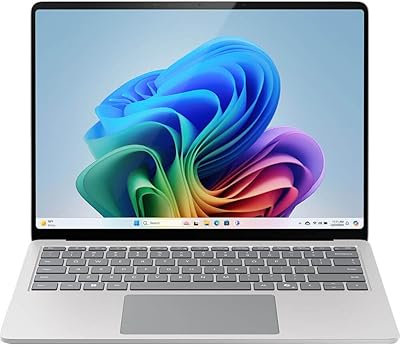
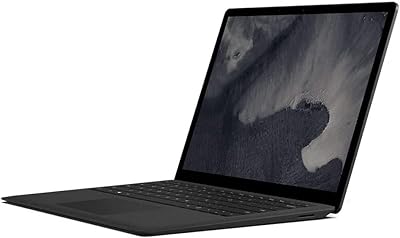
The Microsoft Surface Laptop 1769 128GB arrived at a point when Microsoft was making a genuine push to compete on design as much as performance. The slim aluminum lid paired with an Alcantara-covered keyboard deck gives it a tactile quality that stands apart from the plastic-chassis crowd. The 13.5-inch PixelSense display uses a taller 3:2 aspect ratio, which means you see more of a document or webpage before scrolling — a quiet but meaningful advantage for productivity work. One caveat worth raising upfront: it ships with Windows 10 S, which limits you to Microsoft Store apps only, a restriction that catches buyers off guard more often than it should. Upgrading to full Windows 10 is free, but it requires deliberate action.

Features & Benefits

The PixelSense touchscreen reaches up to 2256x1504 pixels, and day-to-day it is crisp, bright, and comfortable for extended reading or writing. The Core i5 and 8GB of RAM handle browsing, Office apps, and video calls without complaint — nothing dramatic, but reliably smooth. SSD storage keeps boot times and app launches quick despite the modest 128GB ceiling. Battery life is a genuine strength: Microsoft advertises 14.5 hours, and real-world use typically lands between 9 and 11 hours depending on screen brightness and workload, which still covers a full day for most people. Weighing just 2.76 pounds at barely over half an inch thick, it travels well. The single USB-A port, however, is a recurring inconvenience that demands planning.

Best For

Microsoft's slim touchscreen laptop is a natural fit for college students who spend their days writing, researching, and attending virtual classes. Users already embedded in the Microsoft 365 and OneDrive ecosystem will find the experience feels cohesive rather than forced. Frequent travelers and light business users who prioritize portability and battery stamina over raw horsepower will also find a lot to like here. Where it falls short is equally clear: 128GB of non-upgradeable storage fills up fast, and the integrated graphics put creative workloads, video editing, and gaming firmly out of reach. If those are part of your regular workflow, this machine will disappoint. For focused daily tasks, though, it punches consistently above its weight.

User Feedback

Buyers frequently single out the keyboard and trackpad for praise — the Alcantara surface has an unusually soft, premium feel that holds up well during long typing sessions. Display clarity and color accuracy draw consistent compliments as well. On the frustration side, the single port draws repeated criticism from users who need to juggle peripherals, and the fact that storage cannot be expanded post-purchase means 128GB is a permanent ceiling. Some long-term owners have noted the Alcantara palm rest showing visible wear after a year or more of daily use. Confusion over Windows 10 S limitations surfaces regularly in negative reviews, though most buyers who upgraded to full Windows 10 report that resolving it quickly improved their overall experience.

Pros

  • The build quality feels genuinely premium — the aluminum chassis and Alcantara deck are a cut above most laptops in this price range.
  • At 2.76 pounds and just over half an inch thin, this Surface Laptop is easy to carry in a bag all day without noticing the weight.
  • The 13.5-inch PixelSense touchscreen is sharp and vivid, with a 3:2 aspect ratio that shows more content vertically than standard widescreen displays.
  • Battery life holds up well for office and school use, typically delivering a full workday on a single charge.
  • The backlit keyboard has a comfortable, cushioned feel that makes long typing sessions noticeably less fatiguing.
  • Boot times and app launches are fast thanks to SSD storage — no waiting around for the machine to wake up.
  • Performance across browsing, video calls, and Microsoft 365 apps is consistently smooth with no frustrating lag.
  • The display supports touch input naturally, which works well for annotation, scrolling, and navigating documents on the go.

Cons

  • 128GB of storage fills up quickly and cannot be upgraded after purchase — cloud storage becomes a necessity, not an option.
  • Only one USB-A port means you will need a hub the moment you want to connect more than one peripheral at a time.
  • The laptop ships with Windows 10 S, which silently blocks non-Store apps — many buyers only discover this limitation after purchase.
  • Real-world battery life lands noticeably below the advertised 14.5-hour figure under typical mixed-use conditions.
  • The Alcantara palm rest, while comfortable, can show visible wear and discoloration with regular daily use over time.
  • Intel HD Graphics 620 handles basic display tasks but rules out any serious creative software or graphics workloads.
  • There is no Thunderbolt port, SD card slot, or HDMI output, making external display and accessory setups more complicated than they should be.
  • As an older-generation model, it will not receive indefinite software support and may feel underpowered compared to current mid-range alternatives.

Ratings

Our AI rating system analyzed thousands of verified global buyer reviews for the Microsoft Surface Laptop 1769 128GB, actively filtering out incentivized, duplicate, and bot-generated submissions to surface what real owners genuinely experience. Scores reflect a balanced synthesis of both enthusiastic praise and recurring frustrations, so what you see here is an honest, unvarnished picture of how this machine performs in daily life — not a curated highlight reel.

Build Quality
91%
Owners consistently describe this Surface Laptop as feeling more substantial and refined than its price suggests. The aluminum lid resists flex noticeably better than typical plastic-chassis competitors, and the Alcantara keyboard deck draws repeated comparisons to premium accessories rather than budget hardware. Carrying it around daily, it holds up without the creaks or wobbles that plague cheaper builds.
The Alcantara fabric, while initially impressive, begins to show wear and discoloration on the palm rest after extended daily use — typically within 12 to 18 months. A few long-term owners have flagged that the soft surface traps oils and is harder to keep clean than a standard aluminum deck.
Display Quality
88%
The PixelSense panel earns consistent praise for sharpness and color accuracy in everyday use — reading long documents, reviewing PDFs, and watching video content all look noticeably better than on a standard 1080p display. The 3:2 aspect ratio is a quiet but meaningful advantage for productivity, giving you more vertical content without scrolling as frequently.
Outdoor visibility is a known weak point; the display reflects glare noticeably in bright sunlight, which limits usability on sunny commutes or outdoor study sessions. Some users also note that maximum brightness, while adequate indoors, falls short of what you would expect for the price tier.
Battery Life
74%
26%
For a thin and light laptop, the battery performance is genuinely competitive. Users working primarily on documents, emails, and web browsing regularly report getting through a full school or workday without needing to plug in, which is the primary use case this machine was designed for.
The advertised 14.5-hour figure creates expectations that real-world use rarely meets. Mixed workloads — including video calls, streaming, and active browser tabs — tend to land between 8 and 10 hours, which is decent but leads to disappointment among buyers who took the spec at face value. Battery degradation over time is also a concern on older units.
Keyboard & Trackpad
87%
The keyboard is a recurring highlight in user reviews, with the Alcantara surface providing a noticeably softer, more comfortable feel during extended typing sessions. Students and writers in particular appreciate the key travel and feedback, describing it as one of the better laptop keyboards they have used at this size.
A small but vocal group of users finds the key travel shallower than they prefer, particularly those coming from older ThinkPad-style keyboards. The trackpad, while precise and smooth, occasionally registers unintended inputs during palm-heavy typing styles.
Performance
76%
24%
For its intended audience — students, remote workers, and light business users — the Core i5 and 8GB RAM combination handles daily workloads without hesitation. Switching between a dozen browser tabs, a video call, and a Word document rarely causes slowdowns, and the SSD keeps everything feeling snappy rather than sluggish.
Push it beyond productivity tasks and cracks appear quickly. Multiple users report noticeable slowdowns when running several resource-heavy applications simultaneously, and the integrated graphics make any creative or media production work feel genuinely painful. It is not built for heavy lifting, and buyers who underestimate that tend to be frustrated.
Portability
93%
At 2.76 pounds and barely over half an inch thick, this is one of the easiest laptops to carry daily. Students moving between lectures and remote workers packing for travel consistently cite the weight and form factor as a standout advantage — it slips into a backpack without adding noticeable bulk.
The slim profile comes at the cost of port diversity and internal expandability, which means portability in practice requires carrying accessories like a USB hub to stay functional. A few users also note that the Surface Connect charger adds a proprietary cable to their already-packed bag.
Port Selection
38%
62%
The single USB-A 3.0 port handles basic peripheral needs adequately for users who primarily work wirelessly or with one connected device at a time. For minimal setups, it gets the job done without much friction.
One USB port on a productivity-focused laptop is a genuine daily inconvenience for most buyers. The absence of USB-C, Thunderbolt, HDMI, and an SD card slot means even basic desk setups require a hub, and multiple reviewers describe the port situation as the most frustrating aspect of owning this machine.
Software Experience
62%
38%
Once upgraded to full Windows 10 Home — which is free — the software experience is clean, well-integrated, and stable. Microsoft 365 apps feel particularly at home on this hardware, and OneDrive integration works smoothly for users already in that ecosystem.
The Windows 10 S default OS is a persistent source of buyer frustration. Many owners discover the app restrictions only after purchase, and while the upgrade is free, the extra step feels like a bait-and-switch. Users who are less technically comfortable sometimes struggle with the process or are unaware it exists.
Storage
47%
53%
The 128GB SSD is fast enough that boot times and app launches feel immediate rather than sluggish, which is a tangible day-to-day benefit over older spinning-disk laptops. For users who keep most files in the cloud, the capacity is workable in the short term.
128GB disappears quickly once the OS, applications, and a semester worth of files are accounted for. The fact that storage cannot be expanded post-purchase is a hard constraint that forces reliance on OneDrive or external drives — an ongoing inconvenience that many buyers did not fully anticipate before purchase.
Value for Money
69%
31%
Purchased at a discount as a refurbished or older-generation unit, this Surface Laptop offers premium design and a strong display at a price that undercuts current flagship Windows laptops significantly. For budget-conscious students who want a quality-feeling machine, that trade-off can make strong sense.
At original retail pricing, the value equation becomes harder to justify given the single port, non-upgradeable internals, and the age of the platform. Competing newer devices offer better connectivity and more storage at comparable price points, which makes this a smart buy only when priced accordingly.
Connectivity & Wi-Fi
78%
22%
The 802.11ac Wi-Fi performs reliably in typical home and office environments, maintaining stable connections during long video calls and large file uploads without the dropouts that plague cheaper wireless chipsets. Bluetooth connectivity for mice, keyboards, and headphones is consistent and pairs without fuss.
There is no built-in Ethernet port, which is a minor but occasional inconvenience for users in enterprise environments or dorms with wired network requirements. The lack of Wi-Fi 6 support means this machine will feel dated sooner as newer router standards become the norm.
Display Usability
82%
18%
The touchscreen adds a layer of natural interaction that regular laptop displays lack — annotating documents, scrolling through slides, and navigating web pages with a finger feels intuitive and well-calibrated. Students taking handwritten digital notes particularly appreciate the touch responsiveness.
Without stylus support included in the box, the touch functionality has a ceiling for note-takers or sketchers who want pen input. The Surface Pen is sold separately, and that additional cost is something buyers sometimes overlook when comparing this to tablet-laptop hybrids.
Thermal Management
71%
29%
Under light to moderate workloads, this Surface Laptop runs quietly and stays cool, which makes it comfortable to use on a lap for extended periods. The fanless design in lower-stress scenarios means near-silent operation during lectures or quiet work environments.
Sustained heavier workloads — prolonged video streaming, large downloads, or multi-app use — can cause the chassis to become noticeably warm, particularly around the keyboard area. A small number of users report that extended thermal stress leads to reduced performance as the processor throttles to manage heat.
Long-Term Durability
66%
34%
The aluminum chassis holds up well over time for most users, showing minimal structural degradation with regular careful use. Owners who treat it well report that the machine feels nearly as solid after two or three years as it did when new.
The Alcantara palm rest is the durability weak point, with visible wear and staining common after 12 to 18 months of daily use. Hinge smoothness has also been noted as degrading over time by a subset of long-term owners, and repair options are limited given how tightly the internals are integrated.

Suitable for:

The Microsoft Surface Laptop 1769 128GB is a strong match for students who spend most of their day writing papers, attending virtual lectures, and managing coursework through web-based tools or Microsoft 365. Its light frame and reliable all-day battery make it easy to carry between classes or work from a coffee shop without hunting for an outlet. Remote workers who live inside Word, Excel, Outlook, and Teams will find the experience feels well-tuned and consistent. The sharp PixelSense display with its taller 3:2 screen ratio gives you noticeably more vertical space for documents and spreadsheets, which is a quiet but practical advantage during long work sessions. Anyone already using OneDrive for cloud storage will benefit from how naturally this machine integrates with that workflow. If your needs are focused, predictable, and productivity-oriented, this Surface Laptop delivers a premium-feeling experience at a more grounded price point than current flagship models.

Not suitable for:

The Microsoft Surface Laptop 1769 128GB is the wrong tool for anyone whose work pushes hardware harder than basic productivity tasks. Video editors, graphic designers, and anyone working with large media files will hit the ceiling fast — the integrated Intel HD Graphics 620 and 128GB of non-expandable storage are genuine bottlenecks, not minor inconveniences. Gamers should look elsewhere entirely. Buyers who rely on a wide range of desktop software should also be aware that this laptop ships with Windows 10 S, which blocks installation of anything outside the Microsoft Store; upgrading to full Windows 10 is free but requires an extra step that many buyers do not expect. The single USB-A port becomes a daily frustration for anyone who routinely connects external drives, monitors, or peripherals simultaneously. If you frequently work offline and need substantial local storage, 128GB will fill up faster than you anticipate with no upgrade path available.

Specifications

  • Display: 13.5-inch PixelSense touchscreen with a native resolution of 2256x1504 pixels and a 3:2 aspect ratio optimized for document and productivity work.
  • Processor: Intel Core i5 running at up to 3.1 GHz, suited for everyday multitasking, web browsing, and Office-suite workloads.
  • RAM: 8GB LPDDR3 memory running at 1800 MHz, soldered to the motherboard and not upgradeable after purchase.
  • Storage: 128GB solid-state drive providing fast read and write speeds, with no option for user expansion or replacement.
  • Graphics: Intel HD Graphics 620 integrated GPU, capable of driving the built-in display and light visual tasks but not designed for creative or gaming workloads.
  • Operating System: Ships with Windows 10 S, which restricts app installation to the Microsoft Store only; a free upgrade to Windows 10 Home is available.
  • Battery Life: Microsoft rates battery life at up to 14.5 hours; real-world mixed use typically yields between 9 and 11 hours depending on screen brightness and active workloads.
  • Weight: 2.76 pounds, making it one of the lighter 13-inch class Windows laptops available in its product generation.
  • Dimensions: Measures 8.78 x 12.12 x 0.56 inches, with a slim profile that fits comfortably in a standard laptop sleeve or backpack.
  • Connectivity: Equipped with one USB-A 3.0 port and a proprietary Surface Connect port for charging; no USB-C, Thunderbolt, HDMI, or SD card slot is included.
  • Wireless: 802.11ac dual-band Wi-Fi for reliable wireless networking; Bluetooth is also supported for peripherals and accessories.
  • Keyboard: Full-size backlit keyboard with an Alcantara fabric palm rest that provides a softer, more cushioned typing surface than standard plastic decks.
  • Trackpad: Precision trackpad with smooth multi-touch gesture support and consistent responsiveness across common navigation tasks.
  • Keyboard Deck: Platinum-colored Alcantara fabric covering the keyboard area, which gives the laptop a distinctive premium feel but may show wear with heavy daily use over time.
  • Charging: Uses a proprietary magnetic Surface Connect cable for charging; standard USB-C chargers are not compatible with this model.
  • Chipset: Intel chipset platform supporting DDR memory and Serial ATA SSD interface, consistent with mid-range ultrabook architecture of its release generation.
  • Audio: Dual front-facing speakers with Dolby Audio processing provide clear sound for calls and media playback in a quiet to moderately noisy environment.
  • Camera: 720p HD front-facing camera positioned above the display, suitable for video calls and virtual meetings under good lighting conditions.

Related Reviews
Microsoft Surface Laptop Go - 12.4″, Intel Core i5, 8GB RAM, 128GB SSD
83%
92%
Value for Money
96%
Portability/Size/Weight
89%
Battery Life
81%
Display Quality
84%
Performance
More
Microsoft Surface Laptop Go 3 Notebook
79%
91%
Build Quality
93%
Portability
84%
Display Quality
78%
Performance
74%
Battery Life
More
Microsoft Surface Pro 5th Gen 128GB
84%
86%
Performance
91%
Battery Life
88%
Display Quality
95%
Portability
83%
Build Quality
More
Microsoft Surface Laptop 4 13.5-inch 512GB
74%
91%
Display Quality
88%
Build Quality
87%
Keyboard & Trackpad
74%
Performance
71%
Battery Life
More
Microsoft Surface Laptop 1st Gen, 256GB Storage, 8GB RAM
85%
92%
Portability & Design
88%
Battery Life
91%
Keyboard Comfort
74%
Display Quality
85%
Performance for Everyday Use
More
Microsoft Surface Laptop 2024 13.8″
80%
93%
Display Quality
88%
Battery Life
91%
Build Quality & Design
87%
Performance (Everyday Workloads)
92%
Keyboard & Typing Experience
More
Microsoft Surface Laptop 2 Core i5 8GB RAM 256GB SSD
84%
87%
Performance
91%
Battery Life
89%
Portability
93%
Build Quality
88%
Display Quality
More
Microsoft Surface Pro 6 (Intel Core i5, 8GB RAM, 128GB)
86%
85%
Performance
92%
Battery Life
94%
Portability
88%
Display Quality
90%
Build Quality
More
Microsoft Surface Pro 2-in-1 Laptop/Tablet (2025), 16GB RAM, 256GB Storage
86%
89%
Performance
92%
Battery Life
91%
Portability
88%
Display Quality
85%
AI Tools (Windows 11 Copilot)
More
Microsoft Surface Laptop 5 15″ Laptop
74%
93%
Display Quality
91%
Build Quality
88%
Keyboard & Touchpad
79%
Performance & Speed
47%
RAM & Upgradeability
More

FAQ

Not right away. This Surface Laptop ships with Windows 10 S, which only allows apps downloaded from the Microsoft Store. That means Chrome, Steam, and most third-party software are blocked by default. The fix is straightforward: you can upgrade to full Windows 10 Home for free through Microsoft's settings menu, after which you can install anything you want. Just know that once you switch, you cannot go back to Windows 10 S.

Unfortunately, no. Both the 8GB of RAM and the 128GB SSD are soldered or integrated in a way that makes user upgrades impossible without specialized equipment. What you buy is what you get. If storage is a concern, plan to rely on OneDrive, an external drive, or a USB hub with additional storage from day one.

Microsoft quotes 14.5 hours, but that figure is measured under light, controlled conditions. In typical use — a mix of browsing, video calls, documents, and some streaming — most users land between 9 and 11 hours. That is still genuinely strong for a laptop this thin, and it will comfortably cover a full school or workday for most people.

Yes, this is arguably where the Microsoft Surface Laptop 1769 128GB performs at its best. Word, Excel, Outlook, Teams, and OneDrive all run smoothly and feel well-integrated with the hardware. If your workflow lives inside the Microsoft ecosystem, the experience feels cohesive in a way that generic Windows laptops sometimes do not.

For most college use cases, yes. Writing papers, attending virtual classes, doing research, and managing coursework through web apps or Office 365 are all well within its abilities. The light weight and solid battery life make it practical for carrying around campus. The main limitation is storage — 128GB goes quickly once you factor in the OS, apps, and files, so a cloud storage habit is essentially required.

There is one USB-A 3.0 port and the proprietary Surface Connect charging port — that is it. No USB-C, no HDMI, no SD card slot. If you ever need to connect a monitor, a flash drive, and a mouse at the same time, you will definitely need a USB hub or dock. Budget for one if you plan to use this at a desk regularly.

It is noticeably better. The PixelSense panel has much higher pixel density than a typical 1080p screen, and the 3:2 aspect ratio gives you more vertical space for reading documents and browsing pages. Colors are accurate and brightness is adequate for indoor use. It is not OLED, but it is one of the better IPS-style displays in its class.

It can over time. Alcantara is a soft microfiber-like material that feels great when new but is susceptible to discoloration from oils and everyday grime with extended use. Wiping it down gently with a slightly damp cloth periodically helps, but some long-term owners do report visible wear on the palm rest after a year or more of heavy daily use. It is worth being mindful of if you eat at your desk or have oily hands.

Not really. The integrated Intel HD Graphics 620 and modest storage make it a poor fit for video editing, Photoshop, or any creative software that demands GPU power or large file handling. You would experience slow render times, storage headaches, and general frustration. For those workflows, a laptop with a dedicated graphics card and more storage is a much better investment.

It comes with a Surface Connect magnetic charger in the box. You cannot use a standard USB-C charger with this model — it predates Microsoft's move to USB-C charging on newer Surface devices. If you lose the charger, you will need to purchase an official Surface Connect replacement, which is worth keeping in mind as an ongoing ownership consideration.