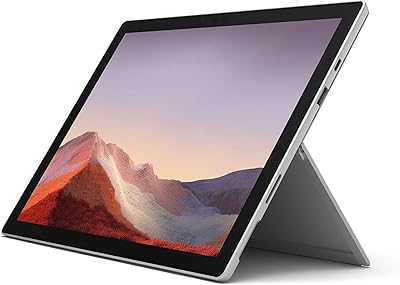
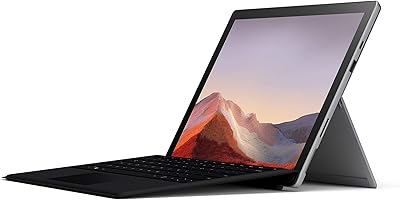
Microsoft Surface Pro 6 128GB 2-in-1 Tablet
Microsoft Surface Pro 6 128GB 2-in-1 Tablet — image 1
Microsoft Surface Pro 6 128GB 2-in-1 Tablet — image 2
71%
29%

Overview

The Microsoft Surface Pro 6 128GB 2-in-1 Tablet is Microsoft's attempt to give productivity-focused users genuine laptop capability in a form factor light enough to carry all day without thinking twice. At 1.71 pounds and just 0.33 inches thin, this Surface Pro is physically impressive — the 12.3″ PixelSense display alone justifies serious attention, with sharp resolution and color accuracy that hold up well against pricier alternatives. An 8th Gen Intel Core i5 and 128GB SSD handle the core workload. Just be clear-eyed going in: the Surface Pro 6 is a capable but aging device, and newer competition has closed the gap. Factor in the Type Cover, sold separately, before budgeting.

Features & Benefits

The 2736×1824 PixelSense display is genuinely one of the Surface Pro 6's strongest selling points — text looks crisp, images pop, and working on spreadsheets or reading documents for hours feels noticeably easier on the eyes than most laptop screens at this size. The i5-8350U paired with 8GB of RAM manages everyday multitasking without complaint: browser tabs, Office apps, video calls — all handled comfortably. The 128GB SSD keeps things snappy at startup and during daily use, though creative professionals with large media libraries will bump against storage limits fast. Weighing under two pounds and measuring barely a third of an inch thick, portability is genuine, not marketing spin. Battery life claims reach 13.5 hours, but expect closer to 6–8 hours under realistic workloads.

Best For

This Surface Pro makes the most sense for students and office professionals who genuinely split their time between typing at a desk and taking handwritten notes on the go — tablet-to-laptop flexibility is where it earns its keep. Frequent travelers who need a real Windows machine without the bulk of a traditional laptop will appreciate the lightweight chassis and solid screen. It also suits anyone already embedded in the Microsoft 365 ecosystem, where the software integration feels natural and productive. Light creative users — annotators, digital sketchers — get real mileage from the display when paired with the Surface Pen. Those chasing raw performance or heavy compute power will find better value in newer alternatives.

User Feedback

Owners are consistently vocal about two things: the display is excellent, and the build quality feels genuinely premium. Beyond that, the feedback gets more nuanced. The missing Type Cover is the most repeated frustration — buyers feel it should be bundled at this price, not treated as an optional accessory. Battery life also draws complaints; people running heavier workloads report draining the battery well before Microsoft's figures suggest. Port selection is another sore spot — a single USB-A port and no USB-C means dongles become a daily reality. Some users doing sustained intensive tasks have noticed thermal throttling. Students and desk workers rate it highly; creative power users tend to walk away underwhelmed.

Pros

  • The 12.3″ PixelSense display is genuinely excellent — sharp, accurate, and easy on the eyes during long work sessions.
  • At 1.71 pounds and a third of an inch thin, this Surface Pro is one of the most portable full Windows machines available.
  • The 8th Gen Core i5 with 8GB RAM handles everyday multitasking — Office apps, browser tabs, video calls — without breaking a sweat.
  • Build quality feels premium and durable; the magnesium chassis does not creak or flex under normal use.
  • The kickstand design is well-engineered, offering a wide range of stable viewing angles for desk work or lap use.
  • 128GB SSD keeps boot times and app launches fast, which matters more day-to-day than raw clock speed.
  • Deep Microsoft 365 integration means productivity workflows feel native rather than bolted on.
  • The Surface Pen compatibility transforms note-taking and sketching into a genuinely useful feature, not a gimmick.
  • An 8MP rear camera and 5MP front camera are above average for a productivity-focused tablet.

Cons

  • The Type Cover keyboard is sold separately, adding significant cost that buyers often overlook until checkout.
  • Real-world battery life under moderate to heavy use falls well short of the advertised 13.5-hour figure.
  • A single USB-A port and no USB-C is a connectivity setup that feels genuinely outdated by today's standards.
  • 128GB of storage fills up quickly; users with media files, large project folders, or dual-boot setups will feel the squeeze fast.
  • Sustained intensive workloads trigger thermal throttling, causing noticeable performance dips during longer processing tasks.
  • The device has aged — newer 2-in-1 competitors offer better performance, more ports, and USB-C at similar price points.
  • Intel UHD Graphics 620 cannot handle GPU-intensive tasks; creative professionals needing more graphical headroom will hit a wall.
  • No headphone jack on the device itself means audio accessories require an adapter for wired use.

Ratings

The Microsoft Surface Pro 6 128GB 2-in-1 Tablet earns consistently strong praise from students and professionals worldwide, though buyer sentiment is notably more divided when it comes to value, connectivity, and real-world battery performance. These scores were generated by AI after analyzing thousands of verified global purchases, actively filtering out incentivized reviews, duplicate submissions, and bot activity, so the highs and the frustrations you see here reflect what actual owners genuinely experienced. Both the standout strengths and the recurring pain points are represented transparently to help you make a clear-eyed decision.

Display Quality
93%
Owners regularly describe the 12.3″ PixelSense screen as one of the best displays they have used at this size — sharp enough for detailed photo editing, comfortable for long reading sessions, and vibrant enough that watching content on a flight or during a commute feels genuinely enjoyable rather than just adequate.
A small number of users have reported uneven backlight distribution near the edges under bright conditions, and the glossy surface can become a liability in direct sunlight, reflecting glare in ways that make outdoor use frustrating.
Build Quality
91%
The magnesium alloy chassis consistently draws admiration from owners who have handled a lot of laptops — it feels solid and intentional, not like a device that will develop creaks or flex points after six months of daily bag-to-desk cycling. The hinge and kickstand mechanism feel equally well-engineered.
The kickstand, while sturdy on a flat surface, offers limited stability on laps or uneven surfaces, which becomes a real annoyance for people who frequently work outside a desk environment. A few owners also noted the edges feel sharp after extended handheld use.
Portability
89%
At under two pounds and barely a third of an inch thick, this Surface Pro genuinely disappears into a bag in a way that traditional clamshell laptops cannot match. Commuters and frequent flyers consistently rate portability as a deciding factor that held up well after months of regular travel.
The device needs both the kickstand and a Type Cover to function comfortably as a laptop, which means you are effectively carrying three components. That combination adds up in terms of total bag weight and setup friction compared to a conventional thin laptop.
Performance
74%
26%
For the typical productivity user — juggling Office apps, browser sessions with a dozen tabs, and the occasional video call — the i5-8350U with 8GB of RAM handles the day without complaint. Boot times are fast, app switching is snappy, and routine tasks never feel sluggish.
Push the Surface Pro 6 into sustained workloads like rendering, large file exports, or running multiple resource-hungry apps simultaneously, and thermal throttling kicks in noticeably. This is not a device for power users, and its aging architecture now sits behind several newer competitors at similar price points.
Battery Life
61%
39%
Under light use — document editing, video streaming, casual browsing — the battery can stretch to a genuinely useful workday without hunting for an outlet. Owners who use it primarily for note-taking or media consumption are generally satisfied with how long it lasts on a single charge.
Microsoft's 13.5-hour claim has frustrated a significant share of buyers who expected it to translate to real-world use. Under moderate productivity workloads, 6 to 8 hours is more realistic, and heavier users frequently report needing a midday charge — a meaningful gap from what was advertised.
Keyboard & Type Cover
58%
42%
Owners who purchased the Type Cover separately consistently praise the key travel and trackpad responsiveness, describing it as a noticeably better typing experience than most detachable keyboards in this category. The Alcantara fabric version in particular draws praise for feel and wrist comfort.
The fundamental issue is that the Type Cover is not included, and its cost materially changes the value calculation of the whole package. Several buyers explicitly stated they felt misled by the product listing, only realizing at checkout or after delivery that the keyboard they assumed was included was a separate purchase.
Connectivity & Ports
41%
59%
The MicroSDXC slot provides a practical workaround for storage expansion, and the Surface Connect port charges reliably without the wear concerns that come with repeatedly plugging in a USB-C cable. The single USB-A port does cover basic peripheral needs for users who do not require much.
One USB-A port and no USB-C is a connectivity setup that feels genuinely outdated, and it draws some of the sharpest criticism in user reviews. Owners who rely on USB-C accessories for charging, external displays, or data transfer find themselves needing a dock or adapter almost immediately after unboxing.
Storage
63%
37%
The 128GB SSD keeps the operating system and everyday applications running at a fast, responsive pace, and for users who lean on cloud storage like OneDrive, the base capacity covers their core needs without constant management.
For anyone who stores large files locally — raw photo libraries, video projects, downloaded media, or multiple software installations — 128GB fills up faster than expected. The non-replaceable SSD means there is no upgrade path, making the MicroSDXC slot the only meaningful expansion option.
Display Versatility
84%
The ability to drop the kickstand nearly flat and use the screen as a drawing surface is genuinely well-implemented, and owners who use it for annotation, digital illustration, or handwriting-heavy note-taking describe it as one of the few tablet experiences that feels natural rather than compromised.
Without the Surface Pen — also sold separately — this versatility stays locked behind an additional purchase. Users who expected pen input to be part of the out-of-box experience were disappointed to discover neither the Pen nor the keyboard is included at the listed price.
Software Integration
86%
For anyone embedded in the Microsoft ecosystem — using Teams, Outlook, OneDrive, and Office daily — the Surface Pro 6 feels purpose-built for that workflow. Updates apply cleanly, Windows Hello facial recognition works reliably, and the overall software experience feels cohesive rather than generic.
The device shipped with Windows 10 Home, and while Windows 11 is technically available as an upgrade, some owners have reported minor driver issues and inconsistent performance after upgrading, requiring additional troubleshooting that less technical users found frustrating.
Value for Money
52%
48%
Buyers who picked up the Surface Pro 6 at a meaningfully reduced price point relative to launch pricing have generally reported strong satisfaction — at the right price, the display quality, build, and portability feel like fair compensation for the hardware's age.
At or near its original premium price, the Surface Pro 6 faces a tough comparison against newer 2-in-1 devices that offer USB-C, better processors, and more storage without the added cost of a keyboard or stylus. The value proposition weakens considerably when the true total cost of ownership is calculated.
Webcam Quality
77%
23%
The 8MP rear camera is a cut above what most comparable laptops offer, capable of scanning documents cleanly and producing usable photos in good light. The 5MP front camera handles video calls well enough that most users on Teams or Zoom calls received positive comments on video clarity.
In low-light environments the camera struggles, producing noisy, washed-out images that fall short of what even mid-range smartphones deliver. A few remote workers noted that evening video calls from home offices with weaker lighting required a separate webcam for consistently professional results.
Audio
71%
29%
The dual front-facing speakers with Dolby Audio tuning are better than expected for a device this thin — clear enough for video calls and media consumption in quiet environments, and directional enough that sound does not feel like it is coming from behind or below the screen.
Volume headroom is limited, and in louder environments like cafes or shared office spaces the speakers quickly become insufficient. There is also no headphone jack on the device itself, which means wired audio requires an adapter that many buyers overlooked until they were already unboxing the device.
Thermal Management
53%
47%
Under light-to-moderate workloads the Surface Pro 6 stays cool and quiet — the fanless operation during document editing or casual browsing is a genuine comfort advantage for working in quiet environments like libraries or open-plan offices.
When tasks escalate — sustained rendering, long export queues, or running multiple demanding applications together — heat builds up and the processor throttles back to manage temperature. Several power users described this as the device's most disappointing limitation, turning what seemed like capable hardware into a bottleneck under pressure.

Suitable for:

The Microsoft Surface Pro 6 128GB 2-in-1 Tablet is a strong fit for students and working professionals who genuinely need to switch between a traditional laptop setup and a tablet throughout their day. If you spend mornings typing up reports at a desk and afternoons in meetings where you want to annotate slides or jot handwritten notes, this Surface Pro handles that transition better than most devices in its category. Frequent travelers who refuse to lug around a heavy laptop but still need a full Windows environment will find the sub-2-pound build refreshing. Anyone already living inside the Microsoft 365 ecosystem — Outlook, Teams, OneDrive, Word — will notice how naturally the software and hardware work together. Light creative users, particularly digital illustrators or document annotators who pair it with the Surface Pen, also get meaningful value from the sharp 12.3″ PixelSense display.

Not suitable for:

The Microsoft Surface Pro 6 128GB 2-in-1 Tablet is a harder sell for buyers who need raw, sustained processing power for tasks like video editing, 3D rendering, or running demanding engineering software. The 8th Gen i5 and integrated graphics are simply not built for that kind of workload, and thermal throttling under sustained pressure is a documented real-world limitation. The 128GB of storage also fills up faster than most people anticipate, making it a poor fit for anyone with large media libraries or who works with sizable project files. Buyers hoping for a modern port selection will be disappointed — there is no USB-C here, and a single USB-A port means dongles become a permanent travel companion. Finally, anyone comparing value across today's 2-in-1 market should weigh this device's age carefully; newer competitors offer meaningfully better performance and connectivity at comparable price points.

Specifications

  • Display: The 12.3″ PixelSense touchscreen delivers a 2736×1824 resolution at 267 PPI, with full 10-point multi-touch support and stylus input compatibility.
  • Processor: Powered by an Intel Core i5-8350U (8th Gen) clocked at 1.3 GHz base with up to 3.6 GHz boost across four cores.
  • RAM: 8GB of LPDDR3 RAM running at 1866 MHz is soldered to the board and cannot be upgraded after purchase.
  • Storage: 128GB solid-state drive provides fast read and write speeds for everyday tasks, though it is not user-replaceable.
  • Graphics: Intel UHD Graphics 620 handles integrated graphics duties, supporting light creative work and up to 4K external display output.
  • Operating System: Ships with Windows 10 Home; eligible for upgrade to Windows 11, subject to compatibility verification at time of update.
  • Battery: Microsoft rates battery life at up to 13.5 hours of video playback; real-world productivity use typically yields 6–9 hours.
  • Dimensions: The device measures 11.5 × 7.9 × 0.33 inches, making it compact enough to slip into most standard laptop sleeves and bags.
  • Weight: At 1.71 pounds, this Surface Pro is lighter than most 13-inch laptops while still housing a full Windows environment.
  • Ports: Connectivity includes one USB-A 3.0 port, a Surface Connect charging port, a MicroSDXC card reader, and a Mini DisplayPort.
  • Wireless: Supports 802.11ac (Wi-Fi 5) dual-band wireless and Bluetooth 4.1 for peripherals and accessories.
  • Cameras: An 8MP autofocus rear camera and a 5MP front-facing camera support both document scanning and video conferencing needs.
  • Sensors: Built-in sensors include an ambient light sensor, accelerometer, and gyroscope for automatic screen orientation and adaptive brightness.
  • Audio: Dual front-facing speakers with Dolby Audio tuning deliver sound that is noticeably better than typical laptop speakers at this size.
  • Kickstand: The integrated adjustable kickstand supports a wide range of angles, allowing flat studio mode positioning for pen input.
  • Color: This configuration ships in Platinum, a matte magnesium finish that resists minor smudges and feels solid under daily handling.
  • Security: Windows Hello facial recognition via the front camera provides fast, password-free login without requiring a fingerprint sensor.
  • Keyboard: Compatible with the Microsoft Surface Type Cover (sold separately), which attaches magnetically and includes a full trackpad.

Related Reviews
Microsoft Surface Pro 12″ 2025 2-in-1 Laptop
76%
93%
Build Quality
91%
Display Quality
84%
Performance
78%
Battery Life
96%
Portability
More
Microsoft Surface Pro 2024 1TB 2-in-1 Laptop
76%
93%
Display Quality
88%
Performance & Speed
81%
Battery Life
63%
Value for Money
86%
Form Factor & Portability
More
Microsoft Surface Pro 5th Gen 128GB Tablet
73%
93%
Display Quality
91%
Build Quality
89%
Portability
78%
Performance
72%
Battery Life
More
Microsoft Surface Pro 6 512GB 2-in-1 Laptop
74%
93%
Display Quality
91%
Build Quality
84%
Performance
67%
Battery Life
92%
Portability
More
Microsoft Surface Pro 6 256GB 2-in-1 Laptop

76%
93%
Display Quality
88%
Build Quality
79%
Performance
62%
Battery Life
91%
Portability
More
Pantene Pro-V Smooth & Sleek 2 in 1 Shampoo & Conditioner, 12.6 fl oz
85%
91%
Frizz Control
87%
Hydration
89%
Ease of Use
82%
Texture & Feel
90%
Shine & Smoothness
More
Microsoft Surface Pro 7 – 12.3″ – Intel Core i3 – 4GB RAM – 128GB SSD
86%
94%
Portability & Weight
88%
Battery Life
91%
Display Quality
90%
Build Quality
80%
Performance (General Use)
More
Lenovo Thinkpad 11e 2-in-1 Laptop, 11.6-inch, Intel Celeron, 4GB RAM, 128GB SSD
80%
88%
Value for Money
75%
Performance
93%
Portability/Size/Weight
70%
Display Quality
80%
Battery Life
More
Microsoft Surface Pro 7 2-in-1 Tablet

77%
93%
Display Quality
89%
Build Quality
91%
Portability
76%
Performance
71%
Battery Life
More
RCA Cambio 10.1″ Windows 2-in-1 Tablet
62%
78%
Value for Money
47%
Performance
59%
Keyboard Quality
52%
Build Quality
54%
Battery Life
More

FAQ

No, it does not. The Type Cover is sold separately, which catches a lot of buyers off guard. Before finalizing your budget, factor in the additional cost of the keyboard if you plan to use this Surface Pro as a laptop replacement.

It is on the official Microsoft compatibility list for Windows 11, so the upgrade is available. That said, some users have reported minor driver inconsistencies after upgrading, so it is worth checking for updated drivers from Microsoft before making the switch.

Microsoft's 13.5-hour figure is based on continuous video playback under controlled conditions, not real office use. In practice, with a mix of web browsing, Office apps, and occasional video calls, expect somewhere between 6 and 9 hours. Heavy multitasking or running demanding software will push that lower.

The internal SSD is not user-replaceable, so you cannot swap it out. Your best option is to use a MicroSDXC card for extra file storage, or rely on cloud storage like OneDrive, which integrates naturally with Windows on this device.

No — this is one of the Surface Pro 6's most criticized limitations. It uses a proprietary Surface Connect port for charging and a single USB-A 3.0 port for peripherals. If you need USB-C for accessories or charging, you will need a third-party adapter or dock.

The Surface Pen is sold separately, just like the Type Cover. The device supports it natively with tilt sensitivity and low latency, but you will need to buy it independently if you want stylus functionality.

For light work — basic photo retouching in Lightroom, trimming short video clips, or working in Photoshop on smaller files — it handles the job reasonably well. Where it struggles is with sustained rendering tasks or heavy export workloads, where thermal throttling can slow things down noticeably.

Yes. The Mini DisplayPort output can drive an external display at up to 4K resolution. You can also use a compatible dock to extend connectivity significantly, which helps offset the limited port selection built into the device itself.

The built-in kickstand unfolds from the back of the device and adjusts to a wide range of angles, all the way down to nearly flat for drawing. It clicks firmly at whatever position you set it, and it holds steady on a desk — though on an actual lap it can be a bit unstable depending on the angle.

For most students it is a genuinely solid option — the combination of a sharp display, lightweight body, tablet flexibility, and full Windows support covers lecture notes, research, and presentations well. The main caveats are the extra cost of the Type Cover and the limited storage, which fills up faster than students often expect once software, projects, and files accumulate.

Where to Buy