Overview

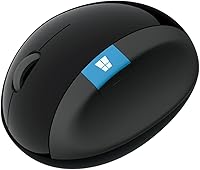
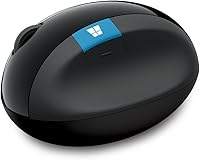
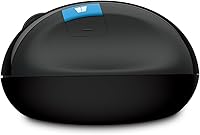
The Microsoft Sculpt Ergonomic Mouse has been a staple in the ergonomic peripheral space since 2013, and its distinctive angled shape still sets it apart from the sea of flat, standard mice. The design tilts your hand into a more natural handshake-like position, which is immediately noticeable the first time you pick it up. It connects wirelessly through a small USB receiver and is broadly compatible with both Windows and Mac systems, though Mac users will find some functionality is missing. Priced in the mid-to-premium range for ergonomic mice, it is clearly built for comfort-first desk workers, not competitive gamers chasing speed.

Features & Benefits

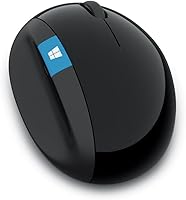
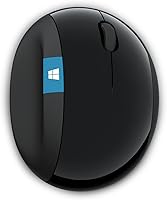
The sculpted tilt design is the headline feature here. By raising the right side of the mouse, it positions your forearm in a more neutral angle, reducing the rotational stress that builds up when your hand lies flat on a traditional mouse for hours. The thumb scoop on the left side gives your thumb somewhere to rest naturally rather than pressing into the desk. For spreadsheet users or anyone working in wide documents, the 4-way scroll wheel is genuinely handy — scroll left and right without hunting for a scrollbar. A dedicated Windows button and a back button round out the controls, and the nano USB receiver stays plugged in permanently with a single AA battery included.

Best For

This ergonomic mouse is a strong match for office workers who clock long hours at a computer and have started noticing discomfort in their wrist or forearm. People dealing with early symptoms of RSI or carpal tunnel may find the repositioned hand angle genuinely helpful — though it is not a medical device, and individual results will vary. Windows users get the most out of it, with the dedicated shortcut buttons fitting naturally into that workflow. If you want simple wireless without pairing headaches, the plug-and-forget receiver suits that preference well. Mac users can use the Sculpt mouse but should know the Windows button is non-functional on macOS.

User Feedback

Across a wide range of reviews, the shape earns consistent praise — many users say the hand position feels natural within just a few days of switching, and a good number report less wrist soreness during long work sessions. The size tends to suit medium to large hands well, though some smaller-handed users find the grip a bit wide. The most recurring complaint is the scroll wheel, which many describe as stiff or imprecise compared to mainstream office mice. A few reviewers also flag the nano receiver as easy to misplace, with no Bluetooth fallback if it gets lost. Sitting at roughly 3.9 out of 5 stars, Microsoft's ergonomic mouse has its loyal fans alongside a vocal minority with valid frustrations.

Pros

  • The angled tilt design noticeably reduces wrist and forearm strain during long work sessions.
  • Most users adapt to the hand position within just a few days of regular use.
  • The thumb scoop keeps your hand in a natural arch without any conscious effort.
  • Horizontal scrolling via the 4-way wheel is practical for spreadsheet-heavy workflows.
  • The nano USB receiver delivers a reliable, drop-free wireless connection without any setup fuss.
  • Battery life is strong, and a single AA battery comes included right out of the box.
  • Works across both Windows and Mac systems, covering the most common office environments.
  • The back navigation button is a small but genuinely useful addition for browser-heavy work.
  • Microsoft's ergonomic mouse has been on the market since 2013, suggesting proven staying power.
  • Optical tracking performs consistently across standard desk surfaces without needing a special mat.

Cons

  • The scroll wheel feels stiff and imprecise to many users compared to standard office mice.
  • There is no Bluetooth option — if you lose the nano receiver, the mouse stops working entirely.
  • The design is right-hand only, completely excluding left-handed users.
  • Smaller hands may find the wide body awkward to grip for extended periods.
  • Mac users lose access to the Windows button entirely, reducing the control layout.
  • No rechargeable battery option means ongoing AA battery replacement over time.
  • The shape takes some adjustment, and users coming from flat mice may find the transition uncomfortable at first.
  • No software customization suite is offered, so button remapping is not possible.
  • At its price point, the scroll wheel quality feels like a meaningful compromise.
  • The nano receiver has no onboard storage slot on the mouse itself, making it easy to misplace.

Ratings

The Microsoft Sculpt Ergonomic Mouse scores below are generated by AI after analyzing thousands of verified user reviews from global buyers, with spam, bot activity, and incentivized feedback actively filtered out. This ergonomic mouse has accumulated a substantial review base since 2013, giving us a reliable signal across a wide range of real-world work environments. Both the genuine strengths and the recurring frustrations are reflected transparently in each category score.

Ergonomic Design
88%
The angled, tilted body is the core reason most people buy this mouse, and for the majority it delivers. Users who switched from flat traditional mice frequently describe immediate relief from forearm rotation fatigue, and many report that the hand position starts feeling natural within just a few days of regular use.
The ergonomic benefit is most pronounced for medium to large hands. Smaller-handed users often struggle to grip the wide body comfortably over long sessions, which significantly undercuts the comfort promise for that segment of buyers.
Wrist Comfort
83%
For desk workers clocking six or more hours a day at a computer, the reduction in wrist strain is the most consistently praised outcome. The thumb scoop in particular draws positive comments for how it keeps the hand from collapsing inward, which is a common source of lateral wrist pressure with flat mice.
Results are not universal — users with more severe pre-existing wrist conditions sometimes find the shape does not go far enough, and a small number report that the fixed tilt angle does not match their specific natural resting position well.
Scroll Wheel
51%
49%
The 4-way scroll functionality is genuinely appreciated by people who work heavily in spreadsheets or wide-canvas design tools, since horizontal scrolling without holding a modifier key saves real time over a full workday.
The wheel itself is the most criticized single component across user reviews. A recurring complaint describes it as stiff, notchy, and less fluid than what comparable mice in this price range offer — making precise vertical scrolling feel labored compared to mainstream office alternatives from other brands.
Wireless Reliability
84%
The nano USB receiver delivers a stable, low-latency connection that the vast majority of users describe as set-and-forget. There are very few complaints about signal dropout or interference in typical office environments, and the receiver stays snugly in place once plugged in.
The complete absence of a Bluetooth fallback is a structural weakness. If the nano receiver is lost or the USB port is unavailable — on newer laptops with limited ports, for instance — the mouse is fully non-functional with no alternative connection path.
Battery Life
79%
21%
Most users report several months of reliable use from a single AA battery under normal office workload conditions, and the included battery means there is no wait before first use. It is not something most buyers find themselves thinking about frequently.
There is no rechargeable option and no wired fallback mode, so when the battery dies mid-session it means an interruption to find a replacement. For users who prefer modern rechargeable peripherals, this feels like a dated design choice at this price point.
Build Quality
72%
28%
The mouse has a solid, planted feel during use and the overall construction does not feel cheap for a branded Microsoft peripheral. The body has held up well for many long-term users who have been using the same unit for two or more years without structural issues.
The plastic finish shows wear and minor scuffing over time, and a few users note that the scroll wheel mechanism starts to feel looser or squeakier after extended use — suggesting the internal components are not quite as durable as the outer shell implies.
Button Layout
77%
23%
The back navigation button is a quietly useful addition that browser-heavy workers come to rely on quickly. For Windows users, the dedicated Start button provides genuinely fast access to the Start menu without lifting hands from the mouse.
The button layout is entirely Windows-centric by design, and Mac users lose meaningful functionality out of the box. There is also no software to remap buttons, which limits customization for power users who want to reassign controls to suit their own workflows.
Size & Hand Fit
68%
32%
For users with medium to large hands, the proportions feel well-matched — the mouse fills the palm naturally and the sculpted curves align well with typical larger hand geometry, reducing the feeling of gripping or clutching that flat mice can cause.
The size fit issue is a genuine dealbreaker for a notable minority. Reviewers with smaller hands consistently describe it as too wide and too tall to hold comfortably for hours, which is a significant problem for a product sold specifically on the promise of comfort.
macOS Compatibility
61%
39%
The core mouse functions — cursor movement, left and right click, scrolling, and the back button — all operate correctly on macOS without any driver installation. For Mac users primarily after the ergonomic shape, the basic experience is fully functional.
The Windows Start button is completely non-functional on macOS and cannot be remapped through any built-in or official means, effectively reducing the button count compared to what Windows users get. Mac buyers paying a mid-to-premium price for this mouse should factor that in.
Setup & Ease of Use
91%
Plug the nano receiver in, and the mouse works — there is genuinely nothing else to it. No app download, no account creation, no pairing sequence. For non-technical users or anyone setting up a new workstation quickly, this zero-friction setup is a real convenience.
The simplicity comes at the cost of any configuration options. There is no companion software, no DPI adjustment, and no way to customize behavior — which is fine for most office users but limiting for anyone who wants more control over how the mouse operates.
Tracking Accuracy
74%
26%
The optical sensor performs reliably on standard desk surfaces and most common mouse pads without any noticeable stuttering or jumping during typical office navigation tasks like document editing, web browsing, or spreadsheet work.
The sensor is not tuned for precision or speed — it is a comfort-focused office mouse, not a high-performance tracking device. Users who have previously used mice with adjustable DPI or advanced sensors will likely notice a step down in tracking responsiveness.
Portability
58%
42%
The mouse is light enough to slip into a laptop bag without adding much bulk, and the wireless design means no cable management to deal with when moving between desks or rooms within an office environment.
The nano receiver is a persistent portability liability — it is tiny, easy to drop, and has no dedicated storage slot on the mouse body itself. Frequent travelers or hot-deskers who move their setup regularly face a real risk of losing it, with no Bluetooth backup available.
Value for Money
66%
34%
For users who genuinely need ergonomic relief and find the shape effective, the price is defensible — the comfort improvement across a full work year has real practical value that goes beyond the sticker price comparison with cheaper flat mice.
At its price point, buyers reasonably expect a better scroll wheel, rechargeable battery, and Bluetooth support — all of which are available on competing ergonomic mice. The hardware feels like it has not kept pace with what rivals now offer for similar or lower prices.

Suitable for:

The Microsoft Sculpt Ergonomic Mouse is purpose-built for desk professionals who spend the majority of their workday at a computer and have started feeling the physical cost of that routine. If you work long hours in spreadsheets, documents, or any environment that demands sustained mouse use, the angled shape and thumb scoop are genuinely designed around reducing that cumulative strain. People who are proactively trying to avoid RSI or wrist fatigue — or who are in early stages of discomfort — often find the repositioned hand angle makes a noticeable difference over time, though it is not a substitute for medical advice. Windows users get the fullest experience, with the dedicated shortcut buttons fitting naturally into everyday workflows. Those who want simple, hassle-free wireless connectivity without dealing with Bluetooth pairing will also appreciate the plug-in nano receiver approach.

Not suitable for:

This ergonomic mouse is not the right tool for everyone, and it is worth being honest about where it falls short. Left-handed users are immediately out — the shape is strictly right-hand-only with no mirror version available. People with small hands may find the body too wide for comfortable control, which is a real usability issue rather than just a minor preference. Mac users who want full button functionality will be disappointed, since the dedicated Windows button does nothing on macOS, and there is no software to remap it. If precise scrolling matters to your workflow, the stiff wheel reported by many users could become a daily frustration. And for anyone who tends to misplace small accessories, the reliance on a nano USB receiver with zero Bluetooth fallback is a genuine risk — lose it and the mouse is essentially unusable.

Specifications

  • Connectivity: The mouse connects wirelessly via a small nano USB receiver using 802.11a/b/g/n wireless protocol, requiring no Bluetooth support from the host device.
  • Movement Detection: Optical tracking technology is used for cursor movement, providing reliable performance across most standard desk and mousepad surfaces.
  • Scroll Wheel: A 4-way scroll wheel supports vertical and horizontal scrolling, allowing left and right navigation without additional gestures or key combinations.
  • Buttons: The mouse includes a left click, right click, back navigation button, a 4-way scroll wheel click, and a dedicated Windows Start button.
  • Hand Orientation: The design is exclusively right-handed, with an asymmetric sculpted body that does not accommodate left-hand use.
  • Battery: Powered by a single AA battery, which is included in the box; there is no rechargeable battery or USB charging option.
  • Weight: The mouse weighs 6.9 ounces, which gives it a solid, planted feel during use without being overly heavy.
  • Color: Available in black as the standard finish for this model.
  • OS Compatibility: Fully compatible with Windows 8, 10, and 11; also functional on macOS, though the dedicated Windows button has no assigned function on Apple systems.
  • Wireless Range: The nano USB receiver provides a typical wireless operating range suitable for standard desktop and laptop desk setups.
  • Ergonomic Shape: The body features a pronounced lateral tilt that angles the hand into a more upright, handshake-like position to reduce forearm pronation.
  • Thumb Support: A sculpted thumb scoop on the left side of the mouse cradles the thumb and encourages a more natural hand arch during use.
  • Power Source: Battery-powered only, with no option to use the mouse in a wired mode as a power fallback.
  • Model Number: The official model number is L6V-00002, useful for warranty claims or identifying compatible replacement receivers.
  • Launch Date: This mouse was first made available in August 2013, making it one of the longer-running ergonomic mouse designs currently on the market.
  • Brand: Manufactured and sold by Microsoft under its hardware accessories line.
  • Platform Support: Designed primarily for use with laptops and desktop PCs; does not require proprietary drivers for basic operation.
  • Receiver Type: Uses a nano USB receiver that plugs into a standard USB-A port and is intended to remain plugged in during normal use.

Related Reviews
Microsoft Bluetooth Ergonomic Mouse
81%
88%
Ergonomic Comfort
83%
Build Quality
91%
Scroll Wheel
89%
Battery Life
72%
Bluetooth Connectivity
More
Microsoft Ergonomic Wired Mouse
74%
83%
Comfort & Ergonomics
76%
Build Quality
79%
Tracking Accuracy
81%
Scroll Wheel
67%
Programmable Buttons
More
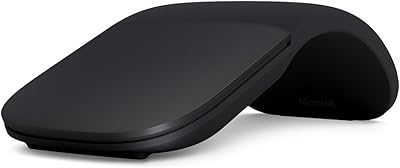
Microsoft Arc Mouse
Microsoft Arc Mouse
81%
96%
Portability & Form Factor
88%
Build Quality
63%
Scroll Plane Experience
82%
Bluetooth Connectivity
58%
Ergonomics & Comfort
More
Vassink Ergonomic Wireless Mouse
84%
88%
Ergonomics & Comfort
81%
Build Quality
89%
Battery Life
91%
Quietness of Buttons
85%
Ease of Use
More
Microsoft Ergonomic Keyboard for Business Wired
77%
88%
Ergonomic Comfort
83%
Build Quality
79%
Typing Feel
86%
Wrist & Posture Support
67%
Shortcut Keys
More
SANWA Wired Ergonomic Mouse
81%
88%
Ergonomic Comfort
85%
Quiet Operation
81%
DPI Adjustability
83%
Build Quality
78%
Compatibility (Mac/Windows)
More
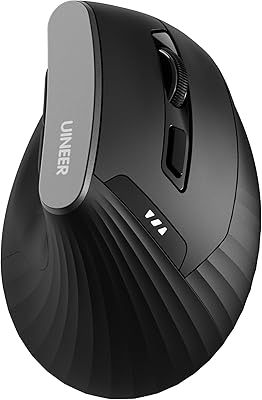
Uineer Ergonomic Wireless Mouse
83%
87%
Ergonomic Comfort
92%
Ease of Setup
85%
Adjustable DPI Performance
80%
Battery Life
93%
Compatibility with Devices
More
MOFII Wireless Ergonomic Mouse
89%
94%
Ergonomic Comfort
88%
Build Quality
91%
Button Responsiveness
87%
Connectivity Stability
93%
Battery Life
More
SANWA Wired Ergonomic Trackball Mouse
86%
91%
Ergonomics & Comfort
88%
Trackball Precision
87%
Silent Click Performance
95%
Setup & Installation
93%
Device Compatibility
More
Acer Ergonomic Vertical Wireless Mouse
80%
92%
Ergonomics & Comfort
88%
Battery Life
85%
Build Quality
90%
Wireless Connectivity
80%
DPI Adjustability
More

FAQ

It does work on a Mac — the cursor movement, scrolling, and standard click buttons all function normally. The one thing that does not carry over is the dedicated Windows Start button, which has no function on macOS. If you are a Mac user primarily after the ergonomic shape, you will still get the core benefit; just do not count on that extra button doing anything.

No, the Microsoft Sculpt Ergonomic Mouse is plug-and-play. Just insert the nano USB receiver into an available USB port and the mouse is ready to go within seconds. There is no companion app or driver package required for standard use.

Unfortunately, this is one of the more frustrating aspects of this mouse — there is no Bluetooth fallback, so if the receiver is lost, the mouse becomes unusable. Replacement receivers are sometimes available through Microsoft or third-party sellers, but it is worth keeping track of that tiny dongle carefully.

The Sculpt mouse is generally better suited to medium and large hands. Several users with smaller hands find the body a bit too wide to grip comfortably over long periods. If your hands are on the smaller side, it may be worth trying it in person before committing.

Battery life is generally good — many users report several months of use from a single AA battery depending on daily usage. The battery is not rechargeable, so you will need to swap in a fresh AA when it runs out. On the positive side, a battery is included in the box so you can get started right away.

Not really. This ergonomic mouse is built around comfort for extended office-style use, not speed or precision gaming. There is no adjustable DPI, no programmable buttons for gaming macros, and no high-polling-rate sensor. It would work in a pinch for casual use, but competitive or even casual PC gaming is not what it is designed for.

No, the design is right-hand only. The sculpted shape and thumb scoop are built specifically for right-handed use, and Microsoft does not currently offer a left-handed variant of this model.

This is honestly the most divided aspect of user feedback. Many people find it functional and appreciate the horizontal scrolling capability, but a recurring complaint is that the wheel feels stiffer and less fluid than what you get on mainstream office mice from Logitech or similar brands. If smooth, precise scrolling is important to your workflow, it is something to be aware of before buying.

Some Microsoft devices use a unified receiver system, but it is not guaranteed across all models. The receiver included with this mouse is primarily paired to it from the factory, and mixing it with other devices may not work without Microsoft-specific pairing tools.

The angled shape is genuinely designed to reduce the rotational stress on your forearm and wrist that builds up with traditional flat mice, and a good number of users do report less discomfort after switching. That said, it is not a medical device, and results vary depending on the person, their workstation setup, and the underlying cause of their discomfort. If you are dealing with significant or persistent wrist pain, it is worth speaking to a healthcare professional alongside considering ergonomic tools like this one.

Where to Buy