Overview

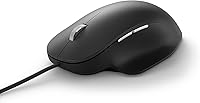
The Microsoft Ergonomic Wired Mouse is Microsoft's straightforward answer to a real workplace problem: mice that leave your hand sore by mid-afternoon. Built specifically for right-handed users — worth flagging immediately if you're a lefty — it occupies a practical mid-range spot, sitting above no-name budget options without competing with high-end specialty peripherals. The design philosophy is simple: shape over features. A contoured shell and dedicated thumb rest encourage a more natural hand angle throughout the day. There's no wireless module, no flashy lighting, no gaming ambitions. It plugs into USB, works on Windows right away, and gets out of your way. Comfort is the whole point.

Features & Benefits

The sculpted thumb ledge is what separates this from a standard mouse immediately — your hand rests at a raised, angled position rather than lying flat on the desk, which noticeably reduces wrist pressure during extended sessions. The laser sensor tracks reliably across wood, laminate, and most bare desk surfaces, so a mousepad is optional rather than required. The scroll wheel is firm and deliberate, well-suited for moving through long documents or spreadsheets without accidental skipping. Two side buttons can be remapped through Microsoft's Mouse and Keyboard Center software, adding a layer of personalization. At 3.2 ounces, arm fatigue is rarely a factor even across full workdays.

Best For

This office mouse makes the most sense for right-handed people who spend the better part of their day in front of a screen — writing, data entry, research, or general office tasks. If you experience mild wrist discomfort from long hours of mouse use, a contoured design like this can help reduce strain over time, though it is not a medical solution and results will vary. It is also a natural fit for anyone who has grown tired of wireless battery anxiety or dropped connections mid-meeting. Windows PC users benefit most, given the native software support. Left-handed users and anyone needing a gaming-capable mouse should look at other options.

User Feedback

Owners of Microsoft's wired comfort mouse generally split into two groups. The larger camp reports a genuine improvement in daily hand comfort after switching from a flat mouse, with the thumb rest earning consistent praise as a practical, well-placed feature. A smaller group finds the shape slightly restrictive for larger hands, noting the fit feels tailored to a specific hand size. Cord length comes up occasionally among buyers with non-standard desk setups. The right-hand-only design is a hard limitation worth emphasizing. Against pricier rivals like the Logitech MX Vertical, most users agree that this office mouse hits a reasonable balance between comfort improvement and cost without overcomplicating the experience.

Pros

  • The sculpted thumb rest genuinely reduces hand fatigue during long work sessions.
  • Laser sensor tracks accurately on wood, laminate, and bare desk surfaces without a mousepad.
  • Wired USB connection means zero latency and no batteries to replace or recharge.
  • At 3.2 ounces, it is light enough to use all day without tiring your arm.
  • Two programmable side buttons add useful shortcuts through Microsoft's free remapping software.
  • Plug-and-play setup on Windows — no drivers to hunt down, no software required to get started.
  • The scroll wheel is firm and precise, well-suited for navigating long documents and spreadsheets.
  • Holds a strong 4.4-star rating across hundreds of real-world buyers, suggesting consistent satisfaction.
  • Mid-range price makes it accessible for anyone upgrading from a basic flat mouse on a budget.

Cons

  • Strictly right-handed — left-handed users have no compatible version to consider.
  • Button remapping software only works on Windows, limiting functionality for Mac users.
  • Some users with larger hands find the shell size slightly too narrow for a fully comfortable fit.
  • The USB cord length has been flagged as short or awkward for certain desk configurations.
  • No wireless option exists for buyers who prefer a cable-free workspace.
  • Lacks DPI adjustment, making it a poor fit for tasks requiring variable cursor speed.
  • Compared to pricier rivals like the Logitech MX Vertical, the wrist angle improvement is more modest.
  • The matte black finish shows skin oils and dust relatively quickly on the palm rest area.

Ratings

The scores below for the Microsoft Ergonomic Wired Mouse were generated by our AI system after analyzing verified global buyer reviews, actively filtering out incentivized, duplicate, and bot-flagged submissions to surface what real everyday users actually experienced. We weighed both the praise and the frustrations equally, so the ratings reflect honest performance across a range of office environments and hand types. Where this mouse genuinely delivers, the scores show it — and where it falls short for certain buyers, those gaps are just as visible.

Comfort & Ergonomics
83%
The raised shell and sculpted thumb ledge make a noticeable difference for people coming from a flat mouse, particularly during long uninterrupted work sessions. Users doing hours of spreadsheet work or document editing consistently report less end-of-day hand fatigue after switching to this design.
The improvement in hand position is real but modest compared to more aggressive vertical mice. Users with larger hands specifically noted that the palm rest felt slightly short, leaving part of the hand unsupported during extended sessions.
Build Quality
76%
24%
The plastic shell feels solid for its weight class, and the matte finish resists minor scuffs reasonably well under daily office use. Several buyers noted that even after a year or more of heavy use, there was no creaking, rattling, or button degradation.
The matte surface tends to collect skin oils and visible smudges faster than expected, requiring regular wiping to keep it looking clean. A handful of users also noted that the material does not feel particularly premium relative to what the brand name might suggest.
Tracking Accuracy
79%
21%
The laser sensor handles the vast majority of everyday desk surfaces well, including bare wood, standard laminate, and fabric mousepads, without requiring any calibration or adjustment. For general office tasks — navigating browsers, editing documents, managing spreadsheets — the tracking is reliable and consistent.
Users who tried this office mouse on glass or highly polished surfaces found tracking erratic, which is a limitation common to laser sensors at this tier. Those needing precision cursor work for design or illustration tasks also found the fixed sensitivity less adaptable than they needed.
Scroll Wheel
81%
19%
The scroll wheel has a deliberate, slightly resistant feel that works particularly well when moving through long documents or dense spreadsheets, where accidental over-scrolling is genuinely annoying. Buyers who do a lot of vertical reading or PDF review highlighted this as one of the better-tuned wheels they had used at this price.
The same firmness that makes it precise for documents feels slightly stiff when used for casual web browsing, where a faster free-spin wheel would be more comfortable. There is also no horizontal scroll tilt, which limits navigation in wide spreadsheets.
Programmable Buttons
67%
33%
The two side buttons are well-positioned for the thumb and add genuine workflow shortcuts once configured through Microsoft's remapping software. Power users who set them to actions like switching between virtual desktops or triggering copy-paste found they saved meaningful time over a full workday.
The remapping software is Windows-only, which means Mac users are left with whatever default function the OS assigns — typically browser back and forward. Two buttons is also a fairly minimal offering compared to mice in this price bracket that include three or four programmable inputs.
Wired Reliability
91%
Buyers who had previously dealt with wireless connectivity drops during video calls or presentations specifically called out the wired connection as a relief. The plug-and-play experience on Windows is instant — no pairing, no dongles, and no mid-meeting cursor freezes.
The fixed cable is the one trade-off, and for users working from a laptop in different locations around their home or office, managing the cord can feel restrictive. The cable length has also been noted as slightly short for some tower PC setups where the USB ports sit low or behind the desk.
Hand Fit & Size Compatibility
63%
37%
For users with small to medium-sized right hands, the shell fits naturally without requiring any adjustment period, and the contour feels intuitive from the first day of use. Several buyers with average hand measurements described the fit as one of the most immediately comfortable mice they had tried out of the box.
Buyers with larger hands consistently flagged that the mouse body is simply too compact for their grip, with the palm extending noticeably past the rear of the shell. This is a meaningful limitation given that the ergonomic benefit depends heavily on the hand fitting the contour as designed.
Software & Setup
77%
23%
Out-of-the-box setup on Windows takes seconds — no account creation, no mandatory software installation, and no driver hunting. The Microsoft Mouse and Keyboard Center app, when used, is cleaner and more straightforward than many third-party mouse configuration tools.
The software is a Windows-exclusive, creating a clear gap for anyone using macOS or Linux. The app itself also occasionally requires a manual update check to display the connected mouse correctly, which a small number of users found frustrating on first install.
Value for Money
74%
26%
As a wired comfort mouse from a major manufacturer, it sits in a sweet spot where the build and comfort improvements over a basic mouse are real and immediately noticeable. Buyers upgrading from a flat no-name mouse consistently rated it as one of the better investments they had made for their home office setup.
At its price point, the lack of DPI adjustment, the Windows-only software, and the right-hand-only design start to feel like meaningful compromises. Buyers who compared it directly to the Logitech MX Vertical noted that the additional spend on that alternative buys considerably more ergonomic correction and wireless flexibility.
Weight & Portability
82%
18%
At just 3.2 ounces, this ergonomic mouse moves around the desk with very little effort, which matters more than most buyers expect over a full eight-hour workday. Users who had previously experienced shoulder fatigue from a heavier mouse appreciated how little resistance the movement required.
The attached cable adds some drag that partially offsets the lightweight body, particularly for users with limited desk space where the cord needs to bend or loop. Portability for travel use is also limited by the fixed cord, making it less practical to toss in a laptop bag compared to compact wireless options.
Compatibility Range
58%
42%
On Windows PCs and laptops, compatibility is essentially universal — the USB connection works across generations without any known conflicts, and the mouse is recognized instantly across Windows 10 setups. For Windows-first office environments, it covers everything most users need.
The combination of right-hand-only design, Windows-centric software, and USB-A only connectivity creates a narrower compatibility window than many buyers initially realize. macOS users lose programmable button support entirely, and anyone with a USB-C-only laptop needs a separate adapter.
Aesthetic Design
61%
39%
The all-black matte finish is understated and professional, fitting cleanly into both corporate office setups and minimal home desk environments without drawing attention. There is nothing cluttered or over-designed about the look, which some buyers actively preferred over the glossy or RGB-heavy alternatives.
It is available in one color only, which limits personalization for buyers who care about their desk aesthetic. The matte plastic also shows wear and fingerprints more than the neutral look initially suggests, requiring more frequent cleaning to maintain a tidy appearance.
Click Feel & Responsiveness
73%
27%
The primary left and right clicks have a satisfying, medium-weight actuation that feels deliberate without being stiff, which works well for sustained clicking tasks like data entry or browsing. Buyers coming from mushy budget mice consistently noted the click feedback felt noticeably more controlled.
The side buttons have a slightly harder actuation than the main clicks, which some users found required more intentional thumb pressure than expected mid-task. There is also no silent or low-noise click option, which can be a consideration in shared or open-plan office environments.

Suitable for:

The Microsoft Ergonomic Wired Mouse is a practical pick for right-handed office workers and remote workers who spend the majority of their day at a desk. If your current mouse leaves your wrist feeling stiff or tired by afternoon, the contoured shell and raised thumb rest here offer a meaningful improvement over a standard flat mouse without requiring a steep investment. It suits people who work primarily on Windows PCs or laptops, since the software integration is native and setup requires no configuration whatsoever — just plug in and go. Writers, analysts, accountants, and anyone doing document-heavy or browser-based work will find the deliberate scroll wheel and reliable laser tracking well-matched to their daily tasks. It also appeals to users who have grown frustrated with wireless mice and simply want a dependable, no-fuss wired connection that never drops or runs out of battery at the wrong moment.

Not suitable for:

Left-handed users should stop here — the Microsoft Ergonomic Wired Mouse is shaped exclusively for right-handed grips, and there is no mirrored version available. Gamers looking for high-precision tracking, adjustable DPI settings, or fast click response will find this mouse under-equipped for those demands. If you work at a Mac or a non-Windows system, you lose access to the button remapping software, which reduces the mouse to its most basic functions. People with larger hands have noted the fit can feel snug or slightly restrictive, so it is worth considering if hand size is a factor for you. Those who need a wireless setup for a clean, cable-free desk environment will also need to look elsewhere, as there is no Bluetooth or USB dongle option in this line.

Specifications

  • Brand: Manufactured by Microsoft under model number RJG-00001.
  • Dimensions: The mouse measures 4.63 x 1.67 x 3 inches (L x W x H).
  • Weight: The unit weighs 3.2 ounces, keeping it light enough for extended daily use.
  • Connectivity: Connects via a standard wired USB plug with no additional adapter required.
  • Tracking: Uses a laser sensor capable of tracking on most common desk surfaces without a mousepad.
  • Hand Orientation: Designed exclusively for right-handed users; no left-handed variant is available.
  • Programmable Buttons: Includes two remappable side buttons configurable through Microsoft Mouse and Keyboard Center software.
  • Scroll Wheel: Features a precision-tuned scroll wheel optimized for controlled document and web page navigation.
  • Power Source: Powered entirely through the USB connection; no batteries or charging are required.
  • Compatible OS: Fully supported on Windows 10; basic plug-and-play functionality works on other systems, but software remapping requires Windows.
  • Compatible Hardware: Works with desktop PCs and laptops equipped with a standard USB-A port.
  • Key Design Feature: Contoured shell includes a sculpted thumb rest to promote a more natural hand angle during use.
  • Color: Available in matte black only.
  • User Rating: Holds a 4.4 out of 5 star rating based on 628 verified buyer ratings on Amazon.
  • Sales Rank: Ranked #493 in the Computer Mice category on Amazon at time of review.
  • Release Date: First made available for purchase on September 23, 2019.
  • Manufacturer Status: Confirmed as actively sold and not discontinued by Microsoft as of the latest available data.

Related Reviews
Microsoft Sculpt Ergonomic Mouse
73%
88%
Ergonomic Design
83%
Wrist Comfort
51%
Scroll Wheel
84%
Wireless Reliability
79%
Battery Life
More
SANWA Wired Ergonomic Mouse
81%
88%
Ergonomic Comfort
85%
Quiet Operation
81%
DPI Adjustability
83%
Build Quality
78%
Compatibility (Mac/Windows)
More
Microsoft Bluetooth Ergonomic Mouse
81%
88%
Ergonomic Comfort
83%
Build Quality
91%
Scroll Wheel
89%
Battery Life
72%
Bluetooth Connectivity
More
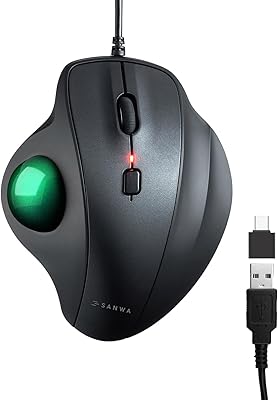
SANWA Wired Ergonomic Trackball Mouse
86%
91%
Ergonomics & Comfort
88%
Trackball Precision
87%
Silent Click Performance
95%
Setup & Installation
93%
Device Compatibility
More
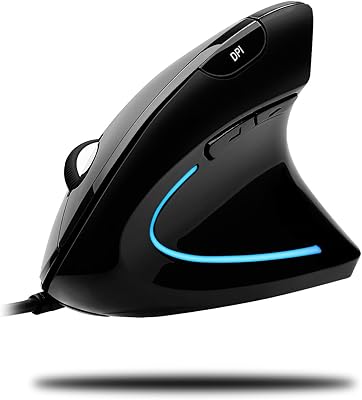
ADESSO iMouseE1 Wired Vertical Ergonomic Mouse
86%
88%
Ergonomics & Comfort
91%
DPI Control & Precision
94%
Ease of Setup
85%
Build Quality & Durability
80%
Design & Aesthetics
More
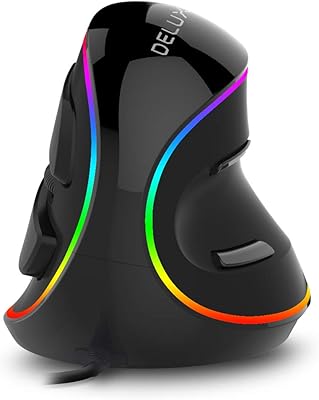
DeLUX M618Plus RGB Wired Ergonomic Mouse
83%
88%
Ergonomics and Comfort
84%
RGB Lighting Customization
90%
DPI Precision and Adjustability
85%
Build Quality and Durability
82%
Compatibility with Different Operating Systems
More
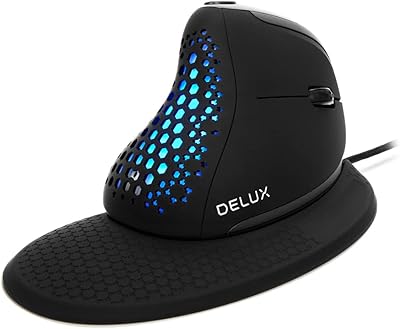
DeLUX Seeker M618XSU Wired Ergonomic Vertical Mouse
85%
88%
Ergonomic Comfort
85%
DPI Adjustability
90%
Quiet Operation
76%
RGB Lighting Customization
82%
Build Quality
More
ELECOM M-XGM30UBSKBK Wired Ergonomic USB Mouse
86%
89%
Ergonomics
91%
Silent Click Function
85%
Customizability
84%
Build Quality
87%
Tracking Precision
More
Razer Basilisk V3 Wired Gaming Mouse
80%
93%
Ergonomics & Comfort
91%
Click Feel & Switch Performance
89%
Scroll Wheel Versatility
88%
Sensor Accuracy & Tracking
86%
Programmable Buttons & Customization
More
Microsoft Arc Mouse
Microsoft Arc Mouse
81%
96%
Portability & Form Factor
88%
Build Quality
63%
Scroll Plane Experience
82%
Bluetooth Connectivity
58%
Ergonomics & Comfort
More

FAQ

It will function as a basic plug-and-play mouse on macOS — cursor movement, clicking, and scrolling all work without any setup. However, the two side buttons cannot be remapped on a Mac since the Microsoft Mouse and Keyboard Center software is Windows-only, so those buttons will either do nothing or default to browser back and forward depending on your system.

Unfortunately, no. The shell is specifically sculpted for right-handed grips, with the thumb rest positioned on the left side of the mouse. Left-handed users would find the shape uncomfortable and the thumb rest completely unusable. Microsoft does not currently offer a mirrored left-handed version of this model.

No software is needed for basic use — just plug it into a USB port and it works immediately on Windows. If you want to remap the two side buttons to custom shortcuts, you will need to download the free Microsoft Mouse and Keyboard Center app, which is straightforward to install and use.

Yes, the laser sensor tracks reliably on most smooth and semi-textured surfaces including wood, laminate, and plastic desks. Highly reflective or glass surfaces may cause inconsistent tracking, as is common with most laser mice, so a mousepad is advisable in those cases.

Microsoft does not publish an official cable length in the product specifications, but based on common buyer feedback, the cord is adequate for most standard desktop setups. A small number of users with tower PCs placed on the floor or at a significant distance from the desk have found the cable slightly short for their configuration.

There is no on-board DPI button or hardware sensitivity control on this office mouse. You can adjust pointer speed through your operating system's standard mouse settings, which gives you some control, but it is not the same as dedicated DPI switching found on gaming mice.

The contoured shape and raised thumb rest do encourage a more natural hand position compared to a flat mouse, which many users find reduces fatigue over a long workday. That said, it is not a medical device and should not be treated as a guaranteed solution for existing wrist conditions. If you have a diagnosed repetitive strain injury, it is worth consulting a healthcare professional alongside trying a comfort-focused mouse like this one.

The Logitech MX Vertical takes a more aggressive approach by tilting the hand to a nearly vertical handshake position, which some users find more effective for wrist relief but also requires a short adjustment period. Microsoft's wired comfort mouse uses a gentler contour that feels immediately familiar, making it easier to transition to. The MX Vertical is also significantly more expensive and wireless, so the choice often comes down to budget and how much ergonomic correction you actually need.

No. This mouse is fully wired and draws power directly through the USB connection, so there are no batteries to install, replace, or recharge. This makes it a reliable option for users who dislike the ongoing maintenance of wireless mice.

Fit can vary. The mouse has a moderate footprint at 4.63 x 3 inches, which works well for average to medium-sized hands. A segment of buyers with larger hands has noted that the shell feels slightly compact, particularly around the palm area. If you have notably large hands, it may be worth comparing dimensions against other comfort-focused mice before committing.

Where to Buy