Overview

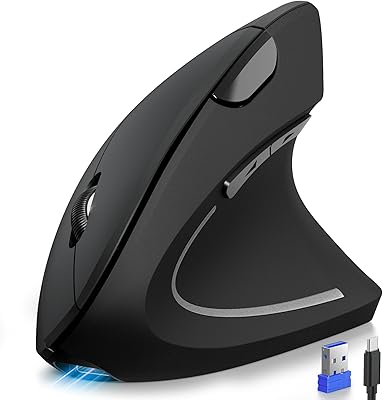
The Acer OMR241 Ergonomic Vertical Mouse is Acer's entry into a format that has quietly won over a lot of desk workers — and at its price tier, it's one of the more accessible ways to try vertical mousing without a big financial commitment. The core idea is a 57° vertical tilt angle that holds your forearm in a more natural, handshake-like position rather than flat against the desk. A few things are worth knowing upfront: this is strictly a right-hand design built for medium to large hands, and it connects through a 2.4GHz USB-A dongle, not Bluetooth. Think of it as a practical daily driver for productivity work, not a precision or gaming tool.
Features & Benefits

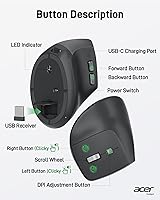
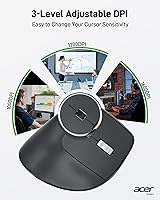
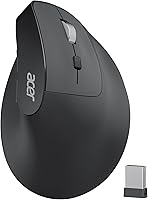
The 57° tilt does most of the work here — it rotates your wrist into a position that reduces forearm pronation, which is a common source of strain for people clicking and typing across long work sessions. Sensitivity runs across three levels: 1000, 1200, and 1600 DPI, which covers document editing and general navigation well enough, though anyone on a large high-resolution display may find the ceiling limiting. The rechargeable 300mAh battery holds up to roughly a month on a full charge, and a USB cable comes in the box. The nano receiver tucks inside the mouse body — a small but useful detail for travel. Mac users take note: the side navigation buttons are non-functional on macOS.

Best For

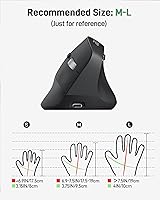
This wireless ergonomic mouse is a strong fit for office and remote workers who spend extended hours at a desk and have started feeling wrist or forearm discomfort from a conventional flat mouse. It's shaped for right-handed users with medium to large hands — those with smaller hands will likely find the grip awkward. Windows, Linux, and Chrome OS users with a spare USB-A port will have zero friction getting started. It's also a reasonable choice for anyone curious about vertical mice but not ready to spend more on a premium model. The built-in rechargeable battery is a quiet everyday advantage over mice that require disposable replacements.

User Feedback

The Acer ergo mouse sits at a 4.3 out of 5 rating, and reviews follow a fairly consistent pattern. Buyers who stick with it typically report noticeable comfort improvement after a week or so, though most also mention that the first few days feel strange — and a handful describe real discomfort until their grip adjusts. On the critical side, users on large or high-resolution screens flag the 1600 DPI ceiling as a genuine limitation. Some also note that the scroll wheel feels a little lightweight for a branded device. The Mac side-button issue comes up repeatedly in the Q&A section — not a dealbreaker for Windows users, but worth knowing if your household runs mixed operating systems.

Pros

  • The 57° vertical tilt genuinely reduces forearm pronation, making all-day clicking noticeably less taxing on the wrist.
  • A rechargeable lithium battery lasts close to a month on a single charge, eliminating disposable battery costs.
  • The nano USB receiver stores neatly inside the mouse body, so losing it during travel is much less likely.
  • Three DPI settings give enough flexibility for switching between detailed document work and faster general navigation.
  • At its price point, this vertical mouse delivers a credible ergonomic experience from a recognizable tech brand.
  • Setup is instant — plug in the receiver and it works across Windows, Linux, and Chrome OS without driver installs.
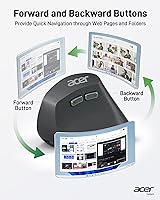
  • Forward and back navigation buttons work reliably for browser and file explorer use, speeding up everyday workflows.
  • Weighing just 3.3 oz, this wireless ergonomic mouse is light enough that extended sessions never feel arm-tiring.

Cons

  • The 1600 DPI maximum is noticeably limiting for users on large or high-resolution displays.
  • Side navigation buttons are completely non-functional on macOS, reducing it to a four-button mouse for Mac users.
  • No Bluetooth support means USB-C-only laptops and tablets require a separate adapter just to connect.
  • The scroll wheel feels lightweight and a little imprecise — a common complaint at this price tier.
  • The adjustment period is real; expect up to a week of awkward use before the grip starts feeling natural.
  • Exclusively right-handed design locks out left-handed users entirely with no alternative configuration.
  • Sleep mode kicks in after just 10 minutes of inactivity, and waking it with a double-click can occasionally cause unintended clicks.
  • Battery life estimates assume light use — heavy daily users may find the real-world charge cycle falls short of a month.

Ratings

The Acer OMR241 Ergonomic Vertical Mouse holds a 4.3 out of 5 aggregate score drawn from thousands of verified buyer reviews worldwide, with our AI model actively filtering out incentivized, bot-generated, and duplicate submissions before weighting each data point. The category scores below reflect both what this mouse genuinely gets right and where it falls short — strengths and recurring pain points are represented with equal honesty.

Ergonomic Comfort
83%
For office workers who switched from a flat mouse, the 57° tilt makes a real difference during back-to-back hours of document editing or data entry. Most buyers report noticeably less forearm tension within the first week, and several mention that persistent wrist discomfort began to ease after consistent daily use.
The adjustment period is real — a meaningful number of buyers describe genuine discomfort during the first three to five days, particularly in the forearm and thumb. Users with small hands consistently flag that the grip contour is too wide, leaving fingers stretched uncomfortably to reach the primary buttons.
Build Quality
67%
33%
For a mouse at this price tier, the overall shell feels solid enough for daily desk use — it holds its shape, sits stably on a flat surface, and the main click buttons register cleanly without excessive wobble or play under normal working conditions.
The scroll wheel is the most frequently cited weak point — multiple reviewers describe it as feeling plasticky and imprecise, particularly when scrolling slowly through long documents. Some flex in the side panels and a slightly hollow sound on the main clicks serve as consistent reminders that corners were cut.
Battery Life
88%
A rechargeable battery that genuinely lasts close to a month under typical workday conditions is a strong practical advantage — buyers frequently mention that they charge it once and then forget about it for weeks. Not needing to stock AA batteries removes a small but recurring hassle from the daily routine.
Heavy users — those running the mouse six or more hours a day — report the real-world charge cycle falling notably short of a month. The 10-minute auto-sleep is helpful for preservation, but waking it with a double-click occasionally triggers an unintended action mid-workflow, which some find disruptive.
DPI and Precision
61%
39%
For standard productivity work on a 1080p monitor — email, documents, light web browsing — the available DPI range covers the bases adequately. The one-click DPI toggle is convenient, and the 1200 DPI middle setting feels like a natural default for most everyday navigation tasks.
The 1600 DPI ceiling is a genuine limitation that surfaces regularly in feedback from users on larger or higher-resolution displays. Anyone doing photo editing, working across dual monitors, or simply preferring faster cursor travel will find the maximum sensitivity frustratingly slow and imprecise for their needs.
Mac Compatibility
43%
57%
Basic mouse functions — left-click, right-click, scrolling, and DPI switching — work without issue on macOS, and the USB receiver connects with no driver installation required. Mac users who only need core functionality and do not rely on browser navigation shortcuts will not encounter major disruption.
The side navigation buttons are completely non-functional on macOS, stripping two of the six buttons and removing what many buyers considered a key reason to purchase. This well-documented limitation has frustrated several Mac users who only discovered it after the mouse arrived.
Wireless Connectivity
84%
The 2.4GHz connection holds up reliably across a standard desk setup — buyers report that cursor movement stays smooth and lag-free during spreadsheet work, video calls, and general browsing within a typical office environment. The nano receiver rarely needs to be repositioned once it finds a clean USB port.
A subset of users report intermittent dropout when the mouse is used near heavily congested wireless environments — crowded offices with many 2.4GHz devices nearby seem to amplify the issue. There is also no Bluetooth fallback, so anyone on a USB-C-only device must carry a separate adapter at all times.
Value for Money
79%
21%
For buyers entering the vertical mouse category for the first time, the price point represents a reasonable way to test whether the ergonomic format genuinely improves their comfort — without the financial sting of a premium model that might not suit them. The built-in rechargeable battery adds long-term value by eliminating ongoing battery costs.
Users who need higher DPI, Bluetooth connectivity, or full Mac button support will likely find themselves outgrowing this mouse and spending more on an upgrade shortly after, which somewhat undermines the value proposition. The build quality also feels a modest step below what the brand name might lead buyers to expect.
Setup and Ease of Use
91%
Plug-and-play setup is one of the most consistent positives across all reviews — users report the USB receiver connecting instantly on Windows, Linux, and Chrome OS without any driver installation. The built-in receiver slot is a thoughtful design touch that prevents the small dongle from being misplaced during travel.
The sleep mode wake-up behavior trips some users up — a double-click to wake means there is a brief delay before the mouse responds, which can feel disorienting after returning from a short break. First-time vertical mouse users also report a steeper-than-expected learning curve locating the navigation buttons by feel.
Portability
82%
18%
At 3.3 oz and with built-in receiver storage, this vertical mouse travels well — it slips into a laptop bag without adding noticeable weight, and there is no risk of fumbling for a loose dongle. The light frame handles commuter bag jostling without any concern.
The 57° vertical profile is noticeably taller than a standard mouse, so it does not pack as flat or as neatly in tight cases. USB-C-only laptop users also have to carry a separate adapter, adding one more item to an already full travel kit just to make the connection work.
Scroll Wheel Feel
58%
42%
The scroll wheel functions reliably for basic navigation and does not exhibit the skipping or double-scrolling issues that sometimes appear in budget peripherals. For casual web browsing and document reading, most users find it gets the job done without requiring any adjustment or recalibration.
The tactile feedback feels noticeably light — multiple reviewers specifically mention the thin plastic click and lack of defined scrolling resistance as a let-down for a branded device. Precise line-by-line scrolling through dense spreadsheets or code is harder than it should be given the vertical grip angle.
Grip Ergonomics
73%
27%
For medium and large right hands, the shell contour is one of the most appreciated aspects — buyers describe how the thumb rests naturally against the side and the ring finger settles into the lower curve intuitively once the adjustment period passes. The 93g weight distribution stays comfortable across long work sessions.
Small-handed and left-handed users are entirely excluded by the design — this is a hard incompatibility, not a minor fit issue. Even within medium-to-large right hands, buyers with shorter fingers report difficulty reaching the forward navigation button comfortably without fully repositioning their grip mid-task.
Optical Tracking
76%
24%
On standard desk surfaces — mouse pads, wooden desks, and most matte materials — the optical tracking performs accurately and without noticeable jitter during everyday tasks like clicking between spreadsheet cells or navigating document menus. Most buyers do not flag tracking accuracy as a concern at all.
A handful of users report the sensor struggling on very dark or highly reflective surfaces, including glass desks, which is a common limitation for optical sensors at this price point. The vertical grip angle also means fine-motor micro-adjustments feel less natural than on a flat mouse until the user fully adapts.

Suitable for:

The Acer OMR241 Ergonomic Vertical Mouse is a genuinely practical choice for right-handed desk workers — particularly those who have started noticing wrist soreness or forearm fatigue after long hours at a computer. If you spend most of your day in spreadsheets, writing documents, or browsing, the 57° tilt puts your arm in a far more natural resting position than a conventional flat mouse does. It suits medium to large hands well, and the built-in rechargeable battery removes the ongoing nuisance of swapping out disposable cells. Windows, Linux, and Chrome OS users who have a USB-A port available will find setup completely effortless — plug in the nano receiver and you are ready to go. It is also a smart entry point for anyone curious about the vertical format who wants to test whether ergonomic mousing actually works for them before committing to a higher-cost option.
Not suitable for:

The Acer OMR241 Ergonomic Vertical Mouse has some real limitations that will matter to certain buyers. Left-handed users should stop here — this is a strictly right-hand-only design, and there is no ambidextrous or mirrored version in this lineup. Mac users will find that the side navigation buttons simply do not work on macOS, which strips away two of the six buttons and diminishes the value for Apple-focused workflows. Anyone working on a large 4K or high-DPI display may also find the 1600 DPI ceiling frustrating, as precise cursor control across a wide screen demands more sensitivity than this mouse offers. It connects only via a 2.4GHz USB-A dongle — there is no Bluetooth option — so users on modern ultrabooks or tablets with only USB-C ports will need an adapter. Gamers or anyone needing fast, precise tracking should look elsewhere entirely.
Specifications

  • Model Number: This mouse carries the model designation OMR241, manufactured by Acer.
  • Tilt Angle: The shell is angled at 57° from horizontal, placing the wrist in a more neutral, upright position compared to a traditional flat mouse.
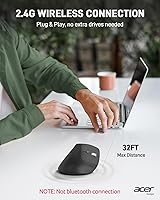
  • Connection Type: It connects via a 2.4GHz wireless USB-A nano receiver; Bluetooth is not supported.
  • Wireless Range: The mouse maintains a stable connection up to 32 ft (10 m) from the connected computer.
  • DPI Settings: Three sensitivity levels are available: 1000, 1200, and 1600 DPI, switchable via a dedicated button.
  • Button Count: The mouse features six buttons in total, including left-click, right-click, scroll wheel click, DPI toggle, and forward and backward navigation keys.
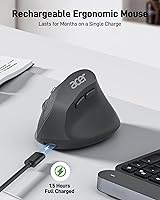
  • Battery: A built-in 300mAh rechargeable lithium battery powers the mouse, rated for up to approximately one month of use on a full charge under typical office conditions.
  • Charging: The mouse recharges via an included USB cable, eliminating the need for disposable batteries.
  • Sleep Mode: The mouse enters a low-power sleep state after 10 minutes of inactivity and wakes with a double-click.
  • Receiver Storage: The USB-A nano receiver stores inside a dedicated compartment in the mouse body when not in use.
  • Hand Orientation: The ergonomic shell is shaped exclusively for right-handed users; no left-handed version is available in this model.
  • Hand Size: The dimensions and grip curve are optimized for medium to large hands; users with smaller hands may find the fit uncomfortable.
  • Dimensions: The mouse measures 4.3 inches long, 3.1 inches wide, and 2.9 inches tall.
  • Weight: It weighs 3.3 oz (93g), making it light enough for extended daily use without arm fatigue from the device itself.
  • OS Compatibility: The mouse is compatible with Windows, macOS, Linux, and Chrome OS, though the side navigation buttons do not function on macOS.

Related Reviews

seenda Ergonomic Vertical Wireless Mouse
86%
90%
Wrist Comfort & Ergonomics
87%
Battery Life & Charging
91%
Quiet Click Performance
85%
Compatibility & Connectivity
88%
Build Quality & Durability
More
Woddlffy RAAVEE Ergonomic Vertical Wireless Mouse
75%
81%
Ergonomic Comfort
54%
Build Quality
83%
Wireless Connectivity
57%
DPI Range
63%
Button Functionality
More
Contour Unimouse Ergonomic Vertical Mouse
85%
89%
Ergonomic Comfort
87%
Customizability
82%
Ease of Use
93%
Battery Life
85%
Build Quality
More
HP 920 Ergonomic Vertical Mouse
87%
89%
Comfort & Ergonomics
92%
Battery Life
84%
Ease of Use
87%
Multi-Device Support
88%
Adjustable DPI & Precision
More
Logitech Lift Vertical Ergonomic Mouse
83%
91%
Ergonomic Comfort
74%
Build Quality
93%
Click Quietness
88%
Wireless Connectivity
96%
Battery Life
More
UGREEN Vertical Wireless Ergonomic Mouse
84%
88%
Ergonomic Comfort
84%
Connectivity Performance
80%
Ease of Use
91%
Design and Build Quality
82%
Battery Life
More
Lekvey XC-05 Vertical Wireless Mouse
75%
83%
Ergonomic Comfort
66%
Build Quality
88%
Battery Life
54%
Sleep Mode & Wake Responsiveness
81%
Wireless Connectivity
More
Cherry MW4500 Wireless Vertical Ergonomic Mouse
83%
89%
Ergonomics & Comfort
74%
Battery Life
81%
DPI Performance
77%
Ease of Use
85%
Build Quality
More
Philips SPK Vertical Ergonomic Wireless Mouse
77%
83%
Ergonomic Comfort
91%
Silent Click Performance
78%
Hand Size Fit
62%
DPI Range & Cursor Control
79%
Wireless Reliability
More
SHARE SUNSHINE Ergonomic Vertical Wireless Mouse
74%
83%
Ergonomic Comfort
79%
Adjustable Tilt Angle
71%
Build Quality
74%
Palm Rest Comfort
88%
Wireless Connectivity
More

FAQ

Unfortunately, no. The forward and back navigation buttons on the Acer OMR241 Ergonomic Vertical Mouse are not recognized by macOS. The left-click, right-click, scroll wheel, and DPI button all work fine on Mac, but you lose two of the six buttons entirely. If side navigation is important to your workflow, this is a real limitation worth considering before buying.
No, this mouse only supports the included 2.4GHz USB-A receiver — there is no Bluetooth option at all. If your laptop or tablet only has USB-C ports, you will need a USB-A to USB-C adapter to use it.

Under typical office use — a few hours of clicking and scrolling per day — most users find it lasts close to the advertised month. If you use it heavily all day or forget to flip the power switch off at night, expect a shorter cycle. Charging takes a couple of hours via the included USB cable.

It goes into sleep mode automatically after 10 minutes of inactivity to save battery. A double-click anywhere on the mouse surface will wake it back up. If it still does not respond, check that the power switch on the bottom is in the on position and that the USB receiver is fully seated in the port.

Probably not. This vertical mouse is specifically sized for medium to large hands, and the grip contour is quite wide. People with smaller hands tend to find it awkward to reach the buttons naturally, which actually creates more strain rather than less. If your hands are on the smaller side, a more compact vertical mouse would serve you better.

Most people need somewhere between three and seven days before it starts feeling natural. The first day or two can genuinely feel uncomfortable or even tiring, because your forearm muscles are working slightly differently. Stick with it through that initial period before deciding whether the format works for you — most people find the discomfort fades quickly.

No, and it was not designed with gaming in mind. The maximum sensitivity of 1600 DPI is quite low for fast-paced gaming, and the response characteristics are tuned for steady office navigation rather than rapid precision movement. This is a productivity and comfort tool, not a gaming peripheral.

For most standard 1080p monitors and typical productivity tasks like writing and spreadsheets, the 1200 DPI setting is a solid starting point. Drop to 1000 DPI if you want more deliberate, slower cursor movement for detailed work, or bump to 1600 DPI for faster navigation across a larger screen. The DPI button cycles through all three settings with a single click.

First, make sure the battery is adequately charged and the mouse is within a reasonable distance of the receiver — walls and other wireless devices can cause interference. Try moving the receiver to a different USB port, ideally one that is not surrounded by other USB devices or metal objects. Keeping the mouse within about 10 ft of the receiver tends to give the most stable connection.

There is a small storage slot inside the mouse body specifically for the nano receiver — it snaps in securely when you are on the move. It is a genuinely useful feature for people who carry their mouse in a bag, since nano receivers are notoriously easy to misplace otherwise.