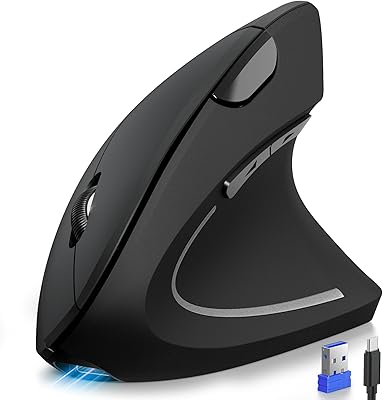
Uineer A06 Vertical Ergonomic Mouse


Overview
The Uineer A06 Vertical Ergonomic Mouse entered a crowded market in early 2025 and has quietly climbed to the top of its category — which says something for a brand most buyers hadn't heard of before. Uineer isn't a household name, but the A06 earns its place on merit. At this price point, landing triple wireless connectivity alongside a rechargeable battery is genuinely unusual. This isn't a peripheral built for pixel-level design work or competitive gaming. Think of it as a practical, comfort-focused daily driver for the kind of person whose wrists start aching by mid-afternoon — someone who just wants relief without spending a fortune.
Features & Benefits
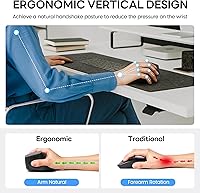
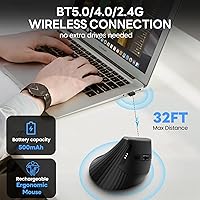
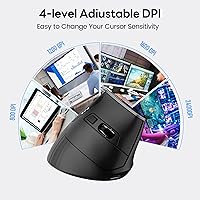
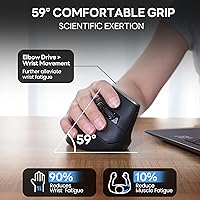
What makes the A06 stand out day-to-day is how its features work together rather than just looking good on paper. The vertical handshake position keeps your forearm in a more neutral rotation, which takes meaningful pressure off the wrist over hours of use. Pairing is handled through a three-mode wireless system — Bluetooth 5.0, Bluetooth 4.0, or a 2.4GHz USB dongle — so switching between your laptop at the office and a tablet at home takes a few seconds, not a troubleshooting session. The four DPI settings top out at 2400, which is plenty for productivity like browsing, writing, and spreadsheet work. A small LED on the body flags battery level before it ever becomes a problem.
Best For
This ergonomic mouse makes the most sense for people who clock long hours at a desk and are starting to notice the toll it takes on their wrists or forearms. It is also a natural pick for multi-device workers — the kind who bounce between a personal laptop, a work computer, and maybe a tablet, all without wanting to juggle separate peripherals. First-time vertical mouse buyers should feel reasonably at ease here: the six-button layout mirrors a conventional mouse closely enough that the transition isn't jarring. If you are on a tight budget but unwilling to compromise on a true ergonomic form factor, the A06 hits a genuinely useful middle ground without asking you to break the bank.
User Feedback
Among verified buyers, the A06 carries a strong overall rating, and the praise follows a consistent pattern: people notice reduced wrist discomfort within days, appreciate how quickly all three connection modes pair up, and find the battery indicator a small but genuinely useful touch. Criticism is less dramatic but worth knowing. Some users with smaller hands find the grip a touch wide for extended sessions, and a few note the scroll wheel feels slightly loose compared to pricier alternatives. If you have never used a vertical mouse before, expect an awkward first week — your hand will adjust, but not instantly. The 45-day return window and 12-month replacement policy mean the risk of trying an unfamiliar brand stays low.
Pros
- Three wireless modes — Bluetooth 5.0, Bluetooth 4.0, and 2.4GHz dongle — cover virtually every device pairing scenario without hassle.
- The vertical orientation puts your forearm in a natural resting position, which noticeably reduces wrist strain during long work sessions.
- A built-in rechargeable battery with a visible LED indicator means you are never caught off guard by a dead mouse mid-afternoon.
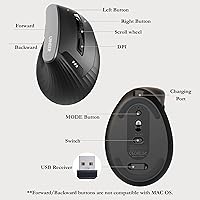
- Six buttons, including thumb-operated back and forward keys, keep the layout practical without overwhelming users switching from a standard mouse.
- Broad compatibility across Windows, macOS, Linux, Android, and iOS 13+ makes this ergonomic mouse genuinely useful across mixed-device households.
- At its price tier, the combination of ergonomic form factor and multi-device wireless is hard to match from better-known brands.
- The 45-day no-reason return window and 12-month replacement policy take a meaningful amount of risk out of buying from an unfamiliar brand.
- Four DPI presets cycling up to 2400 handle everyday productivity tasks — document editing, spreadsheets, general browsing — without any setup required.
- Buyers consistently report a noticeable comfort improvement within the first few days, which is the clearest validation this type of peripheral can get.
Cons
- No companion software means button remapping and DPI fine-tuning beyond the four presets are simply not possible.
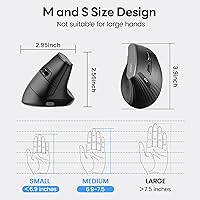
- Users with smaller hands may find the grip width slightly too broad for truly comfortable extended use.
- The scroll wheel has drawn occasional criticism for feeling less precise and slightly loose compared to mice in higher price brackets.
- Uineer has little brand history or community support to draw on if you run into edge-case compatibility or firmware questions.
- First-time vertical mouse users should expect a genuine adjustment period of one to two weeks — hand fatigue and awkward tracking are common early on.
- The optical sensor performs adequately for office work but lacks the polling rate and accuracy that creative professionals or gamers would need.
- Only available in black, which is a minor but real limitation for buyers who want to match a light-colored or styled desk setup.
- There is no carrying pouch or travel case included, making the mouse less convenient to pack safely for frequent commuters.
Ratings
The scores below reflect our AI-assisted analysis of verified global buyer reviews for the Uineer A06 Vertical Ergonomic Mouse, with bot-generated, incentivized, and spam feedback actively filtered out before any category was scored. Each rating is calibrated to capture the full picture — where this vertical mouse genuinely delivers for real-world desk workers and where consistent pain points pull the experience back. Both standout strengths and recurring frustrations are weighted into every number you see here.
Ergonomic Comfort
Build Quality
Wireless Connectivity
Battery Life & Charging
DPI & Tracking
Multi-Device Switching
Button Layout
Software & Customization
Value for Money
OS Compatibility
Hand Fit & Sizing
Scroll Wheel Quality
Setup & Pairing Ease
Brand & After-Sale Support
Suitable for:
The Uineer A06 Vertical Ergonomic Mouse is built for desk workers who spend the better part of their day at a computer and have started feeling the early warning signs of wrist or forearm strain — the dull ache after a long afternoon, the stiffness that lingers into the evening. If your setup spans more than one device, this mouse handles that well too: switching between a work laptop, a personal desktop, and a tablet is a practical, low-friction part of daily use rather than a chore. It is a particularly smart choice for first-time vertical mouse buyers who want a familiar button layout to ease the transition, rather than jumping into a radically different form factor all at once. People who regularly work across Windows and macOS — or even Android and iOS — will find the broad compatibility genuinely useful rather than a marketing checkbox. At its price point, it competes more honestly than most, offering a real ergonomic upgrade for buyers who cannot justify the cost of premium-brand alternatives.
Not suitable for:
If you are a competitive gamer or a digital illustrator who depends on precise, fast cursor control, the A06 is not the right tool — a 2400 DPI ceiling and the absence of companion software for button remapping simply do not meet those demands. Left-handed users should also look elsewhere, as the sculpted vertical body is shaped specifically for right-hand grip and offers no ambidextrous variant. People with notably small hands may find the dimensions — just over 11.6 cm long and 7.5 cm tall — a bit much for comfortable all-day use without some fatigue. Anyone expecting plug-and-play DPI customization beyond the four preset levels will be disappointed, since there is no dedicated software to fine-tune sensitivity curves or reassign buttons. It is also worth being clear: while an ergonomic mouse can reduce repetitive strain, it is not a medical device, and buyers dealing with diagnosed conditions like carpal tunnel syndrome should treat this as a complement to professional guidance, not a substitute for it.
Specifications
- Brand: Manufactured by Uineer, a peripheral brand that entered the ergonomic mouse market in early 2025.
- Model Number: The official model designation is A06, as listed by the manufacturer.
- Form Factor: Vertical ergonomic design positions the hand in a natural handshake orientation to reduce forearm pronation during use.
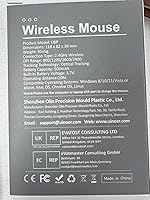
- Dimensions: The mouse measures 11.6 x 7.2 x 7.5 cm (4.57 x 3.03 x 2.95 inches), sized for average to large adult hands.
- Weight: The unit weighs 3.7 oz, which keeps it light enough for extended daily use without causing arm fatigue.
- Connectivity: Supports three wireless modes: Bluetooth 5.0, Bluetooth 4.0, and a 2.4GHz USB dongle, allowing connection to up to three devices.
- DPI Settings: Offers four selectable DPI levels — 800, 1200, 1600, and 2400 — switchable via a dedicated button on the mouse body.
- Button Count: Features six physical buttons, including left-click, right-click, scroll wheel click, DPI toggle, and two thumb-operated navigation buttons.
- Sensor Type: Uses an optical movement detection sensor suitable for standard office surfaces and most mouse pads.
- Power Source: Equipped with a built-in rechargeable battery; an LED indicator on the body signals current charge status to the user.
- OS Compatibility: Compatible with Windows 11, 10, 8, 7, XP, and Vista; macOS X; Linux; Android; and iOS 13 and above.
- Hand Orientation: Designed exclusively for right-hand use; no left-handed or ambidextrous variant is available for this model.
- Color: Available in black only; no alternative colorways are offered for this model.
- Warranty: Comes with a 12-month replacement warranty for quality defects and a 45-day no-reason return policy from the point of purchase.
- Release Date: First made available for sale in February 2025, making it one of the newer entrants in the budget ergonomic mouse segment.
Related Reviews

UGREEN Vertical Wireless Ergonomic Mouse

seenda Ergonomic Vertical Wireless Mouse

Lekvey XC-05 Vertical Wireless Mouse

Acer OMR241 Ergonomic Vertical Mouse
Logitech Lift Vertical Ergonomic Mouse
HP 920 Ergonomic Vertical Mouse

Woddlffy RAAVEE Ergonomic Vertical Wireless Mouse
Contour Unimouse Ergonomic Vertical Mouse
Philips SPK Vertical Ergonomic Wireless Mouse