Overview

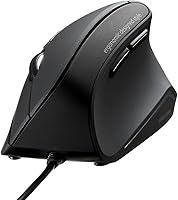
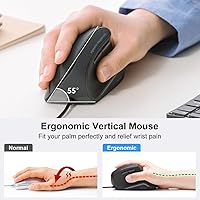
The SANWA GMAERG9N2 Wired Vertical Mouse arrived in late 2024 as a straightforward, no-frills entry into the vertical mouse category — and it delivers exactly what that description implies. Positioned at a 55° vertical angle, it holds your hand in a natural handshake posture that takes pressure off the forearm and wrist during long sessions. At 5.6 oz, it sits lightly in the palm without feeling flimsy. The wired USB connection is plug-and-play, so there are no dongles to misplace and no batteries to replace. It suits medium-to-large hands best, with a palm-grip shape that feels secure once you settle in.
Features & Benefits

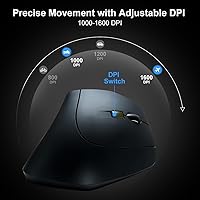
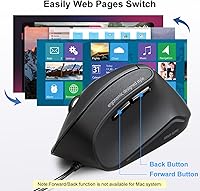
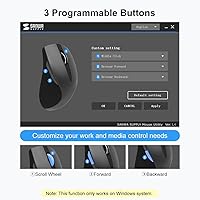
The silent click mechanism covers every button — left, right, and both thumb buttons — making this wired ergonomic mouse genuinely unobtrusive in shared spaces or late-night work sessions. You can toggle between 1000 and 1600 DPI on the fly, which is a modest but functional range for everyday office tasks. The blue LED optical sensor handles most desk surfaces without needing a mousepad. Three buttons can be remapped through SANWA's downloadable software if the defaults don't suit your workflow. One important caveat for Mac users: the Back and Forward thumb buttons do not function on macOS, so Windows users get considerably more out of this mouse.

Best For

This vertical mouse makes the most sense for desk-bound office workers who spend hours clicking and scrolling and have started noticing tension in the wrist or forearm. The near-silent buttons also make it a practical choice for open-plan offices, libraries, or anyone sharing a room. It works best for people on Windows, where all five buttons function as intended. If you have never tried a vertical mouse before and want to test the concept without spending much, the SANWA ergo mouse offers a reasonable entry point — though those with small hands may find the fit a little large and should size accordingly.

User Feedback

With a 4.2-star average across more than 600 ratings, the SANWA ergo mouse has clearly won over a solid cross-section of buyers. The most common praise centers on genuine wrist relief after switching from a flat mouse, and people consistently note that the quiet clicks live up to the claim. On the critical side, some users feel the two-DPI range is limiting for anything beyond standard office work, and the build quality — while acceptable — does not feel premium. A recurring note worth keeping in mind: expect a few days of adjustment before the angled grip starts feeling intuitive rather than awkward.

Pros

  • The 55° vertical angle genuinely helps reduce wrist and forearm fatigue during extended work sessions.
  • Silent clicks on every button make this vertical mouse easy to use in shared offices or quiet rooms.
  • Plug-and-play USB connection means zero setup time and no dependency on batteries or wireless dongles.
  • At under 6 oz, the mouse is light enough to use comfortably for full workdays without hand fatigue.
  • The SANWA ergo mouse works across Windows 8 through 11, macOS, and Chrome OS with no driver installation required.
  • Three programmable buttons can be customized through SANWA's software for a more personalized workflow.
  • Blue LED optical tracking functions reliably on most desk surfaces without requiring a dedicated mousepad.
  • Over 600 real-world ratings averaging 4.2 stars reflects a product that consistently meets buyer expectations.
  • The Back and Forward thumb buttons make single-handed browser navigation noticeably faster on Windows.

Cons

  • Only two DPI levels are available, which limits flexibility for users who need finer cursor control options.
  • Mac users lose Back and Forward thumb button functionality entirely, reducing the mouse to three effective buttons.
  • Build materials feel functional rather than solid — the plastic housing lacks the reassuring density of pricier alternatives.
  • The scroll wheel has limited tactile feedback, which some users find imprecise for document navigation.
  • SANWA's customization software must be downloaded separately, and the interface is reportedly basic and unintuitive.
  • The wired cable, while reliable, is not braided and may tangle or feel stiff on a cluttered desk.
  • No adjustable vertical angle means users whose wrists need a different tilt have no way to fine-tune the fit.
  • People with small hands may find the grip size too wide for a natural, relaxed palm position.

Ratings

The scores below reflect AI analysis of verified global user reviews for the SANWA GMAERG9N2 Wired Vertical Mouse, with spam, bot-generated, and incentivized feedback actively filtered out before scoring. Each category is rated independently based on what real buyers reported after extended use — strengths and frustrations alike are represented without bias. You will find a clear picture of where this wired ergonomic mouse punches above its weight and where it genuinely falls short.

Ergonomic Comfort
83%
The majority of users who switched from a flat mouse reported a meaningful reduction in wrist and forearm tension within the first week of daily use. The 55° vertical angle consistently earns praise for feeling natural during long office sessions, especially from people who had been dealing with early signs of repetitive strain.
A notable share of users — particularly those new to vertical mice — described a frustrating adjustment period of several days before the grip stopped feeling awkward. People with smaller hands found the palm-fit geometry too wide for truly comfortable extended use.
Silent Click Performance
88%
The dampened click mechanism drew consistent praise from buyers working in shared offices, libraries, and late-night home setups. Most users described the sound level as genuinely unobtrusive rather than just marginally quieter, which is not always the case with mice marketed as silent.
A small subset of reviewers noted that the side thumb buttons, while quieter than standard, produce slightly more audible feedback than the left and right clicks. In very close-proximity or recording environments, the sound reduction may not be sufficient.
Build Quality
61%
39%
For its price tier, the mouse is considered structurally adequate — no flex under normal grip pressure, no rattling scroll wheel, and no early-onset looseness in the click buttons reported during the first months of use. Most buyers found it held up fine for daily office tasks.
The plastic housing feels noticeably lightweight and hollow compared to mid-range or premium alternatives, and several users described the overall construction as below their expectations. The unbraided cable and basic scroll wheel tactility reinforce the sense that materials were kept to a minimum.
Value for Money
84%
Buyers repeatedly framed this wired ergonomic mouse as one of the most accessible entry points into vertical mouse ergonomics, and the general consensus was that the core functionality — silent clicks, wrist-relief angle, plug-and-play reliability — delivered on its promise at the price point.
A portion of reviewers felt that the two-DPI limitation and the non-functional Mac thumb buttons reduced the perceived value, particularly for buyers who only discovered the macOS restriction after purchase. A few extra dollars toward a competing model would get noticeably better build materials.
DPI Range and Cursor Control
57%
43%
For standard office work — documents, spreadsheets, browser tabs — the 1000 and 1600 DPI settings cover the most common use cases adequately. Users doing basic productivity tasks rarely flagged the DPI ceiling as a problem in their day-to-day workflow.
Power users, designers, and anyone working across large or multi-monitor setups found the two-level DPI system restrictive and imprecise. The absence of intermediate settings or a wider top-end ceiling was among the most frequently cited technical complaints in critical reviews.
macOS Compatibility
44%
56%
The mouse connects without issue on macOS and delivers basic left click, right click, and scroll wheel functionality reliably across all supported macOS versions including Sonoma. For Mac users who only need those core inputs, it does work as a functional pointing device.
The Back and Forward thumb buttons are entirely non-functional on macOS, which is a significant limitation given how central those shortcuts are to browser-heavy workflows. Mac buyers who discovered this after purchase expressed clear frustration, and several left low ratings specifically because of this gap.
Tracking Accuracy
76%
24%
The blue LED optical sensor performed reliably across a range of everyday desk surfaces — wood, laminate, fabric desk mats — without requiring a dedicated mousepad. Users appreciated not having to change their workspace setup to accommodate the new mouse.
On glass, highly polished surfaces, or very dark materials, tracking became inconsistent or lost contact entirely, which is a common limitation of optical LED sensors at this level. A small number of users also reported occasional micro-skipping during fast movements at 1600 DPI.
Setup and Ease of Use
91%
Virtually every reviewer commented on how frictionless the initial setup was — plug in, and it works. No driver discs, no account creation, no software installation required for basic use. This made it particularly popular with less technical users and those setting up shared workstations.
The programmable button customization requires downloading SANWA's separate configuration app, which some users found unintuitive and harder to navigate than expected. A handful of reviewers on older Windows versions reported compatibility hiccups with the software itself.
Button Layout and Usability
73%
27%
The placement of the thumb buttons near the natural resting position of the thumb was widely appreciated for making Back and Forward navigation feel intuitive without requiring hand repositioning on Windows. The DPI toggle button was also consistently described as easy to reach mid-task.
The three programmable buttons feel closely grouped on smaller hand sizes, making accidental presses a reported issue during the adjustment period. Mac users effectively have fewer usable buttons than Windows users, which skews the overall layout rating downward.
Cable Quality and Management
58%
42%
The wired connection itself is reliable and lag-free — users working in RF-heavy environments or who had wireless mouse issues in the past specifically cited the cable as a practical advantage. Zero battery anxiety is a recurring note among long-session users.
The standard unbraided cable was flagged as a source of desk clutter and occasional tangling, particularly on messier workspaces. The cable stiffness was also noted by a few users as adding mild resistance to fast mouse movements until it had loosened with use.
Hand Size Fit
69%
31%
Medium-to-large hand users consistently reported a comfortable, secure fit with the palm-grip shell, and several noted that the mouse felt substantially more natural than smaller vertical mice they had tried previously. The width and height proportions suited this hand size well.
Users with small hands found the width noticeably oversized, forcing a stretched or partially supported grip that introduced new discomfort rather than relieving it. SANWA does not offer a compact variant of this model, leaving smaller-handed buyers without a direct alternative from the same line.
Software and Customization
55%
45%
The downloadable SANWA customization app does allow genuine button remapping and scroll wheel function reassignment, which is more flexibility than many mice at this price tier offer at all. Windows users with straightforward remapping needs reported getting their configuration set up within a few minutes.
The software interface was described by multiple reviewers as dated, unintuitive, and lacking clear documentation. Users looking for macro support, per-app profiles, or anything beyond simple button reassignment will find the software falls well short of what competing products offer.
Scroll Wheel Feel
62%
38%
The scroll wheel functions without notable skipping or misfires in standard document and browser scrolling. For basic up-down navigation in everyday applications, most users found it perfectly adequate and not a source of frustration during daily work.
The lack of tactile stepped feedback made the scroll wheel feel imprecise to users accustomed to higher-end mice with defined notched scrolling. Several reviewers specifically noted it felt loose or slightly mushy, which made precise line-by-line scrolling in spreadsheets unreliable.

Suitable for:

The SANWA GMAERG9N2 Wired Vertical Mouse is a strong fit for office workers and remote employees who spend the bulk of their day clicking, scrolling, and browsing, and have started feeling tension or fatigue building in their wrist or forearm. The 55° handshake angle can meaningfully reduce strain during long sessions — not a cure, but a practical way to shift your hand into a more neutral position. It also works well for anyone in a quiet or shared environment: the silent click on every button keeps things genuinely unobtrusive in open-plan offices, libraries, or late-night home setups. Windows users will get the full experience, including Back and Forward thumb navigation and complete button programmability via SANWA's software. People new to vertical mice who want to try the form factor without a large financial commitment will also find this a sensible starting point.
Not suitable for:

The SANWA GMAERG9N2 Wired Vertical Mouse has real limitations that make it the wrong tool for certain buyers, and it is worth being clear about them. Mac users should approach cautiously: the Back and Forward thumb buttons are non-functional on macOS, which strips away a feature many people consider essential for comfortable browsing. The DPI range tops out at 1600, which is adequate for standard office tasks but will feel sluggish or imprecise to anyone who moves across large or multi-monitor setups at speed. People with small hands will likely find the palm-grip dimensions too large for a comfortable fit. Those who prioritize build quality — premium materials, a satisfying scroll wheel, a tight cable braid — should look further up the price ladder, as this wired ergonomic mouse reflects its value-tier positioning in the feel of the hardware.

Specifications

  • Model Number: The official model identifier for this mouse is GMAERG9N2, manufactured by SANWA.
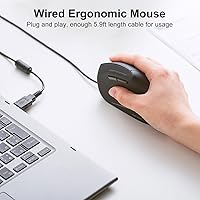
  • Connection: The mouse connects via wired USB and is plug-and-play, requiring no additional drivers for basic operation.
  • Vertical Angle: The housing is built at a 55° vertical angle to position the hand in a natural, forearm-neutral posture.
  • DPI Levels: Two sensitivity settings are available — 1000 DPI and 1600 DPI — switchable on the fly via a dedicated button.
  • Tracking Technology: The mouse uses blue LED optical tracking, which functions reliably across most common desk surfaces without a mousepad.
  • Silent Click: All primary buttons — left click, right click, and both thumb side buttons — use a dampened silent-click mechanism.
  • Programmable Buttons: Three buttons can be remapped using the downloadable SANWA customization software for personalized function assignments.
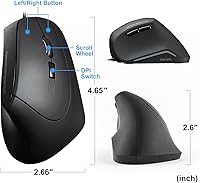
  • Dimensions: The mouse measures 4.65 × 2.66 × 2.6 inches, sized to fit medium-to-large hands in a palm grip.
  • Weight: The mouse weighs 5.6 oz (0.35 lb), keeping it light enough for extended daily use without hand fatigue.
  • Grip Style: The ergonomic shell is designed for a palm grip, where the entire hand rests naturally over the body of the mouse.
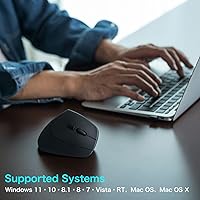
  • OS Support: Compatible operating systems include Windows 8 through 11, macOS 10.12 through Sonoma 14, and Chrome OS.
  • macOS Limitation: On macOS, the Back and Forward thumb navigation buttons are non-functional; basic clicking and scrolling work normally.
  • Software: Button customization requires downloading SANWA's proprietary configuration app separately — it does not come pre-installed.
  • Cable: The mouse uses a standard wired USB cable in a plug-and-play configuration; cable length is not officially specified in product data.
  • Color: The mouse is available in a single matte black finish.
  • Release Date: This model was first made available in August 2024.
  • Scroll Wheel: The mouse includes a middle scroll wheel that can also be remapped via SANWA's software.
  • Hand Size: SANWA rates this mouse as suitable for medium-to-large hands based on its physical dimensions and grip geometry.

Related Reviews

SANWA GMATB128GR Ergonomic Trackball Mouse
75%
78%
Ergonomic Comfort
61%
Trackball Size & Precision
88%
Silent Click Performance
63%
Build Quality
54%
Scroll Wheel Feel
More
ADESSO iMouseE1 Wired Vertical Ergonomic Mouse
86%
88%
Ergonomics & Comfort
91%
DPI Control & Precision
94%
Ease of Setup
85%
Build Quality & Durability
80%
Design & Aesthetics
More
DeLUX M618XSU Wired Ergonomic Vertical Mouse
72%
83%
Ergonomic Comfort
76%
Build Quality
79%
Horizontal Thumb Wheel
88%
Silent Click Performance
91%
Windows Compatibility
More
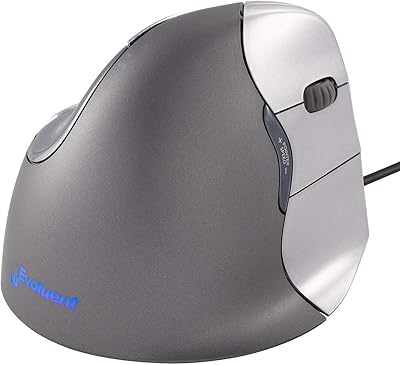
Evoluent Vertical Mouse 4 Wired (Medium to Large)
86%
92%
Ergonomic Comfort
85%
Performance & Precision
88%
Ease of Setup
80%
Customization Options
90%
Build Quality
More
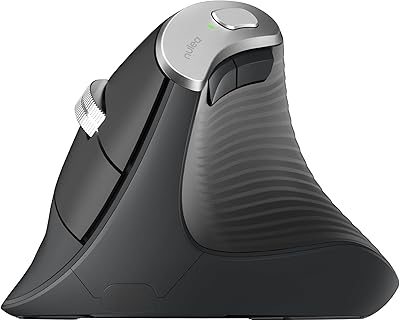
Nulea M510 Vertical Mouse
85%
91%
Ergonomics and Comfort
83%
Build Quality
88%
DPI Adjustability
90%
Wireless Performance
85%
Setup and Installation
More
X9 Performance X9BLKEYLP7CB Wired Keyboard and Mouse Combo
77%
88%
Key Readability
83%
Backlight Effectiveness
94%
Ease of Setup
71%
Mouse Comfort
62%
Build Quality
More
DeLUX M618mini Wireless Vertical Ergonomic Mouse
74%
83%
Ergonomic Comfort
88%
Fit for Small Hands
86%
Wireless Connectivity
79%
Battery Life
81%
Silent Click Performance
More
Ergodriven Om Vertical Wireless Mouse
81%
88%
Ergonomic Comfort
86%
Wireless Performance
83%
Click Switch Quality
81%
OLED Display Utility
84%
Value for Money
More
PORLEI TM551 Wired Trackball Mouse
76%
88%
Ergonomic Comfort
71%
Tracking Precision
63%
DPI Versatility
67%
Build Quality
94%
Ease of Setup
More
Contour Unimouse Ergonomic Vertical Mouse
85%
89%
Ergonomic Comfort
87%
Customizability
82%
Ease of Use
93%
Battery Life
85%
Build Quality
More

FAQ

It works immediately as a plug-and-play USB device — just plug it in and your computer recognizes it without any driver installation. The downloadable SANWA software is only needed if you want to remap the programmable buttons to custom functions.

Not entirely. The SANWA GMAERG9N2 Wired Vertical Mouse connects and tracks fine on macOS, and the left click, right click, and scroll wheel all function as expected. However, the Back and Forward thumb buttons are non-functional on Mac — this is a known hardware-software limitation, not a defect. If those navigation shortcuts are part of your daily workflow on a Mac, this mouse will feel incomplete.
The clicks are genuinely quiet — noticeably softer than a standard mouse. The silent mechanism covers all main buttons, including the thumb buttons on the side. It is not completely soundless at close range, but in a normal office environment, the sound is unlikely to bother anyone nearby.

This wired ergonomic mouse is specifically sized for medium-to-large hands, so larger hands tend to be well accommodated. If you have small hands, the fit may feel wide and less natural, and you might want to look at a more compact vertical mouse instead.

Yes, and it is worth being upfront about: most first-time vertical mouse users need a few days before the angled grip starts feeling natural. The posture is quite different from a flat mouse, and your hand and wrist muscles need a short period to adapt. Most people find that the initial awkwardness fades within three to five days of regular use.

Yes. The blue LED optical sensor tracks reliably on most standard desk surfaces, including wood, plastic laminate, and fabric. A mousepad is not required, though very reflective or glass surfaces may cause tracking issues, as is common with most optical mice.

Using SANWA's downloadable software, you can assign different functions to the three programmable buttons and the scroll wheel. This might include shortcuts, macros, or application-specific actions. The software itself is fairly basic in its interface, but it covers the core remapping needs most users would have.

It depends on your setup. At 1600 DPI — the higher of the two settings — most single-monitor and standard dual-monitor setups work fine for everyday tasks like browsing, documents, and spreadsheets. If you are working across very large or high-resolution displays and need to cover a lot of screen distance quickly, the top DPI may feel a little slow. Power users or multi-monitor enthusiasts may want a mouse with a wider DPI range.

The cable is a standard unbraided USB cable. It is functional and reliable for everyday use, but it is not reinforced with a braided sleeve, so it may be more prone to tangling on a cluttered desk over time. For most office setups this is not a practical problem, but it is worth knowing if cable durability is a priority.

The SANWA ergo mouse feels appropriate for its price tier — it is lightweight and the plastic housing is decent, but it does not feel premium. There is no flex or creaking during normal use, and nothing feels like it will break with regular handling. That said, if you are used to higher-end mice with denser materials and more tactile buttons, you will notice the difference.