Overview

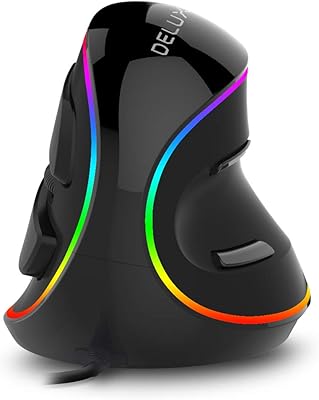
The DeLUX M618XSU Wired Ergonomic Vertical Mouse enters a category that has grown steadily as more desk workers start feeling the toll of hours spent gripping a flat mouse — wrist fatigue, forearm tension, and in some cases the early signs of carpal tunnel discomfort. This vertical mouse positions itself as a mid-range wired option that does not ask you to sacrifice features for comfort, pairing a rubber-coated grip with a magnetic detachable wrist rest and a thumb scroll wheel. That said, if you have never used a vertical mouse before, expect a real adjustment period — a few days at minimum before the posture starts to feel natural rather than awkward.
Features & Benefits

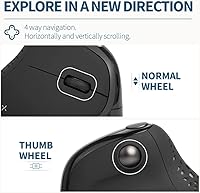
What makes the DeLUX ergonomic mouse stand out in its price bracket is the combination of thoughtful hardware choices rather than any single standout feature. The rubber-coated surface genuinely reduces grip fatigue compared to hard plastic shells, and the magnetic wrist rest snaps on and off cleanly — useful when you want to pack it away or simply prefer mousing without it. The dual scroll wheels are legitimately practical: horizontal scrolling via the thumb wheel saves real time for anyone navigating wide spreadsheets or design canvases. Five DPI steps from 800 up to 4000 cover most workflows, the clicks are whisper-quiet, and the RGB lighting turns off automatically when you grip the mouse, so it stays out of the way.

Best For

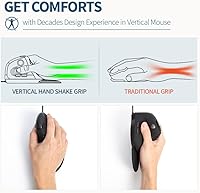
This wrist-friendly mouse makes the most sense for Windows users who spend long stretches at a desk and are starting to notice tension in their wrist or forearm. It is not a medical device, but shifting to a vertical grip does reduce the rotational strain that flat mice cause over time. The silent click buttons make it a natural fit for open-plan offices or anyone working in quiet environments. The thumb wheel is a genuine plus for people who navigate wide documents daily. Hand size matters here — medium to large hands will feel at home, while smaller hands may find the grip slightly awkward. Mac users should also know upfront that some buttons simply will not function, which is worth factoring in before buying.

User Feedback

Buyers who switched from a standard flat mouse tend to report noticeable comfort improvement within the first week, once the initial awkwardness of the vertical grip wears off. The thumb wheel gets consistent praise for being genuinely useful rather than gimmicky, and most reviewers find the build quality solid for the price tier. On the critical side, some users mention a learning curve that lasts longer than expected, and a handful report frustration with the button-mapping software. The magnetic wrist rest draws mixed reactions — some find it secure and comfortable, while others feel it shifts too easily during use. Long-term durability feedback is generally positive, though a few buyers note the rubber coating showing wear after months of heavy daily use.

Pros

  • The vertical grip noticeably reduces forearm rotation, making long desk sessions more comfortable over time.
  • A built-in thumb scroll wheel handles horizontal navigation cleanly — genuinely useful for wide spreadsheets and timelines.
  • Silent left, right, and scroll-wheel clicks make this vertical mouse easy to use in quiet shared spaces.
  • The magnetic detachable wrist rest is a practical inclusion that supports the forearm without adding bulk permanently.
  • Five DPI settings from 800 to 4000 cover the full range of everyday productivity and detail work.
  • Rubber-coated surface feels secure in hand and is noticeably more comfortable than standard hard-plastic mouse shells.
  • Wired USB connection means zero latency, no pairing hassle, and no battery management whatsoever.
  • RGB lighting defaults off when you grip the mouse, so it never becomes a visual distraction during work.
  • Six programmable buttons give power users room to assign shortcuts without reaching for the keyboard constantly.
  • Build quality feels solid relative to the price tier, with few reports of early mechanical failure.

Cons

  • Mac users lose several key buttons out of the box, including forward and back navigation — a significant limitation.
  • The adjustment period for new vertical mouse users can stretch beyond a week, affecting short-term productivity.
  • The magnetic wrist rest shifts or detaches more easily than some users would like during active mousing.
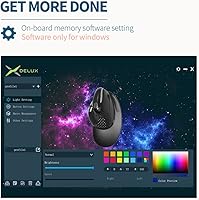
  • Button-mapping software has drawn complaints about reliability and ease of use from a portion of buyers.
  • The rubber coating on the grip surface shows visible wear after months of heavy daily use on some units.
  • No wireless option exists — the cable is a permanent fixture, which some desk setups handle less gracefully.
  • Thumb wheel functionality is restricted in Office software and entirely unavailable on Mac OS.
  • Hand-size fit is narrow; users with smaller hands may find the grip tiring or imprecise over long sessions.
  • Driver and software support feels thin compared to more established ergonomic mouse brands.
  • RGB lighting, while toggleable, adds no functional value and may feel like an unnecessary addition for strictly professional buyers.

Ratings

The scores below reflect an AI-driven analysis of verified global buyer reviews for the DeLUX M618XSU Wired Ergonomic Vertical Mouse, with spam, bot activity, and incentivized feedback actively filtered out before scoring. Each category is weighted against real-world usage patterns reported by Windows office workers, spreadsheet-heavy professionals, and users managing wrist discomfort. Both the strengths that keep buyers satisfied and the friction points that generate returns or complaints are represented transparently.

Ergonomic Comfort
83%
The majority of users who switched from a standard flat mouse reported meaningful reduction in forearm tension and wrist strain within the first one to two weeks. The rubber-coated surface and the included wrist rest work together to create a grip that feels noticeably less fatiguing during multi-hour desk sessions.
The adjustment period is real and can be frustrating — some users took longer than two weeks to feel fully at ease, and a minority never fully adapted to the vertical angle. Users with smaller hands also reported that the grip geometry forced an uncomfortable stretch to reach certain buttons.
Build Quality
76%
24%
For a wired mouse at this price tier, the overall construction feels solid and deliberate — the click mechanisms are firm without being stiff, and the body does not flex or creak under normal hand pressure. Most long-term users report that buttons and scroll wheels remain consistent after months of daily use.
The rubber surface coating is the most commonly flagged durability concern, with several buyers noting visible wear, scuffing, or slight tackiness developing after sustained heavy use. The magnetic wrist rest, while a thoughtful inclusion, feels lighter in construction than the mouse body itself.
Horizontal Thumb Wheel
79%
21%
Among users who work with wide spreadsheets, financial models, or horizontal design canvases, the thumb scroll wheel earns consistent praise as a genuinely practical feature rather than a marketing add-on. It eliminates the need to grab the horizontal scroll bar or hold Shift while scrolling, which adds up to a real workflow improvement across a full workday.
The thumb wheel is unavailable in Microsoft Office applications and entirely non-functional on macOS, which significantly limits its usefulness for a large segment of potential buyers. A handful of users also found the thumb wheel's scroll resistance slightly too light, leading to accidental horizontal scrolling.
Silent Click Performance
88%
The dampened left click, right click, and scroll wheel button are among the quietest found at this price point — users in open-plan offices and shared workspaces consistently praised how unobtrusive the clicks are during meetings or in library settings. The sound reduction is perceptible and real, not just a minor improvement over standard switches.
A small number of buyers noted that the silent mechanism gives the clicks a slightly mushy tactile feel compared to a standard crisp click, which takes some getting used to if you rely on click feedback for precision work. The forward and back buttons are not silenced, creating an audible contrast when those are pressed.
Windows Compatibility
91%
Plug-and-play functionality across Windows XP through Windows 11 is reliable and consistent — buyers report that the mouse is recognized immediately without driver installation for all core functions. The wired connection eliminates the connectivity variables that plague wireless peripherals in busy office environments.
The driver software required for button remapping has attracted complaints about stability and an unintuitive interface, meaning advanced customization is less accessible than it should be. A few users on Windows 11 reported occasional DPI button misfires that required a USB reconnect to resolve.
Mac Compatibility
34%
66%
Basic left click, right click, and vertical scroll wheel functions operate correctly on macOS, making the mouse technically usable for Mac owners who only need core pointer control. The optical sensor tracks accurately on Mac without any additional configuration.
Mac compatibility is severely limited — the forward and back buttons are non-functional, the thumb scroll wheel does not work with macOS software, and there is no Mac-compatible driver. This is the single largest source of one-star reviews for this mouse, and it represents a genuine mismatch for any Mac-primary buyer.
Wrist Rest Design
67%
33%
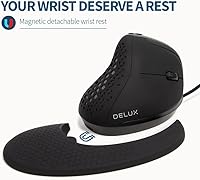
The concept of a magnetic detachable wrist rest is well-executed in principle — it snaps on cleanly, adds real forearm support for stationary desk work, and can be removed in seconds when not needed or when packing up. Users who work at a fixed desk setup with limited mouse movement found it particularly comfortable.
The magnetic hold is not strong enough to stay reliably attached during fast or broad mouse movements, and several users reported needing to reposition it multiple times per session. The wrist rest also sits low relative to some desk heights, meaning its support benefit varies depending on your chair and desk combination.
DPI Range & Switching
74%
26%
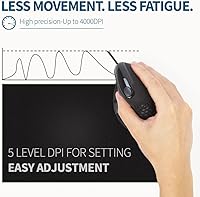
Five DPI steps from 800 to 4000 cover the realistic needs of productivity users comfortably, and on-the-fly switching via a dedicated button works reliably without requiring software. Users doing detailed work like form-filling or careful document editing appreciated the ability to drop to lower DPI settings quickly.
The 4000 DPI ceiling is adequate for office work but feels limiting for users who want this mouse to double for light creative tasks or who work across multiple large monitors. There is no visual DPI indicator beyond a brief color flash, which makes it harder to confirm which gear you have landed on without trial and error.
RGB Lighting
58%
42%
The grip-sensor auto-off feature is a genuinely smart implementation — the light disappears the moment you pick up the mouse, meaning it rarely intrudes during actual work. For users who enjoy some desk ambiance, the five lighting modes cycle through cleanly and the colors are vibrant.
RGB lighting has no functional relevance for the target audience of this mouse, and several professional users flagged it as an unnecessary feature they wished they could remove entirely rather than just toggle off. The button combination required to switch lighting modes is not intuitive and is easy to trigger accidentally.
Button Programmability
62%
38%
Six programmable buttons give power users real flexibility for assigning shortcuts, copy-paste commands, or application-specific macros, which can meaningfully reduce keyboard reach during long productivity sessions. The default button assignments are sensible enough that many users never feel compelled to remap anything.
The companion software for remapping buttons has received consistent criticism for being clunky, occasionally unstable, and poorly documented. Users who rely heavily on custom macros found the experience frustrating compared to more established peripheral brands with mature software ecosystems.
Value for Money
77%
23%
At its price point, this wrist-friendly mouse bundles a meaningful set of ergonomic features — detachable wrist rest, dual scroll wheels, silent clicks, and programmable buttons — that would individually push the cost higher on competing products. Buyers who specifically needed a quiet vertical mouse with horizontal scrolling found it hard to match this combination elsewhere near this price.
Users who expected premium build finishing or polished software support at this tier were sometimes disappointed — the value proposition depends heavily on not expecting more than solid hardware fundamentals. For Mac users who discover the compatibility gaps post-purchase, the value equation collapses quickly.
Setup & Ease of Use
81%
19%
Out of the box, the DeLUX ergonomic mouse is plug-and-play on Windows — most users had it running within thirty seconds of opening the box. The physical layout of buttons is logical for right-handed users, and the wrist rest attachment requires no instructions.
First-time vertical mouse users often underestimate how disorienting the initial setup period feels — the mouse is physically easy to connect, but controlling it precisely takes real practice. The RGB mode-switching and DPI indicator behavior are also not clearly explained in the included documentation.
Long-Term Durability
71%
29%
The click switches and scroll mechanisms hold up well over time based on multi-month user reports, with very few complaints about double-clicking issues or scroll wheel degradation. The wired connection also eliminates the battery and wireless module failure points that affect longevity of comparable wireless options.
Surface rubber wear is the most reliable long-term complaint, appearing in reviews from users after six or more months of heavy daily use. A smaller subset of buyers reported that the DPI button became less responsive over time, requiring a firmer press to register a gear change.

Suitable for:

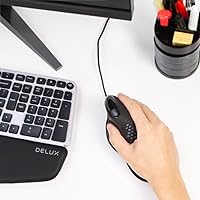
The DeLUX M618XSU Wired Ergonomic Vertical Mouse is a strong choice for Windows-based desk workers who are starting to feel the physical cost of long hours with a traditional flat mouse — think forearm tension, wrist soreness, or that dull ache that builds up by late afternoon. The vertical grip naturally reduces the rotational strain on your forearm, and while it is not a substitute for medical advice, many users find real day-to-day comfort improvement after the initial adjustment period. People who regularly work across wide spreadsheets, financial models, or broad design canvases will particularly appreciate the thumb scroll wheel, which handles horizontal navigation without forcing awkward keyboard shortcuts. The silent click mechanism makes this wrist-friendly mouse a practical fit for shared offices, library settings, or anywhere noise is a consideration. Medium-to-large handed users who prefer the reliability of a wired connection — no batteries to charge, no wireless dropouts — will find the overall package well-matched to their needs.
Not suitable for:

The DeLUX M618XSU Wired Ergonomic Vertical Mouse is not the right tool for Mac-primary users — several buttons, including forward and back navigation, simply do not function on macOS, and the thumb wheel has known compatibility gaps with Mac software, which has frustrated a number of buyers who did not check this before purchasing. Gamers or anyone who needs precise, high-speed pointer control for fast-paced tasks will also find this mouse limiting; the optical sensor and DPI ceiling are adequate for productivity work but not tuned for competitive gaming or pixel-precise creative work. People with small hands should be cautious, as the grip is sized for medium-to-large hands and can feel unwieldy over long sessions if your hand does not fill it comfortably. If you are already committed to a wireless setup and dislike cable management on your desk, the wired-only connection is a genuine trade-off worth considering. Finally, buyers expecting an instant, effortless transition from a flat mouse should know that vertical mousing has a real learning curve — for some people, the adjustment takes longer than a week.
Specifications

  • Model Number: This mouse is manufactured by DeLUX under the model designation M618XSU.
  • Connection Type: Connects via wired USB, requiring no drivers for basic operation on compatible Windows systems.
  • DPI Settings: Offers five selectable DPI levels: 800, 1200, 1600, 2400, and 4000, switchable on the fly via a dedicated button.
  • Button Count: Features 6 programmable buttons in total, plus a dedicated horizontal thumb scroll wheel as an additional input.
  • Silent Buttons: Left click, right click, and the scroll wheel button are engineered for silent operation, reducing click noise by more than 90% compared to standard switches.
  • Scroll Wheels: Equipped with two scroll wheels: a standard vertical scroll wheel and a side-mounted thumb wheel for horizontal scrolling.
  • Wrist Rest: Includes a magnetic detachable palm rest that attaches to the base of the mouse to lift and support the wrist during extended use.
  • Surface Material: The mouse body is coated in a rubber finish designed to mimic a skin-like texture, improving grip comfort over long sessions.
  • RGB Lighting: Offers five RGB lighting effects, with a built-in grip sensor that automatically turns off the light when the mouse is held.
  • Weight: The mouse weighs 5.6 oz (approximately 159 g), not including the detachable wrist rest.
  • Hand Size Fit: Recommended for medium-to-large hands; users with smaller hands may find the vertical grip geometry less comfortable over time.
  • OS Compatibility: Fully compatible with Windows XP through Windows 11; Mac support is limited — the forward, back, and thumb wheel functions are not available on macOS.
  • Movement Sensor: Uses an optical movement detection sensor suited to everyday productivity and general desktop use.
  • Grip Orientation: Designed as a right-hand-only vertical mouse; no left-handed variant of this model is available.
  • Lighting Control: RGB modes are cycled by pressing the scroll wheel and back button simultaneously, and the auto-off grip sensor can be toggled on or off independently.
  • Thumb Wheel Limits: The horizontal thumb wheel does not function within Microsoft Office applications or on macOS, as noted by the manufacturer.
  • Manufacturer: Produced by DELUX, a peripheral brand focused on ergonomic input devices, with the M618XSU listed as available since early 2025.

Related Reviews

DeLUX M618Plus RGB Wired Ergonomic Mouse
83%
88%
Ergonomics and Comfort
84%
RGB Lighting Customization
90%
DPI Precision and Adjustability
85%
Build Quality and Durability
82%
Compatibility with Different Operating Systems
More
ADESSO iMouseE1 Wired Vertical Ergonomic Mouse
86%
88%
Ergonomics & Comfort
91%
DPI Control & Precision
94%
Ease of Setup
85%
Build Quality & Durability
80%
Design & Aesthetics
More
DeLUX Seeker M618XSD Wireless Ergonomic Vertical Mouse
85%
88%
Ergonomics & Comfort
93%
Connectivity Options
85%
Customizability (DPI & RGB)
91%
Display & Functionality
82%
Battery Life
More
SANWA GMAERG9N2 Wired Vertical Mouse
69%
83%
Ergonomic Comfort
88%
Silent Click Performance
61%
Build Quality
84%
Value for Money
57%
DPI Range and Cursor Control
More
HP 920 Ergonomic Vertical Mouse
87%
89%
Comfort & Ergonomics
92%
Battery Life
84%
Ease of Use
87%
Multi-Device Support
88%
Adjustable DPI & Precision
More
DeLUX M618mini Wireless Vertical Ergonomic Mouse
74%
83%
Ergonomic Comfort
88%
Fit for Small Hands
86%
Wireless Connectivity
79%
Battery Life
81%
Silent Click Performance
More
Contour Unimouse Ergonomic Vertical Mouse
85%
89%
Ergonomic Comfort
87%
Customizability
82%
Ease of Use
93%
Battery Life
85%
Build Quality
More
Lekvey XC-05 Vertical Wireless Mouse
75%
83%
Ergonomic Comfort
66%
Build Quality
88%
Battery Life
54%
Sleep Mode & Wake Responsiveness
81%
Wireless Connectivity
More
Logitech Lift Vertical Ergonomic Mouse
83%
91%
Ergonomic Comfort
74%
Build Quality
93%
Click Quietness
88%
Wireless Connectivity
96%
Battery Life
More
SANWA GMATB128GR Ergonomic Trackball Mouse
75%
78%
Ergonomic Comfort
61%
Trackball Size & Precision
88%
Silent Click Performance
63%
Build Quality
54%
Scroll Wheel Feel
More

FAQ

For basic use on Windows, you can plug it in and start using it immediately — no software installation required. If you want to remap the programmable buttons beyond their defaults, you will need to download the DeLUX driver software, which has received mixed reviews for ease of use, so factor that in if button customization is important to you.

Most people need at least three to five days before the vertical grip starts feeling natural, and some users report the adjustment taking closer to two weeks. During that time, precision can feel slightly off and your hand may fatigue differently than it did with a flat mouse. Stick with it — the discomfort during the adjustment is normal and typically fades as your muscles adapt to the new grip angle.

The DeLUX M618XSU Wired Ergonomic Vertical Mouse is designed to reduce the forearm rotation that flat mice force on your wrist, which many users find reduces daily discomfort over time. That said, it is a comfort-oriented tool, not a medical treatment — if you have a diagnosed condition, it is worth speaking with a healthcare professional rather than relying on a peripheral alone to address it.
Not fully. The left click, right click, and scroll wheel will function normally, but the forward and back buttons are non-functional on macOS, and the thumb scroll wheel also does not work with Mac software. This is a meaningful limitation if you are a Mac user, and it is one of the most common complaints from buyers who did not check compatibility before purchasing.

The magnet holds the wrist rest in place reasonably well for general desk use, but it is not a rigid lock. Some users find it shifts slightly during faster or more forceful mouse movements. If you move the mouse aggressively or work on a slick desk surface, you may find yourself reattaching it occasionally.

For people who regularly scroll horizontally — through wide spreadsheets, financial models, long timelines, or broad design files — the thumb wheel is genuinely useful and saves a lot of awkward horizontal scroll-bar dragging. If your daily work is mostly standard vertical browsing, you probably will not use it much, but it rarely gets in the way either.

The silent buttons are impressively quiet for a mouse at this price point. The left click, right click, and scroll wheel click are all damped, and in practice they produce a soft muffled sound rather than the usual sharp click. Using it during a video call or in a library is realistic — it is unlikely to register on a microphone or disturb nearby people.

Yes. You can cycle through the five lighting modes by pressing the scroll wheel and back button together until the light turns off entirely. There is also a grip sensor that turns the light off automatically whenever you are holding the mouse, which means in normal use the RGB is mostly invisible anyway. It is a minor background feature rather than something you will need to actively manage.

The manufacturer recommends medium-to-large hands, and that guidance is worth taking seriously. The vertical grip is fairly tall and wide, and users with smaller hands tend to report that reaching the buttons comfortably requires an awkward stretch. If your hands are on the smaller side, it is worth checking the physical dimensions against your hand size before committing.

Overall durability feedback is positive, with most buyers reporting no mechanical failures after months of regular use. The main wear point flagged by long-term users is the rubber surface coating, which can show scuffing or slight degradation after heavy daily use over many months. The clicks and scroll wheels tend to remain consistent, and the magnetic wrist rest attachment does not appear to weaken noticeably over time.