Overview

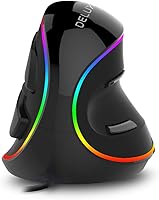
The DeLUX M618Plus RGB Vertical Ergonomic Mouse sits in a category that most people only discover after their wrists start complaining. Unlike a standard horizontal mouse, this vertical mouse holds your hand in a natural handshake position, keeping your forearm from rotating inward during long sessions. It targets RSI sufferers, heavy computer users, and anyone with larger hands who finds conventional designs cramped. What makes it stand out at this price point is the RGB lighting — a feature you rarely see in budget-friendly ergonomic options. Don't expect gaming-grade precision here; this is a straightforward plug-and-play wired mouse built around comfort, not speed.
Features & Benefits

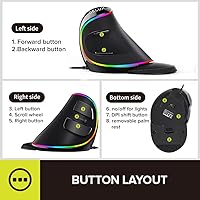
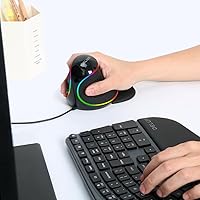
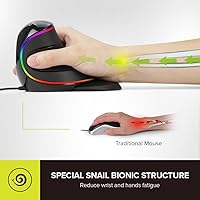
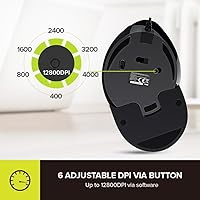
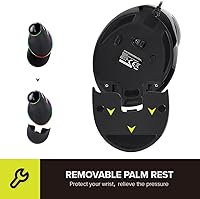
The vertical grip angle is where this ergonomic wired mouse earns its keep. By angling your hand roughly 60 degrees, it takes the pronation stress off your forearm — something you notice within the first hour of use. The detachable wrist rest clips on snugly and does stay in place during normal use, adding a cushioned lift that most vertical mice at this price skip entirely. Five DPI levels run from 800 up to 4000, which covers office work and casual browsing well, but the DPI switch on the bottom is a genuine frustration — flipping the mouse over mid-task to adjust sensitivity is awkward. Silent left, right, and scroll clicks round out the package nicely for quiet office environments.

Best For

The DeLUX M618Plus is ideally suited for Windows users who spend long stretches at a desk and are starting to feel it in their wrists. If you've been dealing with early carpal tunnel symptoms or persistent wrist fatigue, the handshake grip can genuinely reduce that daily discomfort. Hand size matters here — this mouse is built for large hands, and anyone with small or medium hands will likely find it feels clunky rather than comfortable. It's also a strong pick for open-plan office workers who need silent clicks to avoid disturbing colleagues. Mac users should be aware that side buttons and driver support simply don't work on macOS, making it a much less compelling option on Apple hardware.

User Feedback

With over 6,500 ratings and a 4.2-star average, this vertical mouse has clearly built a loyal following. Most positive reviewers point to immediate wrist relief after switching from a traditional mouse, and plug-and-play setup earns consistent praise. On the critical side, the scroll wheel draws complaints — some users report it feels loose or cheap, and a portion of long-term owners mention it degrades noticeably over months of heavy use. The size comes up repeatedly: large-handed users tend to love the fit, while those with smaller hands find it unwieldy. Mac owners specifically flag the loss of side-button functionality as a dealbreaker. Overall it's a solid value pick, but not without its real-world trade-offs.

Pros

  • The vertical handshake grip genuinely reduces forearm pronation, offering noticeable wrist relief for long desk sessions.
  • The detachable wrist rest stays firmly in place and adds cushioned support that most mice at this price skip entirely.
  • Silent left, right, and scroll-wheel clicks make this ergonomic wired mouse a considerate choice for quiet office environments.
  • Plug-and-play USB setup means zero installation headaches on Windows — just plug in and get to work.
  • Five DPI levels up to 4000 cover the full range of everyday office and light creative tasks without feeling limited.
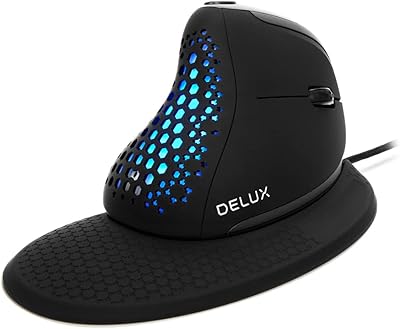
  • RGB lighting with a simple toggle adds a clean aesthetic touch that is rare among budget ergonomic mice.
  • At its price point, the build quality feels solid and durable enough for full-time daily office use.
  • The large body shape is a genuine comfort advantage for users whose hands have always felt cramped by standard mouse designs.
  • Over 6,500 real-world reviews back up the comfort claims with consistent reports of fast, noticeable wrist relief.

Cons

  • The DPI switch is mounted on the bottom of the mouse, making mid-session adjustments genuinely awkward and disruptive.
  • Mac users lose access to side buttons and driver support entirely, which significantly limits the value proposition on Apple devices.
  • Multiple long-term users report scroll wheel degradation after months of heavy use, raising questions about lasting durability.
  • The large body size that suits big hands will feel unwieldy and potentially uncomfortable for small or medium hands.
  • There is no wireless option for this model, so the wired cable may feel restrictive for users used to cord-free setups.
  • RGB lighting can only be toggled on or off — no color customization or effects control is available.
  • The bottom-button DPI control offers no on-screen feedback, so you have to guess which level you've switched to.
  • Programmable button functionality is locked to Windows only, reducing the mouse to basic operation on other operating systems.

Ratings

The scores below for the DeLUX M618Plus RGB Vertical Ergonomic Mouse were generated by our AI system after analyzing thousands of verified global buyer reviews, with spam, incentivized, and bot-flagged submissions actively filtered out before any scoring was applied. The results reflect a candid cross-section of real-world daily use — not just the best-case scenarios. Both the genuine strengths and the recurring frustrations are weighted equally to give you an honest picture before you buy.
Ergonomic Comfort
88%
The vertical handshake grip is the core reason most people buy this mouse, and for large-handed users logging six or more hours at a desk, the forearm relief is often noticeable within the first day. Reviewers dealing with early RSI symptoms or chronic wrist fatigue consistently describe it as one of the most immediate improvements they've made to their workstation setup.
Comfort is heavily size-dependent — users with small or medium hands frequently report that the oversized body forces an unnatural stretch to reach buttons, which can create new tension points rather than relieving existing ones. The ergonomic benefit essentially disappears if the mouse is the wrong size for your hand.
Build Quality
74%
26%
For a wired mouse in this price bracket, the plastic shell feels solid and the overall construction inspires reasonable day-to-day confidence. The main buttons have a firm, consistent feel that holds up well through months of typical office use, and the body does not flex or creak when gripped firmly.
The scroll wheel is the clearest weak point in the build — a notable portion of long-term users report it becoming wobbly or losing tactile precision after several months of heavy scrolling. At this price it is an acceptable trade-off, but buyers expecting multi-year durability from every component may be disappointed.
Wrist Rest Quality
79%
21%
The removable wrist rest is a genuine differentiator at this price point — most budget vertical mice ship without one. It clips securely to the mouse base, elevates the wrist slightly off the desk surface, and adds a layer of cushioning that users managing wrist fatigue notice immediately during longer working sessions.
The padding material feels adequate but not premium, and some users note it shows surface wear and compression after a few months of daily contact. It can also shift slightly during quick lateral mouse movements, requiring the occasional repositioning click to snap it back into place.
Click Silence
83%
The dampened left click, right click, and scroll wheel click produce a noticeably muted sound that is genuinely unobtrusive in shared office environments or late-night home setups. Colleagues seated nearby typically stop noticing it entirely within the first day, which is the real benchmark for a silent office peripheral.
It is quieter, not silent — in a very quiet room you can still hear a faint thud up close. The side buttons are also not dampened, so users who rely heavily on programmable buttons will still generate a standard click sound from those, breaking the otherwise quiet experience.
DPI & Tracking
67%
33%
The five available DPI levels from 800 to 4000 cover a practical range that handles everything from precise document editing at lower settings to faster screen navigation at higher ones. For everyday office work and light creative tasks, the optical tracking is consistent and accurate enough on standard desk surfaces.
The DPI switch placement on the underside of the mouse is a real usability problem — you have to lift and flip the mouse every time you want to change sensitivity, which interrupts workflow in a way that feels like an afterthought in the design process. There is also no visual or on-screen indicator confirming which DPI level is currently active.
RGB Lighting
61%
39%
Having RGB lighting on a budget ergonomic mouse at all is somewhat unexpected, and for users who care about a cohesive desk aesthetic, the glow adds a visual flourish that competitors in this tier rarely offer. The ability to toggle it off completely is a useful option for those who prefer a clean, distraction-free workspace.
There is no customization whatsoever — no color selection, no effects, no brightness control, just on or off. The toggle is also located on the bottom of the mouse, which means controlling the lighting requires the same awkward flip-and-press routine as the DPI switch, making it feel like an accessory feature rather than a considered one.
Button Layout
71%
29%
Six buttons give this ergonomic wired mouse a functional layout that extends beyond basic clicking, and on Windows the side buttons can be remapped to suit individual workflows such as browser navigation, copy-paste shortcuts, or application switching. For Windows-based office users, this adds a layer of efficiency that single-scroll-wheel mice can't match.
The side buttons are entirely non-functional on macOS, which is a hard limitation with no workaround — not even third-party software can bridge the gap. Even on Windows, the default button assignments feel generic out of the box and require driver setup to become genuinely useful.
Windows Compatibility
91%
On Windows the DeLUX M618Plus is truly plug-and-play — connect via USB and all six buttons work immediately without any driver installation, which is exactly what most office environments need. Compatibility spans from Windows XP through Windows 10, meaning it works reliably across older enterprise systems that other peripherals have quietly dropped support for.
Driver software is required to unlock programmable button functionality, and the installation experience for that software draws some criticism for feeling dated and unintuitive. Without the driver, the side buttons default to fixed assignments that may not match a given user's preferred workflow.
Mac Compatibility
29%
71%
The mouse does register on macOS as a basic input device and the primary left and right click functions operate without any setup required. For a Mac user who only needs a wired vertical mouse for its ergonomic posture benefits and nothing else, it will technically function at a minimal level.
Side buttons are completely disabled on macOS, no driver exists to restore them, and there is no indication this will change. Mac users effectively pay for a six-button mouse and receive a three-button one, making this vertical mouse a genuinely poor value proposition for Apple platform users compared to competitors with broader OS support.
Hand Size Fit
72%
28%
Users with large hands — roughly palm lengths above 19 cm — frequently describe the body shape as one of the most naturally fitting mice they have used, with buttons landing exactly where fingers rest without any stretching. For this specific demographic, the sizing feels intentional rather than incidental.
The same generous sizing that benefits large hands becomes an active obstacle for everyone else. Medium-handed users report overstretching to reach the side buttons, and small-handed users often find the grip tiring within an hour. The manufacturer does recommend large hands specifically, but this caveat is easy to overlook at the point of purchase.
Setup & Ease of Use
92%
Plug-in-and-go is genuinely the experience here — the wired USB connection means no pairing process, no dongle to lose, and no battery to charge. From box to functional mouse is a matter of seconds on Windows, which makes it an easy recommendation for users who want zero friction getting started.
The learning curve for new vertical mouse users can take a few days of adjustment before the grip feels natural, and some first-time buyers are surprised by how different the posture feels initially. This is not a product flaw, but it's a realistic expectation to set for anyone coming directly from a traditional horizontal mouse.
Value for Money
84%
For Windows PC users, the combination of ergonomic vertical design, detachable wrist rest, silent clicks, six buttons, and RGB lighting at this price tier is genuinely competitive and hard to replicate with a comparable feature set from better-known brands. The value proposition is strong for the target audience.
Mac users and small-handed buyers are paying for features they cannot access or use comfortably, which significantly erodes the value equation for those groups. The scroll wheel durability concerns also introduce a risk that the mouse may need replacement sooner than the price point implies.
Long-Term Durability
63%
37%
The main body and primary click buttons hold up reliably for most users across the first year of standard office use, with the overall shell showing minimal wear under typical conditions. At this price point, the construction is reasonable and meets expectations for light-to-moderate daily use.
The scroll wheel is a recurring durability concern, with enough user reports of degraded feel after six to twelve months of heavy use to treat it as a known risk rather than an isolated complaint. Users who scroll intensively through long documents or web pages daily should factor this into their long-term expectations.

Suitable for:

The DeLUX M618Plus RGB Vertical Ergonomic Mouse is a strong fit for Windows PC users who spend four or more hours a day at a desk and are starting to feel the toll in their wrists, forearms, or fingers. If you've been diagnosed with early-stage carpal tunnel syndrome, or simply notice that dull ache building up by mid-afternoon, the handshake-style grip this mouse encourages can take meaningful pressure off overworked forearm muscles. It's particularly well-matched to people with large hands — the generous body shape that would feel clumsy to a smaller hand becomes a genuine comfort advantage here. Office workers in open-plan or shared spaces will also appreciate the silent click design, which keeps keystrokes and clicks from becoming a distraction to those nearby. For budget-conscious buyers who want real ergonomic benefits without committing to a high-end peripheral, this ergonomic wired mouse hits a practical middle ground that's hard to argue with.
Not suitable for:

The DeLUX M618Plus RGB Vertical Ergonomic Mouse is genuinely not a good match for Mac users — the side buttons stop functioning entirely on macOS, and there is no driver support to work around that limitation, so you'd be paying for a six-button mouse and using only three. Users with small or medium-sized hands should also look elsewhere; the body is sized for large hands, and forcing a smaller hand to grip it for hours tends to create new discomfort rather than resolve existing problems. Gamers or creative professionals who need to switch DPI settings on the fly will find the bottom-mounted DPI switch more frustrating than functional, since adjusting it requires lifting and flipping the mouse mid-task. Those who travel frequently with a laptop setup may also find the fixed wired connection limiting compared to a compact wireless alternative. And if scroll wheel durability is a priority — say, for heavy document scrolling across a full workday — the mixed long-term feedback on this vertical mouse suggests caution.
Specifications

  • Brand: Manufactured by DELUX, a peripheral brand focused on ergonomic input devices.
  • Model Number: The official model designation is DeLUX-M618Plus RGB.
  • Dimensions: The mouse body measures 5.82 × 3.74 × 3.89 inches, sized specifically for large hands.
  • Weight: The unit weighs 7.4 oz, giving it a substantial feel without being heavy on the wrist.
  • Connection Type: Connects via wired USB, requiring no batteries, dongles, or pairing process.
  • DPI Range: Offers five selectable DPI levels: 800, 1200, 1600, 2400, and 4000, switched via a button on the underside.
  • Button Count: Features six total buttons, including left click, right click, scroll wheel click, and two side buttons.
  • Silent Buttons: Left click, right click, and scroll wheel click are dampened to reduce noise by over 90% compared to standard clicks.
  • RGB Lighting: Includes built-in RGB lighting that can be toggled on or off via a dedicated button on the bottom of the mouse.
  • Wrist Rest: Comes with a removable, cushioned wrist rest that attaches directly to the base of the mouse body.
  • Grip Orientation: Uses a vertical ergonomic design that holds the hand at approximately a 60-degree angle to reduce forearm pronation.
  • Tracking Technology: Uses optical movement detection for reliable cursor tracking on standard desk surfaces.
  • OS Compatibility: Fully compatible with Windows XP, Vista, 7, 8, and 10; Mac support is limited and excludes side buttons and driver functionality.
  • Programmable Buttons: Side buttons are programmable on Windows only; no driver or customization support is available for macOS.
  • Hand Size Rating: Officially recommended for large hands; users with small or medium hands may find the body size uncomfortable over time.
  • Release Date: This model was first made available in August 2018 and has not been discontinued by the manufacturer.

Related Reviews
DeLUX Seeker M618XSD Wireless Ergonomic Vertical Mouse
85%
88%
Ergonomics & Comfort
93%
Connectivity Options
85%
Customizability (DPI & RGB)
91%
Display & Functionality
82%
Battery Life
More
DeLUX M618XSU Wired Ergonomic Vertical Mouse
72%
83%
Ergonomic Comfort
76%
Build Quality
79%
Horizontal Thumb Wheel
88%
Silent Click Performance
91%
Windows Compatibility
More
UGREEN Vertical Wireless Ergonomic Mouse
84%
88%
Ergonomic Comfort
84%
Connectivity Performance
80%
Ease of Use
91%
Design and Build Quality
82%
Battery Life
More
Lekvey XC-05 Vertical Wireless Mouse
75%
83%
Ergonomic Comfort
66%
Build Quality
88%
Battery Life
54%
Sleep Mode & Wake Responsiveness
81%
Wireless Connectivity
More
Acer OMR241 Ergonomic Vertical Mouse
74%
83%
Ergonomic Comfort
67%
Build Quality
88%
Battery Life
61%
DPI and Precision
43%
Mac Compatibility
More
HP 920 Ergonomic Vertical Mouse
80%
88%
Ergonomic Comfort
83%
Build Quality
91%
Multi-Device Switching
86%
Battery Life
62%
Software & Customization
More
DeLUX M618mini Wireless Vertical Ergonomic Mouse
74%
83%
Ergonomic Comfort
88%
Fit for Small Hands
86%
Wireless Connectivity
79%
Battery Life
81%
Silent Click Performance
More
seenda Ergonomic Vertical Wireless Mouse
86%
90%
Wrist Comfort & Ergonomics
87%
Battery Life & Charging
91%
Quiet Click Performance
85%
Compatibility & Connectivity
88%
Build Quality & Durability
More
Woddlffy RAAVEE Ergonomic Vertical Wireless Mouse
75%
81%
Ergonomic Comfort
54%
Build Quality
83%
Wireless Connectivity
57%
DPI Range
63%
Button Functionality
More
Contour Unimouse Ergonomic Vertical Mouse

85%
89%
Ergonomic Comfort
87%
Customizability
82%
Ease of Use
93%
Battery Life
85%
Build Quality
More

FAQ

For many users, yes — the vertical grip angle reduces the inward rotation of the forearm that traditional mice force you into all day. That said, it is not a medical device, and results vary depending on the severity of your symptoms. If your wrist pain is serious, it's worth pairing any ergonomic switch with advice from a physiotherapist.

It works on a Mac as a basic two-button mouse, but the two side buttons will not function, and there is no macOS driver available to change that. If you rely on programmable side buttons or need full feature access, this ergonomic wired mouse is genuinely not the right pick for an Apple setup.

You flip the mouse over and press the small DPI button on the underside — there are five levels to cycle through, from 800 up to 4000. It works, but it's admittedly awkward to do mid-task since you have to pick the mouse up and turn it over every time. If you switch DPI frequently, this design will likely frustrate you.

The wrist rest clicks into the base of the mouse and stays put during normal use — it is not just resting loosely underneath. Most users report it holds well throughout a standard workday. That said, if you move the mouse frequently with sharp lateral motions, it can occasionally shift slightly, but it snaps back into position easily.

Noticeably quieter, not completely silent. The left click, right click, and scroll wheel click are all dampened, and in practice they produce a soft muted thud rather than the sharp click of a standard mouse. In a quiet room you can still hear it up close, but across a desk or in an open office setting it becomes genuinely unobtrusive.

It will technically function, but comfort-wise it may not be a great fit. This vertical mouse is sized for large hands, and users with medium or small hands often find themselves overstretching fingers or gripping awkwardly to reach the buttons. If your hands are on the smaller side, it's worth looking at a vertical mouse designed for a narrower grip.

On Windows it is fully plug-and-play — just plug it in via USB and all six buttons work immediately without installing anything. A driver is available if you want to remap the side buttons, but it is optional. On Mac, no driver exists, so you get basic mouse functionality only.

This is one area where user experience varies more than most. Some users report the scroll wheel still feels tight and responsive after a year or more, while others notice it becoming wobbly or less precise within several months of intensive use. It is a known weak point flagged across a portion of long-term reviews, so it's fair to go in with that expectation.

Yes — there is a dedicated toggle button on the underside of the mouse that switches the lighting off entirely. Like the DPI button, it requires flipping the mouse over to access, which is not the most elegant solution, but it does work. The lighting state appears to reset when you unplug and reconnect the mouse.

Most users find the cable length adequate for a standard desktop or laptop setup where the USB port is within a reasonable reach. It is not an exceptionally long cable, so if your tower sits on the floor or your ports are unusually far from your mouse pad, it is worth checking the cable length specification against your specific desk arrangement before purchasing.