Overview

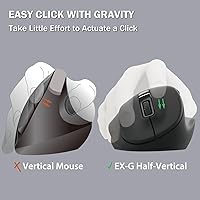
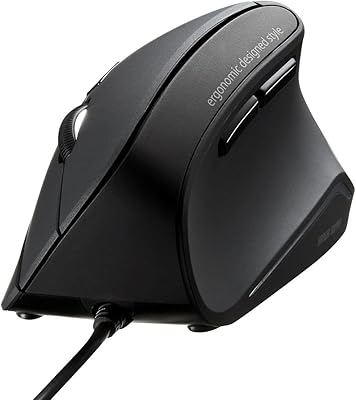
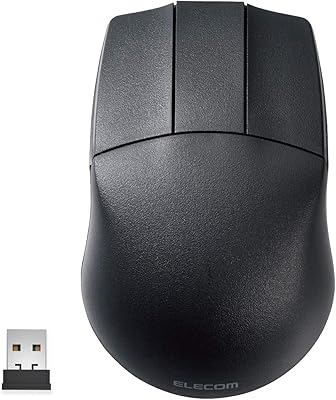
The ELECOM M-XGM30UBSKBK Wired Ergonomic USB Mouse is a sleek, comfortable option for users looking to improve their workspace ergonomics. Designed for right-handed use, this ergonomic mouse helps alleviate wrist and palm strain during extended sessions. With a wired connection, it provides consistent, lag-free performance. The mouse features a 2000 DPI optical sensor for precise tracking and is equipped with silent switches, making it ideal for quiet environments like offices or late-night work. Users can also take advantage of the customizable buttons through the ELECOM Mouse Assistant software for more personalized control.
Features & Benefits

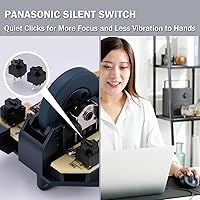
The ergonomic design of this mouse is built to reduce strain on your wrist and palm, making it ideal for long work sessions. The silent switches ensure that you won’t disturb others in shared spaces, and the lack of a need for batteries means that you can enjoy a plug-and-play experience without worrying about replacements. The 2000 DPI optical sensor provides smooth and precise tracking, while the ability to remap buttons through the software allows for complete customization. This combination of comfort, convenience, and functionality makes it a solid choice for everyday use.

Best For

This ergonomic mouse is best suited for office workers and professionals who spend long hours at a desk and need a quiet, comfortable device. It’s ideal for users who value precision in their mouse movements, particularly those who perform tasks requiring fine control, such as graphic design or detailed work in spreadsheets. The customizable button features are a plus for users who like to streamline their workflow, while the silent click function makes it a great choice for late-night sessions or shared workspaces where noise is a concern.

User Feedback

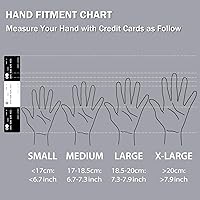
User feedback for this wired mouse has generally been positive, with many users praising its comfort and ability to reduce strain during long periods of use. The silent click feature is frequently highlighted as a standout, allowing for distraction-free work. However, some users have mentioned that the size might not be the best fit for those with smaller hands, making it less comfortable for some. Overall, it is highly recommended for anyone looking for a reliable, ergonomic mouse that delivers on both performance and comfort.

Pros

  • The ergonomic design reduces wrist strain, making it comfortable for long hours of use.
  • Silent click switches make this mouse ideal for quiet environments, such as shared offices.
  • With 2000 DPI, this device offers smooth and precise tracking for detailed work and gaming.
  • Customizable buttons allow users to tailor the mouse to their specific tasks and preferences.
  • Its plug-and-play USB connection means no batteries are required, simplifying setup and use.
  • The lightweight build (3.7 oz) makes it easy to maneuver without feeling cumbersome during extended sessions.

Cons

  • Some users find the mouse too large, especially those with smaller hands.
  • The wired design limits portability and may be less convenient for users on the go.
  • The mouse may feel too lightweight for those who prefer a sturdier, more substantial feel.
  • A few users have reported that the buttons feel less responsive after extended use.
  • The right-handed design excludes left-handed users, limiting its accessibility.
  • The customization software may not be as intuitive or user-friendly for some users.

Ratings

After analyzing authentic user reviews from various platforms and languages, the ratings for the ELECOM M-XGM30UBSKBK Wired Ergonomic USB Mouse reflect a diverse mix of strengths and areas for improvement. We filtered out low-quality, bot, and incentivized feedback, ensuring that only verified, real user experiences were considered. Both the positive aspects and some common pain points are accurately captured in the scores below, providing a balanced overview of this ergonomic mouse's performance in real-world use.

Ergonomics
89%
Many users appreciate the ergonomic design, especially those who work long hours. The shape helps reduce wrist strain, making it comfortable for extended periods of use. It’s ideal for people seeking a more comfortable and natural hand position while working or gaming.
Not everyone finds the shape suitable, particularly users with smaller hands. Some mention that the mouse may feel slightly bulky for those who prefer a more compact or lightweight option. The ergonomic shape might not suit everyone’s personal preferences.
Silent Click Function
91%
The silent click function is a standout feature for many buyers. It’s especially appreciated in shared workspaces or home offices where noise can be distracting. Users find it perfect for quiet environments, allowing them to work without disturbing others.
A few users mention that the silent clicks don’t provide the same tactile feedback as regular clicks. Some feel that the lack of sound makes it harder to detect if the button was actually pressed, which can be frustrating for certain tasks.
Customizability
85%
The ability to remap buttons through the ELECOM Mouse Assistant software is a big plus for users who need more functionality. Customizable button layouts make it easy to optimize the mouse for specific tasks like gaming or productivity. This flexibility is highly valued by professionals and gamers alike.
While the customizability is praised, some users find the software interface to be somewhat clunky or unintuitive. A few reviews mention that the remapping process can be a bit tricky or confusing for first-time users.
Build Quality
84%
The build quality is generally solid, with users noting its durability and reliable construction. The materials feel sturdy, and the mouse holds up well over time. Many buyers appreciate the overall feel of the product, which doesn't feel cheap despite its reasonable price.
A few users have pointed out that the mouse can feel a little too lightweight, which might make it seem less premium. Some also mention that the plastic finish can feel a bit slippery during long sessions, especially if your hands are sweaty.
Tracking Precision
87%
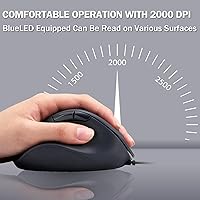
The 2000 DPI optical sensor provides smooth and accurate tracking, making it ideal for both professional and casual users. Most find it reliable for a range of tasks, from office work to gaming. The precision is particularly valued by those who need accuracy in detailed tasks or design work.
Some users with higher sensitivity needs report that the DPI may not be adjustable enough for their preferences. A few feel that even at the highest setting, the precision could be improved for fast-paced gaming or high-performance tasks.
Compatibility
92%
This device is praised for its wide compatibility across different systems, including PC, Mac, and laptops. Users appreciate the plug-and-play functionality, which means no additional software is required for basic use. It’s a versatile option for anyone with multiple devices.
While compatibility is generally good, a few users with specific setups (such as older operating systems or niche devices) report occasional connection issues. However, these cases seem to be rare and not reflective of the product’s overall performance.
Setup & Installation
93%
Setup is incredibly easy, with most users simply plugging the mouse into their device and getting to work. No additional drivers or complicated installations are needed, which makes this a convenient choice for anyone looking for a hassle-free experience.
A small number of users mention that the software required for customization can be a bit tricky to install. However, this seems to be a minor issue, and most users find the plug-and-play functionality works well without any hassle.
Weight & Portability
80%
20%
The weight of the mouse is just right for many users who prefer a slightly heavier feel. It offers a solid and stable experience without feeling too light or flimsy. It is portable and compact enough to be easily carried for those on the go.
However, some users prefer a lighter mouse, finding this model a bit too heavy for extended sessions. The extra weight might not be ideal for those who prefer a more nimble and ultra-light design for faster movements.
Software Experience
82%
18%
The ELECOM Mouse Assistant software allows for a high degree of customization, including button remapping and DPI adjustments. Users who enjoy tweaking settings find it useful for personalizing the mouse to suit their specific needs.
Several users find the software interface to be clunky or unintuitive. A few have mentioned that the customization process is more complicated than expected, with a learning curve for new users unfamiliar with similar programs.
Price vs. Quality
88%
Many buyers believe this mouse offers great value for the price. It delivers a combination of comfort, performance, and features that are usually found in higher-end models. Users are generally happy with what they get for the cost, especially considering the ergonomic design and functionality.
A small group of users feel that the mouse could be a bit more durable, given its price. Some report that after extended use, the material feels less premium, which may affect long-term value. However, this is a minor issue in the grand scheme of things.
Comfort During Extended Use
86%
Users find the ergonomic design of this mouse comfortable for long hours of use. Many report that it helps reduce wrist strain, making it ideal for office work or gaming marathons. The shape and button placement work well to minimize discomfort during extended sessions.
A few users with smaller hands find that the design doesn’t fit as comfortably, leading to some discomfort during extended use. The overall size of the mouse might not be suitable for those who prefer more compact devices.
Size & Fit
75%
25%
The size and shape are generally well-received by users who have larger hands. The mouse provides a comfortable grip for people who need a solid, ergonomic device for daily use.
However, some users with smaller hands mention that the mouse is too large or bulky for them, making it difficult to use comfortably. This discrepancy in fit is a notable downside for those who don’t have larger hands.

Suitable for:

The ELECOM M-XGM30UBSKBK Wired Ergonomic USB Mouse is an excellent choice for office workers and professionals who spend long hours at their desks. Its ergonomic design helps reduce wrist and palm strain, making it particularly beneficial for users with repetitive tasks or those who experience discomfort from traditional mice. The silent click feature is ideal for quiet environments, such as shared offices or home setups. Additionally, its 2000 DPI optical sensor provides precise tracking, making it a great option for tasks requiring accuracy, such as graphic design, video editing, or casual gaming. Users who appreciate customizable buttons through software will find it easy to tailor the mouse to their specific needs, offering flexibility for both work and leisure activities.

Not suitable for:

However, this mouse may not be the best fit for users with smaller hands, as some reviews indicate that its size and ergonomic shape can be uncomfortable for those who prefer a more compact design. Gamers looking for ultra-high sensitivity or advanced performance in fast-paced gaming scenarios might find the DPI and sensor capabilities limiting. While the mouse is praised for its durability, a few users have mentioned that its lightweight construction may feel too flimsy for those accustomed to more robust, heavy-duty mice. Lastly, users seeking a wireless option will be disappointed, as this is a wired mouse that requires a USB connection, which may limit portability and convenience for mobile setups.

Specifications

  • Connectivity: This mouse connects via a wired USB interface for a reliable, lag-free connection.
  • DPI: The mouse features a 2000 DPI optical sensor, providing precise tracking for detailed tasks.
  • Buttons: It has five programmable buttons, which can be customized through the ELECOM Mouse Assistant software.
  • Ergonomic Design: The right-handed ergonomic design reduces wrist and palm strain, ensuring comfort during long sessions.
  • Silent Clicks: The mouse uses silent switches, designed to minimize click noise in shared or quiet environments.
  • Weight: The mouse weighs 3.7 oz, offering a light and responsive feel without causing strain.
  • Dimensions: It has a compact size of 4.5 x 2.2 x 3.0 inches, ideal for most desk setups.
  • Compatibility: This mouse is compatible with PCs, Macs, and laptops, supporting a wide range of systems.
  • Customization: Button remapping is available via ELECOM Mouse Assistant, allowing full customization to suit your needs.
  • Sensor Type: The mouse uses an optical sensor, providing smooth and accurate tracking on most surfaces.
  • Power Supply: No batteries are required, as the mouse operates directly through the USB connection.
  • Warranty: It comes with a two-year warranty for peace of mind regarding durability and performance.
  • Design: The mouse is specifically designed for right-handed users, with a shape that supports natural hand positioning.
  • Plug-and-Play: This mouse is plug-and-play, meaning it works immediately once connected, with no need for driver installation.
  • Use Case: Ideal for office work, this mouse offers comfort for long hours of use without causing hand fatigue.

FAQ

Setting up this mouse is simple. Just plug it into any available USB port on your PC, Mac, or laptop. It’s plug-and-play, so no drivers or batteries are needed for basic functionality. For advanced customization, download the ELECOM Mouse Assistant software from the official website.

Yes, this ergonomic mouse is compatible with PCs, Macs, and laptops, making it versatile for a wide range of users. The 2000 DPI optical sensor works well across different operating systems without requiring additional software for basic use.

Yes, you can fully customize the buttons on this device using the ELECOM Mouse Assistant software. This allows you to remap buttons to suit your workflow, whether you need shortcuts for work, gaming, or creative tasks.

The silent click feature in this mouse is designed to minimize noise when pressing the buttons, which makes it ideal for environments where quiet operation is important, such as offices or shared workspaces. The clicks are soft but responsive, providing a similar tactile feel to regular switches.

The ergonomic design of this mouse helps reduce wrist and palm strain, especially during extended use. Its shape supports a natural hand position, which can improve comfort and prevent discomfort or repetitive strain injuries for users who spend long hours working on the computer.

The DPI (dots per inch) on this mouse can be adjusted using the ELECOM Mouse Assistant software. You can select from a range of settings to suit different tasks, such as high DPI for precise work or lower DPI for general navigation. This allows you to fine-tune the performance based on your preferences.

Unfortunately, this mouse is designed specifically for right-handed users. The button layout and ergonomic shape may be uncomfortable for left-handed users. If you are left-handed, you may want to look for a left-handed version or an ambidextrous design.

This wired mouse weighs just 3.7 oz, making it light and easy to maneuver. The lightweight design ensures that users don’t feel fatigued or strained even after extended use, but some may find it too light if they prefer a heavier, more substantial feel.

While this mouse offers a 2000 DPI optical sensor, which provides precise tracking, it’s primarily designed for office work and general use. For competitive gaming, some users may prefer a higher DPI range or additional features, such as customizable RGB lighting or extra buttons tailored for gaming.

If the mouse stops working, first check the USB connection to ensure it's securely plugged into your device. Try using a different USB port. If issues persist, reinstall the ELECOM Mouse Assistant software or test the mouse on another computer to rule out hardware problems. If needed, contact the manufacturer for troubleshooting or warranty support.