


Overview

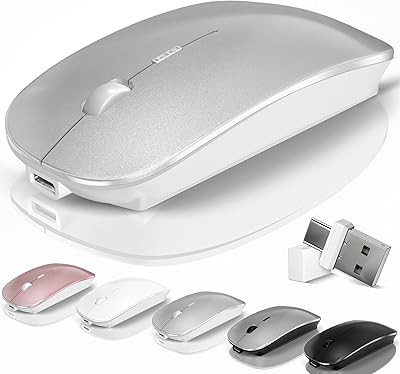
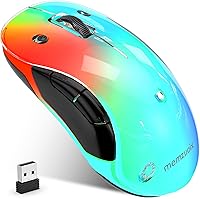
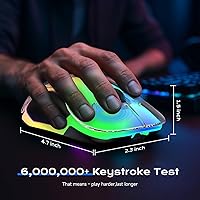
The memzuoix WM-2017 Wireless LED Mouse enters a crowded budget wireless market with one clear hook: it actually looks different. The detachable magnetic cover and auto-cycling RGB lights give it a visual personality that most mice at this price simply don't bother with. It's ambidextrous, compact, and light enough to toss in any bag without a second thought. Charging via USB-C means no hunting for AA batteries. That said, be clear-eyed going in — the DPI is fixed at 1200, clicks are audible, and Chromebook users are out of luck entirely. Despite those caveats, its bestseller ranking signals this mouse has earned genuine real-world traction among everyday users.

Features & Benefits

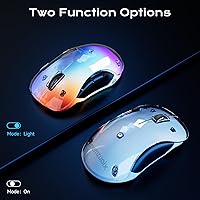
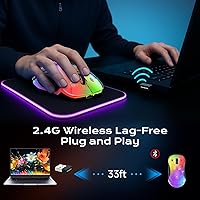
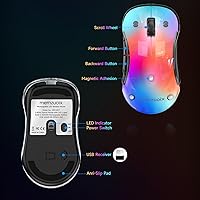
The RGB lighting cycles through nine colors automatically, and the magnetic detachable cover snaps off and on without fuss — a small touch that makes personalization feel tangible rather than theoretical. On the connectivity side, the 2.4GHz USB receiver pairs instantly with no driver installation required, and the 33-foot range is more than adequate for any desk setup. Battery life splits depending on how you use it: leave the LEDs running and you get around 17 hours; switch to power-saving mode and that stretches to roughly 90 hours. One genuine limitation worth flagging — the fixed 1200 DPI sensor cannot be adjusted, so power users or anyone needing variable sensitivity should look elsewhere.

Best For

This wireless mouse is a natural fit for students, remote workers, and frequent travelers who want something compact and cord-free without spending much. Its plug-and-play setup takes seconds on Windows, and the lightweight build won't add meaningful weight to a bag. The ambidextrous design also makes it a solid pick for left-handed users who are often overlooked at this price tier. It doubles as a genuinely fun gift — the RGB lighting tends to land well with anyone who appreciates personality in their peripherals. Mac users can use it, but should know upfront that the side buttons won't respond, making it best suited as a primary Windows mouse.

User Feedback

Buyers consistently praise the memzuoix RGB mouse for its eye-catching appearance straight out of the box — the glowing cover concept gets specific callouts as a pleasant surprise. On the downside, audible click noise is a recurring complaint from users in libraries, shared offices, or quiet home environments, and it's a dealbreaker worth taking seriously. People with larger hands occasionally find the compact frame uncomfortable during long sessions. Battery life generally tracks close to advertised figures under normal conditions. Build quality draws mixed reactions — most find it perfectly adequate for daily use, though a handful note the plastic feels light. Overall, this rechargeable mouse holds up reliably through the first few months of regular use.

Pros

  • USB-C charging means no disposable batteries to buy or replace.
  • Plug-and-play USB receiver works instantly on Windows with zero driver installation.
  • The detachable magnetic cover is a genuinely fun customization touch that stands out at this price.
  • Ambidextrous shape makes this wireless mouse a rare left-hand-friendly option in the budget category.
  • At under 3 ounces, it adds almost nothing to a laptop bag or backpack.
  • Battery life in power-saving mode stretches to roughly 90 hours on a single charge.
  • Nine-color RGB lighting cycles automatically and looks noticeably vibrant for a budget peripheral.
  • The 33-foot wireless range is more than enough for any standard desk or couch setup.
  • Auto-sleep mode kicks in after 8 minutes of inactivity, helping preserve battery without manual intervention.
  • Works across a wide range of Windows versions including older systems like XP and Vista.

Cons

  • Clicks are clearly audible — a real problem in quiet shared spaces or open-plan offices.
  • DPI is fixed at 1200 with no adjustment option, which limits precision for design or detail work.
  • Mac users lose both side buttons entirely, reducing functionality to just three effective controls.
  • Completely incompatible with Chromebooks, which rules out a growing segment of laptop users.
  • The compact size can cause hand fatigue during long sessions for anyone with medium or large hands.
  • Only 17 hours of battery life when RGB lighting is active — heavy users may charge frequently.
  • The plastic construction feels light in hand, and long-term durability beyond a few months is uncertain.
  • No DPI indicator or button means you cannot confirm or switch sensitivity settings on the fly.
  • The auto-changing RGB cycle cannot be locked to a single preferred color.
  • Single fixed DPI makes this unsuitable as a daily driver for anyone doing image editing or precise work.

Ratings

The scores below reflect an AI-driven analysis of verified global buyer reviews for the memzuoix WM-2017 Wireless LED Mouse, with spam, bot-submitted, and incentivized feedback actively filtered out before scoring. Each category is rated independently based on what real users consistently praised or criticized in their own words — strengths and genuine pain points are weighted equally. Nothing has been softened or inflated to favor the product.

Value for Money
88%
Most buyers feel this wireless mouse punches well above its price bracket, particularly given the RGB lighting, USB-C charging, and magnetic cover — features that typically cost more elsewhere. For students and budget-conscious remote workers, it consistently delivers more than expected at checkout.
A small but vocal group of users feel the fixed DPI and non-silent clicks hold back the overall value case, arguing that paying slightly more for adjustable sensitivity is worth it for daily professional use.
RGB Lighting Quality
83%
The nine-color auto-cycling LEDs draw consistent praise for being genuinely vibrant and eye-catching, especially in dim rooms or low-light desk setups. Many buyers mention it as the primary reason they chose this mouse over simpler alternatives at a similar price.
The inability to lock onto a single color is a recurring frustration — users who want a static blue or red to match their setup have no way to achieve that. The always-cycling behavior feels unfinished to buyers expecting more lighting control.
Portability & Size
91%
At under 3 ounces and barely 4.7 inches long, this rechargeable mouse slips into laptop sleeves and small pouches without taking up meaningful space. Frequent travelers and commuters consistently rate the form factor as one of the best practical aspects of the purchase.
The same compactness that makes it ideal for travel creates real comfort issues for users with medium-to-large hands during longer sessions, with some reporting wrist fatigue after 90 minutes or more of continuous use.
Ease of Setup
94%
Plug-and-play performance is the most uniformly praised aspect across all reviewer segments — users plug in the receiver and the mouse is ready in seconds with no software, no account creation, and no configuration required. First-time peripheral buyers in particular highlight how stress-free the experience is.
A handful of users reported the USB receiver not being recognized immediately on older Windows XP machines, requiring a port swap before it connected. This is an edge case, but worth noting for anyone running legacy hardware.
Battery Life
72%
28%
Users who keep the RGB lighting off and rely on auto-sleep mode find the advertised 90-hour figure reasonably accurate, often going multiple weeks between charges during normal workday use. The USB-C charging cable is a universally appreciated upgrade over older micro-USB designs.
With lighting enabled, the 17-hour ceiling disappoints users who expected more from a rechargeable design — some report needing to charge every two to three days. There is also no battery level indicator, so dead-mouse surprises mid-session are a real complaint.
Click Noise Level
41%
59%
Users who work from home alone or in private offices report that the click feel is satisfying and tactile, and a subset of buyers actively prefer audible feedback when navigating documents or spreadsheets throughout the day.
This is the single most common complaint across all review sources. Library regulars, open-office workers, and late-night users frequently flag the audible click as disruptive to those around them, with several buyers returning the mouse specifically because of the noise level.
Wireless Reliability
86%
Within a standard desk-to-laptop range, the 2.4GHz connection holds up consistently with no reported lag or dropout under normal conditions. Users running it alongside other wireless devices — keyboards, headsets, speakers — generally report no interference issues.
At distances approaching the 33-foot limit, a small number of users noted occasional cursor stuttering, particularly when walls or furniture stood between the mouse and receiver. Performance at the advertised maximum range is not as reliable as at typical desk distances.
Ambidextrous Design
79%
21%
Left-handed buyers are notably enthusiastic about this mouse, since genuinely ambidextrous options are rare at this price point. The symmetrical shell works well for casual left-hand use without any reconfiguration needed.
The ambidextrous compromise means the shape lacks the pronounced thumb rest and palm support that right-handed-specific mice offer, leaving some right-handed users feeling the grip is less natural than they expected.
Build Quality
67%
33%
For everyday light-to-moderate use over a few months, most buyers find the construction holds up acceptably well with no cracking, loose buttons, or scroll wheel degradation. The magnetic cover attachment mechanism in particular gets credit for feeling more premium than the price suggests.
The overall plastic shell feels noticeably lightweight in hand, and longer-term durability is uncertain — users approaching the six-month mark report mixed results, with some experiencing scroll wheel inconsistency or cover magnet weakening over time.
macOS Compatibility
48%
52%
Basic cursor movement, left-click, right-click, and scroll wheel functions all work correctly on macOS without any setup, making it functional for the most essential tasks on a MacBook during travel or as a temporary backup mouse.
The two side buttons are completely inactive on macOS, reducing the button count to three functional inputs. Mac users who rely on back-and-forward navigation shortcuts find this a significant daily frustration, and several describe feeling misled by the broad compatibility claims.
Detachable Cover Experience
77%
23%
The magnetic cover concept earns genuine enthusiasm from buyers who enjoy personalizing their accessories — swapping it out is fast, satisfying, and the magnet holds firmly during normal desktop sessions. As a gift differentiator it is consistently mentioned positively.
Users who carry this mouse loosely in bags report the cover occasionally detaching in transit, requiring a quick reattach on arrival. Additionally, replacement covers in alternate colors are not broadly available, limiting the customization potential the design implies.
DPI Performance
58%
42%
For standard productivity tasks — browsing, spreadsheets, video calls, casual document work — the fixed 1200 DPI setting is smooth and responsive enough that most everyday users never feel limited by it during a typical workday.
The complete absence of DPI adjustment is a hard dealbreaker for photo editors, graphic designers, and gamers who need to shift between high-speed navigation and fine cursor control. Several users only discovered the fixed DPI limitation after purchase, which drives frustration.
Ergonomic Comfort
63%
37%
For short sessions of one hour or less, most users across hand sizes report no significant discomfort. The low weight helps here — there is no strain from lifting or repositioning throughout a normal browsing or email session.
Extended work sessions surface clear comfort gaps, particularly for users with larger hands who find the compact profile forces an unnatural claw grip. The mouse is sized for portability first and ergonomics second, and that trade-off becomes apparent after a couple of hours.
Charging Experience
82%
18%
USB-C charging is a genuinely welcome standard at this price tier, and buyers appreciate that the same cable used for phones and laptops works here too. The green indicator light that cuts off when charging is complete is simple but effective.
Charging time data is not officially published, and some users report having to guess whether the mouse is fully charged since the indicator light only shows active charging status. A low-battery warning mechanism of any kind is absent.

Suitable for:

The memzuoix WM-2017 Wireless LED Mouse is a strong pick for students, remote workers, and frequent travelers who need a reliable, no-fuss wireless mouse without spending much. If you work predominantly on Windows and just want something you can plug in and use immediately, this delivers exactly that — no software, no setup headaches. The rechargeable battery removes the ongoing cost and hassle of replacements, which is genuinely useful for anyone who uses a mouse daily. Left-handed users will also appreciate the ambidextrous shape, since options at this price tier rarely consider them. And if you're shopping for a gift — especially for a teenager, college student, or anyone who enjoys a bit of personality in their tech accessories — the swappable magnetic cover and RGB lighting make it feel more considered than a generic mouse ever could.

Not suitable for:

The memzuoix WM-2017 Wireless LED Mouse is simply the wrong tool for several buyer types, and it's worth being direct about that. If you work in a quiet office, library, shared study room, or anywhere noise matters, the audible clicks will draw attention and frustration — there is no silent mode. Gamers and graphic designers who rely on adjustable DPI sensitivity should look elsewhere entirely, since this mouse locks in at 1200 DPI with no way to change it. Users with large hands may find the compact frame tiring during long work sessions, as it is sized for portability rather than extended ergonomic support. Mac users lose access to the side buttons entirely, which cuts the functional button count down to three — a meaningful limitation if you rely on browser navigation shortcuts. Chromebook users should skip this mouse outright, as it is explicitly incompatible with ChromeOS.

Specifications

  • Dimensions: The mouse measures 4.7 × 2.3 × 1.5 inches, making it compact enough for most laptop bags and travel pouches.
  • Weight: At 2.89 ounces, this is a genuinely lightweight peripheral that adds minimal bulk to any carry setup.
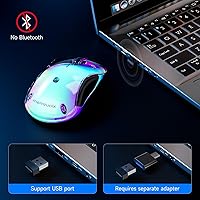
  • Connectivity: Uses a 2.4GHz wireless signal transmitted via a compact USB-A receiver included in the box.
  • Wireless Range: Rated for up to 33 feet of reliable signal distance under typical indoor conditions.
  • DPI: Fixed optical sensor at 1200 DPI with no adjustable sensitivity settings available.
  • Button Count: Features 5 buttons total; the two side buttons are non-functional on macOS and fully active only on Windows and Linux.
  • Battery Type: Built-in lithium polymer battery, rechargeable via USB-C — no replaceable or external batteries required.
  • Battery Life: Rated at approximately 17 hours with RGB lighting active, or up to 90 hours in power-saving mode with LEDs off.
  • Charging Port: USB-C input port; the indicator light glows green during charging and switches off automatically when fully charged.
  • Sleep Mode: In standard ON mode, the mouse auto-sleeps after 8 minutes of inactivity and wakes with a single click.
  • RGB Lighting: Cycles automatically through 9 colors via built-in LEDs; lighting can be toggled off via the dedicated Light button.
  • Cover Design: Includes a detachable magnetic cover that snaps on and off without tools, allowing basic visual customization.
  • Click Type: Clicks are audible and tactile — this mouse does not have a silent or soft-click mechanism.
  • Driver Requirement: No driver or software installation is needed; the USB receiver is fully plug-and-play across supported operating systems.
  • OS Compatibility: Fully supported on Windows XP, Vista, 8, 10, and 11, with partial support on macOS and basic compatibility with Linux.
  • Incompatibility: Explicitly not compatible with Chromebooks or ChromeOS-based devices.
  • Hand Orientation: Ambidextrous shell design supports both right- and left-handed users without any configuration changes.
  • Tracking Tech: Uses optical movement detection technology for cursor tracking on standard desk and mat surfaces.

Related Reviews

Arteck HW192 Wireless Keyboard and Mouse Combo

78%
78%
Build Quality
72%
Typing Experience
63%
Mouse Comfort & Ergonomics
81%
Battery Life
69%
Wireless Connectivity
More
Logitech M320 Wireless Mouse
74%
94%
Ease of Setup
88%
Wireless Reliability
91%
Battery Life
62%
Tracking Performance
63%
Comfort & Ergonomics
More
seenda Wireless Trackball Mouse
78%
88%
Ergonomic Comfort
74%
Trackball Precision
86%
Multi-Device Connectivity
83%
Battery Life
71%
Build Quality
More
Logitech M275 Wireless Mouse
76%
84%
Ergonomic Comfort
82%
Wireless Reliability
91%
Setup & Ease of Use
77%
Battery Life
79%
Value for Money
More
Logitech M325 Wireless Mouse
82%
88%
Scroll Wheel Performance
93%
Battery Life
78%
Comfort & Ergonomics
81%
Wireless Reliability
84%
Value for Money
More
Macally Wireless Bluetooth Mouse
86%
93%
Quiet Operation
89%
Battery Life
91%
Comfort and Ergonomics
75%
Bluetooth Connectivity
92%
Cross-Device Compatibility
More
iClever MD172 Wireless Bluetooth Rechargeable Mouse
79%
91%
Multi-Device Connectivity
84%
Battery Life
88%
Silent Click Performance
79%
Ergonomics & Comfort
58%
Scroll Wheel Quality
More
Logitech M510
Logitech M510
81%
91%
Ergonomic Comfort
93%
Battery Life
88%
Wireless Reliability
79%
Tracking Accuracy
74%
Build Quality
More
Vassink Ergonomic Vertical Wireless Mouse
77%
83%
Ergonomic Comfort
58%
Build Quality
66%
Battery Life
93%
Ease of Setup
88%
Click Quietness
More
SABLUTE Wireless Trackball Mouse

74%
83%
Ergonomic Comfort
79%
Adjustable Tilt Base
86%
Multi-Device Connectivity
67%
Trackball Precision & Feel
74%
DPI Range & Customization
More

FAQ

No, nothing to install at all. Just plug the USB receiver into an available port and the mouse connects automatically within a few seconds. It works this way on Windows, Linux, and macOS right out of the box.

You can, but with a notable limitation: the two side buttons will not respond on macOS, leaving you with just three functional buttons. If you rely on side buttons for browser navigation or app shortcuts, this wireless mouse will feel stripped down on a Mac. For basic scrolling and clicking, it works fine.

Unfortunately, no. The memzuoix WM-2017 Wireless LED Mouse is explicitly incompatible with Chromebooks and ChromeOS, so Chromebook users should look at other options.

Battery life depends on your lighting preference. With the RGB LEDs running, expect around 17 hours of use. If you turn the lights off and let the auto-sleep feature do its job, that stretches to roughly 90 hours. There is no low-battery indicator light, so keeping a loose charging schedule is a good habit.

The clicks are clearly audible — this is not a silent mouse. If you work in a library, quiet office, or open-plan workspace where noise is a concern, the click sound will likely be noticeable to those around you. That is an honest limitation worth factoring into your decision before buying.

No, the sensor is fixed at 1200 DPI with no way to change it. For general web browsing, document editing, and everyday productivity tasks that is perfectly adequate, but if you need higher or variable sensitivity for design work or gaming, this mouse is not the right fit.

The lighting cycles through all nine colors automatically and cannot be locked to a single color. Your options are cycling RGB on or all lights off — there is no static color mode available.

For users with small to medium hands, the shape holds up reasonably well for a few hours at a time. That said, the compact dimensions — 4.7 inches long and 1.5 inches tall — are sized for portability, not extended ergonomic support. If you have larger hands or work 8-hour days at a desk, you may find it tiring compared to a full-sized ergonomic mouse.

The cover attaches with magnets and snaps into place with a satisfying click. During normal desktop use it stays put reliably, though it is worth being mindful when tossing the mouse into a bag since the cover could separate if it catches on something. Reattaching it takes about two seconds.

The box includes the mouse itself, the USB-A wireless receiver, and a USB-C charging cable. Everything you need to start using it is in the package — no batteries to buy, no separate software to download, and no additional accessories required.