Overview

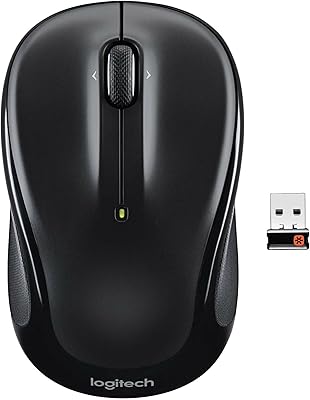
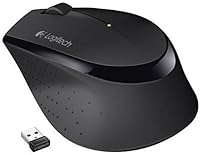
The Logitech M275 Wireless Mouse is a straightforward, budget-conscious pick for anyone who wants reliable wireless performance without complexity. If you're left-handed, stop here — the asymmetric body is built exclusively for right-hand use, and that's worth knowing upfront. For everyone else, this wireless mouse delivers exactly what most daily users actually need: a comfortable grip, instant wireless setup, and broad compatibility across Windows, macOS, and Linux. There's no software to install, no pairing ritual, no learning curve. It won't satisfy power users chasing precision or extra buttons, but for browsing, writing, and general office work, it's a solid, sensible choice.

Features & Benefits

The M275 sits naturally in the right hand — the curved shell guides your palm into a relaxed position that holds up during extended work sessions. Tracking is handled by an optical sensor that performs dependably on most desk surfaces, though it's not designed for high-speed or precision-critical tasks. The nano USB receiver plugs into any open port and works immediately, no configuration needed. Battery life is manufacturer-rated at 18 months on one AA cell, but real-world longevity depends heavily on usage habits. The wide scroll wheel offers more surface contact than a standard wheel, making long-document scrolling feel noticeably more controlled and less tiring.

Best For

This Logitech mouse is an easy recommendation for right-handed users who spend most of their day on tasks like writing, spreadsheet work, or casual browsing. It's a strong fit for students and home office users who want to cut the cord without spending much. The small nano receiver makes it a capable travel companion — slip it in a bag and you're set up anywhere you land. Linux users will appreciate that it works straight out of the box with no driver hunting. Anyone expecting programmable buttons, adjustable DPI, or an ambidextrous shape should look at other options. This is a comfort-first mouse, plain and simple.

User Feedback

Most buyers who reviewed the M275 highlight how comfortable it feels during a full workday — the ergonomic shape earns genuine appreciation from right-handed users who deal with hand fatigue regularly. On the critical side, some find the click action a bit stiff, and the scroll wheel can feel slightly plasticky compared to what you'd get at a higher price point. A number of users also note that battery life tracks closer to 12 months under heavy daily use, which is still respectable. Long-term reliability holds up well in most accounts, with early failures rarely mentioned. Left-handed users, predictably, come away disappointed — the shape simply does not work for them.

Pros

  • Ergonomic right-hand contour reduces fatigue noticeably during long typing and browsing sessions.
  • The nano USB receiver plugs in once and connects instantly — no pairing steps required.
  • Works out of the box on Windows, macOS, and Linux with zero driver installation.
  • Optical tracking is smooth and consistent across most standard desk surfaces.
  • The wide scroll wheel gives noticeably more control when navigating long documents or web pages.
  • Battery life is genuinely strong — many users report well over a year between changes.
  • Compact and lightweight enough to slip into any laptop bag without adding noticeable bulk.
  • A reliable everyday wireless mouse at a price point that requires very little deliberation.
  • Stable 2.4 GHz wireless connection keeps cursor movement smooth and lag-free at typical desk distances.

Cons

  • Strictly right-hand only — left-handed users are completely excluded by the asymmetric design.
  • Click resistance feels stiffer than expected and may frustrate users who prefer a lighter touch.
  • Scroll wheel feedback is soft and slightly loose, which can feel cheap under the finger.
  • No Bluetooth option means you must permanently sacrifice a USB port for the nano receiver.
  • Real-world battery life often falls short of the 18-month claim for heavy daily users.
  • Plastic construction is adequate for the price tier but will not impress anyone used to premium builds.
  • No adjustable DPI, programmable buttons, or any meaningful customization options whatsoever.
  • The optical sensor can struggle on glossy or reflective surfaces, causing occasional erratic cursor movement.
  • The M275 has been on the market since 2016 with no meaningful hardware revisions since launch.

Ratings

The Logitech M275 Wireless Mouse scores below were generated by AI after analyzing thousands of verified buyer reviews across global markets, with spam, incentivized, and bot-submitted feedback actively filtered out before scoring. Each category reflects the full spectrum of real user experience — strengths are credited where they are genuinely earned, and pain points are surfaced without softening. What emerges is an honest picture of a comfort-focused peripheral that serves the right buyers well and disappoints the wrong ones in equal measure.

Ergonomic Comfort
84%
Right-handed users consistently praise how naturally the curved shell fits the palm during long work sessions — many credit it with reducing the wrist tension they used to experience with flat or symmetrical mice. Office workers who spend several hours a day on documents and spreadsheets report noticeably less hand fatigue compared to their previous mice.
The right-hand-only design is an absolute dealbreaker for left-handed users, with no workaround available. Even among right-handed buyers, those with larger hands find the body a touch compact after extended sessions, and a few wish the rear of the mouse offered more palm support to fully cradle the hand.
Wireless Reliability
82%
18%
The 2.4 GHz connection holds steady in typical home and office environments, with most buyers reporting a cursor that tracks smoothly throughout an entire workday without noticeable stuttering or dropout. At standard desk distances, the signal is dependable enough that the vast majority of users stop thinking about it entirely after the first day.
In dense wireless environments — open-plan offices packed with competing 2.4 GHz devices — a small number of users report occasional brief lag spikes. There are also isolated reports of interference when the nano receiver shares a USB hub with USB 3.0 devices, though this is an uncommon edge case rather than a reliable pattern.
Setup & Ease of Use
91%
The plug-and-play experience is among the strongest points of ownership — most buyers describe the first-time setup as taking under ten seconds with zero confusion. This is especially valuable for students and office workers on IT-managed machines where software installs are restricted, since the mouse works entirely without drivers or a companion application.
The complete absence of onboard customization means what you plug in is exactly and only what you get. Users who want to adjust pointer speed, reassign buttons, or set up any shortcuts must install Logitech's optional software, which itself offers limited adjustments for a mouse with no programmable buttons to begin with.
Battery Life
77%
23%
For light-to-moderate users — a few hours of daily browsing and document work — getting close to a year or beyond from a single AA battery is a genuine convenience that eliminates nearly all maintenance. Buyers upgrading from rechargeable mice that needed weekly charging find the extended battery cycle a surprisingly pleasant change of habit.
The manufacturer's 18-month estimate represents a best-case scenario that heavy all-day users rarely approach, with many reporting cycles closer to six to ten months instead. There is also no battery level indicator of any kind, so the first warning that the cell is dying is usually an erratic or stuttering cursor appearing mid-task.
Value for Money
79%
21%
For right-handed buyers who need a functional, comfortable wireless mouse for everyday computing without spending much, the M275 delivers a strong practical return on investment. The combination of reliable wireless, ergonomic comfort, and long battery life covers every realistic daily need without requiring a significant financial commitment.
The value case weakens considerably for anyone who needs DPI adjustment, ambidextrous support, or a build quality that feels premium in hand. Left-handed buyers receive nothing usable from this design regardless of price, and shoppers with even slightly more advanced needs will find competing options at a similar cost that offer more flexibility.
Build Quality
63%
37%
The plastic construction is free of sharp edges, obvious mold lines, or structural wobble — it holds together cleanly under normal daily use. A majority of buyers who use the mouse for standard home and office tasks report no cracking, flexing, or structural failures within the first one to two years of ownership.
The overall feel is unmistakably budget — the hollow, lightweight plastic body, combined with the soft click buttons and loose scroll wheel, gives an impression of economy that users notice the moment they pick it up. Anyone coming from a mid-range or premium mouse will feel the material downgrade immediately and consistently.
Tracking Accuracy
73%
27%
On fabric mouse pads and standard desk surfaces, the optical sensor tracks smoothly and predictably — entirely sufficient for web browsing, document editing, and general navigation. Most everyday users never feel constrained by the sensor because their tasks simply do not demand the precision that would expose its limitations.
The sensor struggles meaningfully on reflective, glossy, or glass surfaces, producing erratic cursor jumps that make precise work difficult without a mouse pad beneath it. There is no DPI adjustment available, which becomes a real limitation for users working across multiple monitors or high-resolution displays who need to shift between fast sweeps and fine selections.
Scroll Wheel Feel
58%
42%
The wider scroll wheel surface provides more finger contact than a standard narrow wheel, which does translate to slightly more controlled scrolling when working through long reports, email threads, or sprawling web pages. Users upgrading from a very basic entry-level mouse often notice the improved surface area as a tangible step forward.
The wheel itself feels soft, slightly wobbly, and lacks the satisfying notch-by-notch resistance that more refined mice deliver. Buyers who have previously used Logitech's mid-range lineup describe the scroll experience here as noticeably cheap by comparison, and a subset of long-term users report the wheel developing additional looseness after several months of regular use.
Click Feel
61%
39%
Both primary buttons register consistently and without accidental misfires during normal use, which is the minimum acceptable standard for an office mouse and the M275 does meet it reliably. Users performing light tasks like link clicking, text selection, and form filling find the buttons functional enough to not disrupt their workflow.
The click resistance is stiffer than most users anticipate, requiring a more deliberate press that becomes tiring during extended clicking tasks like data entry or rapid spreadsheet navigation. Several buyers specifically describe the left button as having a stiff, springy quality that never fully feels natural, even after extended break-in use.
Portability
83%
The compact body and genuinely light weight make this an easy mouse to carry in any laptop bag without adding meaningful bulk or mass. Students and remote workers who move between home, libraries, and offices frequently cite the small footprint and discreet nano receiver as reasons they keep reaching for this mouse over larger alternatives.
The nano receiver is small enough to misplace during frequent moves between work locations, and losing it renders the mouse completely non-functional since it cannot be paired with a generic replacement dongle. A handful of travelers have flagged this as a frustrating vulnerability that caught them off guard at the worst possible moment.
OS Compatibility
88%
Working across Windows, macOS, and Linux without any driver installation is a genuinely practical advantage that covers the overwhelming majority of users. Linux users in particular find real value here — plug-and-play peripherals that work reliably across distributions without configuration effort are more the exception than the rule in this price segment.
Bluetooth connectivity is entirely absent, which excludes users on Bluetooth-only setups — including certain tablet configurations used in desktop mode or newer ultrabooks with limited USB-A ports. Users who already have a crowded USB hub situation may also find dedicating a port to the nano receiver permanently to be an inconvenient constraint.
Long-Term Reliability
74%
26%
A significant share of buyers report using the M275 daily for well over a year without any meaningful functional degradation — buttons keep registering, the sensor keeps tracking, and the wireless signal stays stable. For a budget peripheral used in light to moderate daily conditions, the reliability track record holds up better than the price might lead buyers to expect.
A smaller but consistent segment of long-term users reports the scroll wheel developing increased play and looseness over time, and some note that click buttons begin to feel mushy after heavy use extending beyond 18 months. Warranty terms are not prominently communicated at the point of purchase, leaving buyers uncertain about their options if hardware issues do emerge.

Suitable for:

The Logitech M275 Wireless Mouse is a well-matched choice for right-handed users who spend the bulk of their day on routine computing tasks — think document editing, spreadsheet work, email, and general browsing. Students working from dorm rooms or shared spaces will find it easy to set up and easy to forget about, which is exactly what a no-fuss peripheral should be. Home office workers on a sensible budget get a comfortable, low-maintenance option that handles daily demands without asking much in return. The plug-and-play nano receiver is a genuine convenience for anyone who moves between locations frequently — remote workers and light travelers especially will appreciate not needing extra cables or software installs. Linux users, often underserved by peripherals that require proprietary drivers, can count on it working straight out of the box across all major distributions.

Not suitable for:

The Logitech M275 Wireless Mouse has a few firm limitations that will send certain buyers shopping elsewhere. The most immediate is handedness — the right-hand-only contour is a hard stop for left-handed users, with no ambidextrous version available in this model line. Anyone who needs adjustable DPI, programmable side buttons, or responsive clicking for gaming will find it underpowered on every front. Designers, video editors, and other creative professionals who rely on precise cursor control across high-resolution displays will want a more capable sensor and build quality. The plastic construction and scroll wheel feel reflect the budget positioning honestly, but they will disappoint users who are accustomed to mid-range or premium peripherals. Additionally, anyone who prefers Bluetooth to keep their USB ports free will need to look at a different product entirely, as this mouse depends fully on the physical nano receiver.

Specifications

  • Form Factor: Right-hand ergonomic contour shaped to guide the palm into a natural, relaxed position during extended computing sessions.
  • Dimensions: The mouse body measures 4.15 x 2.67 x 1.5 inches (L x W x H), placing it in the compact full-size category.
  • Weight: The mouse body weighs approximately 0.32 oz without the AA battery installed.
  • Connectivity: Connects wirelessly via a 2.4 GHz signal delivered through a compact USB nano receiver included in the box.
  • Wireless Range: Operates reliably within approximately 33 feet (10 meters) of the connected computer under typical indoor conditions.
  • Tracking: Uses an advanced optical sensor for smooth, consistent cursor tracking across most standard desk and mouse pad surfaces.
  • Scroll Wheel: Features a wide-surface scroll wheel designed to maximize finger contact for more controlled line-by-line and page-level scrolling.
  • Battery: Powered by one AA battery (included), with a manufacturer-estimated battery life of up to 18 months under typical usage conditions.
  • Buttons: Includes three standard inputs — left click, right click, and a clickable scroll wheel — with no programmable side buttons.
  • Setup: Plug-and-play via USB nano receiver with no driver installation, software download, or Bluetooth pairing required.
  • Compatibility: Works out of the box with Windows, macOS, and Linux operating systems without additional configuration.
  • Color: Available in black only, with a matte finish across the primary body surface.
  • Model Number: Officially designated as model 910-004525, sold under the M275 series by Logitech.

Related Reviews

Logitech M320 Wireless Mouse
74%
94%
Ease of Setup
88%
Wireless Reliability
91%
Battery Life
62%
Tracking Performance
63%
Comfort & Ergonomics
More
Logitech M217 Wireless Mouse
76%
94%
Ease of Setup
88%
Battery Life
71%
Tracking Performance
62%
Ergonomics & Comfort
81%
Value for Money
More
Logitech M510
Logitech M510
81%
91%
Ergonomic Comfort
93%
Battery Life
88%
Wireless Reliability
79%
Tracking Accuracy
74%
Build Quality
More
Logitech M325 Wireless Mouse

82%
88%
Scroll Wheel Performance
93%
Battery Life
78%
Comfort & Ergonomics
81%
Wireless Reliability
84%
Value for Money
More
Logitech Wireless Anywhere Mouse MX
86%
94%
Tracking Performance
89%
Ergonomics/Comfort
72%
Battery Life
91%
Portability/Size
87%
Ease of Use/Setup
More
Logitech MX Vertical
79%
88%
Ergonomic Comfort
61%
Adjustment Period
83%
Build Quality
86%
Multi-Device Connectivity
91%
Battery Life
More
Logitech Signature M550 L
83%
93%
Ergonomic Comfort
91%
Silent Click Performance
89%
Battery Life
88%
Wireless Connectivity Reliability
84%
Multi-Device Compatibility
More
Logitech M705 Marathon Wireless Mouse
81%
94%
Battery Life
91%
Scroll Wheel Performance
88%
Wireless Reliability
83%
Ergonomics & Comfort
81%
Tracking Accuracy
More
Logitech M720 Triathlon
82%
91%
Multi-Device Switching
93%
Scroll Wheel Performance
94%
Battery Life
78%
Ergonomics & Comfort
82%
Connectivity Reliability
More
Logitech M325 Wireless Mouse
77%
91%
Value for Money
93%
Battery Life
94%
Ease of Setup
86%
Wireless Reliability
71%
Tracking Accuracy
More

FAQ

No installation is needed at all. Plug the nano receiver into any open USB port and the cursor starts working within seconds — no drivers, no companion app, no account setup required. It is about as close to instant as a peripheral gets.

Unfortunately, no. The M275 has an asymmetric shell shaped specifically for right-hand use, and trying to use it in the left hand would feel awkward and unsupported over any length of time. Left-handed buyers should look for an ambidextrous or dedicated left-handed mouse instead.

The 18-month figure is Logitech's estimate based on controlled testing, so treat it as an upper bound rather than a guarantee. Users who work at a computer several hours a day typically report somewhere between 10 and 14 months on a single AA. If you use the mouse heavily all day, expect a shorter cycle — closer to 6 to 9 months. Either way, the battery life is well above average for a wireless mouse in this category.

This is worth thinking about before you buy. The mouse relies on its specific nano receiver, so a lost dongle means the mouse stops working. Some users make a habit of storing the receiver in the battery compartment when traveling to avoid exactly this problem. If you do lose it, your best option is to contact Logitech support directly to explore replacement possibilities.

Yes, it works on macOS with zero setup — plug in the receiver and start using it right away. All the basic functions work natively. If you want additional settings like scroll speed adjustments, you can optionally install the Logitech Options software, but it is not required for the mouse to function normally.

It is worth checking the dimensions carefully — at 4.15 inches long, this is on the smaller end of full-size mice, which can feel cramped for users with large hands during extended sessions. The ergonomic curve does help, but if hand size is a concern, you might be better served by a larger Logitech model designed for bigger hands, such as the MX Master series.

Not reliably. Optical sensors generally struggle on transparent or highly reflective surfaces, and this one is no exception. On a standard wooden desk, a fabric mouse pad, or any matte surface, tracking is smooth and consistent. If your desk is glass, a basic mouse pad will solve the problem entirely.

In most setups, yes. A powered USB hub works fine for the nano receiver. Some users in environments with many competing 2.4 GHz devices or cheap unpowered hubs report occasional minor interference, but for a typical home or office desk setup, a hub connection is perfectly reliable.

It gets the job done, but it does feel somewhat soft and plasticky under the finger — a noticeable step down from what you would find on a mid-range or premium mouse. The wider surface area does help with control during long document scrolling, but the feedback and resistance are not particularly satisfying. For basic everyday use it is fine; for anyone who cares about the scroll experience specifically, it may be a disappointment.

For the most part, yes. User feedback on longevity is generally positive, with most buyers not reporting significant failures within the first year or two of regular use. The plastic construction is not premium, and the click buttons may soften slightly over time, but for daily home or office work it holds up reasonably well. It is not a mouse built to last a decade, but for its price tier, durability is fair.