




Overview

The Logitech M510 sits comfortably in the mid-range wireless mouse category, built for everyday PC and laptop users who want reliability without overspending. It connects via a 2.4GHz USB Unifying Receiver — not standard Bluetooth — so expect a stable, low-latency link rather than the occasional hiccup Bluetooth can bring. The contoured, right-handed shape with rubber side grips makes long work sessions noticeably more comfortable, and at 4.5 oz it never feels heavy on the desk. Powered by two AA batteries with a claimed two-year life, this wireless mouse is built around one clear idea: stay out of your way and just work.

Features & Benefits

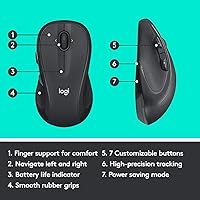
One of the M510's more practical touches is the Unifying Receiver, which lets you pair multiple compatible Logitech peripherals through a single USB dongle — no juggling ports, no extra clutter. It sits flush and is easy to forget about in a good way. The scroll wheel tilts side to side for horizontal scrolling, a small addition that adds real convenience over a long workday. A battery indicator light on top warns you before things go dark, and the physical On/Off switch combined with a smart sleep mode means the batteries genuinely last. Five total buttons, including programmable Back/Forward keys, round out a well-considered feature set for everyday computing.

Best For

This ergonomic mouse is a natural fit for office workers and students who need a dependable daily driver without fussing over connectivity or charging. If you move between a desk and a couch, or carry a laptop bag regularly, the compact receiver that stays plugged in is a genuine convenience. It also suits anyone already using Logitech gear — one receiver, multiple devices, less desk clutter. That said, left-handed users should look elsewhere; the shape is firmly right-handed with no ambidextrous option in this line. It is aimed at moderate to heavy users prioritizing comfort and low maintenance, not power users chasing high-precision gaming performance.

User Feedback

With nearly 34,000 ratings averaging 4.6 out of 5 stars, real-world satisfaction for this wireless mouse is hard to dismiss. The two most repeated compliments are all-day comfort and battery longevity — many reviewers report going well over a year on a single set of batteries, which aligns with what the specs promise. On the downside, a recurring complaint is the scroll wheel feeling slightly loose after prolonged use, which matters if tactile feedback is important to you. Left-handed buyers are a vocal minority who find the right-handed contour simply does not work for them. Tracking across varied desk surfaces earns mostly positive marks, though it is not a match for high-DPI mice built for precision tasks.

Pros

  • Battery life is exceptional — many real users report going over a year without a replacement.
  • The Unifying Receiver lets you pair multiple Logitech devices to a single USB port.
  • Ergonomic shape and rubber grips make all-day desk use noticeably more comfortable than flat mice.
  • A battery indicator light means you will never be caught off guard by a dead mouse mid-meeting.
  • Setup takes under a minute — plug in the receiver, flip the switch, and it just works.
  • Compatible with Windows 10 and 11, Chrome OS, and Linux right out of the box.
  • Scroll wheel tilts side-to-side for horizontal scrolling, handy for wide spreadsheets.
  • The M510 ranks among the top mice in its category with over 34,000 verified buyer ratings.
  • Programmable side buttons can be remapped for shortcuts, saving real time during repetitive tasks.
  • The physical On/Off switch makes powering down before travel or storage genuinely simple.

Cons

  • Scroll wheel tends to develop a loose, wobbly feel after several months of regular use.
  • No USB-C or Bluetooth option — the RF dongle is the only connection method available.
  • macOS is not officially supported, limiting full functionality for Apple computer users.
  • Left-handed users have no viable option within this mouse line whatsoever.
  • Button customization requires installing Logitech Options software, which runs background processes some users find intrusive.
  • Losing the tiny USB receiver means the mouse becomes unusable with no easy self-service fix.
  • Tracking breaks down on glass or highly reflective surfaces, which affects some desk setups.
  • Only five buttons total, which feels limiting for power users accustomed to more input options.
  • The plastic shell picks up fingerprints easily and shows wear over time in the graphite finish.
  • Rivals at a similar price now offer rechargeable batteries, making AA dependency feel dated.

Ratings

Our scores for the Logitech M510 are generated by AI after systematically analyzing thousands of verified global user reviews, with spam, bot-submitted, and incentivized feedback actively filtered out. The result is an honest snapshot of how this wireless mouse performs in real daily use — strengths and frustrations included, nothing glossed over.

Ergonomic Comfort
91%
Right-handed users consistently describe hours-long sessions at the desk without wrist fatigue, thanks to the contoured palm area and soft rubber side grips that keep the hand naturally positioned. For office workers putting in full eight-hour days, that kind of sustained comfort is a genuine differentiator at this price point.
The right-handed-only shape is a hard stop for left-handed users, and there is no ambidextrous version in this line to fall back on. Users with very large hands have also noted the mouse feels slightly compact for an all-day grip.
Battery Life
93%
This is where the M510 earns its most enthusiastic praise. A large number of reviewers report going well past a year — sometimes closer to 18 months — on a single pair of AA batteries, which means most buyers simply forget battery replacement is even a concern.
Battery performance does vary depending on usage intensity and sleep mode behavior. Heavy users who rarely turn the mouse off manually report shorter cycles, and a small number of buyers found the battery drain faster than expected when the smart sleep mode did not trigger reliably.
Wireless Reliability
88%
The 2.4GHz USB Unifying Receiver delivers a stable, consistent connection that most users describe as indistinguishable from a wired mouse during everyday tasks. Dropouts and lag are rarely mentioned across thousands of reviews, which counts for a lot during video calls or spreadsheet work.
The receiver occupies a USB-A port permanently, which is a real inconvenience on modern ultrabooks with limited ports. Users who lose the tiny dongle face a frustrating replacement process, as the mouse cannot pair with a standard Bluetooth stack.
Tracking Accuracy
79%
21%
For everyday computing — web browsing, document editing, spreadsheet navigation — the optical sensor tracks accurately across wood, fabric mouse pads, and most standard desk surfaces. Most office users report zero tracking hiccups during normal workloads.
On highly reflective or glass surfaces, tracking becomes unreliable, which is a known limitation of optical sensors at this tier. Users expecting laser-grade precision for graphic design or detailed image editing will likely find the sensor underwhelming.
Build Quality
74%
26%
The overall plastic construction feels solid enough for daily desk use, and the rubber grips add a premium touch that disguises the modest material cost well. Many buyers note the mouse still feels structurally sound after two-plus years of regular use.
The scroll wheel is a repeated pain point — multiple users describe it developing a loose, slightly wobbly feel over time, which degrades the tactile satisfaction of scrolling. The plastic shell also shows fingerprint smudges fairly easily in the graphite colorway.
Scroll Wheel Quality
66%
34%
The scroll wheel covers both vertical and horizontal scrolling via a tilt mechanism, which is a practical addition for working in wide spreadsheets or navigating timelines. Out of the box, most users find the resistance and click feedback acceptable for everyday use.
Longevity is the real concern here. A notable subset of reviewers report the scroll wheel feeling noticeably looser within six to twelve months of use, and the horizontal tilt click can feel imprecise compared to dedicated side buttons found on pricier mice.
Button Programmability
77%
23%
The two side buttons — Back and Forward by default — are well-positioned for right-handed use and can be remapped through Logitech Options software for shortcuts, application switching, or custom macros. For productivity users, this is a welcome layer of personalization.
Logitech Options software, required to unlock full remapping, is not always intuitive to set up and has drawn criticism for its background resource usage. The total of five buttons also leaves power users wanting more input options compared to rivals at a similar price.
Unifying Receiver Convenience
86%
For anyone already running Logitech peripherals, the ability to pair this mouse and a keyboard — or another device — to a single USB dongle is a genuinely useful perk. It keeps the desk tidy and reduces the number of ports consumed on a desktop or docking station.
The Unifying ecosystem requires that other peripherals also support the standard, so the benefit only applies to compatible Logitech products. If you have no other Logitech gear, this feature adds no practical value and is simply a standard receiver connection.
Value for Money
89%
Positioned as a mid-range option, the M510 punches above its weight in comfort and battery longevity — two factors that matter most during extended daily use. Buyers upgrading from basic wired or budget wireless mice consistently describe it as a noticeable step up without a painful outlay.
At its current price, it sits in a competitive bracket where newer wireless mice from other brands offer rechargeable batteries and more modern sensor technology. Buyers willing to spend a bit more have options that age better over a two-to-three year ownership window.
Ease of Setup
94%
Plug the receiver in, flip the On/Off switch, and it works — no driver installation required for basic functionality on Windows, Chrome OS, or Linux. Nearly every reviewer describes setup as taking under a minute, which is exactly what most users expect from a plug-and-play peripheral.
macOS is not officially listed as a supported operating system, which catches some buyers off guard. While basic pointer movement tends to work, the side buttons and full programmability require Logitech Options, which has had intermittent compatibility issues on certain OS versions.
OS Compatibility
83%
Wide support across Windows 10 and 11, Chrome OS, and Linux makes the M510 a flexible choice for multi-OS households or IT environments where machines run different operating systems. Chrome OS users in particular appreciate how rarely peripherals are certified for their platform.
The notable absence of official macOS support limits its appeal in creative or design environments where Macs dominate. Linux compatibility is present but functional support for programmable buttons depends on third-party tools, adding friction for non-technical users.
Portability
72%
28%
At 4.5 oz and with a receiver small enough to leave plugged into the laptop permanently, this wireless mouse travels reasonably well in a laptop bag without adding much weight. The physical On/Off switch makes it straightforward to power down before packing up.
The mouse itself has no dedicated storage slot for the receiver, so there is a real risk of losing the dongle in transit if it is not kept plugged in. The size also leans toward medium-to-large hands, which can feel slightly bulky inside a compact laptop bag.
Noise Level
81%
19%
Click noise is moderate — noticeably quieter than many budget mice but not marketed as a silent option. In a shared office or quiet home study, most users describe the click sound as unobtrusive during regular web browsing and document work.
Users in open-plan offices or shared bedrooms who need near-silent operation will find the M510 louder than purpose-built quiet mice. There is no silent-click variant in this specific model line, which is a gap compared to some competing options at this price.
Software & Customization Depth
63%
37%
Logitech Options provides a straightforward interface for remapping buttons and adjusting pointer speed, and it works reliably on Windows for most users. Basic DPI and scrolling adjustments are accessible without digging through complicated menus.
The customization ceiling is relatively low compared to Logitech's higher-end software like G HUB. Options for DPI adjustment are limited to software settings rather than on-the-fly hardware switching, and the app has drawn criticism for running background processes that some users find intrusive.

Suitable for:

The Logitech M510 is a strong match for right-handed office workers, students, and anyone who spends the bulk of their day at a desk and just wants a mouse that works without fuss. If your workload is built around documents, spreadsheets, email, and web browsing, this ergonomic mouse covers all of it reliably without demanding any attention. The contoured shape and rubber grips make a real difference over a six-to-eight hour workday compared to flat, budget-tier alternatives. It is also an excellent pick for people who move between a home desk and an office — the receiver stays plugged in, the mouse flips on with a switch, and you are working in seconds. Those already running Logitech keyboards or other Unifying-compatible peripherals will especially appreciate consolidating everything to one USB port. Chromebook and Linux users, who are often poorly served by peripheral makers, will find the compatibility here genuinely refreshing.

Not suitable for:

Left-handed users should stop reading here — the Logitech M510 is an exclusively right-handed design, and no amount of adjustment changes that physical reality. If you are a graphic designer, video editor, or anyone who needs precise cursor control for detailed work, the optical sensor at this tier will likely frustrate you, and spending more on a higher-precision mouse makes more practical sense. Gamers should also look elsewhere entirely; this ergonomic mouse is built for comfort during productivity tasks, not for rapid directional inputs or adjustable DPI on the fly. Mac users should be cautious too, as macOS is not officially supported, meaning full button programmability is not guaranteed and may require workarounds. Finally, anyone working primarily from a laptop with only USB-C ports will need a separate adapter just to use the receiver, which adds cost and one more thing to carry.

Specifications

  • Wireless Technology: The mouse connects via a 2.4GHz USB Unifying Receiver, not standard Bluetooth, providing a stable low-latency wireless link up to approximately 33 feet (10 meters) from the receiver.
  • Dimensions: The mouse measures 5.16″ long, 2.83″ wide, and 1.81″ tall, placing it in the medium-sized category suited for average to slightly large right-handed grips.
  • Weight: At 4.5 oz without batteries, the mouse is light enough for extended daily use without causing arm fatigue during long desk sessions.
  • Battery: Powered by 2 AA batteries (included in the box), with a manufacturer-rated battery life of up to 24 months under typical usage conditions.
  • Battery Indicator: A dedicated LED battery indicator light on the top surface illuminates to alert the user when battery levels are running low, preventing unexpected shutdowns.
  • Tracking Sensor: Uses an advanced optical sensor for cursor tracking, performing reliably across standard desk surfaces, fabric mouse pads, and most matte materials.
  • Buttons: Equipped with 5 buttons total: left click, right click, scroll wheel click, and two programmable side buttons (Back and Forward) that can be remapped via Logitech Options software.
  • Scroll Wheel: The scroll wheel supports both standard vertical scrolling and side-to-side tilt for horizontal scrolling, useful for wide documents or spreadsheets.
  • Power Management: A physical On/Off switch on the underside allows manual power cutoff, while an automatic smart sleep mode activates during periods of inactivity to conserve battery life.
  • Handedness: Designed exclusively for right-handed use, with an asymmetric contoured shell and rubber side grips positioned specifically for a right-hand grip posture.
  • OS Compatibility: Officially compatible with Windows 10, Windows 11, Linux, and Chrome OS; macOS is not listed as a supported operating system by Logitech.
  • Unifying Receiver: The included nano USB Unifying Receiver supports pairing with up to 6 compatible Logitech Unifying devices simultaneously through a single USB-A port.
  • Connectivity Port: Requires a USB-A port for the Unifying Receiver; users with USB-C-only laptops will need a separate USB-A to USB-C adapter, which is not included.
  • Color: Available in Graphite, a dark charcoal tone with subtle texture that resists visible scuffs though it does show fingerprint oils over time.
  • Software: Full button remapping and pointer speed customization require the free Logitech Options software, downloadable from Logitech's official website; basic plug-and-play functionality requires no software installation.
  • Model Number: The official model number is 910-006030, part of the M510 Comfort Plus series manufactured by Logitech.
  • Certifications: Carries standard regulatory certifications for sale in North American and European markets, including FCC, CE, and IC compliance markings.
  • In the Box: Package includes the M510 mouse, one USB Unifying Receiver, and 2 AA batteries pre-loaded and ready for immediate use.

Related Reviews

Logitech Wireless Touchpad
84%
80%
Performance
85%
Ease of Use
88%
Wireless Connectivity
83%
Build Quality
82%
Ergonomics
More
Logitech POP Mouse
Logitech POP Mouse
82%
93%
Silent Click Performance
89%
SmartWheel Scrolling
87%
Multi-Device Connectivity
91%
Battery Life
71%
Ergonomics & Hand Fit
More
Logitech X-530
Logitech X-530
75%
82%
Sound Quality
80%
Bass Performance
86%
Dialogue / Center Channel
84%
Surround Imaging
75%
Build Quality
More
Logitech Pebble M350
88%
88%
Build Quality
85%
Ergonomics & Comfort
94%
Battery Life
90%
Connectivity Reliability
87%
Tracking Precision
More
Logitech ERGO K860
Logitech ERGO K860
81%
93%
Ergonomic Comfort
89%
Wrist Rest Quality
84%
Typing Feel & Accuracy
67%
Adjustment Period
81%
Build Quality & Materials
More
Logitech M557 Bluetooth Mouse
82%
92%
Battery Life
88%
Setup and Installation
84%
Ergonomics and Comfort
85%
Performance and Accuracy
90%
Portability and Weight
More
Nulea M510 Vertical Mouse
85%
91%
Ergonomics and Comfort
83%
Build Quality
88%
DPI Adjustability
90%
Wireless Performance
85%
Setup and Installation
More
Logitech MX Creative Console
86%
89%
Ease of Use
91%
Customization Options
94%
Software Integration
85%
Build Quality
88%
Tactile Controls
More
Logitech Wireless Combo MK520
88%
93%
Ease of Setup
94%
Battery Life
88%
Comfort & Ergonomics
91%
Wireless Connectivity
75%
Mouse Size & Design
More
Logitech H570e USB Headset
84%
87%
Audio Quality
91%
Comfort for Long Sessions
88%
Noise-Canceling Microphone Performance
94%
Ease of Setup
82%
Build Quality
More

FAQ

Based on real user feedback, the battery life claim holds up reasonably well. A large number of buyers report going 12 to 18 months or longer on a single pair of AAs under normal office use. Heavy users who skip the On/Off switch when stepping away tend to see shorter cycles, but for most people, battery replacement is genuinely rare.

Technically the cursor will move, but macOS is not officially supported by Logitech for the Logitech M510. That means the programmable side buttons may not function correctly, and full customization through Logitech Options is not guaranteed. If you are primarily a Mac user, it is worth considering a model with official macOS support before buying.

You have to use the included USB dongle — there is no Bluetooth option on this mouse despite some listings mentioning Bluetooth in the spec table. The connection runs on 2.4GHz RF through the Unifying Receiver, which is reliable but does require a USB-A port to be available on your device.

Losing the receiver is the biggest practical risk with this mouse. Logitech does sell replacement Unifying Receivers separately, and if you have the Logitech Options software installed, you may be able to pair the mouse to a new receiver using the Unifying pairing tool. That said, it is not always a smooth process, so keeping track of the dongle matters.

Yes, and this is one of the more useful features here. The Unifying Receiver supports up to 6 compatible Logitech devices simultaneously, so you can add a Logitech Unifying-compatible keyboard without occupying another USB port. Not all Logitech peripherals support Unifying, so just check compatibility on the Logitech website before assuming.

It works well for average-sized hands, but people with notably large hands sometimes find the dimensions slightly compact for an all-day grip. The mouse is 5.16 inches long, which puts it on the smaller side of full-sized mice. If you have large hands, trying it in person or checking a return policy before committing is a smart move.

Unfortunately, yes — scroll wheel loosening over time is the most consistently reported durability complaint for this ergonomic mouse. It does not affect scrolling function immediately, but the tactile feel degrades noticeably for some users within six to twelve months of regular use. It is the one area where the build quality does not quite match the otherwise solid reputation.

For basic use — left click, right click, scrolling, and the Back/Forward side buttons at their default functions — no software is needed. If you want to remap those side buttons to custom shortcuts or adjust pointer speed beyond the OS-level settings, you will need to install the free Logitech Options app from Logitech's website.

Yes, it does, and Chrome OS compatibility is one of the genuinely underrated strengths of this wireless mouse. Plug the receiver into a USB-A port, power the mouse on, and it pairs automatically with no driver installation needed. Basic remapping functionality through Logitech Options may be limited on Chrome OS, but day-to-day use works without any setup friction.

It is actually one of the better options for exactly that transition. The connection is stable enough that most users stop noticing the absence of a cord within a day or two, the setup is immediate, and the battery life means you are not constantly managing a charge like you would with a rechargeable wireless mouse. The step up in comfort from a standard wired mouse is noticeable fairly quickly.