Meetion Master C5000 Wireless Keyboard and Mouse Combo

Overview
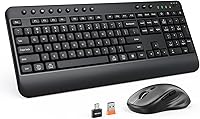
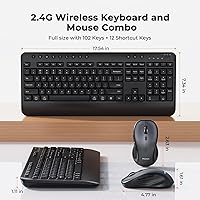
The Meetion Master C5000 Wireless Keyboard and Mouse Combo lands in a crowded entry-level wireless segment, but it brings a few extras that separate it from truly bare-bones options. The full-size 102-key layout includes an integrated wrist rest — something most rivals at this price simply skip. Setup takes about thirty seconds: plug in the single USB-A receiver, and both devices connect instantly. It launched in late 2024, so the review pool is still building, but early buyer response has been encouraging. For anyone who wants a clutter-free wireless desk without paying premium prices, the value-per-feature ratio here is worth a close look.
Features & Benefits
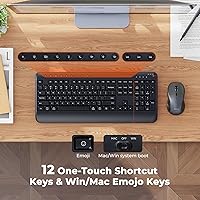
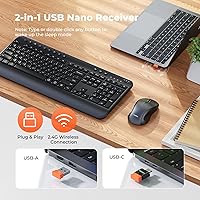
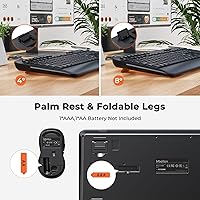
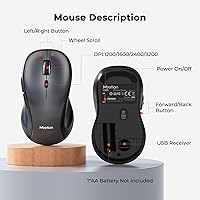
The attached palm rest runs the full width of the keyboard, which actually makes a difference during long writing sessions compared to narrower aftermarket rests. The keyboard supports two tilt angles via adjustable rear feet, and 12 multimedia hotkeys handle volume, playback, and brightness without any driver installation. The mouse punches above its class: four DPI settings topping out at 3200, plus dedicated forward and back navigation buttons, are features you normally find on mid-range hardware. Wireless range extends to 33 feet, generous enough for a living-room setup. One thing to note: the included USB-C accessory is a converter for the existing receiver, not a standalone adapter, so keep that in mind if your only available port is USB-C.
Best For
This keyboard-and-mouse set makes the most sense for people who spend hours at a desk and want basic wrist support without buying a separate accessory. Students grinding through assignments, remote workers handling spreadsheets and emails all day — they are the natural audience here. It is also a solid pick for anyone switching from a wired setup who wants a tidier desk without spending heavily. Windows and Mac compatibility works out of the box with no software required, making it practical for shared workstations. If you run a media setup from the couch or a small conference room, the 33-foot range covers that too. Power users with precision or creative demands will likely outgrow it fairly quickly, though.
User Feedback
With 75 ratings and a 4.2-star average, the C5000 combo is off to a decent start, though the sample size is still thin enough that strong conclusions would be premature. Early buyers tend to highlight the ease of setup and the comfort of the wrist rest during long workdays. On the flip side, some mention that key travel feels shallower than expected, and that mouse clicks can register as slightly loud in quiet office environments. A handful of MacBook owners note the USB-C converter works reliably, which is reassuring. Battery life has not emerged as a concern yet, but with limited reviews, that picture may shift as more buyers weigh in over the coming months.
Pros
- Plug-and-play setup takes under a minute — no drivers, no app installs, no hassle.
- The attached full-width wrist rest genuinely reduces hand fatigue during long typing sessions.
- Four DPI settings up to 3200 on the mouse are rare at this price point.
- Forward and back navigation buttons on the mouse make web browsing and document work noticeably smoother.
- A single USB-A receiver handles both devices, keeping your port usage minimal.
- 33-foot wireless range works well beyond the desk — useful for media room setups.
- Cross-platform compatibility with Windows and Mac works reliably out of the box.
- 12 multimedia hotkeys provide quick access to volume, playback, and brightness without alt-tabbing.
- The C5000 combo includes a USB-C converter for modern thin-and-light laptops, avoiding the need for a separate hub in most cases.
- Adjustable rear feet let you set the keyboard tilt to a comfortable angle rather than being stuck with one fixed position.
Cons
- Key travel is shallower than most typists expect, making long writing sessions feel less satisfying.
- Mouse click noise is louder than ideal for quiet shared office environments.
- The keyboard chassis flexes noticeably under firm typing pressure near the center.
- The USB-C accessory is a converter only — buyers with USB-C-only devices may still need a hub.
- No backlighting makes the hotkey labels difficult to read in dim lighting conditions.
- Mouse scroll wheel feel is looser than expected and can feel imprecise during fast scrolling.
- With only 75 reviews since late 2024, long-term durability and battery performance remain largely unproven.
- The palm rest material picks up oils and fingerprints visibly, requiring regular wiping to stay looking clean.
- No companion software means zero customization — key remapping and macro support are completely absent.
Ratings
The Meetion Master C5000 Wireless Keyboard and Mouse Combo has been evaluated by our AI system after analyzing verified buyer reviews from global markets, with spam, bot-submitted, and incentivized feedback actively filtered out. With 75 ratings collected since its late 2024 launch, the sample is still growing — so scores reflect early but consistent signals rather than a fully mature dataset. Both the genuine strengths and the real friction points buyers have reported are transparently represented in the breakdowns below.
Value for Money
Ease of Setup
Keyboard Comfort & Wrist Rest
Key Travel & Typing Feel
Mouse Performance & DPI Range
Wireless Connectivity & Stability
Build Quality & Durability
Mouse Ergonomics & Grip
Multimedia Hotkeys
USB-C Compatibility
Cross-Platform Compatibility
Battery Life
Packaging & Unboxing Experience
Desk Footprint & Portability
Suitable for:
The Meetion Master C5000 Wireless Keyboard and Mouse Combo is a practical fit for remote workers and students who spend several hours a day typing and want built-in wrist support without budgeting for a separate palm rest. If you are switching away from a tangled wired setup and just want everything to work the moment you plug in a single receiver, this combo delivers exactly that. It handles Windows and Mac equally well with no software installation, making it a dependable choice for shared desks, spare workstations, or family computers used by multiple people. Casual home users who stream media and want quick access to volume and playback controls will also appreciate the dedicated hotkeys. For anyone equipping a secondary desk, a home office on a budget, or a dorm room setup, the feature-to-price balance here is genuinely hard to argue with.
Not suitable for:
The Meetion Master C5000 Wireless Keyboard and Mouse Combo is not the right tool for anyone who demands a satisfying, high-travel typing experience — touch typists and mechanical keyboard converts will likely find the key feel underwhelming and start shopping for alternatives within a few weeks. Graphic designers, photo editors, and anyone doing precision cursor work will hit the limits of the mouse fairly quickly, as it is built for general navigation rather than fine-grained control. Left-handed users are out of luck entirely, since the mouse is shaped exclusively for right-hand use. Developers or power users who rely on remappable keys, macros, or custom profiles will find no companion software to support those workflows. If your laptop has only USB-C ports and no hub, the setup is also slightly more awkward than it should be, since the included USB-C accessory is a converter for the existing receiver rather than a native USB-C solution.
Specifications
- Brand & Model: Manufactured by Meetion Master under model number C5000.
- Keyboard Layout: Full-size 102-key U.S. QWERTY layout with 12 dedicated multimedia hotkeys and one emoji key.
- Keyboard Size: Keyboard body measures 17.54 x 7.34 x 1.11 inches including the attached wrist rest.
- Mouse Size: Mouse measures 2.63 x 4.77 x 1.61 inches with a right-hand ergonomic contour.
- Package Weight: Complete package weighs 2.31 pounds including keyboard, mouse, receiver, adapter, and manual.
- Wireless Technology: Both devices connect via a 2.4 GHz wireless signal through a single shared USB-A receiver.
- Wireless Range: Rated wireless operating range extends up to 33 feet under typical indoor conditions.
- Mouse DPI: Mouse offers four selectable DPI settings: 1200, 1600, 2400, and 3200.
- Mouse Buttons: Mouse includes left click, right click, scroll wheel click, DPI toggle, and dedicated forward and back navigation buttons.
- Receiver Type: One USB-A receiver handles both the keyboard and mouse simultaneously, occupying a single port.
- USB-C Adapter: A USB-C to USB-A converter is included strictly for interface conversion; it is not a standalone second receiver.
- Keyboard Tilt: Adjustable rear feet provide two height settings to customize the keyboard typing angle.
- Wrist Rest: A wide palm rest is permanently attached along the full bottom edge of the keyboard.
- OS Compatibility: Compatible with Windows and macOS operating systems without requiring any driver or software installation.
- Setup Method: Plug-and-play connection requires no software — insert the receiver and both devices are ready to use immediately.
- Color: Available in black with a matte finish on both the keyboard body and mouse.
- Package Contents: Box includes one keyboard, one mouse, one USB-A receiver, one USB-C adapter, and one printed instruction manual.
- First Available: Product first listed on Amazon in December 2024, making it a relatively new entry in the category.
Related Reviews
MEETION Director-D-2 Ergonomic Wireless Keyboard Mouse Combo

Arteck HW192 Wireless Keyboard and Mouse Combo

Mobifice Retro Wireless Keyboard and Mouse Combo

Trueque Wireless Keyboard and Mouse Combo

FOPETT Retro Wireless Keyboard and Mouse Combo

ULSOU Wireless Ergonomic Keyboard and Mouse Combo

KNOWSQT Wireless Keyboard and Mouse Combo

Kootop Wireless Keyboard Mouse Combo

JOYACCESS Wireless Keyboard and Mouse Combo
