Overview

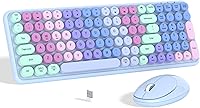
The Links9+ Rainbow Wireless Keyboard Mouse Combo launched in late 2023 into one of the most crowded corners of the peripheral market, yet it carved out a clear identity almost immediately. The gradient rainbow colorway is genuinely its strongest argument — in a sea of black and gray budget combos, this colorful wireless set stands out on a desk in a way that matters to a growing number of buyers. It's not built for speed typists or precision gamers. Think of it as a functional daily driver with a personality. The 2-year support promise is a pleasant surprise at this price tier and adds a layer of confidence that most competing combos simply don't offer.
Features & Benefits

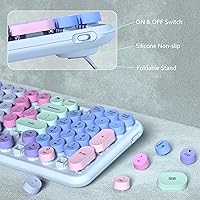
Plug the nano USB receiver into any open port and you're up and running — no software, no setup screens. The 33-foot wireless range keeps things stable even across a room, which is handy if your desk setup occasionally doubles as a couch setup. The full 100-key layout includes 12 hotkeys for skipping tracks or adjusting volume without touching your screen. What genuinely impresses is the removable keycap design: pull the caps off, wipe down the board, and it takes minutes rather than the awkward compressed-air routine most keyboards demand. The auto-sleep function and low-battery LED mean you're rarely caught off guard by dead batteries mid-session.

Best For

This rainbow keyboard combo is a strong pick for college students who want their workspace to reflect their personality without draining their budget. It's also well-suited for home office workers tired of staring at an uninspiring all-black setup — sometimes a colorful desk actually makes sitting down to work feel a bit less like a chore. Casual users on Windows or Mac will appreciate that there's genuinely nothing to install. And if you're hunting for a practical gift idea for a birthday or the holidays, a combo that's both useful and visually distinctive tends to land better than another generic peripheral in a plain box.

User Feedback

With a 4.3-star average across 154 ratings, the Links9+ combo has earned a reasonably warm reception — though that sample size is still relatively small, so it's worth reading individual reviews rather than relying solely on the aggregate score. Buyers consistently mention the visual appeal as the main draw, along with how quick the setup is. On the flip side, some users note that the typing feel is average at best for a membrane board — nobody's going to mistake it for a mechanical keyboard. Mouse tracking accuracy also gets occasional criticism from anyone doing more than casual browsing or document work. Battery life reports seem generally positive, but your mileage may vary.

Pros

  • The gradient rainbow design genuinely brightens up a plain desk without requiring any extra accessories.
  • Plug-and-play nano USB setup means you are typing within seconds of opening the box.
  • Removable keycaps make cleaning this colorful wireless set far less frustrating than most budget keyboards.
  • The 33-foot wireless range is generous enough to use comfortably from a couch or across a small room.
  • Auto-sleep mode and a low-battery indicator together reduce the hassle of managing AA batteries.
  • Twelve dedicated hotkeys cover media playback, volume, and browser controls without any extra software.
  • Compatible with both Windows and Mac right out of the box, no configuration needed.
  • The 24-month support window is a genuinely reassuring commitment at this price tier.

Cons

  • Membrane key feel is average at best — not satisfying for touch typists or anyone used to mechanical switches.
  • The bundled mouse lacks the tracking precision needed for design work, photo editing, or fast-paced tasks.
  • Plastic build quality feels lightweight in hand and may not hold up well under heavy daily use over time.
  • The full 100-key layout takes up significant desk space with no compact alternative offered in this set.
  • With only 154 reviews at time of writing, long-term durability data is still too thin to rely on.
  • No key remapping or software customization is available, so the hotkey layout is entirely fixed.
  • The rainbow aesthetic, while eye-catching, may feel out of place in professional office environments.
  • No backlit keys means using this rainbow keyboard combo in low-light conditions can become genuinely frustrating.

Ratings

Our AI rating system analyzed verified buyer reviews for the Links9+ Rainbow Wireless Keyboard Mouse Combo worldwide, applying filters to remove spam, bot-generated submissions, and incentivized feedback before generating these scores. The results reflect a genuine synthesis of real user sentiment rather than manufacturer claims or promotional positioning. Both the honest strengths and the recurring pain points of this colorful wireless set are transparently reflected in every category score below.
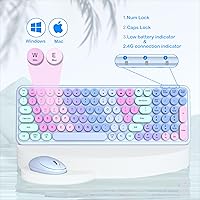
Aesthetic Design
91%
The gradient rainbow colorway is the defining reason most buyers choose this combo over plainer alternatives, and in person it delivers on that promise. Students setting up a dorm desk and home office workers replacing a dull black keyboard both report that the visual impact is genuinely striking rather than garish or cheap-looking.
There is no LED backlighting, which means the rainbow effect disappears entirely in low-light or nighttime environments — the color lives in the physical keycap printing and body finish only. Buyers who pictured glowing keys will find this distinction significant and worth understanding clearly before purchasing.
Setup & Ease of Use
88%
Plug-and-play functionality is one of the strongest arguments for this combo — there are no drivers to hunt down, no pairing buttons to hold, and no setup screens to navigate. For less tech-savvy buyers or students just wanting to get working quickly, going from box to typing in under a minute is genuinely appreciated.
The nano receiver is small enough to misplace easily if removed and set down between uses, which is a recurring frustration for users who share desks or frequently move setups. A handful of buyers also note that the auto-sleep wake delay, though brief, can feel disruptive when returning to the desk after a longer break.
Cleaning & Maintenance
86%
The removable keycap design is a standout practical feature at this price tier — lifting the caps off before a study session or after a coffee spill makes thorough cleaning genuinely accessible. The floating key base also exposes the plate clearly, making a wipe-down quick and far more complete than compressed air ever achieves.
Removing keycaps repeatedly over time can gradually loosen the switch stems on budget membrane keyboards, potentially affecting key responsiveness down the line — a trade-off worth keeping in mind. The mouse, by contrast, offers no special cleaning advantages and accumulates dust and grime in its crevices at the same rate as any standard budget peripheral.
Wireless Connectivity
84%
The 2.4GHz nano receiver delivers a consistently stable connection in typical home and office environments, with users reporting very few dropout events during normal daily use. The 33-foot operational range means this colorful wireless set handles couch-to-TV setups and open-plan rooms without signal degradation.
Interference from other 2.4GHz devices nearby — routers, cordless phones, or competing wireless peripherals — can occasionally cause brief input lag, a known limitation of the RF frequency band. There is also only one shared receiver, so the keyboard and mouse cannot be split across separate host devices.
Value for Money
83%
For anyone shopping with a tight budget, this colorful wireless set punches noticeably above its price tier when aesthetics and convenience are factored in together. Buyers consistently cite it as one of the more visually distinctive combos available at this price, making it a smart choice for students or anyone dressing up a home office without overspending.
Performance-minded buyers will quickly notice that the savings come at a cost to build material quality and mouse tracking precision — two areas where the gap versus slightly pricier options becomes apparent during daily use. The value equation is strongest when looks and ease of use are the top priorities, not raw output or durability.
Compatibility
81%
19%
Coverage across Windows 7, 8, 10, and XP plus Mac means this colorful wireless set works across virtually every operating system found in a typical home or student environment. The plug-and-play recognition is immediate, removing any version-specific driver concerns that can complicate cheaper peripherals.
Chrome OS and Linux are not officially supported, which may matter for buyers on non-standard setups even though basic HID functions sometimes work on those platforms. There is no Bluetooth option, meaning devices without a USB-A port — such as newer thin laptops and most tablets — will require a separate adapter.
Warranty & Support
79%
21%
A 24-month support window with a stated 24-hour response commitment is a notably strong guarantee for a product at this price point, providing buyers with meaningful recourse if issues emerge. This is particularly reassuring for gift buyers who want some assurance that the recipient will be covered after the purchase.
The support is manufacturer-direct rather than backed by a recognized third-party warranty program, meaning actual service quality is harder to independently verify. With only 154 published reviews at time of analysis, there is limited documented evidence of how the team performs when problems are escalated beyond initial contact.
Hotkey Functionality
77%
23%
Twelve dedicated hotkeys for media control, volume adjustment, and browser shortcuts represent a genuine workflow convenience for students and home office users who prefer keeping hands off the mouse for common tasks. They activate reliably out of the box without any software configuration required.
The hotkey layout is entirely fixed — there is no software or utility to reassign functions or build custom shortcuts, which limits the combo's flexibility for anyone with a non-standard workflow. Users who depend on specialized key combinations for creative or technical applications will find the preset selection cannot be adapted to suit their needs.
Ergonomics
68%
32%
The built-in keyboard tilt angle provides a more natural wrist position for most users during moderate typing sessions, removing the immediate need for a separate wrist rest in a basic home setup. The lightweight body also makes it easy to reposition the keyboard throughout the day without effort.
The tilt angle is fixed and cannot be adjusted, which limits comfort for users with specific wrist or posture requirements who benefit from variable elevation. The mouse body follows a fairly generic shape without dedicated palm, claw, or fingertip grip contouring, making it less comfortable during longer pointing or scrolling sessions.
Typing Feel
62%
38%
For casual typing — writing an email, taking lecture notes, or filling out web forms — the membrane keys feel adequately responsive and the floating key design adds a mild tactile character that typical budget keyboards lack. The light actuation weight keeps finger fatigue low during shorter work sessions.
Heavy typists and anyone transitioning from a mechanical keyboard will likely find the membrane feel disappointingly soft and imprecise, a criticism that surfaces in buyer reviews with noticeable regularity. Long writing sessions amplify the sensation of mushy key presses, and the shallow travel depth frustrates touch typists who rely on consistent keystroke feedback.
Battery Life
73%
27%
The auto-sleep feature meaningfully extends how long a set of AA batteries lasts by powering both devices down during inactivity and waking them within approximately 2 seconds on input. The low-battery LED provides enough advance warning to swap cells before any work is interrupted unexpectedly.
Unlike rechargeable peripherals, this rainbow keyboard combo depends on disposable AA batteries for both units, adding a recurring cost and inconvenience that some buyers underestimate at the point of purchase. Real-world battery duration varies significantly with usage intensity, and the limited review pool makes it difficult to establish a reliable average lifespan from buyer reports.
Build Quality
59%
41%
The keyboard body is light enough to reposition easily on any desk surface, and the key tops carry a smooth finish that feels pleasant under the fingertips during casual use. For a budget peripheral, the overall construction is on par with comparable combos competing in the same tier.
The plastic housing on both the keyboard and mouse feels noticeably hollow and lightweight — a characteristic that reads as fragile to buyers accustomed to denser, more substantial peripherals. Several reviewers flag visible body flex under moderate pressure as a concern for long-term durability, especially for users who type with any real force behind their keystrokes.
Mouse Performance
57%
43%
For everyday tasks — moving between browser tabs, clicking through documents, and general desktop navigation — the optical mouse is functional and keeps up without noticeable lag under the 2.4GHz connection. Casual users who stick to light daily work will find little reason to complain about it in practice.
Users attempting any precision-dependent work — photo editing, graphic design, or fast spreadsheet navigation — regularly note that the tracking feels unsteady and imprecise compared to even modestly priced standalone mice. There is no DPI adjustment available, meaning the fixed sensitivity cannot be tuned to individual preferences or task requirements.

Suitable for:

The Links9+ Rainbow Wireless Keyboard Mouse Combo is a solid choice for anyone whose buying decision starts with how something looks on a desk rather than how it performs under pressure. College students setting up a dorm room, remote workers tired of a lifeless all-black keyboard, and teenagers wanting a personality-driven peripheral will all find this colorful wireless set easy to justify. The plug-and-play setup means there is genuinely zero barrier to getting started — no driver downloads, no compatibility headaches. It covers both Windows and Mac, so it works across most household setups without a second thought. Gift buyers will appreciate that it looks noticeably more distinctive than a standard combo, making it a crowd-pleasing option for birthdays and holidays. Anyone stepping up from a wired keyboard for the first time will also enjoy the immediate relief of a clutter-free desk.
Not suitable for:

If your work involves long writing sessions, heavy data entry, or anything where typing comfort and key feel genuinely matter, the Links9+ Rainbow Wireless Keyboard Mouse Combo is probably not your best match. Membrane keyboards at this price tier simply do not have the tactile response or key travel depth that serious typists depend on, and this one is no exception. Gamers and graphic designers should also look elsewhere — the optical mouse bundled here is built for casual use, not for tracking precision or high-speed cursor control. Anyone who needs a compact or tenkeyless layout for a tight desk space will find the full 100-key footprint more than they bargained for. And if you are working in a demanding environment where build quality needs to hold up over years of heavy daily use, the plastic construction here is unlikely to inspire long-term confidence.
Specifications

  • Connectivity: Uses 2.4GHz RF wireless technology to maintain a stable, low-latency connection between the keyboard, mouse, and host device.
  • Wireless Range: Rated for reliable operation up to 33ft (10m) from the connected device, covering most standard desk and small-room setups comfortably.
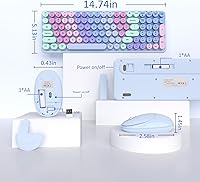
  • Key Count: Full 100-key layout includes a numeric keypad, dedicated arrow keys, and a complete function row for standard desktop use.
  • Hotkeys: Twelve dedicated shortcut keys provide one-press access to media playback controls, volume adjustment, and common browser navigation functions.
  • Keycap Design: Individual keycaps are fully removable and mounted on a floating-key chassis, allowing more thorough cleaning than traditional membrane keyboards permit.
  • OS Support: Officially compatible with Windows 7, 8, 10, and XP, as well as Mac operating systems, requiring no driver installation on any supported platform.
  • Power Source: Both the keyboard and mouse are powered by AA batteries, with each unit requiring its own separate battery set to operate.
  • Auto-Sleep: Both devices automatically enter a low-power hibernation state after a period of inactivity and resume within approximately 2 seconds upon any input.
  • Battery Alert: A built-in low-battery LED indicator activates when power reserves are running low, providing advance warning before either device shuts down unexpectedly.
  • USB Receiver: A nano USB receiver handles the 2.4GHz wireless pairing and can be stored inside the mouse battery compartment when not in active use.
  • Dimensions: The packaged combo measures 15.63 x 8.58 x 1.85 inches, consistent with a standard full-size keyboard and compact mouse layout.
  • Weight: The complete packaged unit weighs 1.87 pounds, making it manageable for occasional transport between a home desk and a study space.
  • Driver Requirement: No drivers or companion software are needed; the combo operates as a standard plug-and-play HID peripheral on all supported operating systems.
  • Warranty: The manufacturer provides 24 months of customer support and commits to responding to reported issues within 24 hours of contact.
  • Color Variant: The reviewed variant features a Purple Colorful gradient finish, with rainbow-gradient printing applied across the keycaps and mouse body.
  • Keyboard Type: The keyboard uses membrane switch technology beneath a floating-key aesthetic, delivering a light actuation feel typical of budget-tier peripherals.
  • Ergonomic Tilt: The keyboard is built with a fixed upward tilt angle intended to encourage a more natural wrist position during extended typing sessions.

Related Reviews

Arteck HW192 Wireless Keyboard and Mouse Combo
78%
78%
Build Quality
72%
Typing Experience
63%
Mouse Comfort & Ergonomics
81%
Battery Life
69%
Wireless Connectivity
More
HP 18H24AA Wireless Keyboard and Mouse Combo
79%
91%
Value for Money
93%
Ease of Setup
74%
Keyboard Typing Experience
63%
Mouse Comfort & Ergonomics
86%
Wireless Reliability
More
GEEZER Wireless Keyboard and Mouse Combo
72%
83%
Value for Money
91%
Aesthetic Design
94%
Ease of Setup
67%
Typing Feel
62%
Mouse Quality
More
MPTOG S801AG Wireless Keyboard and Mouse Combo
75%
88%
Aesthetic Design
93%
Ease of Setup
78%
Typing Feel
61%
Mouse Tracking Accuracy
82%
Wireless Reliability
More
Vssoplor Wireless Keyboard and Mouse Combo
82%
91%
Value for Money
84%
Keyboard Typing Experience
61%
Mouse Ergonomics
88%
Wireless Connectivity & Stability
72%
Battery Life
More
SABLUTE Wireless Backlit Keyboard and Mouse Combo
77%
83%
Value for Money
62%
Typing Experience
71%
Mouse Performance
84%
Wireless Connectivity
88%
Battery Life
More
Harburfine Wireless Keyboard and Mouse Combo
85%
88%
Ergonomics & Comfort
93%
Quietness & Noise Level
85%
Wireless Connectivity & Range
84%
Battery Life & Power Management
90%
Setup & Installation
More
FOPETT Retro Wireless Keyboard and Mouse Combo
82%
93%
Design & Aesthetics
76%
Typing Experience
67%
Mouse Performance
88%
Wireless Connectivity
91%
Battery Life
More
EDJO Wireless Keyboard and Mouse Combo
76%
88%
Value for Money
94%
Ease of Setup
71%
Keyboard Typing Feel
63%
Mouse Performance
86%
Wireless Connectivity & Range
More
UBOTIE Wireless Keyboard and Mouse Combo
79%
88%
Value for Money
74%
Typing Experience
83%
Keycap Design & Aesthetics
67%
Mouse Performance
81%
Wireless Connectivity & Range
More

FAQ

Not at all. Just plug the nano USB receiver into any open USB port and both the keyboard and mouse should be recognized right away. It works this way on Windows and Mac without any downloads or setup screens.

There's a dedicated storage slot for the nano receiver inside the mouse battery compartment. It's a small but genuinely useful detail that keeps the receiver safe and prevents it from getting lost between uses.

The listing confirms that AA batteries are required but does not explicitly state they are included. To be safe, have a set of AA batteries ready for both the keyboard and the mouse before your first use so you are not caught waiting.

It varies depending on how heavily you type and use the mouse, but the auto-sleep feature meaningfully extends battery life by powering down both devices during inactivity. The low-battery LED gives you a heads-up before things cut out, which helps you plan rather than get caught off guard mid-session.

Official support covers Windows and Mac only. That said, Chrome OS generally recognizes standard plug-and-play HID devices, so basic keyboard and mouse functions may work on a Chromebook. For iPad, you would need a USB adapter and results can vary — it is not a guaranteed setup.

The removable keycaps make this much easier than on most keyboards at this price. Pop the caps off carefully using a keycap puller or a flat, soft tool, wipe down the exposed base plate, and clean each cap individually. It takes a few minutes but gives you access to areas that compressed air simply cannot reach.

It is comfortable enough for casual and moderate typing tasks, but this is a membrane keyboard, so the feel is soft and fairly light rather than crisp or tactile. For schoolwork, light office use, or general browsing it holds up fine. If you are a fast or heavy typist used to mechanical keyboards, the feedback may feel a bit flat over longer sessions.

The rainbow effect is entirely in the physical gradient printing on the keycaps and the body of the keyboard — there is no LED backlighting involved. It looks vivid and colorful in a well-lit room, but in a dark environment the keys will not glow.

The Links9+ Rainbow Wireless Keyboard Mouse Combo comes in retail packaging that reflects the colorful, playful theme of the product itself. It is a reasonable gift presentation, though you should not expect premium or luxury unboxing-style packaging at this price tier.

The product description does not mention adjustable DPI or any companion software for configuring the mouse. This is a standard optical mouse optimized for everyday tasks like document work and web browsing. If you need precise sensitivity control for design work or gaming, a dedicated mouse with DPI adjustment would serve you better.