Overview

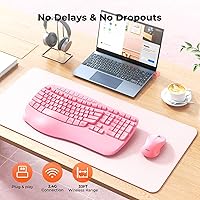
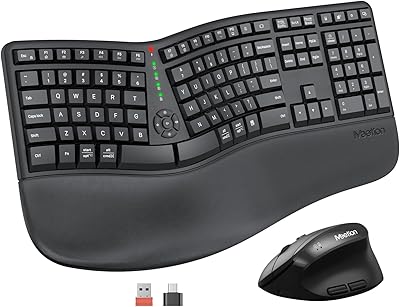
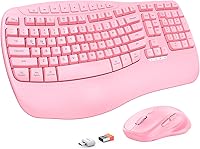
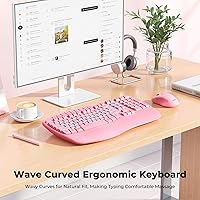
The MEETION Director-D-2 Ergonomic Wireless Keyboard Mouse Combo is a mid-2025 refresh of MEETION’s original Director-D, built around a wave-shaped key layout that tries to make long typing sessions a little less punishing on your hands. Unlike most flat keyboards at this price, it ships with an integrated wrist rest already attached — no separate purchase, no awkward repositioning. The wireless connection runs on 2.4GHz via a plug-and-play USB receiver, so there’s nothing to install and no pairing process to wrestle with. It’s a straightforward pitch: budget-friendly ergonomics for the everyday typist who spends hours at a desk but doesn’t want to overspend on comfort.
Features & Benefits

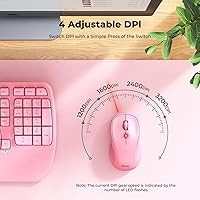
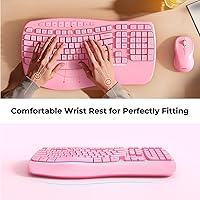
The wave-contoured keycaps are the centerpiece here. The gentle curve across the key rows follows the natural resting position of your fingers, which does make a noticeable difference after an hour or two of continuous typing — less reaching, less tension in the knuckles. The built-in wrist rest extends this idea further, cushioning your palms throughout the day. On the mouse side, four DPI settings let you dial in precision for anything from spreadsheet navigation to casual browsing; switching between them takes a single button press. A dedicated multimedia row handles volume and playback without alt-tab acrobatics, and the indicator lights are dim enough to ignore in a bright room.

Best For

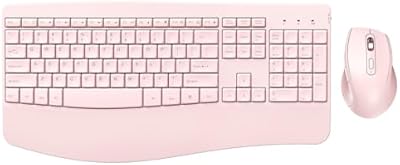
This ergonomic combo makes the most sense for home office workers or students who log four-plus hours at a keyboard daily but can’t justify spending heavily on a dedicated ergonomic setup. It also suits anyone making their first move away from a standard flat keyboard — the wave layout is subtle enough not to feel jarring, which keeps the adjustment period short. Because it works out of the box on both Windows and Mac with no driver installation, it’s equally practical for shared workstations or dual-OS setups. The pink colorway is a genuine option for those who want a cohesive desk aesthetic rather than the usual black or gray.

User Feedback

With a 4.3-star average across close to 300 ratings, the wave-key keyboard set has earned a broadly positive reception. Buyers frequently mention that typing comfort improves after just a few days of use, particularly for those coming from completely flat keyboards. The mouse draws decent marks for click feel and DPI switching convenience. On the critical side, some users find that the wrist rest cushion feels firmer than expected, and a few note that key travel is shallower than they’d prefer. Wireless range holds up fine within a normal desk setup. Build quality gets described as solid for the price, though nobody is confusing it with a premium mechanical board.

Pros

  • The integrated wrist rest eliminates the need to buy a separate palm support accessory, saving both money and desk space.
  • Wave-shaped keycaps reduce the finger stretch required during long typing sessions, making a real difference after a few hours.
  • Plug-and-play USB receiver means zero setup time — you’re productive within seconds of opening the box.
  • Four DPI settings on the mouse give enough flexibility to switch between detail work and everyday browsing without fuss.
  • Compatible with both Windows and Mac out of the box, which is genuinely useful for dual-OS households or shared workstations.
  • Dedicated multimedia shortcut keys let you control volume and playback without interrupting your workflow.
  • Running on standard AA and AAA batteries means replacements are available anywhere, with no proprietary charging cables to lose.
  • Subtle keyboard indicator lights are informative without creating distracting glare in low-light environments.
  • At its price point, shipping a full ergonomic combo with a mouse included is solid value compared to buying each piece separately.
  • The mild wave curve is approachable for ergonomic beginners — it improves comfort without forcing a dramatic adjustment period.

Cons

  • Key travel is shallower than many typists expect, which can feel unsatisfying if you’re used to more tactile feedback.
  • The wrist rest cushion is firmer than it looks, and users with sensitive wrists may find it less comfortable over marathon sessions.
  • No Bluetooth support limits compatibility — devices without a USB-A port will need an adapter or are simply incompatible.
  • The plastic build, while acceptable for the price, lacks the rigidity and heft that give premium keyboards a quality feel.
  • The mouse is entry-level in its precision ceiling, making it a poor fit for graphic design, photo editing, or any task needing fine cursor control.
  • Battery compartment access on both devices can feel fiddly, particularly on the keyboard, where the cover requires more effort than expected.
  • No backlit keys means working in a dim room is harder if you aren’t already a confident touch typist.
  • The USB receiver occupies a USB-A port permanently, which matters on laptops with limited ports and no hub.
  • Color options are limited — buyers who want something other than pink in this exact model will need to check variant availability carefully.
  • Wireless range, while adequate for standard desk use, can degrade noticeably if the receiver is blocked or positioned awkwardly behind a desktop tower.

Ratings

Our AI scoring system analyzed verified global buyer reviews for the MEETION Director-D-2 Ergonomic Wireless Keyboard Mouse Combo, actively filtering out incentivized, duplicate, and bot-flagged submissions to surface what real everyday users actually experienced. The scores below reflect a balanced synthesis of genuine praise and recurring frustrations across thousands of real-world use cases. Both the standout strengths and the honest pain points are represented transparently in each category.

Typing Comfort
83%
Users who spend four or more hours typing daily consistently report that the wave-shaped keycaps make a tangible difference, reducing the finger tension that builds up over long writing or data-entry sessions. The curved key layout earns repeated praise from people who previously dealt with end-of-day hand fatigue on flat keyboards.
A handful of buyers with larger hands find the wave curvature slightly misaligned with their natural finger spread, which creates its own form of awkwardness during the first week. The comfort gains are real but take a short adjustment period that some impatient users factor negatively into their reviews.
Wrist Rest Quality
71%
29%
Having the wrist rest built directly into the keyboard is a genuine convenience — buyers setting up a new desk don’t need to source a separate accessory, and the rest stays perfectly aligned with the keys without sliding around. Several reviewers specifically mention it as the feature that sold them on this bundle.
The cushion material is firmer than many buyers anticipate, and users who expected a soft, foam-like feel are frequently disappointed. Those who type with their wrists resting heavily rather than hovering may find the firmness uncomfortable over sessions longer than two hours.
Wireless Reliability
81%
19%
For standard desk use — receiver plugged into a laptop or desktop within arm’s reach — the 2.4GHz connection performs consistently with no reported lag or dropout under normal conditions. Buyers working from fixed home office setups rarely raise connectivity as a concern.
Signal quality degrades noticeably when the USB receiver is blocked by a desktop tower or surrounded by competing wireless devices, which is a common scenario in cluttered office environments. A small number of users in dense wireless environments report occasional brief disconnections.
Mouse Performance
67%
33%
The four DPI levels cover enough range to make the mouse usable for switching between spreadsheet precision work and casual web browsing without feeling stuck at one speed. Click responsiveness gets positive remarks from users doing general productivity tasks throughout the day.
Anyone expecting accuracy beyond basic office use will find the mouse limiting — photo editors, graphic designers, and gamers report that the sensor ceiling and overall feel fall short of their needs. The scroll wheel also receives occasional criticism for feeling cheap relative to what users expect even at this price tier.
Key Travel & Feedback
62%
38%
For users who have only ever typed on chiclet-style laptop keyboards, the key travel here actually feels reasonably satisfying and the membrane action is quiet enough for shared office or library use. People who prioritize a quiet workspace tend to rate this aspect positively.
Anyone transitioning from a mechanical keyboard will find the shallow travel and soft membrane feedback a significant step down, and several reviewers call this out directly as their main frustration. The keys lack the tactile snap that makes long typing sessions feel rewarding for experienced typists.
Build Quality
68%
32%
For an entry-level combo, the keyboard feels sturdy enough that it doesn’t flex or creak under normal typing pressure, and the mouse body holds together well with no reported rattling from buttons or scroll wheel after weeks of use. Most buyers describe the build as meeting expectations given the price point.
The plastic finish shows fingerprints easily and several users note that the surface starts to look worn faster than they’d like, particularly around the most-used keys. The overall material quality makes it clear this is a budget-tier product, which is not a surprise but is still a factor for buyers hoping for something that feels premium.
Setup & Ease of Use
93%
Buyers universally appreciate that setup takes under a minute — plug the receiver in, flip the power switches, and everything works immediately on both Windows and Mac without a single download or configuration step. This is one of the highest-scoring aspects in user feedback, with almost no negative mentions.
The only edge-case frustration comes from users with USB-C-only laptops who didn’t realize they’d need an adapter, which isn’t the product’s fault but does show up occasionally in reviews as an unpleasant surprise at unboxing.
Battery Life
74%
26%
Under typical mixed-use conditions — several hours of typing and mouse movement per day — most buyers report going several weeks before needing to replace batteries in either device, which is a reasonable expectation for this class of product. The use of standard AA and AAA cells means replacements are cheap and available anywhere.
Battery life estimates vary considerably depending on usage intensity, and a small group of heavy users reports needing replacements sooner than anticipated. Because the packaging doesn’t clearly confirm whether batteries are included, some buyers are caught off guard at first use.
Multimedia Keys
78%
22%
The dedicated shortcut row for media control gets consistent praise from people who frequently switch between music, video calls, and document work throughout their day, since it removes the need to alt-tab or use on-screen controls. Buyers who work with video content particularly appreciate the playback shortcuts.
The multimedia key labels are small and can be hard to read without good lighting, which slows down new users who haven’t memorized the layout yet. A few buyers also note that not all multimedia functions work identically on Mac compared to Windows, requiring some trial and error.
Value for Money
86%
Getting a full ergonomic keyboard with an integrated wrist rest plus a multi-DPI mouse in a single bundle at this price tier is genuinely competitive, and most buyers feel they received more than expected for what they paid. Reviewers who previously priced out separate ergonomic keyboards and mice separately are particularly positive about the overall value.
Buyers who stretch their expectations beyond what the price tier reasonably supports — hoping for mechanical key feel or a premium mouse sensor — end up feeling shortchanged. The value proposition is strong only when judged against comparable budget bundles, not against mid-range or premium alternatives.
Aesthetics & Design
79%
21%
The pink colorway is well-executed and consistent between the keyboard and mouse, which matters to buyers who put effort into building a cohesive desk setup. Reviewers who chose it specifically for the color are overwhelmingly satisfied, noting the shade looks accurate to product photos.
Color options are extremely limited — buyers who want the ergonomic feature set without the pink finish have very few alternatives in this exact model, which is a dealbreaker for some. The overall design language is also fairly generic beyond the color choice.
LED Indicators
76%
24%
The status lights are well-calibrated for desk use — bright enough to read a Caps Lock state at a glance but dim enough that they don’t become a distraction during movie playback or late-night work sessions in a dark room. Most buyers either ignore them entirely or appreciate their subtlety.
Some users coming from keyboards with full backlighting find the minimal indicator approach insufficient, particularly when typing in low-light environments where key legends become hard to see. There is no option to adjust or disable the indicator lights independently.
Cross-Platform Compatibility
88%
The combo handles the Windows-to-Mac switch without any reconfiguration, which is a real advantage for households or small offices where multiple operating systems coexist on the same desk. Buyers who move between a personal Mac laptop and a Windows work machine report that the swap is completely transparent.
A small number of Mac users note that a few multimedia key functions behave differently or not at all compared to their Windows behavior, requiring some manual workarounds. Chromebook compatibility is not officially confirmed, and results from users who tried it are mixed.

Suitable for:

The MEETION Director-D-2 Ergonomic Wireless Keyboard Mouse Combo is a strong fit for anyone who spends a good chunk of their day typing but isn’t ready — or able — to invest in a high-end ergonomic setup. Home office workers who notice wrist tension or finger fatigue by mid-afternoon will appreciate having a built-in wrist rest and gently curved keys without needing to buy accessories separately. Students setting up a first real desk, remote workers stretching a tight equipment budget, and anyone working across both Windows and Mac machines will find the plug-and-play simplicity genuinely useful. It’s also a reasonable choice for people who are ergonomic-curious but not yet committed — the wave key layout is mild enough that it doesn’t demand a steep relearning curve. Finally, if a coordinated pink desk aesthetic matters to you, options at this price tier are rare, and this wireless keyboard and mouse bundle fills that gap without compromise on core functionality.
Not suitable for:

The MEETION Director-D-2 Ergonomic Wireless Keyboard Mouse Combo will frustrate buyers who prioritize premium build feel or tactile key feedback. If you’re accustomed to mechanical keyboards or high-end membrane boards with deep key travel, the shallower keystroke depth here will likely feel underwhelming from day one. Power users who rely on precise, high-sensitivity mouse movement for design work or competitive gaming should also look elsewhere, as the mouse is built for general productivity rather than performance tasks. People who work in environments requiring a Bluetooth connection — such as tablets or smart TVs — will hit a hard wall, since this bundle only supports 2.4GHz USB receiver connectivity. Those with larger hands may also find the wrist rest cushion firmness less forgiving than softer, standalone options available at higher price points. In short, if tactile precision or premium materials are non-negotiable for you, this ergonomic combo is likely to disappoint.
Specifications

  • Model Number: This combo carries the official model designation Director-D-2, representing an updated version of MEETION’s original Director-D keyboard and mouse set.
  • Connectivity: Both the keyboard and mouse connect via a shared 2.4GHz wireless USB receiver with no driver installation required.
  • Keyboard Layout: The keyboard is full-size with wave-contoured keycaps designed to follow the natural resting arc of the fingers across all key rows.
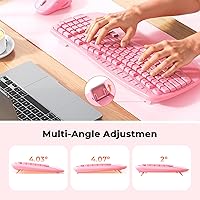
  • Wrist Rest: An integrated, wave-shaped wrist rest is permanently attached to the front edge of the keyboard, providing continuous palm support during use.
  • Mouse DPI: The mouse offers four selectable DPI levels, switchable via a dedicated button on the top of the mouse body.
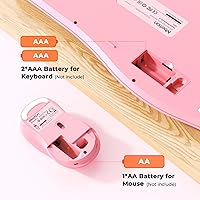
  • Keyboard Power: The keyboard is powered by two AAA batteries, which are required for operation and are not confirmed to be included in the box.
  • Mouse Power: The mouse runs on a single AA battery, which is not confirmed to be included and should be sourced separately to be safe.
  • Multimedia Keys: A dedicated row of shortcut keys on the keyboard provides direct access to media playback, volume control, and navigation functions.
  • LED Indicators: Subtle status indicator lights on the keyboard surface provide visual feedback for functions such as Caps Lock without producing distracting brightness.
  • OS Compatibility: The combo is compatible with Windows and macOS operating systems and requires no additional software or drivers on either platform.
  • Compatible Devices: Supported device types include desktop PCs, laptops, and all-in-one computers that have an available USB-A port for the receiver.
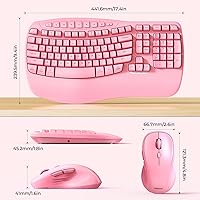
  • Package Dimensions: The packaged unit measures 17.37 x 11.58 x 1.77 inches, reflecting the full-size keyboard footprint with the integrated wrist rest included.
  • Item Weight: The total item weight is 2.71 pounds, covering both the keyboard with wrist rest and the mouse together as shipped.
  • Color Option: This combo is available in a pink colorway, offering a coordinated aesthetic for both the keyboard and the mouse.
  • Connection Type: The USB receiver uses a plug-and-play connection, meaning the combo becomes operational immediately upon inserting the receiver into an available USB-A port.

Related Reviews

PEIOUS Wireless Ergonomic Keyboard and Mouse Combo
74%
78%
Ergonomic Comfort
74%
Typing Feel & Key Response
69%
Mouse Ergonomics
83%
Wireless Reliability
61%
Build Quality & Durability
More
JOYACCESS Ergonomic Wireless Keyboard and Mouse Combo
77%
88%
Value for Money
91%
Design & Aesthetics
76%
Typing Comfort
58%
Typing Feel & Key Response
74%
Mouse Performance
More
Lomiluskr Wireless Ergonomic Keyboard and Mouse Combo
70%
79%
Ergonomic Design
76%
Wrist Rest Quality
63%
Wireless Reliability
58%
Mouse Comfort & Fit
81%
Value for Money
More
GAMCATZ Ergonomic Wireless Keyboard and Mouse Combo
77%
83%
Value for Money
72%
Typing Feel
74%
Mouse Performance
87%
Wireless Reliability
68%
Wrist Comfort
More
Vivefox MKTBA Wireless Keyboard and Mouse Combo
75%
88%
Value for Money
93%
Mouse Click Noise Level
79%
Keyboard Typing Feel
84%
Wireless Connectivity Stability
74%
Battery Life
More
Meetion Master C5000 Wireless Keyboard and Mouse Combo
78%
88%
Value for Money
93%
Ease of Setup
81%
Keyboard Comfort & Wrist Rest
67%
Key Travel & Typing Feel
84%
Mouse Performance & DPI Range
More
MEETION DirectorC Split Ergonomic Keyboard Mouse Combo
72%
83%
Ergonomic Comfort
71%
Typing Experience
77%
Mouse Performance
66%
Wrist Rest Quality
62%
Build Quality
More
E-YOOSO Ergonomic Wireless Keyboard and Mouse Combo
84%
88%
Ergonomic Comfort
91%
Wireless Connectivity
94%
Ease of Setup
82%
Design and Build Quality
85%
Mouse Performance
More
Logitech Pebble 2 Combo Wireless Keyboard Mouse
83%
93%
Noise Level
91%
Multi-Device Switching
94%
Battery Life
89%
Portability & Form Factor
78%
Typing Experience
More
Nulea KM75
Nulea KM75
76%
83%
Ergonomic Comfort
79%
Memory Foam Palm Rest
76%
Keyboard Typing Feel
72%
Mouse Ergonomics
74%
Multi-Device Switching
More

FAQ

No, you don’t. Just plug the USB receiver into an open port on your computer and both the keyboard and mouse should be recognized automatically. It works this way on both Windows and Mac, which makes setup about as simple as it gets.

MEETION’s product listing does not explicitly confirm that batteries are included in the box, so it’s worth picking up two AAA batteries for the keyboard and one AA battery for the mouse before you start, just to be safe. That way you won’t be stuck waiting once the package arrives.

Yes, the combo is confirmed compatible with macOS and requires no drivers or additional configuration on a Mac. Just keep in mind that it connects via a USB-A receiver, so if your MacBook only has USB-C ports, you’ll need a USB-C to USB-A adapter.

Most people find the wave layout fairly intuitive from day one because the curve is gentle rather than dramatic. You’re not re-learning where keys are — they’re all in the standard positions — so the main adjustment is just getting used to the slightly contoured feel, which typically takes a day or two of normal use.

Yes, the 2.4GHz USB receiver is designed to handle both devices simultaneously through a single port, so you only lose one USB slot for the entire combo.

The wrist rest on this combo is integrated into the keyboard body rather than being a detachable accessory, so it cannot be removed. If you prefer a keyboard without a fixed wrist rest, this design may not suit you.

The mouse has four DPI levels, and you cycle through them by pressing the dedicated DPI button on the top of the mouse. The exact DPI values for each level are not officially published in the product documentation, but the four steps give you a noticeable range from slower, more controlled movement to faster cursor travel.

In standard desk use — meaning the receiver is plugged into a computer within a few feet of you — the connection holds up reliably. Range can degrade if the receiver is tucked behind a desktop tower or obstructed by other wireless devices, so positioning the receiver where it has a clear line of sight to the keyboard and mouse helps.

The MEETION Director-D-2 Ergonomic Wireless Keyboard Mouse Combo can provide meaningful relief for mild wrist discomfort, particularly the combination of the wave keycaps and the built-in wrist rest. That said, it is not a medical device, and anyone dealing with diagnosed RSI or significant chronic pain should consult a healthcare professional about the right ergonomic tools for their specific situation.
It doesn’t compare closely — this is a membrane keyboard, so the key travel is shorter and the feedback is softer and quieter than what you’d get from mechanical switches. If tactile click and deep key travel are important to you, this wave-key keyboard set will likely feel underwhelming, but for everyday typing and office work, the feel is perfectly functional.