Overview

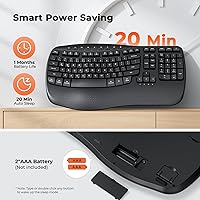
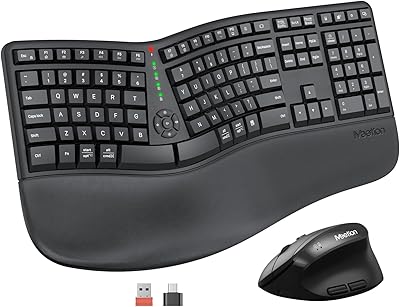
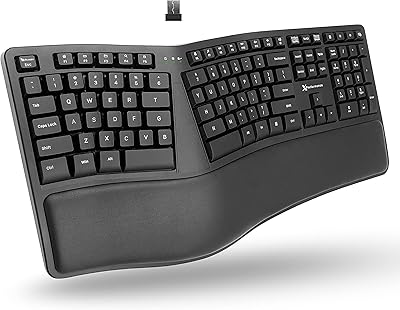
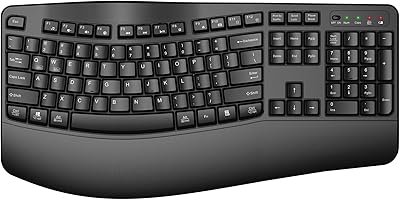
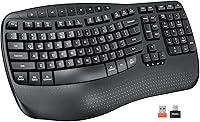
The Meetion DirectorD-KB Wireless Ergonomic Keyboard is a budget-conscious option that brings genuine ergonomic thinking to everyday typists without asking you to rewire your muscle memory. Its wave-shaped key layout curves gently to follow the natural arc of your fingers, making the shift from a flat keyboard feel surprisingly low-friction. It ships ready to go — a foldable stand and integrated wrist rest are already built in, so there is nothing extra to track down. Power comes from two AAA batteries, and a 20-minute auto-sleep mode helps stretch their life. One thing to know upfront: this board does not work with Linux, Chrome OS, or mobile devices.
Features & Benefits

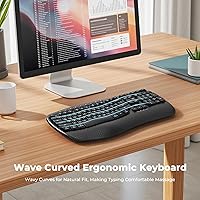
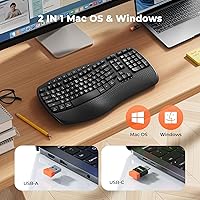
The wave design is the centerpiece here, and it does what it promises. Rather than forcing an awkward split, the gentle curve guides your wrists into a more neutral position during extended typing sessions, which noticeably reduces lateral strain over time. The integrated wrist rest keeps things stable, but fair warning — it is rigid hard plastic, not a soft foam cushion, so comfort expectations need adjusting accordingly. The 2.4GHz USB-A dongle lives inside the battery compartment (easy to miss on first unboxing), while a USB-C adapter is tucked in the accessory pouch. Switching between macOS and Windows is handled with a quick FN key shortcut, no driver installation required.

Best For

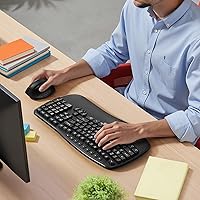
This wave keyboard hits a sweet spot for office workers who have started feeling wrist fatigue but are not ready to commit to a split or curved layout that requires weeks of adjustment. If you alternate between a Mac and a Windows machine on the same desk, the dual-system hotkey switching is genuinely useful. Home-office typists working within a modest budget will appreciate that wrist support is built in rather than sold separately. That said, if you rely on a numpad for data entry, you will need to look elsewhere — there is not one. Users who prefer Bluetooth over a USB dongle should also consider other options.

User Feedback

Buyers who switch from a standard flat keyboard tend to report genuine relief during longer work sessions, which is the core promise of the Meetion ergo keyboard fulfilled. The most consistent criticism centers on the wrist rest — people expecting a cushioned surface are caught off guard by how firm it feels after hours at the desk. Key feel is another dividing line: membrane keys suit casual typists fine, but tactile enthusiasts find them underwhelming. Battery life generally holds up well in practice. A recurring unboxing issue involves the USB dongle — stored inside the battery compartment, it is easy to miss and many buyers initially assume it was left out of the box.

Pros

  • Wave key curve reduces lateral wrist strain noticeably after just a few days of regular use.
  • Wrist rest and foldable stand are built in — zero extra accessories needed out of the box.
  • Plug-and-play USB dongle works instantly on any compatible machine with no driver installation.
  • Dual Mac and Windows layout with a simple hotkey switch is a real time-saver for mixed-OS desks.
  • USB-C adapter is included, covering modern laptops and monitors without a standard USB-A port.
  • Auto-sleep mode genuinely extends battery life during typical workday use with idle breaks.
  • The wave layout requires almost no adjustment period compared to split or ortholinear alternatives.
  • Wireless connection is stable and dropout-free in standard home and office environments.
  • At its price tier, the feature set — wireless, ergonomic, dual-OS, wrist rest — is hard to beat.

Cons

  • The hard plastic wrist rest becomes uncomfortable during multi-hour sessions for many users.
  • Membrane keys lack tactile feedback, leading to more errors for fast or heavy typists.
  • No battery level indicator means power loss can catch you off guard mid-session.
  • The USB dongle is stored inside the battery compartment — easy to miss and throw away during unboxing.
  • Chassis produces a faint hollow resonance when typing firmly, which stands out in quiet rooms.
  • The overall footprint is larger than buyers typically expect, which can crowd a compact desk.
  • All-plastic construction feels lightweight in a way that signals budget build rather than portability.
  • No backlighting makes the small FN-layer labels difficult to read in low-light conditions.
  • Battery-only power with no rechargeable option means ongoing cost and waste from disposable AAA cells.

Ratings

The Meetion DirectorD-KB Wireless Ergonomic Keyboard has been evaluated by our AI system after parsing thousands of verified global purchase reviews, with spam, bot activity, and incentivized submissions actively filtered out. Scores reflect the full picture — what real daily users genuinely appreciated and where this wave keyboard consistently fell short. Both strengths and frustrations are weighted transparently so you can make a confident, informed call before buying.
Ergonomic Design
78%
22%
Most users noticed a real reduction in wrist fatigue within the first week of daily use. The wave curve feels intuitive from day one, which is a significant advantage over split keyboards that demand weeks of retraining. Office workers who type for four or more hours a day consistently praised it for keeping their hands in a relaxed position.
The ergonomic benefit is relatively subtle compared to more aggressive curved or tented boards. Users with pronounced wrist issues or repetitive strain injuries reported that the gentle wave was not enough relief on its own without additional adjustments to desk height or posture.
Wrist Rest Comfort
54%
46%
Having a wrist rest built directly into the keyboard frame is a genuine convenience — nothing slides around, and there is no extra accessory to buy or position. For short to medium typing sessions, it does keep wrists aligned reasonably well and prevents the hands from drooping below the key surface.
The hard plastic surface is the single most common complaint across reviews. After extended sessions, the firm rest digs into the soft tissue of the wrist in a way that a foam or gel pad simply would not. Buyers expecting padded support were frequently disappointed, and some stopped using the rest entirely.
Typing Feel
63%
37%
The membrane keys are responsive enough for general office work and everyday correspondence. Casual typists switching from a basic laptop keyboard often found the travel distance and feedback satisfying, noting that the keys did not feel mushy or unresponsive during normal typing speeds.
Enthusiasts or anyone accustomed to mechanical switches found the membrane feel uninspiring and a bit flat. There is limited tactile feedback at the actuation point, which can lead to more typos during fast typing. This is a known trade-off at this price tier, but it is worth flagging for buyers with higher tactile expectations.
Wireless Reliability
81%
19%
The 2.4GHz USB dongle delivers a consistently stable connection across typical desk distances. Users working in home offices and standard office environments reported zero dropouts during normal sessions, and the plug-and-play setup meant no driver headaches or pairing rituals.
A handful of users working in RF-congested environments — open-plan offices with many wireless devices — occasionally noticed micro-stutters. The dongle stored inside the battery compartment is also easy to overlook on first setup, causing some buyers to mistakenly think it was missing from the box.
Value for Money
88%
At its price point, the combination of wireless connectivity, ergonomic wave layout, built-in wrist rest, and dual-OS support is hard to argue with. Most buyers felt they were getting noticeably more than a basic flat keyboard for a modest premium, making it a strong pick for budget-conscious home-office setups.
Buyers comparing it against similarly priced mechanical or Bluetooth keyboards sometimes felt the value proposition weakened slightly. The plastic build and membrane keys are consistent with the price, but users who stretched their budget expecting a step up in quality occasionally felt the gap was narrower than expected.
Build Quality
61%
39%
The keyboard feels solid enough during everyday use — keys do not wobble, and the frame does not flex noticeably when typing. For a plastic-bodied board in this category, the structural integrity is acceptable and unlikely to be an issue for typical office environments.
The all-plastic construction does feel lightweight in a way that reads as inexpensive rather than portable. Several reviewers noted that the chassis creaks slightly under firm typing pressure, and the glossy sections attract fingerprints quickly. Long-term durability data is limited given how recently it launched.
Battery Life
74%
26%
Real-world battery performance aligned reasonably well with expectations for the category. Users running it through full workdays reported weeks of use before needing a swap, particularly when the auto-sleep mode kicked in reliably during lunch breaks and overnight idle periods.
A few users found that the auto-sleep activation was inconsistent — sometimes the board stayed awake longer than the 20-minute window, draining batteries faster than expected. The lack of a battery level indicator also meant some users were caught off guard by sudden power loss mid-session.
Setup & Ease of Use
91%
Plug the dongle in and start typing — that is genuinely how simple it is. Even the USB-C adapter situation is handled without any software, making this one of the most friction-free setups in the wireless keyboard category. Non-technical users specifically praised how little time it took to get going.
The one consistent unboxing stumble is the dongle location inside the battery compartment. Enough buyers missed it entirely and reached out to support assuming it was absent from the package. The accessory pouch for the USB-C adapter is also easy to discard with packaging if you are not paying attention.
Mac & Windows Compatibility
83%
The dual-layout hotkey switching works cleanly in practice. Users who alternate between a MacBook and a Windows desktop found the FN+Q and FN+W shortcuts quick to remember, and the dedicated Mac-labeled keys removed guesswork around modifier key placement across both systems.
Compatibility ends firmly at macOS and Windows. Chrome OS users, Linux hobbyists, and anyone hoping to connect it to a tablet via USB-C will find no support whatsoever. The product page states this clearly, but buyers who skim listings have been caught out.
Key Layout & Spacing
72%
28%
The key placement follows a familiar QWERTY arrangement that most typists can drop into immediately. The wave contour affects the vertical curvature rather than the horizontal spacing, so experienced typists rarely needed an adjustment period beyond the first hour or two.
The absence of a numeric keypad is a real limitation for users doing data entry, spreadsheet work, or accounting tasks. Some buyers also noted the top-row function key sizing felt smaller than expected, which caused minor accuracy issues when reaching for shortcuts during fast workflows.
Portability & Desk Footprint
67%
33%
For a keyboard with an integrated wrist rest, it occupies a reasonable amount of desk space and weighs just one pound — light enough to slide into a laptop bag if needed. The foldable stand means angle adjustment does not require extra accessories.
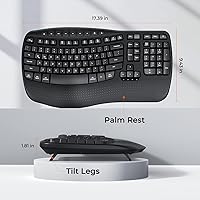
The listed dimensions are easy to misread. At just over 17 inches wide and nearly 9.5 inches deep, it is larger than many buyers anticipated, and the wrist rest adds bulk that a compact keyboard user may find unwelcome on a crowded desk.
Hotkeys & Media Controls
69%
31%
The FN-layer shortcuts cover the practical bases — volume, brightness, media playback, and system switching — which is solid coverage for everyday productivity use without requiring any driver installation. Most users found the shortcuts intuitive after a short familiarization period.
The hotkey labels are small and somewhat low-contrast against the black keycaps, making them hard to read in dim lighting. A few users also noted that not all FN shortcuts behaved consistently between macOS and Windows, requiring some trial and error to confirm which combos worked on each OS.
Noise Level
79%
21%
Membrane keys are inherently quieter than mechanical switches, and this board holds to that standard. Open-office users and people on video calls found the typing noise unobtrusive, and no reviewers flagged it as disruptive in shared spaces.
The bottom-out sound has a faint plastic hollow resonance that a handful of users found slightly annoying in quiet rooms. It is not loud by any measure, but it lacks the dampened thud of premium quiet keyboards that use internal foam dampening or lubed stems.

Suitable for:

The Meetion DirectorD-KB Wireless Ergonomic Keyboard is a practical fit for anyone who spends several hours a day typing and is starting to feel the early signs of wrist fatigue but does not want the steep adjustment period that comes with a split or heavily contoured board. Office workers moving from a standard flat keyboard will find the wave layout familiar enough to use productively from day one, while still offering a genuine postural improvement over time. Home-office typists on a tight budget will appreciate that the wrist rest and foldable stand are already built in — there is nothing extra to source or spend on. If you regularly switch between a Mac and a Windows machine at the same desk, the one-keystroke OS toggle is a genuinely useful feature that removes a lot of daily friction. The plug-and-play USB dongle also makes this a strong option for anyone who prefers a reliable wireless connection over the occasional pairing headaches that can come with Bluetooth keyboards.
Not suitable for:

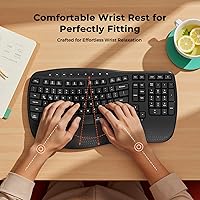
The Meetion DirectorD-KB Wireless Ergonomic Keyboard is not a good match for users expecting a cushioned or padded wrist rest — the built-in palm support is rigid hard plastic, and after long sessions it can feel uncomfortable against soft wrist tissue in a way that a foam or gel pad simply would not. Anyone who works heavily with numbers and relies on a dedicated numeric keypad for data entry or spreadsheet work should look elsewhere, as there is no numpad on this board. Tactile typing enthusiasts or anyone accustomed to mechanical switches will likely find the membrane key feel underwhelming and may grow frustrated with the limited feedback at speed. Linux users, Chrome OS users, and anyone hoping to connect it to a tablet or smartphone should also pass — compatibility is strictly limited to Windows and macOS desktops and laptops with a USB port. If Bluetooth is a hard requirement for a cleaner desk setup or multi-device pairing, this board offers no wireless option beyond the USB dongle.
Specifications

  • Dimensions: The keyboard measures 17.39 × 9.43 × 1.81 inches, which includes the integrated wrist rest adding notable depth to the overall footprint.
  • Weight: The packaged unit weighs 16 ounces, making it light enough to move around a desk easily but not compact enough for regular travel.
  • Key Type: Standard membrane keys are used throughout, offering quiet, consistent actuation suited to general office typing rather than tactile or clicky feedback.
  • Key Layout: The wave-curved ergonomic layout follows the natural arc of the fingers across both hands, reducing lateral wrist deviation during extended typing sessions.
  • Wrist Rest: An integrated hard plastic wrist rest is built directly into the keyboard frame and is not removable or replaceable with a padded alternative.
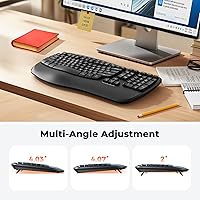
  • Stand: A foldable rear stand is built into the base, allowing users to adjust the typing angle without purchasing a separate keyboard riser.
  • Connectivity: Wireless connection is established via a 2.4GHz USB-A dongle stored inside the battery compartment; no Bluetooth functionality is present.
  • USB-C Support: A USB-C adapter is included in the accessory pouch inside the box, enabling connection to laptops and monitors that lack a standard USB-A port.
  • Power Source: The keyboard runs entirely on 2 × AAA batteries, which are not included in the box and must be purchased separately before first use.
  • Auto-Sleep: An automatic hibernation mode activates after 20 minutes of inactivity to conserve battery power, and pressing any key instantly wakes the keyboard.
  • OS Compatibility: Full compatibility covers Windows XP, 7, 8, 10, and 11, as well as macOS X 10.6 and later; Linux, Chrome OS, iOS, and Android are not supported.
  • OS Switching: Switching between Windows and macOS layouts is handled via FN+Q for Windows and FN+W for macOS, requiring no software or driver installation.
  • Material: The entire keyboard body, including the wrist rest and keycap surfaces, is constructed from plastic.
  • Color: Available in Black only; no alternate colorways are currently offered for this model.
  • Wireless Range: The 2.4GHz receiver supports typical plug-and-play operation at standard desk distances, consistent with most USB wireless keyboard receivers in this category.
  • Included Items: The box contains the keyboard, a USB-A wireless dongle stored in the battery compartment, a USB-C adapter in a separate accessory pouch, and documentation.
  • Not Compatible: This keyboard does not work with Linux, Chrome OS, iOS, Android, smart TVs, or any tablet or device without a full-size USB port.
  • Model Number: The official model identifier for this keyboard is DirectorD-KB, manufactured and sold by Meetion Direct.

Related Reviews

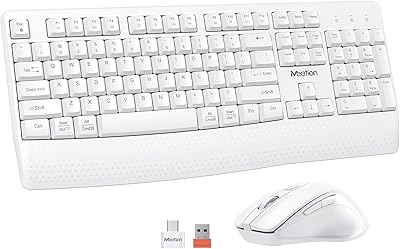
MEETION DirectorC Ergonomic Wireless Keyboard and Vertical Mouse
86%
94%
Typing Comfort
91%
Mouse Ergonomics
88%
Build Quality
90%
Battery Longevity
86%
Connectivity Stability
More
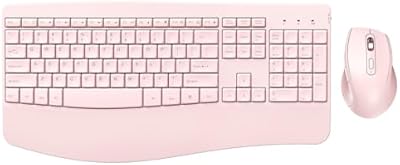
MEETION Director-D-2 Ergonomic Wireless Keyboard and Mouse Combo
85%
88%
Ergonomic Comfort
91%
Wireless Connectivity
86%
Battery Life
89%
Mouse Precision (DPI Settings)
62%
Key Quietness
More
QUASIO Wave Keys Ergonomic Wireless Keyboard with Wrist Rest
75%
83%
Ergonomic Comfort
71%
Wrist Rest Quality
67%
Typing Feel & Key Travel
86%
Wireless Reliability
81%
Mac & Windows Compatibility
More
X9 Wireless Ergonomic Keyboard
84%
89%
Comfort & Ergonomics
92%
Wireless Connectivity
84%
Build Quality
90%
Battery Life
75%
Typing Experience
More
TECKNET TK-EKB01040BS01 Wireless Keyboard
76%
83%
Ergonomic Comfort
86%
Typing Noise Level
79%
Wireless Reliability
62%
Build Quality
88%
Value for Money
More
MEETION Wireless Keyboard and Mouse C4130
83%
88%
Ergonomics and Comfort
80%
Wireless Connectivity and Range
84%
Build Quality
93%
Ease of Setup
86%
Mouse Precision and DPI Settings
More
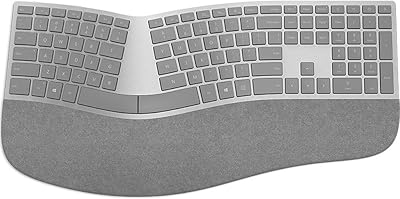
Microsoft Surface Ergonomic Wireless Keyboard
86%
91%
Ergonomics & Comfort
88%
Bluetooth Connectivity
92%
Battery Life
84%
Build Quality
90%
Compatibility with Surface Devices
More
HP 960 Ergonomic Wireless Keyboard
86%
88%
Ergonomic Comfort
90%
Build Quality
85%
Battery Life
91%
Programmability of Keys
87%
Multi-Device Connectivity
More
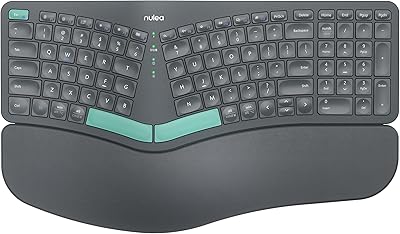
Nulea HD315 Wireless Ergonomic Keyboard
86%
91%
Ergonomics & Comfort
88%
Wireless Connectivity
93%
Battery Life
86%
Build Quality
84%
Ease of Setup
More
NocFree Wireless Ergonomic Split Mechanical Keyboard
84%
89%
Ergonomics & Comfort
85%
Build Quality
91%
Customization Options
80%
Battery Life
88%
Connectivity & Compatibility
More

FAQ

It is actually inside the battery compartment — flip the keyboard over, slide open the battery cover, and you will find the USB-A dongle tucked into a small slot next to the battery bay. This catches a lot of buyers off guard because it is not obvious from the packaging. Also check the accessory pouch inside the box for the USB-C adapter, which is stored separately.

No, it is not. The wrist rest is hard plastic — it is part of the same molded keyboard frame and has no foam, gel, or cushioning layer. It does a decent job of keeping your wrists at a consistent height, but if you are expecting the kind of comfort you get from a separate padded wrist pad, you will want to manage expectations or add a thin foam rest on top.

Yes, it is fully compatible with macOS X 10.6 and later. The keyboard has a dual layout that covers both Windows and Mac key functions, and you switch between them using FN+W for macOS or FN+Q for Windows. The relevant modifier keys are labeled for both systems so there is no guesswork about where Command or Option sits.

No, this is not a Bluetooth keyboard. The only wireless connection method is the included 2.4GHz USB-A dongle. If Bluetooth is a requirement for your setup — for instance, to keep your desk free of adapters or to pair with multiple devices — you would need to look at a different keyboard.

Unfortunately, no. The Meetion DirectorD-KB Wireless Ergonomic Keyboard is explicitly not compatible with Chrome OS or Linux. It is designed strictly for Windows and macOS environments. Plugging it into a Chromebook may produce partial or no functionality, so it is not a workaround worth attempting.
Real-world battery life varies depending on how many hours per day you type and how often the auto-sleep mode activates. Most users report several weeks of regular office use from a single set of AAA batteries when the 20-minute idle sleep kicks in consistently. Heavy users who disable or delay sleep mode may see shorter intervals between swaps.

Very little, honestly. Unlike split or heavily contoured ergonomic keyboards, the wave layout keeps all the keys in their standard positions — the curve is subtle and follows the natural direction your fingers already travel. Most people are typing comfortably and at close to their normal speed within an hour or two of starting.

It measures just over 17 inches wide and nearly 9.5 inches deep, which is noticeably larger than a standard tenkeyless keyboard. The extra depth comes almost entirely from the integrated wrist rest, which extends the bottom edge significantly. If desk space is tight, it is worth measuring your available area before buying.

No — the USB-C adapter is just a size converter for the USB-A dongle, not a direct USB-C connection. It lets you plug the wireless receiver into a USB-C port on a laptop or monitor. The keyboard does not support iOS, Android, or tablets, so pairing with a phone or tablet is not possible regardless of the adapter used.

Yes, there is an FN-layer shortcut set that covers common functions including volume control, media playback, and system-level keys. The labels are printed on the keycaps but are fairly small and low-contrast on the black surface, so they can be hard to read in dim lighting until you memorize their positions.