Overview

The MEETION DirectorC Split Ergonomic Keyboard Mouse Combo is a solid, wallet-friendly option for anyone who spends long hours at a desk and has started noticing tension in their wrists or shoulders. The core idea is straightforward: pair a split curved keyboard with a vertical mouse, and your hands naturally sit at a more relaxed angle throughout the day. Everything runs wirelessly through a single USB-A receiver, so there is no Bluetooth pairing headache. Both peripherals are rechargeable, meaning no hunting for AA batteries mid-deadline. Build quality sits firmly in the mid-range — it will not feel like a luxury device, but for the price, the value proposition is genuinely hard to argue with.
Features & Benefits

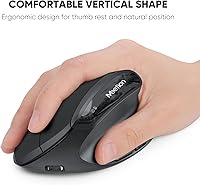
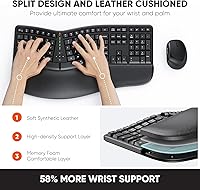
The split keyboard layout is the headline feature — each half angles outward so your wrists stay in a more neutral position rather than bending inward toward each other. The memory foam wrist rest, covered in PU leather, adds a layer of cushioning that many flat-keyboard users will immediately notice. On the mouse side, the vertical grip keeps your forearm in a natural handshake position, which may help reduce the muscle fatigue that builds up over a full workday. Four DPI settings ranging from 800 up to 2400 give you enough range for both precise document work and faster navigation. The full 117-key layout also keeps the numpad intact, a genuine relief for anyone who regularly works with spreadsheets or numerical data.

Best For

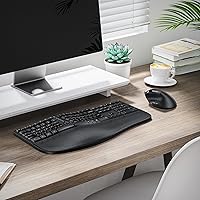
This wireless ergonomic setup works best for office workers and students starting to feel early signs of wrist fatigue but not yet ready to commit to a high-end ergonomic investment. It fits naturally into a home office setup where desk space and cable clutter are concerns — one small receiver handles both devices up to 33 feet away. OS compatibility is worth flagging upfront: this combo works on Windows 10/11 and macOS 10.14 and later, but it does not support Linux or older operating systems. People who prefer rechargeable peripherals over swapping batteries every few weeks will also appreciate the convenience. If you are already deep into customized mechanical keyboards, this probably is not aimed at you.

User Feedback

Buyers who switched from flat keyboards consistently mention reduced wrist discomfort as the standout benefit, particularly after the first week or two of adjustment. That adjustment period is real — the split layout has a genuine learning curve, and some users report slower typing speeds initially. Feedback on the vertical mouse is mostly positive, though a few noted the scroll wheel feels slightly stiff. The wrist rest draws mixed opinions: some find the memory foam supportive, others feel it compresses too quickly over months of regular use. One recurring frustration is the USB-C adapter confusion — the included USB-C port is an adapter requiring the USB-A receiver, not a standalone connection, and several buyers missed that detail entirely when first setting it up.

Pros

  • The split keyboard layout may meaningfully reduce wrist pronation and shoulder tension during long daily typing sessions.
  • A single USB-A receiver handles both the keyboard and mouse, keeping your desk ports free and your setup tidy.
  • Rechargeable batteries in both devices can last one to two months, eliminating the need to stock spare cells.
  • The full 117-key layout with numpad intact is a practical win for spreadsheet users and data-entry workers.
  • The vertical mouse promotes a more natural forearm position that many users notice within the first few days of switching.
  • Four DPI settings give enough range to switch between precise document work and faster general navigation without software.
  • No driver installation required — compatible systems recognize the combo immediately on plug-in.
  • The memory foam wrist rest provides noticeably better out-of-box cushioning than the flat pads found on standard combos.
  • Wireless range of up to 33 feet gives flexibility in how you position your receiver without signal drop concerns.
  • At its price point, this ergonomic combo delivers a rare combination of split keyboard, vertical mouse, and wrist rest together.

Cons

  • The split layout demands a real adjustment period — expect slower typing speeds for at least one to two weeks.
  • The USB-C port is only an adapter for the USB-A receiver, not a standalone connection, which has confused many buyers on first setup.
  • The memory foam wrist rest tends to compress and lose its support noticeably within a few months of regular daily use.
  • Keycaps develop shine and show finger oil residue faster than expected for a keyboard at this price tier.
  • The mouse scroll wheel feels stiffer than average and has drawn repeated complaints from users accustomed to standard mice.
  • No key remapping software or macro support is available, limiting usefulness for power users or programmers.
  • Linux is entirely unsupported, and older versions of Windows and macOS are also excluded from compatibility.
  • The keyboard footprint is large — nearly 19 inches wide — which can feel overwhelming on a smaller or shared desk.
  • The low-battery warning is a basic indicator light only, with no charge level readout, leading to occasional unexpected shutdowns.
  • The PU leather wrist rest surface showed early cracking in some user reports, particularly in dry or heated environments.

Ratings

The MEETION DirectorC Split Ergonomic Keyboard Mouse Combo has been evaluated through AI-driven analysis of verified global buyer reviews, with spam, bot-generated, and incentivized feedback actively filtered out before scoring. The ratings below reflect a genuine cross-section of real-world experiences — covering both the aspects users genuinely appreciated and the friction points that frustrated them. Nothing has been smoothed over to make this set look better or worse than it actually is.
Ergonomic Comfort
83%
Most users noticed a meaningful reduction in wrist tension within the first two weeks of switching from a flat keyboard. The combination of the split layout and vertical mouse addresses two common strain points simultaneously, which buyers dealing with early RSI symptoms found particularly encouraging during full workdays.
The ergonomic benefit is not instant — it requires a deliberate adjustment period that some users found frustrating. A handful of buyers with larger hand sizes felt the mouse grip angle was slightly too steep for extended sessions, which offset some of the comfort gains.
Typing Experience
71%
29%
Once users cleared the learning curve, many described the split layout as natural and difficult to go back from. The slightly concave key surface and angled keycaps give each keystroke a guided feel that flat-keyboard typists tend to appreciate after the initial adjustment.
The split layout is a genuine hurdle for fast typists — several users reported dropping their words-per-minute noticeably during the first week or two. Key feedback is on the mushier side, which satisfies casual typists but disappoints anyone coming from a mechanical keyboard background.
Mouse Performance
77%
23%
The vertical grip design earned consistent praise from users who previously dealt with forearm fatigue after long work sessions. The four DPI settings offer enough range to switch between precise spreadsheet navigation and faster desktop use without feeling limited.
The scroll wheel drew repeated criticism for feeling stiff and slightly resistant compared to standard horizontal mice. A few users also noted that the side buttons require more deliberate pressure than expected, which can disrupt workflow when you are trying to move quickly.
Wrist Rest Quality
66%
34%
Out of the box, the memory foam wrist rest feels noticeably softer and more supportive than the flat rubber pads bundled with standard combos. Users who type for several hours a day found the cushioning took pressure off the heel of the palm in a way that felt immediately different.
Durability is the weak spot — multiple long-term buyers reported the foam compressing and losing its support within three to six months of regular use. The PU leather surface also showed early cracking in a few reviews from users in drier climates or heated office environments.
Build Quality
62%
38%
For the price tier, the keyboard chassis feels reasonably solid and does not flex noticeably when typing firmly. The mouse shell has a consistent finish and the buttons do not rattle, which keeps the overall experience feeling composed during normal daily use.
Closer inspection reveals cost-cutting in the materials — the keycaps develop shine from finger oils faster than expected, and the keyboard halves feel more hollow than sturdy when tapped. This is not a premium-feeling device, and buyers expecting otherwise are likely to be disappointed.
Wireless Reliability
81%
19%
The 2.4GHz connection held up consistently in busy home office environments where several other wireless devices were already competing for signal. Within a standard desk setup, cursor lag and keystroke drops were rarely reported under normal usage conditions.
A small number of users experienced occasional micro-disconnects when the receiver was plugged into a rear USB port on a desktop tower, with interference being the likely cause. Keeping the receiver on a front port or using a short USB extension largely resolved the issue for those affected.
Battery Life
86%
The rechargeable batteries in both the keyboard and mouse lasted well into the one-to-two-month range for most users who work standard office hours. Not needing to stock AA batteries or interrupt a deadline to swap cells was a frequently mentioned quality-of-life benefit.
The battery indicator feedback is minimal — there is no percentage readout, only a low-battery warning light, which left some users caught off guard by a sudden shutdown. Charging both devices simultaneously requires two cables, which a few buyers found mildly inconvenient at end of day.
Setup & Plug-and-Play Ease
68%
32%
For most Windows 10/11 and recent macOS users, the combo was recognized immediately after plugging in the USB receiver — no driver installation needed. The single receiver handling both devices kept the initial setup genuinely simple for non-technical buyers.
The USB-C port on the keyboard caused real confusion — numerous buyers assumed it was an additional wireless connection option and were frustrated to discover it is only an adapter requiring the USB-A receiver to function. The packaging explanation did not prevent repeated complaints about this specific detail.
Value for Money
84%
Relative to dedicated ergonomic peripherals that can cost several times more, this combo delivers the core benefits — split layout, vertical mouse, wrist rest — at a price point that makes the ergonomic switch accessible without a significant financial commitment.
Buyers who compare this against more established ergonomic brands will notice the material and performance gap is real. If you need something built to last several years under heavy professional use, the value equation starts to look less favorable over time.
Software & Driver Support
53%
47%
Basic plug-and-play functionality works without any software, which suits the majority of users who just want to type and click without configuring anything. Standard key functions and DPI switching via the mouse button are fully accessible out of the box.
There is no dedicated software for remapping keys or creating macros, which limits customization for power users. Compatibility is also narrower than the marketing implies — Linux users and anyone on older operating systems are simply not supported, and there is no indication this will change.
Noise Level
74%
26%
The keyboard strikes a reasonable balance — audible enough to confirm each keypress without being the kind of clatter that irritates open-plan office neighbors. The mouse clicks are marketed as silent, and most users agreed they are noticeably quieter than standard mice.
Quiet is not the same as silent — in a genuinely quiet room, both the keyboard and mouse produce enough sound to be noticeable on a video call if the microphone is close. The scroll wheel in particular generates a slightly gritty sound that a few users found distracting.
Key Layout & Numpad
78%
22%
Keeping the full 117-key layout with numpad intact is a practical decision that data-entry workers and spreadsheet-heavy users genuinely appreciated. The standard layout means there is no relearning of key positions beyond the central split itself.
The split does push the numpad further to the right than on a conventional keyboard, which takes adjustment if you regularly shift between the numpad and the main typing area. Some buyers with narrower desks also found the overall footprint larger than they anticipated.
Compatibility
69%
31%
Solid support for Windows 10 and 11 alongside macOS 10.14 and later covers the vast majority of everyday users without any configuration friction. Mac users in particular noted the keyboard shortcuts translated cleanly after a brief adjustment to the key mapping.
The absence of Linux support is a real limitation for developers and power users who rely on it. Older Windows and macOS versions are also excluded, which may catch some buyers off guard if they are running legacy systems for professional software reasons.
Portability & Desk Footprint
57%
43%
The single USB receiver is genuinely compact and easy to move between workstations, making it a workable option for people who carry their peripherals between home and office occasionally. The combined weight stays manageable enough for that kind of semi-regular transport.
At nearly 19 inches wide, the keyboard is a substantial presence on any desk, and the split design means it cannot be compressed into a tighter space when not in use. This is not a peripheral that suits small desks, laptop trays, or truly mobile work situations.

Suitable for:

The MEETION DirectorC Split Ergonomic Keyboard Mouse Combo is a strong fit for office workers and students who have started noticing wrist tension, shoulder stiffness, or early signs of repetitive strain but are not ready to spend heavily on a premium ergonomic solution. If you work a standard desk job on Windows 10/11 or macOS 10.14 and later, this wireless ergonomic setup slots in cleanly without any driver headaches — just plug in the receiver and you are working. It suits home office users particularly well, where a tidy single-receiver setup matters and there is no shared desk etiquette to worry about during the adjustment period. People who are tired of replacing batteries will appreciate the rechargeable design on both the keyboard and mouse, which can comfortably last a month or two between charges under normal use. If you do a lot of numerical data entry, the full-size layout with numpad retained is a practical touch that many split keyboards on the market skip entirely.
Not suitable for:

The MEETION DirectorC Split Ergonomic Keyboard Mouse Combo is not the right choice for fast typists or professionals who cannot afford a productivity dip during a transition period — the split layout has a genuine learning curve that can slow you down for one to two weeks before it starts to feel natural. Linux users and anyone running older operating systems should look elsewhere entirely, as this combo has hard compatibility boundaries that are not likely to change. Mechanical keyboard enthusiasts expecting tactile, clicky feedback will find the key feel underwhelming; this is a membrane keyboard, and it performs like one. If you need a compact setup — a small desk, a laptop tray, or a bag you carry between locations daily — the nearly 19-inch footprint of the keyboard alone makes this a poor practical fit. Finally, buyers expecting the wrist rest and overall build quality to hold up under heavy professional use for several years should temper those expectations, as the materials reflect a value-tier product that may show wear sooner than more expensive alternatives.
Specifications

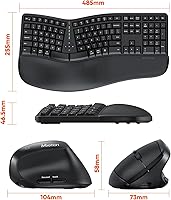
  • Keyboard Layout: Full-size split curved keyboard with 117 keys, including a dedicated numpad, arranged across two angled halves to promote a more neutral wrist position.
  • Keyboard Dimensions: The keyboard measures 19.09 x 10.04 x 1.83 inches, making it a wide footprint suited to larger desks.
  • Mouse Dimensions: The vertical mouse measures 2.87 x 4.09 x 2.28 inches, sized for right-handed use with a standard adult grip.
  • Combined Weight: The keyboard and mouse together weigh 3.52 pounds, which is typical for a full-size wireless ergonomic combo.
  • Connectivity: Both devices connect wirelessly via a single 2.4GHz USB-A receiver with a stated range of up to 33 feet.
  • Bluetooth Support: Bluetooth is not supported; the combo requires the USB-A receiver to be physically connected to function.
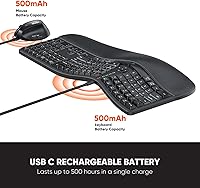
  • Keyboard Battery: The keyboard contains a built-in non-removable 500mAh rechargeable lithium battery charged via USB-C adapter.
  • Mouse Battery: The mouse contains a built-in non-removable 500mAh rechargeable lithium battery charged via a separate cable.
  • Battery Life: Under typical office use, both the keyboard and mouse are rated for up to one to two months per full charge.
  • Charging Spec: Manufacturer recommends charging both devices using a 5V 1A power source before first use.
  • Mouse Buttons: The vertical mouse features 6 buttons, including left and right click, a side-scroll wheel, DPI toggle, and two thumb-side buttons.
  • DPI Settings: Mouse sensitivity can be adjusted across four preset levels: 800, 1200, 1600, and 2400 DPI.
  • Wrist Rest Material: The attached wrist rest uses a memory foam core covered with firm PU leather, fixed to the front edge of the keyboard.
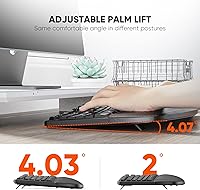
  • Tilt Adjustment: Adjustable legs on the keyboard allow users to set three tilt positions by raising the front, rear, or both sets of legs.
  • Key Count: The keyboard includes 117 keys with standard spacing and slightly concave, angled keycaps designed to reduce finger extension during typing.
  • OS Compatibility: Supports Windows 10 and 11 and macOS 10.14 and later; does not support Linux, Windows 8 or earlier, or macOS 10.13 and earlier.
  • USB-C Port: The keyboard includes a USB-C port that functions only as an adapter for the USB-A receiver, not as an independent wireless or wired connection.
  • Wrist Rest Design: The wrist rest is curved and integrated into the keyboard base, providing palm support across both halves of the split layout.
  • Switch Type: The keyboard uses membrane switches, which produce moderate actuation noise suitable for shared office environments.
  • Mouse Click Noise: The mouse is equipped with a silent switch mechanism, producing noticeably reduced click volume compared to standard optical mice.

Related Reviews
MEETION Director-D-2 Ergonomic Wireless Keyboard and Mouse Combo
85%
88%
Ergonomic Comfort
91%
Wireless Connectivity
86%
Battery Life
89%
Mouse Precision (DPI Settings)
62%
Key Quietness
More
Perixx Periduo-605 Wireless Ergonomic Split Keyboard and Vertical Mouse Combo
85%
89%
Ergonomic Comfort
94%
Ease of Setup
87%
Wireless Connectivity
85%
Build Quality
72%
Keyboard Layout
More
JOYACCESS Ergonomic Wireless Keyboard and Mouse Combo
86%
88%
Ergonomics and Comfort
90%
Wireless Range and Connectivity
93%
Mouse Performance and Noise
70%
Keyboard Responsiveness
85%
Build Quality
More
Lomiluskr Wireless Ergonomic Keyboard and Mouse Combo
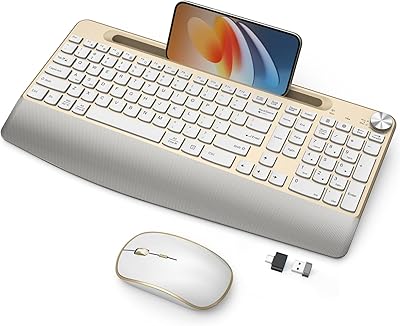
84%
88%
Ergonomics & Comfort
79%
Wireless Performance
85%
Build Quality
75%
Mouse Sensitivity
92%
Ease of Setup
More
GAMCATZ Ergonomic Wireless Keyboard and Mouse Combo
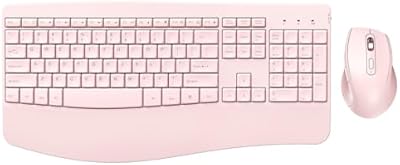
86%
90%
Ergonomics & Comfort
87%
Typing Experience
92%
Battery Life
85%
Build Quality
88%
Noise Level
More
PEIOUS Wireless Ergonomic Keyboard and Mouse Combo
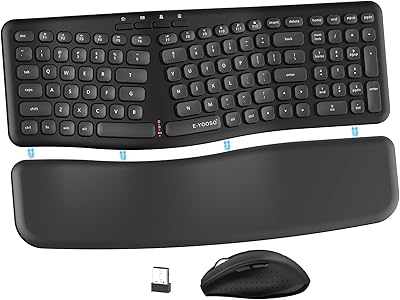
74%
78%
Ergonomic Comfort
74%
Typing Feel & Key Response
69%
Mouse Ergonomics
83%
Wireless Reliability
61%
Build Quality & Durability
More
ProtoArc EKM04 Ergonomic Keyboard Mouse Combo
86%
88%
Ergonomics and Comfort
94%
Setup and Installation
85%
Value for Money
62%
Wrist Rest Comfort
80%
Keyboard Performance
More
Meetion Master C5000 Wireless Keyboard and Mouse Combo
78%
88%
Value for Money
93%
Ease of Setup
81%
Keyboard Comfort & Wrist Rest
67%
Key Travel & Typing Feel
84%
Mouse Performance & DPI Range
More
Nulea KM75
Nulea KM75
76%
83%
Ergonomic Comfort
79%
Memory Foam Palm Rest
76%
Keyboard Typing Feel
72%
Mouse Ergonomics
74%
Multi-Device Switching
More
E-YOOSO Ergonomic Wireless Keyboard and Mouse Combo
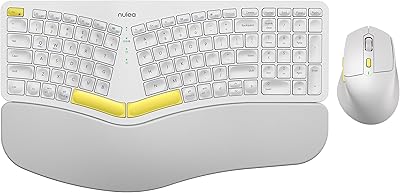
84%
88%
Ergonomic Comfort
91%
Wireless Connectivity
94%
Ease of Setup
82%
Design and Build Quality
85%
Mouse Performance
More

FAQ

Yes, as long as you are running macOS 10.14 or later, the split keyboard and vertical mouse set connects without installing any drivers — just plug in the receiver. A few key labels will differ from what Mac users expect, but the functions map correctly. Older macOS versions are not supported.

This is genuinely one of the most confusing aspects of the MEETION DirectorC Split Ergonomic Keyboard Mouse Combo, and it has tripped up a lot of buyers. The USB-C port is not a standalone connection — it is purely an adapter that the USB-A receiver plugs into if your computer only has USB-C ports. You still need the physical USB-A receiver inserted into it for anything to work. Bluetooth is not available on this combo at all.

Honestly, plan for at least one to two weeks before your typing speed returns to normal. Most people find the first few days the hardest, especially with keys near the center split like B, Y, T, and G. Stick with it — the majority of users who push through that initial period find the new hand position starts to feel natural and difficult to give up.

Yes. Both devices share a single USB-A receiver, so you only use one port on your computer for the entire combo. That is one of the more practical aspects of this wireless ergonomic setup, especially if your laptop has limited ports.

Yes, and the manufacturer specifically recommends connecting both to a charger for two to three hours before your first use. The batteries ship partially depleted, so if you skip this step you may find one or both devices cutting out quickly. Use a standard 5V 1A charger for best results.

No — the mouse is shaped specifically for right-handed use. The vertical grip, thumb buttons, and contoured shell are all designed around a right-hand orientation, so left-handed users would likely find it uncomfortable or unusable.

It typically works fine through a powered USB hub. That said, a few users have reported intermittent disconnects when using unpowered hubs or when the receiver is plugged into a rear desktop port with significant distance from the devices. If you notice any lag or drops, try moving the receiver to a front port or using a short USB extension cable to bring it closer.

It sits somewhere in between. Out of the box it has a noticeable memory foam softness that most flat-keyboard users find immediately comfortable. Over time — typically several months of daily use — the foam compresses and becomes firmer. It is not a gel-filled rest, so do not expect it to stay plush indefinitely under heavy daily pressure.

Yes, there are adjustable tilt legs that let you raise the front edge, the rear, or both sides to change the angle. It gives you a few meaningful options for finding a comfortable typing slope, which is more flexibility than many keyboards at this price offer.

The mouse uses a silent switch design, so the click noise is noticeably reduced compared to a standard mouse — quiet enough for most shared office environments or video calls. The scroll wheel, however, is not silent and has a slightly gritty mechanical sound that a few users found more noticeable than expected.