MEETION C4130 Wireless Keyboard and Mouse Combo
Overview
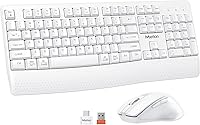
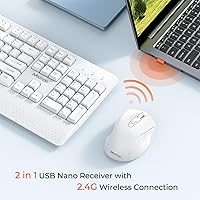
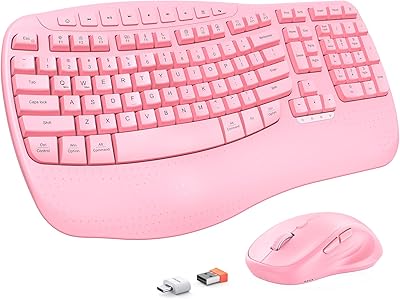
The MEETION C4130 Wireless Keyboard and Mouse Combo is a straightforward, no-frills wireless set built for people who just want to get work done without wrestling with drivers or Bluetooth pairing. The clean white finish looks sharp on a minimal desk, and the plug-and-play 2.4G receiver means you're up and running in seconds — just plug in and type. One thing worth knowing upfront: there's no Bluetooth here, so if you're hoping to connect it to a tablet or iPad, this isn't the right fit. What's genuinely appreciated is that this keyboard-and-mouse set includes a USB-C adapter in the box, making it compatible with modern MacBooks and USB-C laptops without any extra purchases.
Features & Benefits
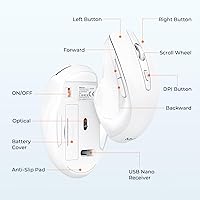
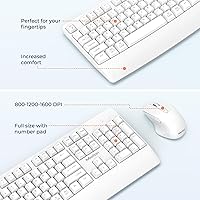
The full numeric keypad is one of the more practical decisions here — it's something a lot of budget combos skip, and it makes a real difference if you spend time in spreadsheets or do any kind of data entry. Along the bottom edge, there's a low-profile wrist ledge built right into the keyboard body; it won't replace a proper ergonomic wrist rest, but it does take the edge off long typing sessions. The mouse offers three DPI settings switchable with a single button press, covering careful precise movements all the way up to quicker navigation across large screens. Battery life is impressive for both devices, each running on a single AA cell and hibernating automatically when idle.
Best For
This wireless combo suits anyone looking for a no-fuss daily driver that works right out of the box. Students and work-from-home professionals who clock long hours typing will find the full keyboard layout and integrated wrist ledge genuinely useful — not life-changing, but meaningfully more comfortable than a standard flat keyboard. It's also a practical choice for people who recently switched to a USB-C laptop and would rather not juggle extra adapters; the included solution keeps things tidy. Desk minimalists who want an all-white workspace look will find this keyboard-and-mouse set fits the bill without spending much. Gamers and graphic designers, however, should look elsewhere — the mouse precision tops out at 1600 DPI with no software customization.
User Feedback
With over 1,800 ratings averaging 4.4 stars, this wireless combo has clearly found its audience. Buyers tend to praise the comfortable typing feel, the plug-and-play setup, and how well both devices hold up over months of regular use — several reviewers noted they were still on their original AA batteries after extended daily use. On the downside, a handful of buyers were caught off guard by batteries not being included, and a few missed the USB-C adapter entirely because it's tucked into a dedicated packaging slot rather than stored under the mouse. The lack of Bluetooth is the most frequently cited complaint, especially from people who hoped to pair it with a tablet or iPad. No keyboard backlight is another recurring mention, though most at this price point seem to accept that trade-off.
Pros
- Full-size layout with a numeric keypad makes data entry and spreadsheet work noticeably faster.
- Plug-and-play setup is genuinely instant — insert the receiver, and you're typing within seconds.
- Included USB-C adapter means most modern laptop users need zero extra accessories to get started.
- Auto-hibernate mode on both devices stretches a single AA battery to last several months.
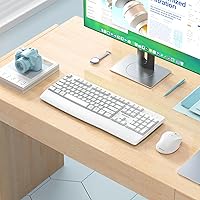
- The all-white aesthetic sits cleanly on any minimal or professional desk without visual clutter.
- Three switchable DPI levels handle everything from precise document editing to casual web navigation.
- The 10-meter wireless range covers a standard desk setup without signal drops or noticeable lag.
- A built-in wrist ledge reduces edge pressure during long typing sessions without adding bulk.
- Consistent 4.4-star rating across over 1,800 reviews points to reliable quality at this price tier.
- Straightforward setup and zero driver requirements make it approachable for less technical users.
Cons
- No Bluetooth support means it cannot connect to tablets, iPads, or any device without a USB port.
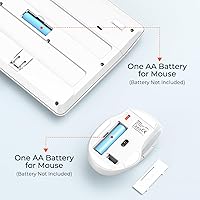
- Neither device ships with batteries — you will need to buy two AA cells before first use.
- The keyboard has no backlight, making it genuinely difficult to use in dim or dark environments.
- The USB-C adapter is easy to miss in the box; it sits in a dedicated side slot, not under the mouse.
- There is no on/off switch on the keyboard — it relies entirely on auto-hibernate to conserve power.
- The wrist rest is a shallow plastic ledge with no padding, foam, or height adjustment.
- A single USB-A receiver occupies one port permanently, which can be limiting on compact laptops.
- No software companion means there is no way to remap keys, record macros, or customize DPI profiles.
Ratings
The MEETION C4130 Wireless Keyboard and Mouse Combo earned these scores after our AI analyzed thousands of verified buyer reviews from global markets, actively filtering out incentivized, bot-generated, and suspicious feedback to surface only genuine user experiences. The resulting ratings reflect both the real strengths that keep this keyboard-and-mouse set competitive in its price tier and the recurring pain points that show up consistently across long-term users. Nothing has been smoothed over — the scores represent an honest picture of what buyers actually encounter day to day.
Value for Money
Ease of Setup
Typing Experience
Mouse Performance
Battery Life
Build Quality
Wireless Reliability
Wrist Comfort
Device Compatibility
Design & Aesthetics
Keystroke Noise
Mouse Ergonomics
Software & Customization
Packaging & Accessories
Suitable for:
The MEETION C4130 Wireless Keyboard and Mouse Combo is a practical fit for home office workers, students, and everyday PC users who want a clean, reliable setup without any technical overhead. If your daily computing involves document editing, spreadsheet work, or general web browsing, the full-size keyboard with its built-in numeric keypad genuinely earns its keep. The low-profile wrist ledge along the keyboard's base is a quiet comfort bonus for anyone who types for several hours at a stretch — not a clinical ergonomic solution, but a meaningful step up from a bare flat keyboard. People who have recently moved to a USB-C laptop and want a plug-and-play wireless option will also find this keyboard-and-mouse set well-suited to their situation, thanks to the included adapter. The all-white design makes it a natural match for minimalist desk setups where visual tidiness matters.
Not suitable for:
If you rely on Bluetooth to switch between a laptop and a tablet or iPad, this keyboard-and-mouse set simply won't work — there's no Bluetooth radio, and no workaround for it. Gamers, graphic designers, or anyone who needs precise, high-speed cursor control should also look elsewhere; the mouse maxes out at 1600 DPI with no software customization, which is well below what performance-oriented peripherals offer. Users who work in dim environments will quickly notice the absence of any keyboard backlighting, which is a genuine drawback for late-night or low-light setups. The MEETION C4130 Wireless Keyboard and Mouse Combo also relies on a single USB-A receiver, so if your device has limited ports, you'll be occupying one permanently with no option to pair across multiple machines. Finally, buyers expecting the wrist rest to function like a dedicated ergonomic accessory will be disappointed; it's a shallow, integrated ledge that softens the angle slightly but offers no padding or adjustability.
Specifications
- Connectivity: Both keyboard and mouse connect via a single 2.4G RF USB-A receiver included in the box.
- Wireless Range: The 2.4G wireless connection supports a stable operating distance of up to 10 meters (33 ft) from the receiver.
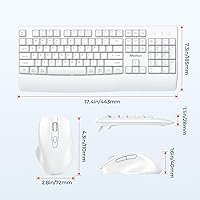
- Keyboard Layout: The keyboard is full-size with a dedicated numeric keypad, measuring 17.44 × 7.3 × 1.1 inches.
- Mouse Dimensions: The mouse measures 4.3 × 2.8 × 1.6 inches, placing it in the standard mid-size range for everyday desktop use.
- Mouse DPI: Three DPI levels — 800, 1200, and 1600 — are selectable via a dedicated button on the mouse body.
- Power Source: Each device is powered by one AA battery, which must be purchased separately as batteries are not included in the box.
- Battery Life: Both devices use an auto-hibernate mode when idle to extend battery life to several months per set of batteries.
- Power Controls: The mouse includes a physical on/off switch; the keyboard has no dedicated switch and relies on automatic hibernation to conserve power.
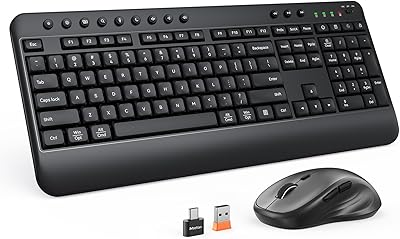
- USB-C Support: A USB-A to USB-C adapter is included in the packaging, enabling connection to USB-C-only devices when used alongside the provided USB-A receiver.
- Wrist Rest: A shallow wrist ledge is built into the front edge of the keyboard body to reduce pressure on the wrists during extended typing sessions.
- Color: Both the keyboard and mouse are finished in white, matching neutral or minimal desk aesthetics.
- OS Compatibility: The combo works without additional drivers on Windows, macOS, and Linux operating systems.
- Device Support: Compatible with desktop PCs, laptops, Macs, and USB-C desktops; Bluetooth connectivity and tablet pairing are not supported.
- Backlight: The keyboard is not backlit and requires adequate ambient lighting for comfortable use in low-light conditions.
- Box Contents: The package includes one keyboard, one mouse, one USB-A wireless receiver, one USB-C adapter, and one user manual; batteries are not included.
- Package Weight: The complete retail package, including all accessories, weighs 1.96 pounds.
- Package Dimensions: The retail packaging measures 17.68 × 10.75 × 1.89 inches.
- Model Number: The official model designation for this combo is C4130, manufactured and sold by Meetion Direct.
Related Reviews
Meetion Master C5000 Wireless Keyboard and Mouse Combo
MEETION Director-D-2 Ergonomic Wireless Keyboard Mouse Combo

Arteck HW192 Wireless Keyboard and Mouse Combo

Letton Wireless Retro Keyboard and Mouse Combo

Kootop Wireless Keyboard Mouse Combo

Mobifice Retro Wireless Keyboard and Mouse Combo

seenda Wireless Keyboard and Mouse Combo

JOYACCESS Wireless Keyboard and Mouse Combo

FOPETT Retro Wireless Keyboard and Mouse Combo
