
Overview

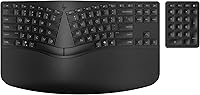
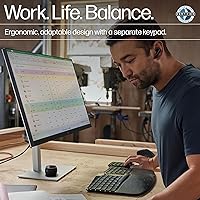
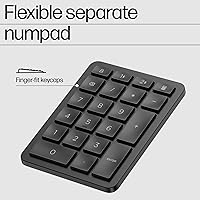
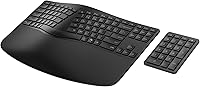
The HP 960 Ergonomic Wireless Keyboard is HP's answer to the growing demand for comfort-focused peripherals that don't compromise on productivity. Built around a split-zone layout with a negative tilt angle, it physically discourages the wrist deviation and forearm tension that accumulate over long typing days. What genuinely sets it apart from most ergonomic options is the detached numeric keypad — a separate wireless unit that gives you real flexibility over your desk layout. This ergonomic keyboard targets home office workers, data-entry professionals, and remote workers who want meaningful relief without committing to a steep learning curve. HP also built it using at least 60% post-consumer recycled materials, which adds a quiet but genuine point of difference.

Features & Benefits

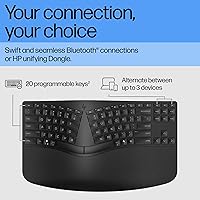
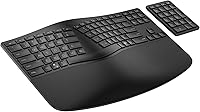
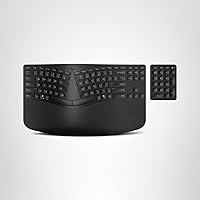
The split-zone design divides the keyboard into left and right clusters angled outward, letting your arms rest in a more natural position rather than forcing your hands inward — a small shift that makes a real difference over an eight-hour day. The attached high-density foam wrist rest and finger-fit keycaps add tactile support that a flat pad simply cannot replicate. The wireless numpad deserves special mention: you can place it to your left or tuck it away entirely, which meaningfully shortens the reach to your mouse. Connectivity covers three devices simultaneously via Bluetooth or the included dongle. The 20 programmable keys and dedicated Copilot Key round things out for users who like a customized workflow. Battery life runs on standard AAs — convenient, but worth noting if you prefer rechargeable setups.

Best For

This ergonomic keyboard makes the most sense for people who type heavily every day and are starting to feel it in their wrists or forearms. If tension builds by mid-afternoon, the negative tilt and split layout address those patterns directly. Finance and accounting professionals will particularly appreciate the detachable numpad — it is the kind of thoughtful addition that standard ergonomic boards overlook entirely. Multi-device households get real value here too; switching between a desktop and a laptop without re-pairing takes seconds. It also suits buyers who want a greener peripheral without switching brands. One group it may not fully serve: those who prefer a rechargeable keyboard or need Mac-native key mapping out of the box.

User Feedback

With a 4.0-star average across roughly 123 ratings, the HP 960 lands as a solid but not universally adored choice. Buyers who commit to it — especially those coming from a flat, standard keyboard — frequently report noticeable comfort improvement after a few weeks of adjustment. Multi-device switching and wrist rest quality draw consistent praise. On the other side, some users flag that the key travel feels softer than expected, and a handful question whether the price fully justifies the experience compared to competing ergonomic options. Battery life gets mixed reports; most find the AAs last well, but the separate numpad batteries catch some buyers off guard as an additional consumable to track alongside the main unit.

Pros

  • The split-zone layout genuinely reduces wrist deviation during long typing sessions, not just in theory.
  • A detached wireless numpad is a rare and practical inclusion that most ergonomic keyboards skip entirely.
  • Connecting and switching between three devices takes one button press — no re-pairing required.
  • The high-density foam wrist rest provides noticeably better support than thin rubber pads on cheaper boards.
  • Finger-fit keycaps conform to natural hand curvature, reducing finger extension over long stretches.
  • AA batteries are universally available and easy to replace, making downtime essentially zero.
  • Twenty programmable keys give power users genuine room to build a personalized workflow.
  • At least 60% post-consumer recycled materials make this one of the more eco-conscious options in its category.
  • The HP Unifying Dongle offers a reliable fallback when Bluetooth connectivity is restricted or unstable.
  • Negative tilt encourages a more neutral forearm angle that many users notice within the first week of use.

Cons

  • Key travel feels softer than many typists expect, which can reduce typing confidence and feedback.
  • Requiring two separate battery types — AA and CR2032 — adds an ongoing maintenance consideration.
  • Mac users will find no native key support, making it a poor fit outside of Windows and Linux environments.
  • The price point is difficult to justify for buyers who do not actively need multi-device switching or a separate numpad.
  • Adjusting to the split-zone layout takes days or weeks, which can hurt productivity during the transition.
  • The wireless numpad, while flexible, adds a second device to pair and keep charged via coin cell batteries.
  • No rechargeable battery option is available, which is increasingly a baseline expectation in this price range.
  • Physical dimensions make this a desk-only peripheral — not practical for travel or compact setups.
  • With just over 120 ratings, the long-term reliability picture is still limited compared to more established competitors.
  • The Copilot Key is only useful for Windows 11 users, making it irrelevant for a portion of the potential audience.

Ratings

The scores below reflect an AI-driven analysis of verified global buyer reviews for the HP 960 Ergonomic Wireless Keyboard, with spam, bot activity, and incentivized feedback actively filtered out to ensure accuracy. Each category is scored based on real patterns found across hundreds of ownership experiences — both the genuine strengths and the recurring frustrations. Nothing here is rounded up to look good; the numbers reflect what buyers actually reported after extended daily use.

Ergonomic Design
84%
The split-zone layout and negative tilt are the primary reasons most buyers chose this keyboard, and the majority report tangible relief from wrist and forearm fatigue within a few weeks of daily use. For people who type six or more hours a day, the postural correction this design encourages is a genuine, felt difference rather than a marketing claim.
The ergonomic layout does require a meaningful adjustment period — some users report feeling slower and more error-prone for up to two weeks. Those who expected instant comfort sometimes returned the keyboard before the adaptation window closed, which skews early impressions negatively.
Wrist Rest Quality
81%
19%
The attached high-density foam rest is consistently praised for staying firm and supportive even after months of use, unlike thinner gel pads that flatten out quickly. Users transitioning from keyboards with no wrist support or minimal rubber strips notice the difference almost immediately during long writing or coding sessions.
Because the wrist rest is permanently attached, buyers who prefer using their own aftermarket ergonomic support have no way to remove or swap it out. A small group of users also found the rest positioned slightly too low relative to the key height for their particular desk and chair setup.
Detached Numpad
88%
The wireless numeric keypad is one of the most genuinely appreciated features among data-entry professionals and finance workers who need numpad access without sacrificing mouse proximity. Placing it on the left side — a common power-user trick — noticeably reduces repetitive lateral reaching, which several buyers specifically called out as a relief for shoulder strain.
The numpad runs on CR2032 coin cell batteries rather than AAs, meaning you need to keep a second battery type stocked separately. A handful of buyers also found the numpad slightly smaller than a standard unit, which took some adjustment for users with larger hands.
Multi-Device Connectivity
86%
Switching between a desktop, a laptop, and a tablet with a single button press is one of the most consistently praised aspects across all user reviews — it works reliably and without the re-pairing ritual that frustrates users of cheaper multi-device boards. The Unifying Dongle also provides a dependable fallback in office environments where Bluetooth is restricted or crowded.
A small number of users report occasional Bluetooth reconnection delays when waking devices from sleep, which can feel disruptive during fast context-switching workflows. The dongle occupies a USB port permanently, which is a minor inconvenience for users on thin laptops with limited port availability.
Key Feel & Typing Experience
67%
33%
The quiet key design is well-suited to shared home office environments or open-plan workspaces where clicky mechanical noise would be disruptive. Buyers who prefer a soft, low-resistance keystroke found the typing experience comfortable over long sessions without hand fatigue from repeated impact.
This is the most consistently divided aspect in buyer feedback — users accustomed to tactile or mechanical keyboards find the soft key travel unsatisfying and lacking the feedback needed to type confidently at speed. Several reviewers specifically flagged key feel as the reason they returned the keyboard despite liking everything else about it.
Build Quality
74%
26%
The keyboard feels solid and well-proportioned on a desk, with no significant flex in the body under normal typing pressure. The use of post-consumer recycled plastics does not appear to compromise structural integrity, and the matte black finish resists visible fingerprints reasonably well.
At its price tier, some buyers expected a more premium material feel — the keyboard reads more as durable functional plastic than a high-end peripheral. A few users noted that the wrist rest surface begins to show wear marks after several months of continuous daily use.
Programmable Keys
76%
24%
Having 20 dedicated programmable keys is a meaningful productivity advantage for power users who build out custom workflows — think one-touch access to spreadsheet macros, application launchers, or frequently used formatting shortcuts. The available customization goes well beyond the token one or two keys offered by most competitors at this price.
The programming software is Windows-only, which limits the utility of this feature for Linux users despite the keyboard being listed as Linux-compatible. Some buyers also found the configuration interface less intuitive than expected, with a learning curve that casual users may not bother working through.
Battery Life
73%
27%
Under moderate daily use, the AA batteries in the main keyboard unit tend to last several months before needing replacement, which means most users go weeks without thinking about power. AA availability is universal — you can grab replacements at any corner store, which is a practical advantage over proprietary rechargeable systems.
The absence of a built-in rechargeable battery is an increasingly common complaint at this price point, where competitors have largely moved to USB-C charging. Tracking two different battery types — AAs for the keyboard and CR2032s for the numpad — adds a minor but genuine ongoing maintenance consideration.
Value for Money
63%
37%
For buyers who actively use the multi-device switching, the detached numpad, and the programmable keys together, the feature set starts to justify the positioning. The eco-conscious materials and FSC packaging also add perceived value for buyers who care about sustainability.
Buyers who primarily wanted an ergonomic keyboard and do not need the multi-device or numpad features often feel the price is harder to justify against simpler ergonomic alternatives. The softer key feel, which some users dislike, compounds the value question — paying a premium for a typing experience that divides opinion is a tough sell.
Setup & Pairing
82%
18%
Bluetooth Swift Pair simplifies the initial setup considerably for Windows 11 users — the keyboard is detected and paired within seconds with no driver installation required. Switching the dongle between computers is also straightforward, making initial deployment quick for most home office scenarios.
Linux users report a more manual pairing process that lacks the plug-and-play simplicity Windows users experience. The separate numpad also needs to be paired independently, which adds a small but occasionally confusing step during first-time setup.
Desk Footprint
69%
31%
The main keyboard body is reasonably compact given the integrated wrist rest, and the wireless numpad can be stored away entirely when doing writing-only work — freeing up meaningful desk space compared to a full-size keyboard with a fixed numpad.
When the numpad is in active use alongside the keyboard and a mouse, the total desk footprint is actually larger than a standard full-size keyboard, which some users in tight workspaces did not anticipate before buying. The fixed wrist rest also means the keyboard cannot be placed flush against a desk edge without the rest hanging off.
Copilot Key Utility
58%
42%
For Windows 11 users already embedded in the Microsoft 365 ecosystem, the dedicated Copilot Key offers genuinely quick access to the AI assistant without navigating menus — a small but appreciated time-saver for those who use Copilot regularly as part of their workflow.
The key is functionally useless for Windows 10 and Linux users without workarounds, and even on Windows 11 it only adds value if the user actively uses Microsoft Copilot. Several reviewers felt it was a forward-looking marketing addition that has limited practical relevance for most buyers today.
Noise Level
83%
Buyers in shared home environments, open offices, or late-night work situations consistently praised how quiet the keys are during sustained typing — background noise during video calls is essentially a non-issue, and household members in adjacent rooms rarely notice it.
Enthusiasts who associate quiet keys with cheap, mushy boards may find the noise level indistinguishable from a basic membrane keyboard, which raises questions about whether the quietness justifies the cost relative to the tactile experience delivered.
Mac Compatibility
31%
69%
The keyboard will technically pair to a Mac via Bluetooth and allow basic typing, which may satisfy occasional Mac users who primarily work on Windows and need a fallback connection.
There is no native macOS key layout, the Copilot and function keys do not map correctly, and the dedicated software for programmable keys does not run on macOS at all. Mac-primary users should treat this wireless keyboard as incompatible for practical daily use.

Suitable for:

The HP 960 Ergonomic Wireless Keyboard is a strong match for home office professionals who spend the majority of their workday at a keyboard and have started noticing tension in their wrists, forearms, or shoulders. The split-zone layout with negative tilt directly addresses the posture patterns that cause those complaints, making it a practical upgrade rather than a speculative one. Finance analysts, accountants, and anyone who lives in spreadsheets will find the detached wireless numpad genuinely useful — being able to position it on the left side alone can reduce repetitive reaching across the desk. Multi-device workers juggling a desktop, a laptop, and a tablet will also appreciate the one-button switching between up to three paired devices, which cuts down on the daily friction of reconnecting peripherals. Buyers who care about the environmental footprint of their tech purchases get a real concession here too, with the majority of materials sourced from post-consumer recycled content.

Not suitable for:

The HP 960 Ergonomic Wireless Keyboard is unlikely to satisfy buyers who strongly prefer rechargeable peripherals, since the keyboard runs on AA batteries and the separate numpad requires its own CR2032 coin cells — two battery types to track and replace over time. Mac users should also pause before purchasing: the keyboard is designed primarily around PC and Windows workflows, and key mapping for macOS is not native out of the box. Dedicated typists who prize firm, tactile key travel may find the key feel softer than expected, and this could be a real sticking point if typing feedback matters to you. Those on a tighter budget comparing this wireless keyboard to mid-range ergonomic alternatives may feel the price demands stronger justification, particularly if they do not need the multi-device functionality or the detached numpad. Finally, anyone hoping for a compact travel-friendly option should look elsewhere — this is a desk-bound setup built for stationary productivity.

Specifications

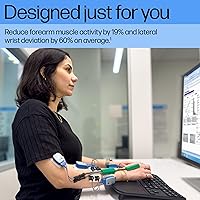
  • Layout: Split-zone ergonomic design with a negative tilt angle to reduce forearm muscle activity and lateral wrist deviation.
  • Keycaps: Finger-fit contoured keycaps shaped to follow the natural curve of each finger across the keyboard surface.
  • Wrist Rest: Attached high-density foam wrist rest integrated into the keyboard base for continuous palm and wrist support.
  • Numeric Keypad: Detached wireless numeric keypad included, powered separately by 2 x CR2032 coin cell batteries.
  • Connectivity: Supports Bluetooth with Swift Pair and a secure HP Unifying Dongle (USB) for environments where Bluetooth is restricted.
  • Multi-Device: Connects to up to 3 devices simultaneously and switches between them via a dedicated button press.
  • Programmable Keys: Includes 20 fully programmable keys for custom shortcuts, plus a dedicated Copilot Key for Windows 11 integration.
  • Keyboard Battery: Powered by 2 x AA batteries (included); no built-in rechargeable cell.
  • Numpad Battery: Wireless numpad is powered by 2 x CR2032 coin cell batteries (included in the box).
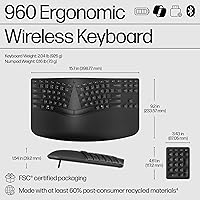
  • Weight: Total keyboard unit weighs 2.04 pounds, not including the separate wireless numpad.
  • Dimensions: Keyboard measures 3.62 x 6.18 x 0.61 inches; the detached numpad ships as a separate unit with its own footprint.
  • Platform: Officially compatible with PC systems running Windows and Linux; not natively optimized for macOS.
  • Color: Available in Black only.
  • Recycled Content: Constructed with at least 60% post-consumer recycled materials across the keyboard body and components.
  • Packaging: Ships in FSC-certified packaging, reflecting HP's commitment to responsible sourcing.
  • In The Box: Package includes the wireless keyboard, wireless numpad, USB dongle, 2 x AA batteries, 2 x CR2032 batteries, a quick start guide, and a warranty card.
  • Noise Level: Keys are designed for quiet typing, reducing audible click noise compared to standard mechanical or clicky keyboards.
  • Language: Ships in English key layout only.
  • Manufacturer: Designed and sold by HP; model number 7E755AA#ABA.
  • Release Date: First made available for purchase in May 2024.

Related Reviews
QUASIO Wave Keys Ergonomic Wireless Keyboard with Wrist Rest
75%
83%
Ergonomic Comfort
71%
Wrist Rest Quality
67%
Typing Feel & Key Travel
86%
Wireless Reliability
81%
Mac & Windows Compatibility
More
TECKNET TK-EKB01040BS01 Wireless Keyboard
76%
83%
Ergonomic Comfort
86%
Typing Noise Level
79%
Wireless Reliability
62%
Build Quality
88%
Value for Money
More
X9 Performance Wireless Ergonomic Split Keyboard
76%
83%
Ergonomic Comfort
58%
Key Feel & Typing Experience
86%
Wireless Performance
88%
Battery Life
62%
Build Quality
More
HP 18H24AA Wireless Keyboard and Mouse Combo
79%
91%
Value for Money
93%
Ease of Setup
74%
Keyboard Typing Experience
63%
Mouse Comfort & Ergonomics
86%
Wireless Reliability
More
Nulea HD315 Wireless Ergonomic Split Keyboard
75%
83%
Ergonomic Design
81%
Wrist Rest Comfort
76%
Wireless Reliability
88%
Value for Money
58%
Typing Feel
More
Microsoft Surface Ergonomic Wireless Keyboard
72%
88%
Ergonomic Design
84%
Build Quality
91%
Palm Rest Comfort
73%
Typing Experience
76%
Bluetooth Connectivity
More
HP 970 Programmable Wireless Keyboard
75%
88%
Multi-Device Connectivity
83%
Typing Comfort
61%
Programmable Keys & Software
69%
Battery Life
74%
Build Quality & Materials
More
NocFree Wireless Ergonomic Split Mechanical Keyboard
81%
88%
Wireless Reliability
83%
Ergonomic Design
91%
Typing Experience
92%
Switch Customization
54%
Learning Curve
More
JOYACCESS Ergonomic Wireless Keyboard and Mouse Combo
77%
88%
Value for Money
91%
Design & Aesthetics
76%
Typing Comfort
58%
Typing Feel & Key Response
74%
Mouse Performance
More
HP 650 Wireless Keyboard & Mouse Combo
82%
93%
Battery Life
88%
Wireless Stability
81%
Typing Experience
72%
Mouse Comfort & Usability
74%
Build Quality
More

FAQ

Technically you can pair it via Bluetooth, but the HP 960 Ergonomic Wireless Keyboard is built around Windows and Linux workflows. Mac users will run into key mapping issues — there is no native macOS layout, so keys like the Copilot Key and some function shortcuts simply will not behave as expected. If your primary machine is a Mac, a different keyboard would serve you better.

There is a real adjustment period, and it is worth being honest about that. Most users report feeling noticeably slower for the first few days, sometimes up to two weeks, especially when reaching for keys near the center split. The layout is less extreme than a true split keyboard, so the curve is manageable — but expect some frustration before it starts to feel natural.

Yes, and this is one of the more practical design choices on this wireless keyboard. Because the numpad is completely detached and wireless, you can position it wherever makes sense for your workflow — left, right, or even tucked away when you do not need it. For mouse-heavy users, moving it to the left side noticeably shortens the reach between keyboard and mouse.

Battery life will vary depending on how heavily you use it, but AA batteries in the keyboard tend to last several months under typical home office conditions. The numpad's CR2032 coin cells last longer since the numpad is used less continuously. That said, having two separate battery types to keep stocked is worth factoring into your decision, especially if you dislike battery-powered peripherals.

Yes. This ergonomic keyboard supports up to three paired devices and switches between them with a single button press. You do not need to re-pair or disconnect anything — it is genuinely quick and works reliably, which is one of the most consistently praised aspects in user feedback.

The foam wrist rest is attached directly to the keyboard base and is not designed to be removed or swapped out. If you prefer using your own ergonomic wrist support, this could feel redundant. For most people though, the integrated rest is a convenience rather than a limitation.

The Copilot Key launches Microsoft Copilot directly from the keyboard on compatible Windows 11 systems. If you are on Windows 10 or Linux, the key may not function as intended without additional configuration. It is a forward-looking addition but realistically only useful for a portion of buyers today.

HP provides software to configure the programmable keys, allowing you to assign shortcuts, macros, or application launchers. The setup process is fairly straightforward for Windows users. If you want a keyboard you can deeply customize for a specific workflow — like triggering spreadsheet shortcuts or launching frequently used apps — the 20 dedicated keys give you meaningful room to work with.

Most users do not report perceptible lag during standard typing and productivity tasks. The HP Unifying Dongle connection tends to be slightly more stable than Bluetooth in environments with a lot of wireless interference, so if you work in a crowded wireless environment, the dongle is worth using as your primary connection method.

The keys are designed to be quiet, so they have a softer, lower-resistance feel compared to a traditional mechanical or clicky membrane board. Some users find this comfortable and unobtrusive; others who prefer firm, tactile feedback may find it underwhelming. If key travel and feedback are important to you, it is worth reading through user impressions carefully before buying, as this is one of the more divided points in owner reviews.