GUKJOB iK6630 Wireless Keyboard and Mouse Combo


Overview
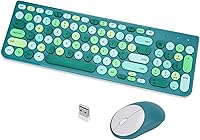
The GUKJOB iK6630 Wireless Keyboard and Mouse Combo is a retro-styled peripheral that brings a bit of nostalgic charm to an otherwise ordinary desk setup — without asking much of your wallet. The star of the show is the round concave keycap design, which mimics the look and feel of an old typewriter in a way that genuinely stands out on a cluttered desk. Both the keyboard and mouse connect through one shared USB receiver, which keeps things tidy at the cost of a single point of failure. It comes in green, black, and pink colorways. Just know going in: this is a budget-tier combo, not a precision tool for power users.
Features & Benefits
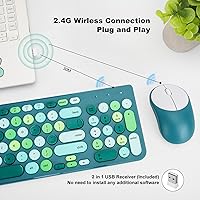
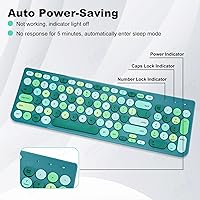
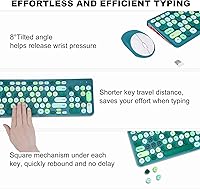
Plug the single nano-receiver into any USB port and both devices come to life instantly — no software, no pairing screens, no fuss. The wireless range stretches up to 30 meters, which is far more than most people will ever need at a home desk. Keys feel noticeably quieter than a typical membrane board thanks to a noise-dampening mechanism that also adds a bit of lateral stability to each press. A full numeric keypad and dedicated multimedia hotkeys round out the layout, giving quick access to volume, playback, and email without hunting through function layers. The keyboard runs on a single AAA battery rated for up to 36 months and auto-sleeps after five minutes idle. One reminder: batteries are not included for either device, so grab some before you unbox.
Best For
This retro keyboard combo makes the most sense for home office workers who want their desk to feel a little more interesting without spending much. Students pulling long typing sessions will appreciate how the soft, rounded keys reduce finger fatigue compared to sharper-edged budget alternatives. The multimedia shortcuts are genuinely handy for anyone who bounces between writing and streaming throughout the day. It also makes a solid first wireless keyboard for someone upgrading from a tangle of USB cables — setup takes under a minute. And if you need a thoughtful desk gift for someone with a vintage or creative aesthetic, the green or pink colorways make this an easy choice that looks more considered than the price suggests.
User Feedback
With a 4.4-star average across more than 2,000 reviews, the GUKJOB wireless set has clearly landed well with its target audience. Buyers consistently mention how easy setup is and how much they enjoy the look and feel of the keycaps — several describe it as genuinely fun to type on. The criticism worth noting: the mouse tends to draw less enthusiasm than the keyboard, with a few users calling it serviceable but unremarkable. A small but vocal group flagged confusion about where the USB receiver is packaged — it sits tucked inside the cardboard beside the mouse, not in an obvious spot. The shared receiver is convenient right up until you misplace it, at which point both devices stop working. Worth keeping somewhere safe.
Pros
- Single USB nano-receiver handles both devices — setup takes under a minute with zero software.
- Round concave keycaps give the keyboard a genuinely distinctive retro look that stands out on any desk.
- Keys are noticeably quieter than most budget membrane boards, which matters in shared spaces.
- Full-size layout with a numeric keypad makes it practical for spreadsheet work and data entry.
- Dedicated multimedia hotkeys let you control volume and playback without diving into function layers.
- Keyboard battery life is rated up to 36 months, so you are unlikely to think about it for a long time.
- Auto sleep mode kicks in after five minutes idle, helping stretch battery life even further.
- Compatible with Windows, macOS, and Linux — no compatibility headaches across different machines.
- Available in multiple colorways, making it one of the few budget combos that feels like a style choice.
Cons
- Batteries are not included for either device — easy to overlook until you open the box.
- The mouse is noticeably less impressive than the keyboard; tracking and build feel are just adequate.
- The shared USB receiver means losing that one dongle renders the entire combo unusable.
- No Bluetooth option, so users with a USB-C-only laptop will need a separate adapter.
- The USB receiver is tucked inside the cardboard packaging beside the mouse, which confuses many buyers on first unboxing.
- Key travel and feedback will disappoint anyone coming from a mechanical keyboard.
- No backlighting of any kind, which limits usability in dim or dark environments.
- The GUKJOB wireless set offers no onboard memory or macro support for power users who want customization.
Ratings
The scores below reflect an AI-driven analysis of verified global buyer reviews for the GUKJOB iK6630 Wireless Keyboard and Mouse Combo, with spam, bot-generated, and incentivized feedback actively filtered out before scoring. Each category is rated on the full weight of real user experiences — not just the positives — so both what works well and what genuinely frustrates buyers is reflected here. The result is an honest, balanced snapshot of where this retro keyboard combo earns its praise and where it falls short.
Value for Money
Keyboard Typing Feel
Aesthetic & Design
Ease of Setup
Mouse Performance
Noise Level
Battery Life
Wireless Reliability
Build Quality
Compatibility
Multimedia Hotkeys
Ergonomics
Packaging & Unboxing
Suitable for:
The GUKJOB iK6630 Wireless Keyboard and Mouse Combo is a natural fit for casual home office users who want a functional, visually interesting setup without committing serious money to peripherals. If you spend your day writing emails, managing spreadsheets, or browsing — and you want your desk to look a little less generic while doing it — this retro keyboard combo checks those boxes comfortably. Students setting up a dorm workspace will find the quiet keys and clutter-free wireless design especially practical. It also works well as a thoughtful gift for someone with a vintage or creative aesthetic, since the round keycap design genuinely looks distinctive out of the box. Anyone making their first switch from a wired keyboard will find the single-receiver setup refreshingly simple.
Not suitable for:
The GUKJOB iK6630 Wireless Keyboard and Mouse Combo is not the right tool for anyone who depends on their peripherals for demanding, precision-heavy work. Gamers, fast typists who need consistent tactile feedback, or professionals logging eight-plus hours of heavy document work will likely find the typing feel underwhelming compared to even a mid-range mechanical keyboard. The mouse, in particular, is the weaker half of this set — users with higher expectations for tracking accuracy or ergonomic support tend to replace it quickly. The shared USB receiver is a real vulnerability: lose that one small dongle and neither device works, with no easy replacement path. If you run a setup that requires Bluetooth connectivity or a USB-C port, this typewriter-style combo will not fit your needs either.
Specifications
- Brand & Model: Manufactured by GUKJOB under model number iK6630.
- Connectivity: Both devices connect via a single 2.4GHz USB nano-receiver with no drivers or software required.
- Wireless Range: Rated for a wireless operating distance of up to 30 meters (approximately 98 feet).
- Keyboard Layout: Full-size layout includes a dedicated numeric keypad and multimedia hotkeys for volume, email, and media playback.
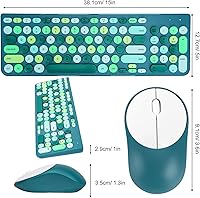
- Keycap Design: Retro round concave keycaps are shaped to follow the natural curve of fingertips, reducing fatigue during extended typing.
- Key Mechanism: Noise-reduction membrane keys sit over a square stabilizer that improves lateral stability and reduces wobble per keystroke.
- Keyboard Battery: Powered by one AAA battery (not included), with a manufacturer-rated battery life of up to 36 months under normal use.
- Mouse Battery: Powered by one AA battery (not included); no rechargeable option is available for either device.
- Sleep Mode: The keyboard enters auto sleep mode after 5 minutes of inactivity and wakes instantly upon any keypress.
- Package Dimensions: The retail box measures 16.27 x 5.24 x 3.38 inches.
- Item Weight: The combined package weight is 1.48 pounds.
- Compatibility: Works with Windows, macOS, and Linux operating systems across desktop PCs, laptops, and notebooks.
- Color Options: Available in three colorways: Green, Black-Colorful, and Pink-Colorful.
- Receiver Sharing: One nano-receiver pairs both the keyboard and mouse simultaneously, occupying only a single USB-A port.
- First Available: This product was first listed for sale in July 2025.
Related Reviews

Arteck HW192 Wireless Keyboard and Mouse Combo
TopMate Wireless Keyboard and Mouse Combo
VEILZOR UK418 Wireless Keyboard and Mouse Combo
MARVO Wireless Keyboard and Mouse Combo
Links9+ Rainbow Wireless Keyboard Mouse Combo
Tayderley Wireless Keyboard and Mouse Combo

RECCAZR Wave Keys Ergonomic Wireless Keyboard Mouse Combo

MPTOG S801AG Wireless Keyboard and Mouse Combo
MOWUX Wireless Keyboard and Mouse Combo